
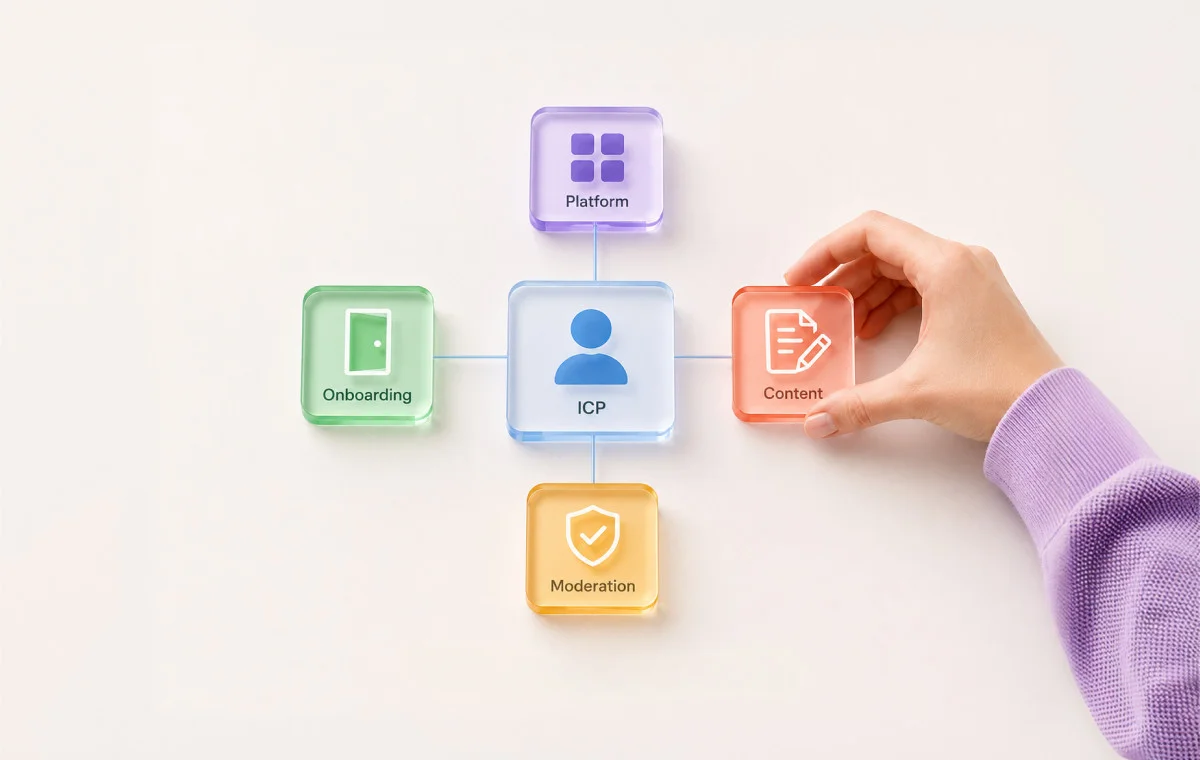
A client messages you. “We have 40,000 followers. Why isn’t anyone buying?” You don’t have a good answer, because you’ve been running the same community playbook on this account that you run on every other account you manage.
If you’ve searched for how to build a social media community before, you’ve probably read some version of this article already. Pick a platform, post consistently, and engage with your audience. That advice isn’t wrong. It’s just incomplete, and brand community building has a well-known failure mode that starts before any of that: the platform gets picked, and the schedule gets built before anyone asks who this is actually for.
This article flips that order. Every step below starts with your client’s ideal customer profile, not their follower count or their platform preference. If you manage more than one client, you’ll also see how to run this same process across completely different accounts without reinventing it each time.
Most community launches fail for one of two reasons, and both are avoidable once you know how to look for them.
The 30-Day Silence Problem
A brand launches a Facebook Group or Discord server with a burst of energy. A welcome post, a couple of questions, maybe a discount code. Then the group goes quiet. Every post the brand makes lands with no replies, and it starts to feel like talking into an empty room.
The truth is that communities under about 50 active members almost never generate organic discussion on their own, no matter how good the posts are. It’s a membership density problem, and it has a specific fix, which we will discuss later in this blog.
The Platform Default Trap
The second failure is choosing a platform out of habit instead of fit. Most brands default to Facebook Groups because it’s familiar, or Discord because it’s trending, without asking where their ideal customer actually spends time already.
If your agency’s process for choosing a platform is “what did the last client use,” you’re not running a real social media community strategy. You’re running a coin flip across every account you manage, and eventually one of those flips lands wrong in front of a client who’s paying attention.
A community only works as part of a larger plan. If a client doesn’t have one yet, build a social media marketing strategy first, then treat the community as one piece of it, not the whole plan.
Community vs. Following vs. ICP: The Foundation You Can’t Skip
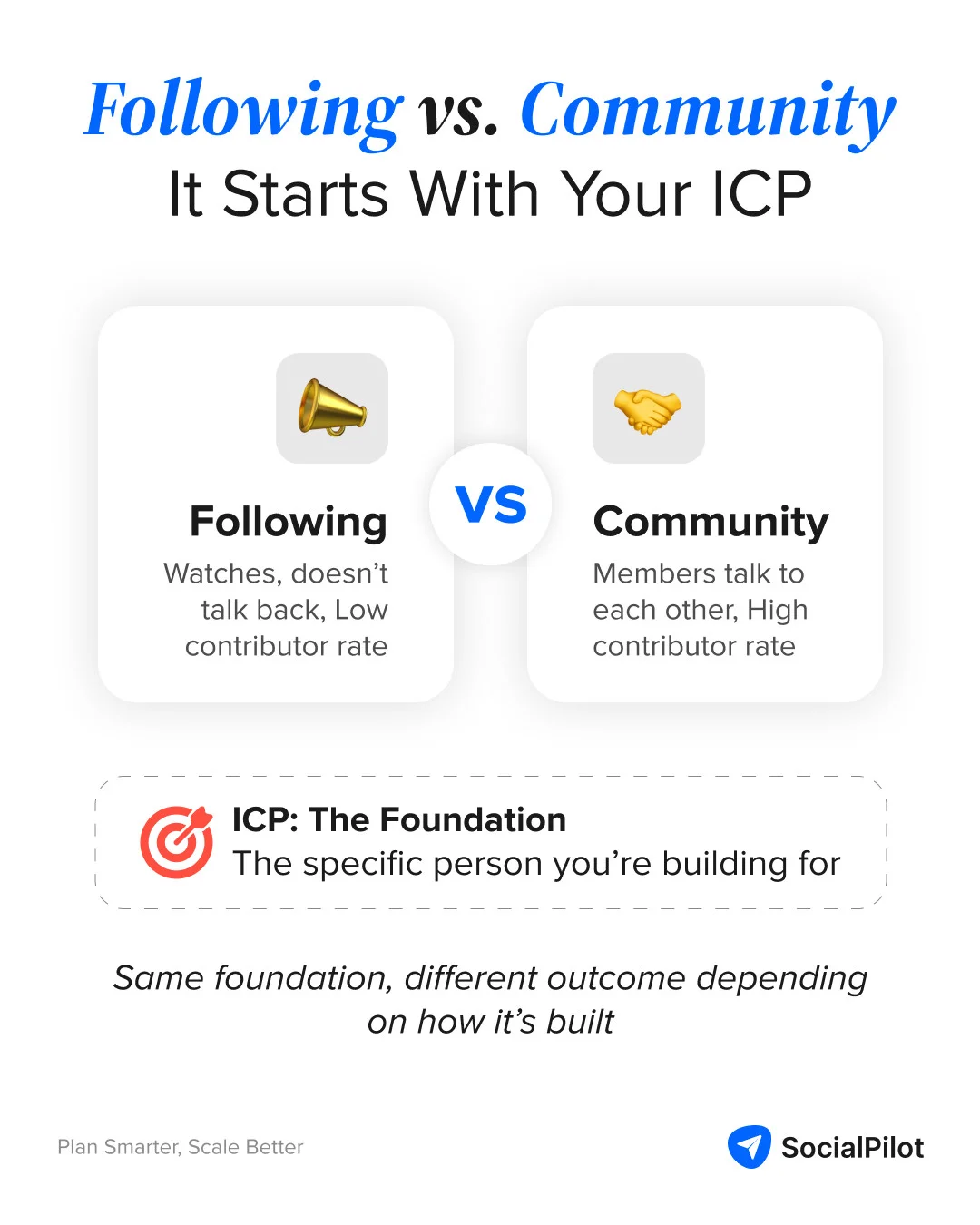
Before we discuss the process, three definitions need to be locked in, because most of the confusion agencies run into with clients comes from using these words as if they mean the same thing.
What Makes a Community Structurally Different from an Audience
An audience mostly listens, while a community talks back, and its members talk to each other without you in the middle. The clearest way to tell the difference is the active contributor rate — the share of members who post, comment, or reply in a given period, not just the number who joined.
A page with 40,000 followers and a 1 percent contributor rate is an audience wearing a community’s clothes. A group with 400 members and a 15 percent contributor rate is doing the actual job.
What an ICP Is, and What It Is Not for Community Strategy
Your ideal customer profile, or ICP, is a detailed description of the type of person or company most likely to buy your client’s product and stay a customer. That’s the whole definition. It isn’t a demographic bracket, and it isn’t “everyone who might be interested.”
An ICP social media strategy starts with one paragraph, not a spreadsheet. If you can’t describe your client’s ICP in three sentences that a stranger would recognize as a real person, you don’t have an ICP yet. You have a guess wearing a label.
The Trust Topology of Your ICP
Every ICP already trusts certain places and certain kinds of interaction before your client shows up. A CFO (Chief Financial Officer) evaluating enterprise software trusts LinkedIn discussions and peer references. A fitness coach building a client base trusts a tight-knit Facebook Group where people show their faces. A gamer trusts a Discord server with clear channels and an active moderator.
Call this the trust topology: the existing map of where your ICP already extends trust, and under what conditions. Your job isn’t to build trust from nothing. It’s to find where trust already exists and build inside it.
Why the Standard Approach Gets the Order Wrong, and the Cascade Effect
Nearly every community guide online tells you to pick a goal, then a platform, then start posting. That order breaks down the moment you manage more than one client, because it assumes there’s one right way to build a community and every brand just needs to follow it.
The ICP determines everything downstream of it. It determines:
- The platform, because that’s where the trust topology lives.
- The content themes, because that’s what this specific person actually wants to read.
- The onboarding experience, because different ICPs need different proof before they’ll engage.
- The moderation rules, because different ICPs expect different cultures.
Get the ICP wrong, and every decision after it inherits the mistake. This is the cascade effect, and it’s the biggest reason two accounts running identical playbooks get completely different results.
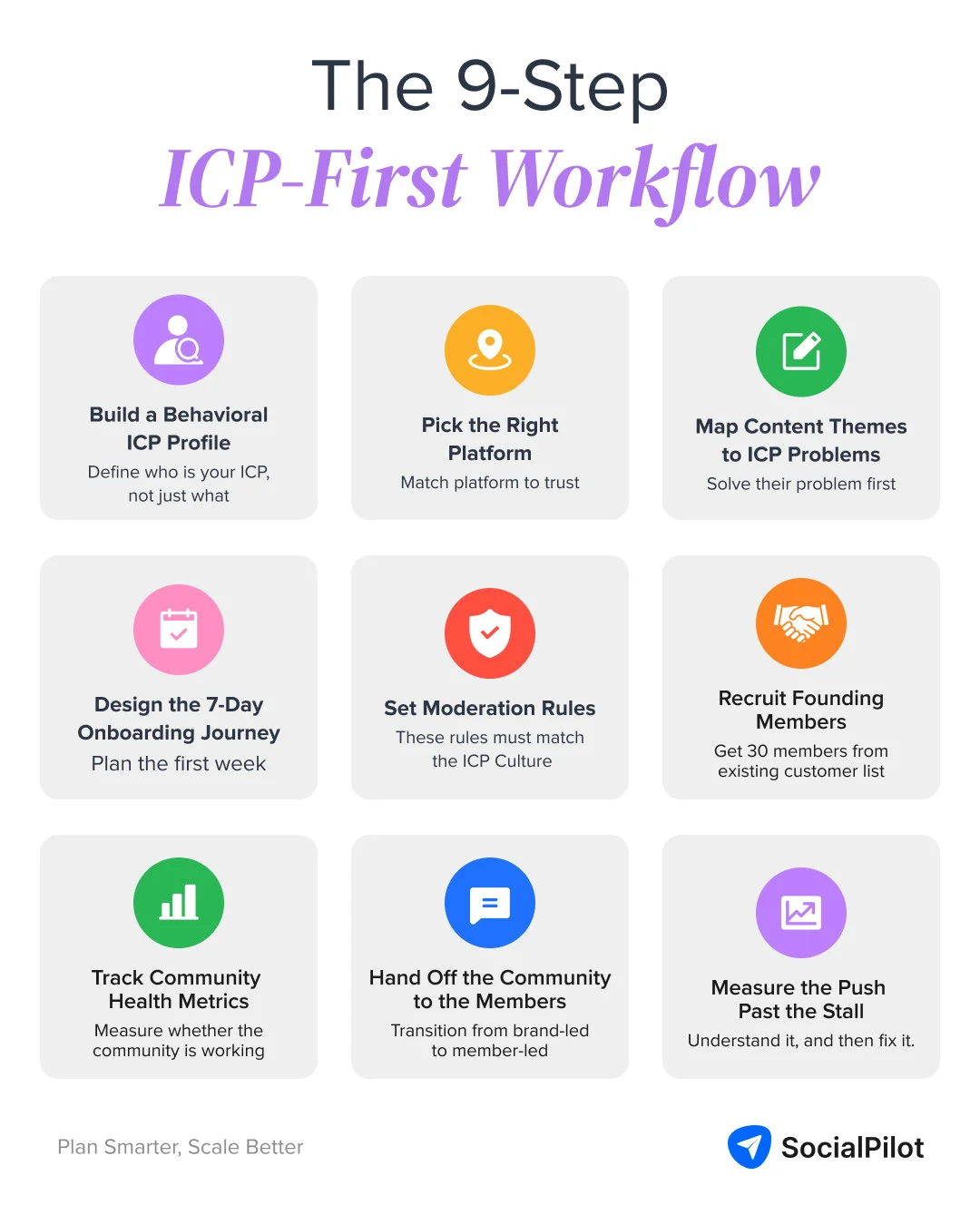
Here are 9 steps to help you build a social media community around the person you’re actually trying to reach. These steps work the same way whether this is your first client or your fifteenth.
Step 1: Build a Behavioral ICP Profile, Not a Demographic One
Skip age range and job title as your starting point. Start with behavior instead.
- What does this person do right before they’d need your client’s product,
- What have they already tried that didn’t work, and
- What do they type into a search bar or a forum thread when they’re stuck.
Here’s what the behavioral ICP profile looks like for two different clients:
| Client Type | Demographic (weak) | Behavioral (useful) |
| B2B SaaS (marketing ops tool) | “Marketing managers, 28-45, mid-market companies” | Juggles 4+ disconnected tools, has personally copy-pasted the same report into a spreadsheet at least once this month, searches things like “how to automate lead scoring without dev help” |
| Fitness coaching platform | “Personal trainers, 25-40, urban areas” | Already has 8-15 paying clients but tracks them in a notes app, has looked up “how much should I charge for online coaching,” dreads the manual work of writing check-in messages every Monday |
Pull this from your client’s actual customer conversations, support tickets, and sales calls, not a generic buyer persona template. Once you’ve sketched the ICP on paper, confirm it against reality.
Audience analytics, the kind built into SocialPilot, can show whether the people actually commenting and sharing on the account match your ICP, account by account, instead of you guessing from vibes. If you want the full process, run a proper social media audience analysis before you touch anything else.
Step 2: Select the Platform Using an ICP-to-Platform Decision Matrix
Once the ICP is written down, the platform choice stops being a debate. Match the ICP type to the platform where its trust topology already lives.
| ICP Type | Recommended Platform | Why |
| B2B decision-maker or enterprise buyer | LinkedIn Group | Professional context, low tolerance for casual chat, decisions get made through peer credibility |
| SMB owner or local business customer | Facebook Group for business | Familiar entry point, broad existing reach among consumer and local audiences |
| Gen Z consumer or creator audience | Discord | Real-time chat culture with a strong track record in gaming, creator, and developer spaces |
| Niche technical B2B (developers, product managers) | Discord or a dedicated Slack space | B2B adoption is growing here but still niche, so pair it with a lighter LinkedIn presence too |
If your ICP is a B2B buyer, your LinkedIn Group strategy should look nothing like a consumer brand’s Facebook Group, right down to posting frequency and tone. Discord for brands still performs best in gaming, creator, and developer spaces.
Step 3: Map Content Themes to ICP Problems, Not Brand Messaging
Once the platform is set, list the three problems your ICP is actively trying to solve this quarter, not the three things your client wants to promote. Pull that list from real sources, not guesswork.
- Mine the Step 1 research first. The vocabulary you pulled from support tickets, reviews, and forum threads already tells you what people are stuck on. Rank those problems by how often they come up.
- Ask the client directly what their support team hears most. Sales and support conversations surface the problems people are actually paying to solve, not the ones marketing assumes.
- Check what competitors’ communities and reviews complain about. A gap competitors haven’t addressed is a stronger content theme than one everyone already covers.
- Set a ratio and stick to it. For every problem-solving post, cap brand messaging at one promotional post. If that ratio flips, the community starts reading like an ad feed again.
Here’s what that problem list actually looks like for different ICPs:
| Client Type | Common Problems the ICP Is Actually Trying to Solve |
| B2B SaaS (marketing ops tool) | Disconnected tools that don’t talk to each other, no benchmark data to justify budget asks, manually reporting the same numbers every week |
| Fitness coaching platform | Pricing sessions without underselling, clients who ghost mid-program, filling a slow month without discounting |
| Local restaurant | Getting repeat visits instead of one-time diners, standing out from delivery apps, staffing a slow shift profitably |
Every content theme should trace back to one row in that table. A SaaS client selling to marketing operations managers doesn’t need more product update posts. It needs workflow templates and benchmark data those managers can’t easily find elsewhere. Build a social media content calendar around those themes first, and slot in brand messaging only where it earns its place.
Step 4: Design the 7-Day Onboarding Journey Before Launch
Most communities have no plan for a new member’s first week. New members join, see nothing relevant, and quietly stop checking back. Decide, before launch, what value a new member needs to see in their first seven days to stay.
That might be a welcome message linking to the single most useful resource for their specific ICP, an introduction thread that gets them talking within a day of joining, or a small win they can get from the community without waiting for the brand to post anything. Write this journey down as a checklist, so it runs the same way for member five and member five hundred.
Tip: This is what it will look like in practice:
- A welcome message that links to the single most relevant resource for that member’s specific situation, not a generic “glad you’re here”
- A day-one prompt asking new members to share what brought them in, so their first action is talking, not just reading
- A pinned post linking the three or four most useful past threads for that ICP, so new members don’t have to dig for value
- A small, fast win within 48 hours — a template, a direct answer, a quick resource — something they didn’t have to wait on the brand to post
- A personal reply to a new member’s first post from an actual founding member or moderator, not an automated one
- A day-seven check-in asking what’s been useful so far, which doubles as a signal for what to reinforce next
Step 5: Write Moderation Rules That Reflect ICP Culture Expectations
A B2B ICP expects a moderated, on-topic space with clear rules posted up front. A creator-focused ICP expects a looser, personality-driven space where off-topic conversation is part of the culture. Write your moderation rules to match, not to a generic template you reuse across every client.
The below image shows the moderation rules for the PN Coaches Community on Facebook.
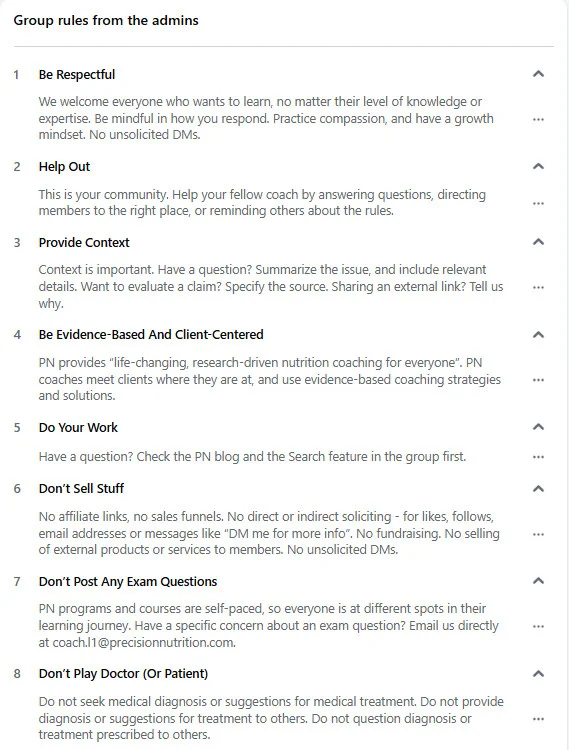
Document what gets removed, what gets a warning, and who handles disputes before the community launches. Agencies that settle this early spend far less time on reactive moderation later, because the ambiguity gets resolved once instead of argued about every week.
Step 6: Execute the Cold Start — Recruit Founding Members Before You Launch
The cold start problem is what happens in a community’s earliest phase, when there are too few members for any organic conversation to start on its own. It’s not a sign the community is failing. It’s a predictable phase every community goes through, and it has a specific fix.
Before you launch publicly, recruit 20 to 30 founding members directly, one at a time if you have to, from your client’s existing customer list or warmest leads. Here’s how:
- Go one at a time if you have to. A personal message beats a mass invite every time at this stage.
- Reach out to people individually, not through a group announcement or a generic email blast.
- Offer early access to something useful — a resource, a template, a preview — not just an invite to “join the community.”
- Ask each person a specific question you already know they can answer. This gets their first post to be a real contribution, not an empty “hi everyone.”
- Act as the connector, not the broadcaster. Introduce founding members to each other directly instead of only posting to the group yourself.
Treat 50 active members within the first 90 days as your activation milestone. Below that number, expect to be doing most of the talking yourself.
Step 7: Track Community Health Metrics and Map Them to Business Outcomes
Follower count tells a client nothing about whether the community is working. These four metrics do, as long as you connect each one to something the client actually cares about.
| Metric | What It Measures | How to Present It to a Client |
| Active contributor rate | Share of members posting, commenting, or replying in a given period | The number that separates a real community from an audience wearing its clothes |
| Member growth rate | New ICP-matched members joining per week or month | Shows growth is intentional, not just bigger, which is what a client is actually paying for |
| Post engagement rate | Reactions, comments, and shares per post inside the community | Ties directly to word-of-mouth reach outside the group itself |
| Member-driven referral rate | Share of new customers who arrived because a community member sent them | The clearest line between the community and revenue a client will actually believe |
Once you can measure and report the community performance on social media with real numbers instead of impressions, client conversations get a lot easier. Set the expectation early that community results play out on a longer timeline than a paid social campaign. A community you launched this month should be reported on monthly for the first quarter, then quarterly once the numbers stabilize.
Step 8: Weekly Activation Rituals That Shift the Community from Brand-Led to Member-Led
Engagement peaks in week one of a launch and drops sharply by week four if the brand is still the only one starting conversations. Social media community engagement doesn’t happen because you asked for it. It happens because you built a reason for members to talk to each other, not just to you.
Set a weekly ritual — a recurring question thread, a member spotlight, or a small challenge — and hand pieces of it to your most active early members to run. Here’s an example from the Perry County Area Chamber of Commerce, that runs a recurring “Weekly Member Spotlight” post in their Facebook community, handing the feature to a different local business each week instead of the page only ever talking about itself.
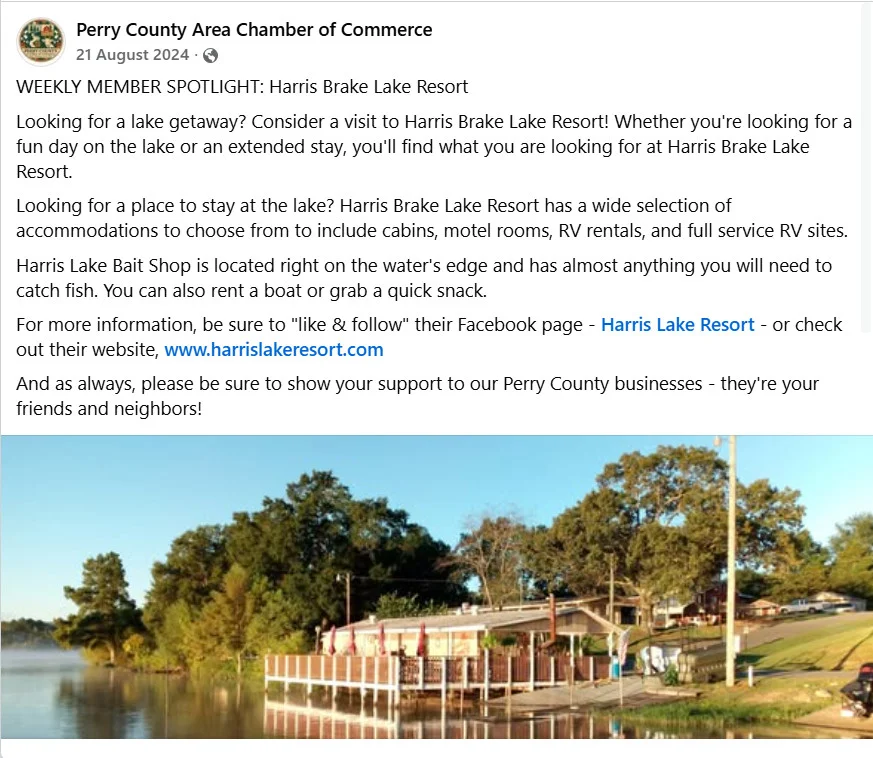
To grow a Facebook Group past a point, you must give a reason for members to talk to each other. It’s just like boosting social media engagement for a brand, but here community adds one more lever that a page doesn’t have: members in a community can talk to each other without the brand starting the conversation.
Step 9: What Actually Happens When Momentum Stalls
Somewhere between the 50-member activation point and the 90-day mark, most communities hit a second, quieter stall. The founding members’ initial energy has worn off, and the next wave of engaged members hasn’t fully arrived yet.
This is normal, not a sign to panic or shut the community down. Go back to steps six and eight. Recruit a second wave of ICP-matched members directly, and hand one more ritual to a member who’s already active. Communities that survive this stall are usually the ones where someone noticed it early and treated it as a recruiting problem, not a content problem.
What ICP-First Community Building Looks Like in Practice
Here’s what community building looks like across three real client types, using the same nine-step process with different answers at every step.
| Community | Built By | ICP | Platform | Content Focus |
| Notion Community | Notion, led by its first Head of Community | People who already loved the product enough to create things for it, not users in general | Discord (also Facebook, Reddit, Slack, run by the same network) | Templates, tips, and product advocacy, run by unpaid ambassadors |
| Airbnb Host Clubs | Airbnb, community-managed since 2015 | Independent hosts running their own hosting business, not guests | Facebook Groups plus in-person meetups, organized by territory | Guest communication, pricing, and reaching Superhost status |
| Precision Nutrition Coaches Community | Precision Nutrition | People certified through PN’s own coaching program, not the public | Private Facebook Group | Coaching practice advice among certified coaches |
Case Study 1: Notion Community
Ben Lang built a Notion template-sharing site and launched a Facebook Group for Notion fans on his own, before Notion had hired him for anything. Notion’s Head of Marketing then brought him on as Head of Community when the company had only 15 employees.
Lang built an application process for Ambassadors that screened for two things specifically: passion for the product, and geography, so ambassadors ended up spread across different cities and countries instead of clustered in one place. Ambassadors are unpaid on purpose. Notion didn’t want compensation distorting who showed up or why.
Here’s Notion’s own page showing up directly for a regional community moment, the same instinct that built the ambassador network in the first place.
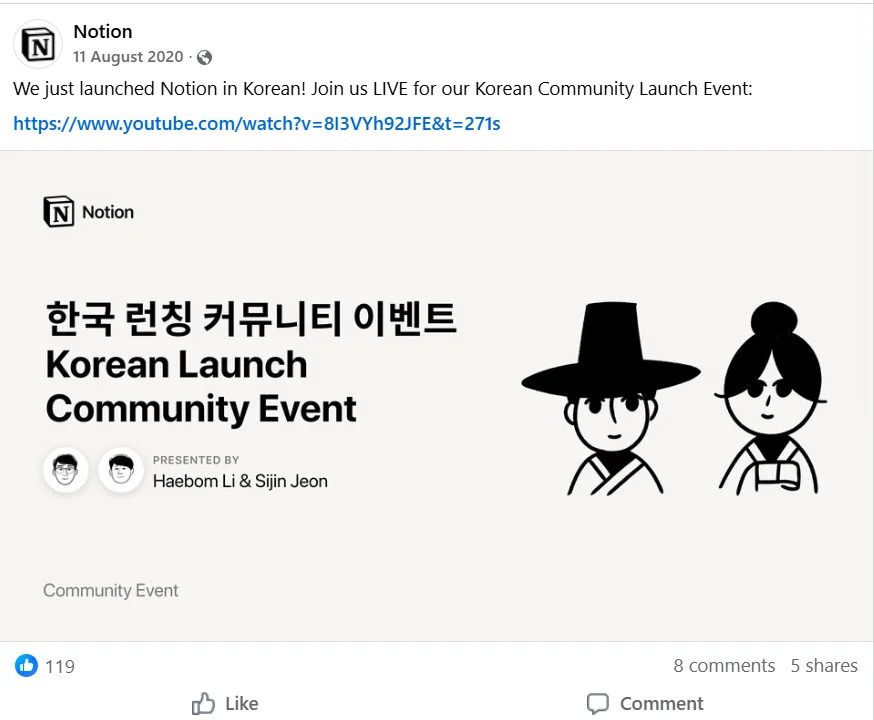
The ICP was never “Notion users.” It was specifically people who already loved the product enough to build things for it for free, and Notion built its entire screening process around finding that exact group instead of opening the door to anyone.
Case Study 2: Airbnb Host Clubs
Airbnb’s host community work started with the founders hosting meetups in their own apartment. Since 2015, Airbnb has run a formal host community program that evolved into the Host Clubs Program in 2022, running through Facebook Groups and in-person events across seven territories.
Volunteer host leaders run these local clubs and meet annually at Host Leader Summits. The community has grown to 1.8 million members across 8 languages, and hosts who participate earn 2.5 times more revenue than hosts who don’t.
Airbnb marked the program’s first big milestone directly on their own page:
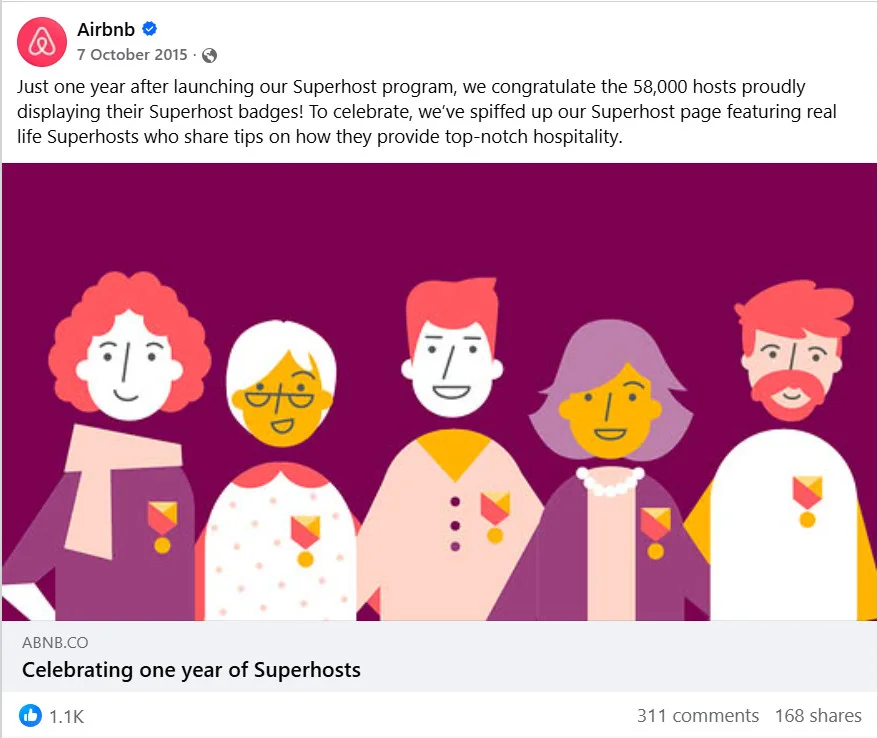
This only works because the community is built for hosts running their own small business on Airbnb, not for the guests booking stays. Two completely different ICPs use the same platform, and Airbnb never tried to serve both in the same space.
Case Study 3: Precision Nutrition Coaches Community
Precision Nutrition, the nutrition coaching certification company, runs a private Facebook Group for people who’ve completed its coaching certification — more than 175,000 of them, according to Precision Nutrition’s own program pages.
PN Coaches Community shows exactly what that gate produces — certified coaches getting celebrated by name instead of anonymous engagement:
The certification requirement is what keeps the ICP narrow. Anyone curious about nutrition can’t just join. Only people running an actual coaching practice can, which is exactly why the advice inside stays relevant instead of drowning in beginner questions.
Notion, Airbnb, and Precision Nutrition are different sizes, different industries, and solve different problems. But each one picked one narrow slice of a much bigger possible audience, and built the platform, the content, and the entry requirements around that slice specifically.
How Can Agencies Use AI to Move Faster Without Losing ICP Judgment
AI speeds up two things here: finding the ICP’s real vocabulary, and turning that vocabulary into content faster. It doesn’t make the judgment calls in between.
Extracting ICP Vocabulary at Scale
Reading a hundred support tickets and forum threads by hand takes a day. A tool built for this, like Dovetail, classifies tickets, reviews, and call transcripts by theme automatically and surfaces the exact phrases customers use, not the phrases your client assumes they use.
Ask it for the three most common ways people describe the problem your client solves. That’s your Step 1 behavioral profile, built in an afternoon instead of a week.
Turning ICP Themes Into a Calendar
Once you’ve mapped ICP problems to content themes in Step 3, SocialPilot’s AI Pilot turns that short list into platform-specific drafts, adjusted for tone, character limits, and time zone, in minutes. Drop the finished drafts into a social media content calendar built around those themes. Every AI draft still needs a pass to sound like a person, not a content mill.
Running This at Agency Scale Without Switching Tabs
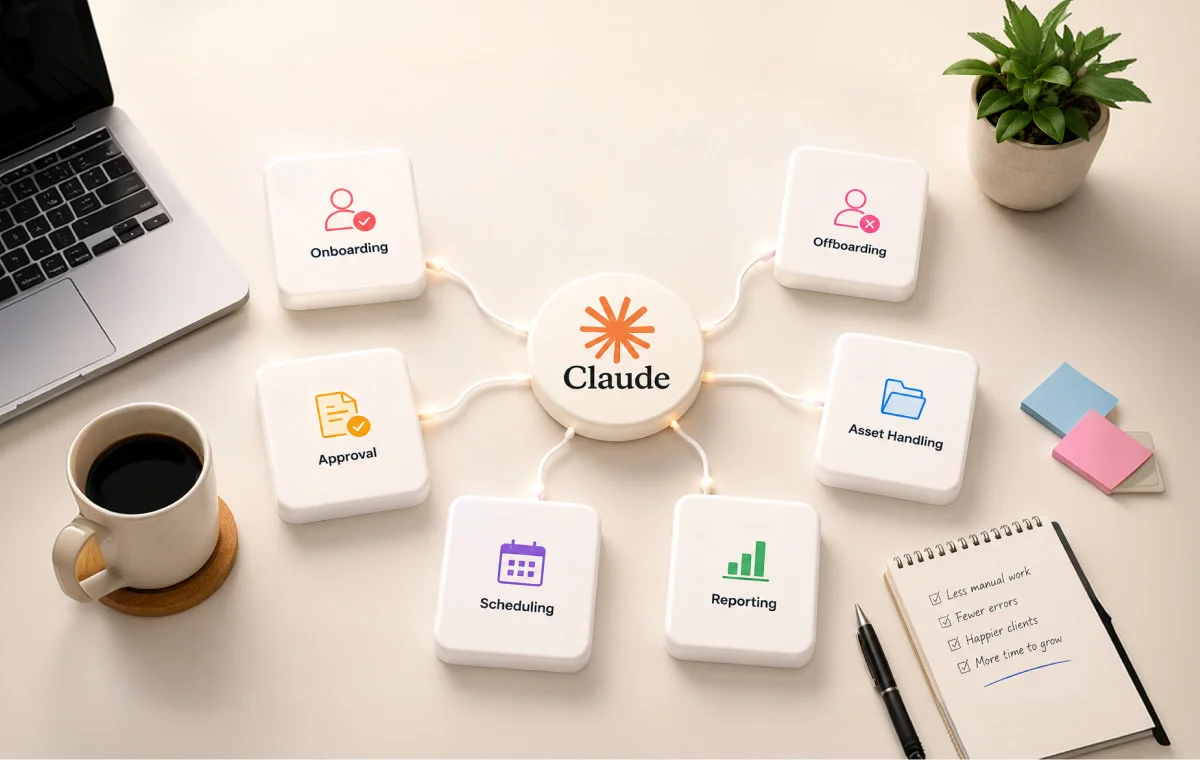
This is where AI tools save real hours instead of just producing drafts. SocialPilot’s MCP server connects Claude or another AI assistant directly to your scheduling queue, so it can draft, schedule, and check delivery status across every client account from one conversation instead of five open tabs. The video below shows how you can connect the SocialPilot MCP to Claude.
To learn more, read this guide on what an MCP connector is and what it actually does before setting up one for your agency.
What AI Still Can’t Decide
AI can’t decide what tone a specific ICP will trust, when a founding member needs a direct message instead of a public reply, or when a moderation call needs human context an algorithm doesn’t have. Those calls are the job. Use AI to clear the busywork around them, not to make them for you.
Preventing Community Drift: Keeping ICP Alignment as the Community Grows
A community that’s working today can quietly stop matching its ICP six months from now, and most agencies don’t notice until a client asks why engagement dropped. Here’s what to watch for before that conversation happens.
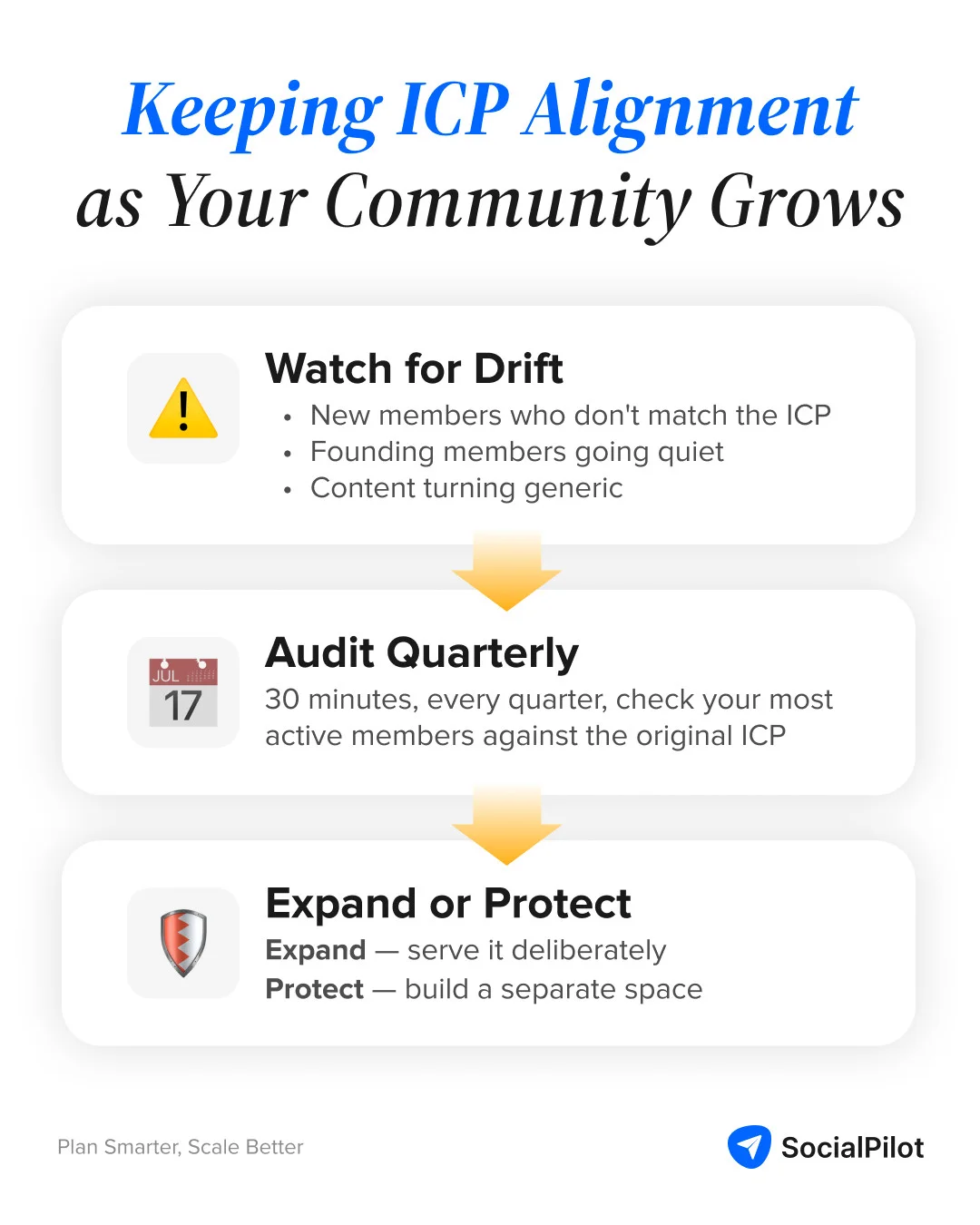
The Three Signals Your Community Has Drifted From Its ICP
Watch out for these three signals.
- New members joining for reasons that don’t match the original ICP, like a broad discount promotion pulling in bargain hunters instead of the client’s actual customer type.
- Founding members going quiet while new members never fully engage.
- Content themes sliding toward generic advice because it’s easier to write than the specific, narrow content the ICP actually wants.
The Quarterly ICP Audit: A 30-Minute Review That Prevents Six Months of Drift
Once a quarter, pull a sample of the most active members and check whether they still match the original ICP description word for word. If they don’t, find out when that shifted and why, before it becomes the community’s new default. This review takes half an hour and catches problems long before a client sees them in a report.
When to Expand the ICP vs. When to Protect the Original Community
Sometimes a community naturally attracts an adjacent ICP worth serving on purpose, and that’s a real expansion decision, not drift. The difference is intent. If the new members are served deliberately with their own content and space, that’s growth. If they’re just diluting what the original members joined for, protect the original community and build a second space for the new group instead of merging them.
The account with fewer, right-fit members is the one that actually renews the retainer — not the one with the biggest growth chart in the monthly report.
The Community That Outlasts the Client Call
Every agency eventually gets that client message about high follower counts and low results. The fix was never a better content calendar. It was building the community around a defined ICP from the first decision instead of retrofitting one after the follower count stopped meaning anything.
Run the above-mentioned nine steps across every account on your roster. While the platform, content, and onboarding change every time, the process stays the same. Following these steps will ensure that the community you built is the right one, not just the biggest one.
None of this needs a new team or a longer retainer. It needs the tools already sitting inside your workflow to do the reporting and scheduling for you. Explore SocialPilot’s plans and pricing and see which one fits the accounts you’re running today.




 Join 55,000+ social media managers


