
You update your Google Business Profile, check your website, and make sure your phone number is correct. Then a customer finds an old number on another listing and never reaches you.
That’s the frustrating part about inconsistent business information: you can have the right details in the places you manage and still have outdated information working against you elsewhere.
Your business name, address, and phone number (NAP) can appear differently across listings, directories, and other websites. When these details don’t match across listings, you have a NAP consistency problem.
Customers may not know which information to trust. They could call an old number, visit an outdated address, or move on to another business. And the more places your business appears, the harder these inconsistencies can be to spot and fix.
In this guide, we’ll look at what NAP consistency really means, how inconsistent listings can cost you customers, where those errors come from, and how to find and fix them before they spread.
What NAP Consistency Actually Means
NAP stands for name, address, and phone number. NAP consistency means these details match across the business listings and profiles where your business appears.
That distinction between correct and consistent matters more than it sounds. A business listing can be complete, verified and well photographed and still be wrong, because its phone number disagrees with three other sites.
Customers won’t know which listing is correct. If they find an old number or address, they may call the wrong number, visit the wrong location, or choose another business.
Search engines also compare information about your business across different sources. As one Redditor in r/Agent_SEO’s discussion on NAP consistency explained:
“NAP consistency still matters, but not because Google “gets confused.” What’s really happening is entity verification. Google isn’t matching text, it’s reconciling identities across sources.”
Their point is that Google is reconciling identities across sources rather than matching strings. Your listings are evidence that one business exists, not copies of a form.
These mentions are called citations. They can be structured or unstructured:
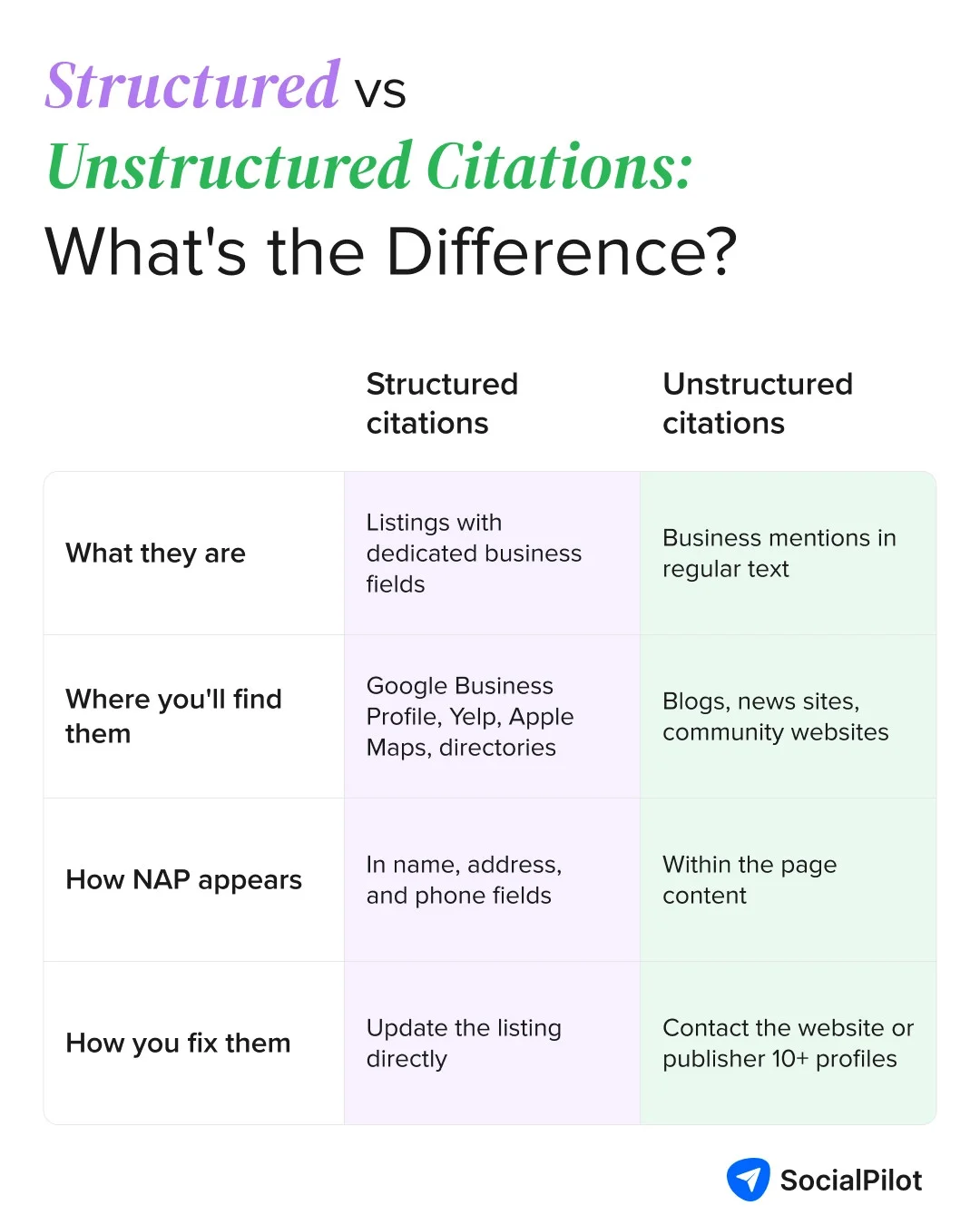
Given the significance of citations in local SEO, it is important to maintain consistent NAP across them. Both types can contain old or incorrect information. Structured listings can usually be updated directly, while unstructured mentions need a different approach.
The Real Cost of Inconsistent Listings
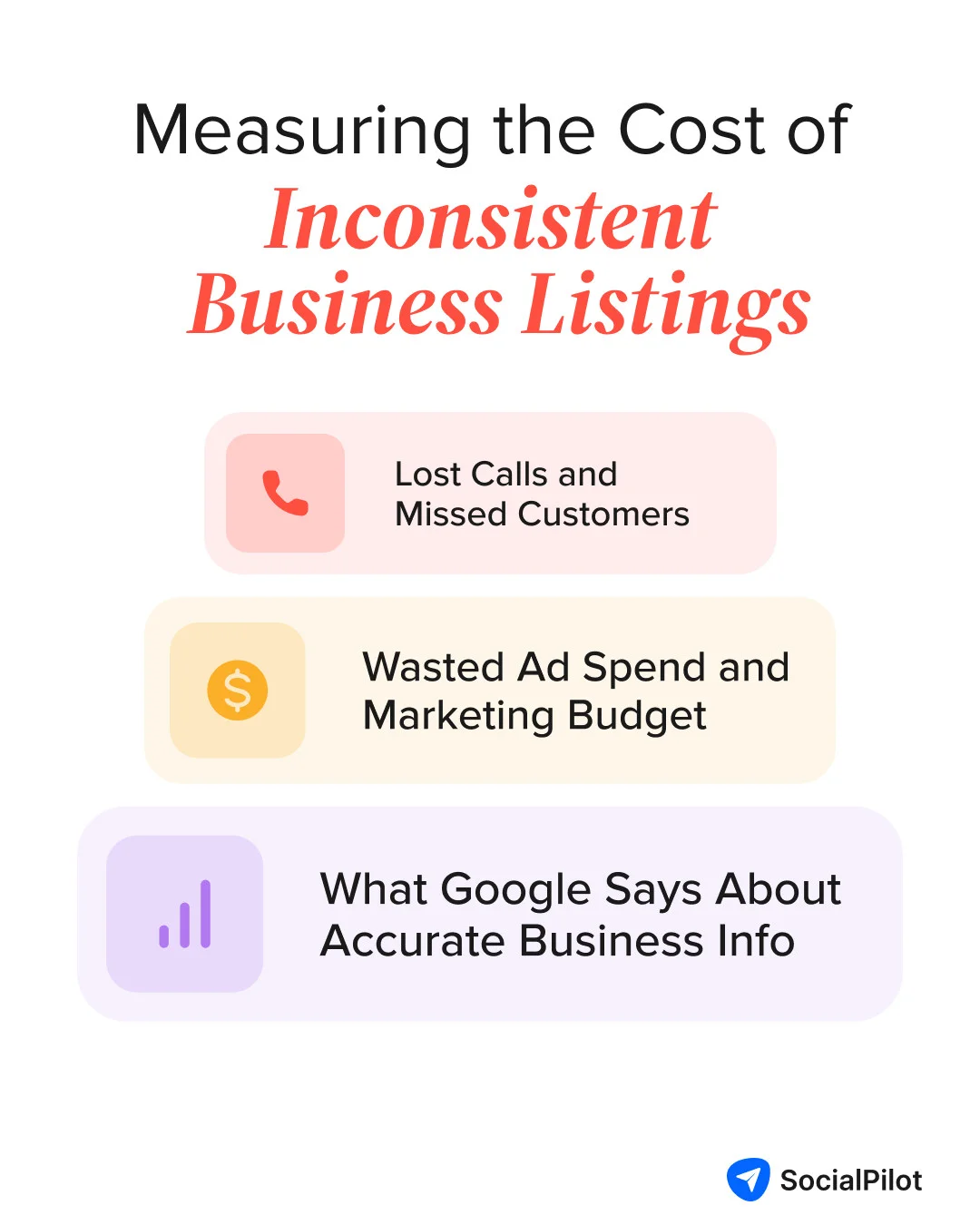
An incorrect phone number or address on one listing may seem unimportant, but these errors can add up when they appear across multiple sites. They can affect how customers find and contact your business, while also creating more work to keep your listings accurate.
Lost Calls and Missed Customers
The first cost is the customer who never reaches you, even though they were already looking for your business. They find your listing, tap the phone number, and try to call.
But if the number listed on your business profile is wrong, the call never reaches you. You won’t see it in your call logs, and you’ll never know that customer was lost.
A Reddit user shared their experience on r/SideProject about a massive traffic drop caused by NAP inconsistency:
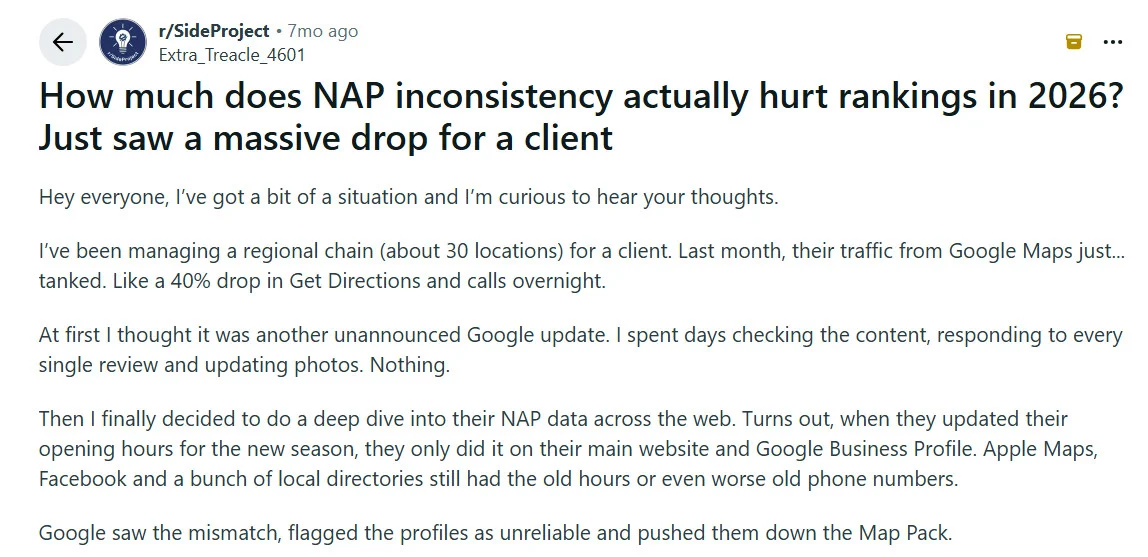
Some people will try again. Others will simply call the next business they find, probably one of your competitors.
Wasted Ad Spend and Marketing Budget
You can pay to bring people to your business and still lose them before they reach you. If a paid click leads to a business listing with a wrong phone number or old address, you pay for the click even if the customer can’t reach you.
Bad listing data doesn’t reduce your ad costs. It reduces what you get back from that spend, and you may never know how many potential customers were lost because of it.
The Ranking Signal Google Actually Uses
Google doesn’t say that mismatched business details lead to a ranking penalty. Google’s own local ranking guidance says “Local results are mainly based on relevance, distance, and popularity. Together, these factors help Google find the best match for customers’ searches.”
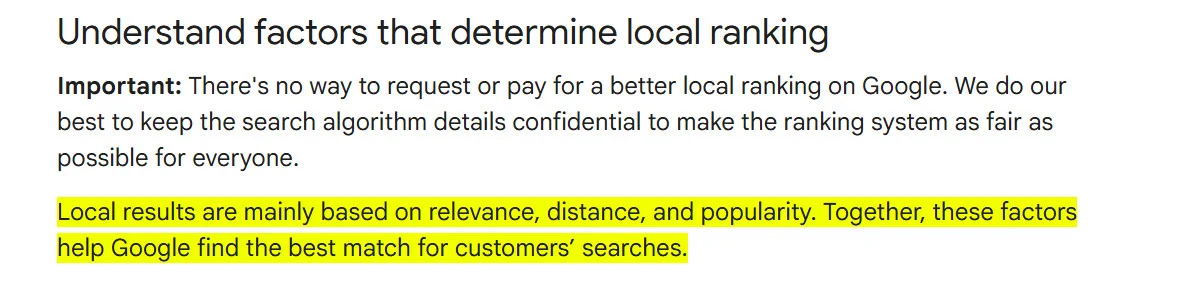
The same documentation also says “Businesses with complete and accurate info are more likely to show up in local search results.”
So, inconsistent NAP information isn’t a direct penalty. But it can make it harder for Google to confirm that the information it finds across different sources belongs to the same business.
That’s also how many local SEO professionals describe the issue. A Redditor commented in a discussion on r/seogrowth about NAP consistency:
“Google is smart enough now to understand small variations but still NAP consistency is important to rank in Local Pack and AI overviews.”
The takeaway is simple: citations aren’t a scorecard where every matching listing earns a point. Instead, consistent information gives Google more reliable evidence about your business and where it operates.
What This Costs Multi-Location Businesses Specifically
At one location, an incorrect phone number or address is frustrating. Across 40 locations it stops being one problem and becomes a steady leak, spread thin enough that no single report makes it obvious.
The example below shows how you can estimate the potential impact for your own business. These are illustrative assumptions, including the “25% locations carry at least one wrong detail” metric. These are not industry benchmarks, so replace them with your actual numbers.
| Input | Assumption used here | Your number |
| Locations | 40 | |
| Local leads per location per month | 120 | |
| Total monthly local leads | 4,800 | |
| Locations carrying at least one wrong detail | 25%, so 10 | |
| Monthly leads at those locations | 1,200 | |
| Share of those leads that see the wrong listing | 25%, so 300 | |
| Share of those that fail to connect | 20%, so 60 | |
| Lead to customer close rate | 15%, so 9 customers | |
| Average first order value | $180 | |
| Monthly exposure | $1,620 | |
| Annual exposure | $19,440 |
The point isn’t that every business will lose this much. It’s that even a small number of incorrect listings can add up quickly when you’re managing multiple locations on GBP and other platforms.
The costs are clear, but fixing NAP inconsistencies isn’t always straightforward. You may update every listing you control and still find outdated information elsewhere. That’s because your business data can spread across directories, data providers, and other websites without you realizing it.
How Inconsistencies Spread (Even When You Didn't Create Them)
You can keep your website updated and Google Business Profile optimized and still find wrong information elsewhere. Business details can be copied from other listings, shared through data providers, or added to websites you don’t manage.
That means a single old phone number or address can spread to several places before you even notice it.
Data Aggregators and Downstream Propagation
Four large data companies sit upstream of most U.S. business listings. They collect records, clean them, and push them to hundreds of sites, apps and assistants that never contact you.
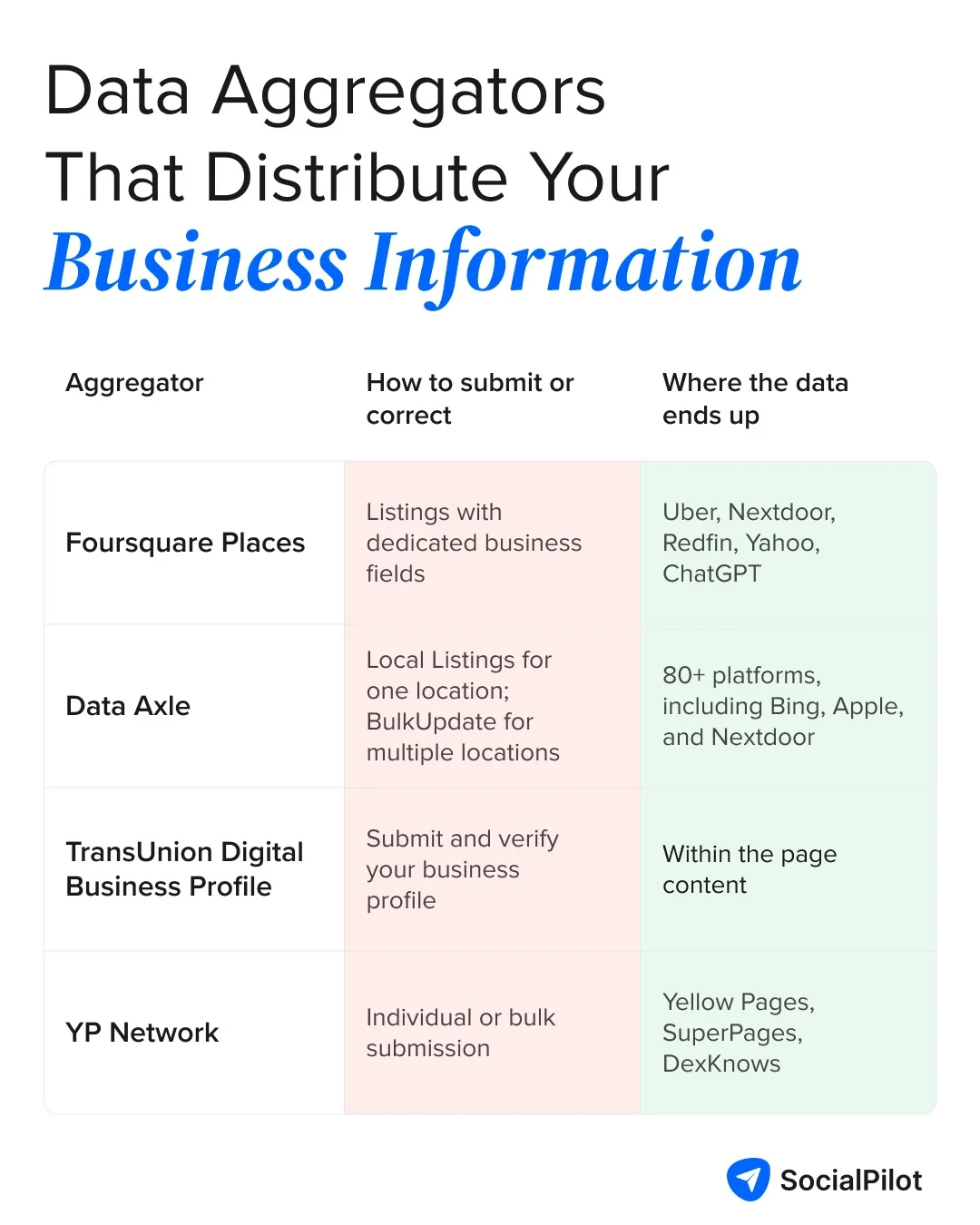
Here’s where things can get frustrating. Updating one directory doesn’t necessarily update the source that supplied its data.
If an aggregator still has your old phone number or address, it can send that information back to the directory later and overwrite your correction. So even when you didn’t create the original error, it can keep coming back.
Unstructured Mentions That Copy the Wrong Number
Errors can also spread when other websites copy your business information. A news article, chamber of commerce page, sponsor list, or old job post may still show the phone number or address you used at the time.
These pages can stay online for years, so an old detail can keep showing up long after you’ve changed it.
Before you fix them, you need to find them. Here’s how to audit your listings and spot every inconsistency.
How to Audit Your NAP Consistency (Find Every Inconsistency)
Finding NAP inconsistencies starts with knowing where your business information appears. Start with the listings you control, then look for other versions across directories and data sources.
Start With Your Core Listings
Start with your Google Business Profile. As one Reddit user in r/localseo puts it:
“If you want your business to rank online for local searches, NAP does matter when it comes to your Google business profile. Your business profile should list your business name (N), Address (A), and phone number (P).”
Then work through your core listings, one location at a time:
- Google Business Profile: Check your business name, address, and phone number.
- Facebook Page: Check the business name, address, and phone number in the About section.
- Apple Maps and Bing Places: Make sure the same details appear here.
- Yelp and key industry directories: Check the directories that appear for your business or category.
- Your website: Check the footer, contact page, location pages, and structured business information.
Start with these core listings before moving on to the wider web. It gives you a reliable baseline for the rest of your audit.
Search by Name, Address, and Phone Variants
Next, search for listings you may not know about. Run these exact-match searches in Google and Bing:
- “555-123-4567” — your current phone number, with and without your usual formatting.
- “555-987-6543” — every old number, including any you retired in the last few years.
- “1200 Old Mill Road” — your former address, plus the street portion alone if you moved within the same town.
- “Northside Dental”, then “Northside Dental LLC”, then “Northside Dental Care” — your business name with and without the legal suffix, along with any variations used by a franchisee or agency.
- site:yelp.com “Northside Dental” — repeat the site-specific search for each major directory.
Log every result, whether it’s correct or not. The correct listings give you a baseline to recheck after an aggregator or data provider sends updated information out.
Check the Data Aggregators
The data aggregators come last. Search for your business on Foursquare, Data Axle’s listings tool, TransUnion’s Digital Business Profile, and the YP Network. Record the NAP information each one has for your business.
Don’t be surprised if you find an old phone number, address, or business name. These sources can hold information that was correct at one point but is no longer current.
By now, you should have a clear list of where your NAP information appears and which listings need attention. The next step is to fix those inconsistencies, starting with the sources that can affect the rest of your listings.
How to Fix NAP Inconsistencies, Step by Step
Finding an inconsistency is only half the job. The next step is to correct the information at its source, then make sure the changes reach the listings and websites that still show the old details.
Pick Your Source of Truth
Before you edit anything, decide what the correct version of your business information should be. Write down the exact name, address, and phone number you want to use across your listings.
For each field, use the version that accurately represents your business:
- Name: Use your real-world business name as it appears on your storefront, signage, or other customer-facing materials. Don’t add legal suffixes or keywords that aren’t part of the business name.
- Address: Use your official business address and keep the formatting consistent across listings. For U.S. businesses, you can verify the standardized format with the USPS address tool.
- Phone: Use the number customers can reach today. Test it to make sure calls are answered and avoid using retired or unmonitored numbers.
Fix the phone number and address first. These are the details customers rely on to call or visit you, so getting them right should take priority over minor differences in formatting.
Fix the Core Listings First
Once you know what the correct information should be, start with the listings you control.
- Claim and verify unclaimed listings, starting with your Google Business Profile. You need control of a listing before you can make changes to it.
- Merge or remove duplicates before editing. There’s little point updating a listing that’s going to be merged or removed.
- Update your Google Business Profile, copying the NAP details from your source-of-truth record.
- Update Facebook, Apple Maps, Bing Places, and Yelp. Use the same information across each listing.
- Update your website, including every location page and your structured business information.
For a few locations, you can manage these updates manually. As the number of locations grows, keeping everything in sync becomes much harder.
A listing management tool can help by centralizing updates and making it easier to spot listings that still have outdated information.
Push Corrections Through the Aggregators
Make these corrections around the same time as your core listings rather than waiting until later. Each aggregator has its own process:
- Foursquare Places. Claim the venue in Foursquare for Business, or create it, and complete verification.
- Data Axle. Local Listings for a single site, BulkUpdate for ten or more. They verify by phone, so have the line answered, and use USPS address format or the submission stalls.
- TransUnion Digital Business Profile. A paid subscription at around $99 per year per profile, and the route to Bing, Apple and around eighty other platforms.
- YP Network. Submit each location on its own, or in bulk if you have many.
Tip: Recheck your listings at four and twelve weeks after submitting corrections. If the old information returns, resubmit the correction instead of editing the directory again.
What to Do About Unstructured Mentions
You usually can’t edit these pages yourself, so prioritize them instead of trying to fix every mention you find:
- Fix it: Prioritize high-traffic pages, pages that rank for your business name, and pages with a live contact or inquiry form. Contact the editor or site owner with the corrected details and the page URL.
- Watch it: For low-traffic pages with an outdated detail, record the mismatch and prioritize other corrections first.
- Leave it: For dead pages, old press coverage, or pages that haven’t been updated in years, further follow-up may not be worth the time.
Tip: Prioritize outdated NAP information on pages that rank for your business name. Customers may see these pages before they reach your website.
Fixing your existing inconsistencies gives you a clean starting point. The bigger challenge is keeping that information consistent as your business changes, adds locations, or updates its details.
Keeping NAP Consistent as You Grow
Every new location, phone change, or rebrand creates another chance for NAP information to drift. The goal isn’t to check listings constantly, but to make the correct information easy to use.
- Update your source of truth first. Change the master record before updating any listing, and use it as the reference for every location.
- Add listings to your opening checklist. Claim and verify each new Google Business Profile early so it’s ready when the location opens.
- Re-audit regularly. Check core listings quarterly and run a broader audit annually. Also audit after a move, phone change, rebrand, or acquisition.
For franchise and dealer networks, limit who can edit listings and make sure everyone follows the same source of truth. This helps prevent local updates from creating new variations.
For businesses managing many locations, that becomes a process and permissions challenge as much as a data-entry one. Managing listings across locations can help you build a more consistent workflow.
Managing NAP Consistency at Scale with a Listing Management Platform
At a few locations, a spreadsheet and calendar reminder may be enough. As you add more locations, though, every change creates more listings to update and more platforms to check.
That’s where a listing management platform can help. The value isn’t just in editing your business information. It’s in making updates from one place, keeping track of listing health, and showing you where something still needs attention.
For businesses managing multiple locations, SocialPilot’s listing management platform brings several of these routine tasks into one workflow.
Instead of updating each profile separately, you can manage location information, keep connected listings in sync, and spot issues from one place. That can make a difference when a single change needs to be reflected across many locations and platforms.
- Manage multiple locations: Keep location listings in one place instead of tracking each one separately.
- Keep details in sync: Update your name, address, phone, or hours once and sync the change to connected listings, reducing manual errors.
- Spot listing issues: Use listing health to identify missing details, unverified profiles, and other issues that might otherwise go unnoticed.
- Claim and verify listings: Bring existing profiles under your control so outdated information can be corrected and maintained.
- Cut down repetitive work: Apply routine updates across locations without repeating the same edits profile by profile.
This doesn’t replace a full NAP audit. Listings on platforms outside your management workflow, data aggregators, and unstructured mentions still need to be checked separately. But when manual updates start becoming difficult to keep up with, centralizing the process can make NAP consistency easier to maintain.
The goal isn’t to automate every part of NAP management. It’s to make routine updates easier to keep consistent, while leaving the wider audit and harder-to-control mentions on your radar.
Final Thoughts on Maintaining NAP Consistency
A wrong phone number or outdated address can mean missed customers, and those errors become harder to fix once they spread across multiple listings. The key is to keep your business information accurate at the source and regularly check where it appears.
For businesses managing multiple locations, SocialPilot’s listing management platform helps centralize location information, keep connected listings in sync, and spot listing issues. The listing management platform’s pricing starts with a free plan and offers paid options as your needs grow.
Ultimately, keeping NAP consistent takes ongoing effort, but having the right process in place makes it much easier to stay on top of as your business grows.