
Moz Local and BrightLocal can both keep your business listings accurate, track your reviews and report on how each location is doing.
Where they differ is in what they’re built around, and that decides whether you’re paying for a focused listings tool or a full set of local SEO tools you may only half use.
Moz Local is a listings tool. You enter your business details once, and it distributes them to directories. BrightLocal is a local SEO suite, with rank tracking, audits and hand-built citations alongside its listings and review tools.
Which one costs you less comes down to the jobs on your list and how many locations or clients you manage.
So this comparison looks at what separates them in practice: listings, reviews, support, social media and price, and how each one fits the locations or clients you look after.
If neither feels like the right fit, we’ve also included a third option, SocialPilot Reviews, so you can still make a confident decision.
How We Compared Moz Local and BrightLocal
We ran the same checks on both tools, and we flagged anything we couldn’t confirm instead of guessing.
Our Comparison Criteria
- Mapped both platforms from their pricing pages, product pages and help-center articles, then checked each feature claim against recent G2 and Capterra reviews. Moz Local has no free trial, and we didn’t take BrightLocal’s.
- Priced both tools per location, using Moz Local’s per-location plans and BrightLocal’s location bands, and checked what each tier includes.
- Confirmed where a review reply actually posts through each tool’s published plan details and help articles, not just which sites it monitors.
- Tested whether BrightLocal’s higher price buys more. It does on directory reach, review collection and support channels, while Moz Local leads on social networks and stays cheaper at a few locations.
- Compared billing terms, renewals, cancellation rules and add-on charges for both tools.
- Pulled G2 and Capterra ratings and read recent G2 reviews for the praise and complaints that keep coming up.
Alongside Moz Local and BrightLocal, we’ve added a third product to this comparison, SocialPilot Reviews. It’s our own product. We build and sell it, and it competes directly with both, so keep that in mind as you read.
We’ve included it as another option for teams that want reviews, listings and social media management in one place, with prices published up front. It sits in its own labeled column in each comparison table, and its full section comes near the end.
With our method and our own stake in this comparison on the table, you can weigh everything that follows accordingly. The quick summary comes next and shows where each tool fits at a glance.
Moz Local vs BrightLocal Quick Summary
Moz Local suits you when listings are the whole job and price matters most, and BrightLocal suits you when you want rank tracking, citations and review requests under one login.
The third column adds SocialPilot Reviews, and the rows for WhatsApp review requests and a free plan show where it differs from both.

Moz Local |

BrightLocal |

SocialPilot Reviews |
|
|---|---|---|---|
| Overall Star Rating (G2) | |||
| Ease of Use | |||
| Quality of Support | |||
| Ease of Setup | |||
| Review Management |  |
|
|
| Review Requests Over WhatsApp |  |
|
|
| Listing Management | |
|
|
| Social Media Management | |
|
|
| Published Pricing | |
|
|
| Starting Price | $20/month | $41/month | Free for Starter Plan then $25.50/month billed annually |
| Free Plan | |
|
|
| Free Trial | |
|
|
| Monthly Billing Without an Annual Contract | |
|
|
| Best For | Small businesses keeping listings accurate at low cost | Local SEO agencies and marketers tracking rankings and citations | Low-cost reviews and listings for small businesses and agencies |
| Visit Website | Visit Website | 14 Days Trial |
Moz Local is the better choice when listings are the whole job. It starts at $20 a month per location, keeps your details consistent across 90+ directories in the US, UK and Canada, and lets you cancel from your account. The trade-off is reach and review tools: it has no review collection, no free trial and email-only support.
BrightLocal is the better choice when you want listings, rankings and reviews under one login. Its citation network covers 1,500+ directories in 20 countries, and it adds rank tracking, audits and review requests. The trade-off is price: review features sit on the Grow plan at $65 a month for one location, and extras such as citations and Yelp sync are billed on top.
SocialPilot Reviews, our own product, is the better choice when you want reviews and listings in one place at a low, published price. Its Starter plan is free for one location, and Pro is $30/month, or $25.50/month billed annually, for three locations. Pro adds review requests over SMS and WhatsApp, plus 24/7 support by chat, email and phone.
That’s the short version of where each tool fits. Next, we look at what Moz Local and BrightLocal each offer, what they cost and where each one falls short.
An Overview of Moz Local
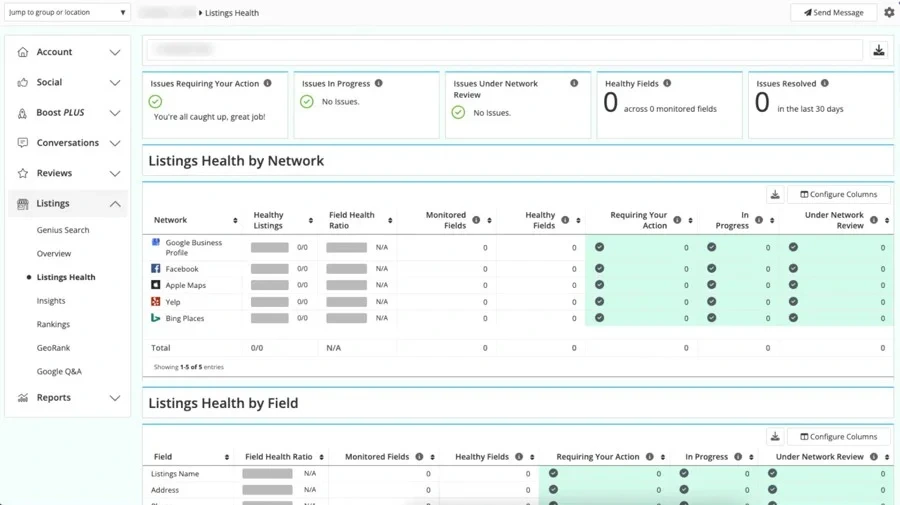
Moz Local is a listings tool that publishes your business name, address and phone number to 90+ directories and keeps them consistent as your details change, with review monitoring, competitor tracking and social posting on its higher plans.
Moz Local’s pricing starts at $20/month per location on the Lite plan, with every added location needing its own subscription.
Key Features
- Listing distribution: Publishes your business name, address and phone number to 90+ directories in the US, UK and Canada from a single entry.
- Two-way sync: Pushes changes to your hours or contact details out to connected listings and picks up edits made on the directories.
- Duplicate suppression: Scans each location for inaccurate and duplicate listings, scores listing health and suppresses the duplicates it finds.
- Review monitoring and replies: Pulls reviews from multiple sites into one feed and lets you reply to Google and Facebook reviews from the dashboard.
- Competitor tracking: Tracks competing businesses alongside your own locations.
Pros and Cons
| Pros | Cons |
| Keeps your name, address and phone number identical across 90+ directories from a single entry. | Has no review collection or personalized campaigns, so you need another tool to ask customers for reviews. |
| Syncs both ways, so edits made on a directory come back in, and suppresses duplicate listings. | Covers listings in the US, UK and Canada only, which rules out locations elsewhere. |
| Bills monthly or yearly per location, and you can turn off renewal or cancel any time from your account. | Needs a subscription for every location, plus paid AI add-ons, so costs climb with each location you add. |
| Replies to Google and Facebook reviews from the dashboard, with AI drafting through the Reviews AI add-on. | Offers email support only, with no live chat, phone or setup help, so every question waits on a reply. |
| Posts to up to five social networks and tracks competitors on higher plans, so basic posting needs no extra tool. | Has no free trial, so you commit to a paid plan before seeing the dashboard. |
BrightLocal takes a different approach, with a local SEO suite behind its listings, so next we look at what that adds and where it falls short.
An Overview of BrightLocal
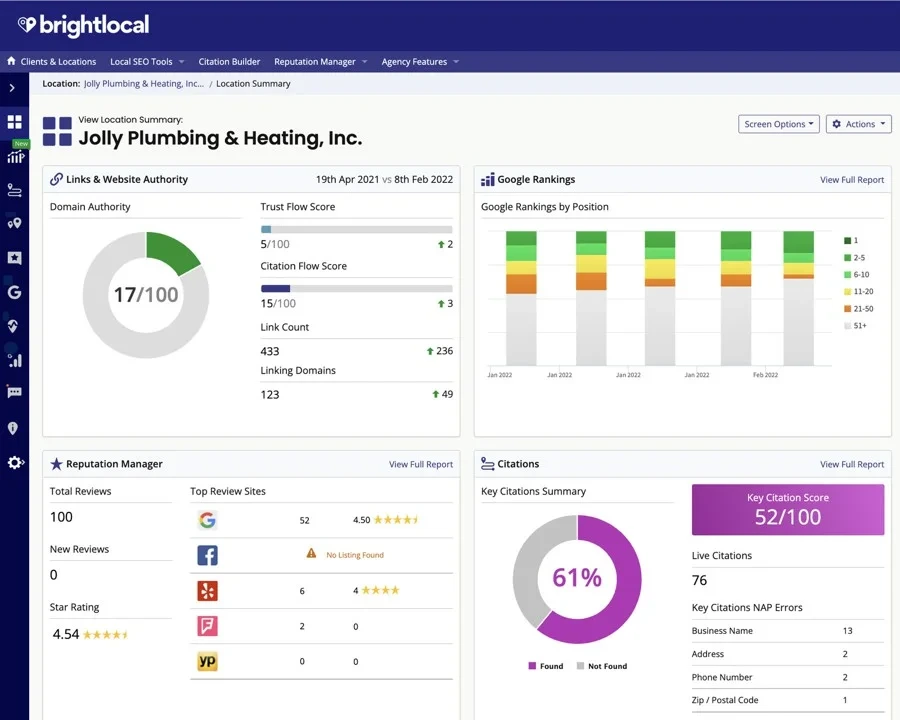
BrightLocal bundles listings, rank tracking, audits and review management into one local SEO suite. It’s best known for Citation Builder, where its team submits your details to directories by hand, and it sells everything in plans priced by location count.
It suits local SEO agencies and marketers who want rankings, citations and client reports under one login. BrightLocal’s pricing starts at $41/month for one location on the Track plan, with prices rising as you add locations and move up to the plans that include reviews.
Key Features
- Citation Builder: Submits your business details to directories by hand and charges per site instead of a monthly fee.
- Rank tracking and geo-grid: Tracks your Google rankings for chosen keywords and plots them on a map grid around each location.
- Local SEO and Google Business Profile audits: Checks each location’s listings and Google Business Profile and lists what needs fixing.
- Active Sync: Pushes changes to your business details out to Google, Facebook, Apple Maps, Bing and Yelp.
- Reputation Manager: Monitors reviews from 80+ sites in one feed and lets you reply to Google and Facebook reviews from the dashboard.
Pros and Cons
| Pros | Cons |
| Submits your details to 1,500+ directories across 20 countries. | Puts review monitoring, replies and requests on the Grow plan, so the $41/month Track price doesn’t include them. |
| Shows how each location ranks through rank tracking and geo-grid, with audits that list what to fix. | Posts replies directly to Google and Facebook only, capped at 350 characters, and links you out for other sites. |
| Syncs listings both ways across Google, Facebook, Apple Maps, Bing and Yelp, and suppresses duplicates. | Has no phone support, setup support or dedicated account manager, and live chat runs on weekdays only. |
| Sends review requests by email and text and monitors 80+ review sites, with replies on Google and Facebook. | Covers one social network, with no analytics, inbox, collaboration or white label. |
| Offers monthly billing with no annual contract and a 14-day trial. | Bills citations, data aggregators and Yelp sync on top of the plan, so the total grows past the plan price. |
We’ve covered what Moz Local and BrightLocal offer, how much they cost and where they fall short. Now, let’s compare their features side by side to see where each one stands out.
Moz Local vs. BrightLocal Head-to-Head Feature Comparison
Moz Local and BrightLocal overlap on listings and reviews, though they go about it differently. Here’s how they compare on review management, listings, customer support, social media and pricing, with the gaps that matter most for the locations and clients you manage.
In each section, we’ve also added a short note on how SocialPilot Reviews handles the same job, so you can see all three options in one place.
Review Management
A review you never see can’t be answered, and one left sitting unanswered tells the next customer nobody is listening.
|
Moz Local |
BrightLocal |
SocialPilot Reviews |
|
|---|---|---|---|
| Review Collection |
|
|
|
| Review Monitoring |
|
|
|
| Review Response |
|
|
|
| Share Review on Social Media |
|
|
|
| Manage Multiple Review Sites |
|
|
|
| Automated AI Review Response (auto reply) |
|
|
|
| Multi-Location Review Dashboard |
|
|
|
| Personalized Email and SMS Campaign |
|
|
|
| Facilitates Team Collaboration |
|
|
|
| Smart Response Template |
|
|
|
| Automated SMS and Email Campaign |
|
|
|
| Email Campaign Metrics |
|
|
|
| Text Campaign Metrics |
|
|
|
| Competitor Tracking |
|
|
|
| Feedback Management |
|
|
|
| Review Reporting & Analytics |
|
|
|
| Visit Website | Visit Website | 14 Days Trial |
Moz Local watches your reviews and lets you reply. However, it has no review collection, no personalized email or SMS campaigns and no campaign metrics, so asking customers for reviews happens in another tool. Replies post directly to Google and Facebook, and competitor tracking is included.
BrightLocal collects reviews as well as monitoring them, with personalized email and SMS campaigns and metrics for both. Replies post directly to Google and Facebook only, and every one of these review features sits on its Grow plan.
SocialPilot Reviews brings reviews from nine sites into one feed: Google, Facebook, Yelp, Tripadvisor, Trustpilot, Foursquare, Zillow, YellowPages and Influenster. When you connect a site, it pulls in up to 1,000 past reviews, so your full history is there from day one. Its AI drafts replies in 40+ languages, which helps when your customers don’t all write in English.
Listing Management
A wrong phone number or an old address on a single listing costs you calls and visits, and nobody tells you it’s happening.
|
Moz Local |
BrightLocal |
SocialPilot Reviews |
|
|---|---|---|---|
| Google Business Profile Management | |
|
|
| Facebook Page Listing Sync | |
|
|
| Apple Maps Listing Sync | |
|
|
| Bing Places Listing Sync | |
|
|
| Yelp Listing Sync | |
|
|
| Listing Creation & Verification | |
|
|
| Directories Covered | 90+ | 1,500+ | 120+ |
| Supported Countries | 3 (US, UK, Canada) | 20 countries | 190+ countries |
| Auto-Sync of Business Info Changes | |
|
|
| Two-Way Sync | |
|
|
| Listing Accuracy Scan / Health Score | |
|
|
| Duplicate Listing Suppression | |
|
|
| Rich Listing Content | |
|
|
| Bulk Updates Across Locations | |
|
|
| Google Business Profile Posts | |
|
|
| Photo Management | |
|
|
| Listing Performance Analytics (views, calls, directions) | |
|
|
| Visit Website | Visit Website | 14 Days Trial |
Moz Local ticks every listing aspect. It keeps your details in step across 90+ directories in the US, UK and Canada, picks up edits made on the directories, suppresses duplicates and reports views, calls and directions for each listing.
BrightLocal also ticks every aspect, and its reach is far wider, with 1,500+ directories across 20 countries through Citation Builder. Active Sync pushes changes to Google, Facebook, Apple Maps, Bing and Yelp, though Yelp sync costs $3 a month extra on the Manage and Grow plans.
The third option, SocialPilot Reviews, has a listings tool that publishes to 120+ directories, including Google, Facebook, Apple Maps, Bing and Yelp. Changes you make in the dashboard sync out automatically, and every location gets an accuracy scan and a health score.
Customer Support
A listing that breaks on a Saturday waits until Monday if nobody picks up, so it’s worth knowing when help is actually there.
|
Moz Local |
BrightLocal |
SocialPilot Reviews |
|
|---|---|---|---|
| Live Chat Support |
|
|
|
| Email Support |
|
|
|
| Phone Support |
|
|
|
| Support Hours | 24-hour support | Chat Mon-Fri 5am-7pm ET | 24/7 |
| Training & Self-Serve Resources |
|
|
|
| Setup Support |
|
|
|
| Dedicated Account Manager |
|
|
|
| Premium & Managed Support Packages |
|
|
|
| Visit Website | Visit Website | 14 Days Trial |
Moz Local lists 24-hour support, but only by email, with no live chat or phone line. There’s no setup support or managed support package either, though a dedicated account manager is available, along with training and self-serve resources.
BrightLocal adds live chat, but only on weekdays from 5 AM to 7 PM Eastern Time, so a problem on a weekend waits until Monday. There’s no phone support, no setup support and no dedicated account manager, though managed support packages and training are available.
Support on SocialPilot Reviews runs 24/7 by live chat, email and phone, with setup support, training and self-serve resources. Phone support and setup support, which neither Moz Local nor BrightLocal offers, come included, and a dedicated account manager and premium support packages are available too.
Posting to every location’s profile is a chore you either centralize or repeat, so it matters whether your listings tool can publish too.
|
Moz Local |
BrightLocal |
SocialPilot Reviews |
|
|---|---|---|---|
| Social Networks Supported | 5 | 1 | 10+ |
| Scheduling |
|
|
|
| Multi-Location Publishing |
|
|
|
| AI Content Assistant |
|
|
|
| Analytics |
|
|
|
| Social Inbox |
|
|
|
| Collaboration |
|
|
|
| White Label |
|
|
|
| Visit Website | Visit Website | 14 Days Trial |
Moz Local publishes to five networks, with scheduling, multi-location publishing, an AI content assistant, analytics, a social inbox and collaboration tools. Posting beyond Google and Facebook starts on the Elite plan.
BrightLocal covers one network, Google, where it schedules Business Profile posts with an AI content assistant and multi-location publishing. It has no social analytics, inbox, collaboration or white label.
On the social side, SocialPilot Reviews users get SocialPilot’s social media plan, which is sold separately from the Reviews plans. It covers 10+ networks with scheduling, multi-location publishing, an AI content assistant, analytics, a social inbox and collaboration. It also includes white label, which neither Moz Local nor BrightLocal ticks.
Pricing Comparison
Per-location pricing looks cheap at one location and adds up quickly at ten, so see how each tool charges before you compare headline prices.
|
Moz Local |
BrightLocal |
SocialPilot Reviews |
|---|---|---|
|
Lite
$20/month, or $199/year
|
Track
$41/month, or $31/month billed annually
|
Starter
Free
|
|
Preferred
$30/month, or $299/year
|
Manage
$54/month or $40/month billed annually
|
Pro
$30/month ($25.50/month billed annually)
|
|
Elite
$40/month, or $399/year
|
Grow
$65/month or $49/month billed annually
|
Enterprise
Custom quote
|
|
Enterprise
Custom quote
|
100+ locations
Custom quote
|
- |
| Not available |
14 day free trial
No credit card required
|
14 day free trial
No credit card required
|
| No extra setup fee | No extra setup fee | No extra setup fee |
| Visit Website | Visit Website | Start free Trial |
Moz Local charges per location, so ten locations cost ten times the plan price. Lite is $20 a month ($199 a year), Preferred is $30 ($299) and Elite is $40 ($399), and Enterprise is quoted. Lite covers listings and review monitoring. Review replies and competitor tracking start on Preferred, and posting beyond Google and Facebook starts on Elite. There’s no setup fee and no free trial.
BrightLocal prices each plan by location band, so the one-location rates of $41 (Track), $54 (Manage) and $65 (Grow) a month change as you add locations. For 2 to 5 locations, the monthly rates are $62, $76 and $87, and for 6 to 10 locations they’re $83, $109 and $131. That’s why Moz Local’s price advantage fades as you grow: four Lite locations cost $80 a month, more than BrightLocal’s Manage plan at $76 a month for two to five locations.
For comparison, the Starter plan on SocialPilot Reviews is free for one location. Pro costs $30 a month, or $25.50 a month billed annually, and includes three locations, with each extra location at $10 a month. Pro adds SMS and WhatsApp campaigns, team and client management and CRM integrations through Zapier, with extra email credits at $10 per 1,000.
Moz Local vs. BrightLocal: Billing, Contracts and Add-Ons
Contract terms and add-on charges decide what you pay over a year, and they’re too long for the main pricing table.
| Aspect | Moz Local | BrightLocal |
| Billing & Contract Terms |
|
|
| Add-ons & Usage Charges |
|
|
Moz Local bills monthly or yearly for each location, and you can turn off auto-renewal or cancel any time from your account, so a year-long commitment is your choice. Listings AI, which the Elite plan includes, costs $14 a month or $119 a year, and Reviews AI costs $10 a month or $69 a year.
BrightLocal plans bill monthly or annually. Under its terms and conditions, subscriptions renew automatically each month, you can cancel at any time and cancellation takes effect at the end of the paid period, with no refund for charges already paid.
For SocialPilot Reviews, billing works the same way on the contract side. You can pay monthly with no annual contract, or pay annually and save 15%. Add-ons are listed upfront: extra locations cost $10 per location per month, and texts bill through your own Twilio account. With no setup fee, what you see on the plans page is what you budget for.
With features, support and pricing side by side, the remaining question is how each tool holds up for the people who use it every day. Next, we look at what customers say about Moz Local, starting with the praise and the complaints that keep coming up.
Moz Local Reviews & Ratings: What Real Customers Say
Moz Local holds a 4.2 out of 5 rating on G2 from 476 reviews, a figure that covers the Moz Local product. On Capterra it scores 4.4 from 33 reviews. These themes come up repeatedly in recent reviews:
1. Common Praise
1.1 One Entry, Consistent Listings Everywhere
Users like that they enter their business details once and Moz Local pushes them to the directories that matter, so name, address and phone stay the same everywhere.
Petya K.
“I use Moz Local for our agency’s local business clients, and its main value is consistency. I enter a client’s business details once, and Moz Local distributes them to the data aggregators and directories we care about, keeping name, address and phone (NAP) identical everywhere.”
1.2 Many Accounts in One Place
Users like managing several business accounts from a single dashboard, which saves them time.
Antonio R.
“What I like the most is being able to unify different business accounts in one place and manage everything from a single site. This facilitates work and saves time.”
1.3 Affordable and User-Friendly
Users like that the platform is simple to work with and priced well for what it does.
Hank P.
“Moz local is the best and most affordable option for getting your business data consistent across all digital platforms and listings. They provide a great analysis tool, and their platform is very user-friendly.”
2. Common Complaints
2.1 Shrinking Listings and Hard-to-Reach Support
Some users say the number of live listings dropped over time and that they struggled to get help when they raised it.
Kara B.
“Our listings decreased from 115+ to only 32 within the past year, despite maintaining our same level of engagement. Customer support was largely inaccessible when I tried to address these concerns.”
2.2 Gaps in Directory Coverage
Some users say a directory they needed wasn’t covered, which left them fixing inconsistent listings with another tool.
Rusty M.
“Although most of the relevant listing services are covered, Yahoo was not. We had some inconsistent listings on Yahoo, and this became a problem that we had to address through another local listing platform.”
2.3 Fewer Features Than Competing Tools
Some users say Moz Local does its core job but has fewer features than competing tools.
Sahana B.
“For my requirement Moz Local is perfect. But It has fewer features compared to its competitors.”
BrightLocal’s customers describe a different set of strengths and frustrations, so next we look at what they praise and what they complain about.
BrightLocal Reviews & Ratings: What Real Customers Say
On G2, BrightLocal scores 4.6 out of 5 from 230 reviews, and Capterra rates it 4.8 from 283 reviews. The same reviews raise these themes again and again:
1. Common Praise
1.1 Rank Tracking That Shows Where You Stand
Users like seeing how each location ranks around it, and they use the grid and rank checkers most.
Gazala S.
“It has everything that a local SEO needs. I use the grid rank checker, citation checker, and local rank checker the most. The grid rank checker is fantastic and very helpful in removing spam profiles.”
1.2 Support and Training That Teach You the Tool
Users like that the support team knows the product well and will walk them through citation problems.
Jon P.
“The customer support! A++ Everyone seems extremely knowledgeable and willing to answer any questions you have when it comes to citation building and correcting citation related issues.”
1.3 Citations, Rankings and Reviews in One Dashboard
Users like having citations, rankings and reputation management under a single, easy-to-use login.
Mark D.
“BrightLocal provides an all-in-one solution to improve local search rankings, manage citations, and oversee reputation management with an easy-to-use dashboard.”
2. Common Complaints
2.1 Costs That Add Up
Some users say the price feels high next to what their own clients will pay for the service.
Marc C.
“It’s a bit expensive considering what my clients are willing to pay for the services.”
2.2 So Many Tools That It’s Hard to Find Your Way
Some users say the number of tools makes the first few sessions harder than they expected.
Adam J.
“Because of all the tools and options available, it can be a little difficult to navigate or find where you are looking to go the very first time.”
2.3 Limited White Label and User Controls for Agencies
Some agency users say they’d like more white label options and finer control over user groups.
Tony G.
“As an agency, I’d prefer more options with white labelling. I believe the platform would benefit from administrators being able to exert more granular control over user groups, although, in fairness, there is a workaround that goes some way toward solving that (relatively minor) issue.”
With both sets of customers heard, you can match their praise and complaints to your own situation. Next, we turn all of this into a clear choice, and if the complaints rule out both tools for you, the section on other tools further down lists alternatives.
Moz Local or BrightLocal: Which Should You Choose?
In a BrightLocal vs Moz Local decision, one question settles it: do you need a tool that keeps listings accurate, or one that also tracks rankings and brings in reviews?
Choose Moz Local If…
- You manage locations in the US, UK or Canada and want accurate listings at the lowest price per location.
- You run one to three locations, where paying per location costs less than BrightLocal’s listings plan.
- You plan to ask customers for reviews with a separate tool and only need to monitor and reply.
- You want basic social posting to up to five networks from the same tool that handles your listings.
Choose BrightLocal If…
- You sell local SEO to clients and need rank tracking, audits and reports alongside listings.
- You need citations beyond the biggest directories, or coverage for locations in the 20 countries it covers.
- You want to collect reviews with email and text requests and answer them in the same place.
- You run four or more locations, where banded pricing starts to undercut paying per location.
That should narrow the choice to one of the two. If neither description matches how you work, the next section shows where a third option, SocialPilot Reviews, sits against both.
SocialPilot Reviews is a better fit than Moz Local or BrightLocal for teams that want reviews, listings and social media in one place, with prices on the page and no annual contract.
It sends review requests by email, SMS and WhatsApp, and neither rival offers WhatsApp requests. The separate social media plan covers 10+ networks, against five on Moz Local and one on BrightLocal, and includes white label, which neither rival offers.
Moz Local and BrightLocal both sell some social publishing, so the case for one platform rests on breadth and price.
Because SocialPilot Reviews sits inside the wider SocialPilot platform, you can run reviews, listings and social publishing from one login, starting on a free plan and paying $30 a month for Pro.
For agencies, the social product includes white label, and on the Enterprise Reviews plan, invite emails and landing pages carry your client’s brand.
For 8 locations, here’s what each tool costs with review replies included, billed monthly:
| Aspect | Moz Local | BrightLocal | SocialPilot Reviews |
| Starting Price | $20/month per location | $41/month | Free for Starter Plan then $25.50/month billed annually |
| Published Add-Ons | Listings AI $14/month, Reviews AI $10/month | Citation Builder $3.20 per site, Yelp sync $3/month | Extra locations $10/month each, extra email credits $10 per 1,000 |
| Free Trial | Not available | 14 days, no credit card required | 14 days, no credit card required |
| Monthly Billing Without an Annual Contract | |
|
|
| Review Requests Over WhatsApp | |
|
|
| Setup & Onboarding Fees | No extra setup fee | No extra setup fee | No extra setup fee |
If none of the three matches what you need, the next section lists other platforms that come up in the same buying conversations.
Other Review and Listing Management Tools Worth Knowing About
If neither tool fits, these platforms come up in the same buying conversations.
- Whitespark is a local SEO toolset for citations, Google Business Profile and rankings, and it starts at $79 a month. Check out our Whitespark vs. BrightLocal comparison for a detailed overview.
- Synup is built for agencies that want white-label listings, reviews and social, with plans from $49 a month. Read our Synup vs BrightLocal comparison for the details.
- Yext is an enterprise listings platform that publishes PowerListings plans from $199 a year and quotes its full platform.
- Birdeye is an all-in-one platform for multi-location brands and it covers reviews, listings, and social; sold on custom quotes.
- Reputation is a reputation platform for multi-location brands, with plans from $80 a month on annual contracts.
If none of the tools on this page fits, start with our roundups of Moz Local alternatives and BrightLocal alternatives.
Final Thoughts: Choosing Between Moz Local and BrightLocal
Side by side, Moz Local earns its place when listings are the whole job. It costs $20 a month per location, covers 90+ directories in three countries and lets you cancel from your account.
BrightLocal earns its place when you want rankings, citations and review requests under one login, with 1,500+ directories across 20 countries.
The practical point to weigh is the full-year cost, since Moz Local bills every location separately and its price advantage fades from about four locations, while BrightLocal’s review tools start on Grow at $65 a month for one location.
If neither fits, SocialPilot Reviews starts free and covers reviews, listings and social media from one platform.
Whichever tool you lean towards, start with the job that costs you the most today, then set the full-year price beside it. The right choice gets much clearer from there.