
LinkedIn isn’t a job portal anymore. It’s where B2B deals start, where agencies win clients, and where one good post can fill a pipeline. So, automating the busy work like scheduling, outreach, prospecting – makes sense.
- 89% of B2B marketers use LinkedIn for lead generation. [LinkedIn for Business]
- LinkedIn is 277% more effective for B2B lead generation than other platforms.
But the rules got stricter. LinkedIn enforces its connection limits harder than it used to, and according to some estimated ~23% of heavy users of Expandi, Dripify, and Waalaxy faced some form of restriction in Q1 2026. [Cleverly]
The tool you pick and how you use it, now decides whether automation saves you time or costs you your account.
So, this guide ranks the 12 best LinkedIn automation tools for 2026, and it also helps you understand which tools are safe, which ones need guardrails, and which ones can get your account restricted.
Types of LinkedIn Automation Tools in 2026 by Use Case
Not every “LinkedIn automation tool” does the same job and the safe ones do a very different job from the risky ones. Here’s the short version, sorted by what you’re trying to do and how much account risk it carries.
For content scheduling & posting (Zero risk):
- SocialPilot: $30/month flat rate, 15,000+ customers, built for agencies
- Taplio: Starts at $39/month for Founders, creators, and B2B professionals
- Zoho Social: $10–15/month
For outreach & connection automation (Low–medium risk):
- Expandi: Cloud-based, dedicated IPs. Stay within 20–30 connections/day
- Dripify: Automated sequences. Stay under ~100 connections/week
- Linked Helper: Desktop-based. Lower detection risk than browser extensions
For data extraction (Low–medium risk, with compliance protocols):
- Wiza: Email and phone finder via Sales Navigator
- Evaboot: Sales Navigator export cleaner
Nota: Apollo.io and Seamless.ai had their LinkedIn company pages restricted in 2025 over Chrome-extension scraping. [LinkedIn Pulse Article]
Is LinkedIn Automation Safe in 2026?
It’s safe if you use official-API tools for content and conservative cloud tools for outreach and stay under LinkedIn’s limits.
The risk has nothing to do with whether a tool calls itself “safe.” It comes down to how the tool connects to LinkedIn.
- Zero risk: Tools using LinkedIn’s official OAuth API (SocialPilot, Buffer, Hootsuite) and LinkedIn’s own products (Sales Navigator). Explicitly permitted. Cannot trigger restrictions.
- Low–medium risk: Cloud-based outreach platforms with dedicated IPs (Expandi, Dripify, Waalaxy, Linked Helper) used inside the limits.
- High risk: Browser extensions for high-volume outreach, mass connection requests, and cookie/session-based auth tools.
A few things every LinkedIn automation user should know in 2026:
- The connection-request limit is roughly 100 per week. This cap has applied since 2021 and still holds in 2026, new or low-trust accounts are often throttled lower. Safe daily practice is 20–30 requests. [LinkedIn help]
- HeyReach’s LinkedIn company page was reportedly removed in late March 2026. The tool itself is still operating, and the reporting traces to competitor analysis rather than an official LinkedIn statement, treat it as a caution, not a confirmed ban.
- Our social media experts recommend warming up new accounts for at least 14 days before using any automation.
“ To ensure that LinkedIn remains a safe community, we recommend that you only send invitations to people you know and trust, in accordance with LinkedIn’s User Agreement y Professional Community Policies.“
- LinkedIn Help Center, connection invitation guidance
Resumen de las principales herramientas de automatización de LinkedIn
Here is an overview of the top five automation tools for LinkedIn. This quick comparison will help you decide on the best overall LinkedIn scheduling and management tool.
| LinkedIn Sales Navigator | Expandi | Dux-Soup | Wiza | |
| Categoría | Prospecting (official) | Cloud outreach | Browser-extension outreach | Data extraction |
| Precio inicial | ~$99.99/mo | $99/mo | ~$14.99/mo | Free tier/from $49/mo |
| Rating (G2) | ~ | |||
| Safety tier | Zero risk | Low–medium | Medium–high | Low–medium |
| Official LinkedIn API (zero ban risk) |  |
 |
|
|
| Post scheduling & publishing | |
|
|
|
| Connection requests & outreach automation | |
|
|
|
| AI content generation | |
|
|
|
| Email / phone finder | |
|
|
|
| Built-in CRM / lead management | |
|
|
|
| Campaign analytics & reporting | |
|
|
|
| White-label client reports | |
|
|
|
| Multi-platform (beyond LinkedIn) | |
|
|
|
| Free trial / free plan | |
|
|
|
LinkedIn Outreach Automation Tools 2026: Safety Ratings & Recommended Limits
LinkedIn outreach automation can save hours of manual prospecting, but aggressive usage can lead to account restrictions. Use these tools cautiously and view the limits below as maximum thresholds, not goals to hit.

Ideal para: Sales teams and agencies running cloud-based LinkedIn outreach campaigns who want dedicated IPs and smart sequencing and will respect conservative limits.
Plataformas compatibles: LinkedIn (plus email outreach)
Valoración: G2: 4.2/5 · Capterra: 4.4/5
Expandi is one of the better-built cloud outreach platforms: dedicated IPs, smart sequences, A/B testing, and personalization that goes beyond first-name tokens. The architecture is safer than extension-based tools, but no outreach automation is “zero risk.” Keep it to 20–30 connections/day and never exceed ~100/week.
Cloud-based with dedicated IPs, which lowers detection risk versus browser extensions. But Expandi was named in the Q1 2026 Northlight.ai analysis as one of the tools where an estimated ~40% of heavy users faced restrictions. Use it within LinkedIn’s weekly limits.
Funciones clave:
- Cloud-based with dedicated residential IPs
- Smart, conditional outreach sequences
- Image and GIF personalization
- A/B testing for campaigns
- Webhooks and CRM integrations
Ventajas
- Dedicated IPs lower detection risk
- Strong sequence personalization
- Cloud-based – runs without your computer on
Desventajas
- Tied to elevated restriction estimates in Q1 2026
- Carries account risk, not for aggressive volume
- Pricier than entry-level outreach tools
Precios:
Veredicto final:
One of the safer outreach options because of its cloud-and-dedicated-IP architecture, but “safer outreach” still means real risk. Run it conservatively, pair it with an official-API content tool, and watch your SSI.
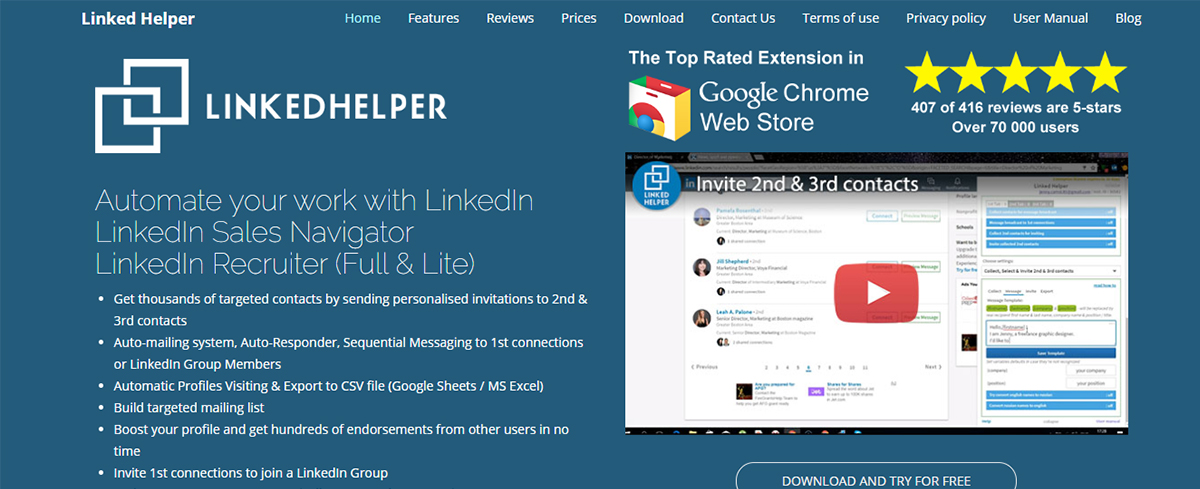
Ideal para: Budget-conscious users and small teams who want flexible outreach automation and accept that a desktop app needs your computer running.
Plataformas compatibles: LinkedIn
Valoración: G2: 4.5/5 · Capterra: 4.9/5
Ayudante de enlace is a long-running, feature-rich desktop tool with a built-in CRM, drip campaigns, and auto-responses. It’s one of the cheaper serious outreach options, and it carries some of the highest user ratings in the category. Because it runs locally, your machine needs to be on for campaigns to fire, the trade-off for its low price.
Desktop-based tool, which can mean lower detection risk than browser extensions, but it still automates outside the official API. Stay within weekly limits.
Funciones clave:
- Built-in CRM for managing prospects
- Multi-step drip campaigns and auto-responses
- Auto-connect, message, and endorse
- Profile data export
- Affordable entry pricing
Ventajas
- Low cost for a full outreach toolkit
- Built-in CRM, very strong user ratings
- Lower detection risk than extensions
Desventajas
- Desktop app – computer must stay on
- Interface feels dated
- Still carries account risk
Precios:
Veredicto final:
The value pick in outreach. Good for small teams who want capability without Expandi-level pricing, as long as you’re fine keeping a machine running, and you respect the limits.

Ideal para: Individuals and small teams who want a simple, browser-based way to automate profile visits, connections, and messages on a budget.
Plataformas compatibles: LinkedIn (Chrome extension)
Valoración: G2: 4.4/5 · Capterra: 4.0/5
Dux-Soup is a browser extension; the architecture LinkedIn detects most easily. In 2026, extensions carry meaningfully higher restriction risk than cloud tools for high-volume use. Use it lightly, if at all, for outreach.
Dux-Soup is one of the original LinkedIn automation tools affordable, easy to start, and good for light prospecting. The same thing that makes it simple (it runs in your browser) is what raises its risk profile. If you use it, keep volume low and lean on it for profile visits and tagging more than mass connection requests.
Funciones clave:
- Auto-visit, connect, and message
- Profile tagging and notes
- Drip campaigns
- CSV data export
- Works directly in Chrome
Ventajas
- Low cost, quick to set up
- Good for light prospecting
- Familiar, long-established tool
Desventajas
- Browser extension, highest detection-risk tier
- Computer/browser must stay open
- Not suited to high-volume outreach in 2026
Precios:
Veredicto final:
Fine for light, careful prospecting on a budget. But in 2026’s stricter environment, a cloud-based tool is the safer choice for anything beyond low volume.

Ideal para: Sales teams and prospectors who want LinkedIn’s own advanced search and lead data, completely official, zero ban risk.
Plataformas compatibles: LinkedIn (native product)
Valoración: G2: 4.4/5 · Capterra: 4.6/5
Safety tier: Zero risk. It’s a LinkedIn-owned product. There’s no third-party automation and nothing to detect.
Sales Navigator is LinkedIn’s official prospecting layer: advanced search filters, lead and account lists, InMail credits, and real-time alerts. It doesn’t automate connection requests for you, but it’s the safe foundation serious prospectors build on, identify and save leads here, then engage them organically or feed them into a conservative outreach tool.
Funciones clave:
- Advanced lead and account search filters
- Saved lead lists and real-time alerts
- InMail credits for direct outreach
- Integraciones CRM
- Official LinkedIn data, always current
Ventajas
- Zero ban risk, it’s LinkedIn’s own tool
- Best prospecting data on the platform
- Integrates with CRMs and outreach tools
Desventajas
- No built-in automation of connections/messages
- Price rose significantly in recent years
- A research/targeting layer, not a sender
Precios:
Veredicto final:
The official, zero-risk prospecting base for any LinkedIn sales motion. It won’t send your outreach, pair it with a conservative cloud tool for that, but it’s where safe prospecting starts.

Ideal para: Sales teams that want set-and-forget, multi-step LinkedIn outreach sequences with analytics used inside safe limits.
Plataformas compatibles: LinkedIn (plus email)
Valoración: G2: 4.5/5 · Capterra: 4.7/5
Dripify focuses on automated outreach funnels: build a sequence of connection requests, follow-ups, and messages, then let it run with conditional logic and team analytics. It’s polished and popular, which is part of the risk, high adoption plus aggressive default volumes is what the Q1 2026 analysis tied to restrictions. The tool is fine; the usage discipline is on you. Stay within 20–30 daily connection requests and under ~100/week.
Funciones clave:
- Multi-step automated outreach sequences
- Conditional actions based on prospect behavior
- Team management and analytics
- Pruebas A/B
- CSV import/export and integrations
Ventajas
- Easy, set-and-forget sequences
- Good team analytics
- Cloud-based
Desventajas
- Named in Q1 2026 elevated-restriction analysis
- Default volumes can push past safe limits
- Carries real account risk
Precios:
Veredicto final:
Capable outreach automation that works well when you throttle it. Treat the safe limits as hard ceilings, pair with an official-API content tool, and monitor your SSI.
LinkedIn Profile Automation Tools 2026: Personalization Without the Ban Risk
These tools focus on profile interaction, personalization, and engagement. The same safety rules apply and one popular sub-category (engagement pods) carries its own risk.
Ideal para: Solo users and small teams who want simple multichannel (LinkedIn + email) outreach with an easy setup.
Plataformas compatibles: LinkedIn, Email
Valoración: G2: 4.5/5 · Capterra: 4.4/5
Waalaxy is built for ease of use, pre-built sequences, a clean interface, and combined LinkedIn-plus-email campaigns make it popular with people who don’t want a steep learning curve. That ease can encourage higher volume than is wise, so set conservative caps from day one.
Waalaxy was named alongside Expandi and Dripify in the Q1 2026 Northlight.ai analysis. It runs partly through a browser extension, so keep volume modest and treat the limits as firm.
Funciones clave:
- Pre-built LinkedIn + email outreach sequences
- Auto-import leads from LinkedIn searches
- Simple, beginner-friendly interface
- Basic CRM and team features
- Multichannel campaigns
- Very easy to start
- Multichannel (LinkedIn + email)
- Affordable entry tier
Ventajas
Desventajas
- Named in Q1 2026 elevated-restriction analysis
- Extension component raises detection risk
- Easy setup can tempt unsafe volume
Precios:
Veredicto final:
A friendly entry point to outreach automation, but the Q1 2026 data means discipline matters. Run it light, pair it with official-API content tooling, and watch your account signals.
Ideal para: Creators, consultants, and LinkedIn-first professionals who want to increase post visibility through engagement communities and creator networks.
Plataformas compatibles: LinkedIn
Valoración: Limited public reviews
Linkboost takes a community-driven approach to LinkedIn engagement. Instead of relying on large, generic engagement pods, it connects users with curated engagement groups designed to help posts gain early visibility and reach a more relevant audience.
The idea is simple: early engagement can increase a post’s momentum on LinkedIn. However, as with any engagement-exchange platform, results depend heavily on the quality and authenticity of interactions. Used thoughtfully, it can help creators expand their reach, but it shouldn’t replace consistently publishing valuable, audience-first content.
Funciones clave:
- Access to curated LinkedIn engagement communities
- Early engagement opportunities for new posts
- Industry and interest-based engagement groups
- Analytics to track post performance and engagement activity
- Web-based platform with community management tools
Ventajas
- Helps generate early post visibility
- More targeted communities than generic engagement pods
- Can complement a content strategy
Desventajas
- Effectiveness depends on the quality of community interactions
- Doesn’t replace organic audience building
- Requires consistent participation to see value
Precios:
Veredicto final:
A useful option for creators and professionals looking to increase early post visibility through engagement communities. However, it works best as a complement to a strong content strategy rather than a substitute for creating genuinely valuable LinkedIn content.
LinkedIn Data Extraction & Email Finder Tools 2026: Safe Scraping Methods
LinkedIn restricted Apollo.io and Seamless.ai in 2025 over scraping. The tools below take a more compliant route, working through Sales Navigator exports rather than mass-scraping profiles, but data extraction still demands care and respect for privacy rules.

Ideal para: Sales and recruiting teams that need verified email addresses and phone numbers from their Sales Navigator searches.
Plataformas compatibles: LinkedIn / Sales Navigator
Valoración: G2: 4.5/5 · Capterra: 4.3/5
Wiza pulls contact data from Sales Navigator lists rather than scraping profiles at random. Stay inside its export limits and use the data in line with privacy law (GDPR/CAN-SPAM). Wiza turns a Sales Navigator search into a clean, exportable list of verified emails and phone numbers. It’s accurate and fast, which makes it a favorite for outbound teams and it carries one of the highest G2 ratings in this guide. The compliance burden – how you collect, store, and contact those leads, sits with you.
Funciones clave:
- Verified email and phone-number finding
- Real-time email validation
- Sales Navigator list export
- Integraciones CRM
- Bulk export with credits
Ventajas
- High data accuracy and verification
- Fast Sales Navigator exports
- Free tier to start; CRM integrations
Desventajas
- Credit-based costs add up at volume
- Compliance responsibility is on you
- Best results need Sales Navigator
Precios:
Veredicto final:
A reliable email finder for outbound teams already using Sales Navigator. Lower risk than profile-scraping tools, but treat data privacy as part of the workflow, not an afterthought.

Ideal para: Teams that want to export and clean Sales Navigator search results into structured, ready-to-use lists.
Plataformas compatibles: LinkedIn / Sales Navigator
Valoración: G2: 4.6/5 · Capterra: 4.4/5
Evaboot exports and cleans Sales Navigator data rather than mass-scraping. Keep usage within limits and handle exported data responsibly. Evaboot’s niche is clean exports: it pulls Sales Navigator search results, filters out junk and mismatches, and finds and verifies emails, handing you a tidy CSV instead of a messy scrape. For teams that live in Sales Navigator, it removes a lot of manual list-cleaning.
Funciones clave:
- One-click Sales Navigator search export
- Automatic data cleaning and filtering
- Email finding and verification
- Detects mismatched/irrelevant results
- CSV export ready for CRM import
Ventajas
- Clean, structured exports
- Filters out bad data automatically
- Simple, focused tool
Desventajas
- Requires a paid Sales Navigator subscription
- Credit-based pricing
- Narrower scope than full data platforms
Precios:
Veredicto final:
The cleanup specialist. If you export from Sales Navigator regularly, Evaboot saves hours of list-scrubbing, just keep data handling compliant and remember it sits on top of a Sales Navigator subscription.
LinkedIn Scheduling & Management Tools 2026: Zero-Risk Options
These tools use LinkedIn’s official API. They can’t get your account restricted, which is exactly why they belong at the foundation of any 2026 LinkedIn stack.
Ideal para: Agencies and content teams managing LinkedIn (and other platforms) for multiple clients at a flat price.
Plataformas compatibles: LinkedIn, Facebook, Instagram, Twitter/X, TikTok, Pinterest, YouTube, Google Business Profile, Threads, Bluesky
Valoración: G2: 4.5/5 · Capterra: 4.4/5
SocialPilot publishes to LinkedIn through the official OAuth API, the same sanctioned endpoint LinkedIn’s own mobile app uses. That’s the whole point: every post you schedule is identical to one you’d publish by hand, so SocialPilot cannot trigger an account restriction. For agencies, the flat-rate pricing is the headline.
Adding team members doesn’t multiply your bill, which is why a small agency pays a fraction of what per-seat tools charge. Layer on white-label client reports, approval workflows, bulk scheduling, and AI Pilot for LinkedIn captions, and it covers the entire content side of LinkedIn without any safety trade-off.
Funciones clave:
- Official LinkedIn API publishing, zero ban risk
- Flat-rate pricing that covers the whole team, not per seat
- Bulk scheduling – up to 500 posts across all client LinkedIn accounts
- MCP server for connecting AI assistants and custom workflows to content planning, scheduling, and publishing processes
- AI Pilot for LinkedIn captions and post ideas
- White-label LinkedIn reports clients receive as thier own branding
- Client approval workflows before anything publishes
- LinkedIn carousel PDFs and multi-account management from one dashboard
Ventajas
- Official API – cannot get a LinkedIn account restricted
- Flat-rate pricing scales for agencies without per-seat fees
- White-label reporting included, not an add-on
- Strong AI caption generation via AI Pilot
Desventajas
- Does not have connection outreach ability
- Advanced agency features come with only higher tier plans
Precios:
SocialPilot offers a 14-day free trial and access to all premium features (no credit card required & cancel any time). Choose a plan de precios that fits your needs.
| Ultimate | Premium | Standard | Essentials |
$170.00/mes$200
Facturado anualmente (Ahorra un 15%)
|
$85.00/mes$100
Facturado anualmente (Ahorra un 15%)
|
$42.50/mes$50
Facturado anualmente (Ahorra un 15%)
|
$25.50/mes$30
Facturado anualmente (Ahorra un 15%)
|
|
Optimiza la gestión de redes sociales
|
|||
Veredicto final:
If your LinkedIn work is content – programación de puestos, publishing, client reporting then SocialPilot is the zero-risk anchor of the stack. It’s the strongest fit for agencies because flat-rate pricing and white-label reporting are built in, and the official API means client accounts are never at risk.

Ideal para: Founders, creators, and B2B professionals who want AI-powered LinkedIn content creation and scheduling for personal branding.
Plataformas compatibles:
Valoración:
Taplio is an AI-powered LinkedIn growth platform designed for personal branding, content creation, and relationship building. It helps users generate posts, hooks, and carousel copy using AI trained on high-performing LinkedIn content.
The platform also includes a visual content calendar with drag-and-drop scheduling, post analytics, a searchable library of viral posts for inspiration, and a lead database to discover and engage with prospects. Additionally, Taplio offers AI-assisted commenting and engagement tools to help users maintain an active presence and build relationships on LinkedIn.
Funciones clave:
- AI post, hook, and carousel generation trained on high-performing LinkedIn content
- Visual content calendar with drag-and-drop scheduling and suggested times
- Inspiration library of top-performing posts, filterable by industry and engagement
- Lead database (3M+ enriched profiles) on the top tier
- Analytics on your post and profile performance
Ventajas
- Strong AI content generation for LinkedIn
- Good inspiration and post-idea tools
- Useful scheduling and analytics
- Built specifically for personal branding
Desventajas
- Cookie-based auth, not the official API
- Reported warnings, restrictions, and shadowbans
- AI features cost well above the headline price
- LinkedIn-only; no multi-platform support
Precios:
Veredicto final:
A powerful AI tool for LinkedIn content creation and personal branding, with scheduling, analytics, and engagement features. However, its cookie-based authentication and automation approach make it a different category from official API-based schedulers. If you use Taplio, it’s best suited for content creation and light engagement rather than aggressive automation.

Ideal para: Solopreneurs and small businesses that want affordable, reliable LinkedIn scheduling, especially teams already inside the Zoho ecosystem.
Plataformas compatibles: LinkedIn, Facebook, Instagram, Twitter/X, TikTok, Pinterest, YouTube, Google Business Profile, Mastodon, Threads, Bluesky
Valoración: G2: 4.6/5 · Capterra: 4.7/5
Zoho Social is a budget-friendly, official-API scheduler that does the core job well: queue posts, track basic analytics, collaborate with a small team. It integrates neatly with the rest of Zoho’s suite, which is the main reason existing Zoho users pick it. It’s zero risk on account safety. Agencies will find its multi-client and white-label features lighter than dedicated agency platforms.
Funciones clave:
- Post scheduling and a publishing calendar
- Basic analytics and engagement monitoring
- Team collaboration and approval roles
- Tight integration with Zoho CRM and the wider Zoho suite
Ventajas
- Affordable entry price
- Official API – zero account risk
- Clean, easy to learn
Desventajas
- Lighter agency/white-label features
- Best value mostly for existing Zoho users
- Fewer advanced reporting options
Precios:
Veredicto final:
A solid, safe, low-cost scheduler for individuals and small teams, especially if you already use Zoho. Agencies managing many clients with white-label reporting needs will outgrow it.
How to Choose a LinkedIn Automation Tool Safely in 2026: 5-Step Process
1. Decide your primary goal: content vs outreach
Content automation (scheduling posts, analytics, team collaboration): use SocialPilot, Tapilo, or Zoho. Zero risk with official LinkedIn API. These are explicitly permitted and can’t trigger restrictions.
Automatización de la divulgación (connection requests, messages, lead gen): use cloud-based tools only (Expandi, Dripify, Linked Helper). Never browser extensions for high-volume outreach. Stay under ~100 connections/week.
Don’t use the same tool for both. Keep your content stack separate from your outreach stack.
2. Check the tool’s API architecture before subscribing
- Official OAuth API (SocialPilot, Zoho): zero ban risk.
- Cloud-based with dedicated IPs (Expandi, La Growth Machine): low risk.
- Browser extensions (Dux-Soup, older Octopus CRM): medium–high risk.
- Cookie/session hijacking tools: immediate restriction risk – avoid.
3. Verify the tool is still operational and in good standing in 2026
Tools come and go. Before you subscribe to any outreach tool, check that it hasn’t been restricted by LinkedIn recently and that it’s actively maintained.
4. Test within conservative daily limits for the first 30 days
- Week 1–2: manual warm-up only, no automation. Build profile activity.
- Week 3–4: start at 10–15 connections/day maximum.
- Month 2+: increase to 20–30/day maximum (never exceed ~100/week total).
Watch your LinkedIn Social Selling Index (SSI). A drop signals risk.
5. Pair your outreach tool with a content tool for maximum safety
The safest LinkedIn automation stack in 2026:
- SocialPilot (content scheduling, official API, $30/month flat rate)
- + LinkedIn Sales Navigator (~$99.99/month, official prospecting data)
- + Expandi or Linked Helper (conservative outreach, cloud-based)
Official-API safety at the foundation, with controlled outreach layered on top.
The 2026 LinkedIn Growth Stack: Content First, Outreach Second
The smartest LinkedIn teams in 2026 stopped relying mainly on outreach automation. After the platform’s tighter enforcement, the highest-performing B2B play is content-led: use official tools to post consistently, let your content pull in inbound leads, then use conservative outreach to follow up on warm signals.
The zero-risk foundation: SocialPilot for content
SocialPilot uses LinkedIn’s official OAuth API, the same sanctioned endpoint LinkedIn’s own app uses. It can’t trigger restrictions because it’s explicitly permitted. Every scheduled post is identical to one you’d publish manually. It automates post scheduling, bulk scheduling, LinkedIn carousel PDFs, AI caption generation, team approvals, white-label reports, and cross-platform publishing. Risk level: zero.
The official prospecting layer: LinkedIn Sales Navigator
Sales Navigator (~$99.99/month Core) gives you LinkedIn’s own prospecting data, advanced filters, and InMail — official, zero ban risk, CRM-friendly. Use it to identify and save leads, then engage them organically through content and connection requests inside the limits.
The optional outreach layer: cloud-based tools (use conservatively)
If you need automated sequences, use cloud tools (Expandi, Dripify, Linked Helper) at conservative limits: 20–30 connection requests/day max, 14-day warm-up, weekly SSI checks, and pause if SSI drops more than 5 points.
Why this stack wins in 2026:
- Zero risk of restriction on your content activity
- LinkedIn’s algorithm rewards consistent, engaging content with organic reach
- Inbound leads from content tend to close at higher rates than cold outreach
- SocialPilot’s AI Pilot generates LinkedIn-optimized content at scale
- Agency clients get white-label reports with no SocialPilot branding visible
Pick an Automation Tool That Fits Your Goals
LinkedIn growth isn’t just about posting regularly, it’s about generating leads, building relationships, and converting prospects into customers. The right automation tool can streamline content scheduling, engagement, and lead management, helping you save time and scale efficiently.
No single tool does it all. Each serves a different purpose, so choose one that aligns with your workflow and business goals.
If your focus is content creation and scheduling, SocialPilot is a smart choice. It helps you plan, publish, and manage LinkedIn content while providing insights to grow your presence.
Prueba gratuita de 14 días, no credit card required.
Preguntas frecuentes
What is the best LinkedIn automation tool in 2026?
It depends on your goal. For content scheduling with zero account risk: SocialPilot ($30/month flat rate, official LinkedIn API). For outreach and lead generation at low–medium risk: Expandi (cloud-based, dedicated IPs) or Linked Helper (desktop). Avoid browser extensions for high-volume outreach in 2026, they carry higher restriction risk than cloud alternatives.
Is LinkedIn automation safe in 2026?
It's safe if you use official-API tools for content and conservative cloud tools for outreach, staying under ~100 connections/week.
- Zero risk: official OAuth API tools (SocialPilot, Zoho).
- Low–medium risk: cloud platforms with dedicated IPs (Expandi, Dripify) used conservatively.
- High risk: browser extensions, mass connection requests, cookie-based auth tools.
What's the difference between scheduling tools and outreach tools?
Scheduling tools (SocialPilot, Tapilo, Zoho) use LinkedIn's official OAuth API - the same endpoint LinkedIn's own app uses, so they're explicitly permitted and carry zero restriction risk. Outreach tools (Expandi, Dripify, Waalaxy, Linked Helper) use third-party methods to send connections and messages; they work within limits but carry account risk. Keep them separate: scheduling tools as your zero-risk foundation, outreach tools layered on carefully.
What is LinkedIn's connection request limit in 2026?
About 100 connection requests per week - a cap that's been in place since 2021 and still applies in 2026 (new or low-trust accounts are often throttled lower). Safe daily practice is 20–30 requests. Any outreach tool you use should stay inside this weekly ceiling.
¿Cuál es el mejor momento para publicar en LinkedIn?
En 2026, las mejores horas para publicar son de martes a jueves entre las 10.00 y las 12.00 horas o entre las 13.00 y las 16.00 horas. Estas franjas horarias suelen ser las de mayor alcance y participación.
¿Cómo puedo generar clientes potenciales B2B en LinkedIn con la automatización?
Empieza por optimizar tu perfil y definir tu público objetivo. Utiliza herramientas de difusión como Expandi o Dripify para realizar seguimientos personalizados y programa contenidos coherentes con SocialPilot para mantener la visibilidad. Combina la automatización con el seguimiento diario para perfeccionar y ampliar la generación de contactos.
¿Pueden las herramientas de automatización de la difusión en LinkedIn automatizar completamente mi difusión?
No del todo. Aunque las herramientas de difusión pueden automatizar el envío de solicitudes de conexión, seguimientos y secuencias de mensajes, es mejor combinar la automatización con la personalización. Depender demasiado de la automatización total puede dañar la confianza y marcar tu cuenta como spam.
Sobre el autor