You check your Google Business Profile one morning and find it suspended. Your listing is no longer showing up, customers can’t find you on Google, and you’re left wondering what went wrong.
A suspension can mean lost calls, website visits, and customers while you work out the issue and wait for an appeal. And if you manage multiple locations, the problem can spread across more than one profile.
But before you appeal, you need to know what actually triggered the suspension. Was it your business information, a duplicate listing, a profile change, or something else?
This guide breaks down the common reasons for Google Business Profile suspensions, how to avoid them, and what to do if your profile has already been suspended.
What a Google Business Profile Suspension Actually Means
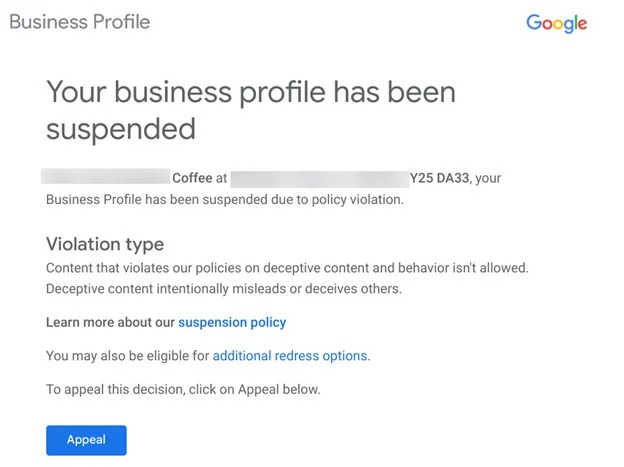
Source: Search Engine Journal
A Google Business Profile suspension means Google has restricted the profile because it believes the listing or account may not follow its guidelines.
The profile may stop appearing on Google Search and Maps, cutting off the visibility and customer actions it normally generates.
Profile-Level Suspension vs. Account-Level Restriction
Not every suspension affects your entire Google Business Profile account. Google distinguishes between a profile-level suspension and an account-level restriction.
Google’s overview of Business Profile policies says: “If a merchant displays a pattern of violating Google Business Profile policies, they may have their Business Profile access restricted.”
The same page adds: “If a merchant’s account is restricted, all Business Profiles associated with that account will be suspended.” One flagged account takes down every listing under it.

The distinction matters when you manage multiple locations. One Reddit user shared their Google account and all the profiles got suspended:
“All my Google Business Profiles under my Gmail account have been suspended. I submitted an appeal, but it was rejected. I have another option to appeal, but when I submit the second appeal, I’m redirected back to the suspension page without any confirmation message or email.”
Soft Suspension vs. Hard Suspension
Check what has actually happened to your listing. Is it still visible to customers but you can’t manage it, or has it disappeared from Search and Maps entirely?
Writing in Search Engine Journal, Sherry Bonelli defined a soft suspension in her article on GBP suspension as “when your business’s Knowledge Panel/Business Profile still shows up online, and you can access it in your GBP dashboard, but it looks as if it hasn’t been verified and you can’t manage or update your listing.”
Bonelli defined the hard version: “A hard suspension is when you do a search for your company’s name and city, and your Knowledge Panel/Business Profile doesn’t show up online.”

The Real Cost of a Suspended Listing
A suspended Google Business Profile can affect far more than your visibility on Google Maps. When customers can’t find your listing or trust the information they see, you can lose calls, visits, and potential business.
Lost Visibility and Missed Calls
A suspended profile doesn’t simply rank lower. It disappears from Google Search and Maps, including the map pack. That means the calls, direction requests, and website visits it generated can stop overnight.
Check your own profile data to understand the impact. Look at your typical monthly calls, direction requests, and website visits to see what you could be losing while the suspension remains unresolved.
Wasted Ad Spend Pointing to a Dead Listing
Paid campaigns keep running while the profile is down, so you keep paying to point people at a business whose map entry has disappeared.
A Reddit user shared how a GBP suspension has led to wasted ad spend for them:
“I’ve been without a Google Maps presence for nearly a year now… I’m actively running Google Ads and spending real money, but I can’t get listed… It feels like I’m permanently banned for simply trying to fix things.”
If your ads use location assets tied to the suspended profile, check them the same day.
Why Appeal Delays Make This Worse Right Now
Google’s published turnaround time and the timelines reported by businesses don’t always match. On the Google Business Profile’s appeals page, Google says that appeal reviews and decisions can take up to five business days.
But industry observations have pointed to longer waits. A Reddit thread on GBP suspension appeal delays mentioned a review lag of three weeks:

That is one observation from the forums, not a measured statistic.
A suspended profile can mean lost visibility, missed calls, and weeks spent trying to restore your presence. The first step toward resolving it is understanding what may have triggered the suspension.
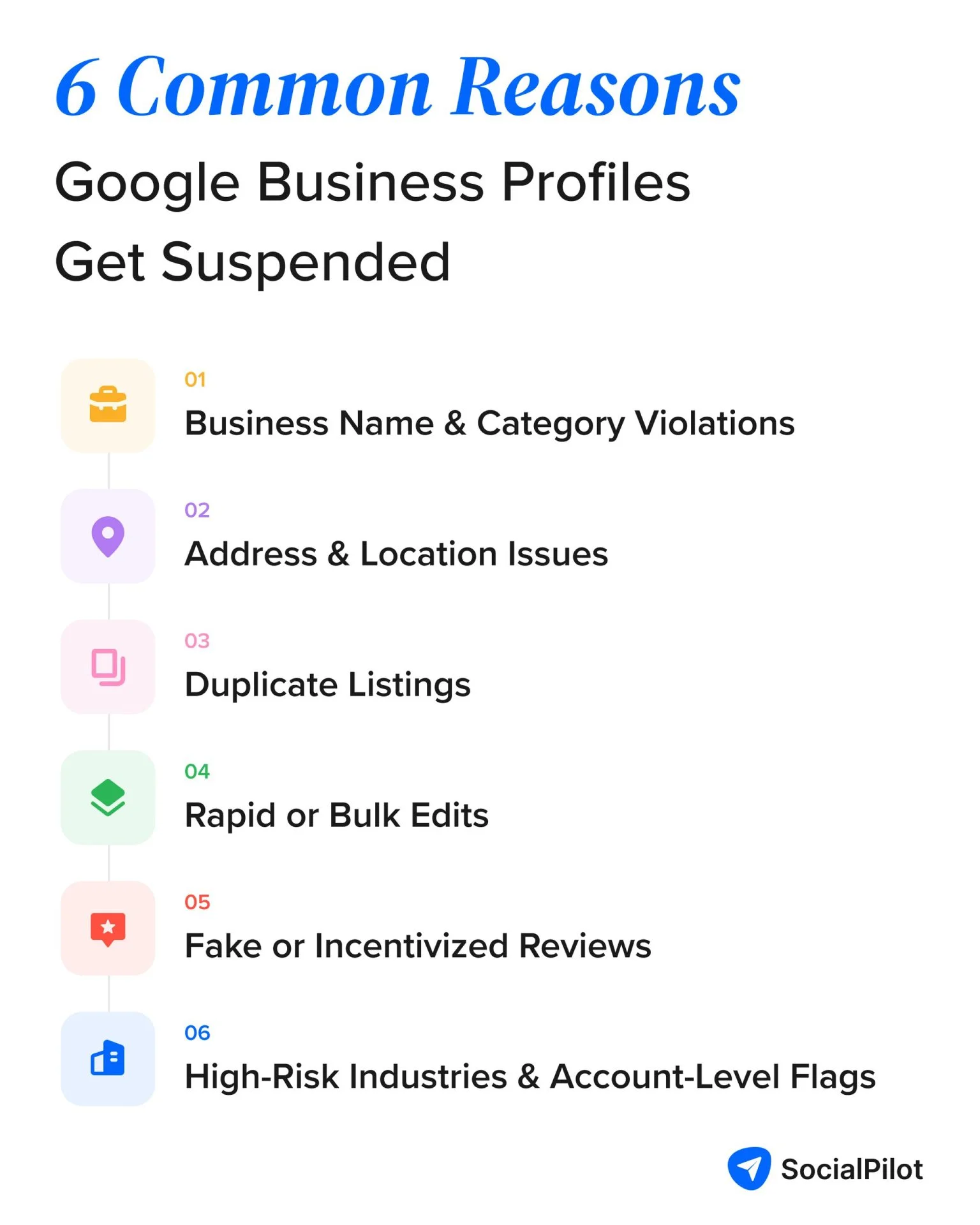
Google suspends profiles for a range of guideline violations, from incorrect business information to suspicious activity. Here are the key reasons to check before you appeal.
Business Name and Category Violations
Google’s guidelines for representing your business say your name should match the real-world name used on your storefront, website, and other business materials. In other words, adding keywords or extra details just to rank better can put your profile at risk.
The guidelines rule out things such as:
- Marketing taglines
- Store codes
- Trademark symbols and unnecessary capitalization
- Business hours
- Phone numbers or URLs
- Special characters and legal terms such as LLC or Inc.
- Service or product details
- Location details that aren’t part of the real-world business name
Categories follow a similar principle. Google’s business category management document states: “Do not select a category for every product or service. Instead, use a few categories from the provided list to describe.”
Adding a long list of loosely related categories can therefore create a guideline issue rather than expand your reach.
Address and Location Issues
If the address on your listing is not a place a customer could physically visit, you are exposed.
Google’s business representation guidelines state: “P.O. boxes or mailboxes located at remote locations aren’t acceptable.” Virtual offices are out too, which catches consultants who use a coworking address.
Service-area businesses have a separate obligation: “If you’re a service-area business, you should hide your business address from customers.” A home-based plumber who leaves that address visible is waiting to be reported.
Drift is the quieter risk. Your address should read the same on your profile, your site and every directory that copied it years ago. It is worth auditing your NAP consistency before Google finds the mismatch first.
Duplicate Listings
Duplicate business listings are almost never deliberate. A previous agency made one, and head office made another.
As per Google’s business representation guidelines, “Do not create more than one page for each location of your business, either in a single account or multiple accounts.” That last part is the trap. A duplicate under someone else’s account still counts against you.
Work through fixing duplicate Google listings properly rather than deleting at random.
Rapid or Bulk Edits
Changing your name, address, phone and category in one sitting is a pattern practitioners tie to suspensions. Google publishes no rule saying so.
A safer approach is to make significant changes gradually and verify each update. If your profile is already under review, avoid making unnecessary changes until the appeal is resolved.
Fake or Incentivized Reviews
Reviews you bought, traded, or asked staff to leave fall under Google’s fake engagement policy and can trigger profile-level restrictions. The reviews you paid for can cost you the listing they were bought to lift.
Incentives count too. A discount offered in exchange for a five-star review is the one most owners never think of as a violation. It is also the one a competitor is most likely to report.
High-Risk Industries and Account-Level Flags
Some categories get reported far more often than others. Locksmiths, garage door services and plumbers sit near the top. Those industries have a history of spam listings, so real businesses get caught in the sweep.
Being legitimate is not always enough. A Reddit post by u/Longjumping-Sail-909 mentioned how their genuine listing was suspended:
“I have already submitted two reinstatement appeals, and I believe both may have been denied… My company is a legitimate, registered service-area business. I do not operate from a physical storefront, as I travel directly to clients’ homes… I understand that service-area businesses are not required to display a public address, and my profile was set up accordingly.”
These triggers may look different, but they usually point to a specific issue. If your profile is already suspended, the next step is to identify what went wrong, fix it, and appeal.
How to Get Reinstated, Step by Step
A successful appeal starts with understanding why Google suspended the profile and addressing that specific issue. Here’s how to approach each step, including what to do if your first appeal is denied.
Find Your Specific Violation First
Do not appeal until you can name what you are fixing. Read the guidelines against your listing line by line: name, address type, categories, hours, and duplicates under other accounts.
Then fix it before you submit anything. An appeal on an unchanged listing asks the same reviewer to reach the same conclusion.
Submit the Appeal Correctly
Submit once. Google’s appeals page says: “Do not submit multiple appeals for the same issue before receiving a decision.” Stacking them only slows the queue you are already stuck in.
Then wait. Google’s line: “We’ll review your appeal and send you an email with a decision.” Until it arrives there is nothing to refresh and nothing to edit.
Upload Evidence Within the 60-Minute Window
This is one part of the appeal process you need to prepare for in advance. Google’s appeal document states that you have 60 minutes to upload supporting evidence after filing the appeal. If you miss that window, the evidence won’t be attached to your appeal.
So, have your documents ready before you start. Depending on your business, useful evidence can include:
- Official business registration
- Business licenses or tax certificates
- Utility bills showing the business name and address
| Stage | Google’s stated timing |
| Evidence upload | Within 60 minutes of submitting the appeal |
| Review and decision | Up to 5 business days |
| Notification | Email with the decision |
| Additional appeal | Available if the initial appeal is not approved |
The safest approach is simple: prepare your evidence first, then submit the appeal. That way, you’re not scrambling to find documents while the 60-minute window is running.
Important: Google adds one instruction that is easy to miss and is the most common reason an appeal with good documents still fails: “For any documents you submit as evidence, check that the business name and address match the profile you want to make an appeal for.”
A utility bill in the owner’s personal name, or a registration showing an old address, gives the reviewer a mismatch rather than proof.
Appealing More Than 10 Profiles at Once
If an account restriction took down every location you manage, you do not file forty separate appeals. Google has a bulk path to fix them.
Open the Business Profile appeals tool, select any one of the affected profiles, and submit the appeal. When the evidence step asks whether the appeal covers more than 10 profiles, click Yes. You then attach a single spreadsheet carrying the evidence and the Business Profile ID for each location, per Google’s reinstatement documentation.
Tip: Build that spreadsheet before you start, because the 60-minute evidence window applies here too, and pulling forty Business Profile IDs under time pressure is not a thing you want to be doing.
What to Do If You're Denied
A denial still leaves one route open. Google’s policy says: “Only if your reinstatement request is denied, we may be able to do an additional review to prove your eligibility.” Use it with evidence you did not send the first time. Resubmitting the same photos gives the reviewer nothing new to consider.
If the denial pointed at something you fixed after submitting, say what changed and when. Keep your hands off the listing while the additional review runs.
Once you fix the issue, gather your evidence, and submit your appeal, the focus shifts to preventing another suspension. Here’s how to avoid the common triggers in the first place.
How to Avoid Getting Suspended in the First Place
You don’t need to constantly worry about a suspension. A few good habits can reduce the risk and keep your Business Profile aligned with Google’s guidelines.
Match Every Field to Reality, Not Just to What Ranks Well
Go field by field and ask whether a customer standing outside could verify it. The name on your storefront sign is the name on your profile. No descriptor, no city, no service keyword.
Do the same with categories. Pick the smallest set that genuinely describes the core business, because Google asks you to “use as few categories as possible.”
Make Changes Gradually, Not All at Once
Rebranding, moving, or changing your phone number all touch sensitive fields. Space them out.
- Update your website first, so the new detail exists somewhere Google can see it
- Change one profile field, then wait several days
- Change the next, keeping the old detail live elsewhere during the transition
- Update citations and directories last, once the profile has settled
Never do any of this while an appeal is open.
Keep Your Account and Access Clean
Audit who has manager access and remove anyone who no longer needs it, former agencies included. Anyone with edit rights can create the pattern of violations that gets the account restricted, and the restriction applies no matter who caused it.
One Reddit comment on a GBP suspension resolution thread explained why this step gets missed:
“I’ve seen a few cases where account-level issues seemed to cause problems even when the business itself was legit… I did review who had access and removed anything unnecessary. It’s one of those things you don’t think about until something breaks.”
Keep one owner account that does nothing else. If you also use that account for something that could get it flagged, every listing you own carries that risk. Then run a quarterly check:
- Search each location by name and city, and confirm one pin, one panel, one set of hours
- Compare the name, address and phone on the profile against the website and your two largest directory entries
- Review who holds manager access, and revoke anything you cannot account for
- Check that every location is still verified, since an expired verification is easy to miss
Following these practices can reduce the risk of suspension, but they can’t guarantee that your profile will never be flagged. If your profile is already suspended, the focus shifts from prevention to getting it reinstated.
Managing Multiple Listings Without Risking Suspension
Managing one Business Profile is fairly simple. Managing dozens or hundreds makes it easier for information to become inconsistent, duplicate listings to appear, or teams to make changes without a clear process.
When a profile is suspended, these issues become more difficult to manage. You have to deal with the appeal while keeping your other locations accurate and active.
SocialPilot Reviews’ listing management platform helps centralize some of that routine listing work, particularly when you’re managing multiple locations.
It lets you manage connected Google Business Profiles and Facebook Pages from one place, rather than updating each listing separately. When your business information changes, you can update the connected listings from the same workflow.
SocialPilot Reviews helps reduce some of the day-to-day listing management issues that become harder to control as you add more locations.
- Keep location information consistent: Manage business names, addresses, phone numbers, hours, and services for connected locations from one place, reducing repeated manual updates.
- Avoid repetitive edits: Update connected Google Business Profiles through one workflow instead of making the same change separately across locations.
- Spot listing issues: Listing health information gives you a way to identify issues across connected profiles before they get overlooked.
- Control who can make changes: Role-based permissions help limit listing edits to the people responsible for managing them, reducing accidental changes.
This doesn’t prevent Google suspensions or replace the appeal process. It helps make the routine management of multiple listings more controlled and less prone to avoidable errors.
Final Thoughts on Avoiding and Fixing GBP Suspension
A Google Business Profile suspension can put your local visibility on hold, but the right response starts with understanding what went wrong.
Check whether the issue affects one profile or your entire account, identify the specific guideline involved, and gather your evidence before submitting an appeal.
If you manage multiple locations, keeping your business information consistent across them becomes a challenge in itself.
SocialPilot Reviews’ listing management tool helps centralize key business details and maintain NAP consistency across connected Google Business Profiles, reducing manual work and avoidable errors. Pricing plans start with a free tier and scale with the number of locations.
The best way to deal with a suspension is to avoid preventable issues in the first place. Keep your listings accurate, manage them carefully, and know what to do if Google flags your profile.