
TikTok lets you schedule videos through its desktop upload flow, but that’s only the starting point. Third-party TikTok scheduling tools offer more ways to manage your content, from automated publishing to post queues, team approvals, and multi-account management.
One key difference is how each tool publishes content. Some publish directly to TikTok, while others send a notification so you can finish publishing in the app. This matters when you want to use TikTok’s in-app sounds or features that aren’t available through automatic publishing.
TikTok’s native scheduler works for basic posting, but managing a busy content calendar or getting posts approved by a team can require more flexibility. Scheduled posts also can’t be edited directly; you have to delete and re-upload them to make changes.
Here we compare 13 TikTok scheduling tools for agencies and teams, creators and small businesses, and larger organizations.
Können Sie Beiträge auf TikTok planen?
You can, through TikTok’s own scheduler or through a third-party tool. The native one works from a desktop browser and lets an eligible account schedule a video between 15 minutes and 10 days ahead. A third-party scheduler connects through TikTok’s Content Posting API and either publishes the post for you or sends it to your TikTok inbox to finish.
The route you take decides what you can change later, which sounds you can use, and whether you need to be near your phone at post time.
TikTok’s Built-In Scheduler – What It Does and Doesn’t Do
The native scheduler sits inside the desktop upload flow. TikTok’s help page on scheduling videos has you click Upload on desktop web, edit the video, then toggle the schedule button and pick a time in your computer’s time zone. It also says, “This feature is not available for TikTok Mobile Web.”
The window runs from 15 minutes to 10 days, which TikTok repeats in its video scheduler announcement for businesses. That 10-day ceiling applies to TikTok’s own tool only.
Eligibility is worded oddly, so here it is exactly: “Only a ‘Business Account’ or over with a 10,000 followers or more can access desktop scheduling.” The announcement says “creators and Business Accounts,” so if the toggle is missing, check your account type under Settings first.
Once a post is queued, it “cannot be edited but can be deleted,” so a caption typo means deleting and uploading again. TikTok sends a push notification when the video goes live.
What TikTok’s pages don’t confirm:
- Photo posts. The scheduling steps only mention video. Regular posting allows photo posts of up to 35 images, but nothing says you can schedule them natively.
- The mobile app. Die TikTok Studio help article lists the app’s create tools and never mentions scheduling.
- Limits beyond the window. No TikTok help page we read states a cap on queued posts or a 30-day window for regular posts.
How Third-Party Schedulers Post to TikTok
Outside tools publish through the Content Posting API, and its rules explain most of what a scheduler can and can’t do here.
Die API offers two modes. Direct Post publishes straight to the account. Upload mode sends the video or photos “to TikTok for the user to review and post,” and you finish from the inbox notification in TikTok’s editor.
A tool can’t post publicly until TikTok audits it. Until then, “All content posted by unaudited clients will be restricted to private viewing mode.”
There’s also a daily ceiling of “typically around 15 posts per day/ creator account,” “shared across all API Clients using Direct Post.” Connecting two schedulers doesn’t buy you thirty posts.
A photo post can carry up to 35 images, so a lower cap inside a tool is that tool’s limit, not TikTok’s. Video uploads through the API are capped at 10 minutes.
TikTok also dictates the posting screen, so a scheduler has to ask you for a few things:
- You pick privacy yourself from a dropdown with “no default value.”
- Comment, Duet and Stitch toggles start off, and Duet and Stitch don’t apply to photo posts.
- A disclosure toggle labels the post “Promotional content” (your brand) or “Paid partnership” (branded content), and branded content can’t be private.
- You agree to TikTok’s Music Usage Confirmation.
That’s why schedulers ask for these settings on every TikTok post.
Sounds cause the most confusion. The API docs say nothing either way about library sounds, and their only music setting, auto_add_music, adds TikTok’s recommended music to Direct Post photo posts. TikTok’s full in-app sound library is only available inside the app, while a few tools offer TikTok’s Commercial Music Library for Business accounts (the entries below name them).
Direct Posting vs. Notification-Based Posting
With direct posting, the scheduler publishes at the set time and you never touch it. With notification-based posting, the draft lands in your TikTok inbox or arrives as a reminder, and you open TikTok to finish it.
| TikTok’s built-in scheduler | Third-party, direct post | Third-party, inbox or reminder | |
| Where you set it up | TikTok on desktop web | The scheduler’s dashboard | The scheduler’s dashboard |
| How far ahead | 15 minutes to 10 days | Set by each tool | Set by each tool |
| Publishes without you | Ja | Ja | No, you finish it in TikTok |
| Photo posts | Not confirmed by TikTok | Bis zu 35 Bilder | Videos or photos |
| Sounds | Not covered in TikTok’s scheduling help | Original audio, auto-added photo music, or a tool’s Commercial Music Library option | TikTok’s full editor and sound library |
| Edit after scheduling | No, delete and re-upload | Set by each tool | You edit in TikTok before posting |
| Daily limit | Not stated by TikTok | Around 15 per account, shared across apps | Not stated for this mode |
If your videos lean on a trending sound, the inbox route gets you TikTok’s editor. If Saturday’s post has to go out while your team is offline, direct posting does that.
How We Chose These TikTok Scheduling Tools
What We Looked At
We grouped thirteen tools by who tends to use them (agencies and teams, creators and small businesses, larger organizations) and checked each against the questions TikTok’s rules raise:
- Direct posting, reminders, or both
- Photo and carousel support, and the image cap
- Sounds and music
- Privacy, interaction and disclosure settings
- Approvals and team workflow
- Free option and starting price
- G2 Ratings
How Pricing and Features Were Checked
This review is based on documentation, with no hands-on testing. In October 2026 we read each vendor’s documentation and pricing, TikTok’s own help and developer docs, and G2 reviews. Where we found nothing on a feature, the entry says so.
Prices show the monthly-billed rate first and the yearly-billed rate in brackets. Ratings are G2 scores from the same week. Prices and TikTok features change often, so confirm before you buy.
We make SocialPilot, and it’s in this list. It leads the agencies and teams group because client approvals and white-label reporting are what it’s built around.
TikTok Scheduling Tools at a Glance
Here are all 13 tools on one screen, with every cell taken from the entries further down. Prices show the monthly-billed rate first and the yearly-billed rate in brackets.
| Werkzeug | Am besten für | Direct post or reminder | Photo carousels | Starting price (yearly billed) | Zulassungen |
| SocialPilot | Agencies needing client sign-off | Both (direct + mobile reminder) | Bis zu 35 Bilder | $30/mo ($25.50/mo) | Internal + no-login client |
| Sendible | Agencies with changing teams | Direct | Images, cap not stated | $35/mo ($29.75/mo) | Internal + client (Plus) |
| Agorapulse | Small in-house teams | Both (reminder: video only) | Ja | $99/user/mo ($79/user/mo) | Internal + no-login client |
| Planable | Brands on TikTok Business | Both (direct: Business only) | Business accounts only | $39/workspace/mo ($33/workspace/mo) | Internal; clients need login |
| Vista Social | Teams wanting trending audio | Beide | Ja | $99/mo ($960/yr) | Internal + no-login client |
| Buffer | Solo creators | Beide | Bis zu 10 Bilder | $6/channel/mo ($5/channel/mo) | Internal (Team plan) |
| Metricool | Small businesses, 1–2 brands | Beide | Bis zu 35 Bilder | $25/mo ($20/mo) | Internal + no-login reviewers |
| Publer | Freelancers, 2–3 accounts | Beide | Up to 35 photos | $5/account/mo (20% less) | Internal + client members |
| Later | Instagram-first creators | Both (videos up to 3 min) | Desktop and iOS only | Monthly not listed ($18.75/mo) | Internal (Growth plan) |
| SocialBee | Evergreen content recyclers | Beide | Up to 12 images | $29/mo ($24/mo) | Internal + client in workspace |
| Hootsuite | Large teams, long calendars | Direct (video) | Not documented | $99/user/mo (only annual billing) | Internal (Advanced plan) |
| Sprout Social | Brand teams with sign-off steps | Both (direct video: Business only) | Ja | $99/seat/mo ($79/seat/mo) | Internal + 3 external approvers |
| Zoho Social | Teams already on Zoho | Both (direct: Business only) | Bis zu 10 Bilder | $15/mo ($10/mo) | Internal + client approvers |
Pricing and features checked October 16, 2026 on each vendor’s own site. Vendors change plans without notice, so confirm on the pricing page before you buy.
Quick Picks by Need
- Best free option: Buffer, whose free plan publishes to TikTok automatically across three channels with 10 posts queued per channel. Publer’s free plan is close behind, with three accounts and 35-photo carousels.
- Best on a budget: Publer, at $5 per social account a month billed monthly, the lowest monthly-billed price for a paid TikTok plan in this list.
- Best for agencies and client approvals: SocialPilot, for clients who approve without logging in and reports that carry your agency’s branding. Sendible suits a team that keeps adding freelancers, because no plan charges per user.
- Best for creators and visual planning: Later, if TikTok is a lane on the Instagram calendar you already keep and your clips stay under three minutes.
- Best for TikTok music: Vista Social, which adds trending audio from TikTok’s Commercial Music Library to scheduled videos. Planable and Metricool also add tracks for Business accounts.
- Best for enterprise teams: Sprout Social, where up to three external approvers sign off from an email link without a seat, starting on Advanced.
Best TikTok Scheduling Tools for Agencies and Teams
1. SocialPilot
Clients approve TikTok posts here without creating an account or logging in, so the week’s calendar doesn’t wait on someone finding a password.
G2 Ratings: 4.5/5 on G2
TikTok coverage
- Post approval workflow (without login)
- White-label client reports (Premium plans)
- Direct publishing and scheduling
- Bulk scheduling (no carousels)
- Calendar/planner
- Photo carousel posts (up to 35 images)
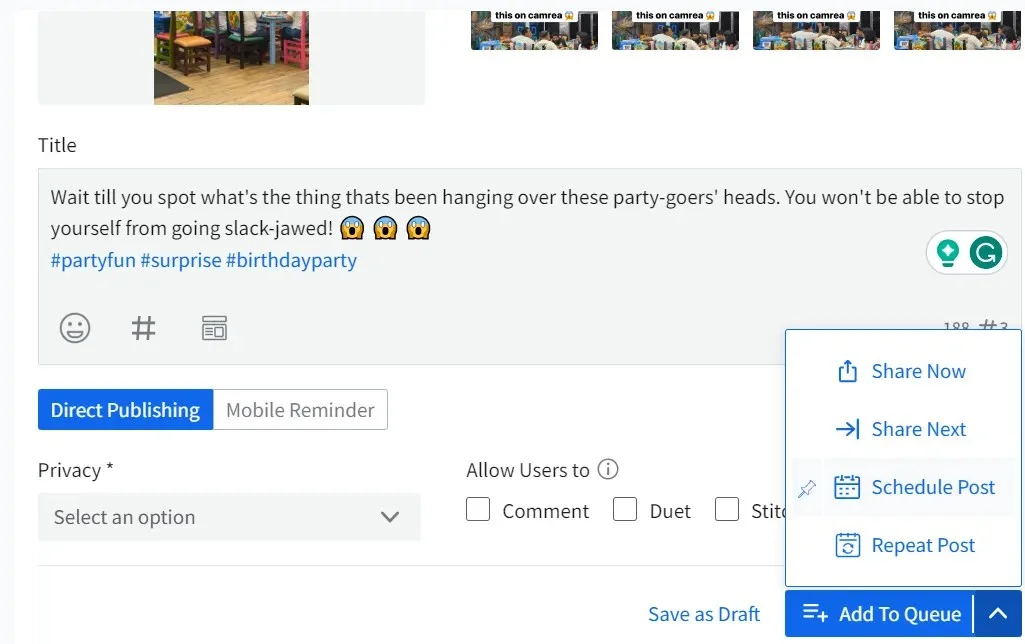
What it actually looks like: You write the post in the TikTok Planer, where a preview of the finished TikTok sits beside the caption, and you pick Schedule Draft or Schedule Post. If someone in-house has to check it first, Manager Approval holds the post until they do.
For a client, you send the post out for review and they approve it from whatever device they have, with no account to create. The client management features page describes it as approval “without the need for login credentials.”
What a user says: “SocialPilot makes it easy to plan, draft, and schedule posts across all our social channels in one central dashboard.” – James H., G2 review
What it does well: It handles the client-facing end of agency work, from reporting to content creation and scheduling. Reports go out under your own logo and colours through the SocialPilot white-label solution, so clients see your brand on their TikTok performance data.
Each client gets a separate workspace, keeping approvals and reports organized by brand. SocialPilot’s AI Pilot helps teams generate captions, post ideas, and hashtags, while its MCP server lets AI platforms such as ChatGPT connect with SocialPilot to automate social media content creation and scheduling workflows. Together, these features help agencies manage client content more efficiently.
Preisgestaltung: SocialPilot’s plans start at $30/month on the Essentials tier and scale through Standard, Premium, and Ultimate for larger agencies, with a 14-day free trial and no card required.
| Ultimate | Premium | Standard | Essentials |
$170.00/Monat$200
Jährliche Abrechnung (15% sparen)
|
$85.00/Monat$100
Jährliche Abrechnung (15% sparen)
|
$42.50/Monat$50
Jährliche Abrechnung (15% sparen)
|
$25.50/Monat$30
Jährliche Abrechnung (15% sparen)
|
|
Social-Media-Management optimieren
|
|||
What running SocialPilot standalone requires: This is agency plumbing for TikTok (sign-off, reporting, many client accounts in one calendar), and it isn’t a TikTok-first creative app. If your videos live or die on a trending sound, Planable, Metricool and Vista Social are the three tools further down whose help docs describe adding tracks from TikTok’s Commercial Music Library.
2. Sendible
Every Sendible plan includes unlimited users, which changes the maths for an agency whose team includes a rotating cast of freelancers.
G2 Rating: 4.5/5
TikTok coverage
- Post approval workflow (dashboard + email)
- White-label custom client reports (Premium plans and full on Elite/Enterprise)
- Direct publishing and scheduling
- Bulk scheduling (no video in CSV)
- Calendar/planner
- Photo carousel posts (images only)
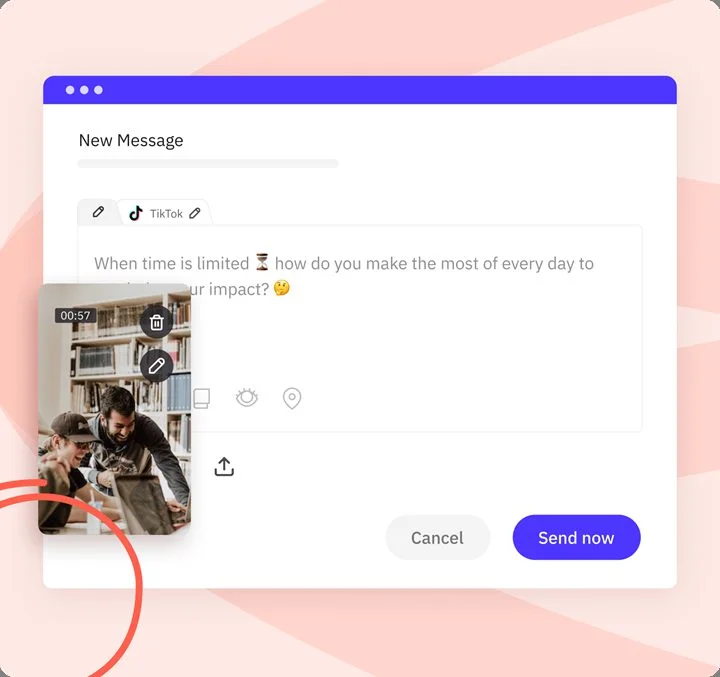
What it actually looks like: You connect the TikTok profile, attach the video or images, write the caption and set a time. TikTok posts can take up to 30 minutes to process, so a post timed to a live moment needs some slack.
For client work you send the post for approval, and the client gets a notification on their dashboard plus an email asking them to approve it.
What a user says: “Scheduling our posts out for the month in under an hour saves so much time and effort.” – Logan C., G2 review
What it does well: Headcount never moves the bill. Adding a freelance editor or a client’s marketing lead costs nothing, and the client reviews from their own dashboard instead of a forwarded screenshot.
Preisgestaltung: Core starts at $35/month ($29.75/month billed yearly), and Enterprise is $750/month ($637.50 yearly). There’s no free plan, but you get a 14-day free trial.
What running Sendible standalone requires: The TikTok creative work happens somewhere else. With no reminder route or sound picker, a video that needs a trending sound gets its audio in your editor before upload, or gets posted from the TikTok app. If that’s most of your calendar, our list of Sendible Alternativen covers tools that handle it.
3. Agorapulse
Photo carousels reached Agorapulse‘s TikTok composer in October 2024, though a few TikTok jobs still need your phone.
G2 Rating: 4.5/5
TikTok coverage
- Post approval workflow (without login)
- White-label client reports
- Direct publishing and scheduling
- Massenplanung
- Calendar/planner
- Photo carousel posts
What it actually looks like: You pick Photo or Video for the TikTok post. For a carousel you add the images and a title, choose who sees it (Public, Followers I also follow, Followers only, or Private), then switch Comments, Duets and Stitches on or off.
If Auto-add music picks a track you dislike, you can swap it in TikTok after publishing. The option isn’t available for all TikTok accounts.
What a user says: “Everytime another account user logged in you were bumped off the screen and no previous work was saved.” – Shellsea H., two-star G2 review
What it does well: Clients can review the calendar without a paid seat. External users ask for a secure login link by email, and that link stays valid for 60 days.
Preisgestaltung: Standard starts at $99/user/month ($79 billed yearly), Advanced is $199 ($149 yearly) and Custom is quote only. It has a 30-day free trial on all plans.
What running Agorapulse standalone requires: Per-user pricing adds up fast. Assuming three people on Advanced, monthly billing comes to $597 a month before any extra profiles. If that’s beyond the budget, see our Alternativen zu Agorapulse.
4. Planable
Of the agency tools here, Planable draws the account-type line most clearly: direct publishing and photo posts need a TikTok Business account, while two fallback routes work for everyone.
G2 Rating: 4.6/5
TikTok coverage
- Post approval workflow (needs login)
- Direct publishing and scheduling (Business only)
- Bulk scheduling (no carousels)
- Calendar/planner
- Photo carousel posts (Business only)
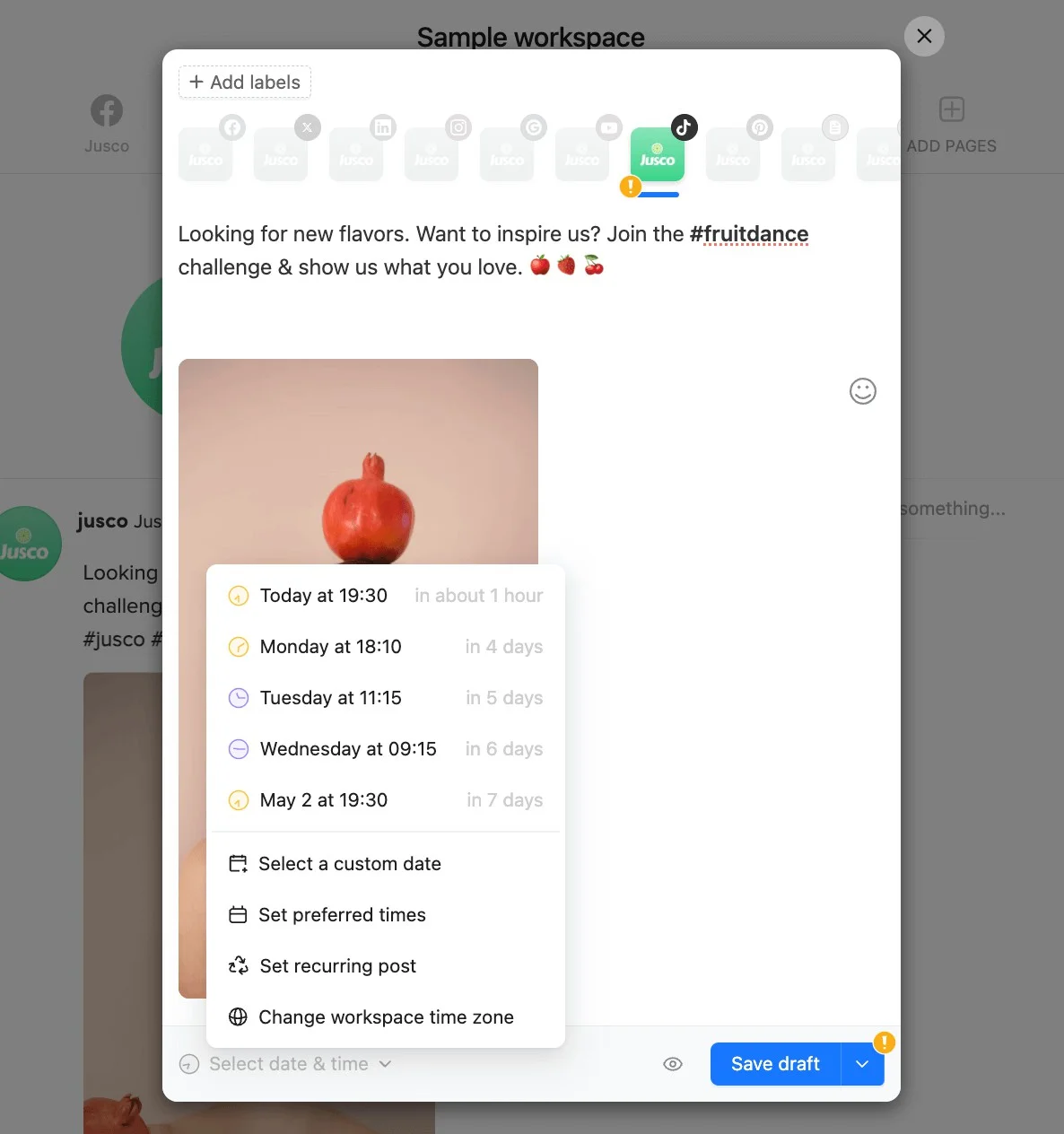
What it actually looks like: On the Business route you finish editing first, because once it’s scheduled you can’t make further edits in the TikTok app. You pick a track in Sound & music and set the time.
Choose the Inbox route instead and the video lands in your TikTok inbox without your caption or the Planable music, so you add both again in the app.
What a user says: “I love that with Planable I can schedule multiple posts at once, which is a huge time saver for managing my own and my clients’ businesses.” – Melanie O., G2 review
What it does well: It can attach a licensed TikTok track to a scheduled video and put that same post through approval on every paid plan, so what the client approves can already carry its sound.
Preisgestaltung: Basic starts at $39/workspace/month ($33 billed yearly), Pro is $59 ($49 yearly) and Enterprise has custom pricing. Your first 50 posts are free.
What running Planable standalone requires: Plan around two snags. TikTok rotates its Commercial Music Library, so a track chosen early can be gone by publish time and the post fails. And a client needs a free Approver account, because public share links allow viewing and commenting but not approving.
5. Vista Social
Trending audio on a scheduled TikTok video is still uncommon among these tools and Vista Social is one of the three in this list that can add it.
G2 Rating: 4.8/5
TikTok coverage
- Post approval workflow (without login)
- White-label client reports (Scale plan+)
- Direct publishing and scheduling
- Massenplanung
- Calendar/planner
- Photo carousel posts
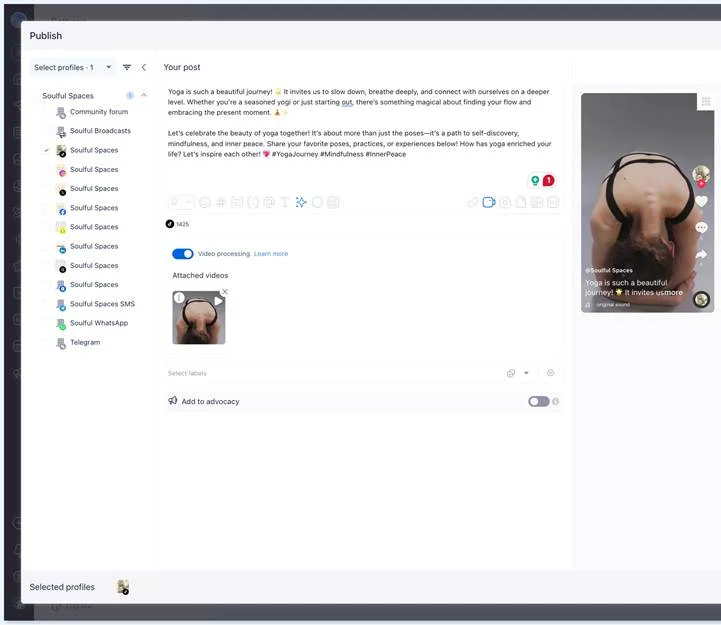
What it actually looks like: In the Publish window you tick the TikTok profile, attach the video and write the caption while a TikTok preview updates beside it. Then you open the TikTok options, add a trending track, set the disclosure label, decide on duets and stitches, and pick auto-post or a reminder.
What a user says: “The CSV bulk scheduling feature is a lifesaver, allowing me to schedule bulk content on my brand account easily and quickly.” – Min S., G2 review
What it does well: Nearly every TikTok setting a brand cares about sits in one panel, including the paid-partnership label, location and Boost. A sponsored video can go out properly disclosed, with its sound, without anyone opening the app.
Preisgestaltung: Professional starts at $99/month ($960/year billed yearly), Scale is $449/month ($4,310/year) and Enterprise is custom. There’s a 14-day free trial.
What running Vista Social standalone requires: The entry plan is tight for a team. Professional lists 2 users, and the shared-calendar step where a client reviews without logging in starts on Advanced.
Best TikTok Scheduling Tools for Creators and Small Businesses
These tools start free or close to it and price by channel or brand, which suits one person running their own TikTok or a small business with a handful of accounts. Approvals exist here too, but only on the higher plans.
6. Buffer
Free for three channels is where Buffer starts, and for a lot of solo creators it’s also where Buffer stays.
G2 score: 4.3/5
TikTok coverage
- Direct publishing and scheduling
- Bulk scheduling (no video)
- Best-time or queue slots
- Photo carousel posts (max 10 images)
- TikTok sounds/music
- Free plan (3 channels)
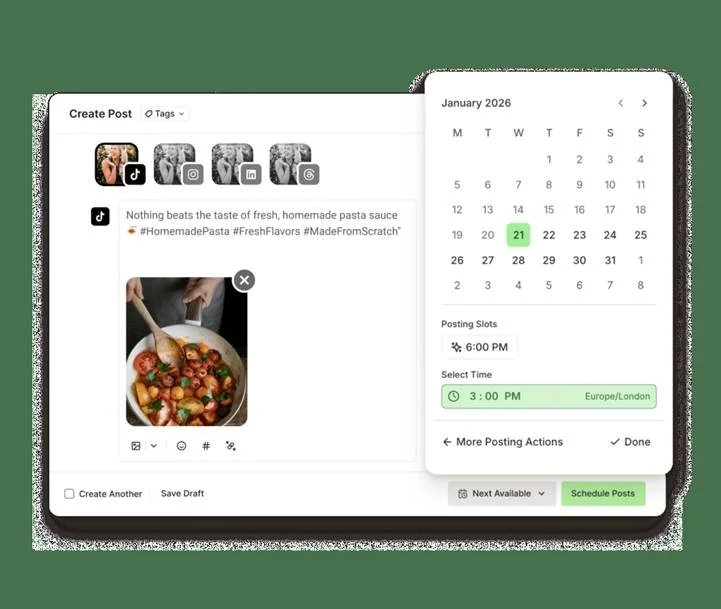
What it actually looks like: In Create, you choose TikTok, attach the video or images and pick a slot. Leave it on Automatic and it posts. Switch to Notify Me and your phone buzzes at post time, so you can add the sound in TikTok. Comments come back into Buffer’s Community view, and Insights backfills 60 days once you connect.
What a user says: From the pros: “One of the only places you can schedule Bluesky and Threads”. From the cons: “Glitches a lot or posts fail.” – Alexie B., three-star G2 review
What it does well: The free plan does real work. It holds 10 scheduled posts per channel at a time, which, assuming you post five TikToks a week, keeps two weeks queued without paying anything.
Preisgestaltung: Essentials is $6/channel/month ($5 billed yearly) and Team is $12/channel/month ($10 yearly). There’s a free plan for 3 channels and a 14-day free trial.
What running Buffer standalone requires: Trending sounds mean picking the phone up every time, and TikTok’s Promote doesn’t work on posts sent through Buffer. Once clients need to approve, you’ve outgrown it, which is where our Alternativen zum Buffer list starts.
7. Metricool
Pick a Business account in Metricool and you can attach a song from TikTok’s Top 100 trending list to a scheduled video, photo post or carousel.
G2 score: 4.5/5
TikTok coverage
- Direct publishing and scheduling
- Massenplanung
- Best-time or queue slots
- Photo carousel posts (up to 35 images)
- TikTok sounds/music (Business only)
- Free plan (1 brand)
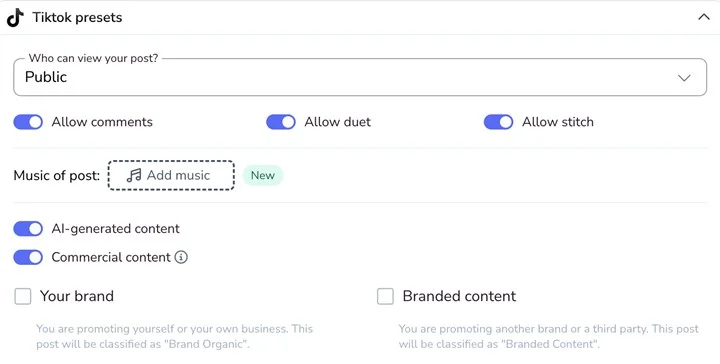
What it actually looks like: You open the TikTok presets panel in the composer, set who can view, switch comments, duets and stitches on or off, add music and flag commercial or AI-generated content. If the song you want isn’t in the Top 100, turn AUTO PUBLISH off and finish in TikTok, where the full Commercial Music Library is available.
What a user says: From the pros: “I value Metricool’s unified multi-platform inbox, which allows our team to handle comments and DMs across TikTok, Instagram, and LinkedIn without switching apps.” From the cons: “Ad-data sync for TikTok is sometimes delayed, and advanced custom report building feels limited.” – Celeste B., G2 review
What it does well: Outside reviewers approve by email with no Metricool login.
Preisgestaltung: Starter starts at $25/month ($20/month billed yearly) for 5 brands, and Advanced at $67/month ($53 yearly). There’s also a free plan for 1 brand.
What running Metricool standalone requires: The free plan’s 20 posts a month runs out at roughly five TikToks a week, and approvals wait until Advanced. If neither fits, see our Metricool Alternativen.
8. Publer
A single TikTok profile on a paid Publer plan starts at $5 a month, because billing runs by the social account.
G2 score: 4.7/5
TikTok coverage
- Direct publishing and scheduling
- Massenplanung
- Best-time or queue slots
- Photo carousel posts (up to 35 photos)
- TikTok sounds/music (carousels only)
- Free plan (3 accounts)
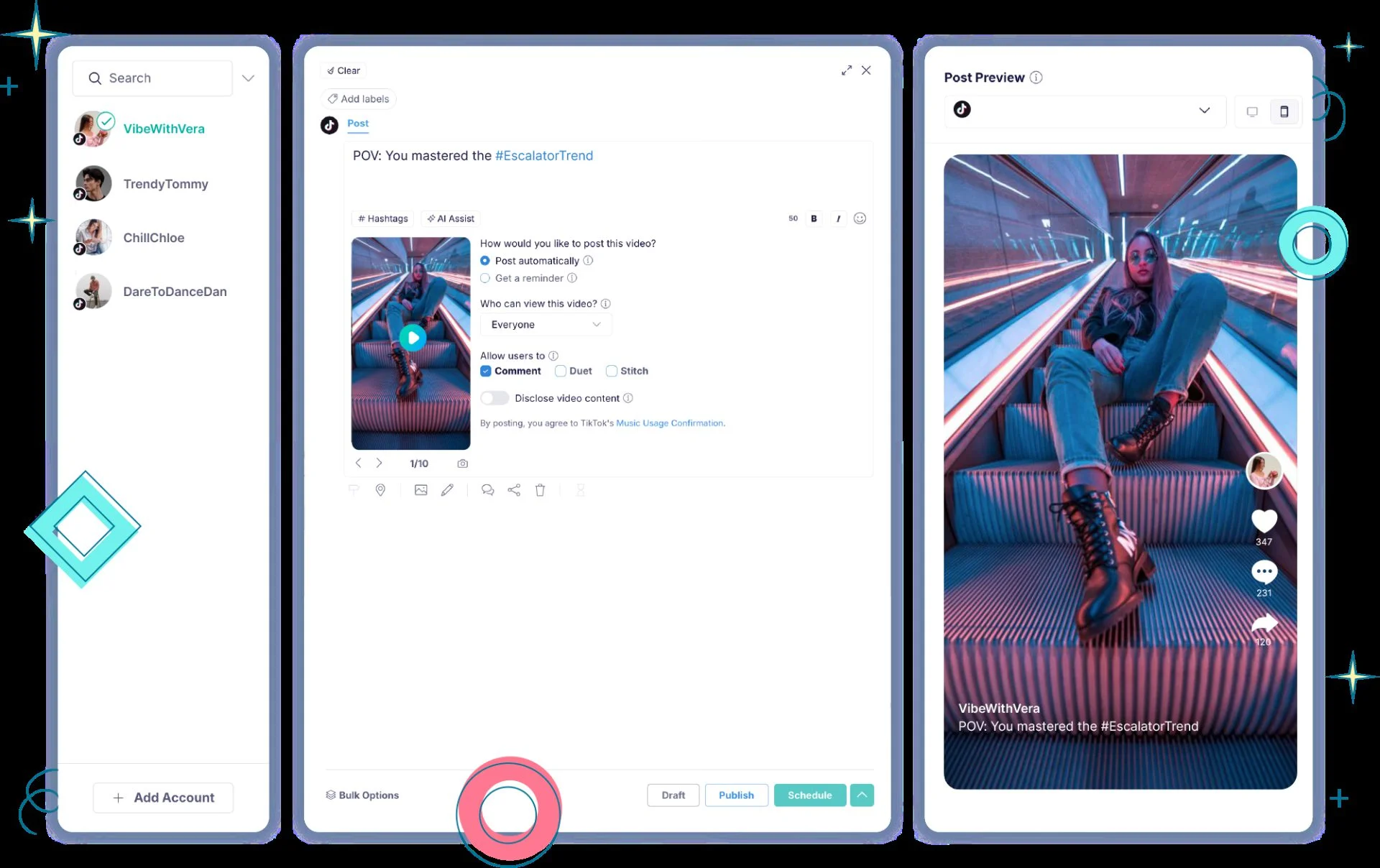
What it actually looks like: Select your TikTok account on the Create page and upload a video. You can choose direct publishing or a push-notification reminder. With direct publishing, you can set privacy and engagement options and select one of the automatically generated video thumbnails; custom thumbnail uploads aren’t supported.
In the reminder flow, Publer sends a notification to your phone so you can finish the post in TikTok, add sounds, and make last-minute edits. TikTok automatically adds #Publer to the caption/notification in this flow, but you can remove it before publishing.
“Bulk scheduling saves me hours, especially when I’m loading a full month of content for a client in one sitting.” – Rebekah P., G2 review, September 2026
What it does well: The carousel cap matches TikTok’s own 35, and the free plan (three accounts, ten queued posts each) lets you trial automatic TikTok posting before paying.
Preisgestaltung: Professional is from $5 per social account a month billed monthly (20% less billed yearly), Business from $10, Enterprise custom. Free plan covers 3 accounts.
What running Publer standalone requires: Trending sounds on video mean the reminder route, and one clip for three brand accounts is three separate posts, since Publer can’t post to several TikTok accounts at once. If that rules it out, see our Publer alternatives.
9. Later
Three minutes is the longest video Later will schedule to TikTok, and that single number tells you who the tool is for.
G2 score: 4.5/5
TikTok coverage
- Direct publishing and scheduling (videos to 3 min)
- Bulk scheduling (via reminders)
- Best-time or queue slots (Business only)
- Photo carousel posts (desktop and iOS)
- TikTok sounds/music (photos only)
- Freier Plan
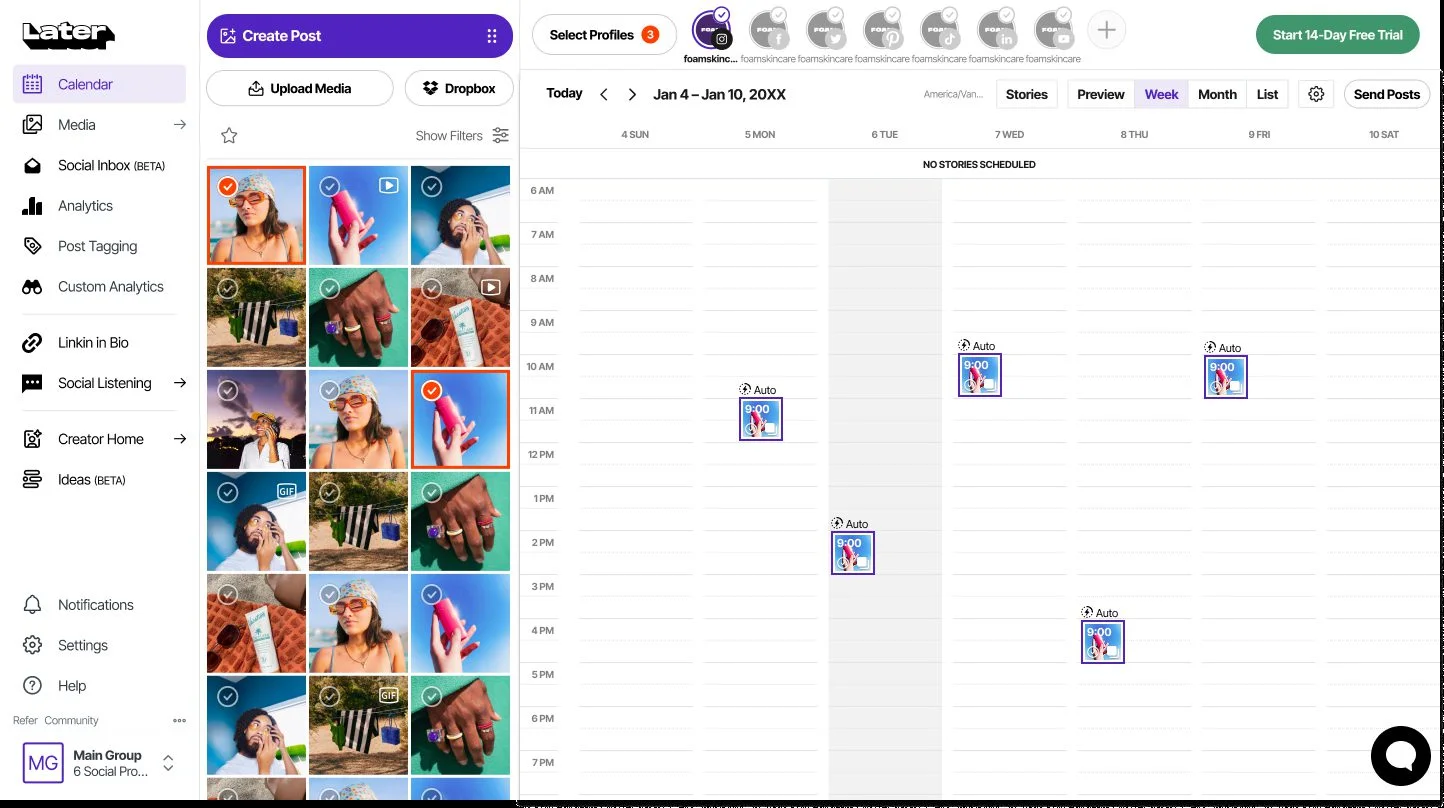
What it actually looks like: You drag a TikTok post onto a calendar day, set Auto Publish or Send Notification, and write the caption, keeping it under 150 characters if you’re on Android.
What a user says: “A standout feature is the ability to schedule posts across different platforms, so if I prepare a post for Instagram, I can quickly reschedule it to be posted on Facebook, TikTok, or LinkedIn.” – Milena M., G2 review, February 2026
The same reviewer adds a catch: “Also, sometimes a photo cannot be scheduled for TikTok on Later due to size, but can be posted in the phone TikTok app.”
What it does well: Auto Publish works on Personal accounts as well as Business ones, so a creator who never converted still gets TikToks that go out on their own.
Preisgestaltung: Monthly billing isn’t listed; Starter is $18.75/month billed yearly, Scale is $82.50 and Enterprise is custom pricing. No free plan, 14-day free trial.
What running Later standalone requires: Anything over three minutes, or needing a trending sound, gets finished in TikTok, and a client who signs off needs a Later seat. Those are the usual reasons people look at Later Alternativen.
10. SocialBee
Think of SocialBee as a content library first and a scheduler second, because posts live in categories and evergreen ones go back into the queue.
G2 score: 4.7/5
TikTok coverage
- Direct publishing and scheduling (videos to 3 min)
- Massenplanung
- Best-time or queue slots
- Photo carousel posts (max 12 images)
- TikTok sounds/music
- Freier Plan
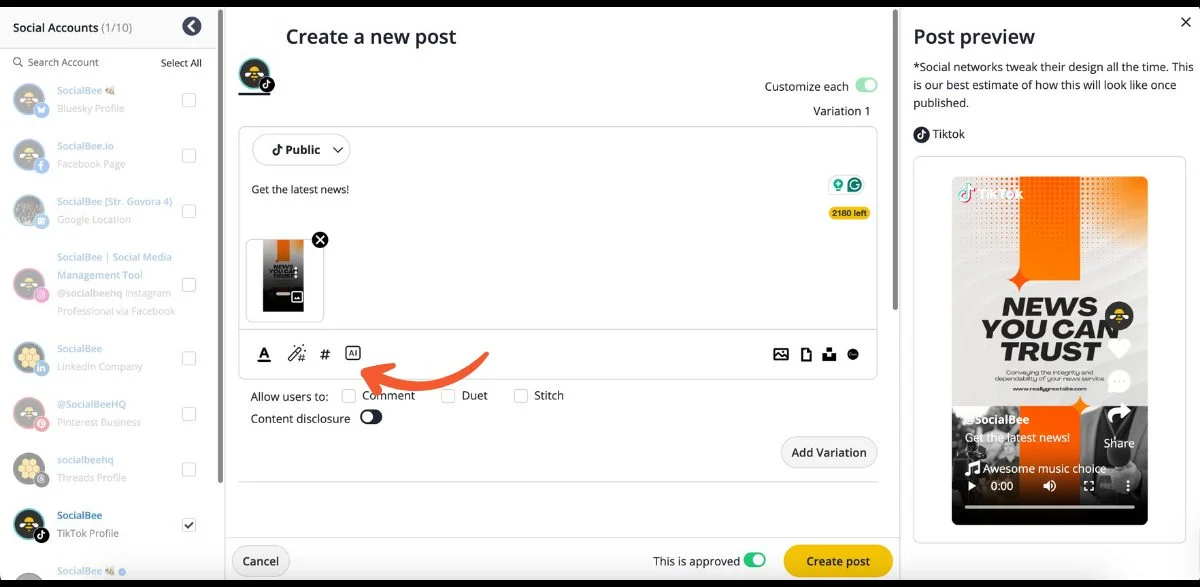
What it actually looks like: You file the post into a category first, and the category decides when it recycles. Then, in Create a new post, you pick the TikTok profile and set Comment, Duet and Stitch plus the disclosure toggle while a TikTok preview sits on the right.
What a user says: “The scheduling tools are flexible, and the ability to recycle evergreen content saves a lot of time.” – Tom, G2 review, October 2025
What it does well: Recycling suits TikTok explainers that stay true for months, since you top up a category instead of rebuilding the queue weekly.
Preisgestaltung: Bootstrap is $29/month billed monthly ($24/month billed yearly), rising to $449 ($374) for Pro150. There’s no free plan, but you get a 14-day free trial.
What running SocialBee standalone requires: Carousels past 12 slides get split or posted in TikTok. Bootstrap and Accelerate include one user, so a second person means Pro. Our SocialBee Alternativen list covers tools without those limits.
Best TikTok Scheduling Tools for Larger Organizations
These three suit teams where TikTok is one channel among many and approvals, reporting and an inbox matter as much as the post itself. Hootsuite and Sprout Social price per user, and Zoho Social sells agency tiers by client count.
11. Hootsuite
Hootsuite sets no limit on how far ahead you can schedule a TikTok video.
G2 score: 4.3/5
TikTok coverage
- Direct publishing and scheduling (video only)
- Bulk scheduling (no privacy set)
- TikTok post settings (no disclosure)
- Team approval workflow (Advanced plan)
- Calendar/planner
- TikTok-Analysen
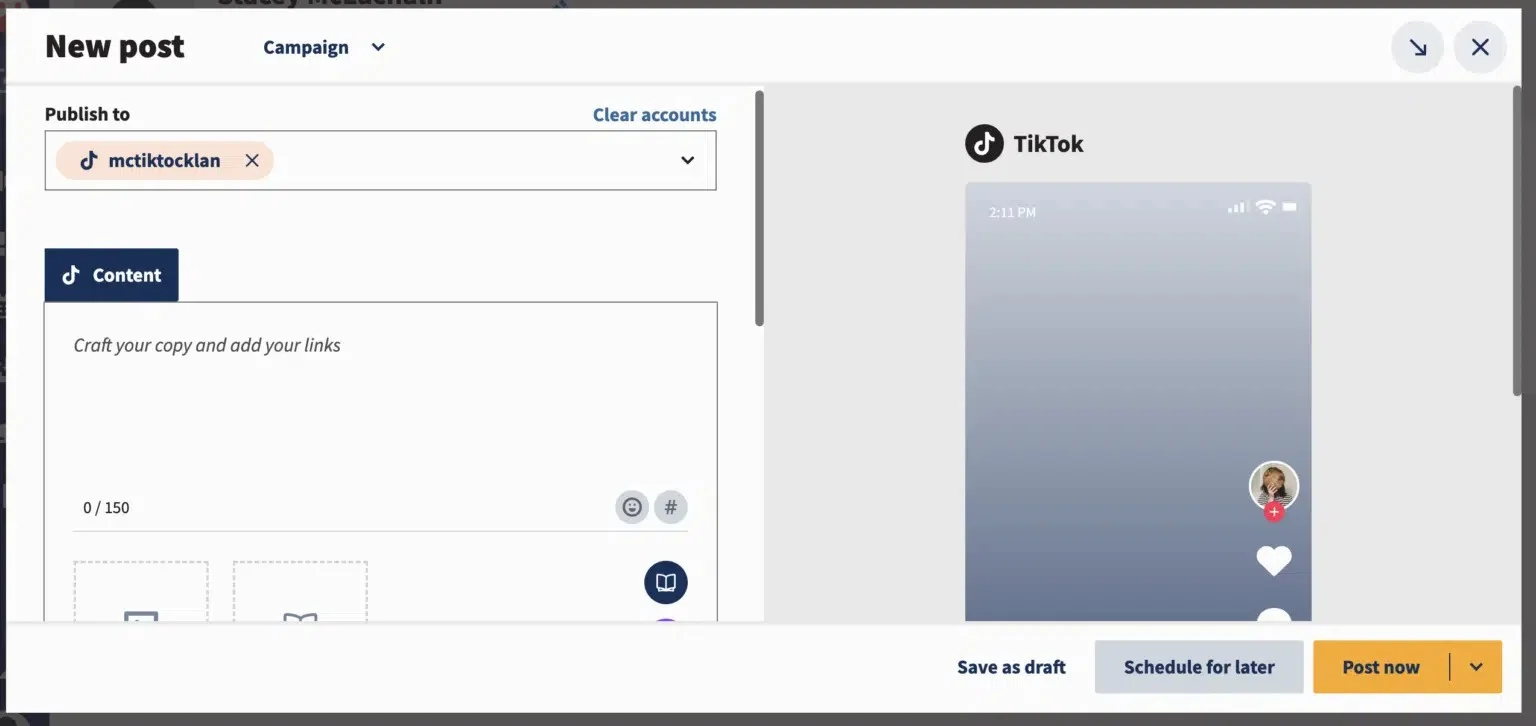
What it actually looks like: You build the post in the composer, attach one video, and either publish now or pick a date, however far ahead you like. The calendar then shows the TikTok slot next to every other network.
What a user says: “I also like that Hootsuite is a preferred partner for platforms like TikTok.” – Chris C., G2 review, October 2026
The same reviewer’s wish list: “I wish Hootsuite provided more reporting capabilities, especially for paid activities and TikTok engagement, like comments.”
What it does well: A no-limit queue suits campaigns planned a quarter out, far past TikTok’s own 10-day window, and Professional’s unlimited accounts let TikTok join a big channel roster.
Preisgestaltung: Monthly billing isn’t listed; Standard is $99/user/month billed yearly, Advanced is $399 and Enterprise is custom pricing. No free plan, 14-day free trial.
What running Hootsuite standalone requires: Hootsuite schedules TikTok video only, so photo posts and trending sounds happen in TikTok, and approvals start on Advanced at $399/user/month billed yearly. Those costs are why teams compare Hootsuite Alternativen.
12. Sprout Social
A TikTok Business account gets direct video publishing in Sprout Social, while a Creator profile sends every video back to your phone.
G2 score: 4.4/5
TikTok coverage
- Direct publishing and scheduling (Business only)
- Reminder publishing
- Bulk scheduling (no video)
- Photo carousel posts
- TikTok post settings (no privacy)
- Team approval workflow (external too)
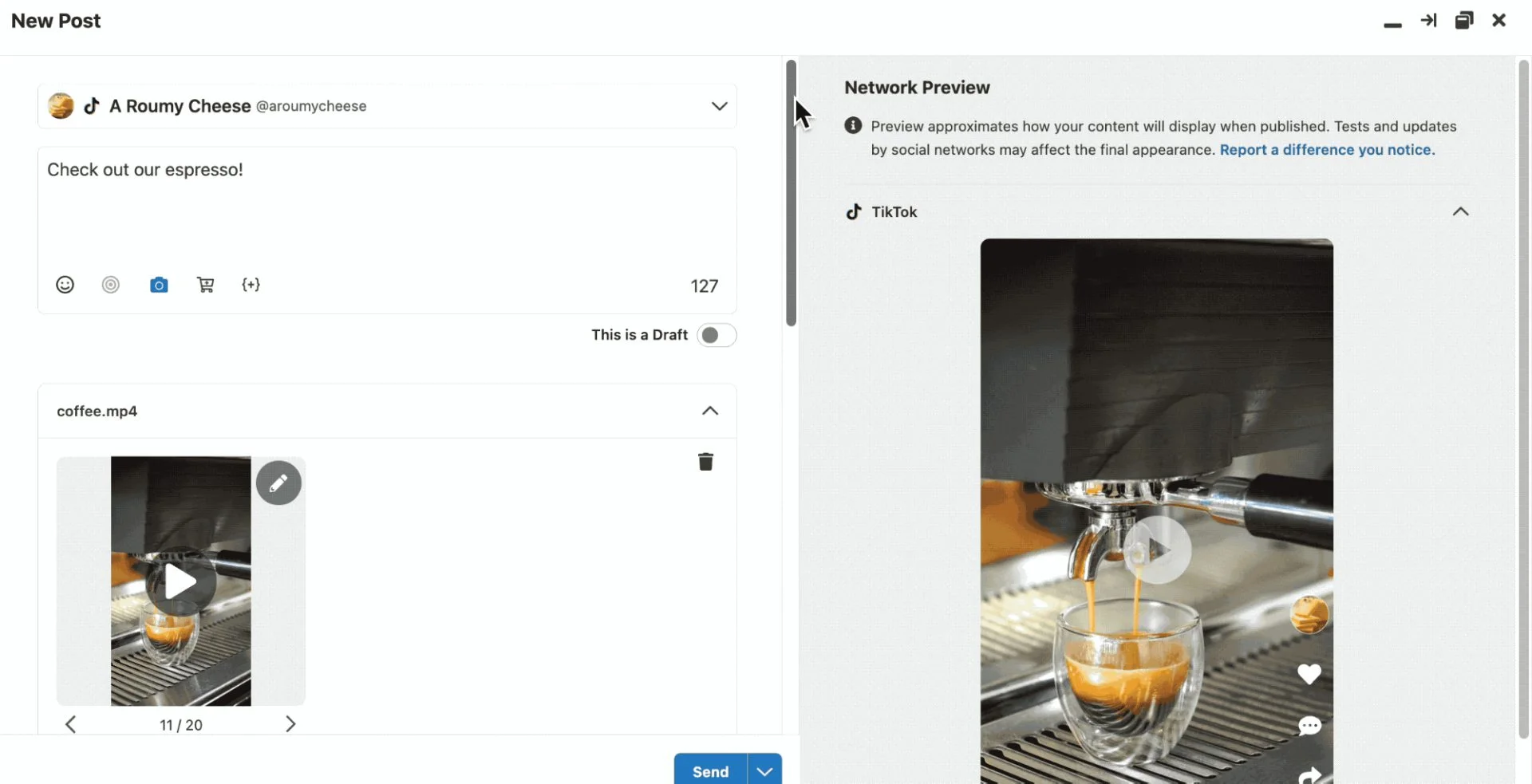
What it actually looks like: You open Compose, tick the TikTok profile in the picker, and attach a video or photos. With a Creator profile, any video lands on your phone as a notification for you to publish in TikTok.
What a user says: “Despite the advanced features of sprout, you are unable to upload custom thumbnails to TikTok, which other much cheaper services allow you to do.” – Alice B., G2 review, October 2026
What it does well: External approvers sign off from an email link, so a legal reviewer or client never needs a seat. Of the three tools in this group, it’s the only one with a no-login approver.
Preisgestaltung: Essentials is $99/seat/month billed monthly ($79 billed yearly), up to $499 ($399) for Advanced, and Enterprise is custom. No free plan, 30-day free trial.
What running Sprout Social standalone requires: Creator-account videos still need someone on a phone at post time. Five seats on Advanced come to $1,995 a month billed yearly before add-ons, which is the gap most Alternativen zu Sprout Social aim at.
13. Zoho Social
Zoho Social‘s free plan doesn’t include TikTok, so your real starting point is the Standard plan at $15 a month.
G2 score: 4.6/5
TikTok coverage
- Direct publishing and scheduling (Business only)
- Reminder publishing (videos under 3s or over 60s require manual publishing via the mobile app)
- Massenplanung
- Photo carousel posts (max 10 images)
- Team approval workflow (client approvers)
What it actually looks like: You select the TikTok profile, attach the video and choose a custom thumbnail (in mobile only). Then, under Publishing Options, you choose Publish Now, Schedule for a Specific Date, Add to Queue or a SmartQ Slot.

What a user says: “The scheduling calendar helps me plan content in advance and stay consistent without having to log in to each platform separately.” – Jabed U., G2 review, October 2026
What it does well: You answer TikTok comments from the shared Inbox, and the thumbnail picker covers the gap the Sprout reviewer complained about, at a fraction of the price.
Preisgestaltung: Standard is $15/month billed monthly ($10 billed yearly), up to $460 ($330) for Agency Plus. The free plan excludes TikTok, and there’s a 15-day free trial.
What running Zoho Social standalone requires: Personal TikTok accounts can’t connect, carousels stop at 10 images, and client approvers need an Agency plan. If that rules it out, see our Alternativen zu Zoho Social.
How to Choose the Right TikTok Scheduling Tool
Four questions decide most of this, and the answers usually knock out half the list before price comes into it.
Direct Publishing or Reminders?
Pick a tool that offers both unless you’re certain which you need. Direct publishing posts at the set time without you, which suits a queue of finished videos. A reminder sends the post to your phone or TikTok inbox to finish, and you need that whenever the sound you want exists only inside TikTok’s app.
Sendible and Hootsuite document direct publishing only. Two more tie it to your account type: Planable posts straight to the feed for Business accounts, and Sprout Social direct-publishes video for Business accounts only, so a Creator profile’s videos arrive as notifications.
If you haven’t set up either route before, our step-by-step guide to scheduling TikTok posts walks through the process.
Photo, Carousel, and Video Format Support
TikTok’s posting API takes up to 35 images in a photo post, so any lower number is the tool’s own cap. Here is what each vendor’s docs say where they give a figure.
| Werkzeug | Photo and video limits in tools |
| SocialPilot, Metricool, Publer | Carousels up to 35 images, matching TikTok’s ceiling |
| SocialBee | Up to 12 images through direct posting |
| Buffer | Up to 10 images, and videos from 3 seconds to 10 minutes |
| Zoho Social | 4 images from New post or 10 from Customize content, and videos from 1 to 600 seconds |
| Later | Photo posts on desktop and iOS only, and videos from 3 seconds to 3 minutes |
| Sprout Social | Photo posts on every plan, and videos up to 10 minutes (15 through the mobile publisher) |
| Hootsuite | One video per post, with photo posts not documented |
| Planable | Single images or carousels, for Business accounts only |
If your account runs on 20-slide carousels, that rules out SocialBee, Buffer and Zoho Social before you look at anything else.
Accounts, Approvals, and Team Workflow
Check two things here: whether the bill grows with every person you add, and whether a client can approve without an account. Agorapulse, Hootsuite and Sprout Social charge per user or seat, while Sendible includes unlimited users on every plan and Planable includes them per workspace.
| How a client approves | Werkzeuge |
| No login or account needed | SocialPilot, Agorapulse (Advanced), Vista Social (Advanced), Metricool (Advanced), Sprout Social (Advanced, up to three approvers) |
| From their own dashboard, with an email request | Sendible (from Plus) |
| Client needs a seat or workspace access | Planable (free Approver account), Publer (workspace member), SocialBee (workspace), Zoho Social (Agency plans) |
| Comment only | Later, through a 7-day share link (growth/scale plan only) |
| Not documented | Buffer, Hootsuite |
If the same team runs Instagram too, compare these with our list of Instagram planners and schedulers, since several tools here cover both.
Whatever you pick, a shared TikTok content calendar with the sound, format, approver and post time on each row keeps everyone working from one plan.
Analytics, Sounds, and Other TikTok-Specific Features
Sounds split the list more than anything else. Buffer, Hootsuite and SocialBee add no sound in the tool, so music goes into the file before upload or into TikTok through a reminder.
| If you need | Tools whose docs or reviews cover it |
| Library or trending tracks on scheduled videos | Vista Social, Planable, Metricool (Top 100 songs, Business accounts) |
| Auto-added music on photo posts | Agorapulse, Planable, Later, Sprout Social, Publer (carousels) |
| TikTok comments in a shared inbox | Buffer (Community view), Metricool, Zoho Social |
| Disclosure labels, location and Boost in one panel | Vista Social |
| A custom video thumbnail | Zoho Social (Publer offers ten generated frames, and a Sprout Social reviewer says custom thumbnails aren’t possible) |
Find the Right TikTok Scheduler for Your Workflow
The right TikTok scheduler depends on how often you post, how you publish content, and whether you work alone or with a team. Solo creators and small businesses can start with a free plan, while creators who rely on trending sounds should check whether a tool supports direct publishing or requires manual posting through TikTok.
For agencies and larger teams, look beyond scheduling. Client approvals, multi-account management, and reporting can make a bigger difference to your workflow than publishing alone.
SocialPilot brings these needs together with client workspaces, approval workflows, white-label reports, and AI Pilot for generating captions, post ideas, and hashtags. Its MCP server also connects AI platforms such as ChatGPT with SocialPilot to help automate content creation and scheduling workflows.
Once you’ve chosen your tool, use our guide to the beste Zeit zum Posten auf TikTok to plan your publishing schedule, and explore our TikTok Marketing-Leitfaden to build a stronger content strategy.
If you’re managing TikTok for multiple clients and want to streamline scheduling, approvals, and branded reporting, book a SocialPilot demo to see how it fits your agency’s workflow.
Häufig gestellte Fragen
Can you schedule posts on TikTok?
Yes. TikTok's own scheduler, on desktop web, lets eligible accounts schedule a video anywhere from 15 minutes to 10 days ahead. Third-party schedulers connect through TikTok's Content Posting API and either publish the post for you at the set time or send it to your TikTok inbox to finish in the app.
Is there a scheduling tool for TikTok?
Plenty, and this guide compares 13 of them. They range from free plans like Buffer, Publer and Metricool to agency tools like SocialPilot, Sendible and Agorapulse and suites like Sprout Social and Hootsuite. Where they differ most is direct posting versus reminders, how many photos a carousel takes, and whether they can add sound.
Is there a free TikTok scheduler?
Yes. Buffer's free plan schedules to TikTok on up to three channels with 10 posts queued per channel. Publer's free plan covers three social accounts, and Metricool's gives one brand 20 posts a month. TikTok's own desktop scheduler is free too. Zoho Social has a free plan, but TikTok isn't one of its channels.
How far ahead can you schedule TikTok posts?
TikTok's own scheduler allows 15 minutes to 10 days ahead. Third-party tools set their own window, and Hootsuite's help article says there's no limit to how far out you can schedule a video. Either way, TikTok's developer guidelines put the cap at typically around 15 posts a day per account, shared across every connected app.
Can you schedule TikToks from a computer?
You can, and a computer is the only place TikTok's native scheduler works. You upload on TikTok desktop web, toggle the schedule button and pick a time, and TikTok's help centre says the feature isn't available on mobile web. With a third-party tool, you set the post up in the scheduler's dashboard instead.
Do scheduled TikToks post automatically?
They do on the direct route. TikTok's own scheduler and any tool set to direct posting publish at the set time without you. In reminder mode, the post lands in your TikTok inbox or arrives as a phone notification, and you finish it in the app, which is also how you add a sound from TikTok's in-app library.
Über den Autor