

It’s the 28th of the month. You have twelve clients. You’re on client four.
You’ve logged into Meta, pulled the numbers, opened Instagram Insights, done it again, copied everything into a spreadsheet, and you’re now reformatting a slide deck you built in 2023 that you keep telling yourself you’ll redesign next quarter. Three hours in. Eight clients left.
In a thread on r/SocialMediaManagers where agency owners described their actual reporting process, one put it plainly:
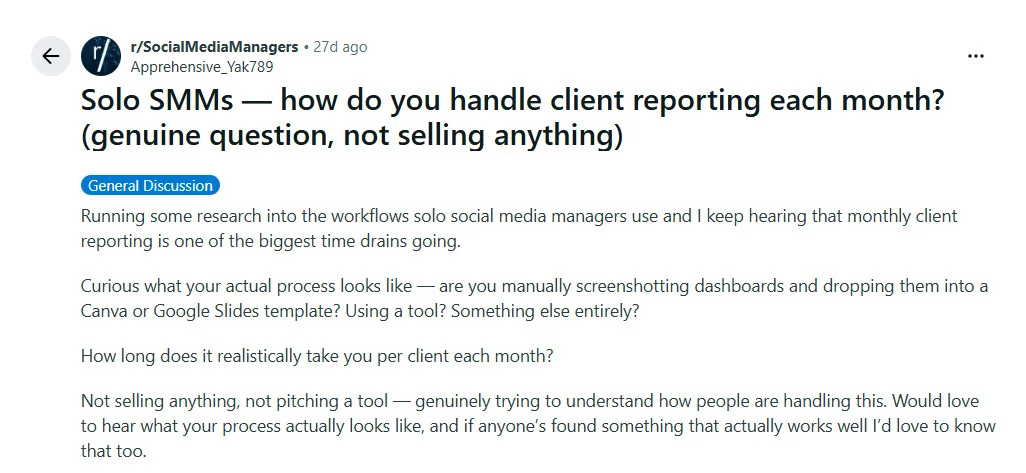
At twelve clients, that’s 18–24 hours a month. More than half a working week spent building something most clients skim for three minutes before replying, “looks good.”
This isn’t a time management problem. It’s a systems problem. And the fix is one afternoon of setup, not a new hire.
The Report Your Client Actually Reads
Before building any system, it helps to understand what the client is actually looking for when they open your report.
Most agency reports are written to show the client that you worked hard. Impressions are high. Posts went out on time. The follower count ticked up. The problem is that clients don’t hire you to work hard. They hire you to get results. And most of those metrics don’t answer the only question they’re actually asking: is this working?
The shift is simple. Stop reporting outputs. Start reporting outcomes.
| Report this | Not this |
| Follower growth rate (% change) | Total follower count |
| Engagement rate relative to reach | Raw likes and comments |
| Reach by platform | Total impressions |
| Top 3 posts, with a line on why they worked | Full post log |
| Link clicks and UTM-tracked traffic | Video views without context |
| Period-over-period comparison | Single-month snapshot with no baseline |
| Progress against the goal you agreed on | Metrics not tied to any goal |
And even with the right metrics, there’s a second problem that doesn’t get enough attention. The format. As one social media manager noted in a thread about the invisible time drains of the job:
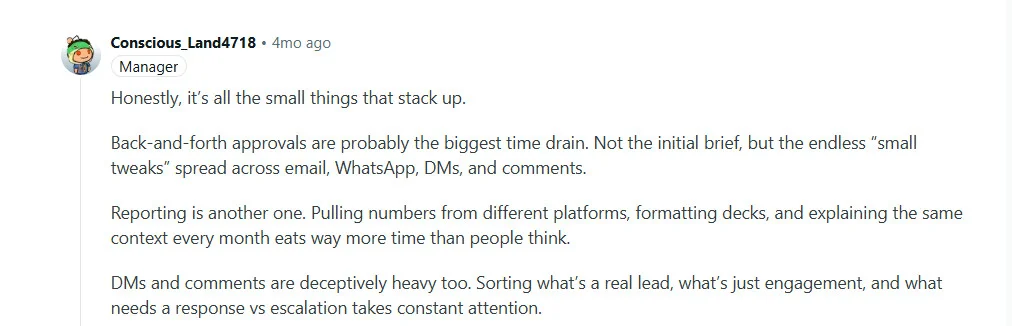
Explaining the same context every month is a social media report template problem. The template is missing the context. Fix it once, and the explanation loop ends.
What Your Report Says Before the Client Reads a Word
Here’s something most agencies don’t consider: the report is a first impression every single month.
A client who opens a PDF with a third-party tool’s logo in the footer (or worse, a generic spreadsheet export) is being quietly reminded that they’re working with someone who hasn’t systematized their operation. It doesn’t matter how good the numbers are inside. The container shapes how the content is perceived.
White labeling fixes this. It removes the tool from the equation entirely. Every report the client receives looks like it came directly from your agency: your logo, your colors, your domain, your email address in the sender field. The tool behind it stays invisible.
In practice, white-label reporting covers three things:
Branded reports. PDFs and dashboards carry your agency’s visual identity. No tool watermarks, no “Powered by” anywhere the client can see.
Custom domain and sender email. Reports are delivered from your email address, from your domain. Not a generic platform notification.
Reusable templates. You build the layout once and replicate it across clients. A new client slots into the existing system. You don’t rebuild from scratch.
Several platforms offer white label reporting for agencies. Most client reporting software either locks white-label features behind expensive enterprise tiers or requires a separate subscription entirely — which is why the entry price matters as much as the feature list. They differ significantly on when white label kicks in and what it costs:
| Tool | White label available from | Starting price |
| SocialPilot | Premium plan | $85/month (billed annually) |
| DashThis | Professional (10 dashboards) | $159/month |
| AgencyAnalytics | Agency plan (full white label) | $239/month |
| Sendible | Dedicated White Label plan | $240/month |
SocialPilot’s white label starts at $85/month on the Premium plan: branded PDF reports, your logo, your colors. Full white label with custom domain and sender email is available on the Ultimate plan at $170/month. Every other tool in this category either locks white-label behind a higher tier or prices it as a standalone plan starting above $150.
This is the difference between reporting as a monthly task and reporting as an infrastructure. The task scales with every new client; the infrastructure doesn’t.
What Actually Happens After You Set Up White-Label Media Reporting
Before the steps: here’s what the end state looks like.
On the first of every month, a branded PDF generates automatically from live data connected to each client’s social accounts. It carries your agency’s logo and colors. It arrives in the client’s inbox from your email address. You get a copy. If you want to add a note, you add one. If not, it’s already done.
You touched nothing.
The setup that produces this runs across two layers: the white label configuration handles the branding, and Advanced Reports handles the data, templates, and scheduled delivery. Together, they take one afternoon to configure.
Step 1: Set up your brand identity
Go to your profile icon, select White Label, and configure:
- Agency name, primary and secondary colors, nav bar color
- Logo (PNG, 170x40px, under 1 MB)
- Favicon (ICO or PNG, 32x32px)
- Login page image
Preview, save. Every report and email going forward carries this branding automatically.
Step 2: Connect your domain and sender email
In the Domain and Email tab:
- Enter your custom domain, verify via DNS records provided in-platform
- Add your agency email address, verify via DKIM, Return Path, and DMARC
- Send a test email to confirm
Full white label (custom domain and email) requires the Ultimate plan. Logo and color branding is available on all paid plans.
Step 3: Build your templates
In Advanced Reports, drag and drop the metrics you want, add context notes, and save the layout as a named template. One template per client type. Most agencies cover everything with two or three: one for e-commerce clients, one for B2B, one for local businesses.
Every new client of the same type gets the same template. Their accounts connect. The structure is already there.
Step 4: Connect client accounts and schedule delivery
Knowing how to send reports to clients consistently — same date, same format, same branding — is the difference between a one-off deliverable and a process clients come to rely on.
Link each client’s social profiles. Set the report period, frequency, delivery date, and recipient email. Toggle automated delivery on.
The system pulls live data, builds the report, and sends it. On the date you set, every month, without you.
What Goes Inside the Report
A client-ready report answers three questions in under five minutes: what happened, is it working, what’s next. It doesn’t need to be long to do that.
Six sections cover all of it: executive summary, KPI scorecard, platform breakdown, content performance, traffic and conversions, and priorities for next month.
One principle worth applying to every metric you consider, comes from a user in r/SocialMediaManagers

If it isn’t tied to a goal you and the client agreed on at onboarding, it doesn’t belong in the report. This is the same discipline that makes approval processes scale cleanly: every deliverable connected to a defined output, nothing floating loose.
You don’t have to figure out this structure yourself if you are using a white-label tool like SocialPilot. The reports come pre-built and client-ready: your branding is already applied, the layout is set, and the report is shareable the moment it generates.
The Version of You That Has Fridays Back
Once the system is running, you’re not getting faster at reporting. You’re getting out of reporting entirely. Reports generate, carry your branding, and land in the client’s inbox on the date you set.
This is exactly what SocialPilot has built for agencies and teams: professional, client-ready reports with custom branding, automated delivery, and powerful analytics, all at one of the most cost-effective price points in the market. You can explore the plans and features here: SocialPilot Pricing.
What the client sees, every month without fail, is an agency that has its act together. What you get is the Friday afternoon you used to spend reformatting a slide deck.
So, does your process right now prove the value of your work, or does it just document it?





 Join 55,000+ social media managers


