

It's the middle of a busy stretch, and you notice your Facebook Page hasn't posted in nine days. You go looking for the old Publishing Tools tab to plan the next few weeks, and it isn't where you left it. Facebook's own Publishing Tools now live inside Meta Business Suite, and further down this page we show exactly where they went.
That free planner is enough for some Pages. Once you run several Pages, work for clients, or post outside Meta's own apps, you'll want Facebook publishing tools that keep posts going out without you. One limit applies to all of them, though. Since 22 April 2024, Meta no longer lets outside apps post to Facebook Groups (source: Meta's announcement), so be careful with any tool that says it can.
We sorted the 11 tools below into three groups (all-in-one platforms, agency and enterprise platforms, and content planning and curation tools). We also checked every price on the vendor's own pricing page. Our own tool, SocialPilot, is one of the 11, written up in the same format as the others, gaps included.
Why You Need Dedicated Publishing Tools for Facebook
Facebook's own tools publish a post for free, and for one Page with a few posts that's enough. Post several times a week, add a second Page, or wait on a client's approval, and the free option slows you down. That's the gap Facebook publishing tools fill.
The Limits of Facebook's Own Native Scheduling
Facebook's free option, Meta Business Suite, works well for one Page and one Instagram profile, and falls short past that. It's where Facebook moved its old Publishing Tools.
Meta networks only. It posts to Facebook and Instagram and shares to Threads, and nowhere else.
No client approval step. In Meta's steps for creating a post, a finished post ends with Publish, Schedule or Finish later. There's no option to send it to a client to approve first.
Reports under your own brand. If clients expect reports with your agency's name on them, you need a tool with white-label reports.
No CSV bulk import that we could find in Meta's help docs, so you can't upload many posts from one spreadsheet file.
If you're here because the Publishing Tools tab disappeared, and wondering where Facebook's own publishing tools feature went, further down we have talked about the same in detail – the current steps, what each gap costs you day to day, and the one area, Groups, where the free tool beats every paid one.
What a Dedicated Tool Adds
A dedicated tool keeps you posting on a steady schedule. You set your posting times once, fill them in one sitting, and the posts go out on Thursday whether or not you remembered it was Thursday.
| Need | What to look for |
| Post on the same days every week | A publishing queue with repeating time slots that each new post drops into |
| Load a month of posts at once | Bulk upload or CSV import, with the limit per upload stated up front |
| Post every Facebook format | One place to create feed posts, links, Reels, Stories and carousels |
| Run several Pages or clients | One calendar across every Page, with a separate space for each client |
| Get sign-off before a post goes live | An approval step a client or manager can use without learning the tool |
| Publish beyond Meta | LinkedIn, TikTok, X, Pinterest and others from the same place |
| Show what worked | Reports you can send to a client, under your own brand if you're an agency |
The queue matters most if you post on set days, because it keeps your Page active in the weeks you're too busy to think about it. If hands-off posting is your main goal, our roundup of Herramientas de automatización de Facebook is the closer match.
Approvals matter the moment a second person has a say. For agencies, our guide to agency social media draft management covers drafts and reviews.
No tool on this list does all seven jobs equally well. Each entry below says what it covers and where it stops.
Facebook Publishing Tools at a Glance
Use this table to compare all 11 tools side by side, from who each one suits to what it costs to start and which Facebook features it covers.
Tool Categories at a Glance:
| Herramienta | Ideal para | Precio inicial | Free Tier | Formatos | Queue & Bulk | Approvals | Multi-Page |
| SocialPilot | Freelancers and agencies with 5 to 25 client Pages that need sign-off | $25.50/mo, flat per plan | No free plan, 14-day trial (no card) |  |
 |
|
|
| Buffer | One Page owner testing a queue for free | $5/channel/mo | Free plan (3 channels), 14-day trial on paid plans | |
|
|
|
| Social Champ | Freelancers with three or four small-business Pages | $23.20/mo, flat per plan (or $4/account/mo) | Free plan (3 accounts), 14-day trial | |
|
|
|
| SocialBee | Local businesses that want a set mix of post types | $24.20/mo, flat per plan ($290/yr) | No free plan, 14-day trial | |
|
|
|
| Later | Creators and boutiques who plan visually and post Reels | $18.75/mo, flat per plan (1 social set) | No free plan, 14-day trial | |
|
|
|
| Agorapulse | Two- or three-person teams splitting posts and replies | $79/user/mo | No free plan, 30-day trial (no card) | |
|
|
|
| Sendible | Freelancers with four to eight client Pages in separate workspaces | $30/mo, flat per plan (unlimited users) | No free plan, 14-day trial | |
|
|
|
| Sprout Social | In-house teams of four or more reporting to leadership | $79/seat/mo | No free plan, 30-day trial (no card) | |
|
|
|
| CoSchedule | Content marketers running blog, email and social on one calendar | $29/mo, flat per plan (+$5 per extra profile) | Free calendar plan (15 posts per profile), 14-day trial | |
|
|
|
| Loomly | Small teams where a boss signs off every post | $49/mo, flat per plan | No free plan, free trial | |
|
|
|
| Post Planner | Solo daily posters short on ideas | $9/mo, flat per plan | Free plan (1 account, 10 posts), 7-day trial | |
|
 |
|
Included on the starting plan · Only on a higher plan, partly covered, reminder only, or not confirmed · Not offered
Prices shown are for annual billing.
These five facebook publishing tools treat your Page as one channel among several, with one composer, calendar and queue for Instagram, LinkedIn and the rest. They suit one or two Pages, or a small agency that's tired of posting by hand. Buffer and Social Champ have free plans, and annual paid tiers run from $4 an account to $170 a month.
All-in-One Social Media Management & Scheduling
1. SocialPilot
One composer handles every Facebook Page format, and client sign-off comes built in.
Coverage
- Formatos
- Queue & Bulk
- Approvals
- Multi-Page
- Analítica
- Curation
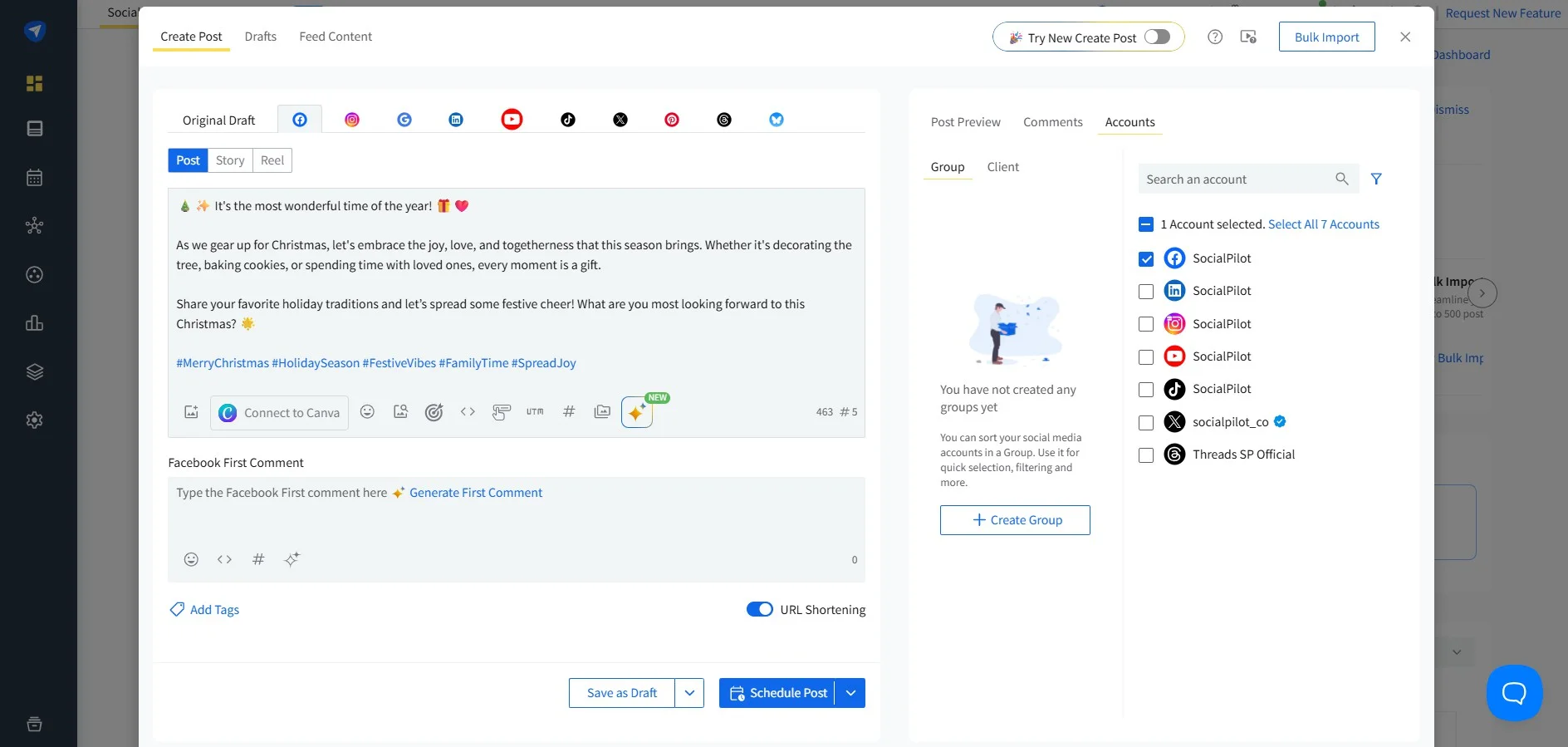
What it actually looks like: In SocialPilot, you open Create Post and tick your Facebook Page in the Accounts panel on the left, where you can filter by group or client. You add an image from your computer, Canva or Google Drive, then write the caption while a counter keeps track of its length.
Under Facebook Options you choose Post, Story or Reel, turn several images into a carousel, add a title and call-to-action button, and type a first comment. If the caption won't come, Piloto de IA suggests post ideas, writes or rewrites the text to suit Facebook, fixes typos and adds hashtags, with 500 AI credits included on Essentials.
Then you click Schedule Post, or Schedule Draft if it isn't ready. For a month of posts on Premium or above, you upload a CSV through Programación masiva and up to 500 posts land on the calendar at once.
James H., a G2 reviewer, wrote: "SocialPilot makes it easy to plan, draft, and schedule posts across all our social channels in one central dashboard."
The platform holds 4.5 out of 5 star rating on G2 from 848 reviews.
What it does well: A post can wait in the client approval workflow until the client says yes. Each client also gets a separate workspace, so the café's Reel never lands on the dentist's Page.
Essentials is $30 a month, or $25.50 billed annually, for 7 accounts and 1 user, at one set price rather than per seat. Standard is $50 ($42.50 annually), Premium is $100 ($85 annually) and Ultimate is $200 ($170 annually).
See SocialPilot's plans for what each tier unlocks.
What running SocialPilot standalone requires: A bigger plan than the entry price suggests. Essentials covers the Smart Queue, first comments and repeat posts. Análisis de Facebook and team approvals need Standard. Bulk CSV uploads, client workspaces and client approvals need Premium. There's no free plan, only a 14-day trial with no card. For finding content to share, it stops at Automatización de canales RSS, so a Page that runs on popular posts found elsewhere belongs on Post Planner. There's also no social listening, meaning no tracking of what people say about you across the web.
2. Buffer
Paying per channel makes Buffer the cheapest way into paid Facebook publishing when you only have a Page or two.
Coverage
- Formatos
- Queue & Bulk
- Approvals
- Multi-Page
- Analítica
- Curation
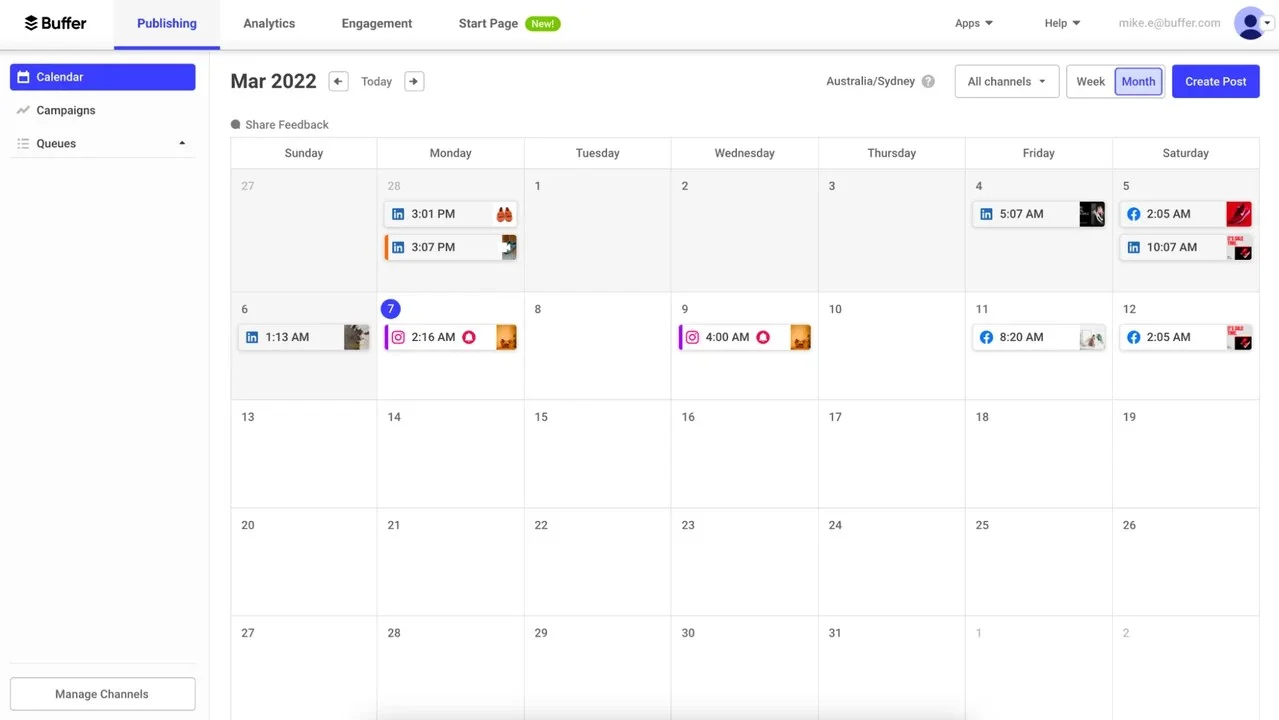
What it actually looks like: In Buffer, you open Publish, switch from List to Calendar and pick Week. Every scheduled post sits on its day with a thumbnail and time, so the Facebook post at 10:00 AM on Thursday shows up next to the Instagram and X posts earlier in the week. You can narrow the view with the Channels filter or pick your Facebook Page from the list on the left. Each post can be text, a single image, up to 10 photos, a link preview, a Reel or a Story. For a Group, Buffer sends a reminder to your phone at the set time, and you post it yourself. Buffer calls this notification publishing.
Sneh M., a G2 reviewer, gave it three stars and wrote: "Some more advanced features—like deeper analytics, competitor tracking, or additional automation—are either missing or only available on higher-tier plans. It’s great if you want something simple and straightforward, but as your needs grow, you may end up outgrowing it."
Buffer holds 4.3 out of 5 star ratings on G2 from 1,071 reviews.
What it does well: The free plan covers 3 channels, 10 scheduled posts per channel at a time and one user. That's enough to try a queue on a small business Page before you spend anything.
Essentials is $6 per channel a month, or $5 per channel billed annually, and Team is $12 or $10 per channel and adds approval workflows and unlimited users. Read our Buffer pricing breakdown para saber más.
What running Buffer standalone requires: The Team plan the moment a second person has to check posts. Every new client Page adds to the monthly bill, and nothing helps you find content to fill the queue. When paying per channel stops adding up, check our list of Alternativas al Buffer to explore more options.
3. Social Champ
If you'd rather pay only for the profiles you connect, Social Champ sells it that way as well as in bundles.
Coverage
- Formatos
- Queue & Bulk
- Approvals
- Multi-Page
- Analítica
- Curation
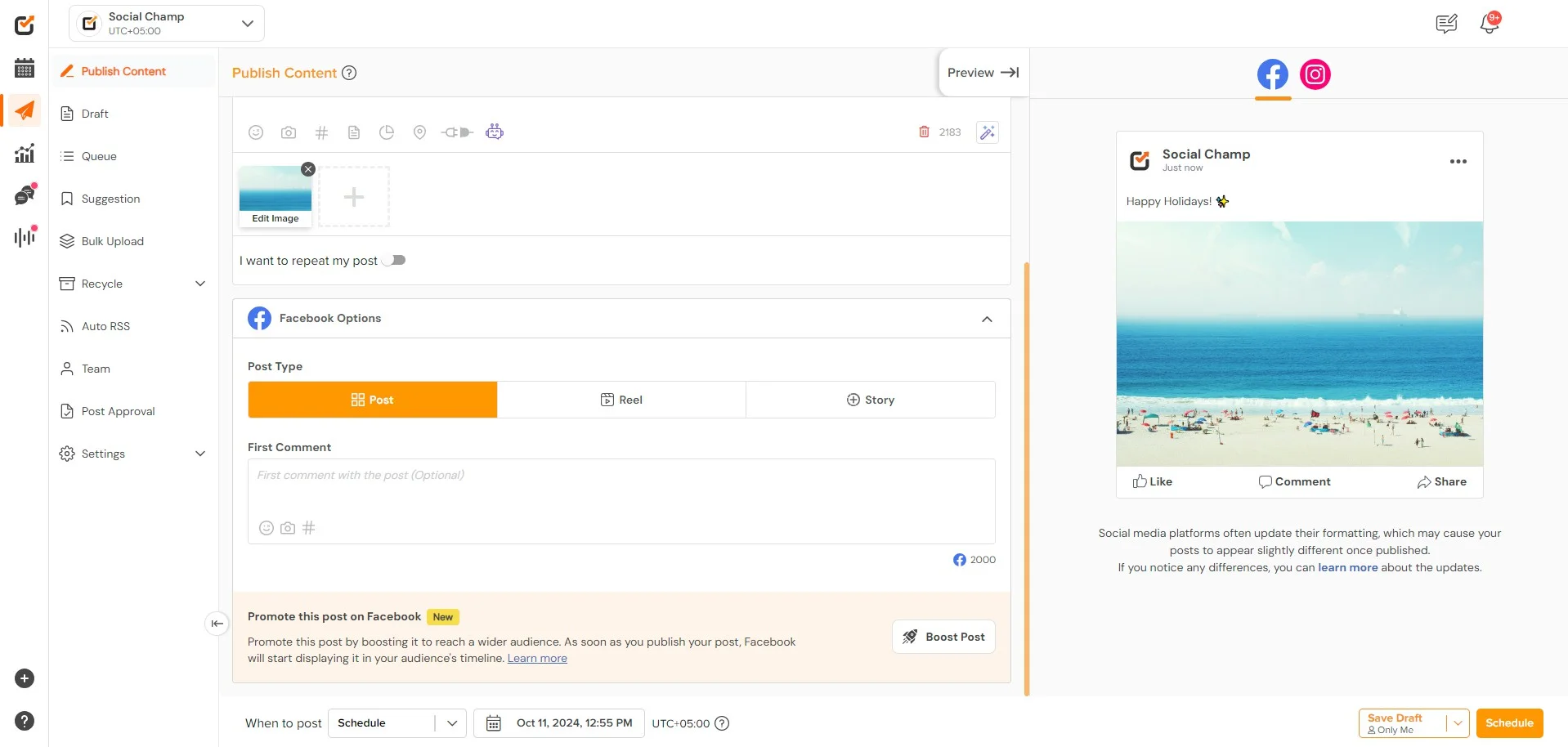
What it actually looks like: In Social Champ, you open Publish Content and pick your profiles in the "Publish to" row. Turn on "Customize for each network" and you get a separate editor for Facebook, so its text can differ from the X version. The preview pane has a tab for each network, so you can check how the post will look before it goes out.
Add a first comment for hashtags or a link, set the date and time under "When to post", then click Schedule or Save Draft. There's also a toggle to repeat the post. For a batch, one CSV upload takes up to 300 posts across your networks, though bulk scheduling on the bundled Standard plan is capped at 50 posts a month.
Abdul G., a G2 reviewer, wrote: "Scheduling posts is super convenient, and the multi-platform support makes it effortless to manage all my social media accounts in one place."
He added: "Sometimes, scheduled posts get delayed, which can be a bit frustrating."
Social Champ holds 4.4 out of 5 rating on G2 from 33 reviews.
What it does well: On weeks with nothing new to say, it reposts your best posts and shares new items from RSS feeds you choose straight to Facebook.
The free plan covers 3 accounts, 15 scheduled posts per account and 1 user. The bundled Standard plan is $29 a month, or $23.20 billed annually, for 6 accounts, 2 users and unlimited scheduled posts. Professional is $59 a month ($47.20 billed annually) for 12 accounts, 5 users and 3 workspaces, and Agency is $149 a month ($119.20 billed annually) for 30 accounts with unlimited users and workspaces. Enterprise is custom-priced for larger teams. You can add more accounts for $3 to $5 per profile per month.
What running Social Champ standalone requires: Professional or higher if your clients approve posts in more than one step. Standard only includes a basic, single-step approval workflow, and multi-step approvals start on Professional. Professional is also where advanced analytics and reporting begin, and white-label reports for clients need Agency.
4. SocialBee
Nothing goes into SocialBee's queue without a content category, and each category owns its time slots.
Coverage
- Formatos
- Queue & Bulk
- Approvals
- Multi-Page
- Analítica
- Curation
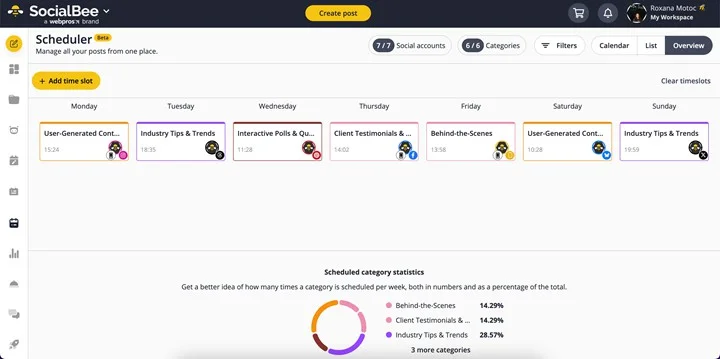
What it actually looks like: In SocialBee, you set up categories first, say promotions, tips and customer photos. Then you open the Scheduler, switch to Overview and click "+ Add time slot" to give each category its times in the week. Under the week, a chart shows what share of your slots each category gets. A post you add to a category takes its next open slot, and posts that don't go out of date can repeat. It's Facebook post scheduler covers text, images and GIFs, video, Reels and Stories, with an automatic first comment.
Brian S., a G2 reviewer, wrote: "Using SocialBee media has helped me save time by posting social media to multiple accounts in one location."
His con: "Sometimes I feel that the social media scheduling can be a little cumbersome, but for the most part setting up a schedule and creating the content to be automatically published does work."
SocialBee holds 4.7 out of 5 star rating on G2 from 477 reviews.
What it does well: The category schedule fixes the Page that posts three promos in a row and then goes quiet for a week. RSS feeds add new posts on their own, and from Accelerate up you can fill categories in bulk from a CSV file.
Bootstrap is $29 a month, or $290 a year (about $24.20 a month), for 5 profiles and 1 user. Accelerate is $49 ($490 a year) for 10 profiles, and Pro is $99 ($990 a year) for 25 profiles, 3 users per workspace and 5 workspaces. Separate agency plans range from $179 to $449 a month.
What running SocialBee standalone requires: Accelerate or higher for post approval and advanced analytics. Adding a new member costs $10 a month on monthly plans or $100 a year on annual plans. Setting up categories takes an afternoon before anything publishes. If you don't think in categories, our Alternativas a SocialBee guide has other options.
5. Later
Later sells profiles in bundles it calls social sets and lays out your Facebook week on a drag-and-drop calendar.
Coverage
- Formatos
- Queue & Bulk
- Approvals
- Multi-Page
- Analítica
- Curation
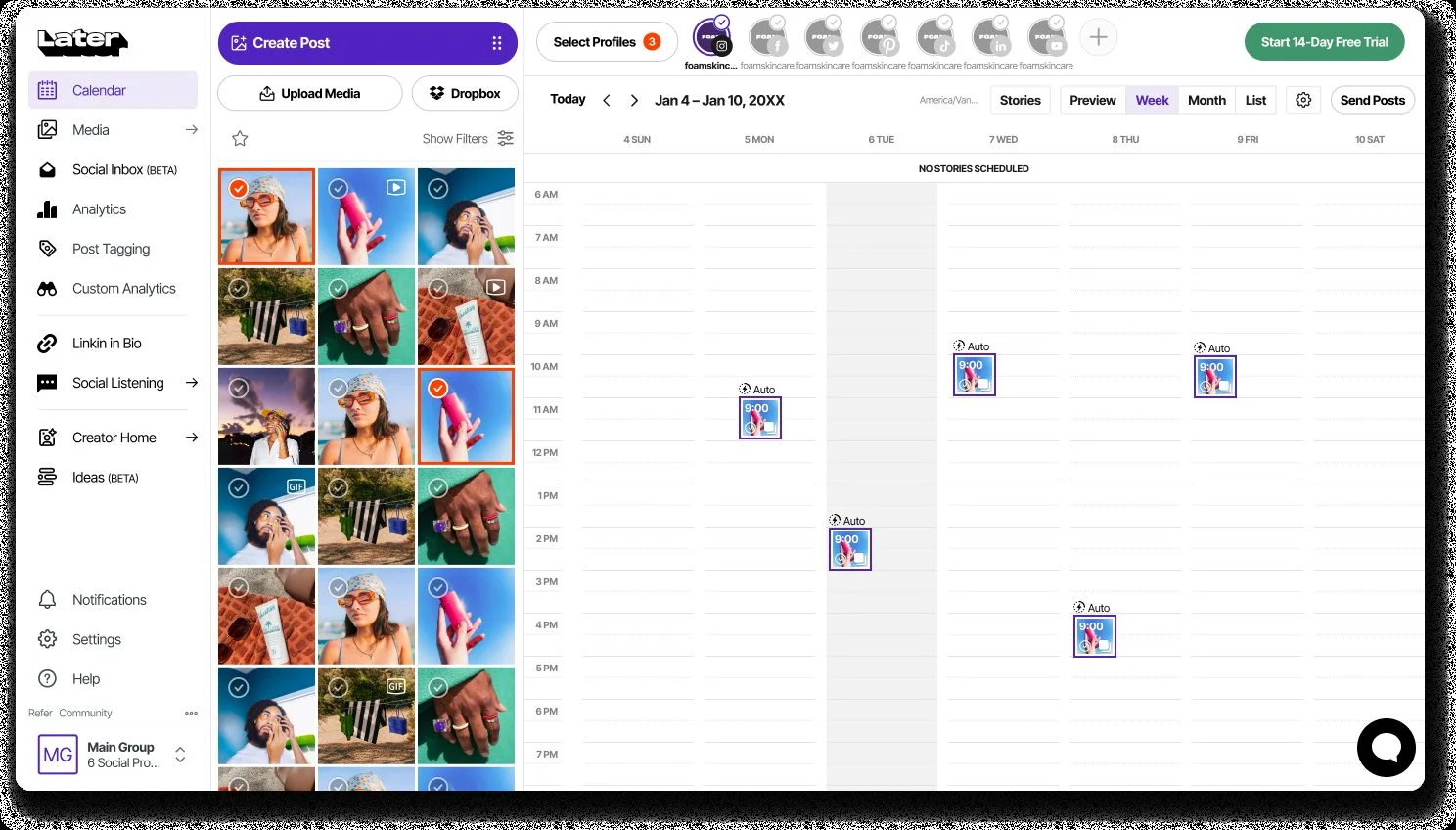
What it actually looks like: In Later, you open the calendar and drag an image or video from your media library onto a day. You write the caption, set the time, and Auto Publish sends it to your Page when that time comes. Text, single-image, video and carousel posts all work. Multi-photo posts publish as a Facebook photo album, not a carousel. Later's help center says Reels for Facebook Pages publish on their own too. When you have a lot to load, you can schedule posts in bulk, and there's a mobile app for when you're away from your desk.
David M., una G2 reviewer, wrote: "It is really easy to use. I love being able to control all of my social platforms, and the ability to have different groups is a huge bonus."
Later holds 4.5 out of 5 ratings on G2 from 852 reviews.
What it does well: On the web you send a post for approval, comment on it and add color-coded notes to the week. Your Facebook Page stats sit in the same account.
Starter is $25 a month, or $18.75 billed annually, for 1 social set (8 profiles, one per network), 1 user and 30 posts per profile a month. Growth is $50 a month ($37.50 billed annually) for 2 sets and 2 users, and Scale is $110 a month ($82.50 billed annually) for 6 sets, 4 users and unlimited posts. For more details on the plans and pricing check our Later pricing breakdown.
What running Later standalone requires: A second social set as soon as you add a second Facebook Page, because each set holds one profile per network, and Starter can't add sets at all. Later can't schedule Facebook Stories, and it doesn't support first comments on Facebook, according to its Facebook posts guide y first comment help page. Check our Alternativas posteriores page to explore tools that are priced differently and come with additional capabilities.
These three tools are built around teams. They give you named users, approval steps, client workspaces and reports you send up to a boss or client. They cost more than the tools above, and all of them charge differently, so check whether it bills per user, per seat or per plan before you compare.
Agency & Enterprise-Grade Publishing Platforms
6. Agorapulse
Agorapulse expects several people to work on every post and inbox message, so each one can be handed to a named teammate.
Coverage
- Formatos
- Queue & Bulk
- Approvals
- Multi-Page
- Analítica
- Curation
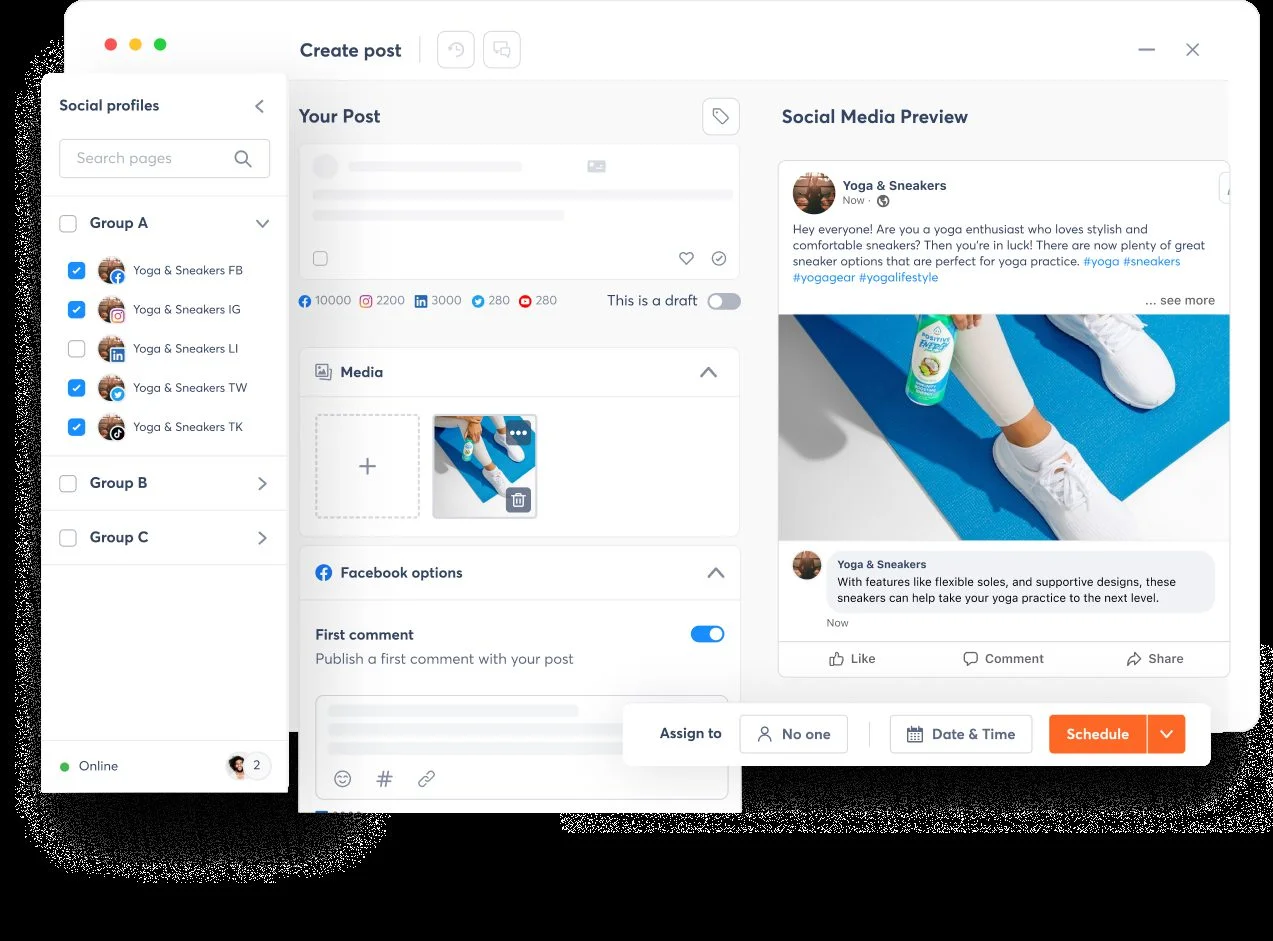
What it actually looks like: In Agorapulse, you click Create post and tick the profiles you want in the Social profiles panel on the left. Profiles sit in groups, so you can pick a single Facebook Page or several profiles at once. You write the caption, add an image under Media, and open Facebook options to switch on a first comment that goes out with the post. The Social Media Preview on the right shows how the post will look on your Page. At the bottom, Assign to hands the post to a teammate, and Date & Time plus Schedule set when it goes live. On Advanced and up, a single CSV upload takes up to 200 posts. Facebook Reels publish from the same composer.
Shellsea H., a G2 reviewer, gave it two stars and wrote: "Everytime another account user logged in you were bumped off the screen and no previous work was saved. No feed view of content."
Agorapulse holds 4.5 out of 5 star rating on G2 from 973 reviews.
What it does well: From Professional up, you can hand posts and inbox items to a specific teammate, and team performance reports show who keeps up. Advanced adds shared content calendars, return on investment (ROI) analysis and comparisons against competitors.
Standard, the entry plan, costs $99 per user a month, or $79 per user a month billed annually, and includes 10 social profiles. Professional runs $149 or $119 per user, Advanced $199 or $149 per user, and Custom is quote only. There's a 30-day free trial, and for more more details read our Agorapulse pricing breakdown.
What running Agorapulse standalone requires: A budget that grows each time you add a person. Three people on Standard already pay $237 a month on annual billing, and approvals that pass through several reviewers sit on the quote-only Custom tier. Our list of Alternativas a Agorapulse covers tools priced per plan.
7. Sendible
Every Sendible plan includes unlimited users, so your bill grows with the clients you sign, not the people you hire.
Coverage
- Formatos
- Queue & Bulk
- Approvals
- Multi-Page
- Analítica
- Curation
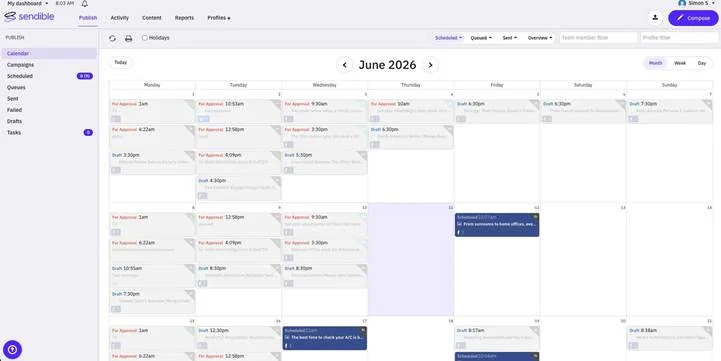
What it actually looks like: In Sendible, you open Publish and land on a month calendar full of Facebook posts. Red "For Approval" cards are waiting for a sign-off, Draft cards are still in progress, and dark blue Scheduled cards are set to go out. You use the Profile filter to show only one client's Page, or the Team member filter to see one person's work. Compose starts a new post, and the Failed tab in the left menu catches any post that didn't go out. Stories and Reels go to a Page from the same composer.
Grace M., a G2 reviewer, flagged one friction point: "I would like to be able to schedule Instagram posts that have images along with Facebook posts that don't have images all in one place. It would be more time-efficient to do it all at one time rather than beginning another scheduling block for each."
Sendible holds 4.5 out of 5 star rating on G2 from 892 reviews.
What it does well: Each client, brand or location gets its own workspace. The pricing page says this means you no longer have to ask clients for their passwords. Custom branded reports start on Premium, and Elite adds advanced bulk posting and user permissions.
Core, the entry plan, costs $35 a month or $30 a month billed annually, flat per plan, with 1 workspace, 6 social profiles and unlimited users. Plus is $99 a month or $84 billed annually (3 workspaces), Premium $199 or $169 (7 workspaces), Elite $299 or $254 (15 workspaces) and Enterprise $750 or $638 (50 workspaces). For more details about each pricing plan refer to nuestro desglose de precios Sendible.
What running Sendible standalone requires: A plan for the day you outgrow Core. Its single workspace fits one brand, and the next plan up costs close to three times as much. White-label reporting, where reports carry your brand instead of Sendible's, is an add-on on Elite. Look at the Alternativas a Sendible before you make that upgrade.
8. Sprout Social
Larger teams accept a per-seat bill for Sprout Social when Facebook publishing has to sit beside listening, employee advocacy and reports for leadership.
Coverage
- Formatos
- Queue & Bulk
- Approvals
- Multi-Page
- Analítica
- Curation
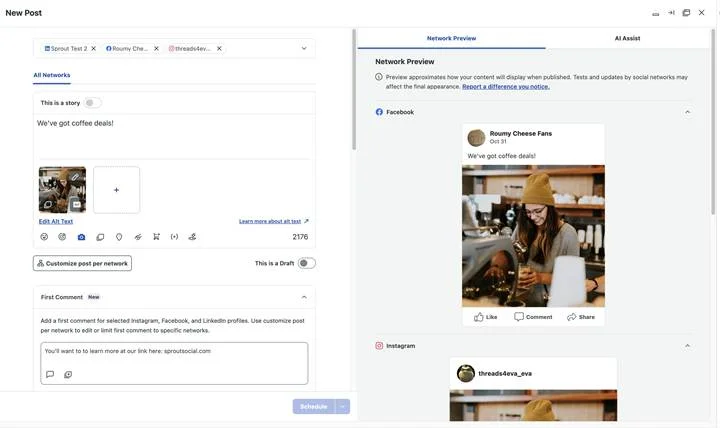
What it actually looks like: In Sprout Social, you open New Post and pick your profiles. Then, on the All Networks tab you write one caption, add an image with its alt text, and keep an eye on the character counter. If Facebook needs different words, you click Customize post per network. Below the caption you can type a First Comment, and you switch on "This is a Draft" if the post isn't ready yet. The Network Preview on the right shows the post as it will appear on the Facebook Page, with Like, Comment and Share, before you click Schedule.
Tegan J., a senior data analyst and a G2 reviewer, said "I like the Sprout is a one-stop shop for all your social monitoring needs. It goes beyond just organic social monitoring, allowing for moderation tools, scheduling, and even social listening!"
Sprout Social holds 4.4 out of 5 star rating on G2 from 7,427 reviews.
What it does well: Professional removes the five-profile limit. From Standard up you can add Employee Advocacy, which gives your staff approved posts to share on their own accounts.
Essentials, the entry plan, costs $99 per seat a month, or $79 per seat a month billed annually and paid upfront, with 5 social profiles. Standard is $249 or $199 per seat, Professional $399 or $299 per seat, Advanced $499 or $399 per seat, and Enterprise is quote only. Read nuestro desglose de precios de Sprout Social to learn more about each of these pricing tiers.
What running Sprout Social standalone requires: Budget for every seat and every add-on. Four people on Professional pay $1,196 a month on annual billing, and Premium Analytics and Listening are each priced separately on request. If you like the publishing side but not the per-seat cost, try our Alternativas a Sprout Social guía.
Here the plan comes before the post. A marketing calendar, an approval step or a stream of ready-made ideas comes first, and Facebook publishing follows. Look here if your harder problem is deciding what goes out, not when.
Content Planning, Calendar & Curation Tools
9. CoSchedule
In CoSchedule, social posts are one color-coded layer on a single marketing calendar that also holds your blog, email and project work.
Coverage
- Formatos
- Queue & Bulk
- Approvals
- Multi-Page
- Analítica
- Curation
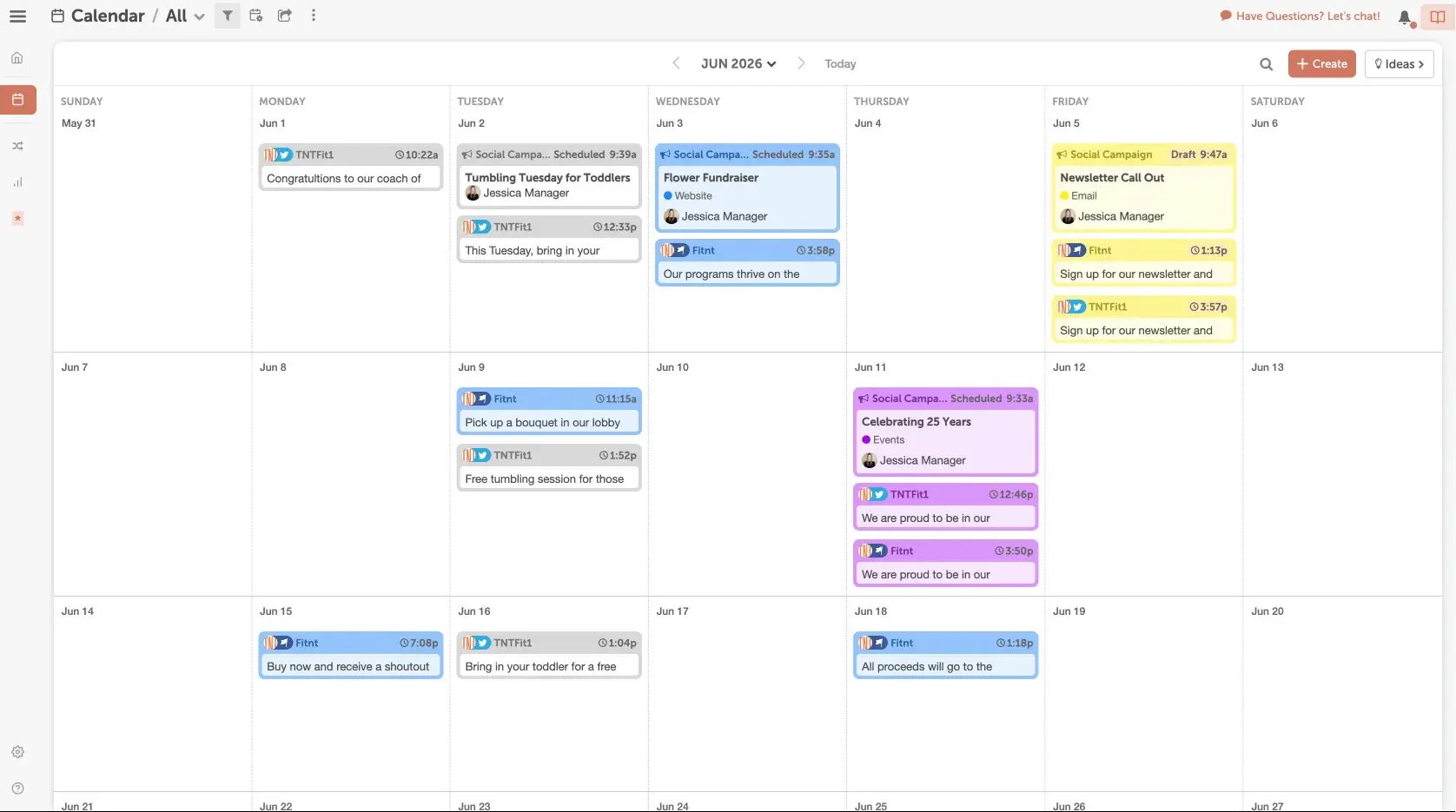
What it actually looks like: In CoSchedule, you open Calendar and switch to Month view, where every social post sits on its day as a colour-coded card. Each card shows the profile name, the network icons it goes to and its publish time. Social campaigns also sit on the same grid with a Scheduled or Draft status, a label such as Website, Email or Events, and the teammate who owns them. To add something new, you click Create at the top right. ReQueue reshares saved messages into gaps in the schedule, and Reels publish to Facebook from the calendar too.
Lyndsey B., a G2 reviewer who gave it 2.5 stars, liked "the easiness of scheduling posts with recommended times in one spot," but flagged one gap: "They do not alert you if the social account has become unlinked and will try and post with failure."
CoSchedule holds 4.4 out of 5 star rating on G2 from 256 reviews.
What it does well: The color labels on CoSchedule sort work by team or product. On Professional, the agency publishing tools give each client its own custom sub-calendar. A free calendar plan covers up to 15 posts per profile.
Starter, the entry plan, costs $39 a month or $29 a month billed annually, flat per plan, with 1 user and 3 profiles included, and each extra profile adds $5 a month. Professional is $59 or $49 with 2 users and 5 profiles (another seat is $29 a month), and the Suite plan is custom, starting at $69 a month. Publishing to X costs an extra $16 per profile a month.
What running CoSchedule standalone requires: Patience with social features that are thinner than the calendar around them. Roles and user permissions come only with the custom Suite plan, so an agency that needs clients to sign off Facebook posts has to pay for Suite first.
10. Loomly
In Loomly you set permissions one box at a time, right down to who can approve, schedule or publish a Facebook post.
Coverage
- Formatos
- Queue & Bulk
- Approvals
- Multi-Page
- Analítica
- Curation
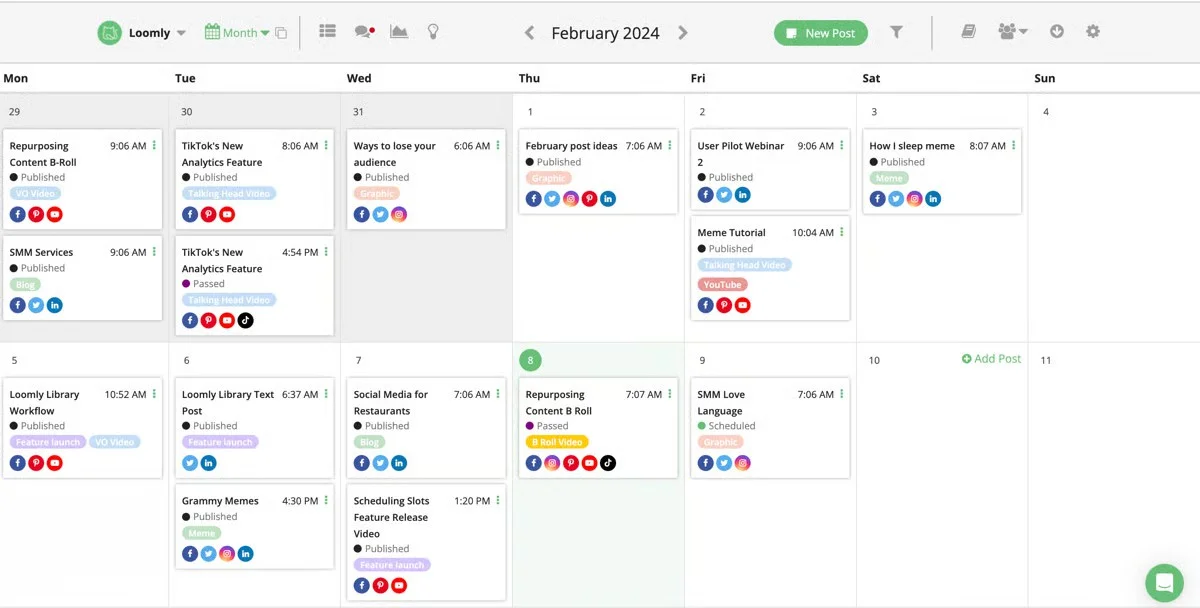
What it actually looks like: In Loomly, you build each post in the Post Builder. Step 1 sets the post details, and step 2, Fine-tune Each Channel, is where you shape the Facebook version. You pick where the post goes (Feed, Reels, Stories or Carousel) and choose Publish Manually or Publish Automatically. Then you set the Facebook date and time, check the text and attachments, and look over the preview on the left before you click Schedule. It has a calendar view (as shown above), that let's you check a post's status (Published, Passed or Scheduled).
Max P., a G2 reviewer who ran B2B channels on it, wrote: "It really stood out for managing multiple B2B social channels across LinkedIn, Facebook, and Instagram, and supported executive visibility on LinkedIn." His one con: "The reporting and analytics felt a bit lighter compared to other enterprise-focused platforms."
Loomly holds 4.6 out of 5 star reviews on G2 from 1,794 reviews.
What it does well: A post can't reach the Page until the person you named clicks Approve. That is the whole point when one boss signs off everything.
Starter, the entry plan, costs $65 a month or $49 a month billed annually ($588 a year), flat per plan, for 12 social accounts and 3 users. Beyond is $332 or $249 a month ($2,988 a year) with 60 accounts and unlimited users, and Enterprise is quote only. There's no free plan, only a free trial, for more details check our Loomly pricing breakdown.
What running Loomly standalone requires: The Beyond plan if you need custom branding (your logo, favicon and subdomain) or scheduled reports. Advanced analytics and approval workflows already come with Starter. It costs $200 more a month than Starter on annual billing. If that gap feels too much, compare the Alternativas al telar that we've reviewed.
11. Post Planner
If you keep running out of things to post, Post Planner brings in content from around the web and fills your week for you.
Coverage
- Formatos
- Queue & Bulk
- Approvals
- Multi-Page
- Analítica
- Curation
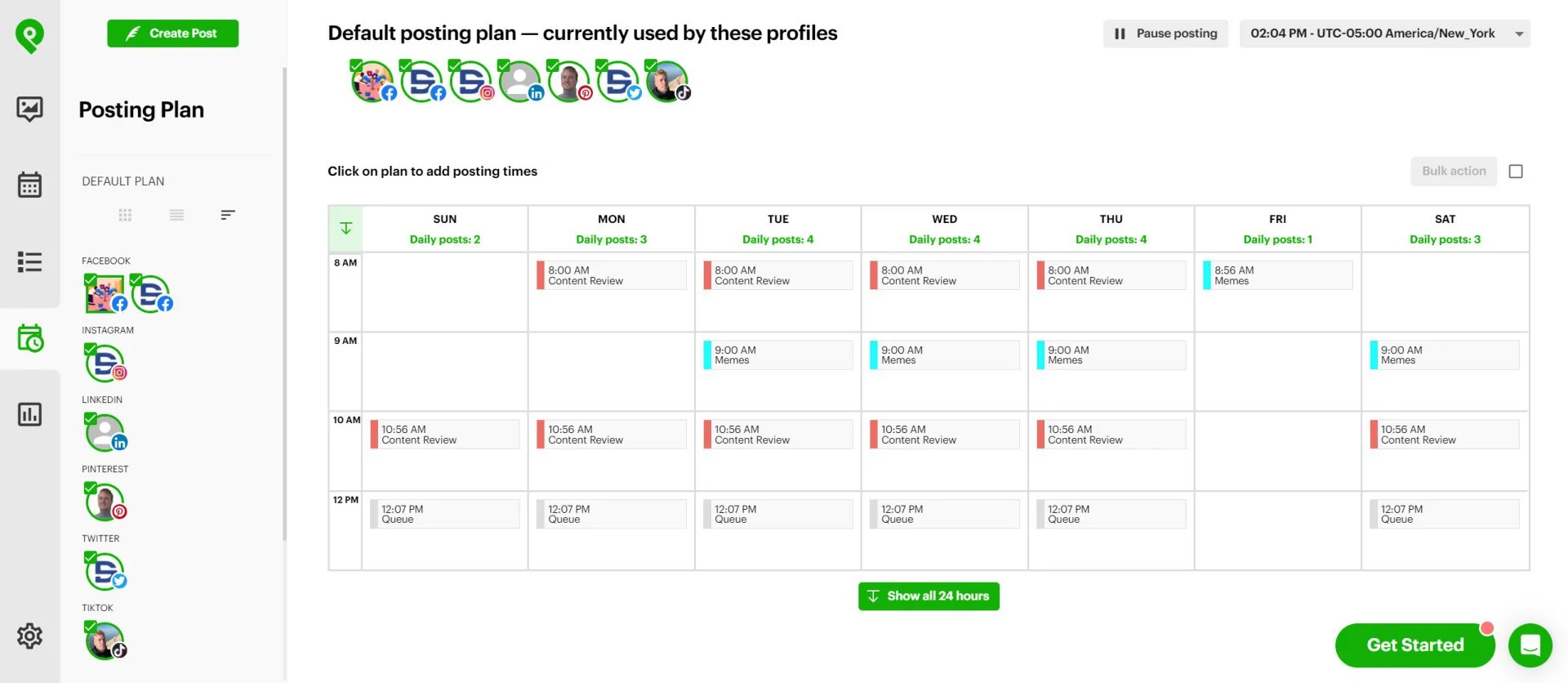
What it actually looks like: In Post Planner, you can create and fine tune posts and each network you post on has its own tab. You can create caption copies, add first comments and add a posting timeline. You can also sort posts into content buckets and set a weekly schedule once. Each time slot is tied to a content bucket, such as Content Review at 8:00 AM, Memes at 9:00 AM or your general Queue at 12:07 PM. The plan applies to every profile including your Facebook Pages, so posts from each bucket drop into their Facebook slots on their own.
Laura B., a G2 reviewer, described the rhythm it gave her: "I can plan and schedule content in advance, keep everything organized in one place, and maintain a consistent social media presence without having to think about posting every day."
Post Planner holds 4 out of 5 star rating on G2.
What it does well: You can load a whole batch of image posts at once, and Reels sit in the same queue, as SM Strategy Lab's tutorial shows. A posting history also keeps a record of what already went out, so a good post doesn't get repeated by mistake.
Starter, the entry plan, costs $14 a month or $9 a month billed annually ($108 a year), flat per plan, for 3 accounts, 1 user and 150 scheduled posts. Growth is $59 or $39 (15 accounts), Business $99 or $69 (25 accounts, unlimited posts) and Agency $179 or $119 (50 accounts). A free plan covers 1 account and 10 scheduled posts.
What running Post Planner standalone requires: Another place to get sign-off. Post Planner has no approval step yet. Post approval is on its published roadmap but hasn't shipped, so if a client or boss checks posts first, you're back to sending screenshots. The free plan's 10 posts last two or three weeks at the three to five posts a week most Pages aim for.
Where SocialPilot Fits in This List
It sits in the All-in-One group with Buffer, Social Champ, SocialBee and Later. It's built for the stretch between one busy Page and a full list of client Pages. If you post to several Pages a week and someone approves those posts first, then SocialPilot's Standard or Premium plan covers publishing and sign-off in one account.
Where Another Tool Might Fit Better
Free, one Page. Buffer's free plan covers 3 channels, and Meta Business Suite costs nothing.
Running out of things to post. Post Planner fills your time slots with content it finds for you, while here, finding content stops at RSS feeds.
Evergreen posts reshared by category. SocialBee reshares posts that stay useful in each category's own time slots.
Work handed to named people. Agorapulse assigns posts and inbox messages to teammates from Professional up.
One workspace per client, unlimited users. Sendible gives you both on every plan.
Listening and leadership reporting. Sprout Social adds both and is priced per seat.
Where Facebook's Own Publishing Tools Feature Went
Facebook's Publishing Tools feature moved into Meta Business Suite. The Create post button and Contenido tab there replace the old tab on your Page.
From Publishing Tools to Meta Business Suite
The tools moved in two steps. Creator Studio replaced the Page tab first, then Meta shut it down and moved its tools into Business Suite, a change TechRadar covered when Meta announced it in January 2023. In 2026 Meta reused the name for a new Creator Studio app, a separate AI assistant that gives creators post ideas and performance insights. It isn't the old Page publishing tool, and we found nothing showing it schedules Page posts, so Business Suite is still where that happens.
Facebook's old Publishing Tools now live inside Meta Business Suite, Meta's free planner for Facebook Pages and Instagram, which can also share posts to Threads.
You need Full control of the Page or Content permission. On desktop, Meta's help page for creating posts lists these steps:
Open Meta Business Suite and click Create post, on the home page or in the Contenido ficha.
En Post to, pick your Facebook Page. You can add an Instagram profile, or choose a Facebook Group you manage.
Add photos or video under Medios de comunicación (Instagram allows up to 10 photos).
Write the caption in Post details, with separate text for Facebook and Instagram if you want it.
Consulte Privacy settings.
Abrir Scheduling options and set a date and time, or pick Active times, which suggests times when your followers were most active over the past 7 days.
Haga clic en Horario. Publique sends it now, and Finish later saves it as a draft.
Your planned posts sit under Contenido, Posts and Reels, o Scheduled. That's the closest thing to the old Publishing Tools list, and you can edit, move or delete posts there.
What Meta Business Suite Still Doesn't Do
Business Suite falls short once a post goes outside Meta's apps or needs someone else's approval.
It stops at Meta. A post that also belongs on LinkedIn, TikTok or Google Business Profile has to be written again somewhere else.
A client can't approve anything. You email screenshots and copy their edits back by hand.
A month of posts means one post at a time. Thirty posts is thirty trips through the post editor.
You can only plan about a month ahead. Meta's help page for Pages says you can schedule posts "between 20 minutes and 29 days away."
Groups are where the free tool comes out ahead. Since 22 April 2024, third-party tools can't automatically publish to Facebook Groups, because Meta removed the Groups API permissions they relied on, as set out in its Graph API v19.0 announcement. Business Suite can still post to a Group you manage, from the same Post to menu.
Some paid tools send a reminder instead. Buffer's notification publishing sends an alert to your phone and you post to the Group yourself. So, if a feature page still lists Groups, check whether it means a reminder.
When a Third-Party Tool Is Still Worth It
A paid tool pays for itself once you have more than one Page, post more than a few times a week, or need someone else to sign off.
Several Pages or networks. The all-in-one tools (entries 1 to 5) put every Page, plus LinkedIn, TikTok, X and Pinterest, on one calendar.
Clients who sign off. The agency and enterprise platforms (6 to 8) all offer approvals, starting on Agorapulse Professional, Sendible Plus and Sprout Social Professional.
Loading a month of content at once. On Premium, SocialPilot takes up to 500 posts in one bulk upload, Social Champ 300 Facebook posts and Agorapulse 200 by CSV.
A queue that fills set time slots. Set Tuesday 9 a.m. and Thursday 1 p.m. once, and each new post takes the next open slot. Business Suite wants a date on every post. For reposting content that stays useful, you can use Post Planner's content buckets and CoSchedule's ReQueue.
How to Choose the Right Facebook Publishing Tool
Count your Pages and the people who check each post. Those two numbers tell you which way of paying stays cheap and whether you need approvals.
Match the Tool to Your Team Size
| Your setup | Start with | What you can skip |
| Solo owner, one Page | Buffer's free plan, or Meta Business Suite for Facebook and Instagram only | Approvals and per-user plans |
| Small business, 2-3 Pages + Instagram | SocialBee Bootstrap or SocialPilot Essentials, both with a slot-filling queue | Bulk uploads and extra seats |
| In-house team, manager signs off | Loomly Starter or SocialPilot Standard, both with 3 users and approvals | Client workspaces |
| Freelancer, 4-7 client Pages | Sendible Premium (7 client workspaces) or SocialPilot Premium (client approvals) | Listening and per-seat suites |
| Agency, 8+ client Pages | Sendible Elite (15 workspaces) or SocialPilot Premium and up, with 500-post CSV uploads | Per-user billing |
| Brand team reporting to leadership | Sprout Social, or Agorapulse for work split between named people | Tools built around finding content |
| Daily poster who runs out of ideas | Post Planner, if nobody else approves posts | Approvals and listening |
All-in-One vs. Specialized Calendar Tool
Choose an all-in-one tool to get posts out to several Pages and networks. Choose a specialized tool when the hard part comes before the post exists.
CoSchedule suits posts tied to a blog and email calendar
Loomly a team stuck on sign-off
Post Planner a Page short on ideas.
Posting well beyond Facebook? See our broader social media tools roundup.
You can also pair them. Post Planner has no approval step, so draft there and send posts to an all-in-one for sign-off.
Budget Considerations
Pick the way of paying that grows slowest for you. Buffer charges for each channel, Agorapulse and Sprout Social for each person, and flat plans like SocialPilot, Sendible and Loomly stay the same until you hit the account or user limit. For example, four people on Sprout Social Essentials pay $316 a month on annual billing. On SocialPilot's Standard plan, three people and 15 accounts cost $42.50 a month billed annually. Most paid tools give a 14-day trial, and Agorapulse and Sprout Social give 30.
How We Analyze and Select These Tools
We built this list from vendor pages, help docs and public reviews, and here's where that work stops.
What We Actually Tested
We checked what vendors publish on their websites and pricing pages.
Checked all 11 pricing pages in September 2026, with both monthly and annual prices and any price data files.
Read each vendor's Facebook pages and help docs for formats (Posts, Reels, Stories, carousels, first comment), bulk upload and approvals.
Pulled named G2 reviews and each tool's G2 rating.
Confirmed the Groups API change at Meta for Developers and the Business Suite steps in Meta's help center.
Grouped the tools by the job they do.
Dropped a tool from the earlier version that is mainly for social listening, since publishing isn't its main job.
What We Couldn't Independently Verify
We couldn’t verify the reliability of these tools over weeks, how they handle failed posts, support speed and effects on reach are untested.
Public docs didn't confirm some formats, such as Stories on Later, Sprout Social and Post Planner, so those cells are marked .
Prices are as of September 2026 and can change without notice, so check the vendor's page before you pay.
Pick the Facebook Publishing Tool That Fits How You Post
Choosing among these Facebook publishing tools comes down to how many Pages you run and who checks posts first. With one Page and no budget, start with Buffer's free plan or Meta Business Suite. With two or three Pages and nobody else signing off, a flat plan with a queue, such as SocialBee Bootstrap or SocialPilot Essentials, would be enough.
Once a manager or client approves posts, look at Loomly, Sendible or SocialPilot's Standard and Premium plans. When leadership wants listening and reports, Sprout Social or Agorapulse are worth paying for each person. If you mostly run out of ideas, try Post Planner first.
If you land in the middle of that range, start a SocialPilot trial for 14 days, and see how it works for you.
Preguntas frecuentes
What is the best free scheduling app for Facebook?
Meta Business Suite is the best free option if you only post to Facebook and Instagram, since it publishes straight to your Page. If you post to more networks, Buffer's free plan covers 3 channels, Social Champ's covers 3 accounts and 15 scheduled posts, and Post Planner's covers 1 account and 10 posts.
How do I set up scheduling on Facebook?
Use Meta Business Suite on desktop. Click Create post on the home page or in the Content tab. Under Post to, pick your Facebook Page, then add media and write the post. Open Scheduling options, choose a date and time or Active times, and click Schedule. You need Full control of the Page or Content permission.
Is there an app for Facebook that lets me schedule posts?
Yes. Meta's free Business Suite mobile app lets you create a post for your Facebook Page and set it to go out later. If you post to other networks too, Later and SocialPilot both have mobile apps, so you can manage your queue from your phone.
Why can't I schedule Facebook posts anymore?
You're most likely trying to post to a personal profile. Meta Business Suite schedules posts for Pages, not personal profiles, and you need Full control of the Page or Content permission. The old Publishing Tools feature also moved into Business Suite. Outside apps can't publish to Facebook Groups for you, though some, like Buffer, send a reminder so you post it yourself.
Where did Facebook's Publishing Tools feature go?
It moved into Meta Business Suite. Meta shut down the original Creator Studio and moved its tools into Business Suite in January 2023. The Creator Studio app Meta launched in 2026 is a different, AI-based app for creators. To find your posts, open Business Suite and go to Content, then Posts & reels. Scheduled posts have their own tab there.
Sobre el autor