Instagram Direct Messages have been around for over a decade. Most businesses still use them as a customer service inbox, a place to handle complaints and answer queries. That’s leaving a significant growth lever untouched.
Instagram Messages are one of the highest-converting channels available to brands right now. Over 200 million people visit a business profile on Instagram every day. When one of those people sends you a DM, they’ve already done the research. They’re ready for a conversation.
And conversations convert. Instagram DMs deliver higher open rates to compare to email. That gap is why businesses are now using DMs to close high-ticket clients, run automated lead funnels, and build communities that don’t depend on the algorithm.
Instagram has also completely rebuilt the inbox over the past 18 months. Folders, filters, scheduled messages, broadcast channels, AI summaries, Comment-to-DM automation, the toolset has changed significantly, and most brands haven’t caught up yet.
This guide covers everything: the basics, the new 2023–2026 features most brands are missing, the automation rules you need to know before you start, and how to manage it all at scale.
Key Takeaways:
- Instagram DMs have become one of the highest-converting marketing channels in 2026, driving both engagement and lead generation.
- Comment-to-DM automation is the most effective Instagram growth tactic right now, combining algorithmic reach with automated lead capture.
- Broadcast Channels help brands reach opted-in followers directly in the inbox without competing with the feed algorithm.
- DM activity now acts as an Instagram ranking signal, faster replies and more conversations can improve overall organic reach.
- Safe Instagram automation only works through Meta’s official Messaging API. Avoid tools asking for your Instagram username and password.
- Tools like SocialPilot, ManyChat, and inrō help brands automate DMs, manage conversations at scale, and centralize inbox workflows.
What Are Instagram Direct Messages?
Instagram Direct Messages also called Instagram DMs are private messages you exchange with other users one-on-one or in small groups. The feature launched in December 2013, making it over 12 years old. It has grown from a simple photo-sharing tool into a full business communication channel.
Today, DMs support text, photos, videos, voice notes, GIFs, reels, stories, and disappearing messages. They’re also the delivery mechanism for two of Instagram’s most powerful 2026 business tools: Broadcast Channels and Comment-to-DM automation.
What’s New in Instagram’s Inbox (2025–2026 Updates)
Instagram has pushed significant DM infrastructure updates since late 2024. Here’s what changed and what matters for businesses.
Notes — Status-Style Messages in Your DM Inbox
Instagram Notes are short posts (up to 60 characters, emoji-only) that appear at the top of your followers’ DM inbox for 24 hours. Friends and followers can reply to your Note, replies land in your DMs as private messages.
For businesses and creators, Notes work as a low-friction touchpoint: announce a launch, ask a question, or prompt a DM with a single line. Recent updates added Spotify integration (share what you’re listening to in real time), @ mentions, likes, and prompts, making Notes more interactive than their 60-character limit suggests.
Inbox Filters and Custom Folders
Instagram has rolled out DM inbox filters for professional accounts and personal accounts with 100,000+ followers:
| Filter | What it shows |
| Unread | All unread messages |
| Unanswered | Threads with no reply from you |
| Story replies | Only messages triggered by story replies |
| Followers | Messages from people who follow you |
| Verified users | Messages from verified accounts |
| Custom folders | User-created folders for specific conversations or campaigns |
You can customize which filters appear in your inbox shortcuts and reorder them. For teams managing high DM volume — lead campaigns, Comment-to-DM campaigns, customer support, these filters turn Instagram’s inbox from a chaos pit into a workable queue.
Pinned Conversations
Pin up to 3 chat threads to the top of your DM inbox for immediate access to priority conversations. You can also pin up to 3 specific messages within any 1:1 or group chat, useful for keeping track of key details, offers, or follow-up items across long threads.
Scheduled Messages
You can now schedule DM in Instagram to send at a specific date and time. Useful for: promotional messages timed to a launch, birthday messages to key clients, or campaign follow-ups scheduled in advance. Set the time, write the message, and let it send automatically.
Group DM Updates
- QR codes for group chats: Each group chat now has a unique QR code. Scan to join, no username search needed. Practical for events, communities, and client onboarding.
- Polls and quizzes inside group DMs: Add interactive polls, quizzes, and countdown timers to photos and videos shared in a group chat.
- Group chat capacity: Up to 250 participants per group DM.
Meta AI in DMs
Meta AI is now active inside Instagram DMs. For users receiving a high volume of unread messages, tapping the AI button summarises what they’ve missed. For businesses, Meta AI in DM is beginning to surface product recommendations and shopping suggestions inside DMs, an emerging channel for passive discovery.
Key Instagram DM Features
| Feature | What it does |
| Text messages | Up to 1,000 characters per message |
| Voice notes/message | Up to 5 minutes per recording |
| React to a message | Long-press → select an emoji reaction |
| Delete a message | Long-press → Delete (removes from your side only) |
| Unsend a message | Long-press → Unsend (removes from both sides before reading) |
| Pin a message | Long-press → Pin (up to 3 messages pinned per conversation) |
| Translate a message | Hold down a message → Tap “Translate” (real-time translation, 2026) |
| Schedule a DM | Set a specific date and time for a message to send automatically |
| Disappearing mode | Double-tap the lock icon to enter vanish mode — messages disappear after reading |
| Music sticker | Share music tracks directly inside DMs |
| Group DM polls/quizzes | Add interactive polls, quizzes, and countdown timers to group chats |
| Meta AI summary | Tap to summarise long unread conversations via Meta AI |
| Instagram Notes | Up to 60-character status posts that appear at the top of your followers’ DM inboxes for 24 hours |
| Share a reel or post | Tap the paper plane icon under any content to send via DM |
How to Send an Instagram DM
Step 1: Open Instagram and tap the paper plane icon (top right of your feed) or swipe left.

Step 2: Tap the compose icon (pencil/edit icon, top right of the inbox).
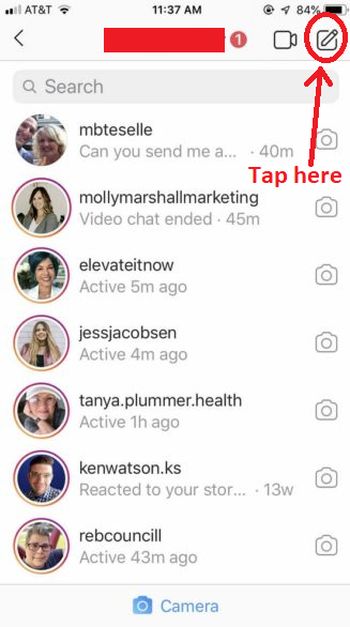
Step 3: Search for a username or select from your existing contacts.
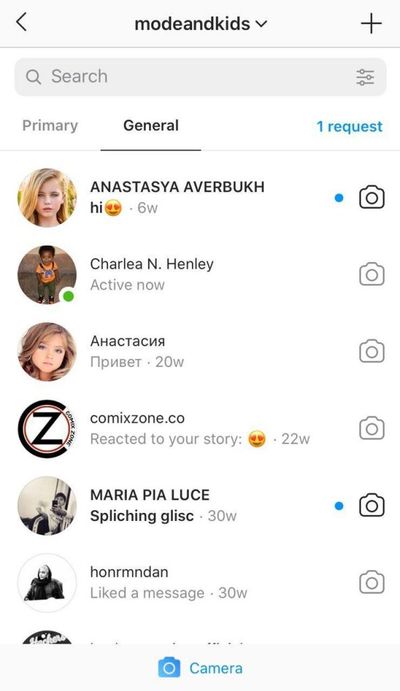
Step 4: Type your message (up to 1,000 characters) and tap Send.
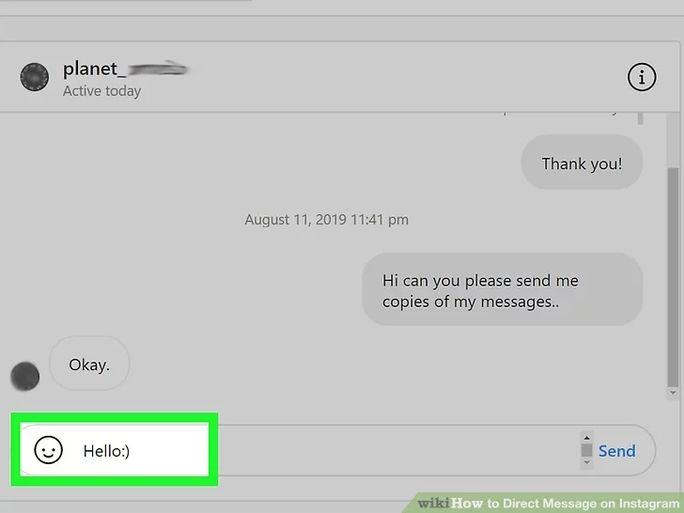
To reply to a story: Open the story, tap the message bar at the bottom, type your reply, and send. This triggers a new DM conversation with that user.
To DM from a post: Tap the paper plane icon below any post to send it to a specific contact via DM.
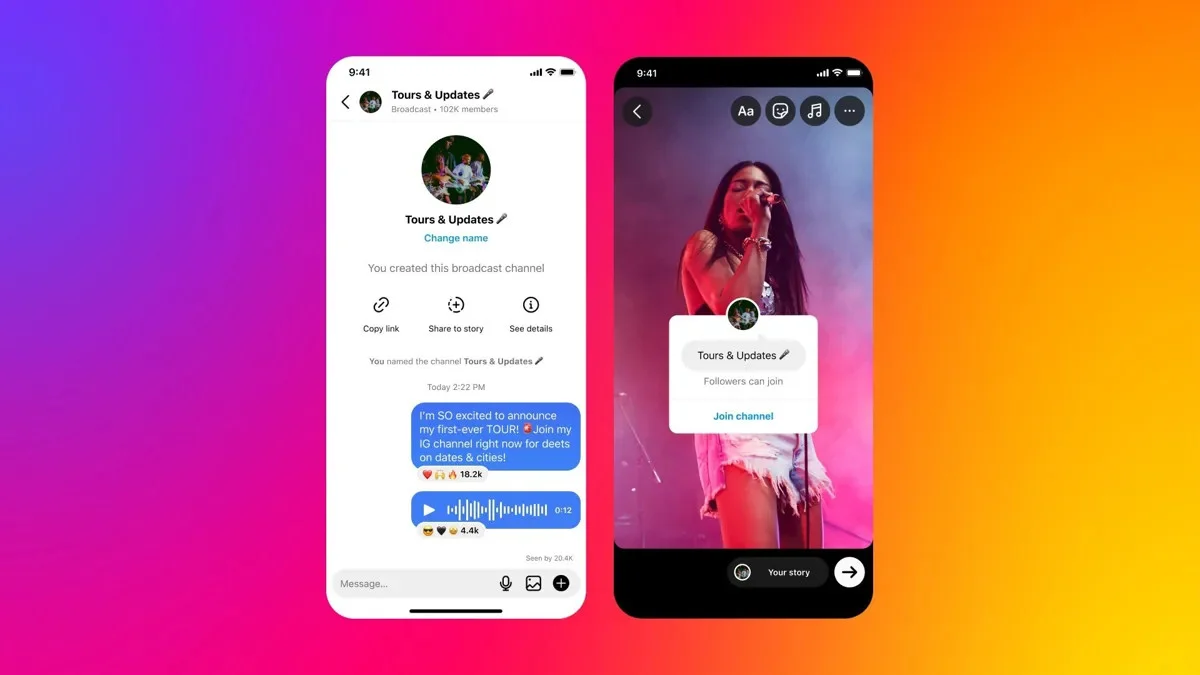
In February 2023, Instagram launched Broadcast Channels, a one-to-many messaging feature that lives inside Instagram DMs. Think of it as a VIP newsletter that lands directly in your followers’ inboxes, with no algorithm between you and them.
Unlike standard DMs (one-to-one), a Broadcast Channel lets you send updates to all subscribers at once. Only you can post messages. Followers can react with emoji, participate in polls, and reply to prompts — keeping the channel signal-rich.
Instagram reports 1.5 billion messages sent through Broadcast Channels every month.
Who can create a Broadcast Channel in 2026:
- Creator or Business professional account with 10,000+ followers
- Account must comply with Instagram community guidelines
- Available globally for iOS and Android
How to create Instagram Broadcast Channel:
- Open Instagram and tap your DM icon (top right)
- Tap the compose icon and select, “Create broadcast channel”
- Choose a name that signals clear value to your audience
- Your followers receive a join notification on your first message
What works well for brands:
- Product launches and exclusive early access
- Behind-the-scenes content
- Weekly insights or industry updates
- Time-sensitive offers
- Q&A sessions using built-in polls
Broadcast Channel messages land directly in the DM inbox. They don’t compete with the feed algorithm. If a follower opts in, they get your message.
Comment-to-DM Strategy: The #1 Lead Generation Tactic in 2026
The most effective Instagram DM strategy in 2026 requires no manual messaging that can turn your every reel or post into a lead magnet or sale.
Here’s how it works:
Once you setup broadcast channel for your business or brand you can begin with,
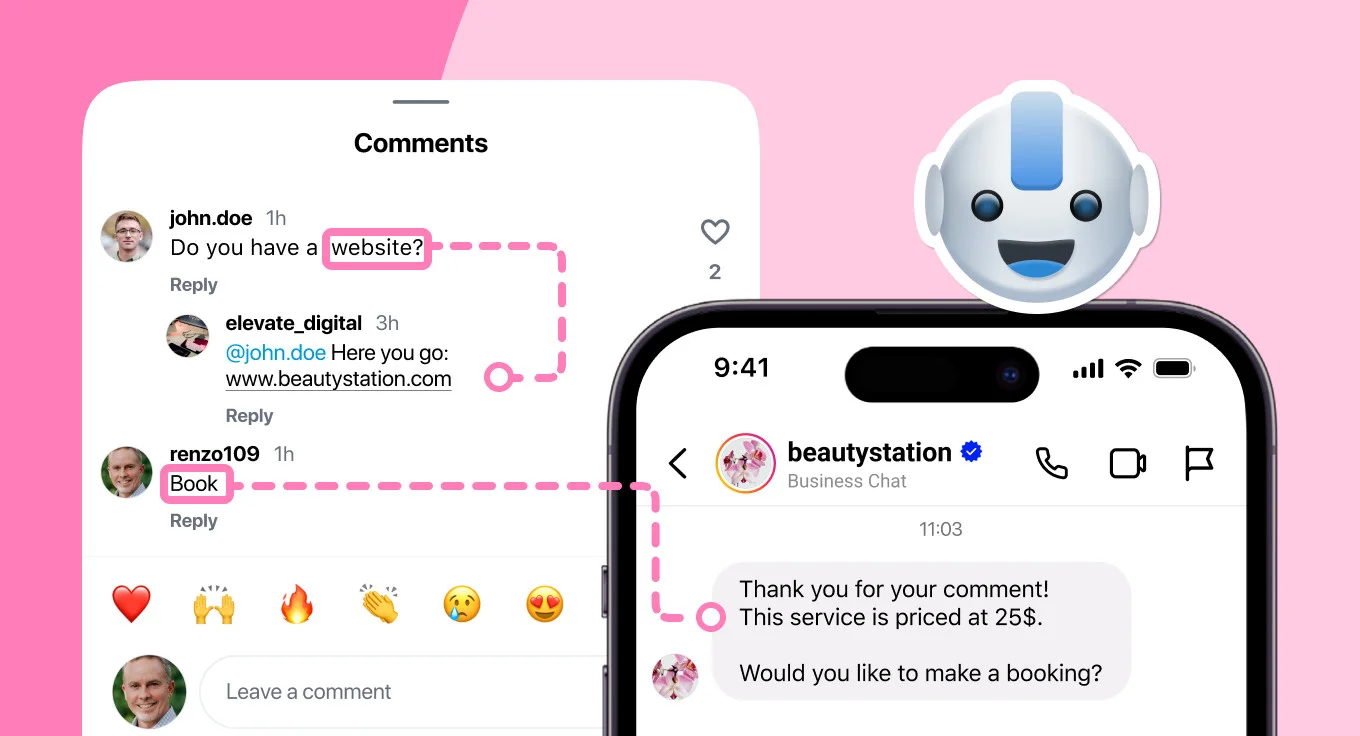
1. Sharing a Reel or static post with a keyword call-to-action.
Example: “Comment GUIDE below and I’ll send you our free Instagram strategy checklist.”
2. When a follower comments the keyword, they automatically receive a DM via Instagram’s official Messaging API.
3. The DM delivers your resource, qualifies the lead, or starts a conversation, hands-free.
| What you get | How it happens |
| Higher reach | Comments signal the algorithm to push your post wider |
| DM conversation | Every commenter enters your inbox automatically |
| Lead capture | DM delivers your resource or starts a qualification flow |
| Opt-in intent | Commenter actively chose to engage — highest quality lead |
This tactic is effective because it solves two problems simultaneously: comments boost reach while DMs start conversations. The commenter opted in. You didn’t cold-message anyone.
Best Ways to Use Instagram DMs for Business & Brands
1. Click-to-DM Ads (Paid — Highest Intent)
Instead of sending users to a landing page, Click-to-DM ads open a one-on-one Instagram DM conversation directly from the ad. The ad appears in Feed, Stories, or Reels, the click opens your DM inbox.
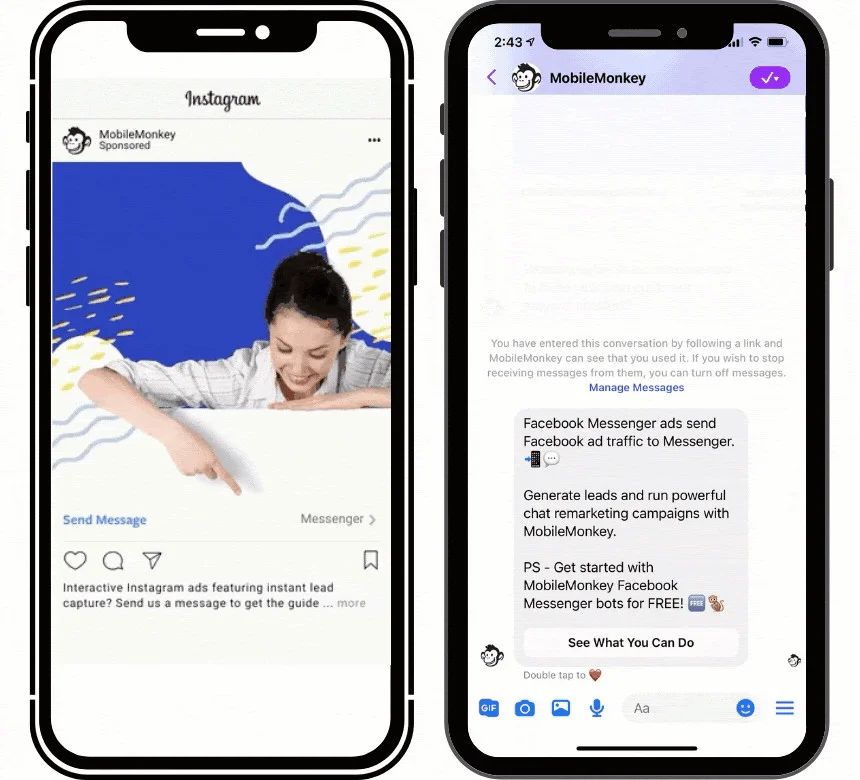
Why it works: DM campaigns can significantly outperform standard lead form ads on cost and quality. In one documented example, a business using Instagram DM automation saw a 34% reduction in cost per lead and a 43% increase in qualified lead volume after optimizing their DM qualification flow, as per Spur’s case study data.
Best for: High-ticket services, local businesses, agencies running client acquisition campaigns.
A successful Click-to-DM campaign sends hundreds of DMs simultaneously. Without automation or a centralised inbox, response time collapses and conversions follow. Use an automation tool or a team inbox tool (like SocialPilot’s Social Inbox) before running these at scale.
2. Story Reply Automation
Post a Story with a call-to-action: “Reply to this story to get our pricing guide.” Every story reply opens a DM conversation and a 24-hour automation window. Automate the follow-up with a tool connected to Meta’s API.
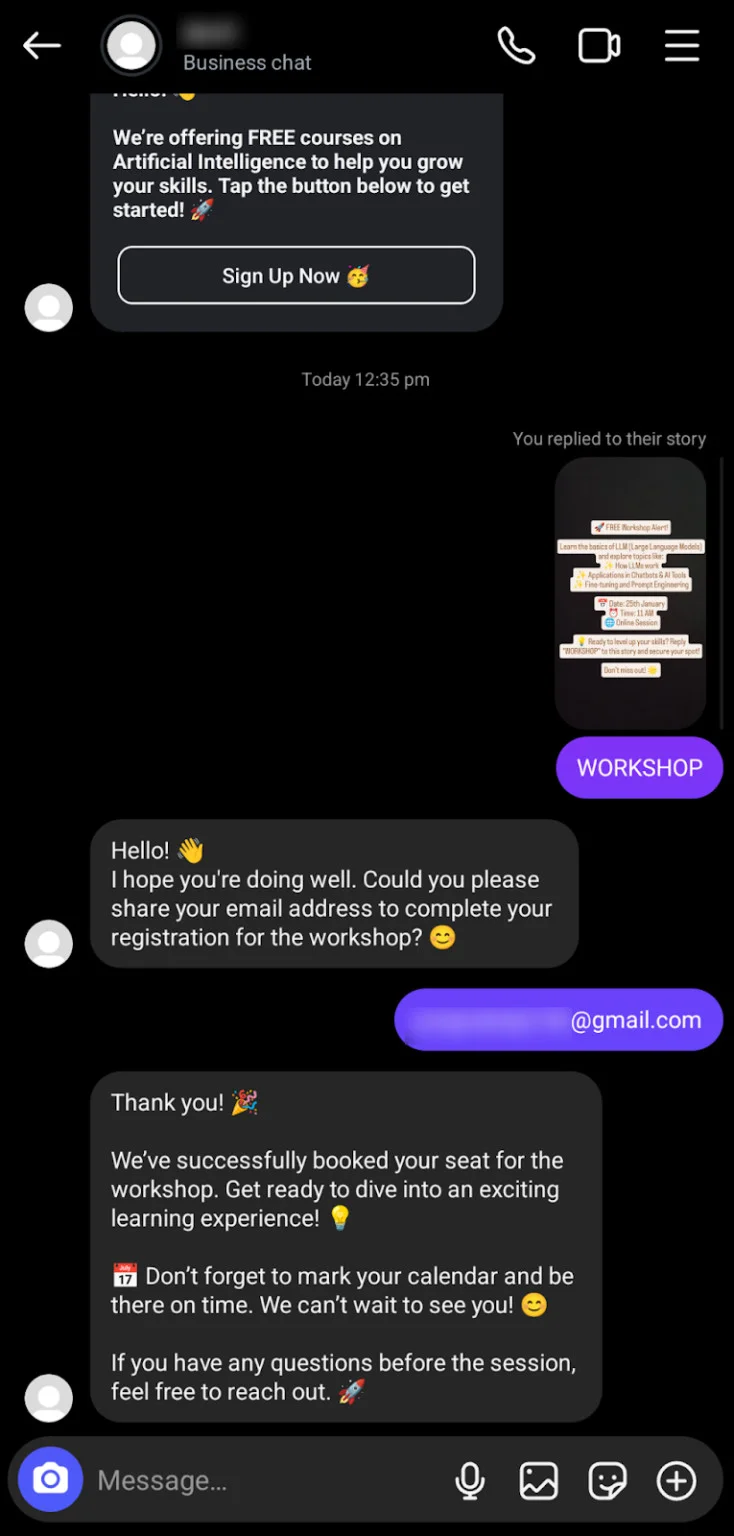
This works because story replies feel personal. The user initiated. Conversion rates are significantly higher than cold outreach.
3. Comment-to-DM at Scale
Run a Reel campaign with a keyword CTA. Pair it with DM automation. Every comment → automatic DM → automated lead sequence. The automation handles hundreds of conversations simultaneously while the Reel continues to generate reach.
4. Broadcast Channels for Mass Reach (Organic)
For accounts with 10,000+ followers, Broadcast Channels are the only compliant way to send one message to thousands of opted-in followers without cold outreach. Use for launches, flash offers, or exclusive content drops.
5. Manage Customer Service at Scale
Instagram DMs are where your customers expect support in 2026. According to Meta, 150 million users message a business on Instagram every month. Ignoring or slow-responding to DMs isn’t just a missed opportunity, it’s a retention risk. For agencies and teams managing multiple accounts, a centralized inbox is essential.
Top Instagram DM Automation Tools for Brands (2026)
All tools below use Meta’s official Instagram Graph API compliant and safe for your account.
| Tool | Best for | Pricing | Key differentiator |
| ManyChat | Multi-platform (Instagram + WhatsApp + SMS + Email) | $15–$65/mo | Strongest flow builder; true multi-channel automation |
| SocialPilot | Agencies and teams managing DMs across multiple client accounts | From $30/mo | Unified inbox across all accounts; AI-generated replies; Comment-to-DM automation; team assignment and response tracking |
| InstantDM | Budget-conscious Instagram-only creators | From $8/mo | Flat rate, unlimited contacts; DM Safety Queues prevent shadowbans |
| inrō | Brands wanting AI-powered conversations | From €12.99/mo | GPT-powered chatbot for AI-generated DM replies |
| CreatorFlow | Creators scaling 10K–100K+ | $15/mo flat | Comment-to-DM, Story-reply-to-DM, Keyword-to-DM triggers |
| Spurnow | Compliance-first agencies | Custom | Built-in compliance guide; 24-hour window management |
Which one Instagram DM tool to choose:
- Multi-platform campaigns → ManyChat
- Managing DMs across multiple client accounts → SocialPilot
- Instagram-only under $10/mo → InstantDM
- Want AI to write DM replies → inrō
- High-volume Comment-to-DM → CreatorFlow
- Agency managing compliance for multiple clients → Spur
Avoid any tool that asks for your Instagram username and password, those are not API-connected and violate Instagram’s Terms of Service.
DMs as an Algorithm Signal: Why Your Inbox Affects Your Reach
In 2026, Instagram’s algorithm uses direct message activity as a ranking signal. This isn’t widely discussed, but it’s well-documented.
According to Metricool’s analysis of 15 million+ Instagram posts, DM sends are among the top three signals Instagram uses to determine how widely to distribute your content. When a user actively DMs your account or replies to your DM, Instagram interprets that as a strong engagement signal and increases how often your content appears to that user.
What this means in practice:
- Accounts that generate regular DM conversations get broader reach, not just better customer relationships
- Comment-to-DM campaigns double as an algorithmic growth tool
- Broadcast Channel subscribers who interact with polls and reactions contribute to your account’s engagement health
- Teams that respond quickly to DMs don’t just convert better they signal activity that helps organic reach
This is why DM strategy and content strategy are the same conversation in 2026.
Instagram DM Automation in 2026: What’s Allowed and What Isn’t
Before automating your Instagram DMs, understand Instagram’s official messaging rules. Breaking them risks temporary restrictions or a permanent DM ban.
The 24-Hour Messaging Window
Instagram only allows automated messages within 24 hours of a user’s last interaction.
An interaction includes: a comment, story reply, DM sent to your inbox, reaction to your Story or Reel, or a click-to-DM ad interaction.
After 24 hours with no interaction, automated follow-up messages are not permitted. The window resets with every user engagement.
DM Rate Limits
| Account type | Daily limit | Hourly limit |
| New accounts (< 3 months) | 20–50 DMs/day | 200/hour |
| Established accounts | 100–200 DMs/day | 200/hour |
| Accounts with restrictions | Reduced temporarily | Reduced temporarily |
Exceeding the hourly limit triggers a 24–48 hour temporary block.
Safe vs. Unsafe Automation
| Approach | Risk level | Examples |
| Official Meta API tools | Safe | Manychat, inro.social, Spur, ManyDMs |
| Tools using your login credentials | High risk | Any tool asking for your username and password |
Safe tools operate through Meta’s Messaging API and are compliant by design. Unsafe tools that require your Instagram credentials violate Instagram’s Terms of Service and carry significant account risk.
The practical rule: if a tool asks for your Instagram username and password, don’t use it for automation.
Instagram DM Limits You Need to Know
| Limit type | Limit |
| Characters per message | 1,000 (letters, spaces, emojis, punctuation) |
| DMs per day (new accounts) | 20–50 |
| DMs per day (established accounts) | 100–200 |
| DMs per hour | Up to 200 |
| Group DM participants | Up to 250 |
| Pinned messages per conversation | Up to 3 |
| Broadcast Channel subscribers | Unlimited |
Messages over 1,000 characters will not send, split long messages into multiple DMs.
Start Treating Instagram DMs Like a Growth Channel
Most brands are sitting on one of the highest-converting channels on the internet and using it to answer “what are your business hours?”
The inbox is the strategy now. Comment-to-DM drives reach and leads at the same time. Broadcast Channels put your message in front of opted-in followers with no algorithm in the way. Click-to-DM ads outperform standard lead forms on cost and quality. And every DM conversation feeds the ranking signal that determines how far your content travels.
The brands winning on Instagram in 2026 aren’t posting more, they’re responding faster, automating smarter, and treating every DM as the start of a relationship.
Your inbox is open. Use it. Start your free SocialPilot trial and automate your Instagram DM responses today.