Eficacia en la gestión de las redes sociales con Planable
Lo mejor para : Pequeñas empresas, agencias, empresas
Precios: $33/mo
Cómo analizamos Planable
Nuestro análisis de Planable se basa en pruebas prácticas y aplicaciones reales realizadas por nuestros expertos en redes sociales. Exploramos sus características principales, como la programación, el análisis y la gestión de anuncios a través de cuentas de marca reales para evaluar el rendimiento. Además, incorporamos información de fuentes externas de confianza, como las opiniones de los usuarios en G2 y Capterra.
| Número de Review (G2) | 838 |
| Clasificación general por estrellas (G2) | |
| Facilidad de uso | |
| Calidad del apoyo | |
| Facilidad de instalación | |
| Precios mínimos | $33/Mes |
| Número de cuentas sociales | 4 |
| Número de miembros del equipo | 30 |
| Programación y publicación |
 |
| Analítica |
|
| Bandeja de entrada social |
|
| Colaboración |
|
| Marca blanca |

|
| Escucha social |
|
| Lo mejor para | Medianas empresas, Empresas, Agencias |
Planable es una herramienta muy práctica que se lanzó hace menos de 10 años con el objetivo de facilitar la planificación de las redes sociales y el trabajo en equipo. Lo que más nos gusta es lo intuitiva que resulta desde el primer momento, perfecta para equipos que quieren tener su proceso de redes sociales ordenado y organizado sin pasar por el aro.
Una de las cosas que más llama la atención cuando empiezas a usar Planable es el flujo de comentarios y aprobaciones. Puedes dejar comentarios directamente en las publicaciones, y las aprobaciones son rápidas y sencillas, por lo que se reducen las idas y venidas por correo electrónico o chat. Además, te ofrecen cuatro formas diferentes de ver tus contenidos: feed, cuadrícula, calendario y vista de lista. Hemos jugado con ellas y, sinceramente, cambiar de una a otra facilita enormemente la visualización de tu calendario o de lo que está por venir. Por ejemplo, la vista de calendario te permite detectar huecos o días atestados de inmediato, mientras que la cuadrícula te ofrece una instantánea rápida de cómo se verá realmente tu alimentación.
La programación también es flexible: puedes programar publicaciones para diferentes plataformas sin complicaciones, lo que ayuda a mantener la coherencia de tu marca en todas partes. Es una gran ventaja si tienes varias cuentas.
Otra de las funciones favoritas de los usuarios es el proceso de aprobación. Realmente reduce las confusas idas y venidas y ahorra tiempo. Además, los análisis que ofrecen son inteligentes pero no abrumadores. Obtienes cifras de participación claras que te ayudan a ver lo que funciona y lo que no, para que tu equipo pueda centrarse en lo que realmente le gusta a tu audiencia.
Planable también tiene una bandeja de entrada social donde puedes responder a los comentarios y mensajes de Instagram y Facebook en un solo lugar. La hemos probado y resulta muy práctica para organizar las conversaciones por estado, reaccionar en tiempo real y mantener a tu comunidad comprometida sin tener que saltar de una aplicación a otra.
En cuanto a los precios, no hay prueba gratuita, pero sí un plan gratuito para todo el tiempo. Después, sus planes empiezan en $33 al mes por un espacio de trabajo que cubre cinco cuentas, bastante competitivo para empresas o agencias. El único inconveniente es que no tiene opciones de marca blanca ni funciones de escucha social, así que si realmente las necesitas, puede quedarse corto.
Alternativa a Planable mejor valorada
Pros
Bibiana O.
Planable es fácil de implementar y se ha convertido en una parte esencial de mis tareas diarias como propietaria de un negocio y gestora de redes sociales. Me gusta lo fácil que es planificar publicaciones en distintas plataformas de redes sociales, como Instagram y Pinterest. Es genial que puedas conectar varias cuentas, lo que hace que la gestión de todo en un solo lugar sea realmente conveniente.
Contras
Poss K.
cuando un post está programado, es bastante difícil hacer algunos cambios (no siempre estoy seguro de qué cambios causan esto), que requiere que usted desprogramar un post (que a veces no está claro si ciertos ajustes se han conservado.
| Inteligente y avanzado Colas |
|
| Repetir entradas |
|
| Calendario de redes sociales |
|
| Publicación automática desde RSS |
|
| Programación masiva |
|
| Vista previa del puesto |
|
| Asistente AI |
|
| Apoya a Facebook Primer comentario |
|
| Apoya Instagram First Comenta |
|
| Apoya a LinkedIn First Comentario |
|
| Publicaciones de colaboración en Instagram |
|
| TikTok Carrusel de Entradas |
|
| Carrusel de publicaciones en LinkedIn |
|
| Programación de cortos |
|
Cuando se trata de programar y publicar, Planable realmente da en el clavo con lo básico que necesitan los equipos de redes sociales. Hemos comprobado que sus funciones hacen que la gestión y planificación de contenidos sea mucho más organizada y eficiente. La vista de calendario de redes sociales es muy útil para organizar visualmente las publicaciones y hacer un seguimiento de lo que está por venir sin tener que hacer conjeturas.
También nos encanta la función de programación masiva. Es un gran ahorro de tiempo, especialmente si estás manejando un montón de contenido a la vez. Poder programar varias publicaciones de una sola vez nos ahorra mucho tiempo. Además, la opción de previsualización de publicaciones es genial, ya que nos permite ver exactamente cómo se verán las publicaciones en cada plataforma, por lo que estamos seguros de que todo encaja antes de pulsar publicar.
Otra herramienta útil es la función de repetición de publicaciones. La utilizamos para reciclar los contenidos que mejor funcionan sin tener que empezar de cero cada vez, lo que aumenta nuestra eficacia. Y luego está Notability, su asistente de inteligencia artificial. Es como tener un compañero de contenidos que nos da ideas e incluso puede ayudarnos a reescribir las entradas, haciendo que el proceso creativo sea más fluido y rápido.
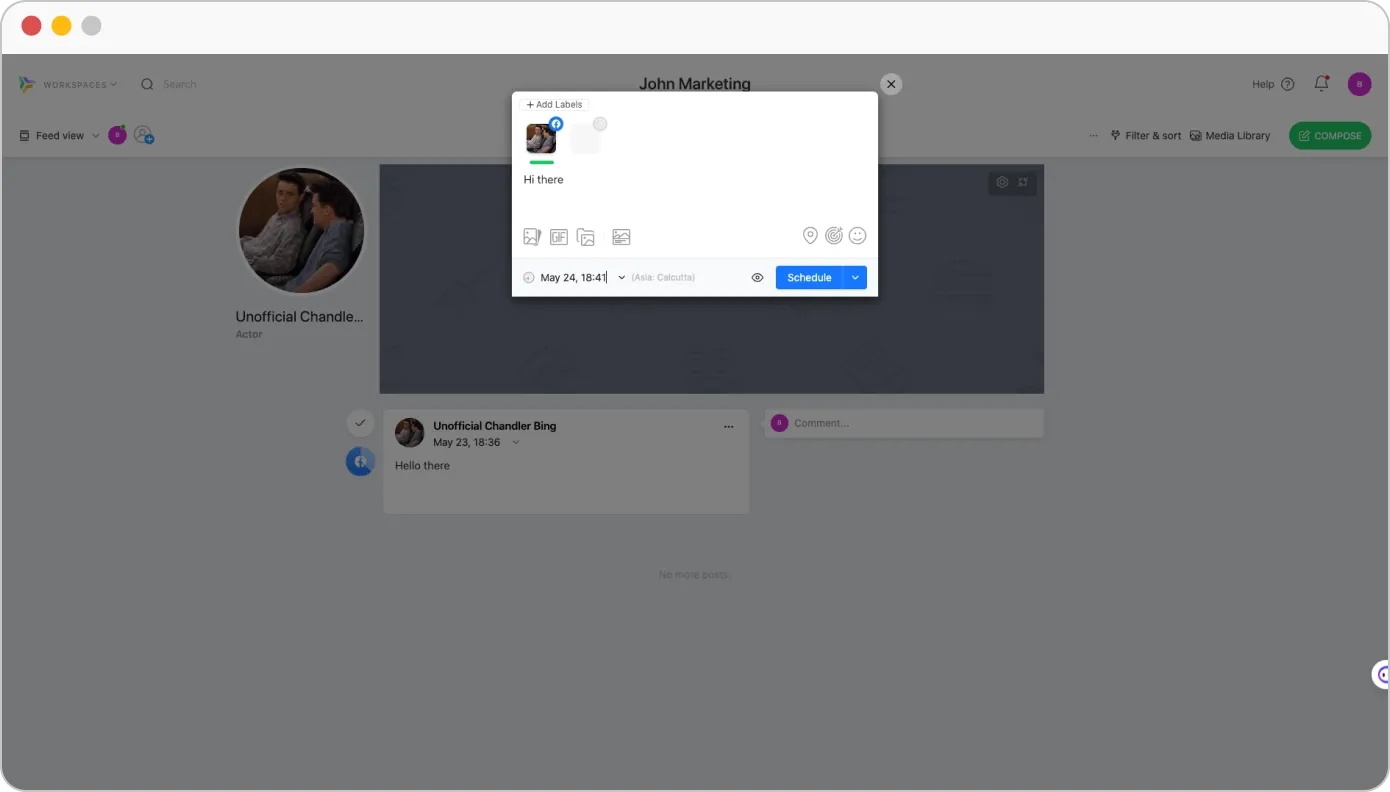
Sin embargo, no pudimos evitar darnos cuenta de la ausencia de colas inteligentes y auto-publicación de RSS, lo que podría ser crítico para los usuarios que buscan un flujo de trabajo más automatizado. Además, no es compatible con las publicaciones en carrusel de TikTok. Sin embargo, la plataforma permite a los usuarios programar YouTube Shorts y publicar LinkedIn carousel posts.
Nat L.
Me encanta que puedo tomarme una hora o dos y planificar todo el mes con el contenido que se publicará en las redes sociales de mis clientes. Me facilita mucho el trabajo. Configurarlo es fácil de hacer también, prefiero la vista de calendario y me permite ver visualmente cómo todos los puestos están programados y me permite llenar las ranuras en las que podemos beneficiarnos de alguna publicación.
| Análisis detallados de las redes sociales |
|
| Análisis combinados multicuenta |
|
| Métricas de compromiso |
|
| Análisis del rendimiento de los hashtags |
|
| Informe personalizado Constructor |
|
| Informe PDF por correo electrónico al cliente |
|
| Informe de autoprogramación para equipo y cliente |
|
| Etiqueta blanca Informe descargable en formato PDF |
|
Cuando nos adentramos en los análisis de Planable, vemos que ofrece una forma sencilla de obtener la información clave que los profesionales del marketing necesitan para realizar un seguimiento de los resultados de sus contenidos. Obtienes métricas de participación detalladas para cada cuenta, por lo que es fácil estar al tanto de lo que está resonando.
Dicho esto, aunque Planable cubre bien los aspectos básicos, sus análisis pueden parecer un poco limitados, sobre todo si eres una agencia o una pequeña empresa que busca escalar. Por ejemplo, no combina datos de varias cuentas ni permite crear informes personalizados para mostrar a los clientes una imagen completa del rendimiento.
Sin embargo, para cualquiera que necesite un análisis fundamental para realizar un seguimiento de la participación y comprender cómo interactúa su audiencia, Planable cumple con su cometido. Te ayuda a ajustar tu estrategia de contenidos en función de lo que realmente funciona, lo cual es muy valioso.
Patricia L.
Me gustaría que Planable tuviera una función de análisis para ahorrarme mucho trabajo a la hora de generar informes para mis clientes. Aparte de eso, Planable sigue satisfaciendo todas nuestras necesidades de gestión de redes sociales.
| Responder a mensajes y comentarios |
|
| Puede responder a los mensajes |
|
| Responder a las preguntas y Review |
|
| Puede Responder en Visitante Mensajes |
|
| Bandeja de entrada social unificada |
|
| Responder a las historias |
|
Planable es excelente para la colaboración y la planificación, lo que facilita la creación de contenidos para los equipos. Pero en lo que respecta a la bandeja de entrada social, el compromiso y las funciones de escucha, es un poco limitado.
Ahora mismo, Planable tiene una bandeja de entrada unificada para los comentarios de Facebook e Instagram, lo cual es bastante práctico. Podemos responder, reaccionar, eliminar y mantener las conversaciones organizadas marcándolas como abiertas, responder más tarde o finalizadas, todo ello sin salir de la plataforma. ¿Y las buenas noticias? Están trabajando para añadir más plataformas, por lo que la gestión de la participación debería ser aún más fácil.
Una cosa a tener en cuenta: todavía no se puede responder a los mensajes directos o comentarios desde Planable. Para ello, tendrás que volver a las aplicaciones sociales nativas para gestionar toda la interacción con el público.
| Flujo de aprobación de contenidos |
|
| Por puesto Multiusuario Colaboración |
|
| Comentarios |
|
| Gestión de accesos |
|
| Incorporación gratuita e ilimitada de clientes |
|
La colaboración es una de las funciones más importantes de Planable para agilizar los procesos de planificación, creación y aprobación de contenidos. Ofrece una interfaz fácil de usar con múltiples vistas para mejorar las estrategias visuales y organizativas.
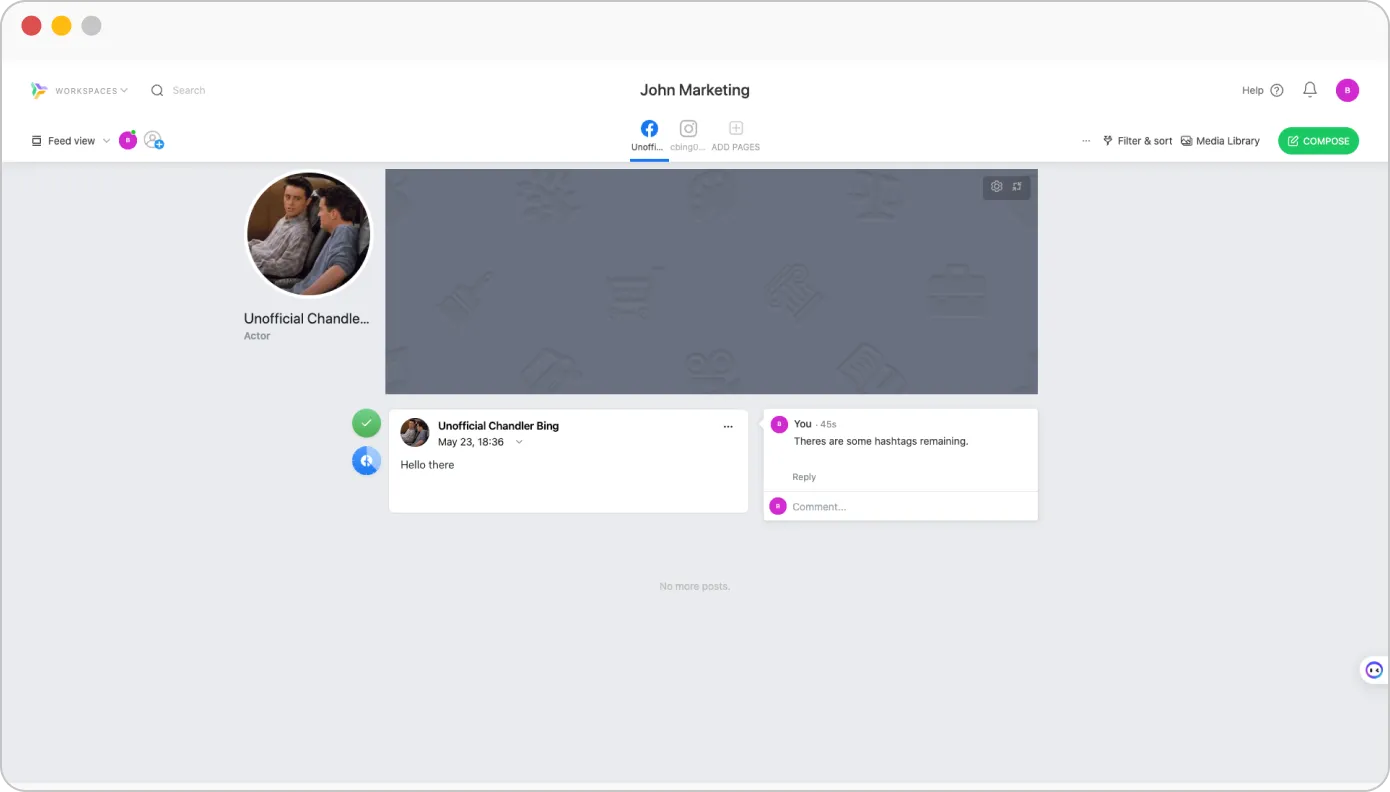
Con una colaboración eficaz, Planable permite a los miembros del equipo participar en debates en tiempo real dejando comentarios directamente en las publicaciones. También admite la colaboración de varios usuarios en una misma entrada, lo que permite que muchos contribuyan al contenido.
Un flujo de trabajo de aprobación Planable mejora y fomenta la revisión estructurada y garantiza que todos los contenidos cumplen las normas necesarias antes de su publicación.
La sólida gestión de accesos es otro aspecto clave de Planable. Ayuda a los equipos a mantener la integridad de los contenidos asignando funciones y permisos específicos a los distintos miembros del equipo.
Hannah R.
Lo hace todo muy fácil. Nos encantan las diferentes vistas, ya que cada miembro del equipo trabaja de forma diferente y tiene preferencias distintas. El proceso de aprobación facilita mucho el trabajo con los clientes y los distintos miembros del equipo.
| Asistente de IA para la generación de contenidos | |
| Sugerencias de subtítulos | |
| AI Mejor momento para publicar sugerencias | |
| Generación de ideas | |
| Reescritura de puestos | |
| AI ChatGPT Post Scheduler | |
| Recomendaciones automáticas de hashtags | |
Las funciones de inteligencia artificial de Planable ayudan a acelerar la creación de contenidos. El generador de pies de foto proporciona ideas rápidas a partir de imágenes o temas que sólo necesitan un pequeño retoque. La herramienta de reescritura de entradas es útil para refrescar los borradores sin tener que empezar de nuevo.
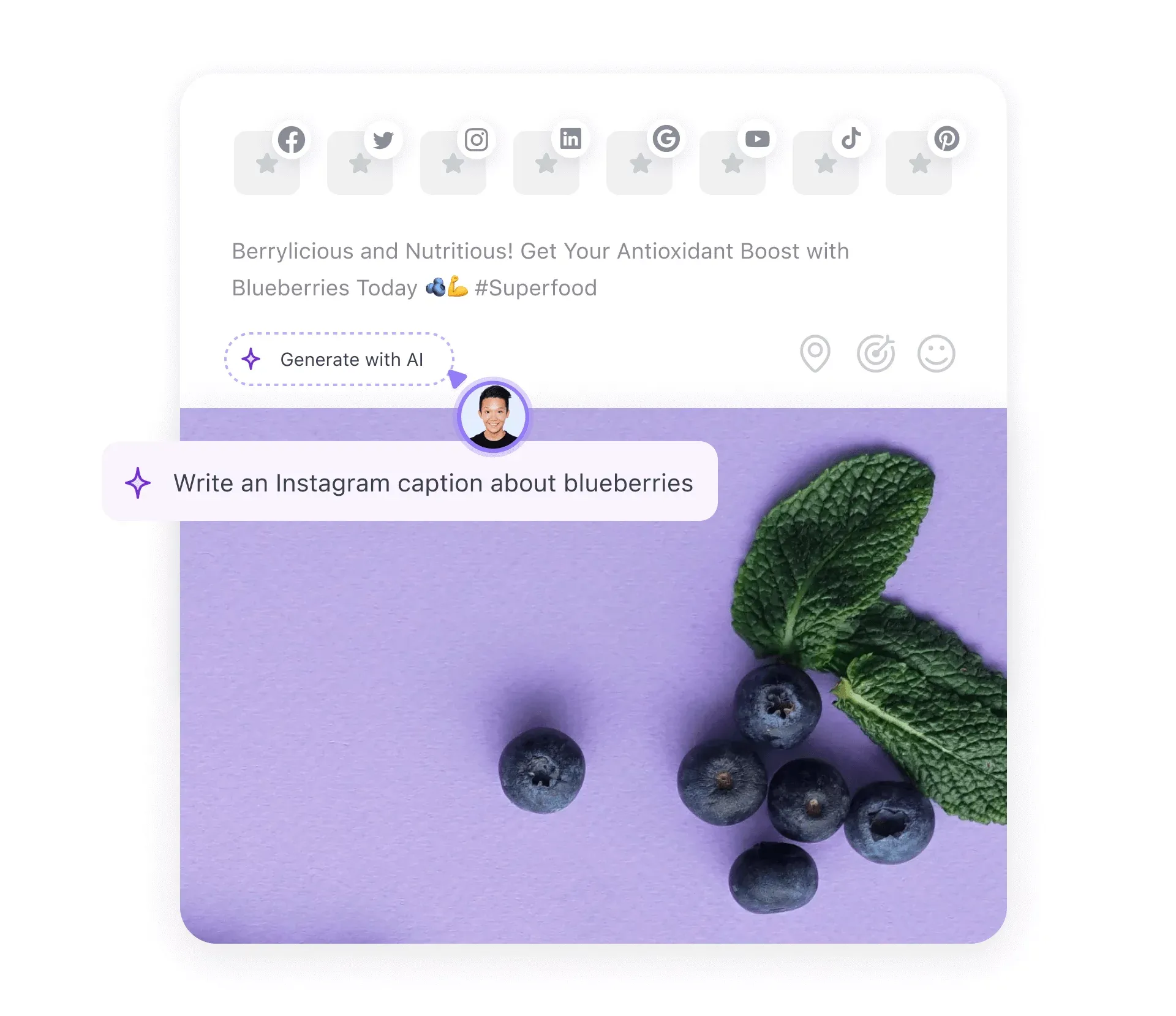
La IA también sugiere nuevas ideas de contenido basadas en lo que hemos publicado antes, manteniendo el flujo creativo. Las sugerencias de hashtags nos ahorran tiempo y nos ayudan a llegar al público adecuado.
El asistente de IA de Planable es útil, pero tiene sus límites. Puede volverse repetitivo, ofrece poca personalización y carece de funciones avanzadas como la predicción del mejor momento para publicar indicaciones y la programación basada en IA. A menudo es necesario realizar ediciones manuales para mantener la naturalidad del contenido. No es tan potente como las herramientas de IA independientes y tiene dificultades con los temas complejos.
Morgan Ellis W.
La herramienta AI Me resulta muy útil y rápida para hacer que mis pies de foto sean más concisos o contundentes, y además se puede editar fácilmente si quiero cambiar o eliminar una palabra de la sugerencia.
| UI/UX | Sencillo y fácil de usar |
| Facilidad de instalación | |
| Tiempo de preparación necesario | Media |
Como ya hemos dicho, Planable es una herramienta fácil de usar y con un diseño intuitivo, lo que la hace accesible a usuarios con distintos conocimientos técnicos. El proceso de configuración es sencillo: los usuarios pueden crear una cuenta, configurar un perfil y establecer un espacio de trabajo en cuestión de minutos.
La eficacia de la plataforma minimiza el tiempo de inactividad, lo que permite a los equipos centrarse en la estrategia de contenidos y establecer rápidamente un entorno de colaboración para la gestión de las redes sociales.
Adam K.
Me ha impresionado mucho lo personalizable que es Planable. Tiene soluciones para todos los casos de uso de nuestro equipo y, en muchos casos, incluso tiene recursos adicionales que van más allá.
| Asistencia por chat en directo |
|
| Asistencia por correo electrónico |
|
| Formación |
|
| Soporte de configuración |
|
| Gestor de cuentas dedicado |
|
Planable ofrece múltiples canales para ayudar eficazmente a los usuarios. Su servicio de chat en directo ofrece asistencia en tiempo real para resolver las dudas inmediatas de los clientes. Con asistencia por correo electrónico, soporte de configuración y un gestor de cuentas dedicado, Planable refuerza las áreas de interés de los clientes.
Aunque la ausencia de asistencia telefónica puede ser una limitación para los usuarios que prefieren la comunicación verbal directa, los canales de asistencia disponibles satisfacen las necesidades del cliente.
Plan gratuito
Gratis
Por mesCaracterísticas
Básico
$33
Por mesCaracterísticas
Pro
$49
Por mesCaracterísticas básicas
Empresa
A medida
Por mesCaracterísticas profesionales
La estructura de precios de Planable está diseñada para satisfacer las necesidades de un amplio abanico de usuarios, desde autónomos a pequeñas empresas, pasando por grandes compañías. La plataforma ofrece precios flexibles a través de planes escalonados para adaptarse a las necesidades de cada usuario del sector.
Tiene un plan gratuito limitado a 50 puestos. Por encima de éste hay un plan básico que cuesta $33 al mes por un espacio de trabajo y usuarios ilimitados, lo que lo hace adecuado para equipos y empresas pequeñas. El plan Pro es más adecuado para equipos más grandes y agencias, y cuesta $49 al mes por más funciones que el plan básico. Por último, está el plan para empresas, que puede personalizarse según las necesidades del usuario.
En general, el precio es razonable, dadas las prestaciones que ofrece la herramienta. Sin embargo, con la falta de funciones de marca blanca para la escucha social, resulta difícil gestionar todas las actividades de las redes sociales desde una única plataforma. Esto podría requerir añadir otra herramienta a sus necesidades de gestión.
A pesar de todo, Planable siempre será una mezcla de flexibilidad, asequibilidad y capacidad de colaboración que agiliza la gestión de las redes sociales.
Bibiana O.
Planable es bastante cara, e incluso con el plan básico, algunas funciones siguen bloqueadas. Su precio es superior al de otras aplicaciones similares, lo que puede resultar frustrante si buscas opciones más asequibles.
Planable incluye algunas funciones sólidas de planificación y colaboración, pero su falta de escucha social unificada, sus limitados análisis avanzados y la ausencia de opciones de marca blanca han hecho que algunos usuarios busquen alternativas más flexibles.
Si eres una de esas personas que está pensando en cambiar de Planable, no te preocupes, hemos reunido cinco alternativas que aportan diferentes puntos fuertes. Estas opciones pueden ser más adecuadas si eres una marca o una agencia que busca una gestión más completa de las redes sociales.
 SocialPilot |
Planable |
 Agorapulse |
 Sprout Social |
 Loomly |
|
|---|---|---|---|---|---|
| Precios | A partir de $30/Mes | A partir de $33/mes | A partir de $69/Mes | A partir de $199/mes | A partir de $60/mes |
| Lo mejor para | Agencias y pequeñas empresas | Medianas empresas | Marcas y empresas | Marcas y empresas | Marcas y empresas |
| Perfiles sociales | 7 | 4 | 10 | 5 | 10 |
| Facilidad de uso | |||||
| Ayuda | |||||
| Publicación | |||||
| Programación masiva | 500 puestos | 400 puestos | 200 puestos | 350 puestos | 400 puestos |
| Colas inteligentes | |
|
|
|
|
| Repetir puesto | |
|
|
|
|
| Primer comentario | |
|
|
|
|
| Selección de audiencias | |
Sólo LinkedIn |
|
No | |
| Planificación y creación de contenidos | |||||
| Biblioteca de contenidos | |
|
|
|
|
| Vista del calendario | Fácil de leer |
Complejo |
Complejo |
Abrumador |
Difícil de leer |
| Asistente AI | |
|
|
|
|
| Etiquetado de ubicaciones | |
Sólo Instagram |
|
|
|
| Calendario festivo | |
|
|
|
|
| Llamadas a la acción personalizadas | |
Sólo Facebook |
|
|
|
| Instagram Collab Posts | |
|
|
|
|
| Editor de imágenes | |
|
|
|
|
| Compromiso | |||||
| Bandeja de entrada social | Bandeja de entrada unificada |
|
Varias bandejas de entrada |
Complejo |
Desorganizado |
| Responder a los comentarios | |
Sólo Facebook e Instagram |
|
|
|
| Responder a Reviews & Consultas | |
|
|
|
|
| Capacidades de IA | |||||
| Programador GPT | |
|
|
|
|
| Respuesta automatizada | |
|
|
|
|
| Generador de subtítulos | |
|
|
|
|
| Generador de hashtags | |
|
|
|
|
| Mejor momento para publicar sugerido por AI | |
|
|
|
|
| Analítica | |||||
| Análisis detallados de las redes sociales | Fácil de leer |
Abrumador |
Complejo |
Complejo |
Complejo |
| Generador de informes personalizados | |
|
|
|
|
| Post Performance | |
|
|
|
|
| Compartición automática de informes con los clientes | |
|
|
|
|
| Colaboración entre equipos y clientes | |||||
| Gestión de clientes | |
|
|
|
|
| Flujos de aprobación | Fácil y rápido |
Complejo |
Confuso |
Fallos de seguimiento |
Funciones que faltan |
| Por puesto Colaboración multiusuario | |
|
|
|
|
| Aprobación sobre la marcha | |
|
|
|
|
| Etiquetado en blanco | |||||
| Cuadro de mandos de marca blanca | |
|
|
|
|
| Informe descargable de marca blanca | |
|
|
|
|
| Pruébelo gratis | Más información | Más información | Más información | Más información | |
Si busca una herramienta de gestión de redes sociales completa en comparación con Planable, SocialPilot destaca como la mejor opción. Llena todos los vacíos dejados por Planable y ofrece funcionalidades aún más robustas.
SocialPilot es una herramienta de gestión de redes sociales que cubre prácticamente las carencias de Planable. Por ejemplo, cuenta con una bandeja de entrada social y funciones de marca blanca, dos grandes ventajas si te importa atraer a tu público y mantener contentos a tus clientes.
SocialPilot también es muy fácil de usar. Tanto si estás empezando como si tienes más experiencia, su interfaz es fluida y fácil de usar. Además, la programación masiva y un flujo de trabajo de aprobación avanzado ayudan a hacer las cosas más rápido.
¿Otra cosa que nos gusta? SocialPilot ofrece planes flexibles que no te dejarán sin blanca -a partir de $30 al mes- y sin comisiones ocultas. Así que si eres una pequeña empresa o una agencia que busca más potencia sin costes adicionales, merece la pena que le eches un vistazo.
Planable es una herramienta sencilla y fácil de usar que ofrece excelentes funciones de planificación, colaboración y programación de redes sociales. Sus increíbles funciones visuales de planificación y colaboración le permiten crear y programar publicaciones perfectas en las redes sociales para varias cuentas simultáneamente.
Planable es un fuerte competidor en el panorama de la gestión de redes sociales para empresas y agencias centradas en una planificación eficaz. Su impresionante estructura de precios es flexible para equipos de distintos tamaños.
Aunque Planable es una plataforma útil para gestionar las redes sociales, tiene algunas lagunas que le impiden ser una solución "todo en uno". Al revisar las capacidades de Planable, descubrimos que varias limitaciones obligan a los usuarios a recurrir a alternativas que ofrecen un conjunto completo de gestión de redes sociales, como SocialPilot.
Ahora que ya hemos hablado a fondo de Planable, estás en una posición más informada para decidir si te decides o no por la plataforma.
Planable es una plataforma de programación de redes sociales que se utiliza para planificar, crear y programar publicaciones para múltiples plataformas de redes sociales desde un único panel de control. Ofrece impresionantes funciones de colaboración para unir a todos los miembros de tu equipo y clientes en una única plataforma para agilizar los procesos de aprobación y retroalimentación.
Estas son algunas de las características más destacadas de Planable:
Entre los competidores de Planable se encuentran:
Sobre el autor