Torne a gestão das redes sociais eficiente com a Planable
Melhor para : Pequenos negócios, agências, empresas
Preços: $33/mo
Como analisámos o Planable
A nossa análise da Planable baseia-se em testes práticos e na aplicação no mundo real pelos nossos especialistas internos em redes sociais. Explorámos as suas principais funcionalidades, como o agendamento, a análise e a gestão de anúncios através de contas de marcas activas para avaliar o desempenho. Além disso, incorporámos informações de fontes externas de confiança, incluindo avaliações de utilizadores no G2 e no Capterra.
| Número de Reviews (G2) | 838 |
| Classificação geral por estrelas (G2) | |
| Facilidade de utilização | |
| Qualidade do apoio | |
| Facilidade de configuração | |
| Preços mínimos | $33/Mês |
| Número de contas sociais | 4 |
| Número de membros da equipa | 30 |
| Programação e publicação |
 |
| Analítica |
|
| Caixa de entrada social |
|
| Colaboração |
|
| Etiqueta branca |

|
| Escuta social |
|
| Melhor para | Médias empresas, empresas, agências |
A Planable é uma ferramenta bastante útil que foi lançada há menos de 10 anos, com o objetivo de tornar o planeamento das redes sociais e o trabalho de equipa mais fáceis e menos complicados. O que realmente gostamos é o facto de ser intuitiva logo à partida - perfeita para equipas que pretendem ter o seu processo de redes sociais limpo e organizado sem ter de se esforçar muito.
Uma das coisas que se destaca quando se começa a utilizar a Planable é o fluxo de feedback e aprovação. Pode deixar comentários diretamente nas mensagens e a obtenção de aprovações é fácil e rápida, com muito menos emails ou chats. Além disso, oferecem-lhe quatro formas diferentes de ver o seu conteúdo: feed, grelha, calendário e vista de lista. Experimentámos estas opções e, sinceramente, alternar entre elas facilita imenso a visualização do seu horário ou do que está para vir. Por exemplo, a vista de calendário permite-lhe detetar imediatamente lacunas ou dias cheios, enquanto a grelha lhe dá uma imagem rápida do aspeto real do seu feed.
O agendamento também é flexível - pode definir publicações para diferentes plataformas sem complicações adicionais, o que ajuda a manter a sua marca consistente em todo o lado. Esta é uma grande vantagem se estiver a fazer malabarismos com várias contas.
Outra funcionalidade favorita, com base no que os utilizadores dizem, é o processo de aprovação. Ele realmente reduz a confusão de idas e vindas e economiza tempo. Além disso, as análises que eles fornecem são inteligentes, mas não são esmagadoras. Obtém números claros de envolvimento que o ajudam a ver o que está a funcionar e o que não está, para que a sua equipa se possa concentrar no que o seu público realmente gosta.
A Planable também tem uma caixa de entrada social muito gira, onde pode responder a comentários e mensagens diretas do Instagram e do Facebook, tudo num único local. Experimentámos e é bastante útil para organizar as conversas por estado, reagir em tempo real e manter a sua comunidade envolvida sem ter de saltar entre aplicações.
Quanto aos preços, não existe um teste gratuito, mas existe um plano gratuito para todos os tempos. Depois disso, os seus planos começam em $33 por mês para um espaço de trabalho que cobre cinco contas - bastante competitivo para empresas ou agências. A única desvantagem é que não tem opções de marca branca ou funcionalidades de escuta social, por isso, se precisar mesmo delas, pode ficar aquém.
Alternativa Planable com melhor classificação
Prós
Bibiana O.
O Planable é fácil de implementar e tornou-se uma parte essencial das minhas tarefas diárias enquanto empresário e gestor de redes sociais. Gosto de como é fácil planear publicações em diferentes plataformas de redes sociais, como o Instagram e o Pinterest. É ótimo poder ligar várias contas, o que torna a gestão de tudo num único local muito conveniente.
Contras
Poss K.
quando uma publicação está agendada, é bastante complicado efetuar algumas alterações (nem sempre se sabe ao certo quais as alterações que provocam este problema), é necessário anular o agendamento de uma publicação (o que, por vezes, não é claro se determinadas definições foram mantidas).
| Inteligente e avançado Enfileiramento |
|
| Repetir mensagens |
|
| Calendário das redes sociais |
|
| Publicação automática a partir de RSS |
|
| Programação em massa |
|
| Publicar pré-visualização |
|
| Assistente de IA |
|
| Apoiar o Facebook Primeiro comentário |
|
| Apoiar o Instagram primeiro Comentar |
|
| Apoiar o LinkedIn First Comentar |
|
| Publicações de colaboração no Instagram |
|
| Posts do carrossel do TikTok |
|
| Posts em carrossel do LinkedIn |
|
| Programação de curtas-metragens |
|
No que diz respeito ao agendamento e à publicação, a Planable consegue realmente fazer o básico de que as equipas de redes sociais necessitam. Descobrimos que as suas funcionalidades tornam a gestão e o planeamento de conteúdos muito mais organizados e eficientes. Veja a vista do calendário das redes sociais - é muito útil para organizar visualmente as mensagens e acompanhar o que está para vir sem qualquer adivinhação.
Também adoramos a funcionalidade de agendamento em massa. É uma enorme poupança de tempo, especialmente se estiver a tratar de uma tonelada de conteúdos ao mesmo tempo. A possibilidade de agendar várias publicações de uma só vez reduz o trabalho. Além disso, a opção de pré-visualização de publicações é excelente - permite-nos ver exatamente o aspeto das publicações em cada plataforma, para que tenhamos a certeza de que tudo se adequa ao ambiente antes de publicar.
Outra ferramenta útil é a funcionalidade de repetição de publicação. Utilizamo-lo para reciclar o conteúdo com melhor desempenho sem ter de começar do zero de cada vez, o que aumenta definitivamente a nossa eficiência. E depois há o Notability, o assistente de IA deles. É como ter um amigo de conteúdo que dá ideias de legendas e pode até ajudar a reescrever posts, tornando o processo criativo mais suave e rápido.
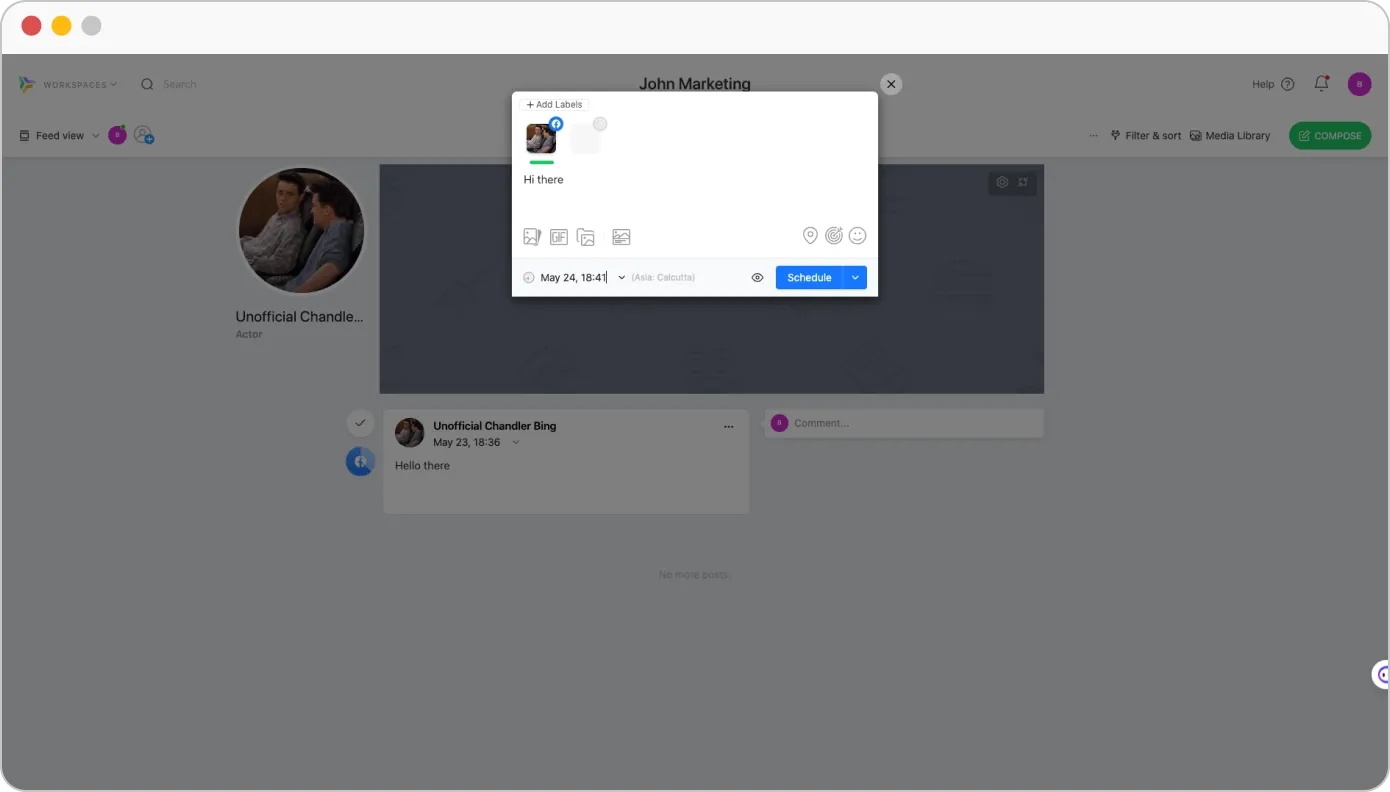
No entanto, não pudemos deixar de notar a ausência de filas de espera inteligentes e de publicação automática de RSS, o que pode ser essencial para os utilizadores que procuram um fluxo de trabalho mais automatizado. Além disso, não suporta publicações em carrossel do TikTok. No entanto, a plataforma permite aos utilizadores agendar curtas do YouTube e publicar publicações em carrossel do LinkedIn.
Nat L.
Adoro o facto de poder tirar uma ou duas horas e planear o mês inteiro com conteúdos a publicar nas redes sociais dos meus clientes. Facilita imenso o meu trabalho. Também é fácil configurá-lo. Prefiro a vista de calendário, que me permite ver visualmente como todas as publicações estão programadas e permite-me preencher os espaços onde podemos beneficiar de algumas publicações.
| Análise pormenorizada das redes sociais |
|
| Análise combinada de várias contas |
|
| Métricas de envolvimento |
|
| Análise de desempenho de hashtag |
|
| Relatório personalizado Construtor |
|
| Enviar relatório em PDF por e-mail para o cliente |
|
| Relatório de agendamento automático para a equipa e o cliente |
|
| Etiqueta branca Relatório descarregável em formato PDF |
|
Quando analisamos a análise da Planable, esta oferece uma forma simples de obter as principais informações de que os profissionais de marketing necessitam para acompanhar o desempenho dos seus conteúdos. Obtém métricas de envolvimento pormenorizadas para cada conta, pelo que é fácil manter um olho no que está a ter impacto.
Dito isto, embora o Planable cubra bem o básico, as suas análises podem parecer um pouco limitadas, especialmente se for uma agência ou uma pequena empresa que pretende expandir-se. Por exemplo, não combina dados de várias contas nem permite criar relatórios personalizados para mostrar aos clientes a imagem completa do desempenho.
Ainda assim, para quem precisa de análises fundamentais para acompanhar o envolvimento e compreender como o seu público está a interagir, o Planable faz o trabalho. Ajuda-o a ajustar a sua estratégia de conteúdos com base no que está realmente a funcionar, o que é bastante valioso.
Patrícia L.
Gostaria que a Planable tivesse uma funcionalidade de análise ou de análise para me poupar muito na criação de relatórios para os meus clientes. Para além disso, a Planable continua a servir todas as nossas necessidades de gestão de redes sociais.
| Responder a mensagens e comentários |
|
| Pode responder a mensagens |
|
| Responder a perguntas e Reviews |
|
| Pode responder no Visitante Mensagens |
|
| Caixa de entrada social unificada |
|
| Responder a Histórias |
|
O Planable é excelente para colaboração e planeamento, facilitando a criação de conteúdos para as equipas. Mas no que diz respeito às funcionalidades de caixa de entrada social, envolvimento e escuta, é um pouco limitado.
Neste momento, a Planable tem uma caixa de entrada unificada para os comentários do Facebook e do Instagram, o que é bastante útil. Podemos responder, reagir, eliminar e manter as conversas organizadas, marcando-as como abertas, responder mais tarde ou concluídas - tudo isto sem sair da plataforma. E as boas notícias? Estão a trabalhar para adicionar mais plataformas, pelo que a gestão do envolvimento deverá ser ainda mais fácil.
Um aspeto a ter em conta: continua a não ser possível responder a mensagens diretas ou comentários a partir do Planable. Para esses casos, terá de voltar às aplicações sociais nativas para lidar com o envolvimento total do público.
| Fluxo de trabalho de aprovação de conteúdos |
|
| Por publicação Multiutilizador Colaboração |
|
| Comentários sobre a publicação |
|
| Gestão do acesso |
|
| Integração de clientes ilimitada e gratuita |
|
A colaboração é uma das funcionalidades mais importantes da Planable para simplificar os processos de planeamento, criação e aprovação de conteúdos. Oferece uma interface de fácil utilização com várias vistas para melhores estratégias visuais e organizacionais.
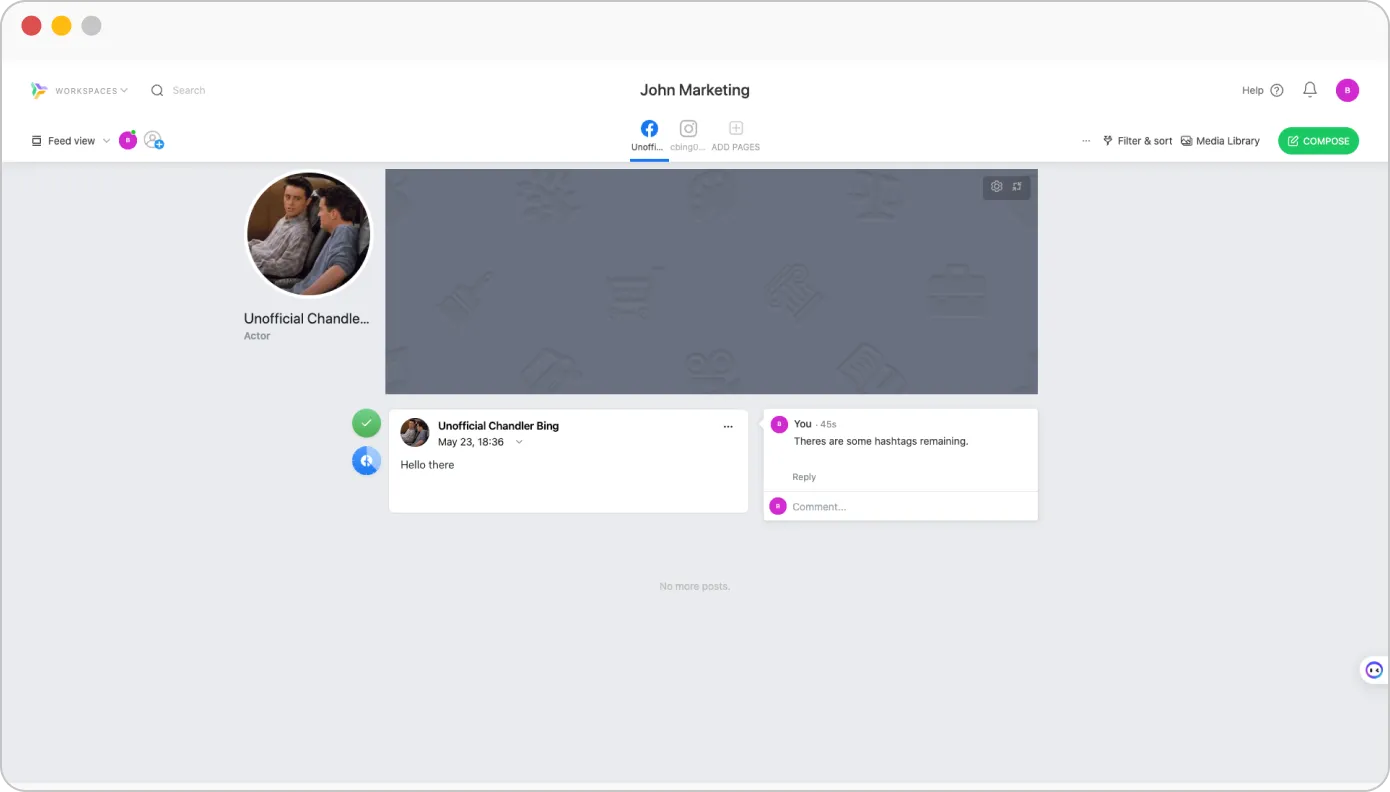
Com uma colaboração eficaz, o Planable permite que os membros da equipa participem em discussões em tempo real, deixando comentários diretamente nas mensagens. Descobrimos que também suporta a colaboração de vários utilizadores numa única publicação, permitindo que muitos contribuam para o conteúdo.
Um fluxo de trabalho de aprovação planeável melhora e promove a revisão estruturada e garante que todos os conteúdos cumprem as normas necessárias antes da publicação.
A gestão robusta do acesso é outro aspeto fundamental do Planable. Ajuda as equipas a manter a integridade dos conteúdos, atribuindo funções e permissões específicas a diferentes membros da equipa.
Hannah R.
Torna tudo muito fácil. Adoramos as diferentes vistas, uma vez que todos os membros da equipa trabalham de forma diferente e têm preferências diferentes. O processo de aprovação torna muito fácil trabalhar com clientes e diferentes membros da equipa.
| Assistente de IA para geração de conteúdos | |
| Sugestões de legendas | |
| AI Melhor altura para publicar sugestões | |
| Geração de ideias | |
| Reescrita de posts | |
| AI ChatGPT Programador de mensagens | |
| Recomendações de hashtag automatizadas | |
As funcionalidades de IA da Planable ajudam realmente a acelerar a criação de conteúdos. O gerador de legendas dá ideias rápidas a partir de imagens ou tópicos que só precisam de alguns ajustes. A ferramenta de reescrita de posts é útil para atualizar os rascunhos sem ter de começar de novo.
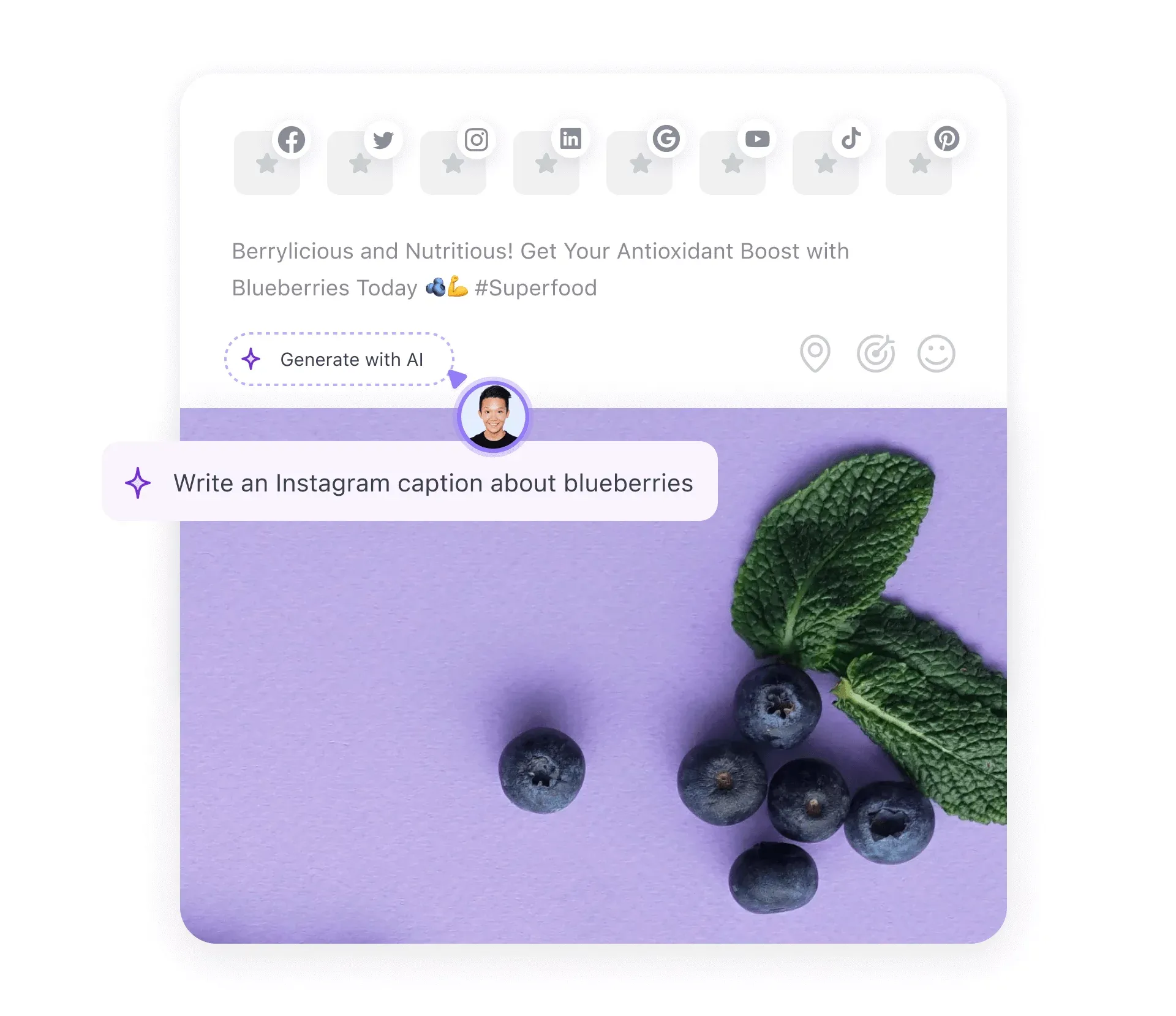
A IA também sugere novas ideias de conteúdo com base no que publicámos anteriormente, mantendo o fluxo criativo. As sugestões de hashtag são uma boa poupança de tempo, ajudando-nos a alcançar o público certo.
O assistente de IA da Planable é útil, mas tem os seus limites. Ele pode se tornar repetitivo, oferece pouca personalização e carece de recursos avançados, como a previsão do melhor momento para postar indicações e agendamento orientado por IA. Muitas vezes, são necessárias edições manuais para manter o conteúdo natural. Não é tão potente como as ferramentas de IA autónomas e tem dificuldade em lidar com tópicos complexos.
Morgan Ellis W.
A ferramenta de IA! É super útil e rápida para tornar as minhas legendas mais concisas ou incisivas e também é facilmente editável se eu quiser alterar ou retirar uma palavra da sua sugestão!
| UI/UX | Simples e de fácil utilização |
| Facilidade de configuração | |
| Tempo de configuração necessário | Média |
Como já referimos, o Planable é uma ferramenta de fácil utilização com um design intuitivo, tornando-o acessível a utilizadores com diferentes conhecimentos técnicos. O processo de configuração é simples, com os utilizadores a poderem criar uma conta, definir um perfil e estabelecer um espaço de trabalho em minutos.
A eficiência da plataforma minimiza o tempo de inatividade, permitindo que as equipas se concentrem na estratégia de conteúdos e estabeleçam rapidamente um ambiente de colaboração para a gestão das redes sociais.
Adam K.
Fiquei extremamente impressionado com o facto de a Planable ser personalizável! Tem soluções para todos os casos de utilização da nossa equipa e, em muitos casos, tem até recursos adicionais que vão mais além!
| Suporte por chat em direto |
|
| Suporte por correio eletrónico |
|
| Formação |
|
| Suporte de configuração |
|
| Gestor de contas dedicado |
|
A Planable oferece vários canais para ajudar eficazmente os utilizadores. O seu suporte de conversação em direto permite assistência em tempo real para as preocupações imediatas dos clientes. Com suporte por correio eletrónico, suporte de configuração e um gestor de conta dedicado, a Planable reforça as áreas de preocupação dos clientes.
Embora a ausência de apoio telefónico possa ser uma limitação para os utilizadores que preferem a comunicação verbal direta, os canais de apoio disponíveis satisfazem as necessidades dos clientes.
Plano gratuito
Grátis
Por mêsCaraterísticas
Básico
$33
Por mêsCaraterísticas+
Profissional
$49
Por mêsCaraterísticas básicas+
Empresa
Personalizado
Por mêsCaraterísticas profissionais+
A estrutura de preços da Planable foi concebida para responder às necessidades de uma vasta gama de utilizadores, desde freelancers a pequenas empresas e grandes empresas. A plataforma oferece preços flexíveis através de planos escalonados para satisfazer as necessidades de cada utilizador industrial.
Tem um plano gratuito que está limitado a 50 mensagens. Acima deste está um plano básico que custa $33 por mês para um espaço de trabalho e utilizadores ilimitados, tornando-o adequado para pequenas equipas e empresas. O plano Pro é mais adequado para equipas maiores e agências, custando $49 por mês para mais funcionalidades do que o plano básico. Por fim, vem o plano empresarial que pode ser personalizado de acordo com as necessidades do utilizador.
Em geral, o preço é razoável, tendo em conta as funcionalidades que a ferramenta oferece. No entanto, com a falta de funcionalidades de etiqueta branca de escuta social, torna-se difícil gerir todas as actividades de redes sociais a partir de uma única plataforma. Isto pode exigir a adição de outra ferramenta às suas necessidades de gestão.
Apesar de tudo isto, a Planable será sempre uma mistura de flexibilidade, acessibilidade e capacidade de colaboração que simplifica a gestão das redes sociais.
Bibiana O.
O Planable é bastante caro e, mesmo com o plano básico, algumas funcionalidades continuam bloqueadas. O seu preço é mais elevado do que o de outras aplicações semelhantes, o que pode ser frustrante se estiver à procura de opções mais económicas.
O Planable inclui algumas funcionalidades sólidas para planeamento e colaboração, mas a falta de escuta social unificada, a análise avançada limitada e a ausência de opções de marca branca fizeram com que alguns utilizadores procurassem alternativas mais flexíveis.
Se é uma dessas pessoas que está a pensar em mudar do Planable, não se preocupe - reunimos cinco alternativas que trazem diferentes pontos fortes para a mesa. Estas opções podem ser mais adequadas se for uma marca ou agência que procura um poder de gestão de redes sociais mais abrangente.
 SocialPilot |
Planable |
 Agorapulse |
 Sprout Social |
 Loomly |
|
|---|---|---|---|---|---|
| Preços | A partir de $30/Mês | A partir de $33/Mês | A partir de $69/Mês | A partir de $199/Mês | A partir de $60/Mês |
| Melhor para | Agências e pequenas empresas | Empresas de média dimensão | Marcas e empresas | Marcas e empresas | Marcas e empresas |
| Perfis sociais | 7 | 4 | 10 | 5 | 10 |
| Facilidade de utilização | |||||
| Apoio | |||||
| Publicações | |||||
| Programação em massa | 500 Mensagens | 400 Mensagens | 200 Mensagens | 350 Mensagens | 400 Mensagens |
| Filas de espera inteligentes | |
|
|
|
|
| Repetir publicação | |
|
|
|
|
| Primeiro comentário | |
|
|
|
|
| Seleção do público-alvo | |
Apenas o LinkedIn |
|
Não | |
| Planeamento e criação de conteúdos | |||||
| Biblioteca de conteúdos | |
|
|
|
|
| Vista do calendário | Fácil de ler |
Complexo |
Complexo |
Esmagadora |
Difícil de ler |
| Assistente de IA | |
|
|
|
|
| Marcação de localização | |
Apenas o Instagram |
|
|
|
| Calendário de férias | |
|
|
|
|
| Chamadas para acções personalizadas | |
Apenas o Facebook |
|
|
|
| Publicações de colaboração no Instagram | |
|
|
|
|
| Editor de imagens | |
|
|
|
|
| Compromisso | |||||
| Caixa de entrada social | Caixa de entrada unificada |
|
Várias caixas de entrada |
Complexo |
Desorganizado |
| Responder aos comentários | |
Apenas Facebook e Instagram |
|
|
|
| Responder a Reviews e a perguntas | |
|
|
|
|
| Capacidades de IA | |||||
| Programador GPT | |
|
|
|
|
| Resposta automatizada | |
|
|
|
|
| Gerador de legendas | |
|
|
|
|
| Gerador de hashtag | |
|
|
|
|
| A IA sugeriu a melhor altura para publicar | |
|
|
|
|
| Analítica | |||||
| Análise pormenorizada das redes sociais | Fácil de ler |
Esmagadora |
Complexo |
Complexo |
Complexo |
| Criador de relatórios personalizado | |
|
|
|
|
| Pós-desempenho | |
|
|
|
|
| Partilha automática de relatórios com os clientes | |
|
|
|
|
| Colaboração entre equipas e clientes | |||||
| Gestão de clientes | |
|
|
|
|
| Fluxos de trabalho de aprovação | Fácil e rápido |
Complexo |
Confuso |
Falhas no rastreio |
Funções em falta |
| Por Post Colaboração entre vários utilizadores | |
|
|
|
|
| Aprovação em movimento | |
|
|
|
|
| Etiquetagem branca | |||||
| Painel de controlo de marca branca | |
|
|
|
|
| Relatório descarregável de marca branca | |
|
|
|
|
| Experimentar gratuitamente | Saiba mais | Saiba mais | Saiba mais | Saiba mais | |
Se procura uma ferramenta de gestão de redes sociais completa em comparação com a Planable, a SocialPilot destaca-se como a melhor escolha. Preenche todos os vazios deixados pelo Planable e oferece funcionalidades ainda mais robustas.
O SocialPilot é uma ferramenta de gestão de redes sociais que preenche praticamente todas as lacunas do Planable. Por exemplo, tem uma caixa de entrada social e funcionalidades de marca branca - ambas grandes vantagens se se preocupa em envolver o seu público e manter os clientes satisfeitos.
Também achámos que o SocialPilot é muito fácil de utilizar. Quer esteja apenas a começar ou seja mais experiente, a sua interface é suave e fácil de utilizar. Além disso, o agendamento em massa e um fluxo de trabalho de aprovação avançado ajudam a fazer as coisas mais rapidamente.
Outra coisa de que gostamos? O SocialPilot oferece planos flexíveis que não vão quebrar o banco - começando em torno de $30 por mês - sem taxas sorrateiras. Por isso, se é uma pequena empresa ou agência que procura mais potência sem custos adicionais, vale a pena dar uma vista de olhos.
A Planable é uma ferramenta simples e fácil de utilizar que oferece excelentes capacidades de planeamento, colaboração e agendamento de redes sociais. As suas fantásticas funcionalidades de planeamento visual e colaboração permitem-lhe criar e programar publicações de redes sociais perfeitas para várias contas em simultâneo.
A Planable é um forte concorrente no panorama da gestão de redes sociais para empresas e agências centradas num planeamento eficiente. A sua estrutura de preços, comparativamente impressionante, é flexível para equipas de diferentes dimensões.
Embora a Planable seja uma plataforma útil para gerir as redes sociais, tem algumas lacunas que a impedem de ser uma solução tudo-em-um. Ao analisarmos as capacidades do Planable, descobrimos que várias limitações obrigam os utilizadores a recorrer a alternativas que oferecem um conjunto completo de gestão de redes sociais, como o SocialPilot.
Agora que já discutimos exaustivamente a Planable, está numa posição mais informada para decidir se deve ou não optar pela plataforma.
A Planable é uma plataforma de programação de redes sociais utilizada para planear, criar e programar publicações para várias plataformas de redes sociais a partir de um único painel de controlo. Oferece funcionalidades de colaboração impressionantes para reunir todos os membros da sua equipa e clientes numa única plataforma para processos de feedback e aprovação mais rápidos.
Eis algumas das caraterísticas notáveis do Planable:
Os concorrentes da Planable incluem: