Rendere efficiente la gestione dei social media con Planable
Il migliore per : Piccole imprese, agenzie, aziende
Prezzi: $33/mo
Come abbiamo analizzato Planable
La nostra recensione di Planable si basa su test pratici e applicazioni reali da parte dei nostri esperti di social media interni. Abbiamo esplorato le sue funzioni principali, come la programmazione, l'analisi e la gestione degli annunci attraverso account di brand in carne e ossa per valutarne le prestazioni. Inoltre, abbiamo incorporato le informazioni provenienti da fonti terze affidabili, tra cui le recensioni degli utenti su G2 e Capterra.
| Numero di Review (G2) | 838 |
| Valutazione complessiva delle stelle (G2) | |
| Facilità d'uso | |
| Qualità del supporto | |
| Facilità di configurazione | |
| Prezzi minimi | $33/Mese |
| Numero di account sociali | 4 |
| Numero di membri del team | 30 |
| Pianificazione e pubblicazione |
 |
| Analisi |
|
| Posta in arrivo sociale |
|
| Collaborazione |
|
| Etichetta bianca |

|
| Ascolto sociale |
|
| Il migliore per | Medie imprese, aziende, agenzie |
Planable è uno strumento piuttosto pratico lanciato meno di 10 anni fa, con l'obiettivo di rendere la pianificazione dei social media e il lavoro di squadra più semplice e meno problematico. Ci piace molto l'intuitività di Planable, perfetta per i team che vogliono un processo di social media ordinato e organizzato senza dover fare i salti mortali.
Una delle cose che si nota quando si inizia a usare Planable è il flusso di feedback e di approvazione. È possibile lasciare commenti direttamente sui post e le approvazioni sono fluide e veloci, con una riduzione delle e-mail e delle chat. Inoltre, offre quattro modi diversi di visualizzare i contenuti: feed, griglia, calendario e vista elenco. Abbiamo giocato con queste opzioni e, onestamente, passare da una all'altra rende molto semplice la visualizzazione del vostro programma o di ciò che sta per arrivare. Ad esempio, la visualizzazione a calendario consente di individuare subito le lacune o i giorni più affollati, mentre la griglia offre una rapida istantanea di come apparirà il vostro feed.
Anche la programmazione è flessibile: potete impostare i post per le diverse piattaforme senza ulteriori problemi, il che aiuta a mantenere il vostro marchio coerente ovunque. Questo è un grande vantaggio se vi destreggiate tra più account.
Un'altra funzione preferita, in base a quanto dicono gli utenti, è il processo di approvazione. Riduce davvero il confuso tira e molla e fa risparmiare tempo. Inoltre, le analisi fornite sono intelligenti ma non opprimenti. Si ottengono numeri di coinvolgimento chiari che aiutano a capire cosa funziona e cosa no, in modo che il team possa concentrarsi su ciò che il pubblico ama davvero.
Planable ha anche un'interessante casella di posta elettronica sociale in cui è possibile rispondere ai commenti e ai DM di Instagram e Facebook in un unico posto. L'abbiamo provata ed è molto comoda per organizzare le conversazioni in base allo stato, reagire in tempo reale e mantenere la vostra comunità impegnata senza dover passare da un'app all'altra.
Per quanto riguarda i prezzi, non c'è una prova gratuita, ma c'è un piano gratuito per tutti i tempi. Successivamente, i piani partono da $33 al mese per un'area di lavoro che copre cinque account: un prezzo piuttosto competitivo per le aziende o le agenzie. L'unico aspetto negativo è che non dispone di opzioni di white label o di funzioni di social listening, quindi se ne avete davvero bisogno, potrebbe non essere all'altezza.
Alternativa più votata a Planable
Pro
Bibiana O.
Planable è facile da implementare ed è diventato una parte essenziale delle mie attività quotidiane di imprenditore e social media manager. Mi piace la facilità con cui è possibile pianificare i post su diverse piattaforme di social media, come Instagram e Pinterest. È fantastico che si possano collegare più account, il che rende davvero comoda la gestione di tutto in un unico posto.
Contro
Poss K.
quando un post è programmato, è piuttosto complicato apportare alcune modifiche (non sono sempre sicuro di quali modifiche causino questo problema), richiede di annullare la programmazione di un post (e a volte non è chiaro se alcune impostazioni sono state mantenute.
| Intelligente e avanzato Accodamento |
|
| Messaggi ripetuti |
|
| Calendario dei media sociali |
|
| Pubblicazione automatica da RSS |
|
| Pianificazione di massa |
|
| Anteprima del post |
|
| Assistente AI |
|
| Supporto a Facebook Primo commento |
|
| Sostenere Instagram prima di tutto Commenti |
|
| Sostenere prima LinkedIn Commenti |
|
| Post di collaborazione su Instagram |
|
| Messaggi del carosello TikTok |
|
| Messaggi carosello di LinkedIn |
|
| Programmazione dei cortometraggi |
|
Per quanto riguarda la programmazione e la pubblicazione, Planable è davvero in grado di soddisfare le esigenze di base dei team dei social media. Abbiamo scoperto che le sue funzioni rendono la gestione e la pianificazione dei contenuti molto più organizzata ed efficiente. La visualizzazione del calendario dei social media è molto utile per visualizzare i post e tenere traccia di ciò che sta per accadere senza fare congetture.
Ci piace molto anche la funzione di programmazione in blocco. È un enorme risparmio di tempo, soprattutto se state gestendo una tonnellata di contenuti in una volta sola. La possibilità di programmare più post in una volta sola riduce la fatica. Inoltre, l'opzione di anteprima dei post è fantastica: ci permette di vedere esattamente come appariranno i post su ogni piattaforma, in modo da essere sicuri che tutto si adatti all'atmosfera prima di premere il tasto di pubblicazione.
Un altro strumento utile è la funzione di ripetizione dei post. La usiamo per riciclare i contenuti più performanti senza dover ripartire da zero ogni volta, il che aumenta decisamente la nostra efficienza. E poi c'è Notability, il loro assistente AI. È come avere un compagno di contenuti che propone idee per le didascalie e può persino aiutare a riscrivere i post, rendendo il processo creativo più fluido e veloce.
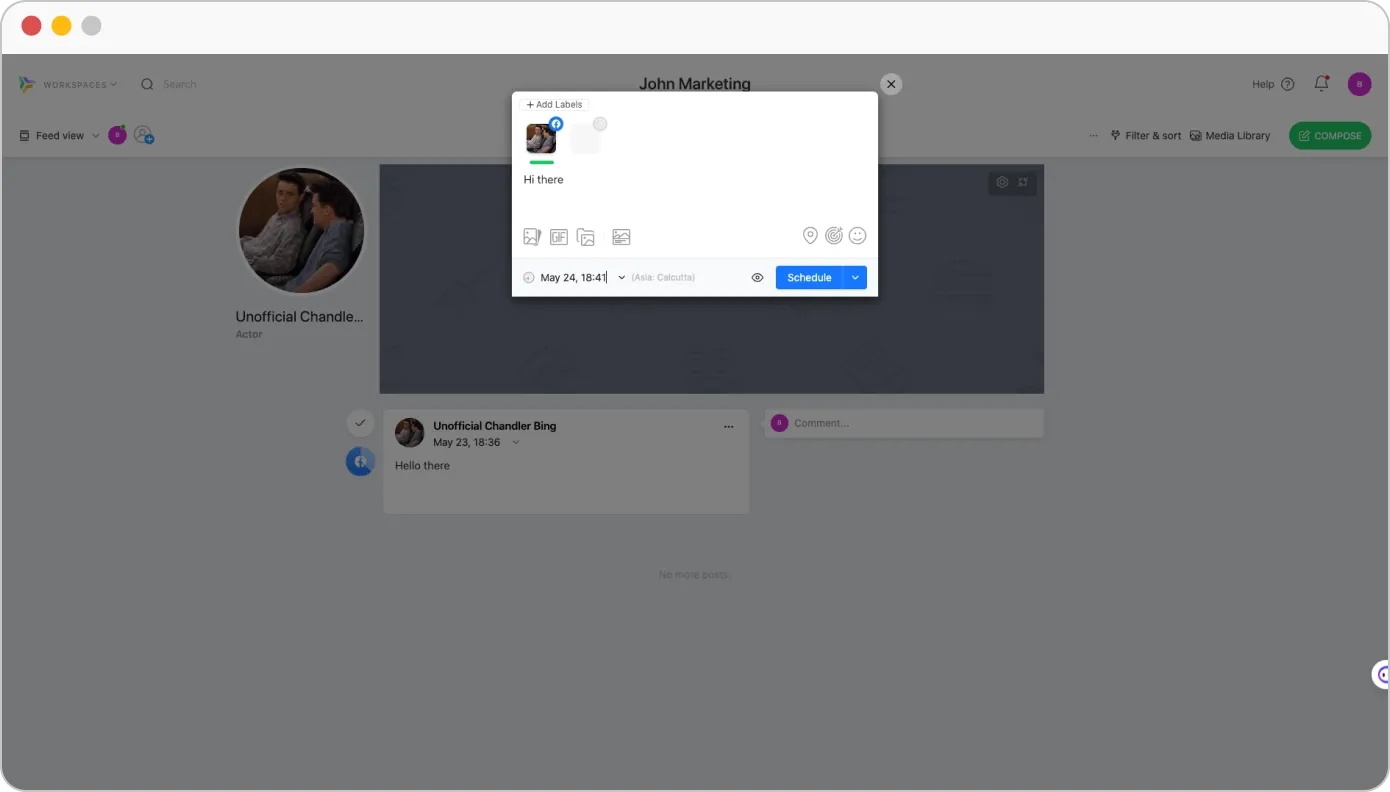
Tuttavia, non abbiamo potuto fare a meno di notare l'assenza dell'accodamento intelligente e della pubblicazione automatica da RSS, che potrebbe essere fondamentale per gli utenti che cercano un flusso di lavoro più automatizzato. Inoltre, non supporta i caroselli di TikTok. Tuttavia, la piattaforma consente agli utenti di programmare i corti di YouTube e di pubblicare i caroselli di LinkedIn.
Nat L.
Adoro il fatto di poter impiegare un'ora o due per pianificare l'intero mese con i contenuti da pubblicare sui social dei miei clienti. Mi facilita il lavoro. Anche l'impostazione è semplice, preferisco la visualizzazione a calendario che mi permette di vedere visivamente come sono programmati tutti i post e mi consente di riempire gli spazi in cui possiamo trarre vantaggio da alcuni post.
| Analisi dettagliate dei social media |
|
.
| Analisi combinata di più conti |
|
| Metriche di coinvolgimento |
|
| Analisi delle prestazioni degli hashtag |
|
| Rapporto personalizzato Costruttore |
|
| Invia il rapporto PDF via e-mail al cliente |
|
| Rapporto di programmazione automatica per team e clienti |
|
| Whitelabel Rapporto scaricabile in Formato PDF |
|
Quando si approfondisce l'analisi di Planable, si scopre che offre un modo semplice per ottenere le informazioni chiave di cui gli esperti di marketing hanno bisogno per monitorare l'andamento dei loro contenuti. Per ogni account si ottengono metriche di coinvolgimento dettagliate, così è facile tenere d'occhio ciò che ha risonanza.
Detto questo, mentre Planable copre bene le basi, le sue analisi possono sembrare un po' limitate, soprattutto se siete un'agenzia o una piccola azienda che vuole scalare. Ad esempio, non combina i dati su più account e non consente di creare report personalizzati per mostrare ai clienti un quadro completo delle prestazioni.
Tuttavia, per chi ha bisogno di analisi fondamentali per monitorare il coinvolgimento e capire come interagisce il proprio pubblico, Planable è in grado di fare il suo lavoro. Vi aiuta a modificare la vostra strategia di contenuti in base a ciò che funziona effettivamente, il che è molto prezioso.
Patricia L.
Vorrei che Planable avesse una funzione di insight o di analisi che mi permettesse di risparmiare molto nella generazione di report per i miei clienti. A parte questo, Planable soddisfa ancora tutte le nostre esigenze di gestione dei social media.
| Rispondere a messaggi e commenti |
|
| Può rispondere ai messaggi |
|
| Rispondere alle domande e agli Review |
|
| Può rispondere al visitatore Messaggi |
|
| Posta in arrivo sociale unificata |
|
| Rispondi alle storie |
|
Planable è ottimo per la collaborazione e la pianificazione, rendendo più fluida la creazione di contenuti per i team. Ma per quanto riguarda le funzioni di social inbox, engagement e ascolto, è un po' limitato.
In questo momento, Planable ha una casella di posta unificata per i commenti su Facebook e Instagram, il che è piuttosto comodo. Possiamo rispondere, reagire, eliminare e mantenere le conversazioni organizzate contrassegnandole come aperte, risposte successive o chiuse, il tutto senza lasciare la piattaforma. E la buona notizia? Stanno lavorando per aggiungere altre piattaforme, quindi la gestione del coinvolgimento dovrebbe diventare ancora più semplice.
Una cosa da notare: non è ancora possibile rispondere ai messaggi diretti o alle recensioni da Planable. Per questi, dovrete tornare alle app sociali native per gestire il coinvolgimento del pubblico.
| Flusso di lavoro per l'approvazione dei contenuti |
|
| Per Post Multi-Utente Collaborazione |
|
| Commenti sul post |
|
| Gestione degli accessi |
|
| Onboarding gratuito e illimitato dei clienti |
|
La collaborazione è una delle caratteristiche più importanti di Planable per ottimizzare i processi di pianificazione, creazione e approvazione dei contenuti. Offre un'interfaccia facile da usare con viste multiple per migliorare le strategie visive e organizzative.
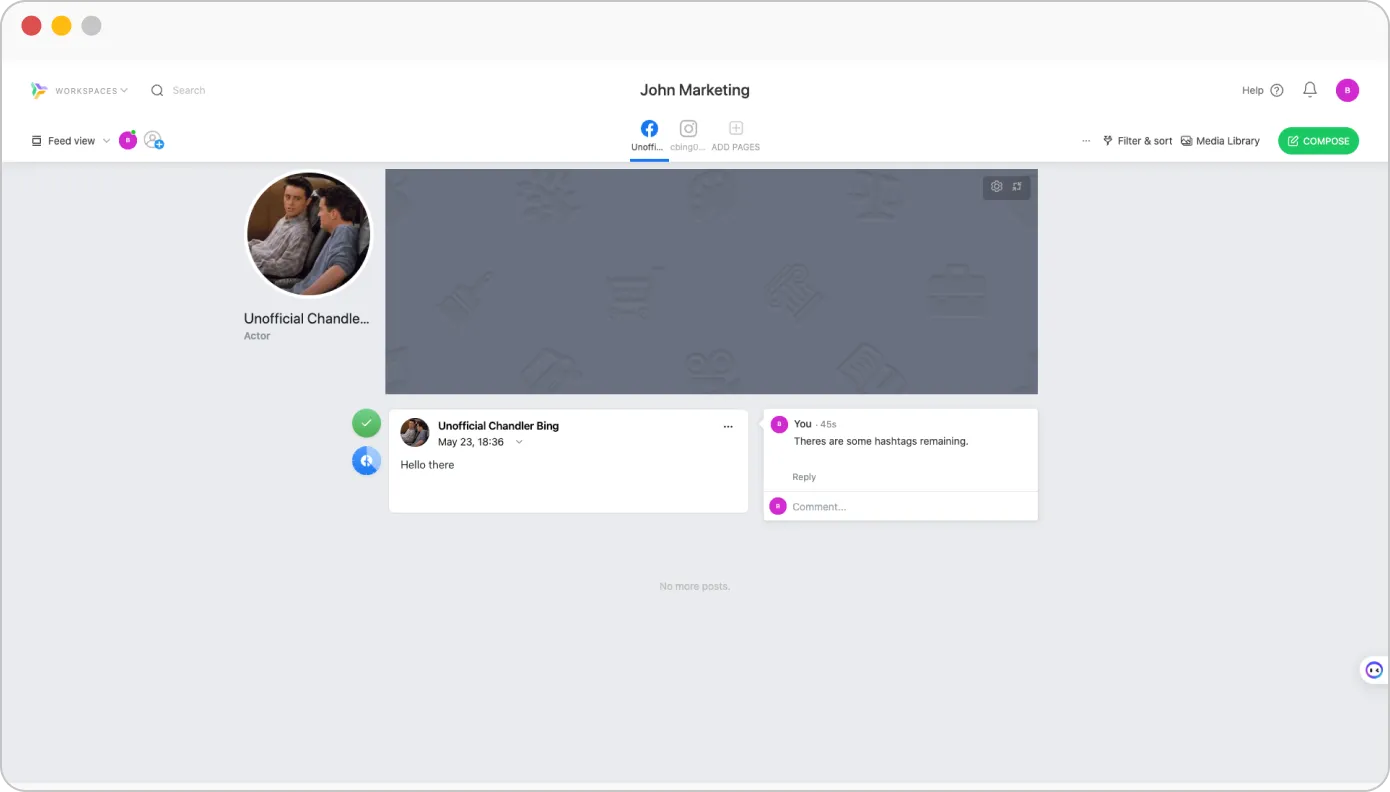
Con una collaborazione efficace, Planable consente ai membri del team di partecipare a discussioni in tempo reale lasciando commenti direttamente sui post. Abbiamo scoperto che supporta anche la collaborazione tra più utenti su un singolo post, consentendo a molti di contribuire ai contenuti.
Un flusso di lavoro di approvazione Planable migliora e promuove la revisione strutturata e garantisce che tutti i contenuti soddisfino gli standard necessari prima della pubblicazione.
La solida gestione degli accessi è un altro aspetto chiave di Planable. Aiuta i team a mantenere l'integrità dei contenuti assegnando ruoli e permessi specifici ai diversi membri del team.
Hannah R.
Rende tutto così semplice. Ci piacciono i diversi punti di vista, perché tutti i membri del team lavorano in modo diverso e hanno preferenze diverse. Il processo di approvazione semplifica enormemente il lavoro dei clienti e dei diversi membri del team.
| Assistente AI per la generazione di contenuti | |
| Suggerimenti per le didascalie | |
| Il momento migliore per inviare suggerimenti | |
| Generazione di idee | |
| Riscrittura dei post | |
| AI ChatGPT Programmatore di messaggi | |
| Raccomandazioni automatiche sugli hashtag | |
Le funzioni AI di Planable aiutano davvero a velocizzare la creazione di contenuti. Il generatore di didascalie offre idee rapide a partire da immagini o argomenti che necessitano solo di qualche ritocco. Lo strumento di riscrittura dei post è utile per rinfrescare le bozze senza ricominciare da capo.
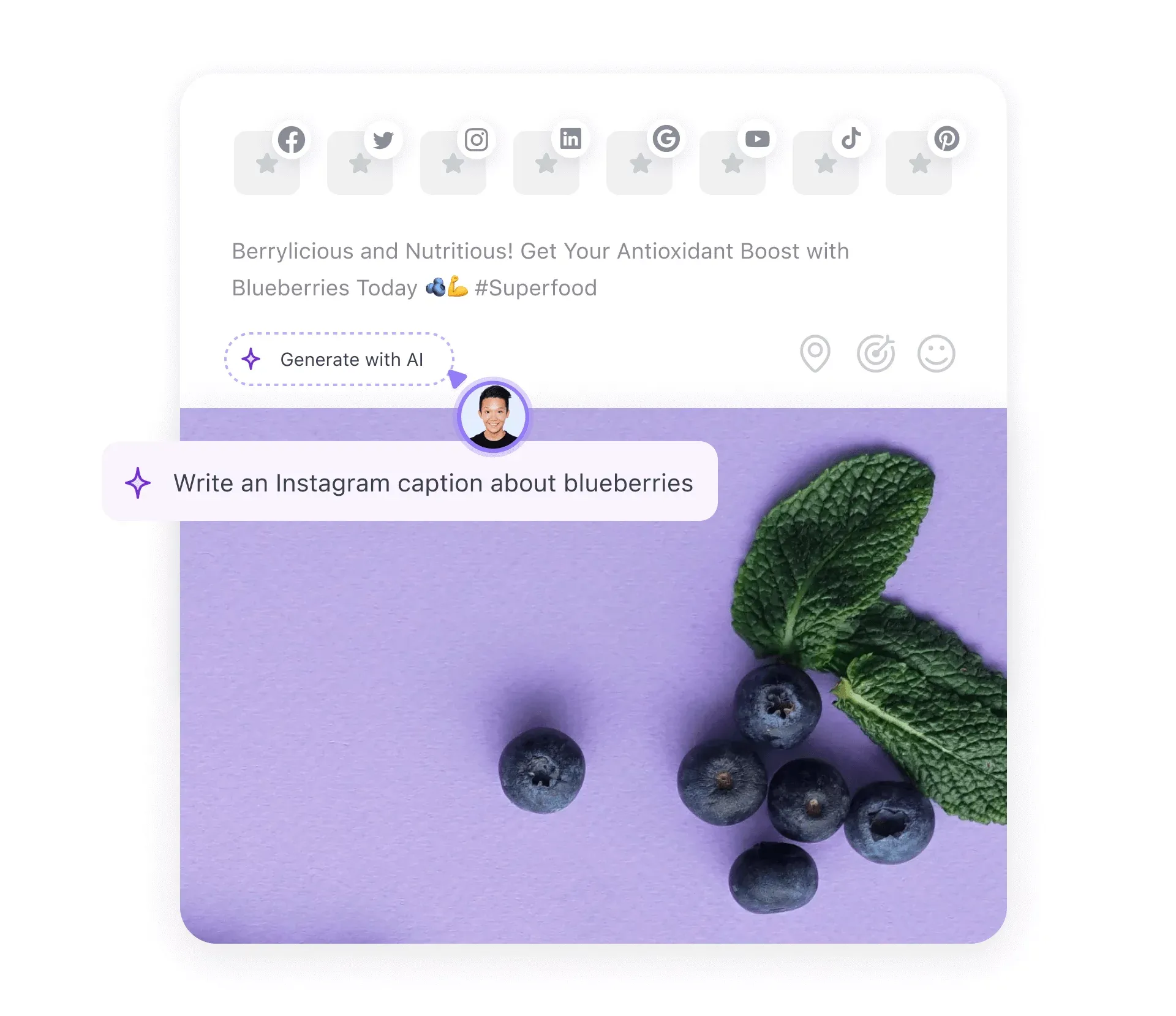
L'intelligenza artificiale suggerisce anche nuove idee di contenuto basate su ciò che abbiamo pubblicato in precedenza, mantenendo il flusso creativo. I suggerimenti sugli hashtag sono un bel risparmio di tempo e ci aiutano a raggiungere il pubblico giusto.
L'assistente AI di Planable è utile ma ha i suoi limiti. Può diventare ripetitivo, offre poca personalizzazione e manca di funzioni avanzate come la previsione del momento migliore per pubblicare indicazioni e la programmazione guidata dall'intelligenza artificiale. Spesso sono necessarie modifiche manuali per mantenere i contenuti naturali. Non è potente come gli strumenti di intelligenza artificiale autonomi e fatica a gestire argomenti complessi.
Morgan Ellis W.
Lo strumento AI! È utilissimo e veloce per rendere le mie didascalie più concise o incisive ed è anche facilmente modificabile se volessi cambiare o togliere una parola dal suo suggerimento!
| UI/UX | Semplice e facile da usare |
| Facilità di configurazione | |
| Tempo di installazione richiesto | Media |
Come abbiamo già detto, Planable è uno strumento facile da usare e dal design intuitivo, che lo rende accessibile a utenti con diverse conoscenze tecniche. Il processo di configurazione è semplice: gli utenti possono creare un account, impostare un profilo e creare uno spazio di lavoro in pochi minuti.
L'efficienza della piattaforma riduce al minimo i tempi di inattività, consentendo ai team di concentrarsi sulla strategia dei contenuti e di creare rapidamente un ambiente collaborativo per la gestione dei social media.
Adam K.
Sono rimasto estremamente colpito dalla personalizzazione di Planable! Ha soluzioni per tutti i casi d'uso del nostro team e, in molti casi, ha anche risorse aggiuntive che vanno oltre!
| Assistenza via chat |
|
| Assistenza via e-mail |
|
| Formazione |
|
| Supporto per la configurazione |
|
| Account Manager dedicato |
|
Planable offre molteplici canali per assistere efficacemente gli utenti. Il supporto di live chat permette di assistere in tempo reale i clienti che hanno problemi immediati. Grazie all'assistenza via e-mail, al supporto per la configurazione e a un account manager dedicato, Planable rafforza le aree di interesse dei clienti.
Sebbene l'assenza di assistenza telefonica possa rappresentare un limite per gli utenti che preferiscono una comunicazione verbale diretta, i canali di assistenza disponibili soddisfano le esigenze dei clienti.
Piano gratuito
Gratuito
Al meseCaratteristiche
Base
$33
Al meseCaratteristiche+
Pro
$49
Al meseCaratteristiche di base+
Impresa
Personalizzato
Al meseCaratteristiche Pro+
La struttura dei prezzi di Planable è progettata per soddisfare le esigenze di un'ampia gamma di utenti, dai liberi professionisti alle piccole imprese fino alle grandi aziende. La piattaforma offre prezzi flessibili attraverso piani differenziati per soddisfare le esigenze di ogni utente del settore.
Ha un piano gratuito che è limitato a 50 messaggi. Al di sopra di questo c'è un piano di base che costa $33 al mese per uno spazio di lavoro e utenti illimitati, che lo rende adatto a piccoli team e aziende. Il piano Pro è più adatto a team e agenzie più grandi e costa $49 al mese per maggiori funzionalità rispetto al piano base. Infine, viene proposto il piano Enterprise, che può essere personalizzato in base alle esigenze dell'utente.
Nel complesso, il prezzo è ragionevole, considerate le funzionalità offerte dallo strumento. Tuttavia, con la mancanza di funzioni di social listening white-label, la gestione di tutte le attività sui social media da un'unica piattaforma diventa difficile. Ciò potrebbe richiedere l'aggiunta di un altro strumento alle vostre esigenze di gestione.
Nonostante tutto questo, Planable sarà sempre un mix di flessibilità, convenienza e collaborazione che ottimizza la gestione dei social media.
Bibiana O.
Planable è piuttosto costoso e anche con il piano base alcune funzioni sono ancora bloccate. Il prezzo è superiore a quello di altre applicazioni simili, il che può essere frustrante se si è alla ricerca di opzioni più convenienti.
Planable offre alcune solide funzionalità per la pianificazione e la collaborazione, ma la mancanza di un ascolto sociale unificato, le analisi avanzate limitate e l'assenza di opzioni white label hanno spinto alcuni utenti a cercare alternative più flessibili.
Se siete tra coloro che stanno pensando di abbandonare Planable, non preoccupatevi: abbiamo messo insieme cinque alternative che offrono punti di forza diversi. Queste opzioni potrebbero essere più adatte se siete un marchio o un'agenzia alla ricerca di una maggiore potenza nella gestione dei social media.
 SocialPilot |
Planable |
 Agorapulse |
 Sprout Social |
 Loomly |
|
|---|---|---|---|---|---|
| Prezzi | A partire da $30/Mese | A partire da $33/Mese | A partire da $69/Mese | A partire da $199/Mese | A partire da $60/Mese |
| Il migliore per | Agenzie e piccole imprese | Aziende di medie dimensioni | Marchi e imprese | Marchi e imprese | Marchi e imprese |
| Profili sociali | 7 | 4 | 10 | 5 | 10 |
| Facilità d'uso | |||||
| Supporto | |||||
| Editoria | |||||
| Pianificazione di massa | 500 Messaggi | 400 Messaggi | 200 Messaggi | 350 Messaggi | 400 Messaggi |
| Code intelligenti | |
|
|
|
|
| Ripetere il post | |
|
|
|
|
| Primo commento | |
|
|
|
|
| Targeting del pubblico | |
Solo LinkedIn |
|
No | |
| Pianificazione e creazione di contenuti | |||||
| Biblioteca dei contenuti | |
|
|
|
|
| Vista calendario | Facile da leggere |
Complesso |
Complesso |
Travolgente |
Di difficile lettura |
| Assistente AI | |
|
|
|
|
| Etichettatura della posizione | |
Solo Instagram |
|
|
|
| Calendario delle vacanze | |
|
|
|
|
| Call-To-Actions personalizzate | |
Solo Facebook |
|
|
|
| Post di collaborazione su Instagram | |
|
|
|
|
| Editor di immagini | |
|
|
|
|
| Il fidanzamento | |||||
| Posta in arrivo sociale | Posta in arrivo unificata |
|
Posta in arrivo multipla |
Complesso |
Non organizzato |
| Risposta ai commenti | |
Solo Facebook e Instagram |
|
|
|
| Risposta a Review e domande | |
|
|
|
|
| Capacità di intelligenza artificiale | |||||
| Pianificatore GPT | |
|
|
|
|
| Risposta automatica | |
|
|
|
|
| Generatore di didascalie | |
|
|
|
|
| Generatore di hashtag | |
|
|
|
|
| Il momento migliore per la pubblicazione suggerito dall'AI | |
|
|
|
|
| Analisi | |||||
| Analisi dettagliate dei social media | Facile da leggere |
Travolgente |
Complesso |
Complesso |
Complesso |
| Generatore di rapporti personalizzati | |
|
|
|
|
| Prestazioni postali | |
|
|
|
|
| Condivisione automatica dei report ai clienti | |
|
|
|
|
| Collaborazione tra team e clienti | |||||
| Gestione dei clienti | |
|
|
|
|
| Flussi di lavoro di approvazione | Facile e veloce |
Complesso |
Confusione |
Problemi di tracciamento |
Funzioni mancanti |
| Per Post Collaborazione tra più utenti | |
|
|
|
|
| Approvazione in movimento | |
|
|
|
|
| Etichettatura bianca | |||||
| Cruscotto White Label | |
|
|
|
|
| Rapporto scaricabile con etichetta bianca | |
|
|
|
|
| Prova gratis | Per saperne di più | Per saperne di più | Per saperne di più | Per saperne di più | |
Se cercate uno strumento di gestione dei social media completo rispetto a Planable, SocialPilot è la scelta migliore. Riempie tutti i vuoti lasciati da Planable e offre funzionalità ancora più robuste.
SocialPilot è uno strumento di gestione dei social media che colma le lacune di Planable. Ad esempio, dispone di una casella di posta elettronica sociale e di funzioni white-label, due vantaggi enormi se vi interessa coinvolgere il vostro pubblico e rendere felici i clienti.
Abbiamo trovato SocialPilot estremamente facile da usare. Che siate alle prime armi o più esperti, la sua interfaccia è fluida e facile da usare. Inoltre, la programmazione in blocco e un flusso di lavoro avanzato per l'approvazione contribuiscono a velocizzare le operazioni.
Un'altra cosa che ci piace? SocialPilot offre piani flessibili che non fanno saltare i conti - a partire da circa $30 al mese - e non prevede costi aggiuntivi. Quindi, se siete una piccola azienda o un'agenzia alla ricerca di maggiore potenza senza costi aggiuntivi, vale sicuramente la pena di dare un'occhiata.
Planable è uno strumento semplice e intuitivo che offre eccellenti funzionalità di pianificazione, collaborazione e programmazione dei social media. Le sue straordinarie funzioni di pianificazione visiva e di collaborazione consentono di creare e programmare post sui social media perfetti per più account contemporaneamente.
Planable è un forte concorrente nel panorama della gestione dei social media per le aziende e le agenzie che puntano a una pianificazione efficiente. La sua struttura dei prezzi, relativamente impressionante, è flessibile per i team di diverse dimensioni.
Anche se Planable è una piattaforma utile per la gestione dei social media, presenta alcune lacune che le impediscono di essere una soluzione completa. Dopo aver esaminato le capacità di Planable, abbiamo scoperto che diverse limitazioni costringono gli utenti a rivolgersi ad alternative che offrono una suite completa di gestione dei social media, come SocialPilot.
Ora che abbiamo discusso a fondo di Planable, siete in una posizione più informata per decidere se scegliere o meno la piattaforma.
Planable è una piattaforma di pianificazione dei social media utilizzata per pianificare, creare e programmare post per più piattaforme di social media da un'unica dashboard. Offre funzioni di collaborazione notevoli per unire tutti i membri del team e i clienti su un'unica piattaforma per velocizzare i processi di feedback e approvazione.
Ecco alcune delle caratteristiche principali di Planable:
I concorrenti di Planable includono: