
La vostra suite di marketing all-in-one
Il migliore per: Imprese, organizzazioni e marchi di tutte le dimensioni
| Numero di Review (G2) | 12575 |
| Valutazione complessiva delle stelle (G2) | |
| Facilità d'uso | |
| Qualità del supporto | |
| Facilità di configurazione | |
| Prezzi minimi | $20/Mese |
| Numero di account sociali | 1 |
| Numero di membri del team | 1 |
| Pianificazione e pubblicazione |
 |
| Analisi |
|
| Posta in arrivo sociale |
|
| Collaborazione |
|
| Etichetta bianca |
|
| Ascolto sociale |
|
| Il migliore per | Imprese, organizzazioni e marchi di tutte le dimensioni |
HubSpot è una rinomata piattaforma CRM che offre una suite di strumenti che integrano marketing, vendite, gestione dei contenuti e servizio clienti in un'unica comoda dashboard. Questo sistema all-in-one rende generazione di contatti, coinvolgendo i clienti e analizzando le prestazioni dei team in modo più semplice.
Pur essendo un CRM, HubSpot dispone di una funzionalità completa di gestione dei social media che consente alle aziende di ottimizzare la propria strategia sui social media. La funzione di pianificazione dei social media di HubSpot consente agli utenti di creare e messaggi programmati su più piattaforme, tra cui Facebook, Instagram, LinkedIn, X/Twitter e YouTube (beta). Oltre alla programmazione, HubSpot fornisce strumenti per monitorare le interazioni, tracciare le prestazioni e ottenere informazioni sui contenuti che risuonano meglio con il pubblico.
È possibile monitorare le prestazioni degli annunci sui social media e fare retargeting degli annunci da un'unica dashboard centralizzata. Il sistema completo di Marketing Hub di HubSpot collega inoltre le attività sui social media a campagne di marketing più ampie, offrendo agli utenti un'ampia gamma di strumenti di marketing. una visione dettagliata di come i singoli post sui social contribuiscono al successo complessivo della campagna. Questa visibilità aiuta a ottimizzare le strategie per ottenere migliori risultati di crescita.
In sintesi, HubSpot è una soluzione all-in-one per le aziende che vogliono accrescere la propria presenza e immagine online. Offre un approccio olistico alla crescita aziendale con strumenti per la gestione dei social media, dei contenuti, del SEO e dell'email marketing.
Alternativa HubSpot più votata
Pro
Jack H.
La gestione dei social media è stata fondamentale per la nostra organizzazione. Dalla pianificazione all'assistenza per la creazione di contenuti, e continua ad aggiungere altre funzioni. È molto facile creare, pianificare e pubblicare.
Contro
Utente verificato nella gestione delle organizzazioni non profit
Non è facile da usare come sprout social e non ha tante funzioni.
| Intelligente e avanzato Accodamento |
|
| Messaggi ripetuti |

|
| Calendario dei media sociali |
|
| Pubblicazione automatica da RSS |
|
| Pianificazione di massa |
|
| Anteprima del post |
|
| Assistente AI |
|
| Supporto a Facebook Primo commento |
|
| Sostenere Instagram prima di tutto Commenti |
|
| Sostenere prima LinkedIn Commenti |
|
| Post di collaborazione su Instagram |
|
| Messaggi del carosello TikTok |
|
| Messaggi carosello di LinkedIn |
|
| Programmazione dei cortometraggi |
|
Partendo dalle funzionalità di programmazione e pubblicazione, HubSpot offre una serie di funzioni che consentono agli utenti di pubblicare contenuti sulle loro piattaforme di social media preferite. HubSpot offre funzionalità avanzate di accodamento, che consentono di inviare tipi specifici di contenuti in giorni e orari specifici. Con il Calendario dei contenuti, è possibile visualizzare tutti i post programmati attraverso un calendario dei contenuti e redigere rapidamente i post dalla dashboard.
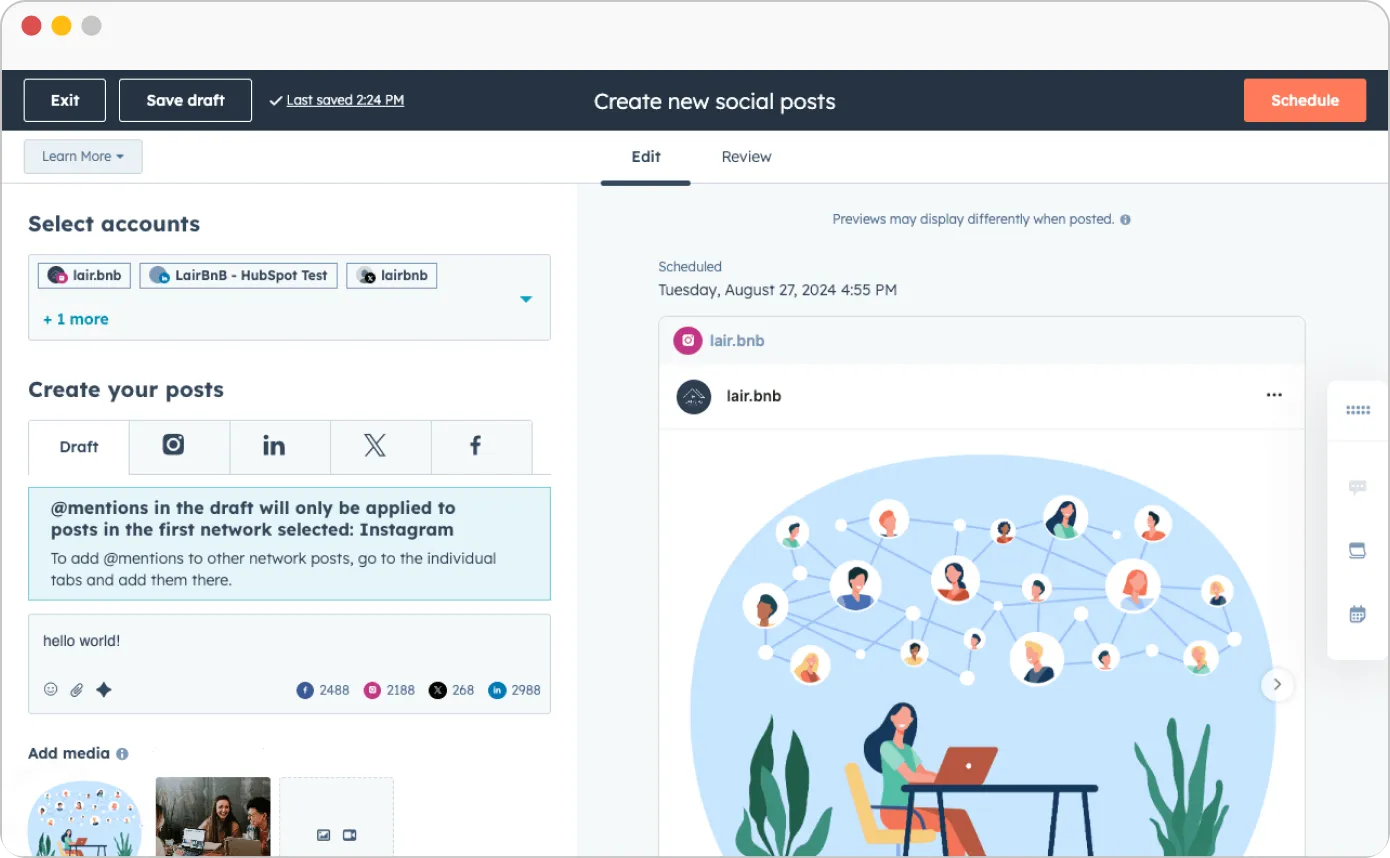
Per risparmiare tempo, è possibile programmare in blocco fino a 300 post in una sola volta utilizzando i file CSV. Tuttavia, l'importazione dei contenuti può richiedere 15-24 ore, a seconda del tipo e del numero di post. Mancano però funzioni essenziali come i post ripetuti e i primi commenti. Inoltre, manca anche la funzione più utilizzata dei post di collaborazione su Instagram.
| Analisi dettagliate dei social media |
|
.
| Analisi combinata di più conti |
|
| Metriche di coinvolgimento |
|
| Analisi delle prestazioni degli hashtag |
|
| Rapporto personalizzato Costruttore |
|
| Invia il rapporto PDF via e-mail al cliente |
|
| Rapporto di programmazione automatica per team e clienti |
|
| Whitelabel Rapporto scaricabile in Formato PDF |
|
Le funzionalità di social media analytics di HubSpot sono progettate per fornire alle aziende approfondimenti dettagliati sulle performance di tutte le loro campagne sui social media. La piattaforma offre analisi approfondite post-performance, consentendo agli utenti di monitorare le prestazioni dei singoli post su Facebook, Instagram, X e LinkedIn. Questo include metriche dettagliate come impressioni, like, clic, reazioni, risposte, retweet e condivisioni, che contribuiscono a una visione completa del coinvolgimento del pubblico.
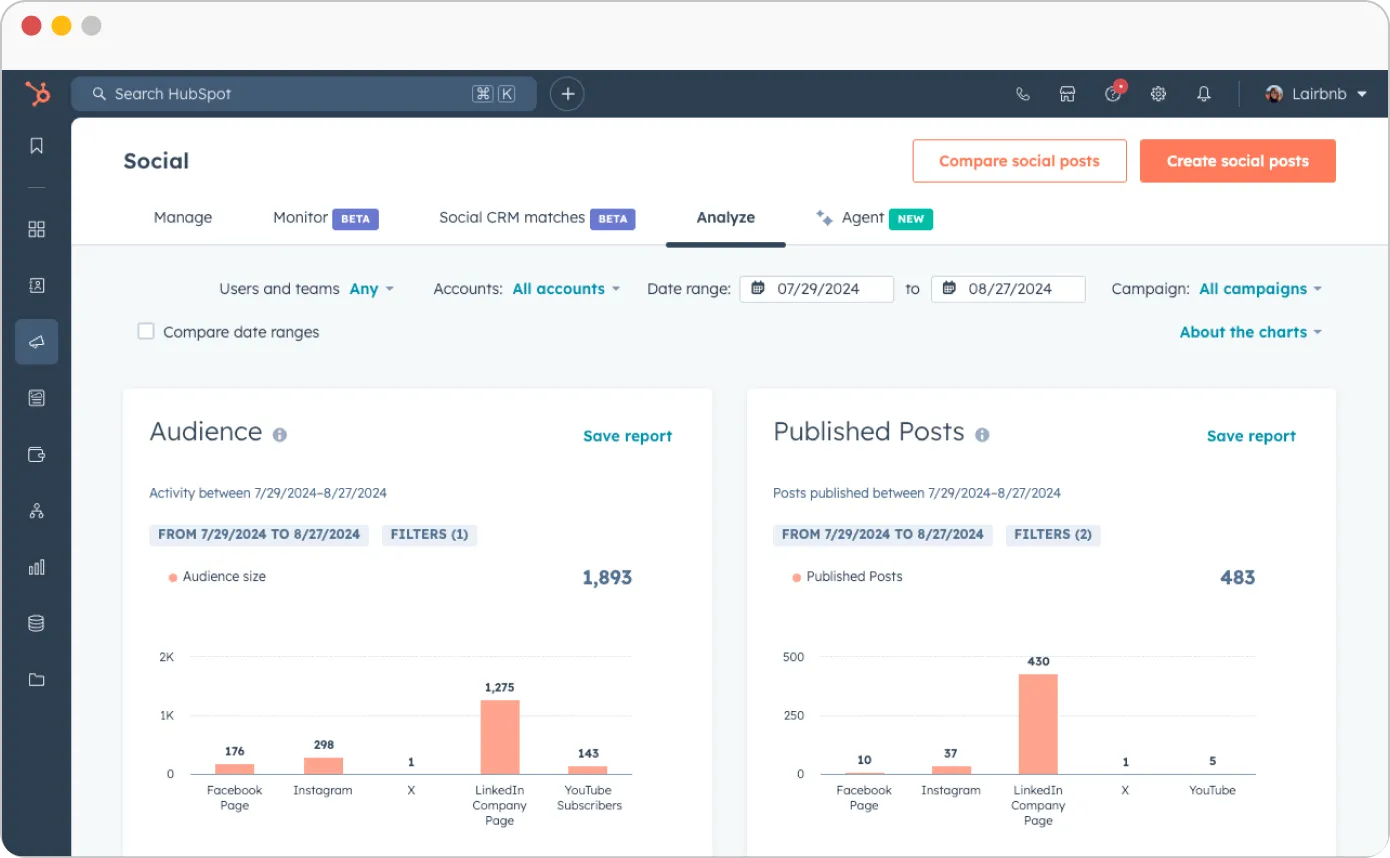
Una delle caratteristiche principali è Il costruttore di report personalizzati di HubSpot, che consente agli utenti di creare report personalizzati in base alle metriche più importanti per loro.. Questi report personalizzati possono essere programmati per la condivisione automatica con i clienti, garantendo aggiornamenti regolari senza interventi manuali. Per le agenzie, HubSpot offre un'opzione white-label, che consente loro di ribattezzare questi report e farli apparire come se provenissero direttamente dall'agenzia stessa, il che è ideale per mantenere la coerenza e la professionalità del marchio.
Tuttavia, HubSpot raccoglie dati specifici per i post solo per 30 giorni dopo la pubblicazione del post.. Mentre le aziende possono tracciare le prestazioni subito dopo la pubblicazione dei post, tutti i dati generati oltre la finestra di 30 giorni non appariranno più negli analytics di HubSpot. Questo potrebbe essere un limite per il monitoraggio a lungo termine, soprattutto per le aziende che si basano su un coinvolgimento prolungato o che cercano di misurare l'impatto a lungo termine dei post.
Nel complesso, gli analytics di HubSpot sono solidi per gli insight a breve termine e per i report dei clienti, il che lo rende uno strumento eccellente per le aziende che desiderano dati rapidi e fruibili sul loro impegno sui social media.
| Rispondere a messaggi e commenti |
|
| Può rispondere ai messaggi |
|
| Rispondere alle domande e agli Review |
|
| Può rispondere al visitatore Messaggi |
|
| Posta in arrivo sociale unificata |
|
| Rispondi alle storie |
|
Lo strumento per i social media di HubSpot include una Social Inbox integrata, che consente di gestire tutte le interazioni da piattaforme come X/Twitter, Facebook, LinkedIn e Instagram in un unico luogo. Questa centralizzazione consente di visualizzare e rispondere facilmente ai commenti su più reti senza dover passare da un'app all'altra.
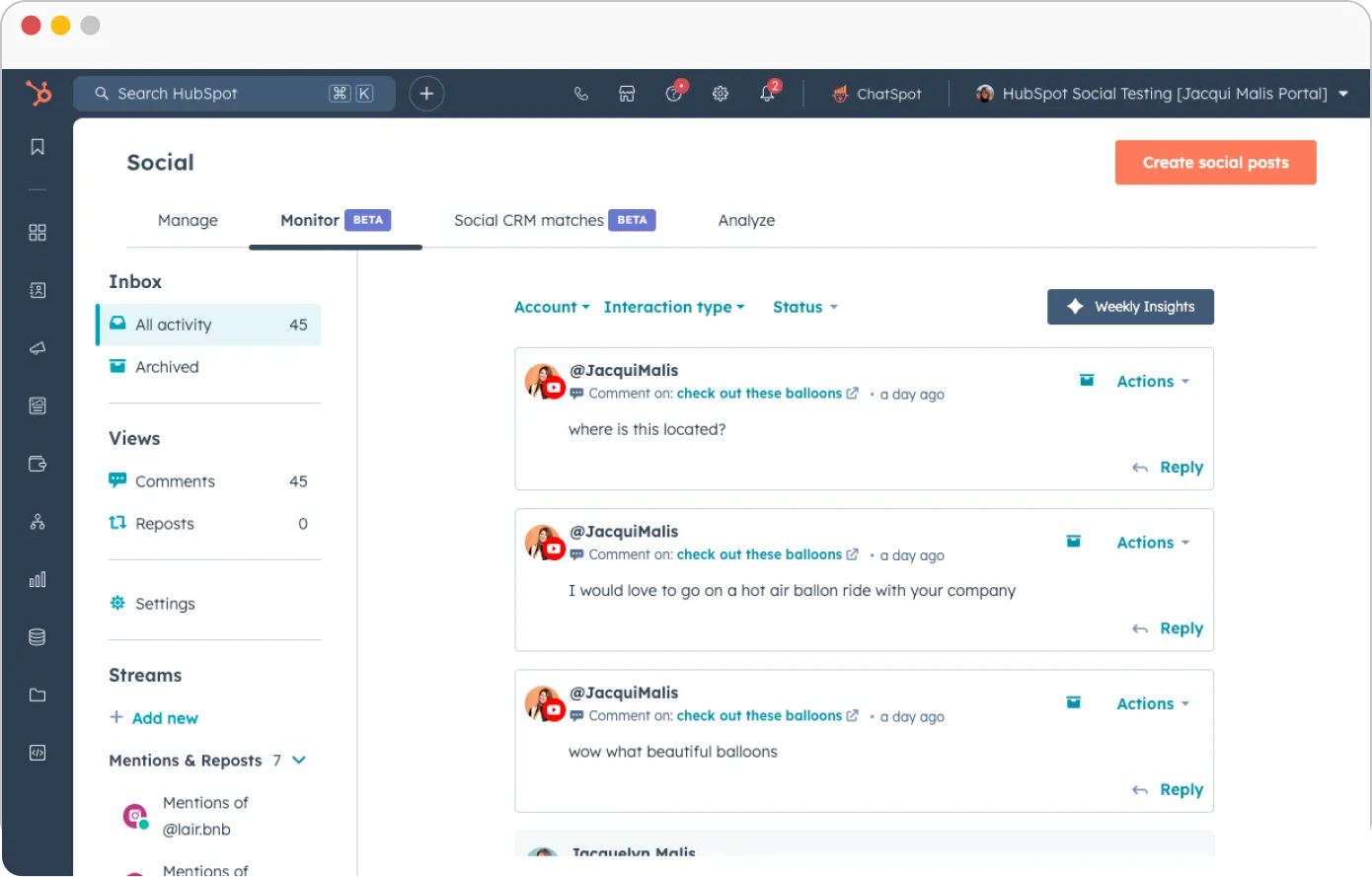
Inoltre, la funzione di social listening di HubSpot vi permette di monitorare le conversazioni sul vostro marchio o sul vostro settore, aiutandovi a coinvolgere il vostro pubblico e a rimanere informati sulle tendenze rilevanti. Questo approccio proattivo alla gestione dei social media migliora le interazioni con i clienti e mantiene le aziende aggiornate sugli sviluppi del settore.
| Flusso di lavoro per l'approvazione dei contenuti |
|
| Per Post Multi-Utente Collaborazione |
|
| Commenti sul post |
|
| Gestione degli accessi |
|
| Onboarding gratuito e illimitato dei clienti |
|
HubSpot offre funzioni di collaborazione sui social media progettate per semplificare il lavoro di squadra e i processi di approvazione. Offre flussi di lavoro per l'approvazione dei contenuti, disponibili solo nel piano Enterprise, che consentono alle aziende di creare flussi di lavoro personalizzati per garantire che i post sui social media siano esaminati e approvati prima della pubblicazione. HubSpot supporta anche la collaborazione multi-utente, consentendo a più membri del team di collaborare su singoli post e migliorando l'efficienza e la collaborazione all'interno dei team.
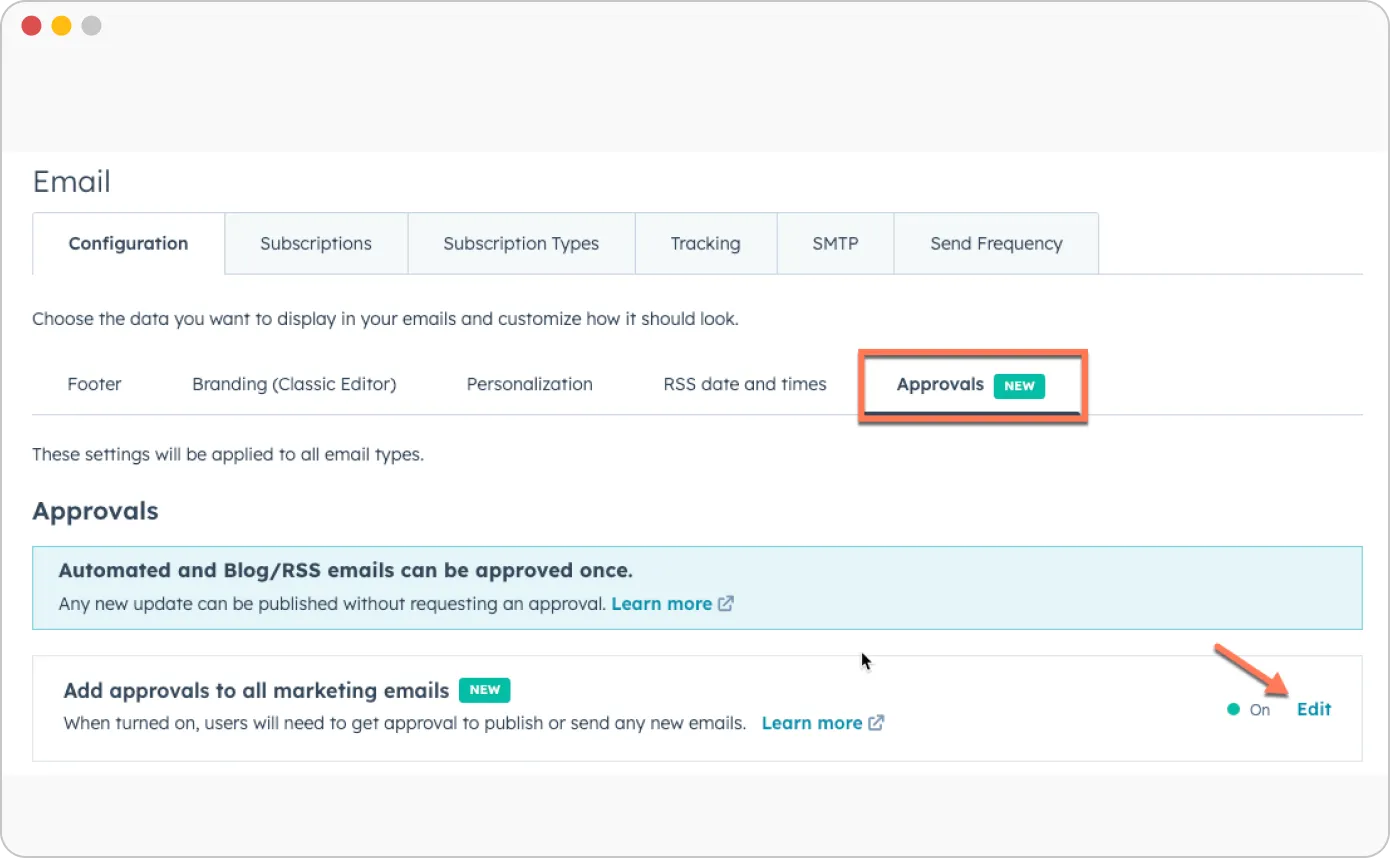
Inoltre, gli utenti possono lasciare commenti sui post, facilitando il feedback in tempo reale e le discussioni tra i membri del team. Per le agenzie e le aziende che gestiscono clienti esterni, HubSpot offre funzionalità di gestione dei clienti, rendendo più semplice la collaborazione con i clienti sulle strategie di social media e l'approvazione dei contenuti.
| UI/UX | Facile da usare, ricco di funzioni |
| Facilità di configurazione | |
| Tempo di installazione richiesto | Massimo, da 10 ore a 50+ ore, a seconda della complessità |
HubSpot viene spesso elogiato per la sua intuitiva UI/UX, ottenendo un punteggio di 8,5 per la facilità d'uso. L'interfaccia utente pulita consente agli utenti di navigare facilmente all'interno della piattaforma, rendendola accessibile sia ai principianti che ai professionisti esperti. La facilità delle attività di amministrazione, come la gestione delle autorizzazioni e delle configurazioni, ha ottenuto un punteggio di 4,0, bilanciando funzionalità e semplicità.
Tuttavia, Il tempo di configurazione può variare in modo significativo in base alle dimensioni e alla complessità delle esigenze dell'azienda.. Sebbene la configurazione iniziale possa richiedere poche ore, l'installazione su scala completa può richiedere in media dalle 10 ore alle 50+ ore per l'implementazione completa, a seconda delle dimensioni dell'azienda e delle personalizzazioni specifiche richieste.
| Assistenza via chat |
|
| Assistenza via e-mail |
|
| Formazione |
|
| Supporto per la configurazione |
|
| Account Manager dedicato |
|
Per quanto riguarda le opzioni di assistenza clienti, HubSpot offre un supporto prioritario agli utenti premium. I clienti possono accedere alla knowledge base, alla community e ai forum e contattare il team di supporto via chat, e-mail e telefono. Per chi ha bisogno di ulteriore assistenza, HubSpot fornisce una guida all'impostazione del prodotto e una guida all'apprendimento per facilitare l'onboarding..
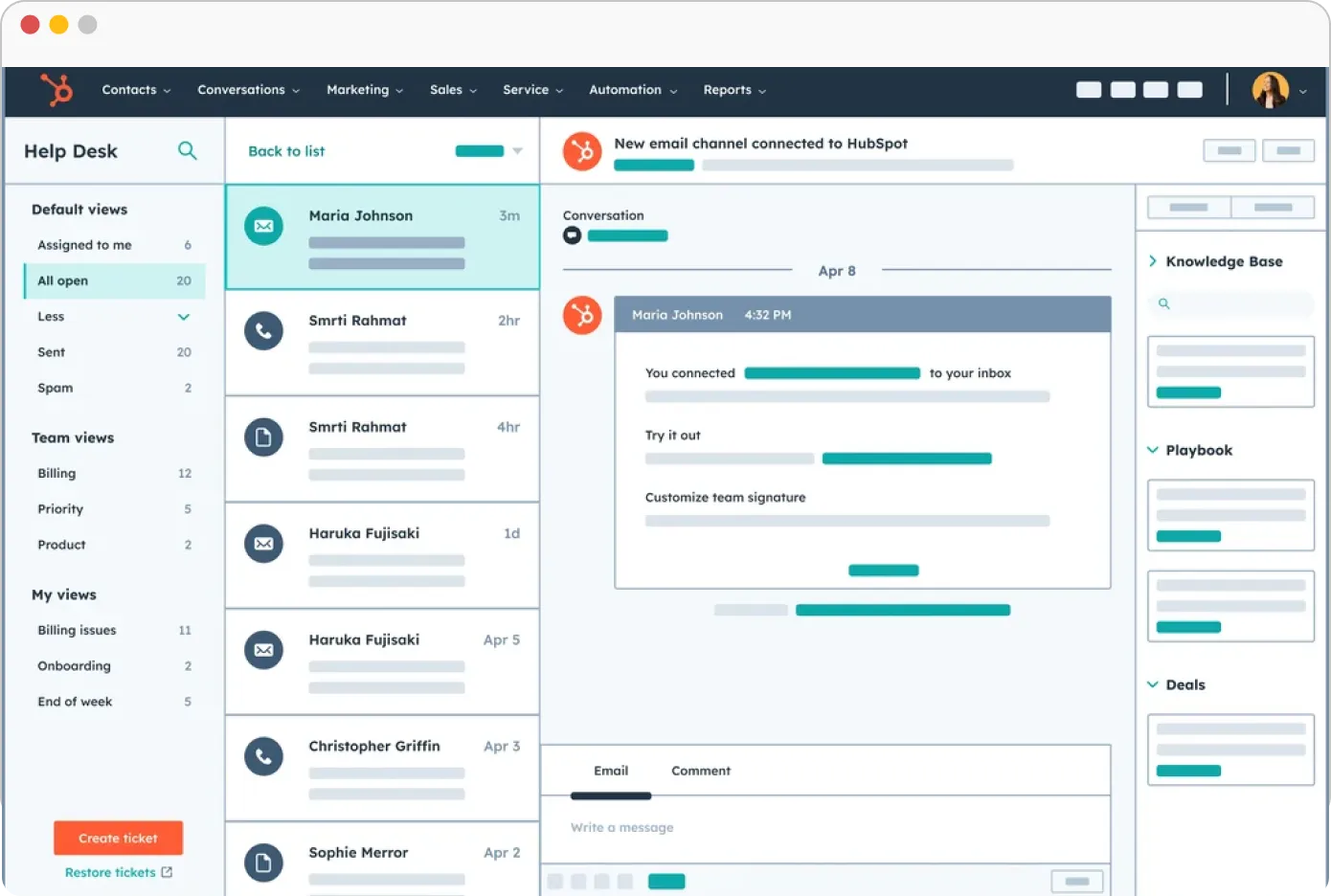
Tuttavia, l'assistenza telefonica è disponibile solo in inglese. Altre forme di assistenza, come la chat, l'e-mail e i servizi di richiamata, sono offerte in più lingue, tra cui inglese, francese, tedesco, giapponese, portoghese e spagnolo. Gli utenti devono assicurarsi che le impostazioni linguistiche individuali siano configurate correttamente per richiedere l'assistenza nella loro lingua preferita.
HubSpot offre diversi piani tariffari per i suoi strumenti di social media e marketing, integrati nel suo Marketing Hub. I piani si rivolgono ad aziende di diverse dimensioni ed esigenze, dalle piccole startup alle grandi imprese:
Strumenti gratuiti: Il piano Free Tools è gratuito e si possono aggiungere fino a 2 utenti. Il piano Free offre gratuitamente strumenti di marketing, strumenti di vendita, strumenti di contenuto, strumenti operativi e strumenti commerciali.
Marketing Hub Starter: Al prezzo di $20 al mese, il piano Starter è adatto alle piccole imprese e consente di gestire 1000 contatti. Consente di catturare e tracciare i lead del sito web con moduli personalizzabili e approfondimenti. Tuttavia, questo piano non offre la funzione di pianificazione dei social media. È adatto ai solisti e ai marketer principianti che vogliono far crescere la propria presenza online e generare più traffico. Oltre all'acquisizione di lead, si ha accesso all'email marketing, alla live chat, ai bot conversazionali e alla gestione degli annunci.
Marketing Hub Professional: Il piano professionale ha un prezzo di $890/mese e comprende 2 postazioni. Questo piano consente di gestire fino a 2.000 contatti di marketing e di automatizzare le campagne di marketing su più canali, compresi i social media. Oltre a tutte le funzionalità del piano Starter, sono disponibili landing page, strumenti SEO, test A/B, hosting video, social media e reportistica sulle campagne. Potete collegare fino a 50 account, pubblicare fino a 10.000 post sui social media al mese e programmare i post fino a 3 anni prima su Facebook, Instagram, LinkedIn e X.
Marketing Hub Enterprise: Al prezzo di $3.600 al mese, il piano Enterprise include tutte le funzioni del livello Professional, con funzionalità aggiuntive per i team più numerosi e supporta 5 sedi. Questo piano include 10.000 contatti di marketing, fino a 300 account collegati, 10.000 post al mese. Supporta Facebook, Instagram, LinkedIn, X e YouTube (Beta). Inoltre, è possibile effettuare test A/B prima di rendere attive le campagne di marketing.
Gratuito
$0
Al meseCaratteristiche
Avviamento
$20
Al meseCaratteristiche gratuite+
Professionale
$890
Al meseCaratteristiche di avviamento+
Impresa
$3600
Al meseCaratteristiche professionali+
Ogni piano offre inoltre un numero variabile di contatti e le aziende possono aggiungerne altri man mano che crescono, con prezzi che scalano in base al numero di contatti nel CRM.
Infine, non esiste una soluzione unica che vada bene per tutti. Ogni team o azienda ha le sue esigenze e deve considerare 3-4 opzioni prima di prendere la decisione finale. Per aiutarvi in questo, abbiamo confrontato HubSpot con tre strumenti di gestione dei social media leader del settore. Consultate la nostra tabella di confronto per avere una visione dettagliata delle principali funzionalità e decidete di conseguenza.
 SocialPilot |
 Sprout Social |
 Hootsuite |
HubSpot |
|
|---|---|---|---|---|
| Prezzi | A partire da $25/Mese | A partire da $199/mese | A partire da $99/Mese | A partire da $20/Mese |
| Il migliore per | Agenzie e piccole imprese | Medie imprese, aziende, agenzie | Professionisti, marchi, grandi aziende e imprese. | Imprese, organizzazioni e marchi di tutte le dimensioni |
| Profili sociali | 10 | 5 | 10 | 1 |
| Facilità d'uso | ||||
| Supporto | ||||
| Editoria | ||||
| Pianificazione di massa | 500 Messaggi |
|
|
fino a 350 messaggi |
| Code intelligenti | |
|
|
|
| Ripetere il post | |
|
|
|
| Primo commento | |
|
|
Solo Instagram |
| Targeting del pubblico | |
|
|
|
| Pianificazione e creazione di contenuti | ||||
| Biblioteca dei contenuti | |
|
|
|
| Vista calendario | Facile da leggere |
Travolgente |
Di difficile lettura |
Facile |
| Calendario delle vacanze | |
|
|
|
| Assistente AI | |
|
|
|
| Post di collaborazione su Instagram | |
|
|
|
| Etichettatura della posizione | |
|
|
|
| Call-To-Actions personalizzate | |
|
|
|
| Editor di immagini | |
|
|
|
| Il fidanzamento | ||||
| Posta in arrivo sociale | Posta in arrivo unificata |
|
|
|
| Risposta a Review e domande | |
|
|
|
| Rispondere a DM e commenti | |
|
|
|
| Analisi | ||||
| Analisi dettagliate dei social media | Facile da leggere |
Travolgente |
Travolgente |
|
| Generatore di rapporti personalizzati | |
|
|
|
| Condivisione automatica dei report ai clienti | |
|
|
|
| Prestazioni postali | |
|
|
|
| Collaborazione tra team e clienti | ||||
| Gestione dei clienti | |
|
|
|
| Flussi di lavoro di approvazione | Facile e veloce |
Problemi di tracciamento |
Base |
Base |
| Per Post Collaborazione tra più utenti | |
|
|
|
| Approvazione in movimento | |
|
|
|
| Etichettatura bianca | ||||
| Cruscotto White Label | |
|
|
|
| Rapporto scaricabile con etichetta bianca | |
|
|
|
| Prova gratis | Per saperne di più | Per saperne di più | Per saperne di più | |
Sentire questi grandi nomi e queste piattaforme complesse può farvi sentire sopraffatti. Tuttavia, non tutte le aziende hanno bisogno di tutta questa complessità; alcuni strumenti combinano la semplicità con funzioni potenti. SocialPilot è uno strumento di gestione dei social media progettato per semplificare il vostro lavoro gestendo più account di social media, pubblicando contenuti, condividendo report o collaborando con il vostro team o i vostri clienti.
Una caratteristica che vi piacerà molto è la possibilità di pubblicare post di collaborazione su Instagram direttamente da SocialPilot, risparmiandovi la fatica di passare da una piattaforma all'altra. Il flusso di lavoro per l'approvazione dei contenuti garantisce che nulla vada in onda senza il vostro via libera.
Quando si tratta di capire il vostro pubblico, le sue analisi vi permettono di fare un'analisi approfondita del vostro pubblico, di vedere chi sono i vostri spettatori e da dove provengono, di trovare gli orari migliori per la pubblicazione e altro ancora. Generate report completi e condivideteli con il vostro team e i vostri clienti.
Semplificate la vostra strategia sui social media senza dover passare ore a imparare funzioni complicate: potete immergervi subito e iniziare a postare.
HubSpot è una solida piattaforma CRM all-in-one che si distingue per le sue capacità di gestione dei social media. I suoi dati analitici, le funzioni di automazione e l'integrazione con il CRM ne fanno una scelta forte per le aziende che desiderano scalare le proprie attività sui social media mantenendo tutto sotto lo stesso tetto.
Tuttavia, i suoi prezzi elevati e la sua complessità potrebbero non essere l'ideale per le aziende più piccole o per chi è alla ricerca di una soluzione più semplice con una curva di apprendimento ridotta. Per chi cerca funzioni avanzate e una piattaforma unificata, HubSpot è un'ottima opzione, ma per le aziende che danno priorità alla facilità d'uso, alternative come SocialPilot possono offrire un punto di ingresso più accessibile.
La più grande forza di HubSpot è il lungo elenco di funzionalità che offre. La piattaforma consente alle aziende di gestire facilmente le proprie attività collegando marketing, vendite, gestione dei contenuti e assistenza clienti in un'unica dashboard.
Sebbene HubSpot abbia molti vantaggi, come ogni strumento, presenta anche alcuni svantaggi di cui gli utenti dovrebbero essere consapevoli:
Per collegare il vostro account Facebook o Instagram a HubSpot, seguite questi passaggi:
Sull'autore