
You open a post and X tells you it’s restricting access “until X estimates your age.” Or you paid X Premium days ago, and the blue checkmark still hasn’t shown up. Or a creator payout is stuck behind an ID check that keeps failing. All three get called “verification,” which is why searching how to get verified on X turns up such tangled answers.
Here’s the short version. X runs three separate systems that barely overlap. The blue, gold and grey checkmarks are badges you get through a paid plan or as an official organization. The age check is a legal requirement in places like the UK, the EU and Australia, and most adults pass it without doing anything. ID verification is an optional identity check that X requires before it pays creators.
This guide takes each one in turn: what it costs, the rules X checks, what to do when something fails, and what happened to the free blue checks people had before 2023. Find the system you’re dealing with below and start there.
Understanding X’s Verification Types: Blue Checkmark, Age, and ID Verification
X uses the word “verified” for three things that barely overlap. One is a badge you pay for, one is an age checkmark the law requires, and one is an identity check that unlocks creator payouts. If you remember Twitter verification as a badge for famous people, that system closed in 2023.
| Checkmark | “ID verified” label | Age check | |
| What it shows | A paid plan that passed X’s review, or an official organization | You matched a government ID to a selfie | You’re old enough to see restricted content |
| Needs Premium? | Yes (gold needs Premium Business) | Yes | Not to pass it (details) |
| Cost | From $8 a month | Included with Premium | Free |
Blue, Gold, and Grey Checkmarks Explained
The color tells you what kind of account you’re looking at, not how trustworthy it is. Here’s how X’s profile labels page splits them:
| Badge | Who it’s for | How you get it | Price from |
| Blue | People with an active X Premium subscription who meet the requirements. | Subscribe, then pass X’s review | $8 a month |
| Gold | Official businesses and organizations (square profile picture). | Premium Business | $200 a month |
| Grey | Government and multilateral organizations and officials. | Premium Organizations, approved by X | $1,000 a month (eligible organizations only) |
Gold organizations on Full Access can also add affiliation badges to linked accounts, like staff.
Why Age and ID Verification Are Completely Different Systems
An age check asks whether you’re old enough to see something. X runs it because laws in the UK, Ireland, the EU and Australia require it, and most adults pass without doing anything.
ID verification asks whether you’re the real person behind the account. It’s optional, Premium-only and for individuals but required for creator payouts.
None of the three proves the others: the blue check “indicates an active X Premium subscription, not account verification,” passing an age check adds no badge or label, and ID verification only counts toward the age check as one automatic signal.
How to Get Verified on X With the Blue Checkmark
Your part of getting the blue check takes about five minutes, and X’s review can take several business days after that. You subscribe to a plan that includes the checkmark, meet X’s eligibility rules and wait. There’s no application form and no notability test anymore.
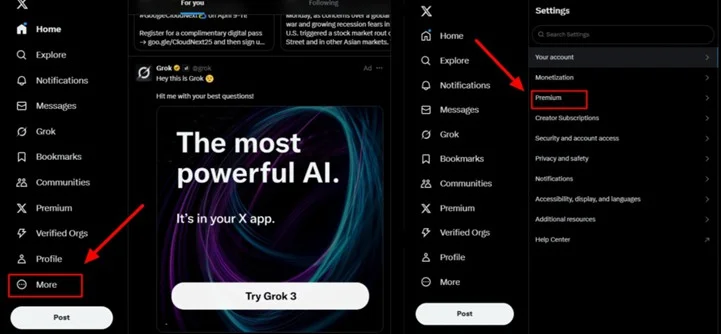
On the web, log in at x.com and click Premium in the left menu, or click More, then Settings and privacy, then Premium. In the iPhone or Android app, tap your profile icon and choose Premium. If it’s missing, update the app.
Which plans you see depends on whether you already subscribe. New subscribers see a new lineup called “The X Subscription,” so the old Premium vs. Premium+ choice now applies only to people already paying for one of them.
| If you’re… | Plans you’ll see (US web, per month) | Cheapest with the checkmark |
| A new subscriber | The X Subscription: Plus $8, Premium $30, Super $100, Ultra $200 | Plus, $8 |
| An existing subscriber | Basic $3 (no checkmark), Premium $8, Premium+ $40 | Premium, $8 |
Already subscribed? In xAI’s announcement, “Nothing changes for existing SuperGrok, Cursor, or X Premium subscribers.”
For the checkmark alone, the $8 plan in either lineup does the job; the pricier tiers add features (the new $30 Premium includes X Premium+ benefits) and carry the same blue badge. Skip Basic, the $3 legacy plan, because it has no checkmark at all.
Step 3: Add Payment Info and Subscribe
Pick monthly or annual billing, add a card and confirm. Legacy Premium costs $84 a year on annual billing, $12 less than paying monthly.
The US iPhone app lists Basic, Premium and Premium+ at $4, $11 and $50 a month, so a browser is the cheaper place to subscribe.
Step 4: Verify Your Phone Number
A confirmed phone number is one of X’s requirements. If your account doesn’t have one, add it in your account settings and enter the code X texts you.
Step 5: Wait for Your Checkmark to Appear
X’s review “can sometimes take several business days,” so no check on day one is normal.
Leave your profile alone while you wait. In the words of X’s own in-app warning, quoted on Hacker News, “Your blue checkmark will be hidden for a period of time after you edit your display name or profile photo until it is reviewed.”
So make any profile changes before you subscribe, not while the review is running. The check then stays while you pay and meet the rules. If you cancel, it lasts until your paid period ends.
How Much Does It Cost to Get Verified on X?
The cheapest blue check costs $8 a month on the US web, through Plus for new subscribers or Premium for existing ones. A gold check for a business starts at $200 a month.
| Plan | Who can get it | Monthly (US) | Annual (US) | Badge |
| The X Subscription: Plus | New subscribers | $8 | Not listed | Blue |
| The X Subscription: Premium | New subscribers | $30 | Not listed | Blue |
| The X Subscription: Super / Ultra | New subscribers | $100 / $200 | Not listed | Blue |
| Basic (legacy) | Existing subscribers | $3 | $32 | None |
| Premium (legacy) | Existing subscribers | $8 | $84 | Blue |
| Premium+ (legacy) | Existing subscribers | $40 | $395 | Blue |
| Basic / Premium / Premium+ (iPhone app) | Existing subscribers | $4 / $11 / $50 | $42 / $114.99 / $490 | Same as web |
| Premium Business Basic | Businesses | $200 | $2,000 | Gold |
| Premium Business Full Access | Businesses | $1,000 | $10,000 | Gold plus affiliates |
| Premium Organizations | Eligible government and multilateral organizations | $1,000 | Not listed | Grey |
Prices last checked on October 21, 2026; X changes pricing often, so confirm on X before you subscribe.
If you’re wondering how to get verified on X without paying, for a new account in 2026 you can’t. Blue and gold both need a paid plan, and grey goes only to eligible government accounts.
The exception people remember is from 2024, when X gave free Premium to accounts with more than 2,500 verified-subscriber followers, and free Premium+ above 5,000. Its current status is unconfirmed, so don’t count on it.
Eligibility Requirements and Why Applications Get Rejected
Once you’ve paid, X’s verification requirements in 2026 decide whether the check shows up. About X Blue Checkmark lists six:
- An active subscription to a plan that includes the checkmark
- A display name and a profile photo
- Activity on the account in the past 30 days
- A confirmed phone number
- No recent changes to your profile photo, display name or @handle
- No signs of misleading or deceptive behavior, platform manipulation or spam
Follower counts, press coverage and fame aren’t on it. Those belonged to the old system.
Account Activity and Age Requirements
“Age” here means the age of your account, not your own age, which is a separate check. On activity, X has one rule: the account must have been active in the past 30 days.
X doesn’t publish a minimum account age, and there’s no follower minimum. If your account has sat quiet since a campaign ended, use it again before you subscribe so it’s inside that window.
Profile Completeness Rules
You need a display name, a profile photo and a confirmed phone number, and then you need to stop touching them.
X’s help text says a new photo, name or handle means a “temporary loss of the blue checkmark until your account is validated,” with no further changes allowed during the review (quoted on Hacker News). This means that even a paying customer can lose their check mark for changing their profile picture.
For a brand, finish any rebrand (name, logo, @handle) before you subscribe. And keep the profile clearly yours, because resembling another person or brand can read as deceptive.
Common Reasons Applications Get Rejected (and How to Appeal)
If you paid and nothing happened, you’re probably wondering if that money vanished. Most missing checks trace back to one item on X’s list:
| What you’re seeing | Likely cause | What to do |
| Paid a day or two ago, no check | Review still running | Wait; it can take several business days |
| No check, no phone on the account | Missing confirmed phone | Add and confirm a number |
| Check vanished after a profile update | New photo, name or @handle | Stop editing and wait for re-review |
| No check on a rarely used account | Not active in the past 30 days | Use the account, then wait |
| Check gone around renewal | Payment failed or plan lapsed | Update your payment method |
| You’re on Basic | Basic has no checkmark | Move to a plan that includes it |
X doesn’t offer a formal appeal for the blue check. Fix the criterion you missed, give the review time to run again, and if the check still doesn’t appear, contact X through its Premium support form with the date you subscribed and what you changed.
What Happened to the Old Free Blue Checkmark?
It’s gone for good. Twitter began removing legacy blue checks on April 20, 2023, and accounts that didn’t start paying lost the badge.
Why Legacy Blue Checks Were Removed
The old check meant Twitter judged you worth protecting from impersonation; the new one means you pay. Here’s how that changed, from Twitter’s first verified accounts in 2009 to the March 2023 announcement that ended legacy checks:
| When | What happened |
| June 2009 | Twitter launches verification |
| November 2017 | General verification is paused |
| Until late 2022 | Checks go free to accounts judged “active, notable, and authentic” |
| November 2022 | Twitter Blue starts selling the check for $7.99 a month |
| March 23, 2023 | Twitter announces legacy checks will go from April 1 |
| April 20, 2023 | Removal actually begins |
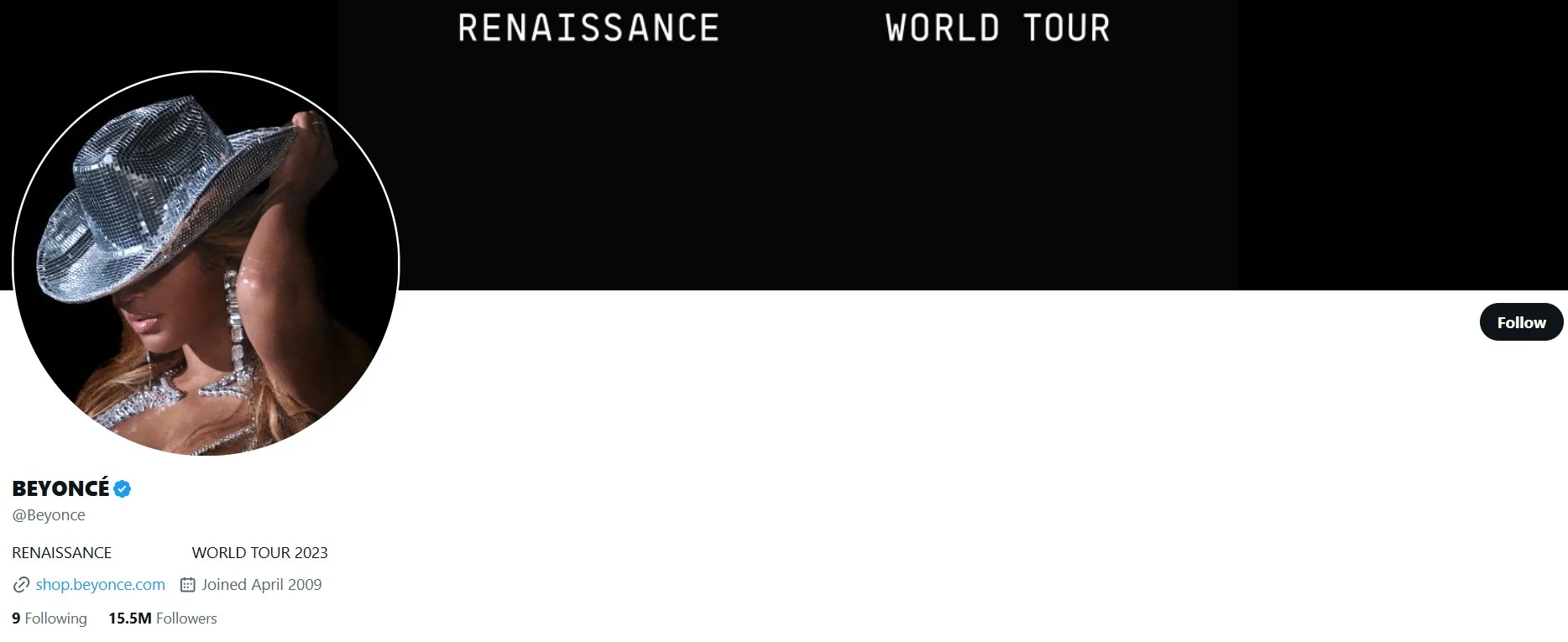
Beyoncé’s account shows what a legacy check looked like. She had the free blue check for years and lost it on April 20, 2023, as NBC New York reported.
Can You Get Your Legacy Status Back?
No. The program is closed and there’s no form to restore it. Checks now come only from a subscription (blue), Premium Business (gold) or government status (grey).
Your legacy status does still help in one place. X lists “Legacy Verified status” among its automatic age signals, so former legacy holders may never see an age prompt.
Gold and Grey Checkmarks for Businesses and Government Accounts
Both are paid, but only gold is open to any business. A business buys gold through Premium Business. Eligible government and multilateral organizations get grey through Premium Organizations, which costs $1,000 a month, and X decides who qualifies. No individual can buy either one.
If you’re verifying a company account, the badge is one decision inside a wider plan for using X for your business, so settle that plan before you pick a tier.
How Businesses Get the Gold Checkmark
You subscribe to Premium Business, X reviews the organization, and the gold check appears once it’s approved. Gold accounts also get a square profile picture.
| Basic | Full Access | |
| Monthly (US, before tax) | $200 | $1,000 |
| Annual | $2,000 | $10,000 |
| Gold check | Yes | Yes |
| Affiliation badges for staff or sub-brands | No | Yes, $50 a month per extra affiliate |
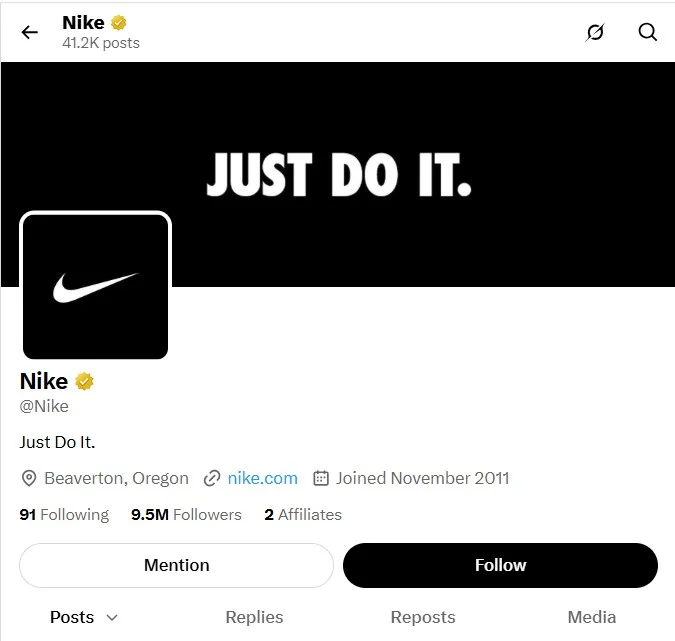
Nike’s account is a good example of what gold looks like in practice. It was one of the first brands reported with a gold check in Dec 2022, and its profile shows the gold badge and square logo together.
If the founder asks “blue or gold?”: blue costs $8 and says the account pays for Premium, while gold costs at least $200 and says X reviewed it as an official organization. That matters more once impersonators copy your logo.
How Government and Multilateral Accounts Get the Grey Checkmark
You can’t apply for a grey check as a person. X reserves it for government and multilateral organizations and their officials. Since October 2025, eligible organizations get it through Premium Organizations, and X decides who qualifies.
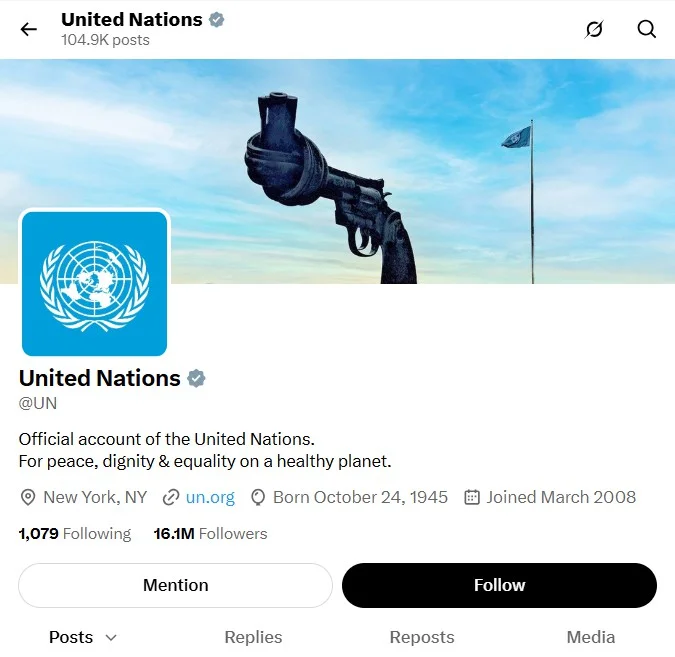
The United Nations’ main account shows the grey check on a multilateral organization. A 2023 fact check used that grey badge to tell the real account apart from a fake post.
Is Getting Verified on X Actually Worth It?
Usually yes, if you run a brand that gets impersonated or you’re a creator who wants payouts. On a casual personal account, the $8 buys features more than trust.
Not everyone agrees, and the skeptics have a point. In his video on paid verification, creator Ryan Vet argues that now anyone can buy the badge, it adds little for most accounts. In the comments under it, though, one viewer made the case for brands: “you want others to be able to know that yours is the real one.”
Both are right, for different accounts. If nobody would bother copying your name, the badge mostly buys features. If impersonators already use your name and logo, or a creator payout depends on it, the check earns its $8.
Whether you choose to buy a badge or not, just don’t expect it to replace the slower work of growing your following on X.
X’s About X Premium page lists features like these:
- Reply prioritization: your replies rank higher in conversations
- Fewer ads
- Edit post within one hour
- Longer posts, up to 25,000 characters
- Creator monetization eligibility (with ID verification on top)
What X doesn’t publish is how much extra reach any of this brings. Before you renew, compare 30 days of impressions and follower growth from before you subscribed with the 30 days after.
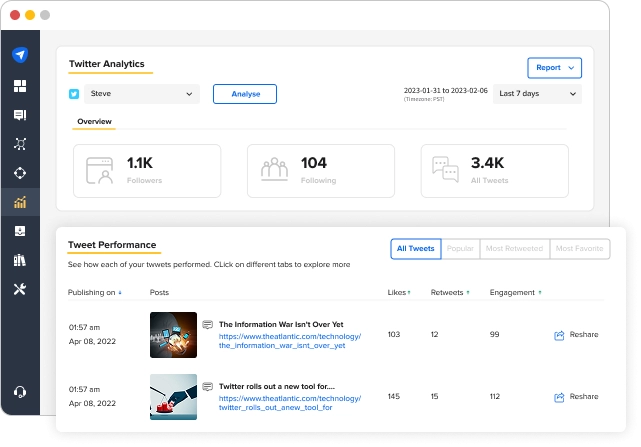
If you’d rather not build that comparison by hand, SocialPilot’s analytics track post performance and follower growth for X and can send it as a scheduled PDF report to whoever signs off on the budget.
What the Checkmark No Longer Means
The blue checkmark on X shows an active X Premium subscription, not a confirmed identity.
That’s X’s own position. But when the European Commission fined X, it went further: “On X, anyone can pay to obtain the ‘verified’ status without the company meaningfully verifying who is behind the account.”
After that €120M fine on 5 December 2025, X’s About X Blue Checkmark page now says that in the EEA it “has stopped referring to blue checkmark users as ‘verified’ and now calls them ‘Premium’ users.”
Scammers know this. Impersonators purchase X Premium, set their display name and profile picture to match a well-known person or brand. In October 2026, Microsoft’s verified X account was hijacked to push a crypto scam.
On X, the checkmark tells you someone pays for a subscription, and the @handle tells you who they are.
If you run a brand account, publish your exact handle on your website so customers can check it.
How to Verify Your Age on X
Being carded to see a post is irritating, but most adults never have to do anything, so hold off on digging out your passport. X confirms age automatically from signals it already has, and only asks for a selfie or ID photo when those aren’t enough.
Plenty of people are stuck on the same screen. Explainic’s video on fixing the age-verification pop-up walks you through the entire process in under 90 seconds.
Here’s how to verify age on X, fastest route first.
Why X Requires Age Verification
If this feels like X picking on you, the real driver is the law. X’s Age Assurance page names the UK Online Safety Act, Ireland’s Online Safety Code, the EU’s Digital Services Act and Australia’s Online Safety Act. The UK rules took effect on July 25, 2025, and X rolled out its checks the next day.
In Australia, under-16s can’t hold an X account, and the lockout notice explains how to appeal.
How to Complete Age Verification, Step by Step
If you’d rather not hand X a selfie or an ID, start by checking whether X can already confirm you. If any of these apply, you’ll usually pass without doing anything:
- A completed ID verification
- Legacy verified public figure status
- An account created in 2012 or earlier
- A grey or gold check
- An estimate from your email address or phone number
If none of those settle it, here’s how to get age verified on X manually:
- Open the restricted post in the official X app or on x.com, and tap the age-check prompt.
- Choose a live selfie (facial age estimation) or a photo of a government-issued ID.
- Follow the on-screen guide: face a light source for the selfie, or lay the ID flat with the whole card in frame.
- Submit, then return to the post once X confirms your age.
Only ever do this from the prompt inside X. X warns about scam messages that imitate its age checks, so ignore links that arrive by email or DM.
Ignore menu paths in older tutorials because those settings do not exist any longer.
No, not to pass the check: X confirms most adults automatically from signals like account age, and its age-assurance policy doesn’t list Premium as a requirement. But if X asks you to verify manually with a selfie or ID, reports through October 2026 (Cybernews, Tom’s Guide) say that option has been limited to Premium subscribers.
Cybernews, also mentions that free users “may have limited or no options.”
How Long Does Age Verification Take?
If automatic signals confirm you, there’s nothing to wait for, because you never see a prompt. For the selfie or ID route, X doesn’t publish a timeframe.
And that route can stall, which is quite maddening. Here are some things to try if your age verification is taking longer than expected:
| What you see | What to try |
| Black screen or endless loading | Update the app, allow camera access, retry on mobile |
| “Something went wrong, please try again” | Close and reopen the app, then try the other method |
| A setting you can’t find | Use the prompt on the restricted post instead |
| Locked out as under 16 in Australia | Contact X Support through the app or website |
| Still stuck | Contact X’s Help Center, not a third-party “fix” |
How to Complete ID Verification on X
Skip this one unless you want X to pay you as a creator or you want an “ID verified” label behind your check. X ID verification is optional, open only to X Premium subscribers who are individuals (not businesses), and matches your government ID to a live selfie.
If you searched for Twitter ID verification or how to verify ID on Twitter, it’s the same process under the platform’s new name.
What ID Verification Is Actually For
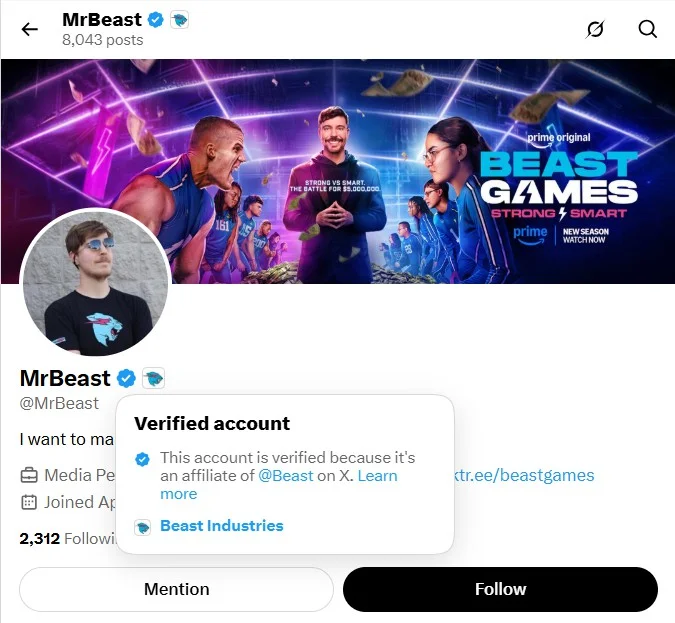
Passing it adds an “ID verified” label that people see when they tap your blue check, plus prioritized support. For creators, the bigger reason is that X requires it for Original Content Rewards and Creator Subscriptions payouts.
The image below shows an “ID verified” status on MrBeast X profile. He also publicly shared a $263,655 X payout for a single video in January 2024, so tapping the blue check on his profile shows the label in action.
How to Submit Your ID
First, make sure your display name matches your ID. Changing it hides your checkmark briefly while X re-reviews the profile.
- Confirm you have an active X Premium subscription.
- Start from the ID verification prompt in your Premium or Creator Studio/monetization settings, as X shows it in the current app.
- Photograph your government-issued ID (front, and back if asked).
- Take the live selfie so the check can match your face to the ID.
- Submit and wait for the result.
X uses Persona and Stripe to run the check, as MediaNama reported. Read the consent screen for how your data is handled, especially if sharing your ID with outside companies worries you.
Common ID Verification Problems and Fixes
When payouts are on hold, every day “under review” stings. “My ID verification has been under review for the past two weeks because of that I dint get paid,” posted one commenter on Mimer update’s YouTube video. Most failures come down to the document, the name or the photo, and each has a fix:
| Problem | What to do |
| National ID rejected (one creator tried “NIN AND VOTERS CARD for 3 days,” per the same video) | Try a passport or driver’s license, using only document types the flow offers |
| Name on the ID doesn’t match your profile | Change your display name to match, wait for the check to return, then retry |
| Blurry photo or glare | No flash, daylight, all four corners in frame |
| Selfie fails | Face a light source, uncover your face, retry in the mobile app |
| Stuck “under review” for weeks | Contact X through its Premium support form with your submission date |
One thing never to do is use someone else’s ID. The check confirms the person running the account, so using someone else’s ID fails the selfie match or puts your payouts at risk.
Start With the Verification You Actually Need
Most of the stress around X verification comes from not knowing which of the three systems you’re facing. Once you know whether it’s the badge, the age check or the ID label, each one comes down to a short list.
If you’re verifying a brand account, the paid check is only worth keeping when it earns something back. Check the eligibility rules before you pay, leave the profile alone during review, then compare 30 days of reach before and after.
That comparison is where a social media management tool helps. With SocialPilot’s built-in X reports, the before-and-after becomes a one-page answer for whoever signs off on the spend, and role-based access lets your team publish without touching the profile settings that send a check back into review.
Once you know how many X accounts you need to report on, the SocialPilot plans show what that costs, and the 14-day free trial needs no credit card.




 Join 55,000+ social media managers


