

Looking to monetize your Facebook profile with Professional Mode?
Professional Mode lets creators, freelancers, and business owners turn a personal Facebook profile into a tool for growth and income. It first rolled out in 2022 and is now broadly available around the world, so this is no longer an early-access feature you have to wait for.
With access to features like a public follower audience, professional insights, and creator monetization tools, you can reach Facebook’s 3.07 billion monthly active users (Statista), attract new customers, and earn while sharing content that connects with your audience.
Meta paid creators about $3 billion in 2025, its highest annual payout yet, and up roughly 35% from the year before. The catch is that you have to qualify first, so let’s start there.
So, how do you get started with Facebook’s Professional Mode to monetize your profile?
Let’s walk through it, starting with who actually qualifies in 2026.
Facebook Monetization Eligibility Requirements for 2026
Before you can earn a cent, your profile has to clear a few bars. Facebook checks more than a follower count in 2026, it looks at where you are, how old your account is, and whether your content and history follow the rules. Here is what you need.
The baseline (everyone):
- You’re 18 or older. This is a hard requirement for every monetization tool.
- You’re in an eligible country. Monetization isn’t global by default. Most major markets qualify, the US, UK, Canada, Australia, and much of Western Europe, but check Facebook’s country list before you count on a payout.
- Professional Mode is switched on. Turning it on tells Facebook you’re open to monetization and ready to follow the creator rules.
- You follow the rules. You need to meet Facebook’s Partner Monetization Policies and Content Monetization Policies, and stay clear of repeated community-standards strikes. Facebook now weighs content originality, audience quality, and watch-time depth, not just raw numbers.
The follower and engagement bars (by feature):
| Feature | What you need in 2026 |
| Stars (fan tipping) | 500+ followers for 30 consecutive days, plus an eligible country. |
| Reels / video monetization | 5,000+ followers, plus one engagement bar — either 60,000 minutes viewed across Reels, long-form, or Live in the last 60 days, or 5 active Reels posted in the last 30 days. |
| Subscriptions | 10,000+ followers or 250+ return viewers, plus 50,000 post engagements or 180,000 watch minutes in the last 60 days. Mostly a Page feature — see the Subscriptions note below. |
| Content Monetization program | Invite-only. Facebook selects eligible creators, but you can raise your hand from the Professional dashboard (see below). |
Meeting the numbers doesn’t guarantee acceptance. Facebook runs a multi-layer review that looks at originality, audience quality, and your policy history, so keep your content original and your record clean.
Quick Eligibility Self-check
Run down this list before you apply. If you can’t tick a box, that’s the thing to fix first.
- I’m 18 or older.
- I’m in a country where Facebook monetization is available.
- Professional Mode is turned on for my profile.
- My account is at least 30 days old with no recent policy strikes.
- My content is original, not reposted or stitched from other creators.
- I meet the follower and engagement bar for the feature I want (see the table above).
Profile or Page – Which One Actually Monetizes?
This trips up a lot of people, so let’s clear it up. A plain personal profile with nothing switched on can’t monetize. You have two real paths:
- Profile with Professional Mode on: Best if you want to keep building a personal, creator-style presence. It unlocks Stars, Reels/video monetization, and (by invite) Content Monetization.
- Facebook Page: Better if you’re running a brand or business. It unlocks the same tools plus Subscriptions, which are mostly Page-based.
You don’t have to pick forever. Many creators start with Professional Mode on their profile and add a Page later as their business grows.
Professional Mode for Facebook Profile Monetization
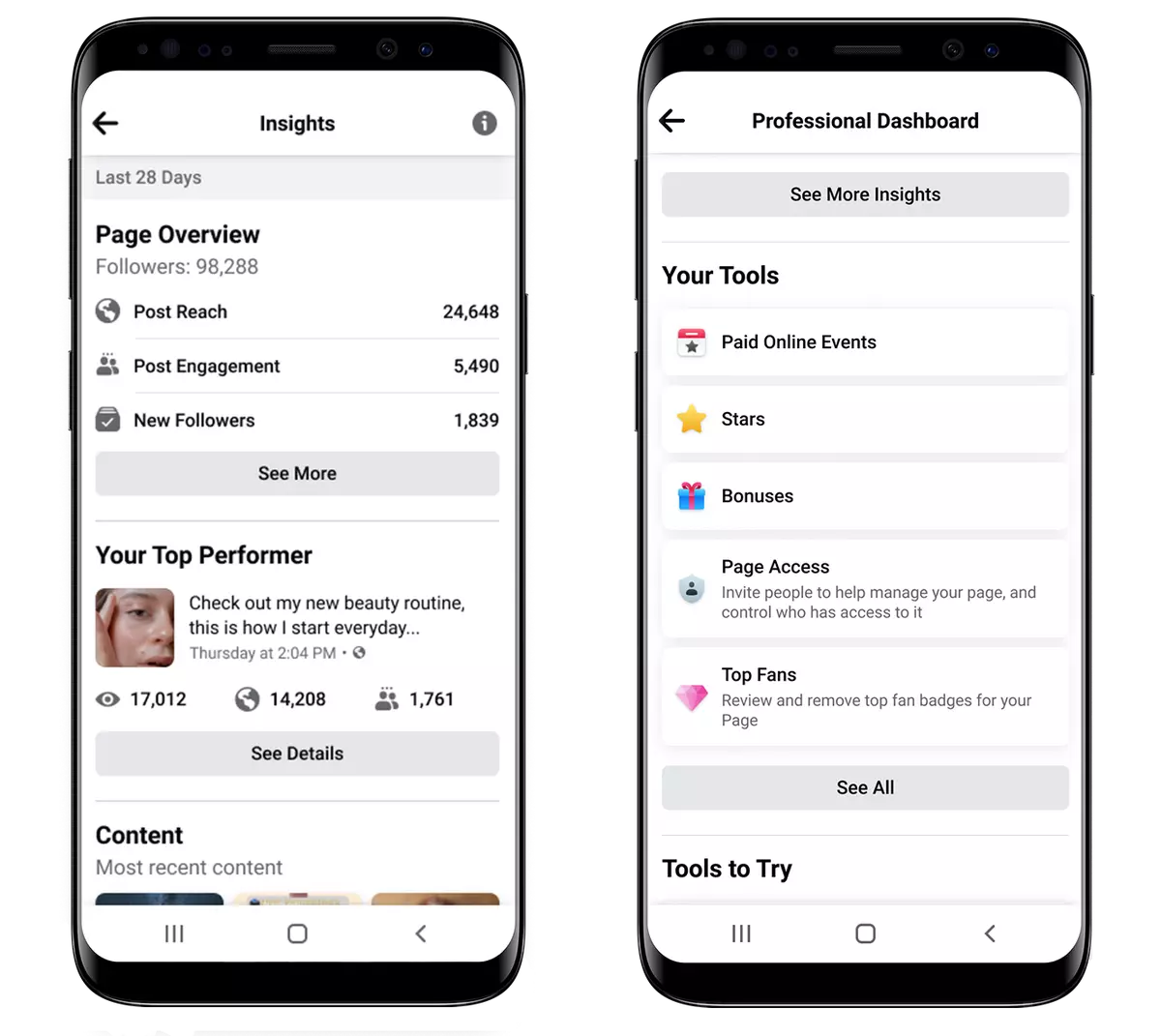
Professional Mode is the switch that turns an ordinary personal profile into a creator profile you can earn from. Flip it on and people can follow you instead of only adding you as a friend, your public posts can reach past your friends list, and you unlock the Professional dashboard, the hub where Facebook’s monetization tools, audience insights, and growth features live.
That dashboard is what makes it matter for money. Without Professional Mode on, a personal profile has no path to Stars, Reels payouts, or the Content Monetization program. With it on, the eligibility checks and the apply buttons for every tool sit in one place.
It also hands you real audience data, which posts land, who’s watching, and when your followers are online. You stop guessing what people want and start making more of what already works, which tends to be the content that earns.
So Professional Mode isn’t the payout itself. It’s the front door. Everything else in this guide like eligibility, setup, Stars, and Content Monetization runs through it.
How to Turn on Monetization Step by Step
Turning on Professional Mode and turning on monetization are two different steps. Here’s how to do both.
Turn on Professional Mode:
- Open the Facebook app or desktop site and go to your profile.
- Tap the three-dots menu (or look for the pop-up inviting you to switch it on).
- Select Turn on Professional Mode and confirm.
Apply for Monetization (Mobile):
- Open your Professional dashboard in the Facebook app.
- Tap the Monetization tab.
- Choose the tool you qualify for Stars, Content Monetization, or Subscriptions and follow the setup prompts.
- Add your payout details when asked so you can actually get paid.
Apply for Monetization (Desktop):
- Open Meta Business Suite on a computer.
- Go to Monetization, then Content monetization.
- Complete the interest form or setup steps for the tool you want.
Check your status any time: in the Professional dashboard, open Monetization to see which tools you’re eligible for, which you’ve been approved for, and what’s still blocking you.
How to Monetize Professional Mode for Your Profiles
Now that we’ve covered what Professional Mode is and who qualifies, let’s get into how you actually earn.
Meta shut down the standalone Reels Play Bonus, along with legacy Ads on Reels, in-stream ad bonuses, and Performance Bonus payouts, on 31 August 2025 (HubSpot, Social Media Today). It no longer exists as a program you can join.
In its place, Meta rolled out Facebook Content Monetization, one unified, invite-only program that bundles what used to be separate tools. Instead of applying to in-stream ads, Ads on Reels, and performance bonuses one at a time, you join a single program and earn across content types: Reels, longer videos, photo posts, and even text updates (Meta for Creators). Payouts are based on how your content performs.
How to get into Content Monetization: it’s invite-only, but you don’t have to wait to be found. Open the Facebook mobile app, go to your Professional dashboard, tap the Monetization tab, choose Content Monetization, and fill out the interest form. If you meet the bars above and Facebook approves you, the program turns on for your profile.
Once you’re accepted, you get access to tools that help you engage your audience and earn directly from your Facebook profile.
Here’s a quick rundown of what to expect.
1. In-stream and Reels ads (under Content Monetization)
Ads that used to sit in separate programs, in-stream ads on longer videos, ads on Reels, and ads around Facebook Live, now run under Content Monetization.
You earn from ads shown before, during, or after your eligible video content, without overwhelming your viewers.
You can control where and how ads show up in your content, so you protect the viewer’s experience while growing revenue. Ads won’t get in the way of your audience; that’s the win-win.
2. Facebook Stars
Fans can support eligible creators by buying Facebook Stars and sending them on supported content, including Live videos and Reels when Stars are available.
Creators earn $0.01 for every Star they receive. However, the amount a fan pays to purchase Stars can be higher than their value to the creator. The final cost can vary depending on where the Stars are purchased, with mobile purchases processed through Apple or Google Play and desktop purchases available through Meta Pay.
You can cash out your Stars once they’ve accumulated.
When you’re filming your next video, give a shout-out to Star senders in your comments; they’re highlighted, so they’re easy to spot.
Answering their questions or replying to their comments is a great way to show appreciation for their support. It also makes your video more engaging for everyone else to watch. So go ahead and give those Star senders some love.
3. Subscriptions
If you have a loyal following, Subscriptions let fans pay a recurring monthly fee for perks like exclusive posts, badges, and members-only content.
Availability depends on your region and whether Facebook has enabled it for your profile, so check your Professional dashboard to see if it’s an option for you.
How Much Can You Actually Make?
Earnings swing widely, so treat any single number with caution. Here’s an honest picture by tool.
| Tool | How you earn | What drives the number |
| Stars | $0.01 per Star from fan tips | How many engaged fans you have and how often you go live |
| Content Monetization | Performance-based ad payouts | Views, watch time, and where your audience is based |
| Subscriptions | Recurring monthly fees | How many fans subscribe and stay subscribed |
A creator with a US-heavy, high-watch-time audience earns far more per view than one with the same follower count elsewhere.
Professional Mode is a real income stream once you clear the bars and stay consistent, but it rewards engaged audiences and original content over follower vanity metrics. Meta’s ~$3 billion paid to creators in 2025 shows the pool is large; your slice depends on the numbers above.
When and How You Get Paid
Once you start earning, Meta pays eligible creators through their linked payout account.
- Payout threshold: The minimum varies by monetization product, payout method, and country. $25 and $100 are common threshold levels across creator and digital platforms, but they aren’t universal Facebook requirements. The $25 minimum is common among smaller affiliate programs, digital marketplaces, and platforms with lower transfer costs. A $100 minimum is more common among major advertising networks, self-publishing platforms, and traditional bank transfer systems.
- Holding period: If your balance is below the applicable threshold, it rolls over to the next payment cycle until you reach the required amount.
- Payment schedule: Facebook generally releases payouts around the 21st of each month for the previous month’s earnings, although timing can vary by product, payment method, and country.
- Payout account: Add and verify your banking, payment, and tax information in Meta’s payout settings before receiving your earnings
Do You Owe Tax on Facebook Earnings?
Short answer, usually yes. Money you make from Professional Mode is income, so treat it that way.
- Facebook may ask for tax details before it pays you, and it issues tax or VAT paperwork where the law requires it.
- You’re responsible for reporting your earnings to your local tax authority, even for small amounts.
- If you’re earning steadily, it’s worth keeping simple records and asking a local accountant how creator income is taxed where you live.
This isn’t formal tax advice, rules vary by country but going in aware saves a nasty surprise later.
What To Do If You’re Rejected or Lose Eligibility
Getting turned down isn’t the end. Facebook reviews eligibility on an ongoing basis, so a “no” today can become a “yes” later.
Here’s how to recover.
- Read the reason. Your Professional dashboard usually shows what failed, a policy strike, unoriginal content, or an unmet follower/engagement bar.
- Fix policy strikes. Remove content that broke the rules and avoid repeat violations. A clean 90-day record helps.
- Post original content. Reused, stitched, or watermarked-from-elsewhere content is the most common reason payouts get blocked.
- Rebuild the numbers. If you fell short on watch time or followers, keep posting consistently and re-check your status
- Reapply. Many tools let you request another review once you’ve fixed the issue.
Perks of Professional Mode
There are many benefits of using the professional mode to monetize your profiles. Here are some:
1. Easily Build an Email List
One option for monetizing a Facebook profile is to use it as a way to build an email list.
By adding a call-to-action button to your profile, you can encourage people to sign up for your email list.
This is a great way to build an audience of people who are interested in what you have to offer.
But you don’t expect people to magically sign up for your email list without any incentive. Always ask, what’s in it for them?
You can offer something of value in exchange for their details. This could be a free e-book, a discount on your products or services, or access to exclusive content that they can’t get anywhere else.
Whatever you decide to offer, make sure it’s something that your target audience will find valuable. In doing so, you can turn every interaction in your social inbox into a revenue opportunity.
2. Gain Insights into Your Audience
Another benefit of using the professional mode to monetize your profile is that you can gain insights into your audience and see whether the content is working or not.
This information is essential for fine-tuning your social strategy and ensuring that your posts are as engaging as possible.
By communicating in a way that is most effective in reaching your target audience, you are more likely to get conversions.
3. Reach a Wider Audience and Increase Revenue Potential
One of the best things about Facebook is that it has a huge user base. By using the professional mode to monetize your Facebook profile, you can reach a wider audience with your content.
Facebook ads are a powerful tool that can help you reach a large number of people with your marketing message.
Overall, if you’re looking for a way to monetize your Facebook profile, a professional mode is a great option. Many benefits come with using this mode, and by taking advantage of them, you can more easily make money from your profile.
Tips for Maximizing Your Earnings Potential
There are a few things you can do to make sure you’re maximizing your earnings potential with Facebook’s professional mode. Here are some tips:
1. Use a Clear and Concise Profile Header
The first thing people will see when they visit your professional profile is your header, and you want people to know exactly what you do and what you’re offering.
A great way to do this is to include a call-to-action in your header, such as “Buy my products,” “Hire me for your next project,” or “Visit my website.”
This will let visitors know right away what they can expect from your profile.
2. Include Your Contact Information and Rates
Another critical piece of information to include in your professional profile is your contact information and rates.
People who are interested in working with you will know how to get in touch, and they’ll also have an idea of what you charge for your services.
Including this information, upfront can save a lot of time down the road.
3. Keep Your Profile Up-to-Date
Finally, it’s essential to keep your professional profile up-to-date.
Add new products or services as you offer them, and keep your contact information and rates current.
By regularly updating your profile, you’ll ensure that interested parties always have the most accurate information about what you have to offer.
Reap Monetization Benefits With Facebook’s Professional Mode
If you’re not already using Facebook’s professional mode to monetize your profile, you’re missing out on a world of opportunity.
In professional mode, you can encourage audience growth by attracting new customers and clients, selling products or services directly from your profile, or promoting your business or brand.
You can also ensure that your professional profile is up-to-date and accurately represents what you do and what you’re offering.
So what are you waiting for? See the results for yourself and get started!



 Join 55,000+ social media managers


