

Sometimes social media management can really feel messy.
One day you’re planning content. The next day you’re chasing approvals. Someone’s waiting on captions, someone else is fixing a last-minute design change, and suddenly the post is late.
It’s not a creativity or content problem. It’s a workflow problem.
Without a clear workflow, even good teams struggle with delays, confusion, and inconsistent results. But when you build a simple process for planning, creating, approving, publishing, and tracking performance, everything runs more smoothly.
A clear social media workflow doesn’t just keep things organized; it helps your team move faster, stay aligned, and drive results.
A social media workflow is a structured process that guides how social media content is planned, created, reviewed, published, and analyzed. Instead of posting randomly or reacting at the last minute, teams follow a defined system to ensure consistency, efficiency, and alignment with business goals.
The purpose of a workflow is to bring clarity, so everyone knows what to do, when to do it, who will approve it, and how success is measured.
A social media workflow is crucial for all online businesses or brands that have a social presence, including:
- Social media agencies managing multiple clients and approval processes.
- Startups building brand presence with limited resources.
- Growing brands scaling content across various social platforms.
- Content creators and solopreneurs who want structure and consistency over their social media profiles.
No matter the size of your business or the number of people on your social media marketing team, a documented process helps prevent confusion and missed opportunities.
Now that you know who needs a properly structured workflow, let’s discuss its key benefits.
Without a structured system, social media often becomes reactive and inconsistent. A clear workflow brings order, accountability, and measurable results to your content efforts. Here are some core benefits of having a clear social media workflow for any team:
- Saves Time and Reduces Chaos: A well-documented process eliminates last-minute scrambling. When planning, creation, and publishing are scheduled in advance, teams can avoid confusion and repetitive tasks.
- Improves Team Collaboration: When every team member has defined roles and approval steps, it ensures that everyone knows their responsibilities. This minimizes miscommunication between managers, designers, writers, and clients.
- Maintains Brand Consistency: A workflow aligns content with brand guidelines, tone, and messaging as it’s created on time and approved by all key stakeholders. And consistency builds trust and strengthens brand identity across social platforms.
- Prevents Missed Deadlines: A proper workflow helps teams maintain content calendars and approval timelines, keeping publishing on track. This ensures campaigns launch as planned and important dates aren’t overlooked.
- Makes Performance Tracking Easier: When a workflow is properly structured, it becomes much easier for the team to decide who creates reports, what metrics are included, and when they are shared with team members and clients. It also helps you clearly connect content efforts to engagement, leads, and overall business growth.
Now that you understand the benefits of a structured approach, let’s look at how to create an effective social media workflow for your social media team or agency.
A strong social media workflow is built on clearly defined stages. Each component ensures your content and strategy are purposeful, organized, and aligned with business objectives.
Phase 1. Strategy & Planning
This is the foundation of your workflow. Without strategy, content becomes random and inconsistent.
- Define Goals and KPIs: Start by identifying what you want to achieve: brand awareness, lead generation, engagement, or sales. Then set measurable KPIs such as engagement rate, reach, clicks, or conversions to track progress.
- Identify Target Audience: First, need to understand who you’re speaking to. Define demographics, interests, challenges, and behaviours. You will get clear audience insights by creating customer personas; it helps you create content that resonates and converts.
- Create Content Pillars: Establish 3–5 core content categories (for example: educational, promotional, community-driven, thought leadership). Content pillars keep messaging focused and prevent off-brand posting.
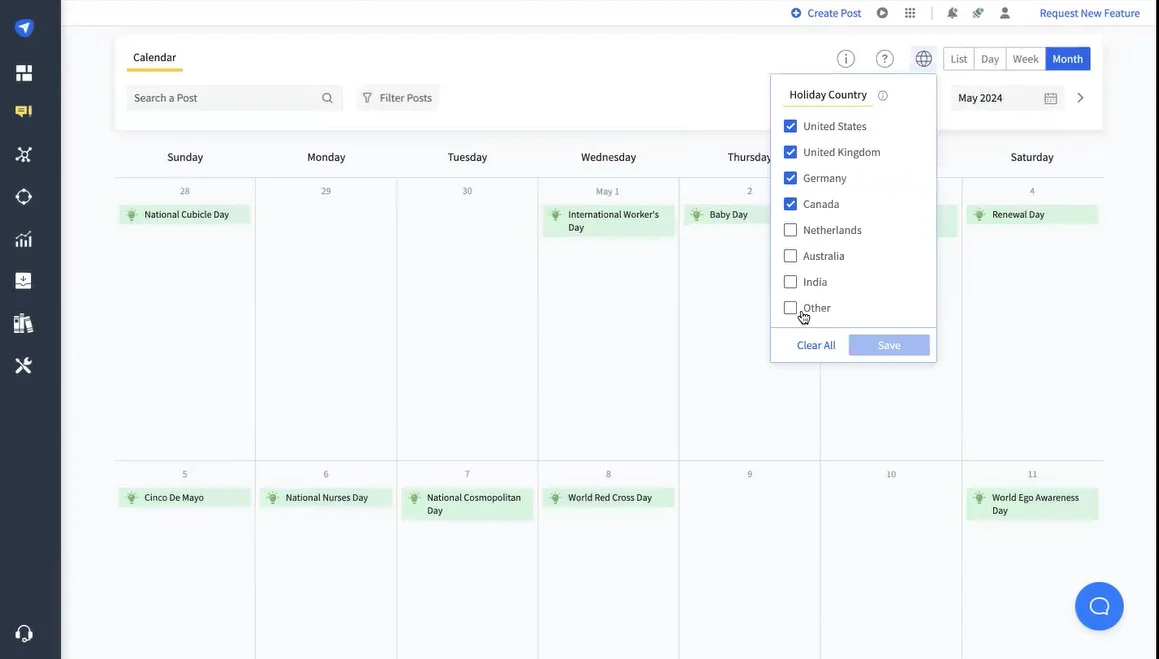
- Plan Monthly/Weekly Calendar: Map out your content in advance using a social media content calendar. Planning ahead ensures consistency, supports campaign launches, and reduces last-minute stress.
Phase 2. Content & Curation
Once you have defined your social media goals, identified your target audience, and set your content strategy, the next step is deciding what content to create and how to create it.
This is where ideas turn into actual posts from original content production to curating relevant industry content that adds value to your audience.
- Brainstorm Content Ideas: First step is generating ideas aligned with your business goals and designed content pillars. You can start with trending topics, FAQs, customer feedback, and industry insights as inspiration. Also, you can explore more content ideas for 2026 social media marketing that keep you ahead of competitors.
- Create Graphics, Videos, and Captions: Next, develop engaging visuals and compelling copy tailored to each platform for posts you ideate. You should maintain brand voice, formatting standards, and platform-specific best practices throughout all posts, every month.
- Repurpose Long-Form into Short-Form Content: Apart from new posts, you can maximize efficiency by turning blogs, webinars, or podcasts into short posts, reels, carousels, or quote graphics. By repurposing long-form content social team can save time and extend content lifespan.
- Organize Assets in Library: A proper workflow allows teams to store images, videos, templates, and captions in a structured system, so everything is easy to access at the time of posting. This prevents random last-minute searches for files or copies. Good workflow reduces duplication, speeds up production, and improves team collaboration with organized assets.

Phase 3. Review & Approval Process
A clear review system prevents errors, miscommunication, and last-minute edits. It ensures every piece of content aligns with brand standards before going live.

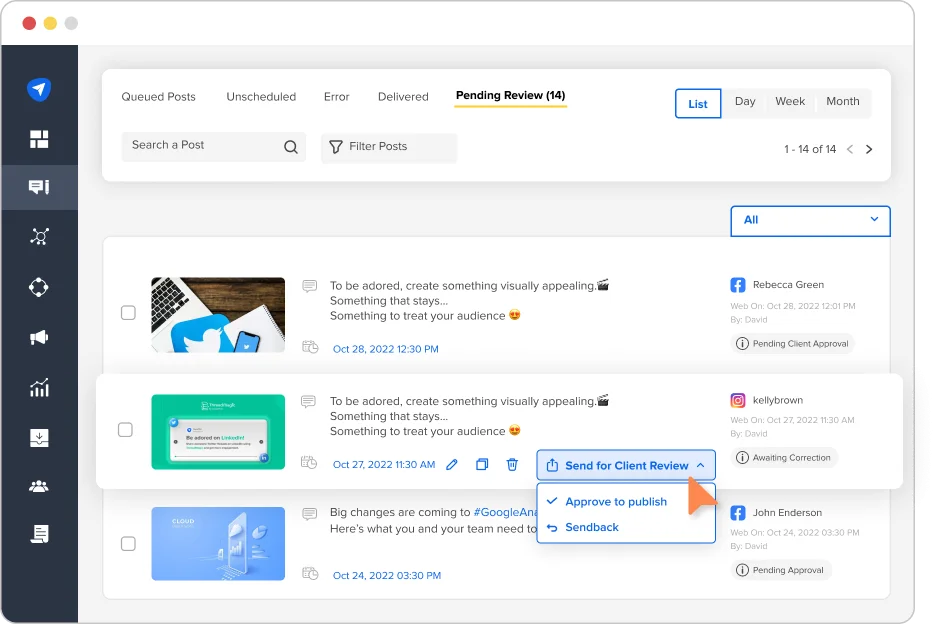
Here’s how the approval process work in social media management workflow:
- Assign Roles and Responsibilities: You should define who creates content, who reviews it, and who gives final approval while creating an approval process in the workflow. Clear ownership reduces confusion and speeds up execution.
- Internal Review Workflow: Establish a step-by-step review process. For example: draft → editor review → design check → final approval. Documenting this flow keeps content moving smoothly.
- Client Approvals (If Agency): Agencies should set approval timelines and feedback guidelines. This avoids delays and keeps publishing schedules intact.
- Feedback Loops: Create a structured way to collect and implement feedback. Use collaborative tools or shared documents to track revisions and maintain version control.
Phase 4. Scheduling & Publishing
Once content is approved, it needs to be published consistently and strategically.
- Choose Scheduling Tools: Select a social media management tool to centralize planning, scheduling, and publishing across platforms. If you are not comfortable to use third party tool, then you can schedule content through Meta or other native platforms in advance.
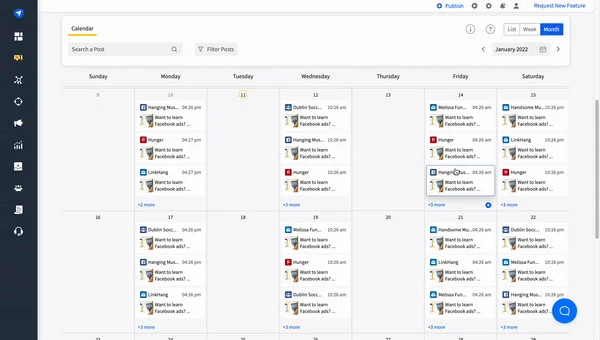
- Automate Posting: Schedule posts in advance to maintain consistency and reduce manual work. Automation ensures content goes live even during off-hours.
- Platform-Specific Formatting: Optimize captions, hashtags, image sizes, and posting times for each platform. Avoid posting identical content without adjustments.
- Maintain Posting Consistency: Stick to a regular posting schedule aligned with your content calendar. Consistency builds audience trust and improves algorithm performance over time.
Phase 5. Monitoring & Engagement
Publishing content is only half the process. Active monitoring and engagement turn followers into a community and improve overall performance.
- Track Comments and DMs: Regularly monitor comments, direct messages, and mentions across platforms. Quick responses increase trust and improve engagement rates.
- Community Management Process: Create guidelines for how your team interacts with followers. Define tone, response style, and escalation procedures to maintain brand consistency.
- Crisis Handling Guidelines: Prepare a basic crisis plan for negative feedback, complaints, or public issues. Knowing how to respond calmly and professionally protects your brand reputation.
- Response Time Standards: Set internal benchmarks for response times (e.g., within 1–4 hours during business hours). Faster replies often lead to stronger engagement and higher conversions.

Phase 6. Analytics & Reporting
A workflow isn’t complete without performance tracking. Analytics help you understand what’s working and where to improve.
- Track Key Metrics: Monitor metrics aligned with your goals, such as engagement rate, reach, clicks, conversions, and follower growth.
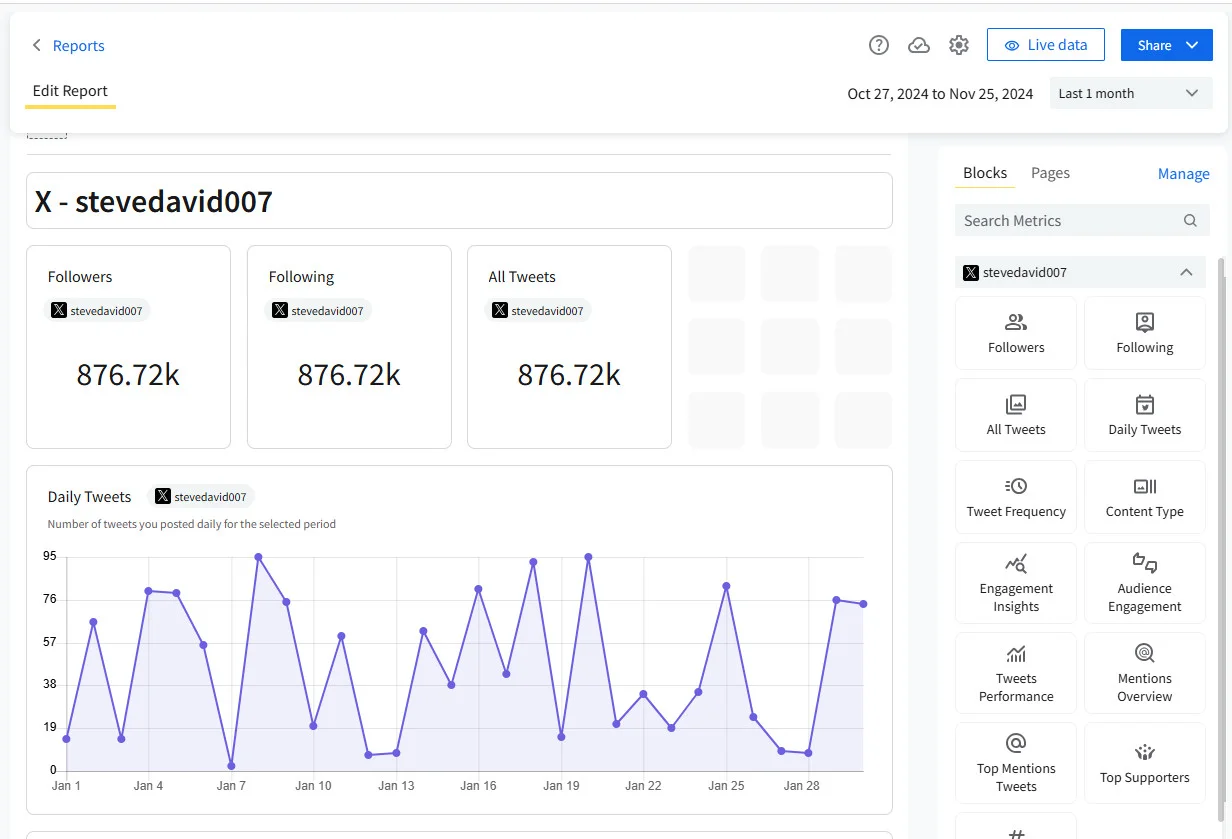
- Weekly/Monthly Reporting: Prepare social media reports to measure progress. Weekly reviews help with quick adjustments, while monthly reports provide deeper strategic insights.
- Performance Optimization: Analyze high-performing content to identify patterns. Replicate successful formats, topics, and posting times.
- Adjust Content Strategy: Use data to refine your content pillars, posting schedule, and campaign approach. Continuous improvement keeps your workflow effective and results-driven.
Using the right tools transforms your workflow from manual and scattered to streamlined and scalable. Instead of managing content, approvals, publishing, and reporting separately, a centralized platform keeps everything organized in one place. SocialPilot is an all-in-one platform that helps you manage these tasks efficiently, saving both time and effort.
- Content Creation: A structured workflow starts with efficient content production. SocialPilot helps teams plan content through a visual calendar, AI Pilot in copywriting, store media assets, and draft captions in advance. This reduces last-minute creation and keeps campaigns aligned with strategy.
- Scheduling & Publishing: SocialPilot allows you to schedule posts across multiple platforms from one dashboard. Bulk scheduling, automated publishing, and platform-specific customization ensure consistent posting without manual effort every day.
- Collaboration & Approvals: For teams and agencies, this tool provides role-based access and approval-on-the-go workflows. Content can be reviewed, edited, and approved before publishing, reducing errors and keeping clients or internal stakeholders aligned.
- Monitoring & Engagement: Through unified social inbox features and account management tools, teams can monitor comments, messages, and interactions more efficiently, ensuring faster response times and better community management.
- Analytics & Reporting: SocialPilot offers detailed social media analytics and customizable reports to track engagement, growth, and campaign performance. This makes it easier to measure results, identify trends, and optimize your strategy.
Even with the best intentions, many businesses struggle because their workflow isn’t clearly defined or consistently followed. Avoiding these common mistakes can significantly improve efficiency and results.
- No Documented Process: When workflows exist only in someone’s head, confusion and inconsistency follow. Without written guidelines for planning, creating, reviewing, and publishing content, teams rely on guesswork, which leads to delays and errors.
- Unclear Responsibilities: If roles aren’t clearly assigned, tasks overlap or worse, get ignored. Everyone should know who is responsible for content creation, approvals, scheduling, engagement, and reporting.
- Poor Approval Systems: A slow or undefined approval process can delay campaigns and disrupt posting schedules. Without clear timelines and feedback loops, content may sit waiting for review, causing missed opportunities.
- Ignoring Analytics: Posting without reviewing performance data limits growth. Analytics reveal what content resonates, what drives engagement, and what generates results. Ignoring insights leads to repeated mistakes.
- Inconsistent Posting: Irregular posting weakens audience trust and reduces algorithm visibility. A structured workflow and content calendar help maintain consistency, which is critical for long-term growth and engagement.
Turning Strategy into a Scalable Workflow
A well-defined social media workflow turns scattered posting into a structured growth system. When roles are clear, approvals are streamlined, and performance is consistently tracked, teams save time, reduce errors, and maintain brand consistency. Systemization eliminates bottlenecks and allows your social media efforts to become predictable and scalable.
As your content volume grows, the right tools make execution easier. Platforms like SocialPilot help teams plan, collaborate, schedule, monitor engagement, and analyze performance from one dashboard, making workflow management seamless.
If you’re ready to streamline your process and scale efficiently, explore the SocialPilot pricing plans to choose a plan that fits your team and start optimizing your social media workflow today.


 Join 55,000+ social media managers


