
How does the Instagram algorithm work? Social media marketers keep confronting this question every year because Meta keeps revamping the algorithm.
Luckily, Meta has been releasing information about it now more than ever. On top of that, Adam Mosseri (Instagram’s CEO) keeps answering questions left and right about how the algorithm decides when, where, and to whom your content will be shown.
In this article, we are gonna bring together all the information on Instagram’s different algorithms and share tips on how you can shape your strategy accordingly.
Latest Instagram Algorithm Updates (August 2026)
Instagram’s algorithm has been shifting steadily since 2024, moving from a follower-first feed toward AI-driven discovery, explicit user controls, and originality enforcement across all content formats. Roughly half of a user’s feed now comes from unconnected recommendations, and the signals that determine which content reaches new audiences have changed meaningfully.
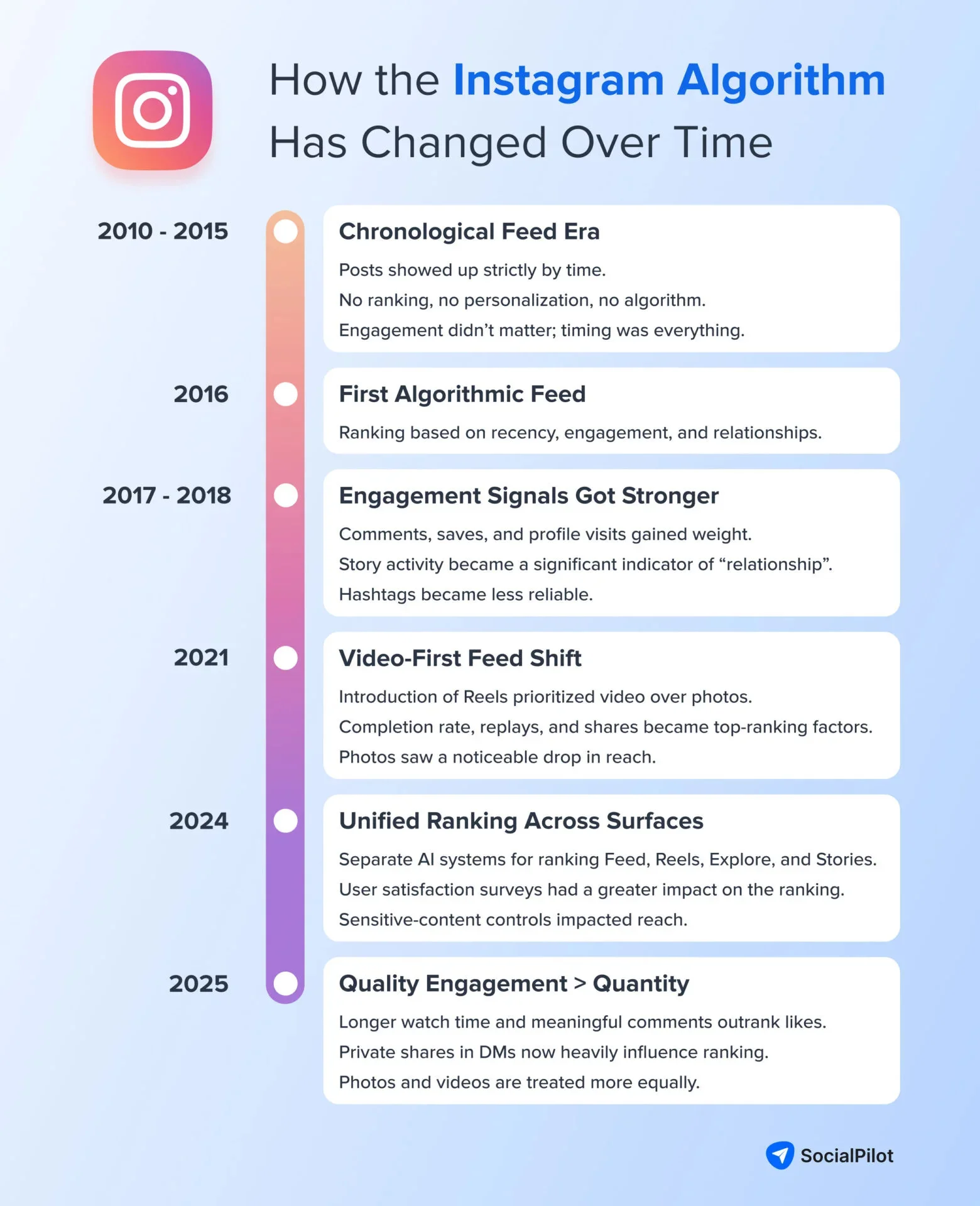
Here’s what’s confirmed:
August 2026: No Significant Algorithm Updates
No confirmed ranking or distribution change was announced for August and July 2026. Instagram’s news this month was feature and product work, not a change to how content is ranked, so the most recent shift is still June’s “Your Algorithm” expansion to the main Feed. But, in July, Meta restated the existing signal order (watch time first, then sends, then likes) and continued April’s originality enforcement, but nothing new landed in how your content gets scored.
June 2026: “Your Algorithm” Expands to the Main Feed
Instagram extended its “Your Algorithm” topic controls to the main Feed, after launching them on Reels in December 2025 and Explore in April 2026. Users can now see the topics Instagram thinks they care about and add or remove them right in the surface where people spend the most time. Explicit topic preferences now shape the main feed’s distribution alongside behavioural signals, and Adam Mosseri framed the move as giving people real control, with the feed becoming mostly algorithm-surfaced content from accounts they never followed.
What this means for you: Topic clarity now matters for the main feed, not just Reels and Explore. Make your niche obvious through captions, visuals, and audio so people who opt into your topic keep seeing you, and accept that users who opt out of your topic become harder to reach, regardless of how strong your engagement is.
Source: Instagram Extends Your Algorithm to the Main Feed – Social Media Today
April 2026: Original Content Protections Extended to Photos and Carousels
Since April 30, 2026, Instagram’s originality enforcement applies to photos and carousels, not just Reels. Accounts posting mostly unoriginal content are excluded from recommendation surfaces like Explore and in-feed suggestions. Simple edits such as borders, watermarks, or credits alone do not count as original content. Instagram now expects meaningful creation or transformation.
Recovery is possible. If most content in a rolling 30-day period is original, accounts can regain recommendation eligibility through Account Status. Instagram says 75% of US recommendations now come from original posts across all formats.
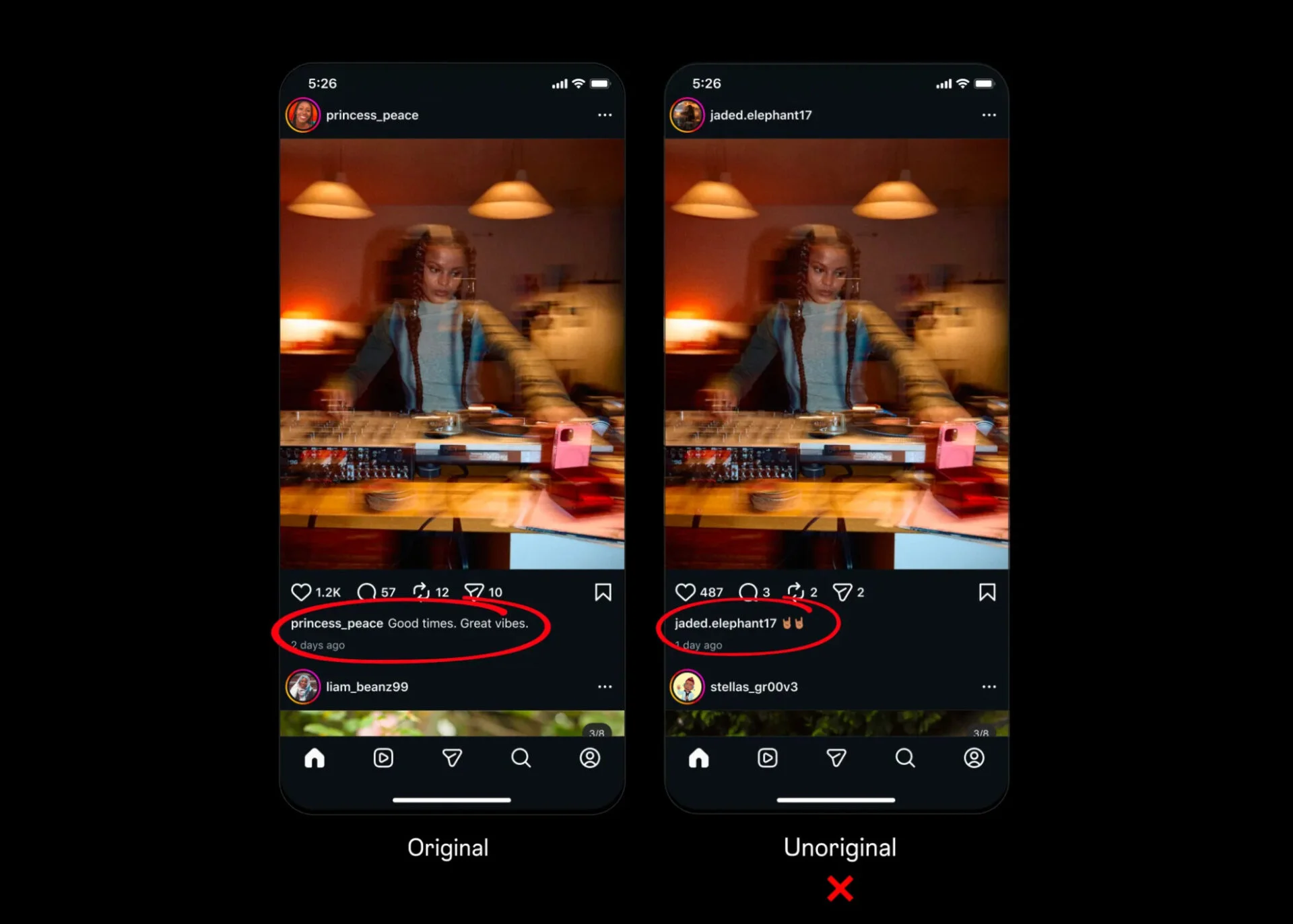
What this means for you: Curated reposts, quote graphics, or screenshot carousels with little creative input will struggle to reach non-followers. The originality standard that once applied to Reels now applies across every content format.
Source: Rewarding Original Creators on Instagram – Instagram for Creators
December 2025: “Your Algorithm” Launches for Reels and Explore
Instagram launched “Your Algorithm” on December 10, 2025, letting users see and adjust the topics influencing their Reels recommendations. Expanded to Explore in April 2026, the feature allows users to choose topics they want more or less of, directly shaping content visibility.
For creators, content is now matched against both user behavior and stated topic preferences. Users interested in your niche are more likely to see your posts, while opted-out audiences are less likely to encounter them.
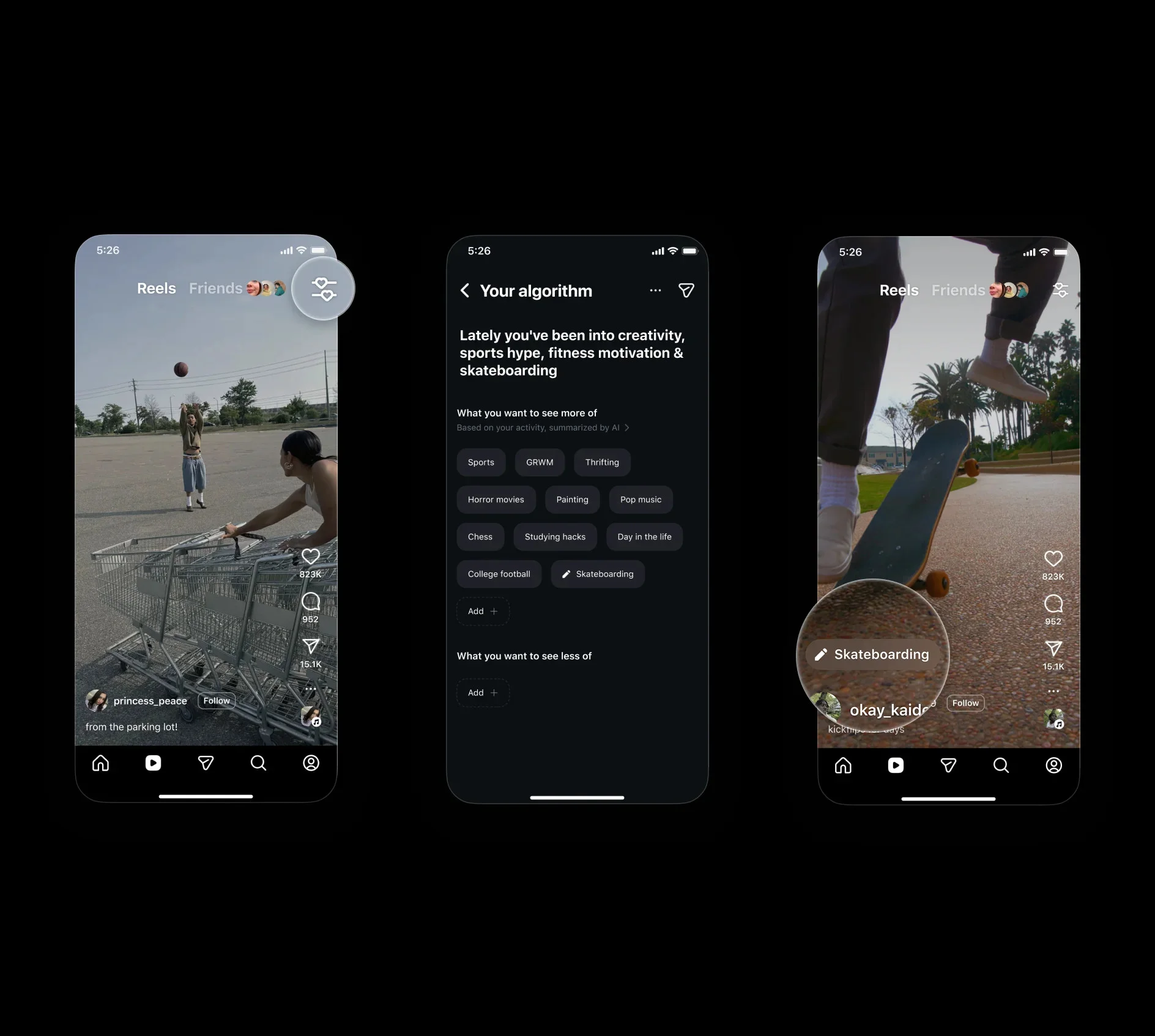
What this means for you: Topic clarity matters more than ever. A focused niche and consistent signals through captions, visuals, and audio make it easier for Instagram to match your content with the right audience.
Source: Control Your Instagram Reels Algorithm – About Instagram
April 2024: Content Auditioning Gives Every Creator Equal Distribution Regardless of Follower Count
Instagram changed content distribution in April 2024, fully rolling out by February 2025. Instead of favoring large accounts, posts are first shown to a small audience. If engagement is strong, through watch time, saves, or shares, content expands to wider, non-following audiences.
Instagram also introduced content auditioning for Reels, where some non-followers see videos before broader distribution. At the same time, DM shares became one of Instagram’s strongest ranking signals.
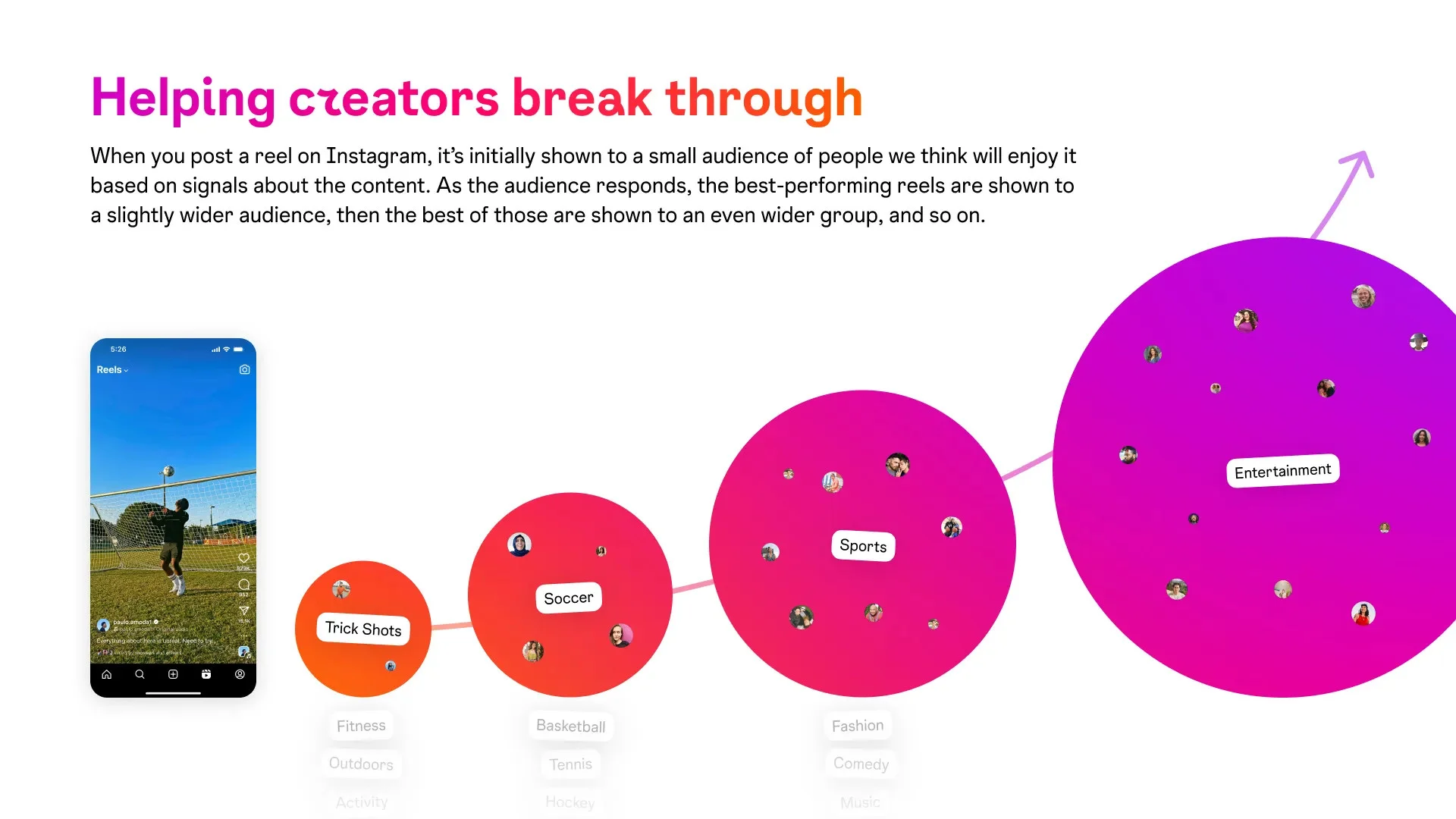
What this means for you: Follower count matters less than early performance. Strong watch time, saves, and shares from your first audience can help even small accounts outperform much larger creators.
Source: Helping Creators of All Sizes Break Through – Instagram for Creators
“We’re going to continue to focus on those products and reorient the app more around DMs, reels, and recommendations over the next couple of months.”
– Adam Mosseri
Now, let’s break down the nitty-gritty behind how the algorithm exactly plays out.
How Does the Instagram Algorithm Work?
The AI systems driving the Instagram algorithm pick up certain signals for ranking your content in the audience’s feed.
At its core, these signals are searching for content relevancy and post engagement. Meta clarified the approach of AI systems to ranking: “These prediction models use underlying input signals to help select content that people are most likely to engage with. Input signals fall into broad categories such as the unique features of a post, how others have interacted with a post, and how people have engaged with similar content in the past.”
But there’s a twist. A single algorithm doesn’t decide what content will show up across every Instagram screen.
Instagram discovered that people are using every screen on the channel for different intents. “People tend to look for their closest friends in Stories, use Explore to discover new content and creators, and be entertained in Reels.”
Also, it was difficult for them to manage content for 3 billion people with the same algorithm that keeps them connected to all their friends, family, and accounts they follow while also suggesting new content.
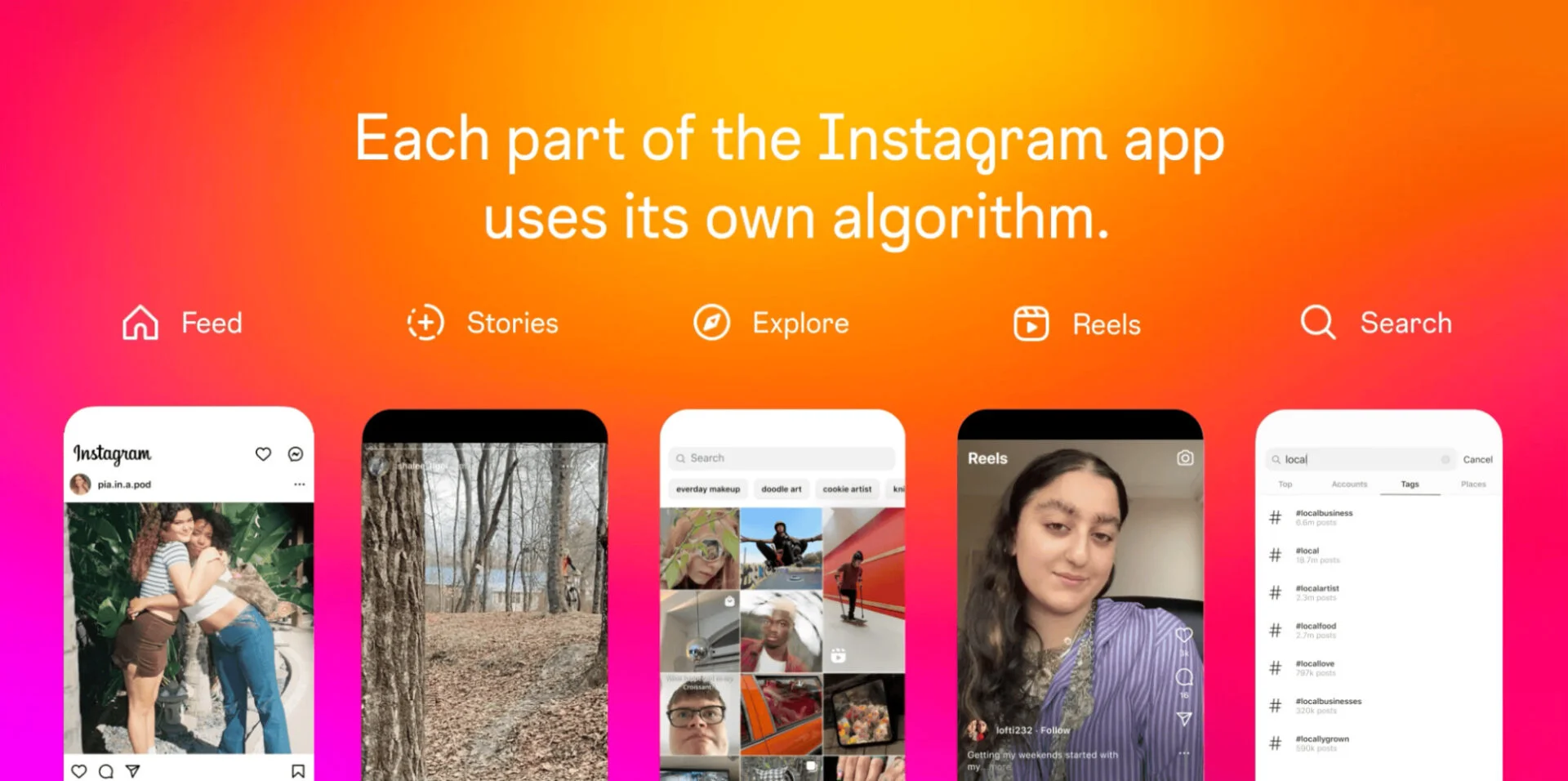
As a result, Instagram has separate algorithms and tracks different signals for feed posts, stories, Reels, the Explore page, and Search. Let’s break down each algorithm and how it selects the content to show the users one by one.
How Does the Instagram Feed Algorithm Work?
Feed is the first page that appears when anyone opens the Instagram app. It shows a mix of posts (feed, carousels, reels, and ads) from accounts you follow and those Instagram thinks might be relevant for you.
The basic signals for the Instagram feed algorithm (technically known as feed AI systems) to pick up both connected and suggested content are somewhat similar:
- User’s activity: Instagram feed algorithms study users’ activity to track what kind of posts they’ve liked, shared, saved, or commented on to understand the type of topics they are probably interested in seeing.
- What’s the post about, and how it’s performing: Instagram evaluates the content itself by looking at how people respond to it. It considers interaction, watch time, and overall engagement rate. It also checks how recently it was posted and its location to provide a more precise recommendation.
- Information about the post creator: AI systems gather information about how relevant the poster is to you. Instagram picks up engagement signals, like how consistently the poster’s content earns attention and whether people generally enjoy what they publish.
- User’s past relationship: If a user has liked your posts before, commented, shared something, saved your content, visited your profile, replied to your stories, or messaged you, the algorithm sees that as a strong relationship. The stronger this history is, the more likely your posts appear for that person.
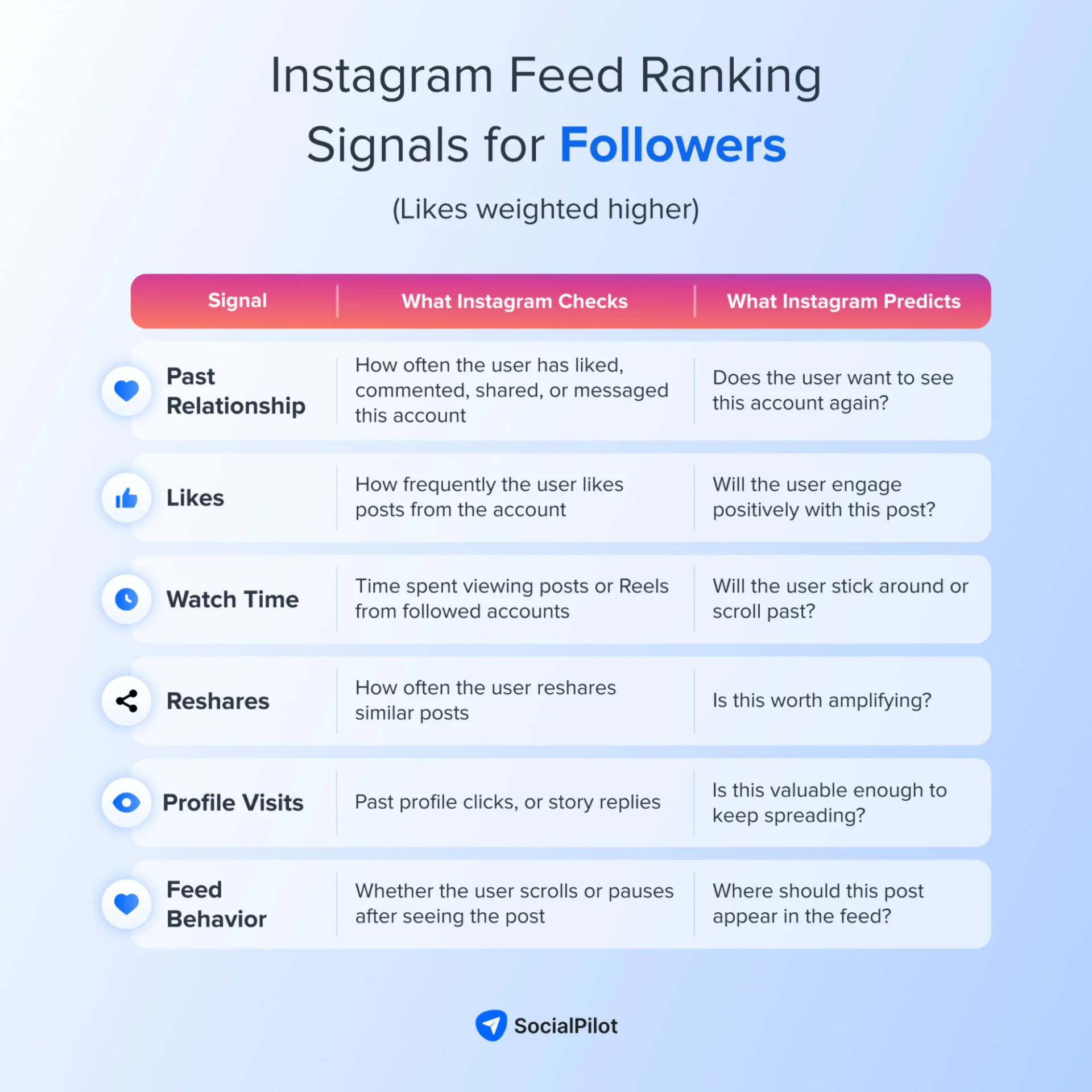
However, there are some nuances in the signals that the Instagram feed algorithm picks to recommend posts from accounts you follow and posts it suggests from outside your network.
“Now, if you really want to understand the nuances, likes are actually slightly more important than sends for connected content, and sends are actually a little bit more important than likes for unconnected content, but watch time is the most important for both.”
– Mosseri
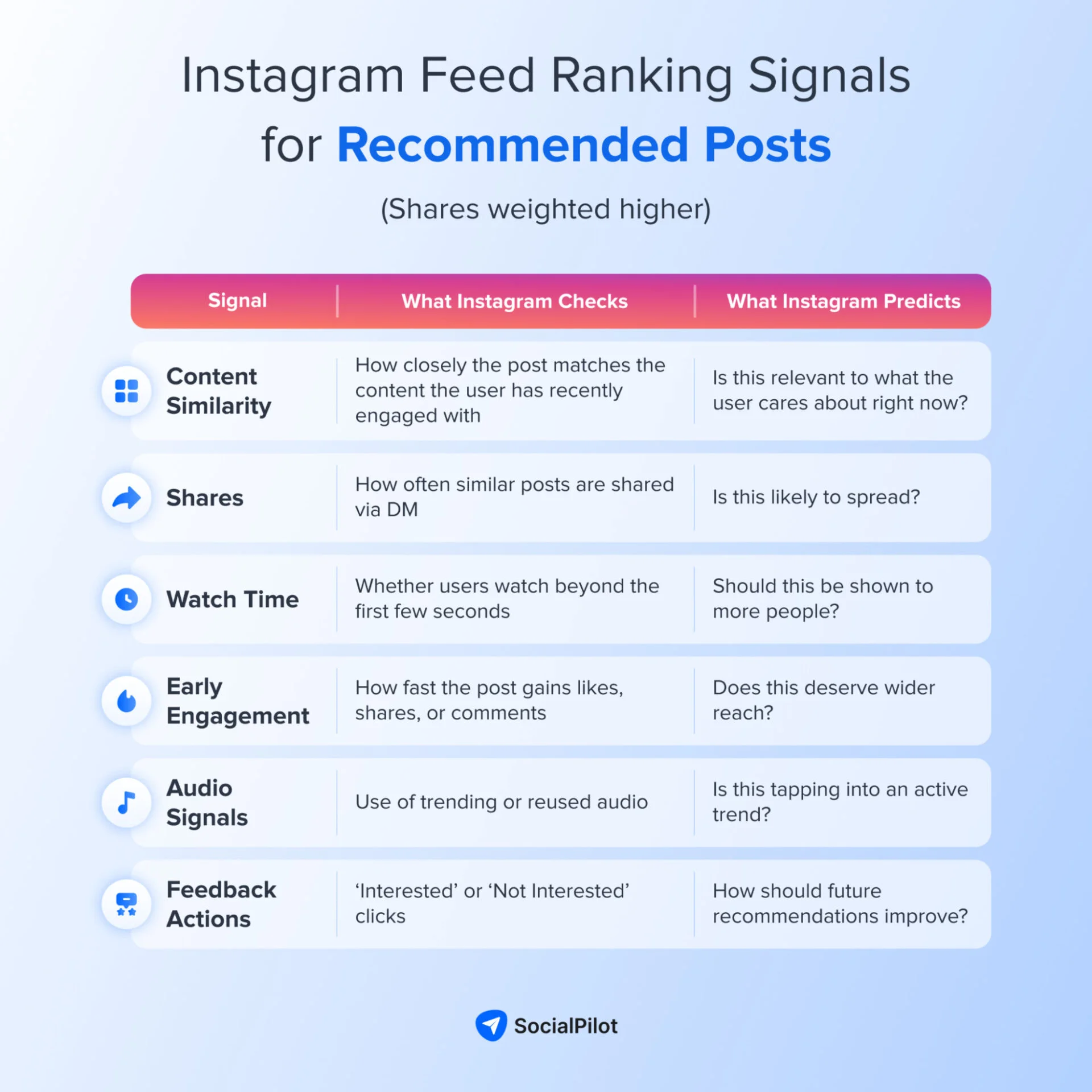
For your content to be suggested, it must have both high sharing value and relevance. Instagram will check how likely you are to share the reel you see as suggestions based on specific signals.
Overall, ranking on the Instagram feed requires creating content that is likable, shareable, and generates high watch time.
How Does the Instagram Algorithm for Reels Work?
The Reels tab is one of Instagram’s most used touchpoints on the channel. Unlike Feed, the majority of content you will see here is from accounts you don’t follow.
How is the ranking on the Reels tab determined?
The Instagram Reels algorithm gathers multiple reels from people you follow or reels that are similar to the recent reels you’ve engaged with. After that, the algorithm “selects approximately 100 of the most relevant Reels” for Reels chaining, Meta said.
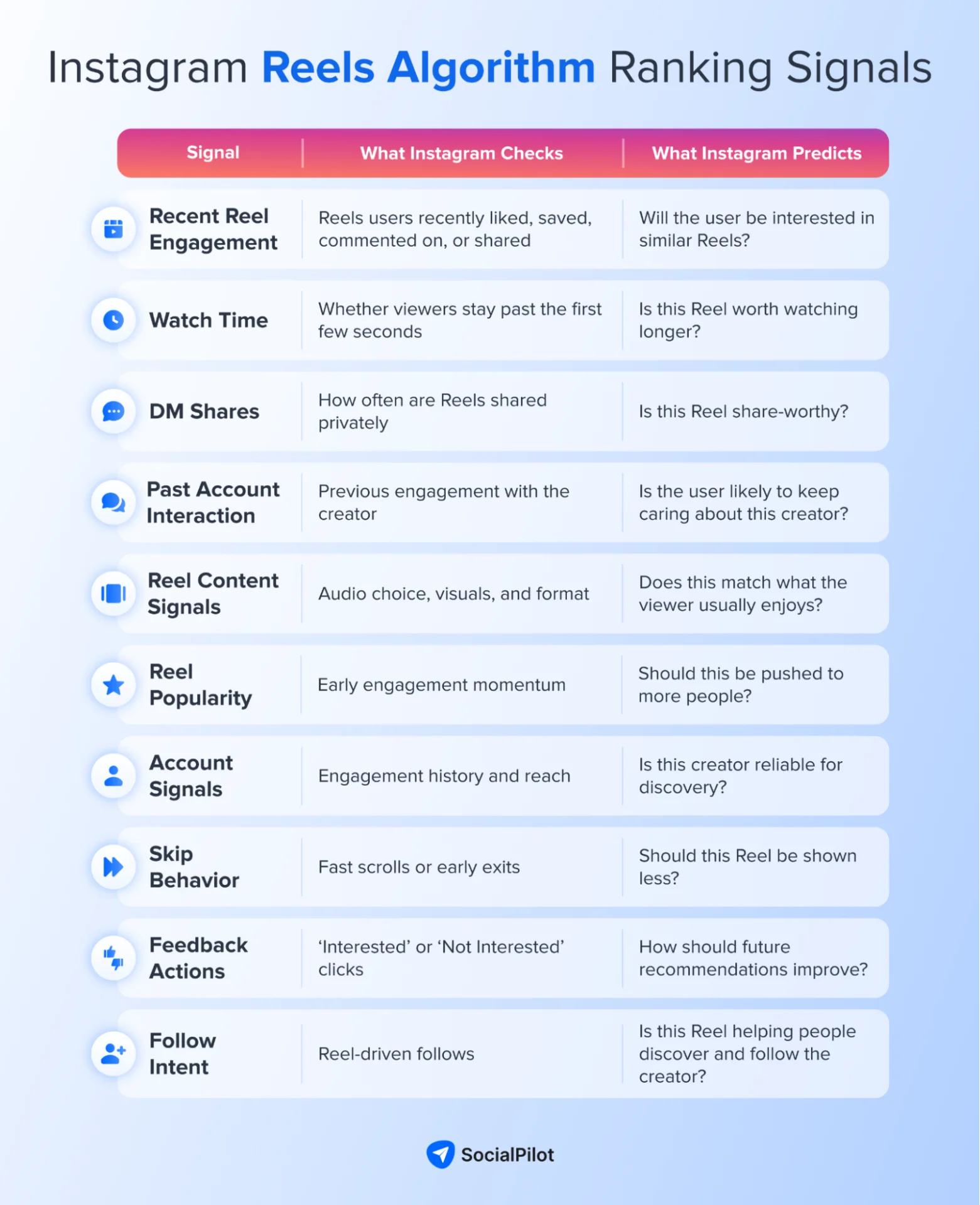
Here are the signals that the AI systems consider:
- User’s recent reels engagement: Instagram checks which Reels your audience has liked, saved, reshared, commented on, and engaged with recently, and tries to show them more of those Reels. Sharing via DM is considered one of the biggest engagement signals. Instagram checks how likely they are to share your Reel based on their previous sharing behavior.
- User’s past interaction with the account: Whether or not the user follows the account, any previous interaction with its Reels signals to Instagram how interested they are in seeing content from that account again.
- Information about the Reel: Signals such as the audio track, visuals, and popularity help the algorithm determine the reel’s ranking in the tab.
- Information about the account that posted: Instagram considers the account’s engagement, reach, and followers as one of the signals to help everyone find their audience.
After checking these signals, the Reels algorithm calculates a relevance score for about 100 Reels and orders them based on that score. The Reels chaining algorithm then uses these signals to predict whether the user will:
- Use the audio from a Reel they are viewing in their own content
- Watch less than three seconds of a Reel
- Click “Interested” when the Interested / Not interested options appear below a Reel
- Comment on a Reel
- Use the audio from a Reel they are viewing in one they create
- Follow the author of a Reel
How Does the Instagram Explore Algorithm Work?
The Explore page on Instagram is all about finding Reels and posts from accounts people don’t already follow. The Instagram Explore algorithm works at three different levels to select and rank content relevant to you.
First, it pulls in a large pool of up to 1500 photos and videos that match a user’s interests. Then, in the next stage, it narrows that pool down to about 100 strong candidates. Finally, it uses an advanced model to predict how likely you are to like, save, or share those posts.
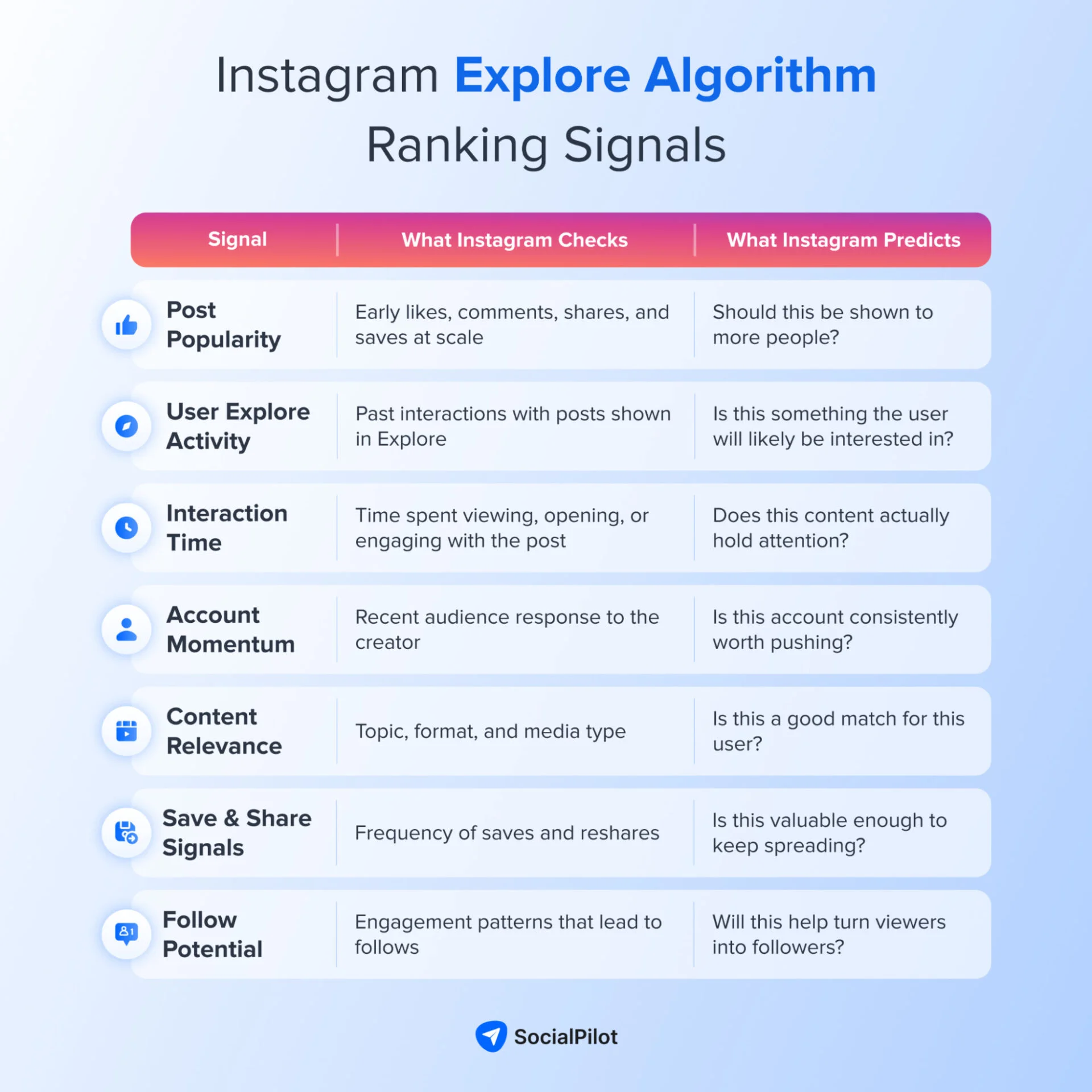
Let’s look at the signals that the Instagram explore page relies on to create your grid:
- Popularity of the posts: Instagram favours posts that are already doing well. The algorithm picks content that people tend to quickly like, comment, share, and save. These signals matter much more in Explore than they do in Feed or in Stories.
- Your activity in Explore: How you’ve interacted with posts in Explore in the past matters here. The AI checks the specific types of posts you’ve liked, saved, shared, or commented on before and tries to show you more of that.
- Past Interaction with the account: Your interaction with the account that posted also plays a role. Even if the post comes from someone you don’t follow, any previous engagement with them helps Instagram gauge how interested you might be in their content.
- Information about the person who posted: AI system also takes into consideration how other people have engaged with the account in recent weeks to gauge its popularity and relevance.
The whole purpose of the Instagram explore page is to help the audience find new people and content. That’s why it evaluates the signals based on:
- How likely are you to follow the author of a post
- How likely are you to spend more than five seconds viewing a post
- How likely are you to click and also engage with a post
- How likely are you to reshare or save a post
- How likely are you to click one of the square posts in Explore to view it in full screen
How Does the Instagram Search Algorithm Work?
Searching has become a common thing on Instagram. More and more people are using Instagram not only to search for accounts but also to discover trending news, audio, reels, and hashtags.
To improve the experience, Instagram uses a separate algorithm to determine what ranks for each user in search based on different signals.
“The big difference between how ranking works on search and how it works on feed or stories or explore is you’re expressing some level of explicit intent or specific intent. You’re searching for something. And so when we try to rank results, that’s actually the most important signal or bucket of signals that we look at.”
Adam Mosseri
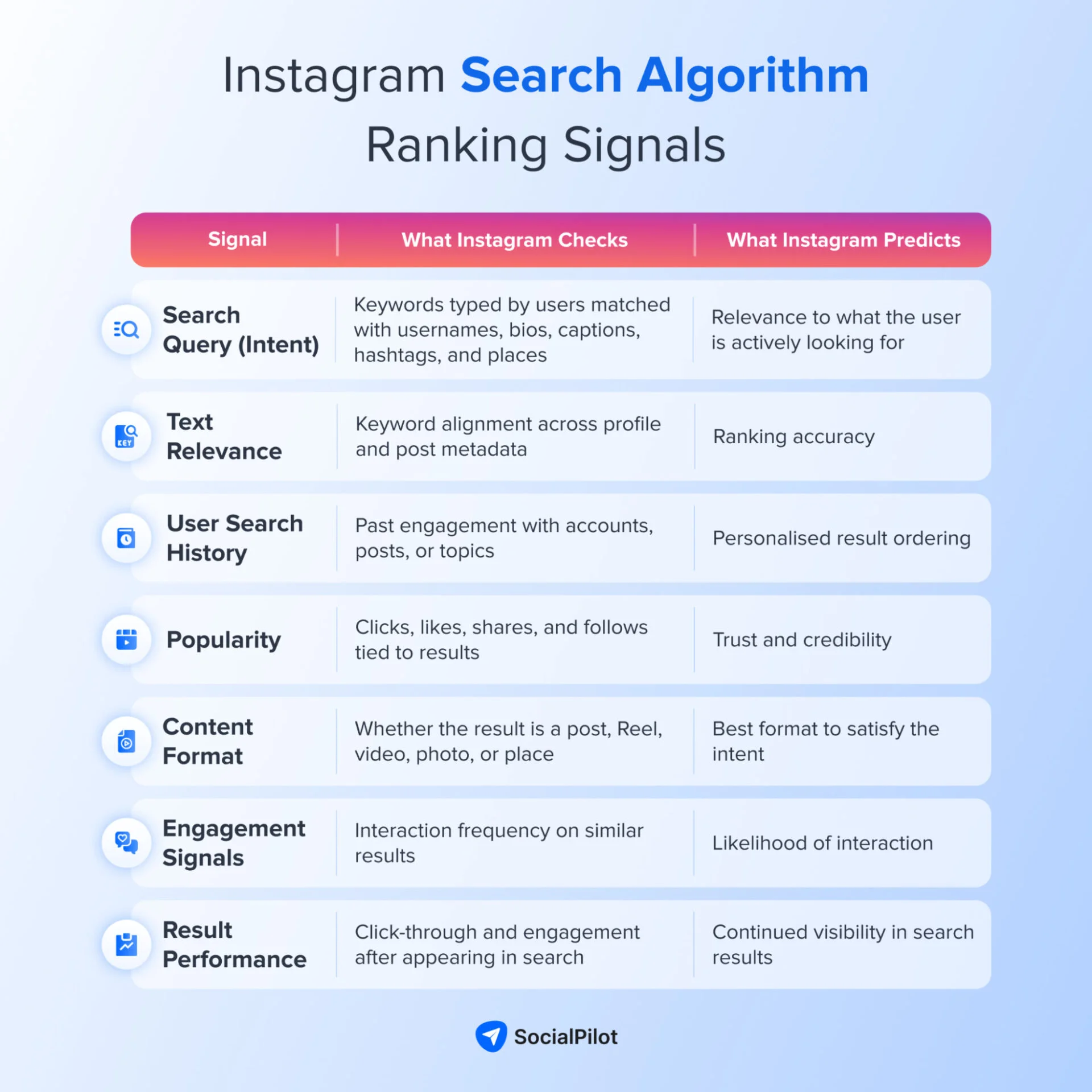
Let’s take a look at all the signals the algorithm uses to rank search results:
- Text Inserted by the User: The AI systems match the texts the user inserted with the relevant usernames, bios, captions, hashtags, and places, to show you the results. That’s why it’s important to follow all the Instagram SEO practices to improve your chances of ranking.
- User’s previous activity: Past engagement plays a role here. Users will first see results from accounts they have interacted with in the past.
- Past activity of the accounts: Algorithm favours the results having good popularity signals. These signals include the number of clicks, likes, shares, and follows for a particular account, hashtag, or place.
How Does the Instagram Stories Algorithm Work?
Stories can be considered the most personal section of Instagram. People tend to look for the stories of their closest friends or creators they often connect with the most.
“We try to value content from your friends really highly across the board, but it’s particularly important for Stories, which is really the best way to keep up with your friends broadly.”
Adam Mosseri
Because the Story tray prioritizes closer connections, it has become a tougher place for creators and even harder for brands to appear.
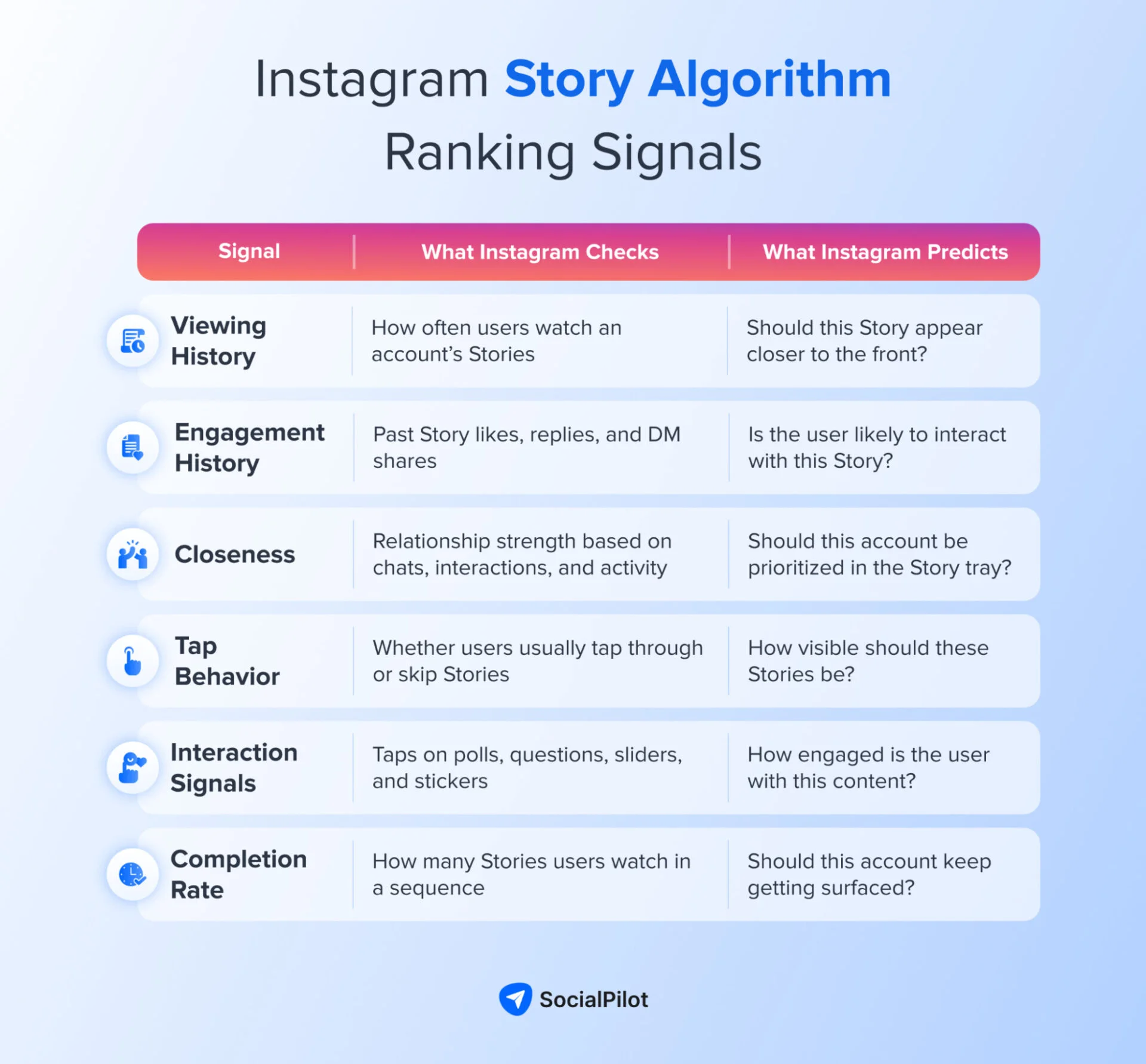
But you can find a way through if you know how the Instagram stories algorithm works. Let’s look at the signals:
- Viewing history: If the audience regularly views an account’s stories, it will receive priority in the ranking on their feed.
- Engagement history: Past engagement, such as liking the story or sharing it via DM is considered a big signal by the algorithm.
- Closeness: The algorithm measures how close the user is to the person who posted the Story. This lets Instagram rank friends’ and family’s stories at the top.
Using these signals, Instagram’s stories algorithm makes predictions about:
- How likely a user is to tap a Story that appears at the top of their home page
- How likely a user is to interact with elements such as questions, polls, or sliders in the Story
- How likely it is that the user and the Story’s author are close connections, such as family or good friends
It’s clear that the story algorithm won’t give businesses an advantage over family and friends. Still, if you want to make it in your audience’s story tray, your Story strategy will need to focus on building a more personal connection with them.
“Think of them as a way to reach your most passionate audience with behind-the-scenes, timely content. The most important signals we look at when ranking Stories are the likelihood that you’ll tap on the story, like the story, or reply with a message.”
Adam Mosseri
14 Tips to Harness Every Instagram Algorithm for Growth
At its core, the Instagram algorithm points toward creating engaging, relevant content. But to truly harness it, businesses should plan their posts across each touchpoint while keeping the nuances of algorithms in mind.
We’ve broken down the best tips based on how each Instagram AI system behaves, so you can use them to push your content higher and reach the audience it was meant for.
Tips to leverage the Instagram Feed algorithm
As we discussed, the Instagram feed algorithm favours posts that make people pause and interact. The stronger the engagement and the more your content gets shared, the higher your chances of being prioritized in the feed.
1. Focus on Holding Attention with Carousels
Instagram carousels are a great format for stopping the scroll and making people swipe. This increases the time they spend on your post and the chance of engagement, two things the feed algorithm loves.
In our study on Instagram carousels, we found that carousels outperform videos and images with a 22.73% higher engagement rate.
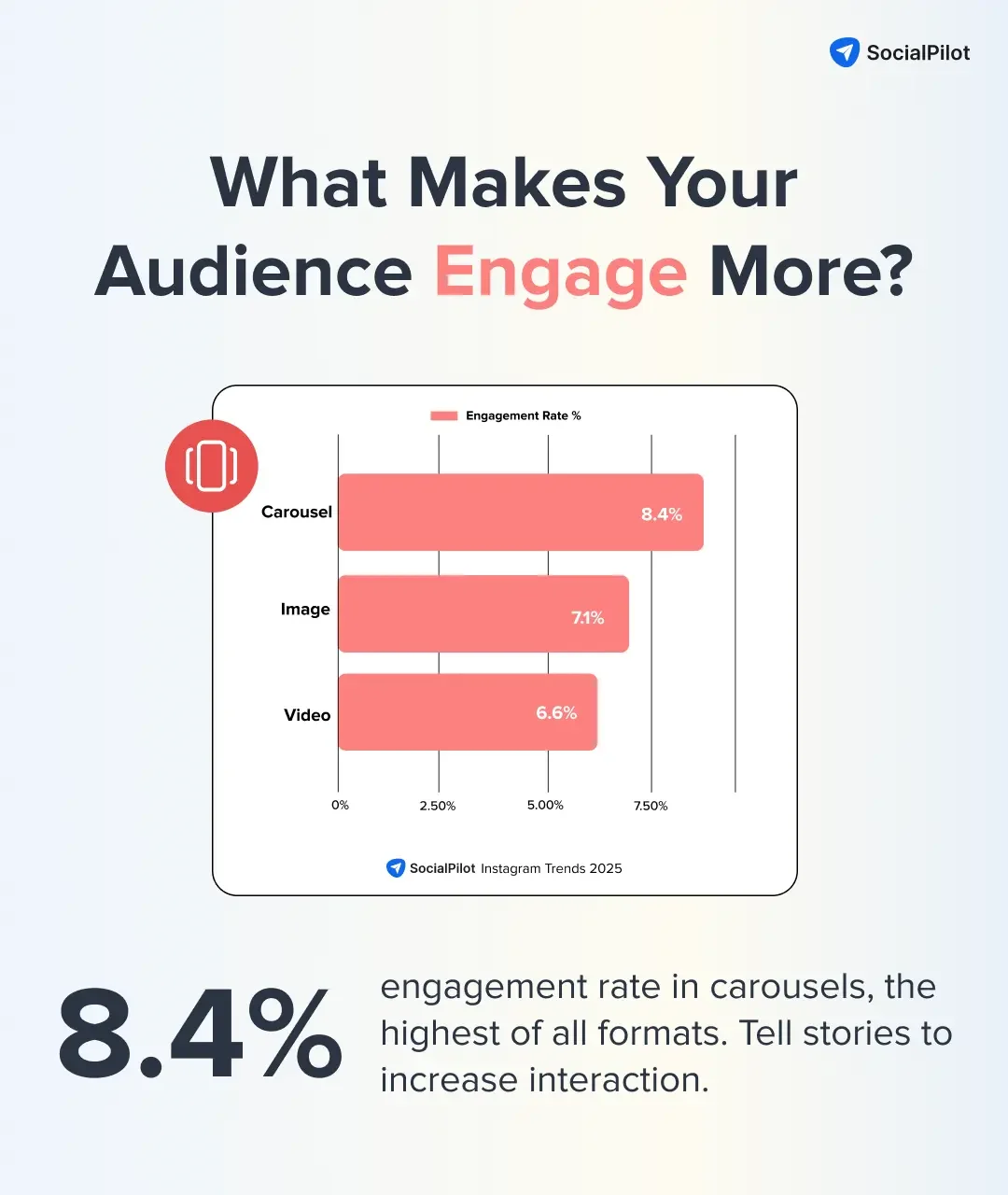
Also, carousels get a second chance to appear in the feed, starting with the slide that the user didn’t see the first time.
“If someone sees your carousel post but they don’t swipe, we’ll often give that carousel a second chance and automatically move to that second piece of media for the viewer.”
– Mosseri
So, try to post more carousel content that excites and informs your audience.
2. Encourage Comments
The feed algorithm prioritizes signals that help it predict the likelihood that a user will comment on your post. That’s why you need to create posts that ask questions and encourage conversation.
But the loop completes only when you reply. Don’t treat Instagram engagement as a one-way street. Participate and respond to build strong engagement and better relationship signals.
3. Create Share-Worthy Content
As Adam Mosseri mentioned, “sends are actually a little bit more important than likes for unconnected content.” Shares weigh more for the feed recommendation.
The algorithm will also push Reels and posts from the accounts whose content has been shared before. That’s why your Instagram content strategy must focus on creating content that is relevant.
There are some Instagram reel hacks that make people share content instantly, such as “this is so me,” or “Send it to a friend who is just like this.”
4. Use Recency to Your Advantage
Knowing the best time to post on Instagram still matters for reaching your followers. Of course, it doesn’t play as much of a role in recommendations.
However, getting an initial strong engagement with followers signals to the algorithm that your post is relevant to others who connect with similar content and accounts like yours.
Tips to Leverage the Instagram Reels Algorithm
The cardinal rule to be loved by the Instagram reel algorithm is to create reels that feel “sendable.” Be it tutorials, memes, quick tips, checklists, relatable moments, FAQs, before-and-afters, and problem-solution formats.
Here are some more dos that Instagram shared on its creators page.
5. Use Trending Audios
Trending audios are a great catalyst to book your slot on the Instagram reels feed because the algorithm looks at the audio track as a ranking signal. If the sound is already popular or widely used, Instagram sees your Reel as easier to match with people who enjoy similar content.
So keep an eye on the latest Instagram audio trends and jump on the ones aligned with your brand values.
Apart from using trending audios, focus on creating videos with original audios that can be reused by your users. Instagram algorithm checks whether a viewer is likely to reuse your audio and ranks it well.
6. Create Strong Hooks
Reels get buried instantly if viewers swipe away in the first three seconds. The algorithm literally predicts whether someone will “watch less than three seconds,” and ranks you accordingly.
Your first frame needs strong Instagram reel hooks. Something that engages with motion, energy, a bold line, or a pattern interrupt. If you win the first three seconds, you win Reels.
7. Remain Consistent
Consistency is a strategic move here. Reels algorithm counts past engagement as an important signal. If someone has interacted with you before, even if not as a follower, your new Reels have a better chance of being shown to them again.
That’s why you should post regularly, respond to comments, and create repeatable content styles so viewers recognize and return to your brand.
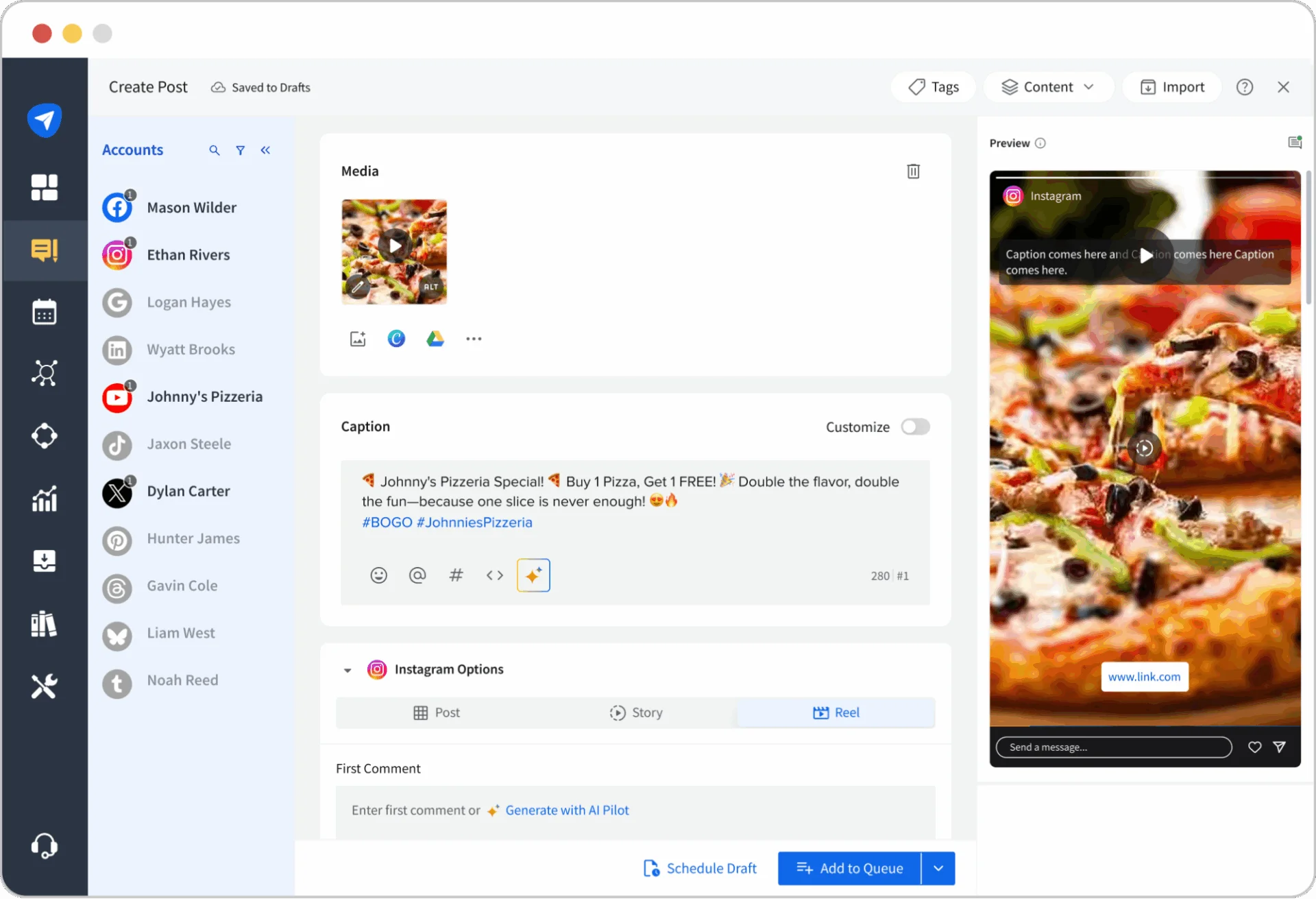
Between Feed posts, Reels, and Stories, there are a lot of places you need to show up on Instagram. Keeping a steady posting rhythm across all of them can feel overwhelming.
That’s where SocialPilot helps. With its Instagram scheduling, you can plan, create, and publish Reels, Stories, and Feed posts for multiple accounts from one dashboard. And with its inbox features, you can even manage comments and DMs easily. Let SocialPilot handle the workflow so you can focus on creating content that actually connects.
Tips to Leverage the Instagram Search Algorithm
The Search algorithm focuses on engagement and past interactions, just like every other Instagram algorithm, and we’ve already shared tips around that.
But the primary thing it looks for is texts. Here’s how to optimize for that:
8. Optimise Everywhere for Text-based Search
Search is driven primarily by the text users type, so Instagram matches that text with usernames, bios, captions, and even the audio from your videos. To rank, businesses need to work on their Instagram SEO.
Use the words your audience actually searches for in your username, name field, bio, captions, alt text, and the audio to improve your chances of getting ranked in Instagram search.
9. Use Locations for Discoverability
Location is a searchable field on Instagram. Adding the right place tag helps you rank when people look for businesses, services, or content in a specific area. For local businesses, this is one of the easiest ways to appear in relevant searches.
Tips to leverage the Instagram Story Algorithm
Stories are for connecting with close friends and followers; if you want to excel, act like one.
10. Use Interactive Features
The Stories algorithm favors Stories that encourage interaction. It treats dwell time and engagement as major ranking factors. If people watch your Stories till the end and also interact by replying, voting in polls, answering question boxes, or reacting with emojis, Instagram sees that as strong interest.
Using interactive features is one of the best ways to keep showing up in their Story tray. Use polls, sliders, and other stickers to ask for their preferences.
11. Create Non-Promotional Content
Stories are designed to prioritise close relationships, not brands. This means your Stories must feel personal, human, and conversational.
Share behind-the-scenes moments, day-to-day context, team updates, or raw thoughts that help your audience feel closer to your brand. The more a viewer feels connected to you, the more natural your appearance will feel to them in the story tray.
12. Create a Daily Cadence
“We’ve also found that creators who post to Stories often see fewer unfollows than creators who don’t, which can lead to stronger growth over time.”
– Adam Mosseri
View this post on Instagram
A steady posting frequency reminds your audience that you’re actually present. When people get used to seeing you in their Stories, they naturally check in more often, which strengthens the viewing signals Instagram looks for.
Also, stories are your chance to put your Reels and feed posts in front of your followers. Plus, the signals you build there through views, replies, taps, and shares can boost how your content performs across Instagram.
Tips to leverage the Instagram Explore Algorithm
Ranking on the Instagram explore page requires the same signals as the reels tab. Your post needs to be popular, use trending audio, and your account must have a past interaction history with the user.
Here are some additional tips to help signal the Explore algorithm to show your posts:
13. Create Attractive Thumbnails and Visuals
Instagram’s Explore algorithm prioritizes posts that make people click the square post in Explore to view them in full screen. To achieve that, you need to create bright, bold visuals, intriguing captions, or eye-catching thumbnails that make users tap to see more.
14. Create Looping Videos
Creating Reels that loop back to the beginning increases the chances of multiple viewings. It signals to the algorithm that your content is engaging and relevant to users.
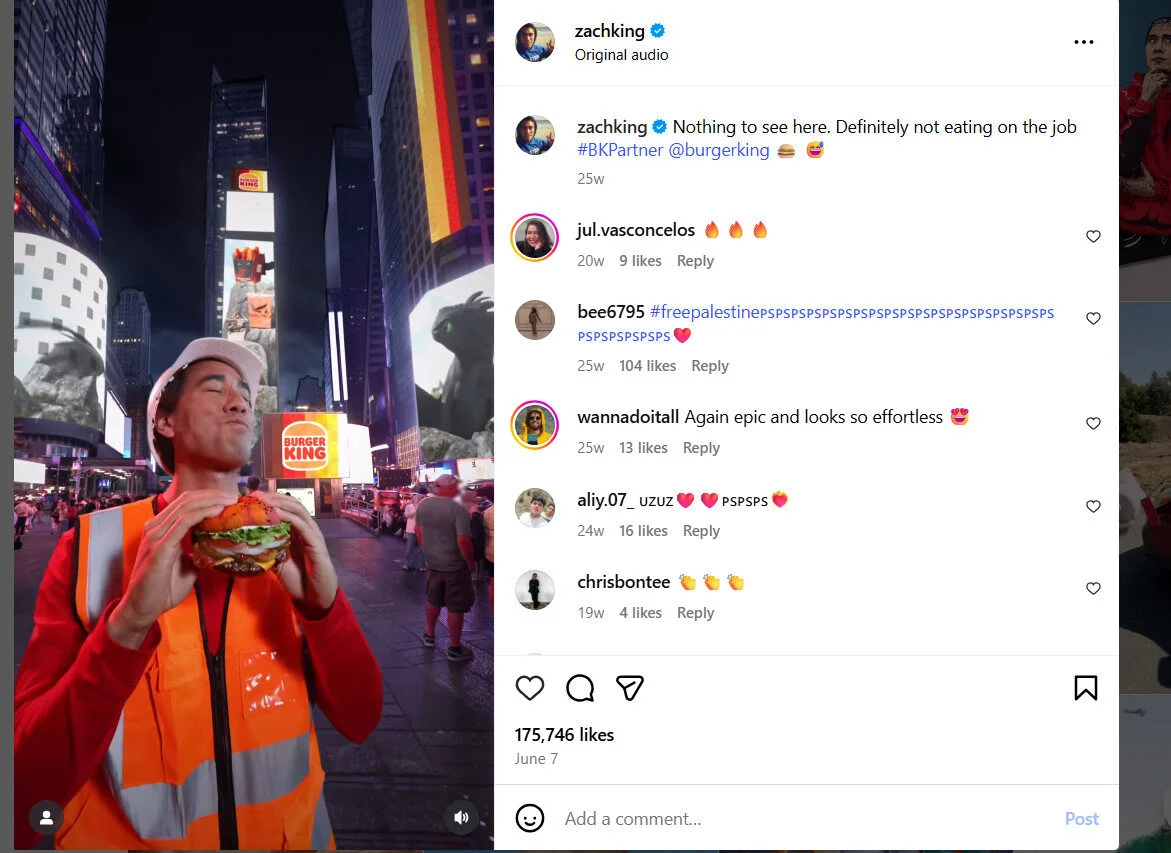
The way to loop your videos is to:
- End your video with a shot or action that flows back to the start. For example, if you start with a specific action like tossing an object, end with the same action to bring the video full circle.
- Use a phrase or action that naturally connects the end to the beginning, like starting with “Ready to see the trick?” and ending with “And here’s the trick!”
What Doesn’t Work for the Instagram Algorithm?
Instagram’s algorithm doesn’t promote content that goes against its recommendation guidelines. Don’t confuse these with Instagram’s community guidelines, which, if violated, can get your content removed from the platform entirely.
They neglect low-quality, objectionable, sensitive, or inappropriate content for younger viewers. Here are a few pointers:
- Content related to self-harm, suicide, or eating disorders
- Content that involves violence or aggressive behavior, such as fighting
- Content that is sexually explicit or suggestive, including images of people in revealing clothing
- Health or finance content that lacks sensitivity or is of poor quality
- Unoriginal content that is heavily recycled from other sources
If your post violates these guidelines, Instagram’s algorithm will not recommend your content on Reels, Explore, or any other touchpoint where it suggests content to non-followers.
Ready to Get Noticed by the Instagram Algorithms?
There you have it. Now you know what and what doesn’t help you get noticed by Instagram’s different algorithms.
As of August 2026, the core ranking logic is unchanged, and no new ranking or distribution change was confirmed in July or August. The most recent development remains June 2026, when “Your Algorithm” topic controls reached the main Feed, giving users more say over what they see. While the algorithm will continue to evolve, the core principle of successful content remains unchanged: creating content that engages, informs, and provides real value.
Your focus should always be on building a genuine connection with your audience through engaging content that speaks to their interests and needs. The more personal and relevant your posts, the more likely they are to get noticed by both your followers and the algorithm.
Ready to put your Instagram strategy into action? Explore SocialPilot’s plans pricing to schedule content, track performance, and stay consistent as Instagram evolves.