
A shared drive and a group chat work until more than one person has to approve a post. Neither shows what followers will actually see, and neither stops the wrong draft from going out. Social media collaboration tools fix that by keeping the draft, the comments and the final yes on the post itself.
We picked 6 tools and split them into two groups: all-in-one management suites with collaboration built in, and dedicated approval and collaboration specialists. Every price comes from each tool’s live pricing page, checked in October 2026. Our own product, SocialPilot, gets the same write-up as the other five, weak spots and all.
Why You Need Dedicated Collaboration Tools for Social Media Teams
General work apps are fine for talking about a post, but they aren’t team collaboration tools for social media. They fall short when someone has to check a post, approve it and publish it on time, which is where dedicated social collaboration tools help.
The Cost of Using Generic Tools for Social Content
Chat apps, file storage, and project boards are content collaboration tools for any kind of work. None were made for a post that must look right on Instagram and LinkedIn on the same day.
No real preview. A screenshot hides cut-off captions, odd line breaks and the first comment, and those problems often only show up after the post is live.
Notes everywhere. Feedback arrives by email, chat, and calls, and someone copies it back by hand.
No record of who said yes. An old email is weak proof of what a client approved.
No publishing. Someone still pastes the final text into a scheduler, one more chance to grab the wrong version.
Notre social media workflow guide shows where these hand-offs usually slip.
What a Social-Specific Collaboration Tool Actually Solves
A social media collaboration tool is software where your team drafts, reviews, approves and schedules social posts in one place. Think of it as social media collaboration software, or social collaboration software, built for one job: getting a post from draft to published without losing anyone’s notes.
| What your team needs | What to look for |
| Feedback on the actual post | Comments on a preview that matches the live post |
| A clear yes first | An approval step that holds the post until someone approves |
| Client or legal sign-off | Outside reviewers who approve without a paid seat or new login |
| Several approvers | Steps in order, such as manager first, client second |
| Control over who does what | Roles for drafting, editing, approving and publishing |
| One shared plan | A shared content calendar showing every post’s status |
Approvals start to matter the day a second reviewer joins, and outside access matters the moment a client refuses another account.
Social Media Collaboration Tools at a Glance
Here are all 6 compared tools side by side.
All-in-One vs. Dedicated Specialist, at a Glance
| Outil | Type | Who it suits | Entry price | Free option | Approvals | Examen des clients | Calendrier |
| SocialPilot | All-in-one | Teams of 3 to 25 needing client sign-off | $25.50/mo, one flat price | Free 14-day trial, card not needed |  |
|
 |
| SocialBee | All-in-one | Small in-house teams | $24.20/mo, one flat price | Free 14-day trial, card not needed | |
 |
|
| Statusbrew | All-in-one | Teams that reply to comments and approve posts | $69/mo on annual billing, one flat price | Free 14-day trial, card not needed | |
|
|
| DashSocial | All-in-one | Enterprise brands with many reviewers | Quote only, per brand | 14 days of free access | |
|
|
| Planable | Specialist | Agencies whose clients comment on every post | $33/mo per workspace | First 50 posts free | |
|
|
| Kontentino | Specialist | Agencies tracking many brands by status | $59/mo, sized by users | Free 14-day trial, card not needed | |
|
|
Comes with the entry plan · Needs a pricier plan, is partial, or isn’t confirmed in public docs · Non disponible
Entry prices mentioned in the above table are monthly rates on annual billing, as checked from each vendor’s pricing page.
Pricing Range Overview
Paid plans start near $24 a month on annual billing, and one tool (DashSocial) publishes no price at all. Billing models matter as much as entry prices, because some tools charge for every person who logs in.
| Outil | Billing model | Monthly / annual entry price | Who raises the bill |
| SocialPilot | Flat per plan | $30 / $25.50 | Extra users, $5/mo. Client seats unlimited from Premium |
| SocialBee | Flat per plan | $29 / $24.20 | Extra users, $10/mo |
| Statusbrew | Flat per plan | $89 / $69 | Outside approvers need no seat |
| DashSocial | Per brand | Quote only | Nobody, users are unlimited |
| Planable | Per workspace | $39 / $33 | Each new client workspace |
| Kontentino | Sized by users | $83 / $59 | Every user, clients included |
These four tools in this group publish posts, run reports and handle comments, with approvals as one part of the package. Pick one if you want posting, reports and sign-off in one place. Prices run from about $24 a month to quote-only, and none has a free plan.
All-in-One Social Media Management With Team Collaboration Built In
1. SocialPilot
Bring as many client contacts into approvals as you like from Premium up, without paying for their seats.
Coverage
- Approvals
- Examen des clients
- Multi-step approval
- User roles
- Calendrier partagé
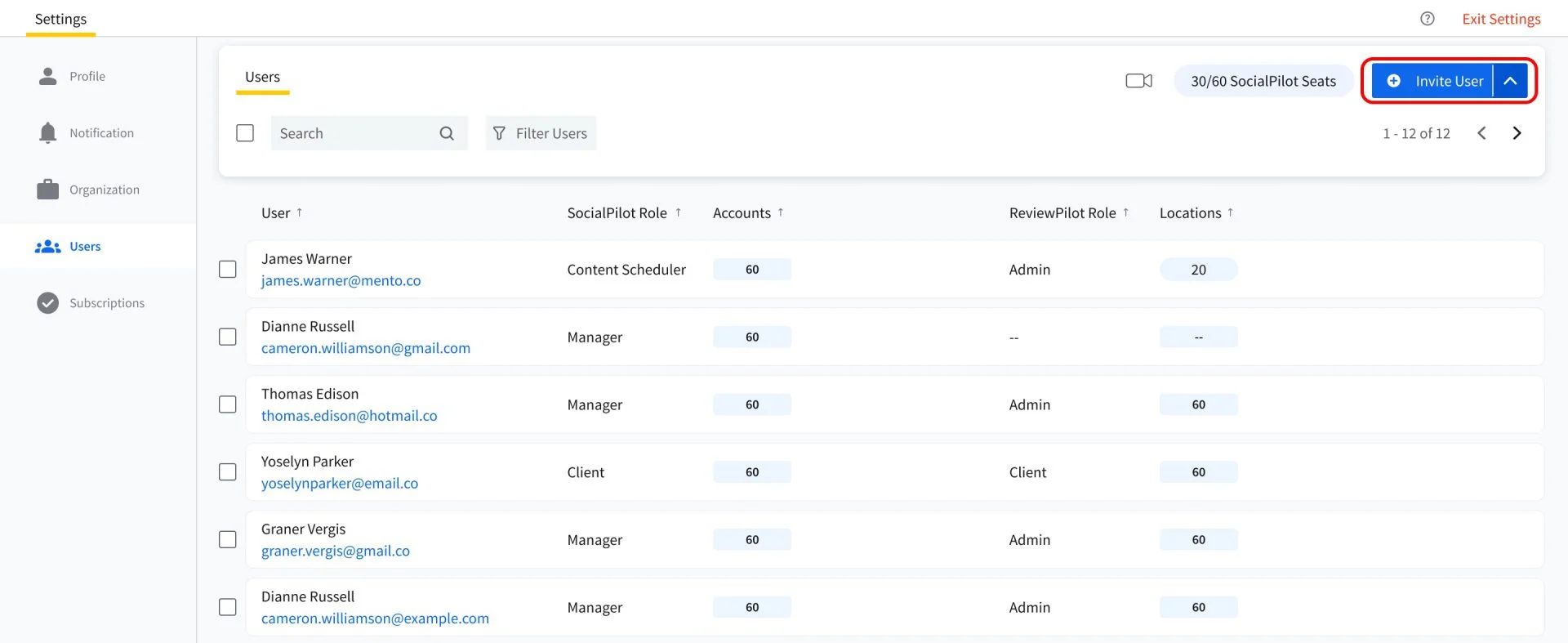
What it actually looks like: You start on the Users screen of SocialPilot, giving each person a role, such as Manager, Client or Content Scheduler, and picking the accounts they can see. Those team roles and permissions decide who drafts and who approves. A finished post goes to a manager, then on to the client. With Agréments en cours de route, the client opens a link in their email, with no password, and approves the post or sends it back with feedback. Once the post is approved the content scheduler will schedule the post on client’s social media account.
Anshu K., a G2 reviewer, wrote that “our organization can handle multiple social media platforms from one centralized dashboard instead of using more than 5 to 6 specific tools for specific tasks.”
On G2, SocialPilot is rated 4.5 out of 5 across 846 reviews.
What it does well: Les client approval workflow runs manager first, client second, so clients only see posts your manager has passed. Every brand also keeps its own space, so drafts never cross over.
Each plan includes a set number of team users, and client seats are free from Premium up. Essentials runs $25.50 a month on annual billing ($30 month to month) for 1 user and 7 accounts. Standard, at $42.50 annually or $50 monthly, covers 3 users and adds manager approvals. Premium, at $85 annually or $100 monthly, covers 6 users and adds client approvals with unlimited client seats. Ultimate costs $170 annually or $200 monthly with no user cap. Extra users on Standard or Premium are $5 a month. See SocialPilot’s plans for more details on each pricing plan.
What running SocialPilot standalone requires: Premium, once clients sign off, because Standard stops at your own team’s approval. The path is fixed at manager then client, so if brand, legal and the client each need their own turn, look at Planable or Kontentino.
2. SocialBee
Approval here is one switch on each post, and posts sit in content categories with their own weekly time slots.
Coverage
- Approvals
- Examen des clients
- Multi-step approval
- User roles
- Calendrier partagé
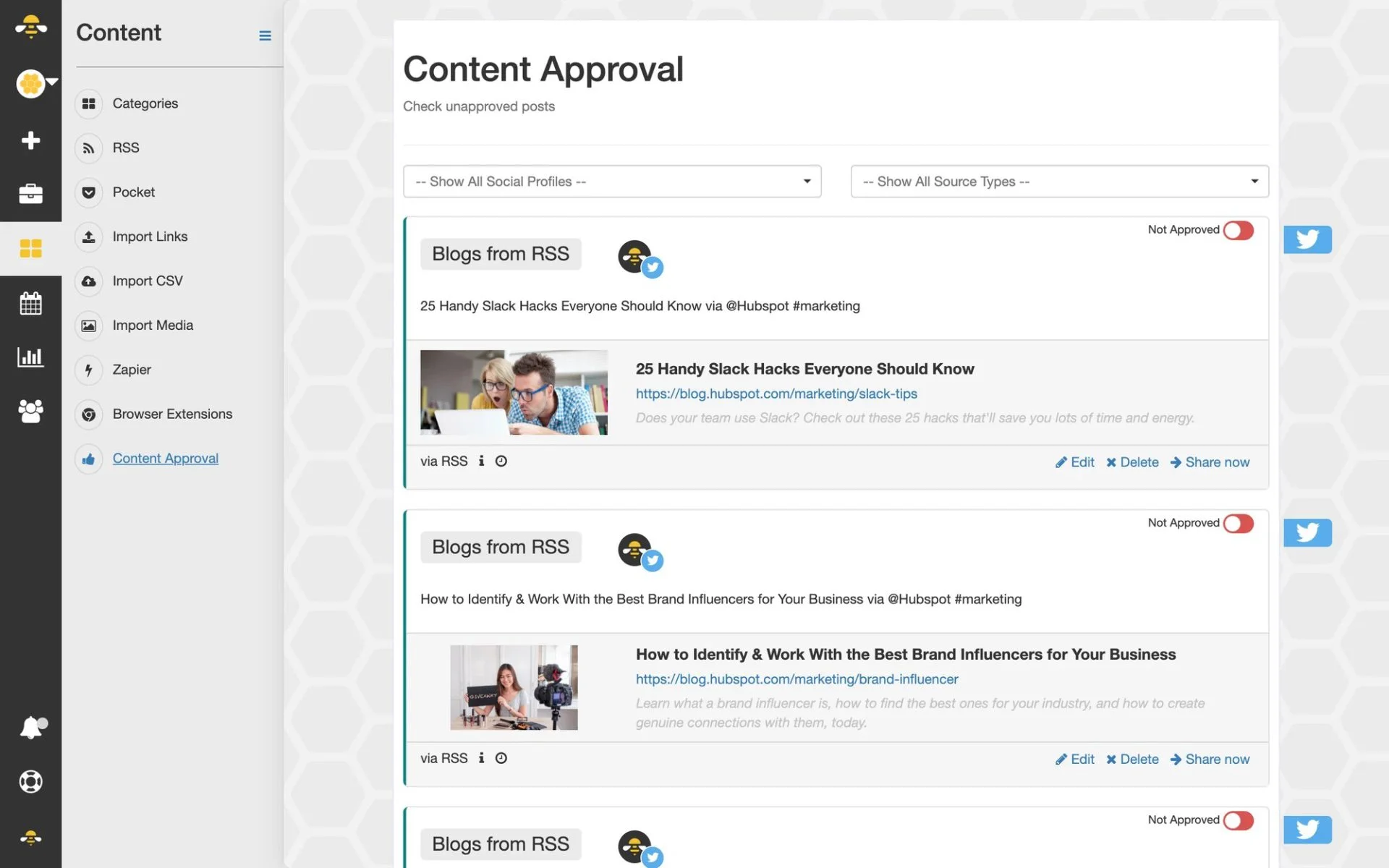
What it actually looks like: You open the Content Approval tab in SocialBee to find every post waiting for review, each switch set to Draft. You check a post and flip it to Approved, and only then does it join the schedule, as given in the SocialBee’s content approval guide. A Contributor can write posts but never approve them.
Elissa v., a G2 reviewer, wrote: “It’s great to have a structured system where drafts, approvals, and final versions are clearly separated.”
On G2, SocialBee is rated 4.7 out of 5 across 477 reviews.
What it does well: A new freelancer understands the Draft or Approved switch on day one, and anything left in Draft never publishes.
According to SocialBee’s pricing page, Bootstrap costs $24.20 a month on annual billing ($29 monthly) for 1 user and 5 profiles. Accelerate, at $40.80 annually or $49 monthly, adds post approvals. Pro, at $82.50 annually or $99 monthly, gives 3 users in each of 5 workspaces. Agency plans run from $179 to $449 a month on monthly billing, and extra users are $10 a month for monthly plans and $100 a year for annual plans.
What running SocialBee standalone requires: Pro, in practice. Accelerate has approvals but only one user per workspace, so the person approving a post is the person who wrote it. The pricing page names no client approval either. Our SocialBee alternatives guide covers tools that have it.
3. Statusbrew
If a post passes several people before it goes out, Statusbrew lines them up as steps, and outside approvers sign off from an email link without a paid seat.
Coverage
- Approvals
- Examen des clients
- Multi-step approval
- User roles
- Calendrier partagé
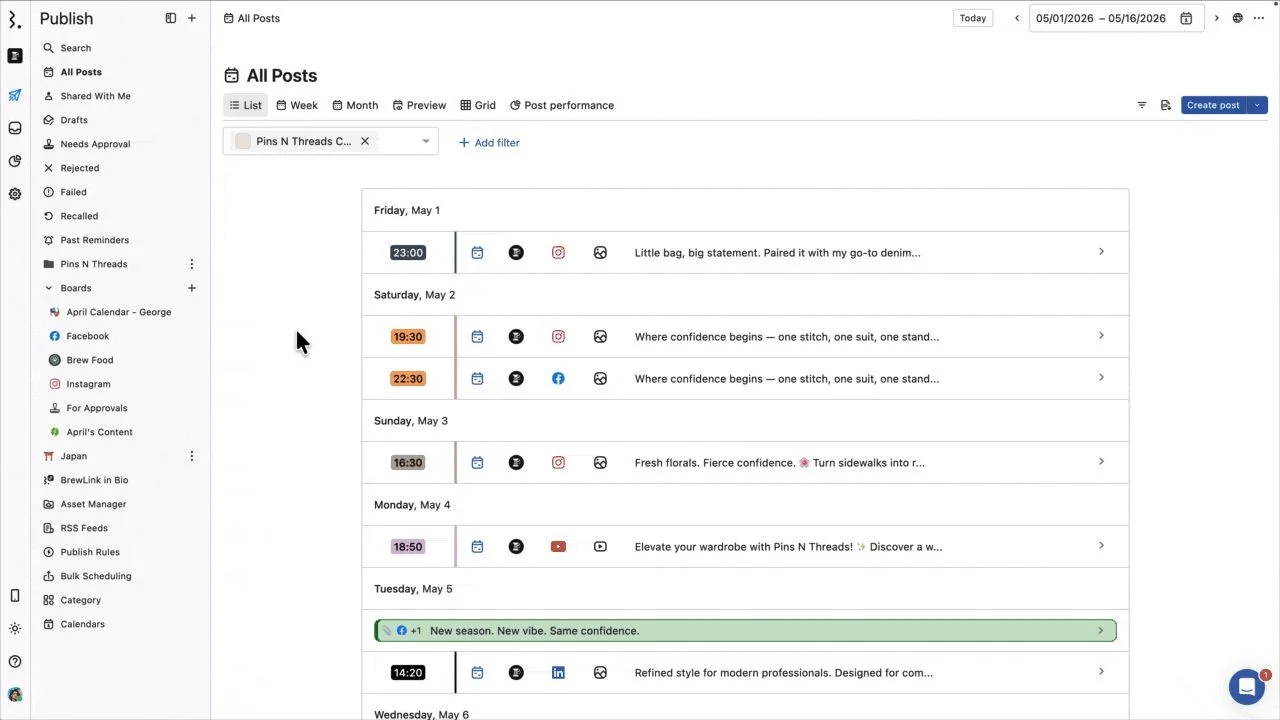
What it actually looks like: En Statusbrew, you open Publish and land on All Posts, a list of every scheduled post grouped by day, with its time, network and the start of its caption. Buttons along the top switch the same posts into Week, Month, Preview or Grid view, and Add filter narrows the list to one brand. The left menu sorts posts by where they stand, with folders for Drafts, Needs Approval, Rejected and Failed, so you can see at a glance what’s still waiting on a reviewer. When you write a post with Create post, team members who need sign-off get a Send for approval button instead of a schedule button. Clients can then approve from a secure email link, with no account needed.
Zeynep, a G2 reviewer, wrote: “What I like the most is client collaboration. I don’t need to deal with Excel for content approval or manually collect data at the end of the month to share with clients.”
On G2, Statusbrew is rated 4.8 out of 5 across 260 reviews.
What it does well: You can stack as many steps as a post needs, and a post nobody approves before its slot is marked Expired instead of going out anyway.
Per Statusbrew’s pricing page, Lite costs $69 a month on annual billing ($89 monthly) for 1 user and 5 profiles. Standard, at $129 annually or $179 monthly, covers 3 users and 10 profiles. Premium, at $229 annually or $299 monthly, covers 6 users and 15 profiles, with room to add more, and is the first plan with approval workflows. Enterprise is custom-priced.
What running Statusbrew standalone requires: Lite and Standard have no approval workflows. Approvals start at Premium, at $229 a month on annual billing, which is a steep jump for a team of two or three.
4. DashSocial
There’s no head count at DashSocial, formerly Dash Hudson, because it prices by brand and every plan has unlimited users.
Coverage
- Approvals
- Examen des clients
- Multi-step approval
- User roles
- Calendrier partagé
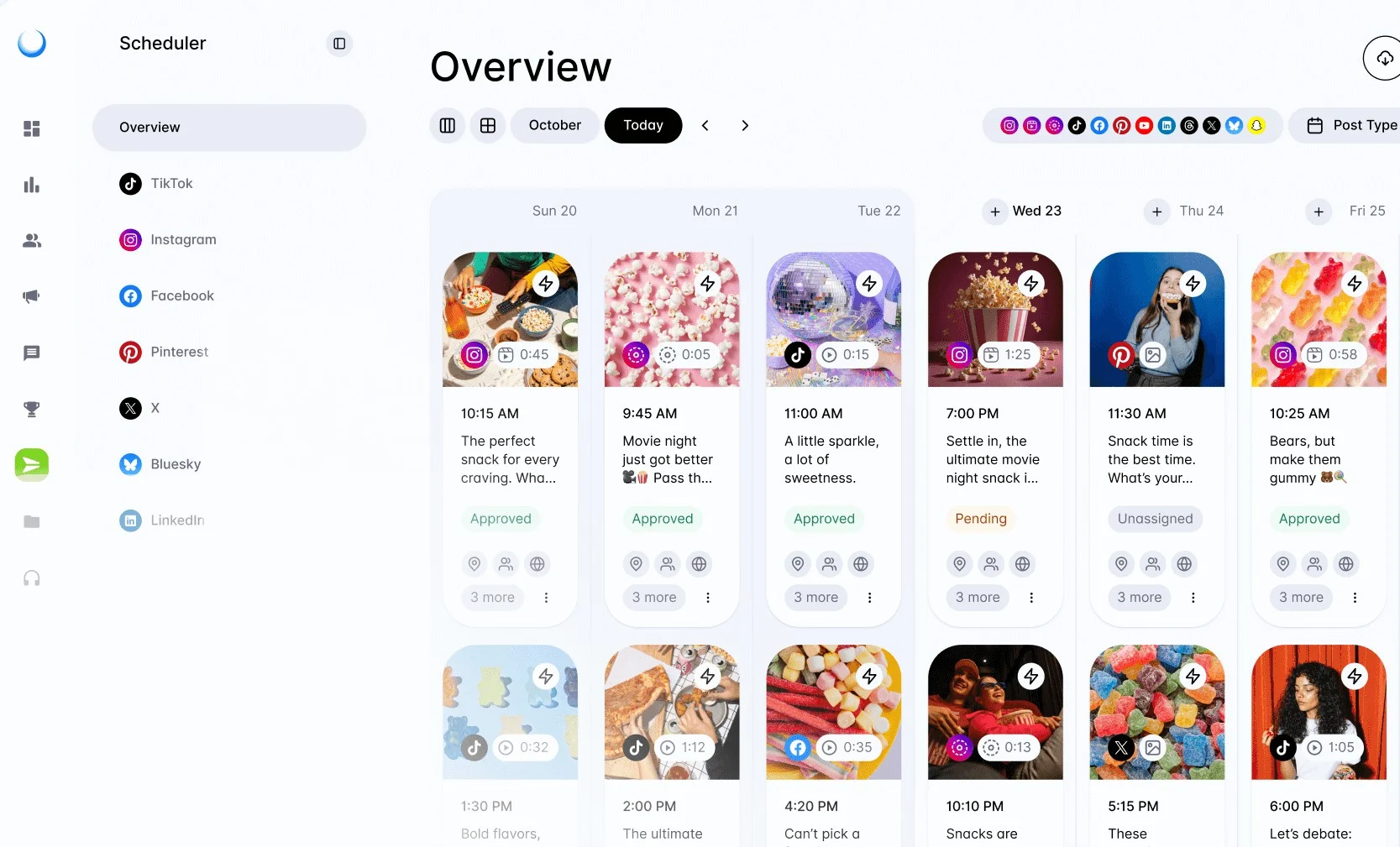
What it actually looks like: En DashSocial, you open the Scheduler and land on Overview, a week laid out in columns with every planned post shown as a card. Each card has the image or video, the network icon, the time and the start of the caption. Below that sits a status label, Approved, Pending or Unassigned, so you can see at a glance which posts are cleared to go and which still need a reviewer. The left menu splits posts by network, from TikTok and Instagram to Bluesky and LinkedIn. Along the top, Today and the arrows move you through the weeks, and the row of network icons plus Post Type narrow what you see. In DashSocial, formal content approvals come with the Advance plan.
Veronica G., a G2 reviewer, said the planner helps “keep teams aligned without relying on multiple spreadsheets or tools,” though she still has to “manually organize or supplement data outside the platform” for internal reports.
On G2, DashSocial is rated 4.7 out of 5 across 410 reviews.
What it does well: Unlimited users let a large brand add regional managers, legal and leadership as reviewers at no extra cost.
Every plan is quote only, per DashSocial’s pricing page. Engage covers the calendar and comment handling, Advance adds content approvals and team collaboration, and Enterprise adds access controls and single sign-on (one company login). Pricing is per brand, with 14 days of free access.
What running DashSocial standalone requires: A sales call before you can compare anything, and the Advance plan for approvals.
Planable and Kontentino put approval first and scheduling second. Look here if getting a clear yes from clients is what holds you up. Planable has a small free tier, and paid plans start at $33 a month.
Dedicated Content Approval & Collaboration Tools
5. Planifiable
In Planable you pay per client workspace, and everyone inside it can comment and approve at no extra cost.
Coverage
- Approvals
- Examen des clients
- Multi-step approval
- User roles
- Calendrier partagé
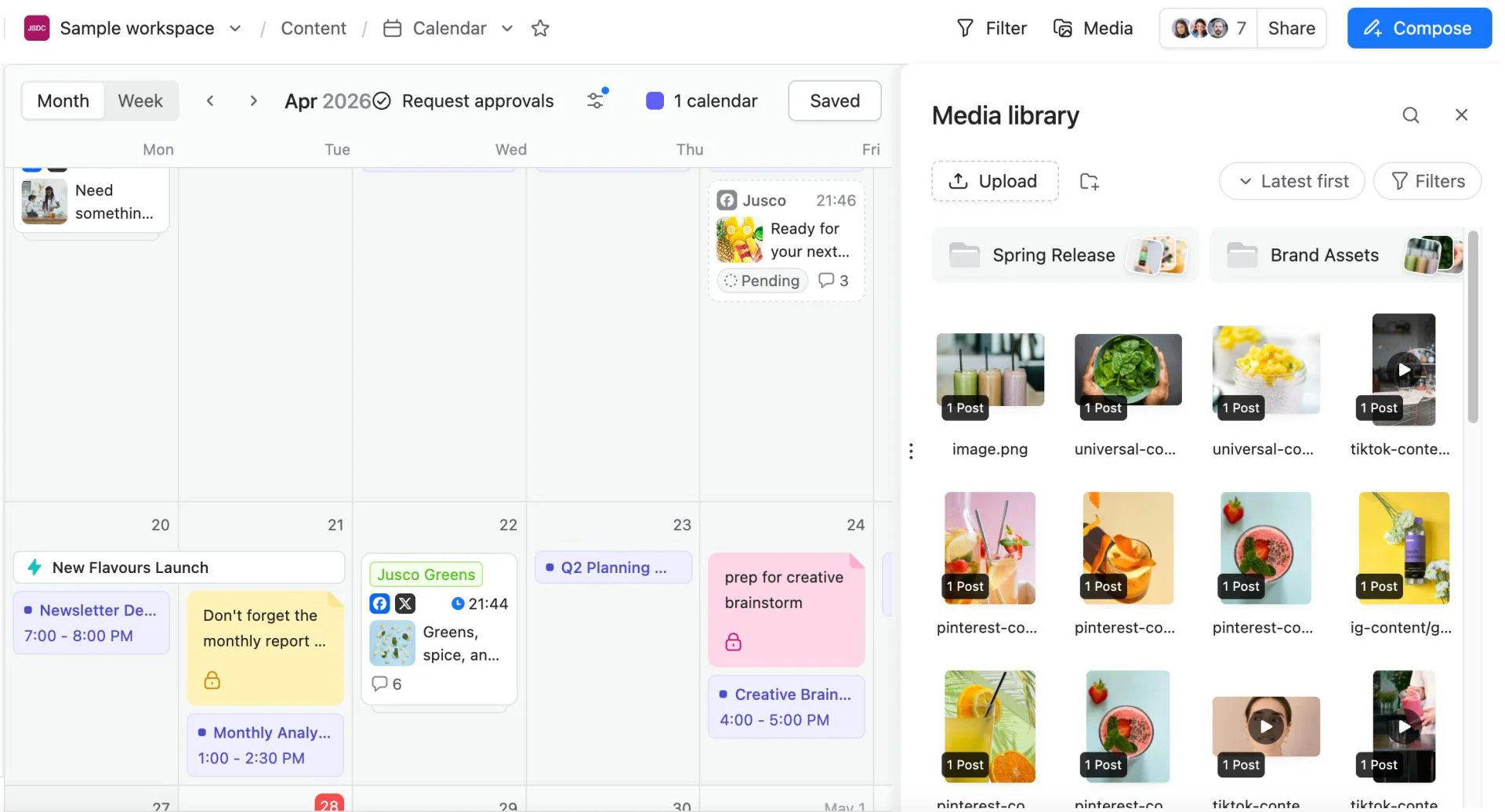
What it actually looks like: En Planable, you open a workspace’s Calendar and see every post as a card on its day, in Month or Week view. Each card shows the network, the time, the start of the caption and how many comments it has. A post waiting on sign-off carries a Pending label. Switch on Request approvals at the top and the calendar shows only the posts that still need a yes. Other cards like “Don’t forget the monthly report” are internal notes and reminders that sit on the same calendar as the posts. To ask for sign-off on a post, you hover over its checkmark, choose Request Approval, and pick people from your team or the client’s.
Alicia S., a G2 reviewer, wrote that it “has saved me from receiving 300 emails back and forth for changes.” Lauren C., a four-star reviewer, found “the high cost a bit challenging, especially for growing teams and agencies.”
On G2, Planable is rated 4.6 out of 5 across 1,121 reviews.
What it does well: Clients comment right on a preview of the live post, and nobody argues over whether a client contact is worth a paid login.
Planable’s pricing page lists Basic at $33 per workspace a month on annual billing ($39 monthly) for 4 social pages and 60 posts a month. Pro, at $49 annually or $59 monthly, raises that to 10 pages and 150 posts and adds required approvals. Enterprise is quote only and adds multi-level approvals, where team lead, client and legal sign off in turn. Planable’s free trial covers your first 50 posts, with no time limit.
What running Planable standalone requires: A bill that grows with every client. Basic caps each workspace at 60 posts a month, every client needs its own workspace, and approvals that pass from one person to the next are Enterprise only.
6. Kontentino
Kontentino gives every post a named status, so you always know whether it waits on your team or the client.
Coverage
- Approvals
- Examen des clients
- Multi-step approval
- User roles
- Calendrier partagé
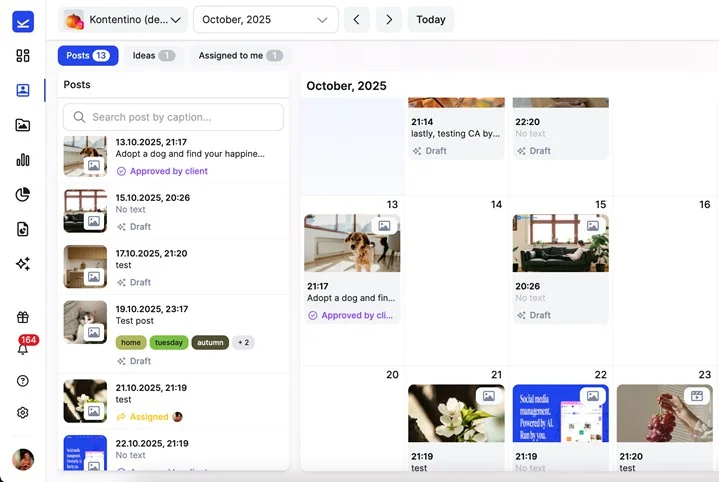
What it actually looks like: When a post is ready in Kontentino, you click Send for approval and mark it Internal or Client. The client then picks Approve or Rework, or leaves a comment. Team and client notes sit on separate Internal and Client tabs, and the calendar gives every post a status such as Client Rework or Approved by Client.
Matej D., a G2 reviewer, wrote that it “keeps content planning, approvals and client feedback in one place.” Thirsa d., another reviewer, warned that “whenever clients want to publish content themselves natively, it completely breaks the approval workflow.”
On G2, Kontentino is rated 4.6 out of 5 across 392 reviews.
What it does well: The statuses leave no room for “I thought you had it,” and separate threads keep your team’s rough notes away from the client.
Kontentino’s pricing page shows Starter at $59 a month on annual billing ($83 monthly) for 3 users and 10 profiles, with internal approvals. Standard, at $131 annually or $179 monthly, covers 10 users and 40 profiles and adds client approvals. Pro, at $239 annually or $323 monthly, adds unlimited profiles and approval flows for each market. Enterprise is custom.
What running Kontentino standalone requires: Standard, once clients approve, and clients count toward your users, so a few contacts per brand use up your user slots fast.
Where SocialPilot Fits In This List
Our tool belongs with the all-in-one suites, next to SocialBee, Statusbrew and DashSocial. It suits teams that want scheduling, reports and client sign-off under one login without paying again for each reviewer.
What SocialPilot Does Well for Team Collaboration
It handles both kinds of approval: a manager checks the post, then the client approves from an emailed link. Roles and Gestion des clients control what each person sees, so a freelancer can draft for one brand without seeing another.
You pay by plan, not by headcount. Client seats cost nothing extra from Premium up. Premium costs $85 a month on annual billing for 6 users, client approvals and unlimited client seats.
Where a Dedicated Specialist Might Be the Better Fit
Three or more approval steps. Planable Enterprise and Statusbrew Premium let you stack as many steps as a post needs, past SocialPilot’s manager-then-client path.
Clients who must see each post’s finished look. Planable is built around previews that match the live post.
Many named post statuses. Kontentino labels every stage.
Dozens of reviewers at one brand. DashSocial includes unlimited users.
The lightest approval possible. SocialBee’s single switch is the simplest here.
How to Choose the Right Social Media Collaboration Tool
Ask who has to approve a post and how many of them work outside your company. Those answers shortlist your tools and point to the cheapest billing model.
Match the Tool to Your Team’s Actual Workflow
| Your team | Shortlist | Features you won’t need |
| In-house team of 2 to 3, no clients | SocialBee Pro or SocialPilot Standard | Client approvals |
| Agency, 3 to 5 clients who comment on everything | Planable Basic or Pro or SocialPilot Premium | Inbox, listening |
| Agency, 5 to 15 brands, manager then client | SocialPilot Premium or Kontentino Standard | Per-market approval flows |
| Team replying to comments and approving posts | Statusbrew Premium | A separate approval tool |
| Brand with legal and regional reviewers | Planable Enterprise, Kontentino Pro or DashSocial Advance | Entry-level plans |
If posts usually stall waiting on a client, our guide to fixing client approval workflows shows where delays start.
All-in-One vs. Dedicated Specialist
Go all-in-one if you also need publishing, reports and comment replies under one login. Go specialist if approval is the real bottleneck and you want social media approval workflow tools with the most control over client review. Some teams approve in a specialist and publish from a broader social media collaboration platform, but that means two bills and two calendars. For most small and mid-size teams, one of the all-in-one social media team collaboration tools above is enough.
Budget and Team Size
List everyone who touches a post, clients included. Per-workspace pricing like Planable’s climbs with your client list, user-based pricing like Kontentino’s climbs with headcount, and flat plans like SocialPilot’s and Statusbrew’s hold steady until you outgrow a plan’s limits.
Picture an agency with 6 staff and 8 client contacts. On SocialPilot Premium, the 6 staff are covered and client seats are unlimited, so the bill stays at $85 a month on annual billing. On Kontentino, all 14 people count as users, which is past Standard’s 10 included users.
How We Analyze and Select These Tools
We rebuilt this list around one question: does the tool help a team approve social posts?
What We Actually Tested
Checked all 6 pricing pages, including monthly and annual prices and the first plan with approvals.
Followed each tool’s approval steps through its help center and matched them to the vendor’s own screenshots.
Confirmed in help docs whether clients need a paid seat or a login to approve.
Pulled named G2 reviews for every tool, critical ones included, plus each G2 score.
What We Couldn’t Independently Verify
How each tool holds up over months of daily use, including failed posts and support speed.
DashSocial’s prices and approval screens, which sit behind a demo, so those cells are marked .
Exact G2 review counts and prices, which change often. Confirm both on the vendor’s site before you buy.
Which Collaboration Tool Should Your Team Start With?
Choosing among the best social media collaboration tools comes down to who approves your posts and how you’d rather pay. A small in-house team with no clients is well served by SocialBee or SocialPilot Standard at a low flat rate.
When clients approve every post, Planable offers the clearest preview and Kontentino the clearest status. For publishing, reports and client approval together, compare SocialPilot Premium with Statusbrew Premium, and large brands with many reviewers should book a DashSocial demo.
If you’re between those cases, try SocialPilot free for 14 days and run a week of real approvals through it.
Questions fréquemment posées
What are the top 5 collaboration tools?
For social media teams, the top 5 collaboration tools are SocialPilot, Planable, Kontentino, Statusbrew and SocialBee, since each lets a team review and approve posts before publishing. General tools like Slack and Asana help with chat and tasks but can't preview or publish a social post.
What is the 5-5-5 rule for social media?
The 5-5-5 rule is a daily engagement habit: comment thoughtfully on five people's posts, reply to five stories with direct messages, and send five direct messages to people in your network.
What are 10 popular social media tools?
Ten popular social media tools are SocialPilot, Sprout Social, Hootsuite, Buffer, Later, Planable, SocialBee, Statusbrew, Kontentino and DashSocial. Most cover scheduling and reporting, and the last five add stronger approval or brand features. For more options sorted by what they do best, see our list of social media tools.
Is there a free social media collaboration tool worth using?
Yes. Planable gives you its full product for your first 50 posts, with no time limit and no card, which is enough to test client approvals properly. Kontentino, SocialBee, Statusbrew and SocialPilot have no free plan but offer 14-day free trials, and DashSocial gives 14 days of free access.
A propos de l'auteur