
If you manage Instagram for a brand, you already know Stories work. You post them because your audience watches them, and because leaving that space empty feels like giving up free real estate. What you probably don’t have is a real system for it: a reason to schedule some Stories and post others live, a posting rhythm you can defend when someone asks “why this many,” and a way to know if any of it is actually paying off.
That’s what this piece is for. Not another walkthrough of where the schedule button lives. You’ve found that already. This is the strategy layer underneath it: what scheduling can genuinely do for you, what still has to happen in the moment, how often to post without becoming background noise, and how to measure whether your Stories are earning their place in your content calendar or just filling it.
Yes, You Can Schedule Instagram Stories, Here’s What That Actually Means
The short answer is yes. The longer answer is that “scheduling” means something different depending on which tool you’re using, and that difference is exactly where most guides on this topic get vague or contradict themselves.
If you’ve searched for meta business suite schedule stories or Instagram stories scheduling tools, you’ve likely landed on two paths: Meta’s own free tool, and third-party social media management platforms. Both let you plan Stories ahead of time. Neither lets you plan everything.
What Native Scheduling (Meta Business Suite) Can and Can’t Do
Meta Business Suite is Instagram’s own scheduling tool, and it’s the only option that publishes Stories automatically without any extra step on your end. You upload your image or video, pick a time, and it goes out on its own.
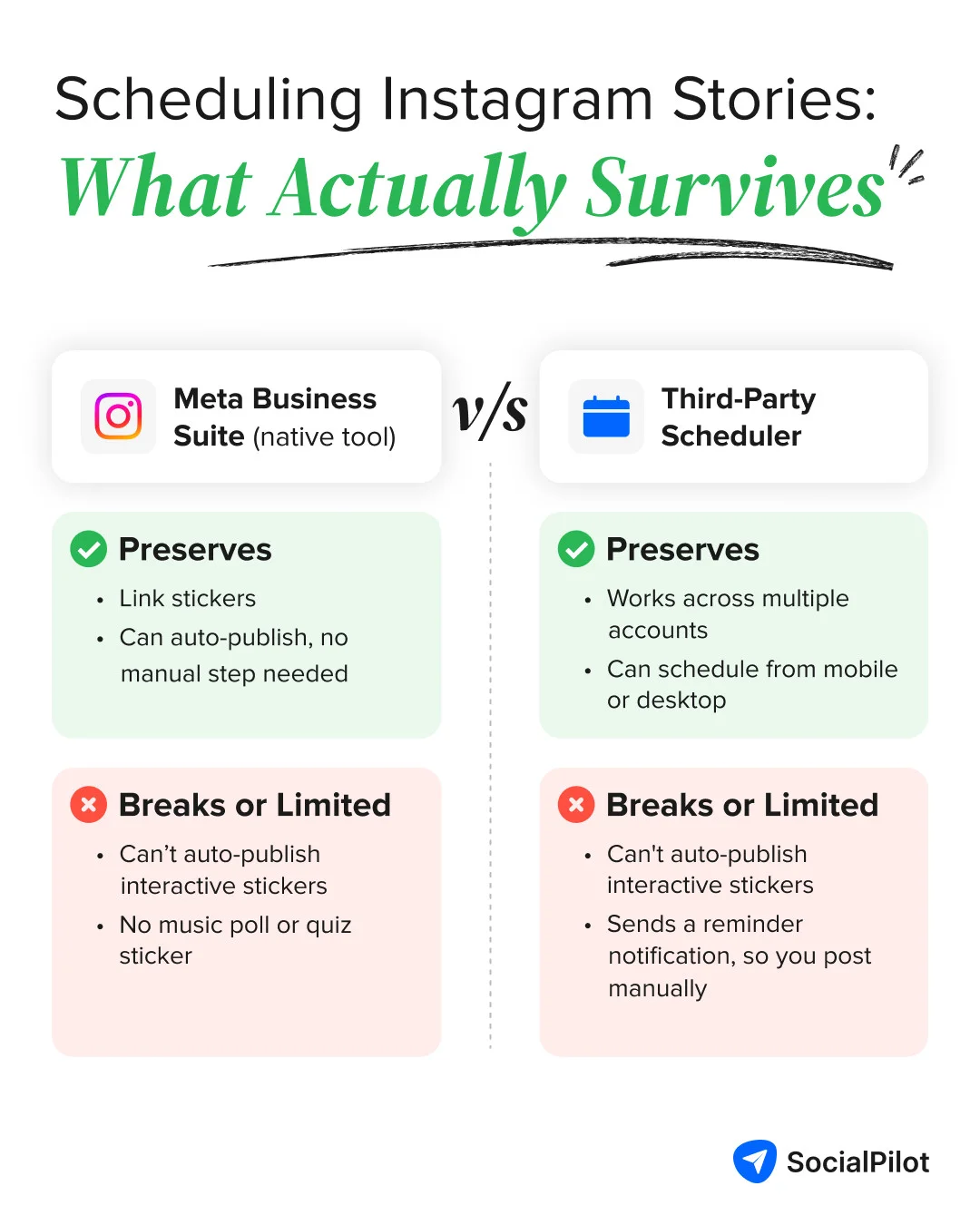
The tradeoff is what it strips away. Meta Business Suite can schedule a Story with a link sticker, but music stickers, polls, and quiz stickers aren’t supported through scheduled publishing. You’re also limited to one Story at a time.
You can queue an Instagram Story using Meta Business Suite up to 29 days in advance (and a minimum of 20 minutes ahead).
What Third-Party Tools Can and Can’t Do
Most of the confusion around scheduling Instagram Stories starts right here. Many third-party tools that advertise Story scheduling aren’t auto-publishing anything. Instead, they send you a push notification at the scheduled time, and you tap to post the Story yourself, manually, inside the Instagram app.
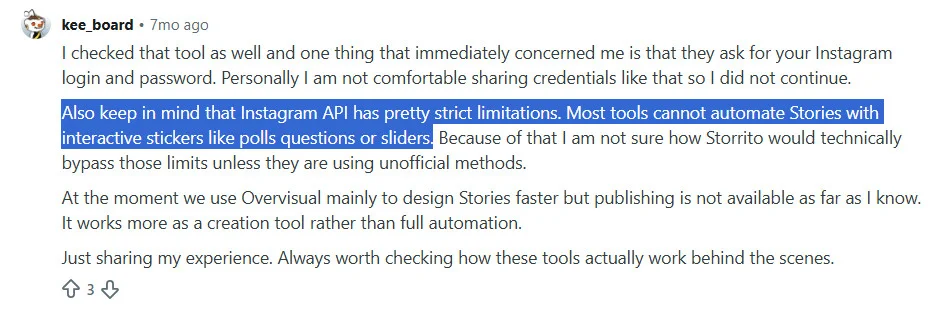
That’s not a flaw specific to one platform. It’s a consequence of Instagram’s API, which restricts third-party apps from automatically publishing Stories that include interactive elements like polls, quizzes, or music. A tool can’t auto-publish something Instagram’s API won’t let it touch, so the workaround is a reminder instead of true automation.
This is worth being direct about, because it changes what you should actually expect. If you’re trying to auto post Instagram Stories with polls or music intact, no scheduler, native or third-party, currently does that for you.
If a tool claims otherwise through some unofficial workaround, treat that as a real risk. One Reddit thread on this exact question got a blunt answer from another marketer:
None of this means scheduling isn’t worth it. It means you should schedule with a clear picture of what survives the process and what doesn’t, which is exactly what the next few sections are about.
Scheduling Capabilities of “Meta Business Suite” vs. “Third-Party Scheduler”
The below image compares the scheduling capabilities of “Meta Business Suite” vs. “Third-Party Scheduler,” showing what each one preserves vs. what breaks or requires manual posting.
For the general mechanics of scheduling regular Instagram posts (not Stories specifically), see our guide on how to schedule Instagram posts.
How to Schedule Instagram Stories: Step-by-Step Breakdown
Here’s exactly how that native-vs-third-party split plays out in practice, one method using Meta’s own tool, and one using a third-party scheduler.
How to Schedule Instagram Stories Using Meta Business Suite
This is the free, native path. It works directly from desktop and mobile and also auto-publishes without any manual step, within the limits already covered above.
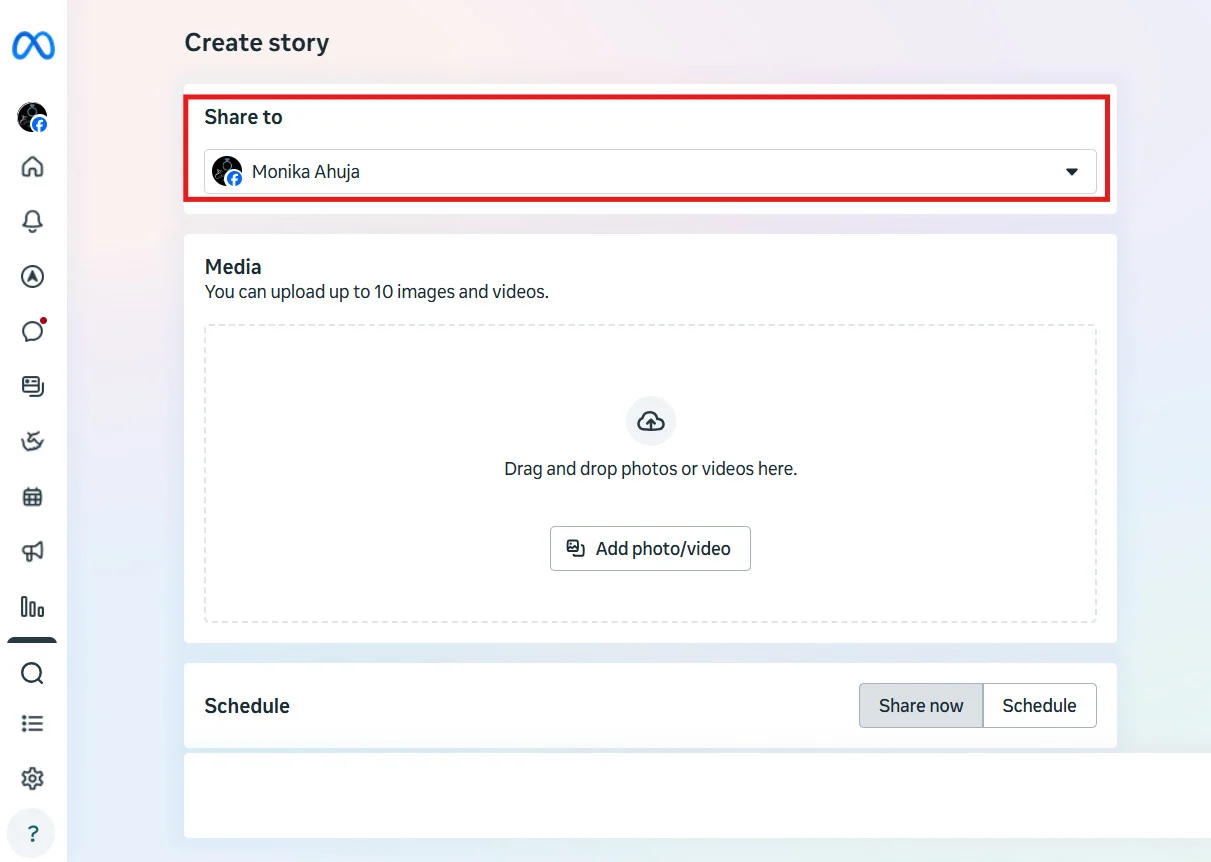
- Log in to Meta Business Suite and click Create Story.

- Use the Share to dropdown to select the Instagram account you want to post to.

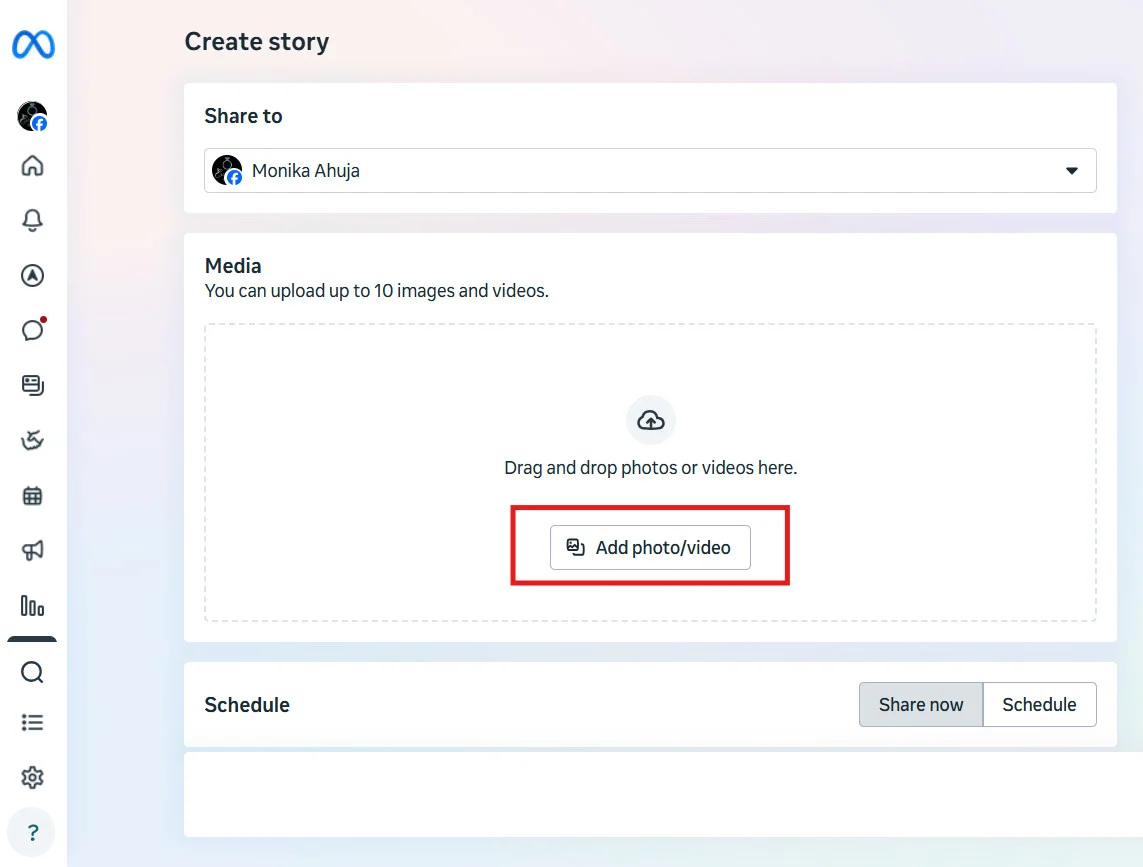
- Click Add photo/video and upload your image or video.

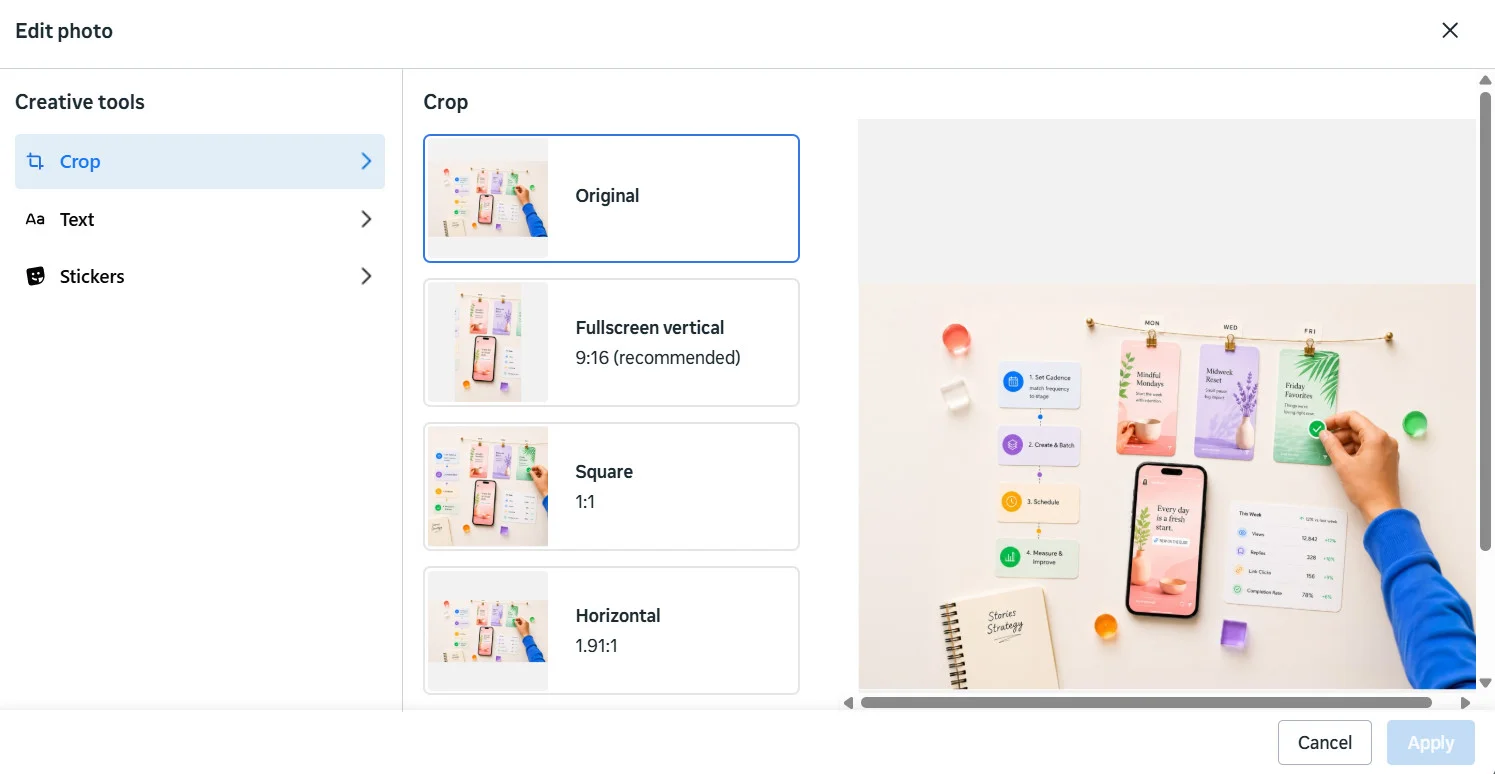
- Click Edit next to the file to add text, crop the image, or add a supported sticker, then click Apply.

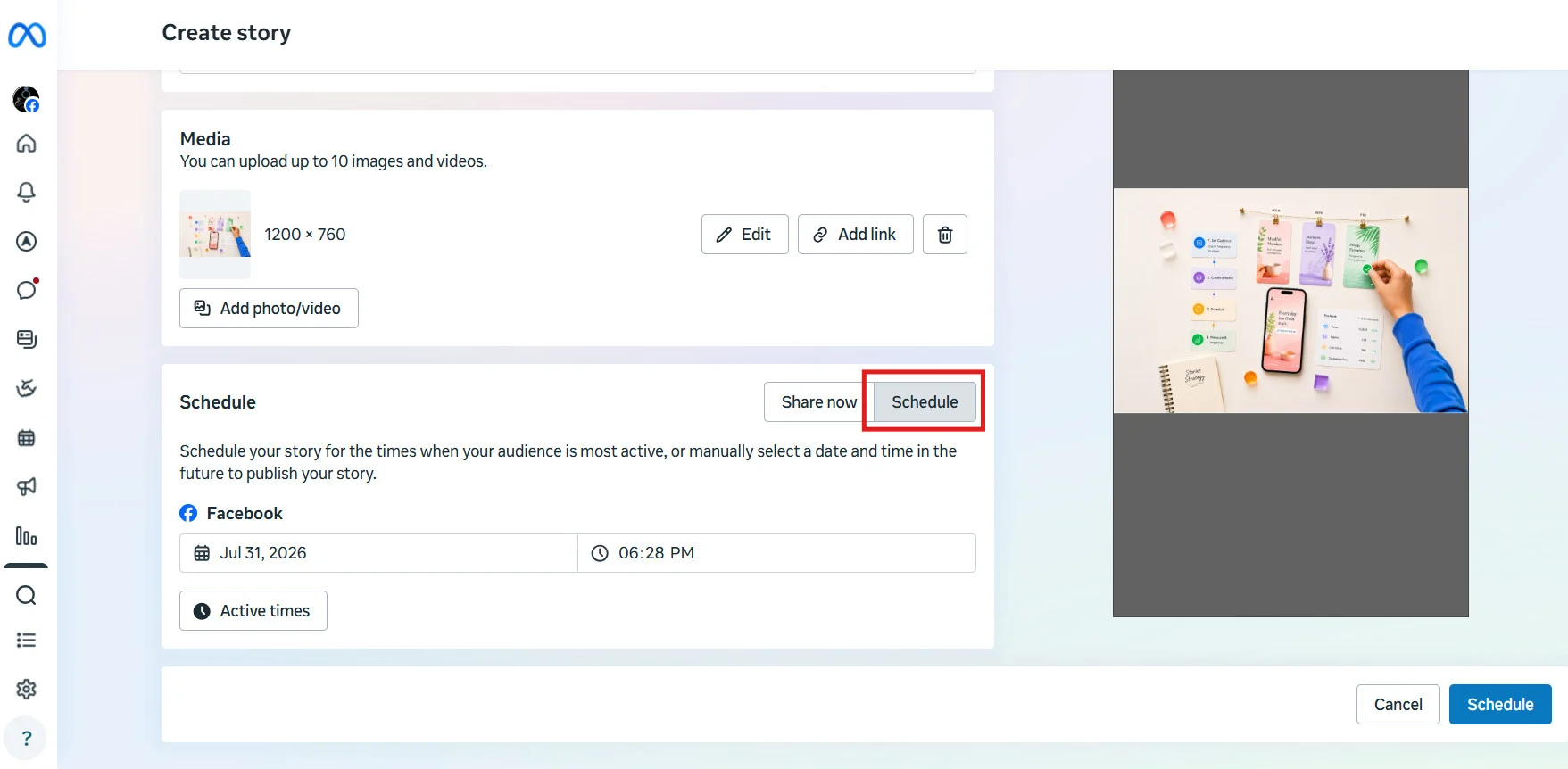
- Move the toggle from Share Now to Schedule, then set your date and time.

- Review the preview and click on the Schedule icon towards the bottom right to finish scheduling.
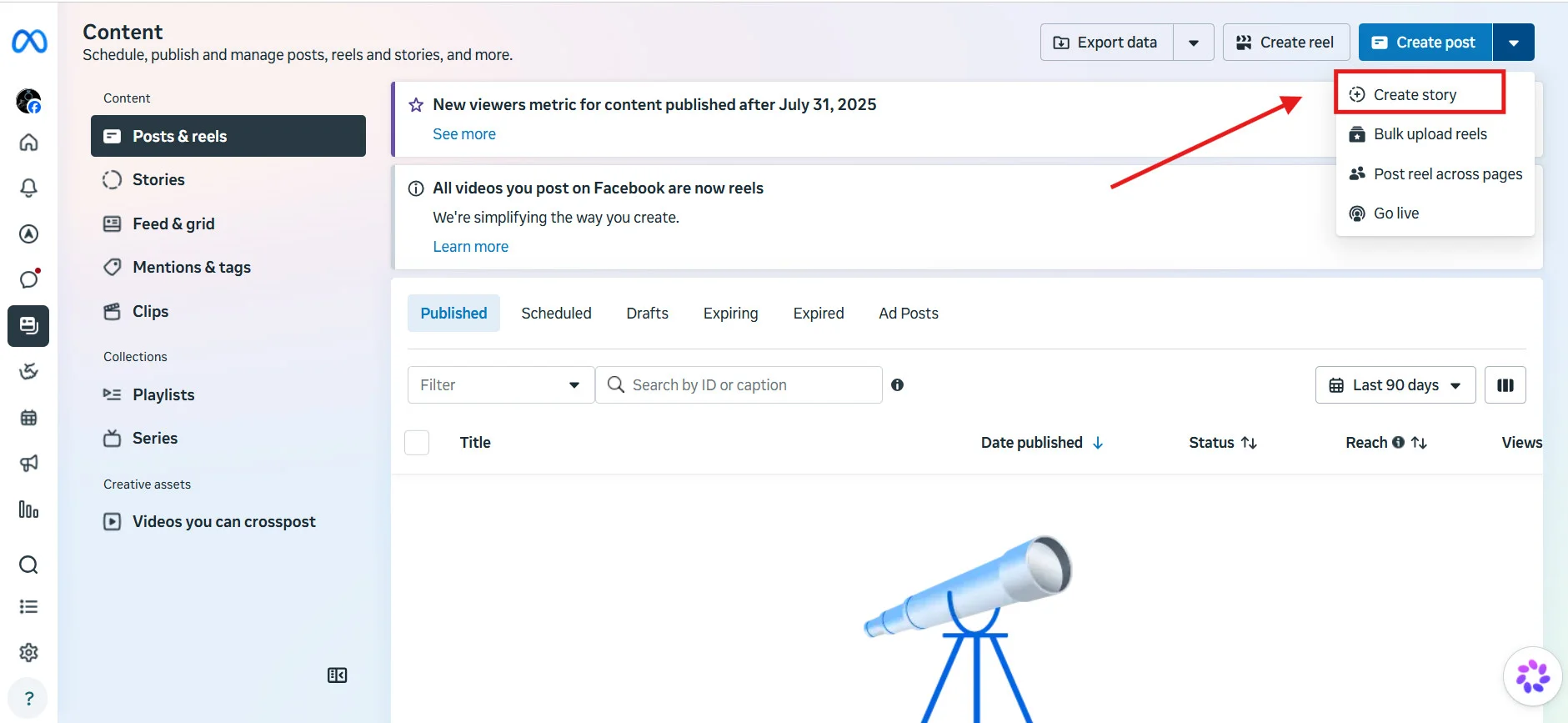
Third-party tools follow roughly the same pattern, upload, choose Story as the content type, set a time, and either auto-publish or get a reminder depending on your account type. Here’s what that looks like in SocialPilot, used here as the example.
- Go to Create Post and select your Instagram Business account from the Accounts panel.

- Upload your image or video. Stories support a single image or video per Story, unlike feed posts, which allow multiple images.

- Under Instagram Options, choose Story as the content type instead of Post.

- For Business accounts, choose Direct Publishing to auto-post, or Mobile Reminder if you’d rather finalize it manually from your phone (the only path available for Personal accounts).

- Set your date and time, then click Schedule.

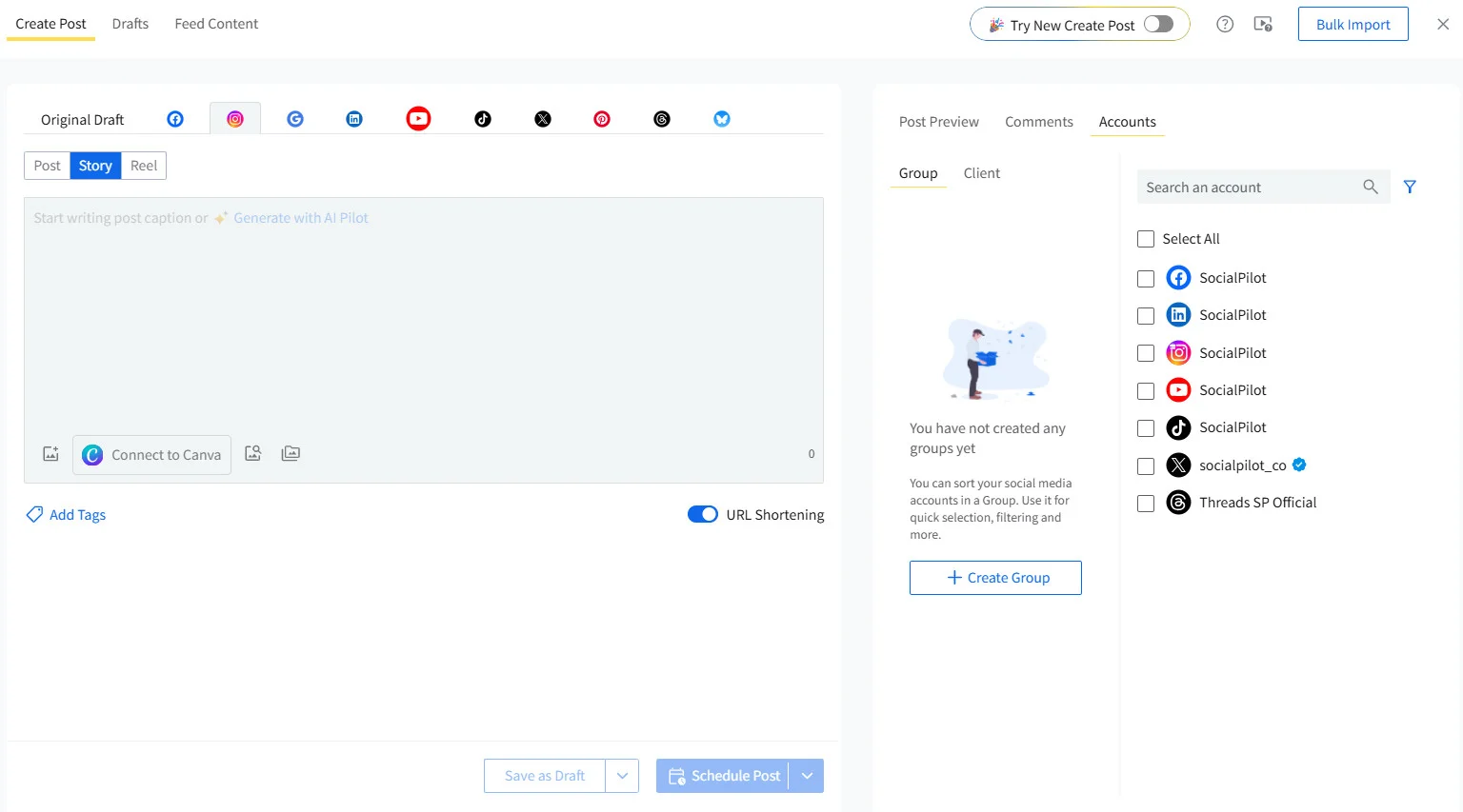
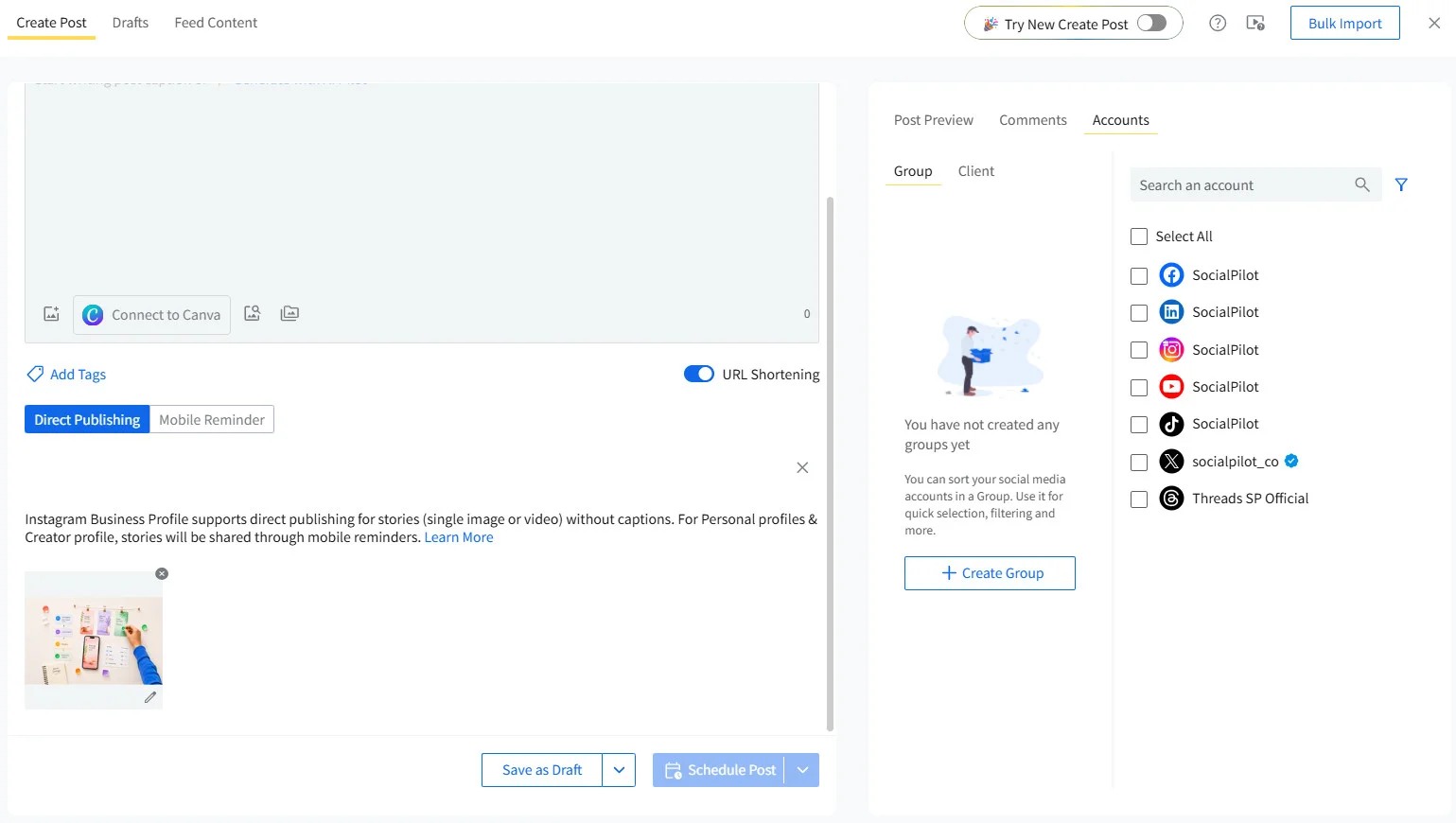
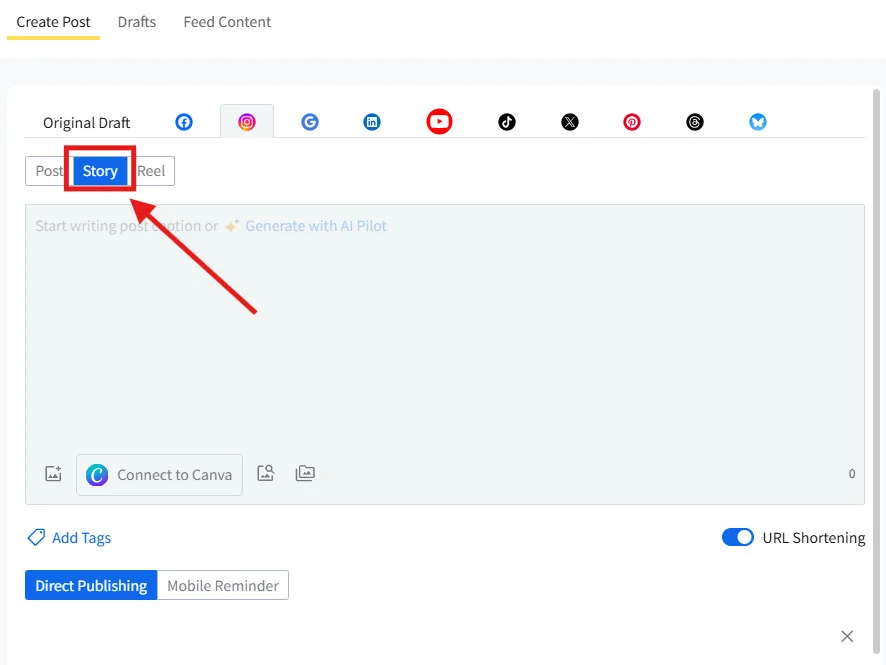
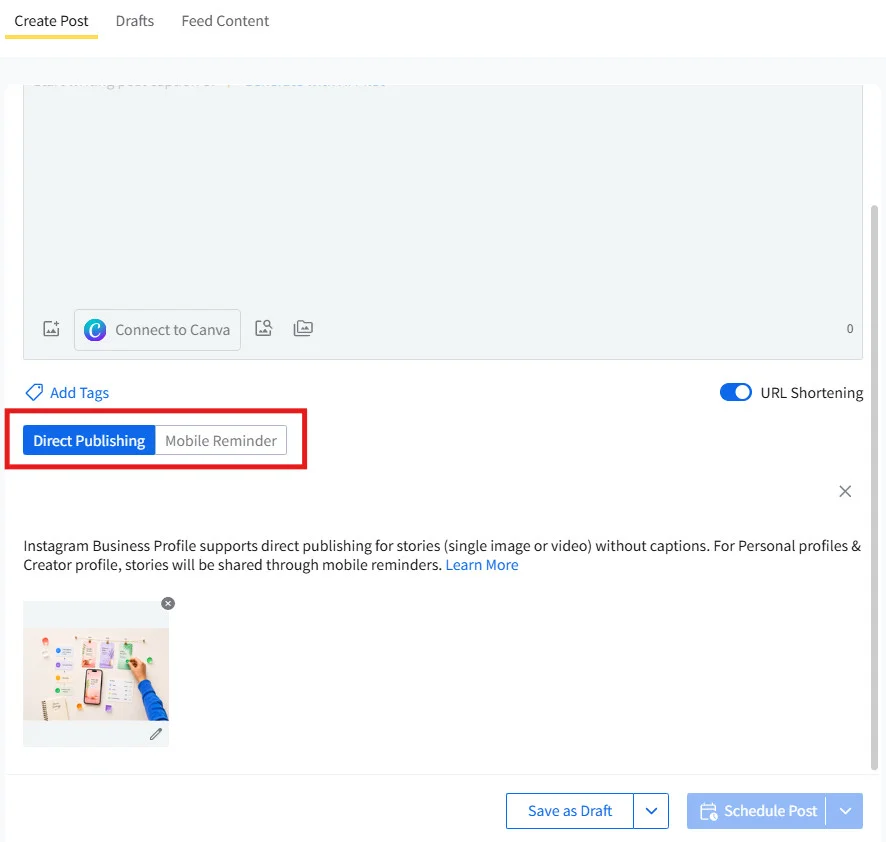
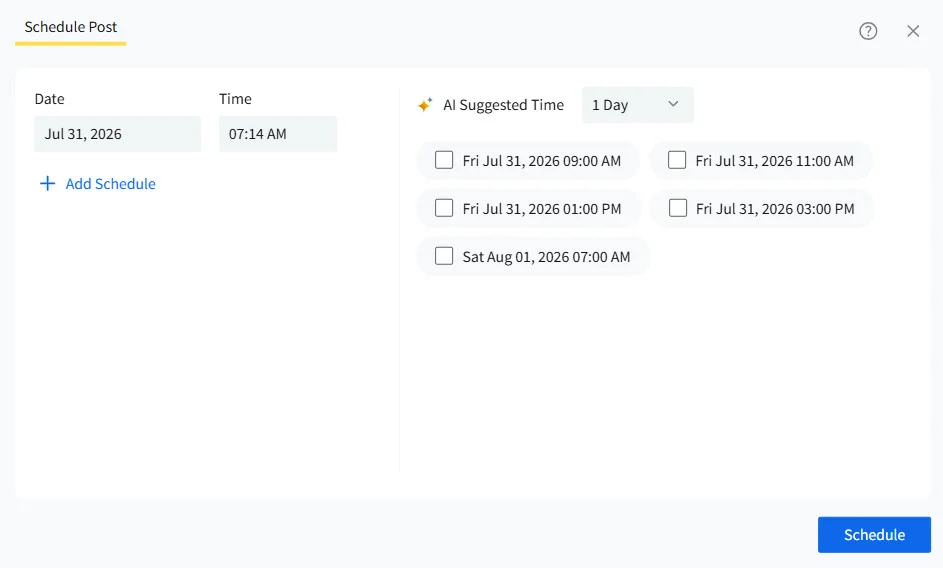
Your Instagram Story is now scheduled via SocialPilot.
What Stories Are Actually Good For
Stories earn a different spot in your content mix than feed posts or Reels. Feed content is built to be found by people who don’t follow you yet. Stories are built almost entirely for people who already do, which changes what they’re for:
- Behind-the-scenes moments that would feel out of place on your main feed
- Quick polls, questions, or “this or that” prompts that invite a reply
- Time-boxed promos, flash sales, or launch countdowns
- Recurring formats, like a weekly tip or a Friday customer spotlight
- Reposting and reacting to what your audience or partners just posted
Where Stories genuinely differ from feed posts and Reels is lifespan and intimacy. A feed post or Reel can keep earning views for days. A Story is gone in 24 hours unless you save it to a Highlight, and that short shelf life is exactly why it reads as more personal and less produced.
That distinction is also why this piece treats Stories as their own scheduling problem instead of folding them into general posting advice. For a full breakdown of what Stories are and how they work, read this complete guide to Instagram Stories.
How Often to Post Stories Without Becoming Noise
There’s no official rule for how many Stories to post a day. Instagram’s own explanation of how it ranks Stories lists exactly what determines whether someone sees your Story:
- How often they view your Stories
- How often they engage with them, and
- How close your relationship is with them.
Posting frequency and time of day aren’t part of that list.
That matters because “post two to four Stories a day” gets repeated across the industry as if it’s an algorithm requirement. It isn’t. It’s a habit some accounts have settled into, not a rule Instagram enforces. If you want a general starting benchmark across Stories, feed posts, and Reels, see our guide on how often to post on Instagram, just don’t mistake it for an algorithmic requirement.
Consistency vs. Overposting
What actually happens when you post too much is simpler than an algorithm penalty: your audience gets tired and stops watching. Instagram doesn’t need to punish overposting when viewer fatigue does that on its own. If someone opens your Story and swipes past three low-value updates in a row, they’re less likely to tap back in tomorrow.
Consistency, on the other hand, is what keeps you in someone’s daily habit. Showing up most days, even briefly, does more for your relationship with viewers than a single perfectly timed post ever will.
Matching Frequency to What You Actually Have to Say
A useful way to set your own cadence is to work backward from your content, not forward from a number. If you genuinely have three worthwhile things to share on a given day, share three. If you have one, share one. Padding your Story bar with filler to hit a quota is the fastest way to train your own audience to skip you.
Account size and content supply start to matter more than any generic rule at this point. A brand running a busy launch week can reasonably post more Stories than a small account with one weekly update to share. For actual time-of-day and day-of-week data, see our guide to the best time to post on Instagram.
The Batch-vs-Live Decision Framework
Scheduling Instagram Stories and posting them live aren’t competing habits. They’re two tools for two different jobs, and the mistake most brands make is picking one and applying it to everything.
The tension is real: Stories work partly because they feel unscripted, and batching content in advance is the opposite instinct. The fix isn’t choosing a side. It’s knowing which pieces of content genuinely benefit from advance planning and which ones lose their point the moment they’re pre-built.
What to Batch and Schedule Ahead
Content that doesn’t depend on the moment it’s posted is safe to plan ahead. That includes evergreen tips, behind-the-scenes content you’ve already filmed, recurring series like a weekly Q&A, and time-sensitive promos where the timing is planned even if the content isn’t spontaneous.
What Needs to Be Posted Live
Anything that depends on real interaction should stay live. This kind of content rarely survives auto-publishing anyway, so scheduling it usually defeats the point:
- Polls, quizzes, and question stickers. They exist to invite a response, and most auto-publishing tools can’t preserve them.
- Reactive content, like responding to something trending right now. The value is in the timing, not just the content itself.
- Live event coverage. It only works because it’s happening in real time. For coverage that goes beyond a quick Story update, Instagram Live is worth considering as its own format.
A Simple Test for Any Piece of Content
Before scheduling anything, ask one question: does this Story need a reaction from your audience to work, or is it complete on its own the moment it posts? If it needs a reply, a poll answer, or a real-time reaction to land, post it live. If it’s complete without one, batching it costs you nothing.
Here is a detailed breakdown:
| Content Type | Batch or Live? | Why |
| Evergreen tips, BTS, educational content | Batch | Doesn’t depend on real-time context or interactivity |
| Time-sensitive promos, flash sales, launches | Batch | Pre-planned even though timing matters |
| Polls, quizzes, or question stickers | Live | Interactive stickers generally aren’t preserved by auto-publishing |
| Reactive or trending-moment content | Live | Depends on something happening in real time |
| Recurring series (weekly Q&A, Monday tip) | Batch | Predictable format, well-suited to advance planning |
| Live event coverage | Live | Inherently real-time by nature |
Measuring Whether Your IG Stories Strategy Is Actually Working
Posting consistently is only half the job. The other half is knowing how Instagram stories can be used for businesses. Start by understanding whether any of your stories are landing, and this is the part almost no guide on scheduling Instagram Stories actually covers.
Instagram’s own Insights, available on any Business or Creator account, break Stories performance into a few specific numbers worth checking regularly, not just glancing at once and forgetting.
Completion Rate, Exits, and Replies: What They Actually Tell You
- Completion rate tells you what share of people stayed till the last frame of your Story. A steep drop partway through usually means a specific frame lost people, not that Stories as a format aren’t working for you.
- Exits tell you where people left entirely, closing out of your Story instead of moving to someone else’s. A high exit rate on one particular frame is a direct signal that something on that frame, the pacing, the length, the content itself, didn’t hold attention.
- Replies, along with sticker taps and link clicks, are your clearest read on actual engagement rather than passive viewing. Someone who swipes through five frames without reacting is a different kind of viewer than someone who replies to your poll or taps your link.
Check these inside Instagram’s own Insights panel for each Story, just go to your profile, click on options and then view insights.
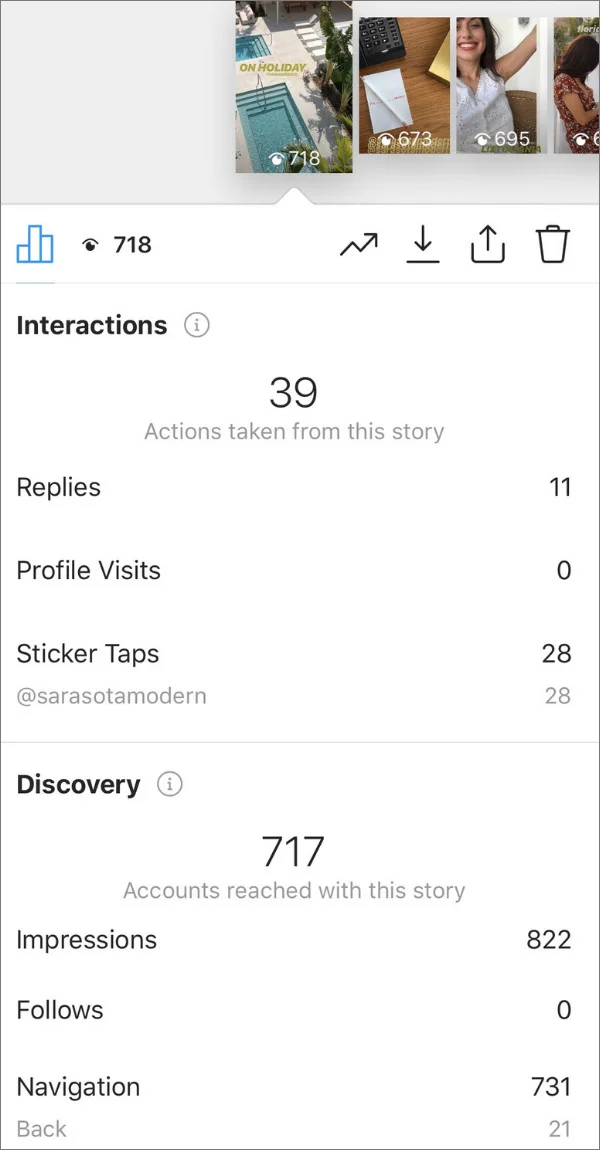
By frequently checking your Story Insights, you’ll usually spot the pattern within a few weeks: certain formats consistently hold attention to the end, and others consistently lose people at the same point.
Beyond Vanity Metrics: Tying Stories to Real Outcomes
Views and reach tell you how many people saw something. They don’t tell you whether it did anything for your business.
- If a Story exists to drive traffic, judge it on link clicks, not views.
- If it exists to build familiarity with a new audience segment, judge it on completion rate and reply rate instead.
The mistake is applying one metric to every Story regardless of what that Story was for. A recurring behind-the-scenes series and a promotional countdown aren’t trying to do the same job, so measuring them the same way tells you nothing.
Matching Your Approach to Your Account’s Stage
The right cadence, batching mix, and metrics to watch aren’t fixed. They shift as your account grows and as your team’s setup changes.
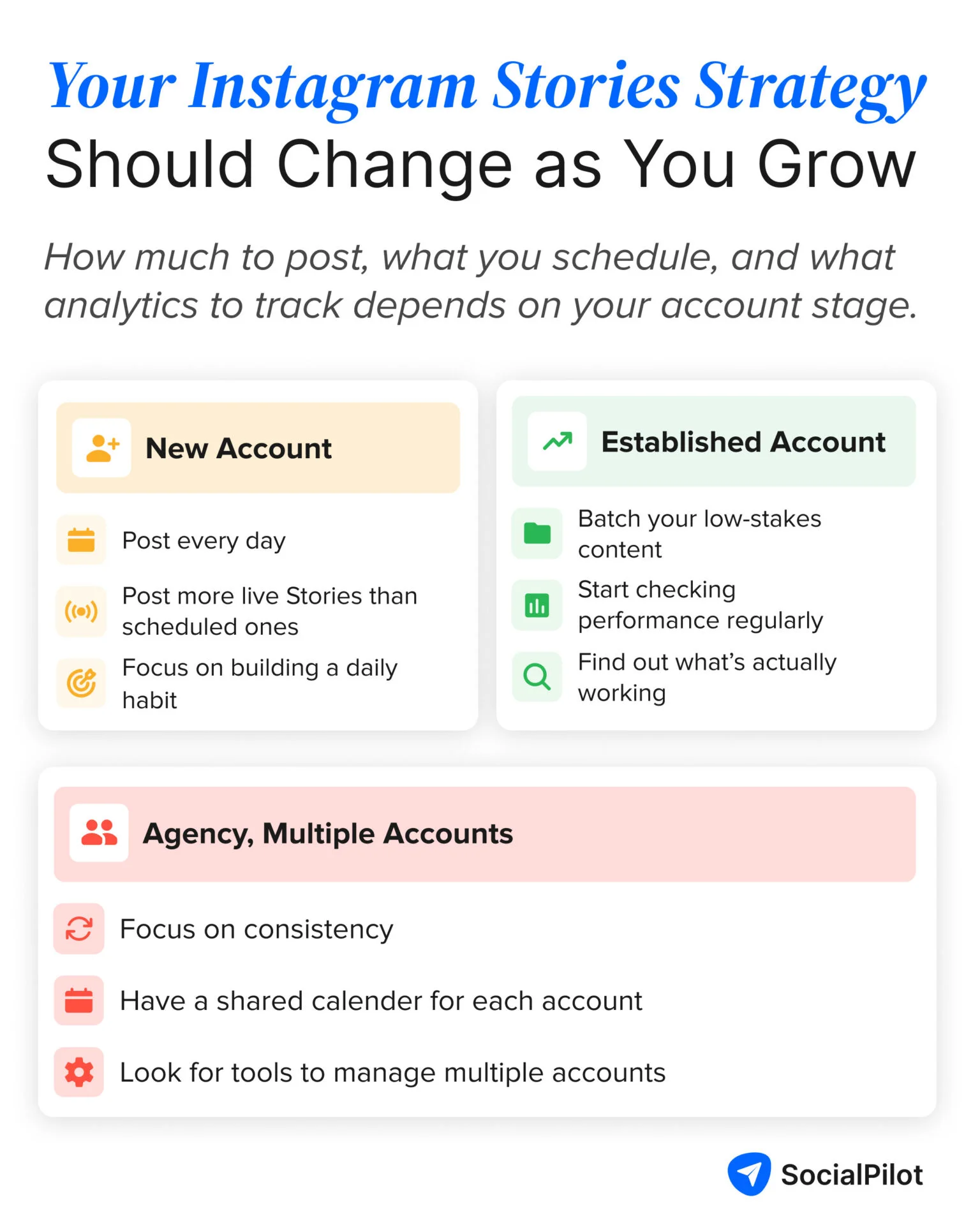
New Accounts Building an Audience
If you’re still building a following, consistency matters more than volume. A steady, modest rhythm, even one Story most days, does more to establish a habit with early followers than an aggressive posting schedule you can’t sustain.
Lean toward live posting more than batching at this stage too, since a smaller, newer audience tends to respond better to Stories that feel personal and unscripted.
Established Accounts with a Consistent Following
Once you have a following that already checks your Stories regularly, you can afford to batch more of your lower-stakes content and reserve your live posting for moments that genuinely benefit from real-time interaction. Measurement also starts to matter more at this stage, since you finally have enough data to spot real patterns instead of guessing from a handful of posts.
Agencies Managing Multiple Accounts
Managing Stories across several client accounts introduces a problem single-account guides rarely mention: the manual work of rebuilding the same Story slot for every account, every day. One marketer managing multiple accounts described exactly this on Reddit.
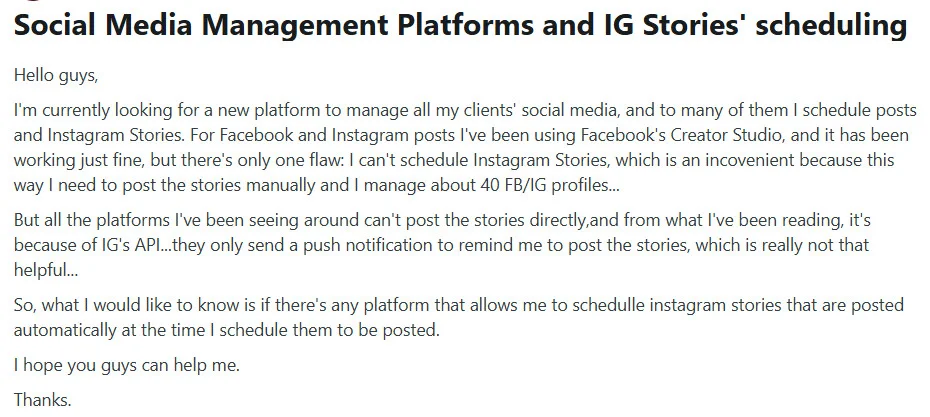
That’s less a content problem than a workflow problem, and it’s where a shared content calendar across accounts earns its keep. Instead of logging into each client’s account separately, managing scheduled Stories from one dashboard, with clear visibility into what’s queued for which account, turns a recurring manual task into something you set up once and adjust as needed.
SocialPilot’s social media content calendar lets you view and schedule Stories across every client account from one screen, filter by account, team, or platform, and share a client-specific calendar view for approval instead of exporting screenshots or granting login access.
Here’s a quick walkthrough of the content calendar view, showing how the scheduled content shows up and how the drag-and-drop rescheduling works.
Common Mistakes That Undermine a Stories Strategy
Most Stories strategies don’t fail from a lack of effort. They fail from a handful of repeatable mistakes that are easy to walk back once you can name them.
Treating Every Story Like It Needs to Be Live
Not everything requires the pressure of real-time posting. Batching your evergreen and recurring content frees up your actual live-posting energy for the moments that genuinely need it, like reacting to something happening right now.
Batching Everything and Losing Spontaneity
The opposite mistake is just as common. If every single Story on your account was clearly planned days in advance, you lose the quality that makes Stories different from a feed post in the first place. Keep a portion of your Stories genuinely unscripted, even if it’s a small portion.
Posting Without Ever Checking Completion or Exit Data
Plenty of accounts post Stories consistently for months without ever opening the Insights panel to see where viewers are dropping off. That’s a missed feedback loop. You don’t need to obsess over daily numbers, but checking in periodically is the only way to know what’s actually working.
Building This Into Your Content Workflow
None of this needs to live in your head as a set of rules you re-decide every week. Most people who want to automate Instagram Stories are really just trying to solve one problem: turning a daily task into a weekly one.
Plan your batched content, recurring series, evergreen tips, and upcoming promos in one sitting, leave clear placeholders for whatever needs to be posted live, and check your Insights on a set day each week.
Once you’ve done this a few weeks in a row, cadence, batching, and measurement stop being separate decisions and start feeling like one habit. SocialPilot brings the batching and the measurement side to that habit into one place. You can queue your batched content in advance and check Stories analytics without digging through Instagram’s app every time.
See SocialPilot’s plans to find the setup that fits how many accounts and how much content you’re actually managing.





 Join 55,000+ social media managers


