


If you post on X for a brand, a client, or your own growing account, you already know the feeling. You check a tweet’s numbers, they look fine, and you still can’t say why one post landed and another one didn’t. That gap between posting and actually understanding what worked is exactly what pushes people toward Twitter analytics tools in the first place.
The timing makes this worse right now. X moved most of its native analytics behind a Premium subscription, and even paying subscribers only get a 28-day rolling window in the standard dashboard view. Exporting a CSV stretches that to 90 days at most, and that’s the ceiling no matter how long you’ve been posting. If you’re a marketer comparing tools before you buy, or an agency trying to prove results across several client accounts, a 90-day cap is not enough to spot a pattern across two quarters, let alone a full year.
That’s the actual reason this list exists. We looked at 11 real options for 2026, split into four categories based on the job each one is built to do: all-in-one platforms that bundle X analytics with scheduling, dedicated benchmarking tools, campaign and hashtag trackers, and full-scale social listening suites. Pick the category that matches what you’re actually trying to solve, and the right tool on this list gets a lot easier to spot.
Quick Comparison: The Top Twitter (X) Analytics Tools at a Glance
Before the full breakdowns, here’s where each tool lands and what it costs to get started. Categories matter more than rank here. A benchmarking specialist and an all-in-one platform aren’t competing for the same buyer, even though both fall under the same Analyse de Twitter software umbrella.
| Outil | Prix de départ | Free Tier | All-in-One Management | Analyse comparative de la concurrence | Suivi des hashtags | Écoute sociale |
| SocialPilot | $25.50/mo | No (14-day trial) |  |
|
 |
|
| Sprout Social | $79/seat/mo | No (30-day trial) | |
|
|
 |
| Agorapulse | $79/mo | No (30-day trial) | |
|
|
|
| Hootsuite | $99/mo | No (14-day trial) | |
|
|
|
| Sendible | $30/mois | No (14-day trial) | |
|
|
|
| Buffer | $5/channel/mo | Oui | |
|
|
|
| Social Champ | $23.20/mo | Oui | |
|
|
|
| RivalIQ | $199/mois | Non | |
|
|
|
| Keyhole | Quote-based | No (14-day trial reported) | |
|
|
|
| Lumen by Talkwalker | Quote-based | Non | |
|
|
|
| Brandwatch | Quote-based | Non | |
|
|
|
Covered
A real, native feature the tool does well.
Partiel
Present but limited, an add-on, or a higher-tier unlock.
Not covered
You would need a second tool for this job.
Each tool profile below also notes this same coverage snapshot again next to its full write-up, so you can see at a glance what each one actually does beyond the headline pitch.
All-in-One Social Media Management With Built-In X Analytics
These seven platforms do more than track your X performance. Scheduling, publishing, and usually a shared inbox come bundled in, and X reporting is one part of a bigger toolkit rather than the whole product. If you’d rather manage your account and read the numbers from the same login, start here.
1. SocialPilot
The scheduling-first platform that keeps X analytics in the same dashboard you already publish from.
Coverage
- Analyse
- Analyse comparative
- Rapports
- Listening
- Multi-account
- Publication
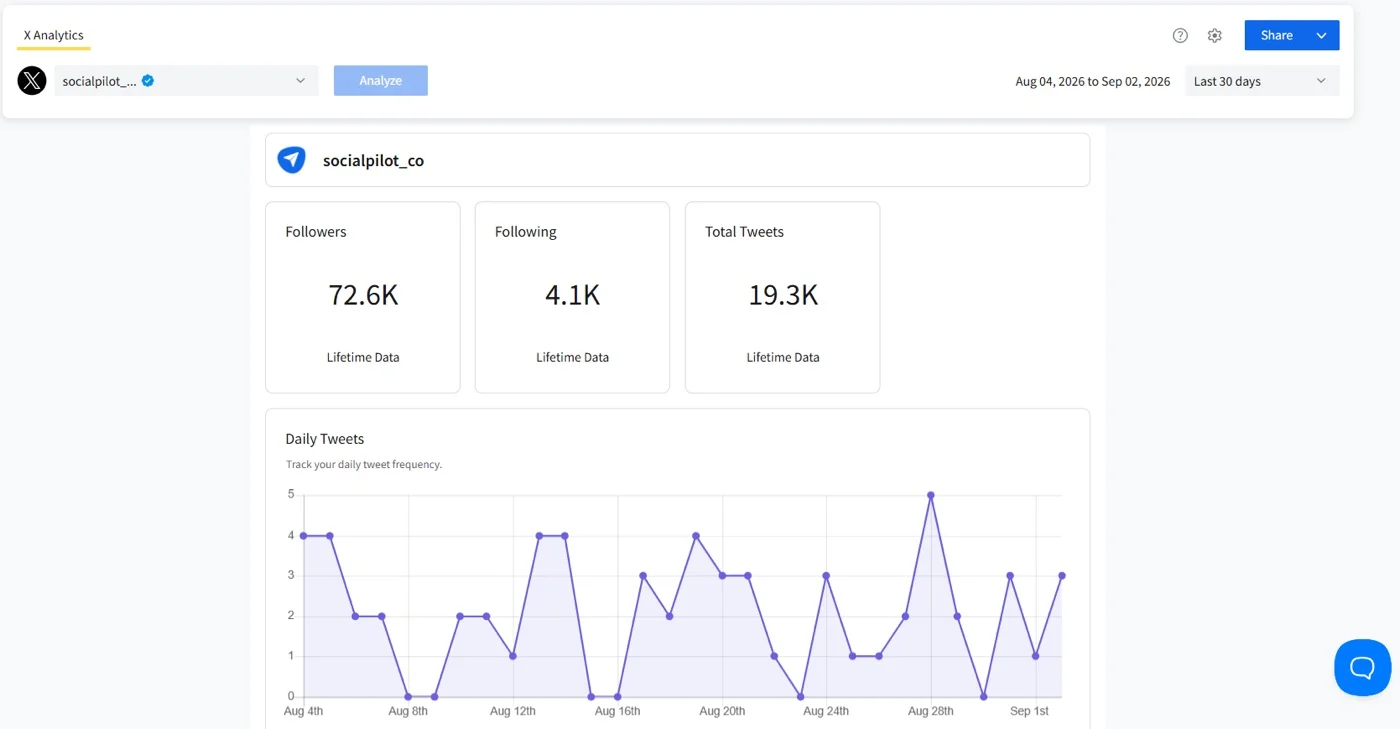
SocialPilot pulls tweet impressions, engagement rate, follower growth, and profile visits into the same screen you use to schedule posts, instead of forcing a separate login just to check how a tweet did. The dashboard is built to be read in a few minutes, not studied for an hour.
Kathleen M., a G2 Reviewer, put it directly: “Everything about SocialPilot makes scheduling your content, from articles to posts, easy. The formatting of your calendar and scheduled activities with multiple social accounts could not be more clear or intuitive. If you are an entrepreneur, a small to medium business, or just an individual who wants to schedule their content, SocialPilot is a no-brainer, and the price point is perfect.”
Les Constructeur de rapports personnalisés par glisser-déposer lets you tailor a report by post type, audience segment, or a custom date range instead of a fixed 28-day window, which matters if you’re trying to spot a trend across a full quarter. Historical data holds for up to two years per account, so a comparison against last year’s growth is actually possible.
For agencies specifically, SocialPilot’s white-label solution goes beyond a logo on a PDF. Client-facing reports, the login screen, and even the domain can carry the agency’s own branding instead of SocialPilot’s, so a client never has to know which vendor is running the reporting behind the scenes.
The newer SocialPilot MCP server changes how that reporting actually gets pulled. Instead of logging into the dashboard to build a report by hand, an AI assistant like Claude or ChatGPT can be connected directly to the account and asked to check what’s scheduled, what’s been delivered, and how a client’s X performance is trending, all from a conversation.
SocialPilot’s Essentials plan starts at $25.50 a month billed annually for 7 accounts, moving up through Standard, Premium, and Ultimate tiers. Here’s the full breakdown of all 4 tiers.
| Ultimate | Premium | Standard | Essentials |
$170.00/mois$200
Facturation annuelle (Économisez 15 %)
|
$85.00/mois$100
Facturation annuelle (Économisez 15 %)
|
$42.50/mois$50
Facturation annuelle (Économisez 15 %)
|
$25.50/mois$30
Facturation annuelle (Économisez 15 %)
|
|
Simplifiez la gestion des réseaux sociaux
|
|||
Check SocialPilot’s current plans and pricing to understand what unlocks at each level.
What running SocialPilot standalone requires: Very little on the scheduling and reporting side. Competitor benchmarking is built in through Rapports sur les concurrents on Premium and above, though it’s naturally lighter than a dedicated benchmarking tool further down this list. The real gap is sentiment listening. SocialPilot doesn’t track brand mentions or sentiment shifts, so a team that specifically needs that will still want a second tool alongside it.
2. Sprout Social
The enterprise all-in-one built for teams that need organic performance, listening, and benchmarking in the same report.
Coverage
- Analyse
- Analyse comparative
- Rapports
- Listening
- Multi-account
- Publication
Sprout Social blends tweet-level performance with competitor benchmarking and sentiment listening, built for a team that reports results up the chain rather than one person checking a single post.
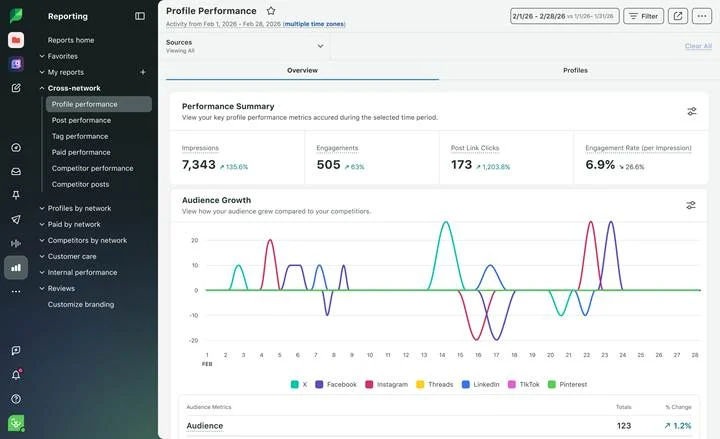
Kavin V., a G2 reviewer, shared: “Sprout has a clean, simple and intuitive interface and main navigation. It makes it easy for new users to learn. At the same time the tool is feature packed and customizable. I love the reporting section and how easy it is to sort and filter with quick responsiveness.”
Beyond the core dashboard, Sprout Social’s AI-driven insights flag which tweets are actually moving engagement, and its social listening picks up conversations mentioning your brand outside your own profile, not just replies to your own tweets. Multi-account management means an agency or in-house team tracking several profiles gets one consolidated view instead of switching logins.
Sprout Social’s Essentials tier starts at $79/seat/month billed annually, climbing to Standard at $199, Professional at $299, and Advanced at $399, with a custom Enterprise tier above that. Read Sprout Social’s pricing breakdown before deciding which tier actually gets you the reporting depth you need.
What running Sprout Social standalone requires: Little beyond a separate creative tool for graphics. It publishes, listens, benchmarks, and reports without needing a second platform. The tradeoff is seat-based pricing, so a five-person team pays for five full seats even if only two of them touch the analytics regularly. If the seat cost stops making sense, Alternatives à Sprout Social covers options that scale differently.
3. Agorapulse
The inbox-and-analytics platform built for teams that want engagement and reporting handled in one workflow.
Coverage
- Analyse
- Analyse comparative
- Rapports
- Listening
- Multi-account
- Publication
Agorapulse pairs a unified inbox for X mentions and comments with tweet-level analytics, so reading the numbers and responding to the conversation happen in the same place instead of two separate tools.
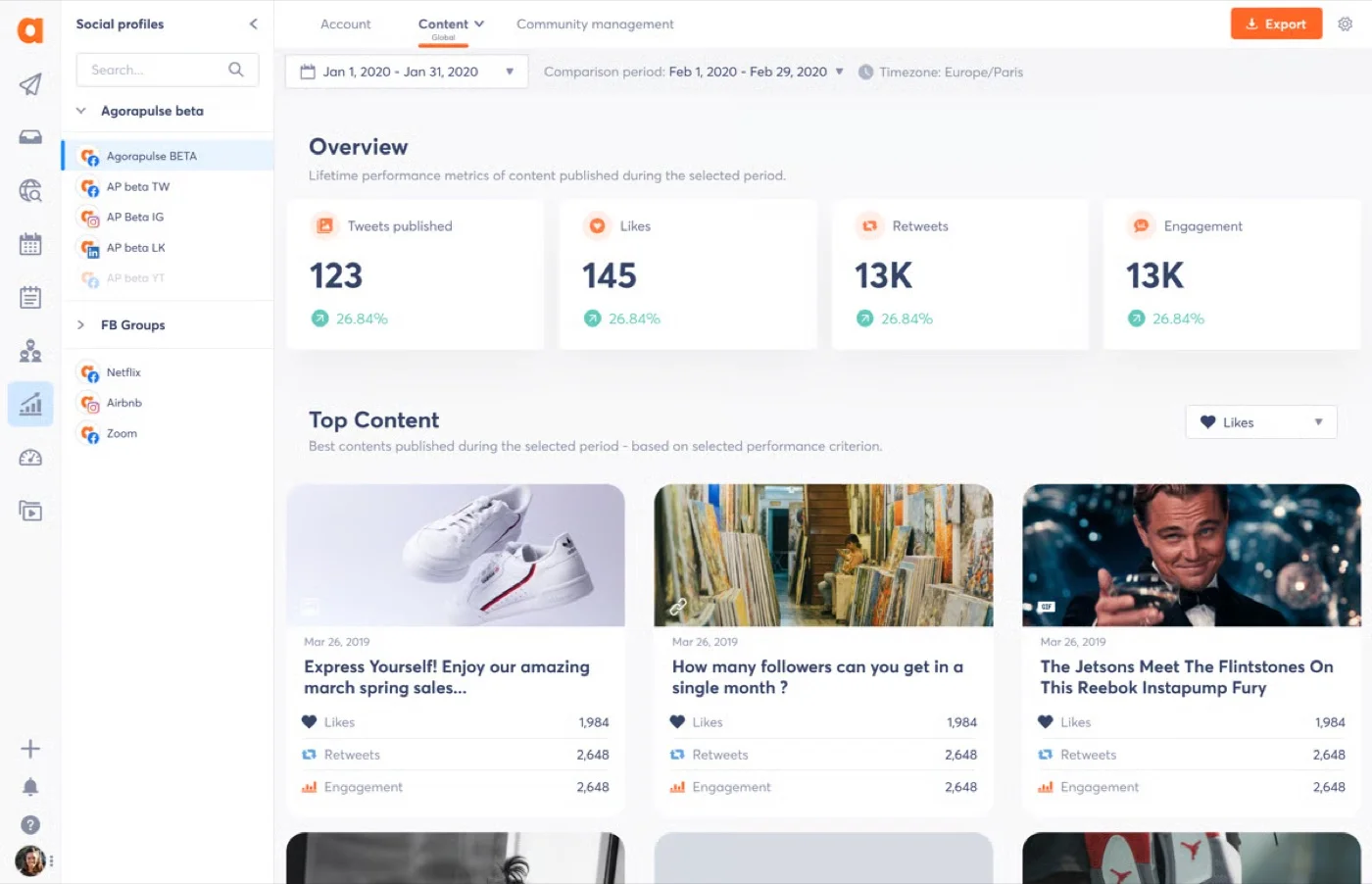
Sandra H., a G2 reviewer, wrote: “Agorapulse is incredibly intuitive and user-friendly, making it easy for me to schedule posts, engage with our audience, and track performance across multiple platforms. The reporting features are also robust, providing valuable insights.”
Its heat map style reporting shows the best time to post based on your account’s own engagement history rather than a generic industry average, and custom report templates can be reused across similar accounts instead of rebuilt every month. Bulk scheduling and workflow automation for mentions round out the toolkit for teams handling more than one profile.
Agorapulse’s Standard plan starts at $79 a month billed annually for 10 social profiles, moving to Professional at $119 and Advanced at $149, with a custom plan above that. See Agorapulse’s full pricing breakdown for what each tier actually unlocks.
What running Agorapulse standalone requires: A separate listening tool the moment brand-wide sentiment tracking becomes a priority, since its own social listening stays fairly basic. Third-party integrations are also thinner than some competitors on this list. If that becomes a blocker, Alternatives à Agorapulse is worth a look.
4. Hootsuite
The long-running all-in-one tool built for breadth across every network you manage, not just X.
Coverage
- Analyse
- Analyse comparative
- Rapports
- Listening
- Multi-account
- Publication
Hootsuite tries to be a home base for every connected platform at once, covering tweet engagement, follower growth, and competitor benchmarking, with deeper social listening layered in as you move up its pricing tiers.
A G2 reviewer shared: “Hootsuite provides many features in one app. Dashboard, analytics, scheduling capabilities, analytics, monitoring, etc. The app has a user-friendly interface as well.”
OwlyWriter AI sits inside the dashboard for drafting a caption or repurposing a tweet that already performed well, which shortens the loop between spotting a winning post in analytics and publishing something similar. Custom reporting can be built for growth, hashtags, or engagement across multiple accounts at once, then exported as PDF or CSV.
Hootsuite’s Standard plan starts at $99 per user a month billed annually, rising to Professional at $199 and Advanced at $399, with a custom Enterprise tier above that. Check Hootsuite’s current pricing breakdown before committing to a tier.
What running Hootsuite standalone requires: Go for an Enterprise plan of Hootsuite, if you want any listening at all. That gets you Lumen Lite, a lighter listening tier Hootsuite bundles in after its June 2026 Social OS launch, covering mention volume and basic sentiment. This plan sites behind a custom quote and the pricing is per user. If that math doesn’t work, Alternatives à Hootsuite lays out lower-cost options with similar depth.
5. Sendible
The agency-focused Twitter reporting tool built for teams juggling many client profiles at once.
Coverage
- Analyse
- Analyse comparative
- Rapports
- Listening
- Multi-account
- Publication
Sendible covers tweet engagement, follower growth, and hashtag performance, with white-label reporting built specifically for agencies presenting results under their own brand rather than Sendible’s.
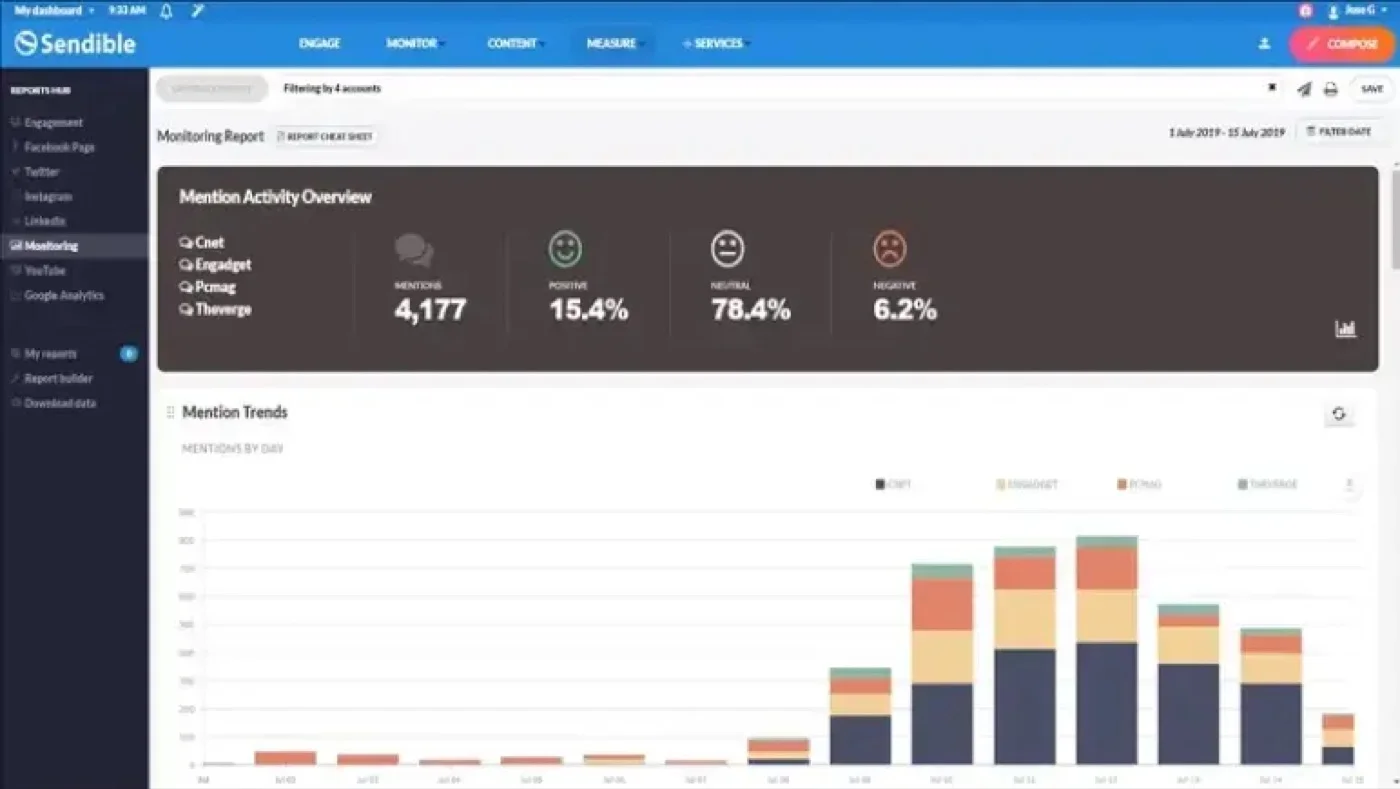
Lolla L., a G2 reviewer, said: “My favorite thing about Sendible is the ability to schedule in advance for multiple platforms, posting constantly every day is a hassle but when you can sit down and schedule it in advance it makes things so much easier.”
Reports can be exported as PDF or CSV and set to send automatically on a weekly or monthly cadence, which matters for an agency reporting to several clients on different schedules. Industry and competitor benchmarking is included, though it’s a lighter version of what a dedicated benchmarking tool offers.
Sendible’s Core plan starts at $30 a month for 6 social profiles, scaling up through Plus ($84/mo, 18 social profiles), Premium ($169/mo, 42 social profiles), Elite ($254/mo, 90 social profiles) and Enterprise ($638/mo, 300 social profiles). See Sendible’s full pricing guide for what changes between tiers.
What running Sendible standalone requires: A clear read on how many client profiles you’ll actually connect, since the jump between tiers is tied directly to profile count rather than features. Report customization is also less flexible than on some competitors here. Alternatives à Sendible covers other agency-focused options if that’s a dealbreaker.
6. Buffer
The lean scheduler that keeps core X reporting genuinely free instead of gating it behind a paid tier.
Coverage
- Analyse
- Analyse comparative
- Rapports
- Listening
- Multi-account
- Publication
Among the Twitter analytics tools free-tier options on this list, Buffer stands out for not hiding its core engagement dashboard behind a paywall at all. Tweet performance, follower growth, and hashtag tracking show up clean and simple, without the depth of a dedicated agency platform.
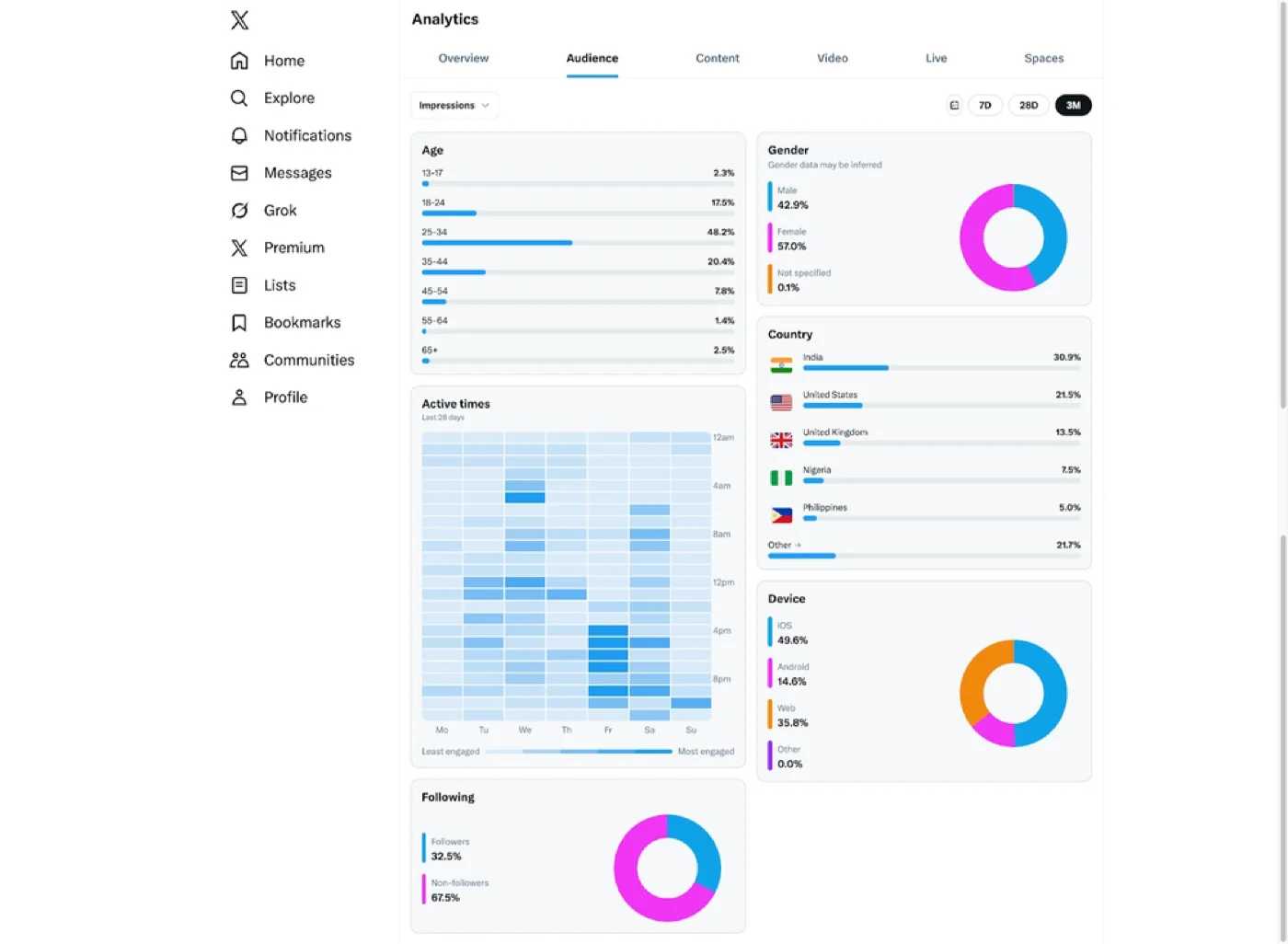
Jack H., a G2 reviewer, wrote: “Buffer takes all the stress out of social media management. There’s a great draft and approval process along with an easy-to-use asset library. Having multiple platforms in one place, but still having the benefit of most of the native apps, is well worth the subscription cost.”
Buffer’s historical tweet performance view helps spot which post format actually earns engagement over time, and custom reports can be scheduled for client sharing without a design step in between. What it doesn’t do is layer in AI-driven sentiment analysis or deep competitor benchmarking, so the analytics stay straightforward by design rather than by limitation.
Buffer’s Free plan covers 3 channels with core scheduling and basic analytics included, genuinely free rather than a time-limited trial. Paid plans start at the Essentials tier for $5 per channel a month billed annually, with the Team tier at $10 per channel. See Buffer’s full pricing breakdown for how the per-channel model compares once you connect more than a couple of accounts.
What running Buffer standalone requires: A second tool the moment competitor benchmarking or sentiment listening becomes a priority, since Buffer doesn’t do either. Multi-client agency features are also thinner than on tools built specifically for agencies. Alternatives à Buffer is worth checking if the per-channel cost adds up past a certain account count.
7. Social Champ
The budget-friendly platform built for small teams that want bulk scheduling without a steep learning curve.
Coverage
- Analyse
- Analyse comparative
- Rapports
- Listening
- Multi-account
- Publication
Social Champ covers tweet performance, engagement, and follower growth through a dashboard built to be usable on day one, even for a team member who’s never touched a social media management tool before.
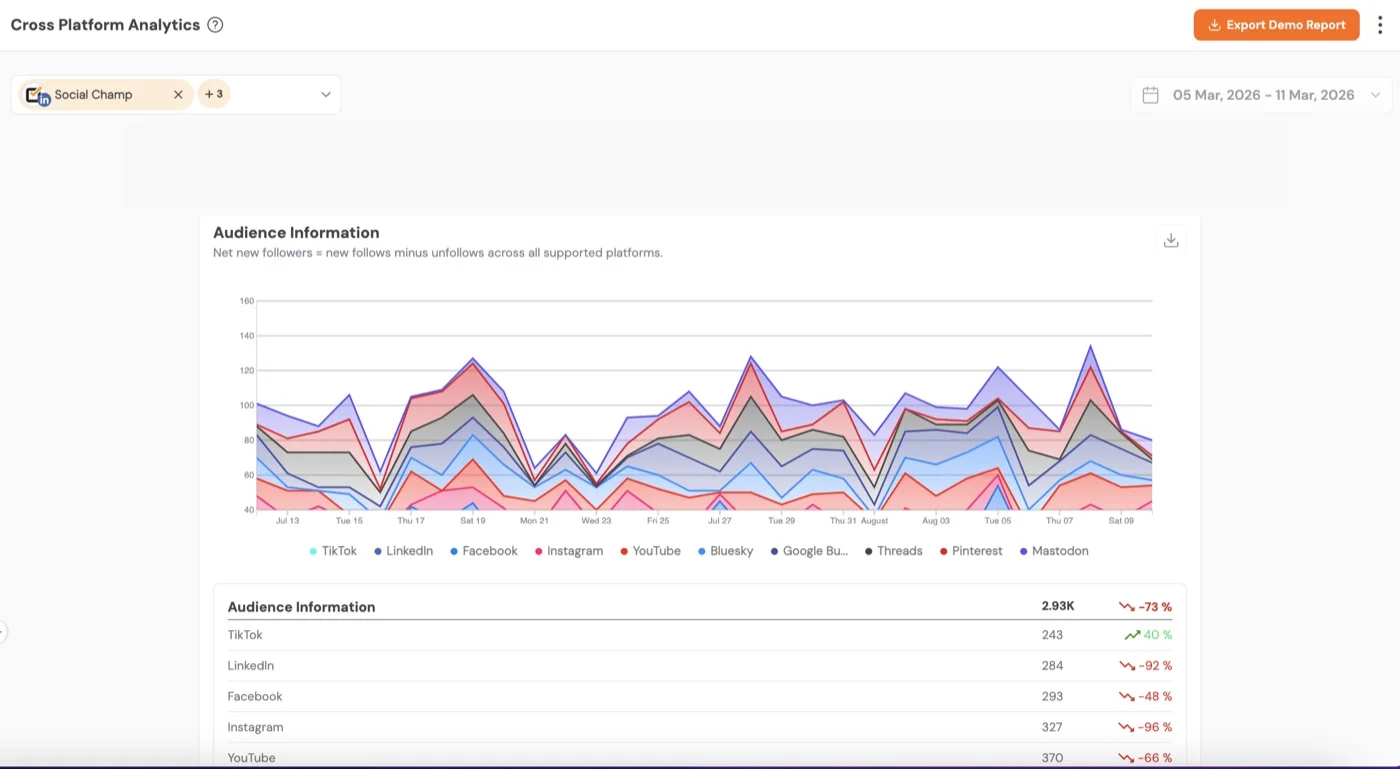
Ann L., a G2 reviewer, said: “Love how easy it is to use and how clients can approve proofs without a lot of extra expense or confusion. AI tools are nice. Reliable, friendly support and most importantly, whenever we have made requests or suggestions, the tech team has taken our requests seriously.”
White-label reporting is included for teams presenting results to clients, and bulk scheduling with a repeat-posting option keeps evergreen content moving without daily manual work. Analytics depth stays lighter than the bigger suites on this list, which is a fair tradeoff given the price.
Social Champ’s Standard plan starts at $23.20 a month billed annually for 6 social accounts, moving to Professional at $47.20 for 12 accounts and Agency at $119.20 for 30 accounts, with a custom Enterprise tier above that.
What running Social Champ standalone requires: A separate tool for anything beyond core scheduling and reporting, since benchmarking and sentiment listening aren’t part of the platform. A handful of users have flagged occasional glitches during bulk scheduling, worth testing on the free trial before committing a full content calendar to it.
Competitive Benchmarking Tools
This category answers a question the all-in-one platforms above don’t handle well: how does your X performance actually compare to named competitors, not just your own numbers in isolation.
8. RivalIQ
The benchmarking specialist built to answer one question directly: how do you compare.
Coverage
- Analyse
- Analyse comparative
- Rapports
- Listening
- Multi-account
- Publication
RivalIQ tracks your X account against a list of named competitors rather than reporting your numbers alone, surfacing which of a rival’s tweets are performing and how your engagement stacks up over time.
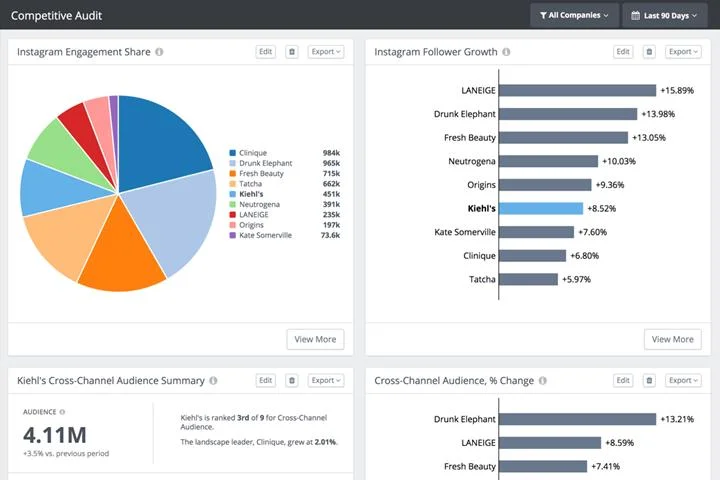
Kelly T., a G2 reviewer, shared: “We use RivalIQ to organize and monitor our competitive landscape. For each indirect or direct competitor we know about or discover, they are added into RivalIQ, tagged and then we receive email alerts and can build a report based on activity like X engagement. I really like how the analysis is relative to your own company.”
RivalIQ isn’t limited to X either. The same tracked competitor list carries over to Instagram, TikTok, LinkedIn, and YouTube, so setting up a competitive landscape once covers every platform a rival is active on. Its social media audit report lines up your account and a handful of named competitors on the same metrics in a single export.
RivalIQ’s Drive plan starts at $199 a month (paid annually) for 10 tracked companies and 6 months of history. Engage moves to $299 for 20 companies and a year of history, and Engage Pro reaches $469 for 40 companies with 24 months of data.
What running RivalIQ standalone requires: A separate scheduler entirely, since RivalIQ measures performance but doesn’t publish tweets or manage your account. One G2 reviewer in IT and services noted: “You have to pay to add more competitors to your reporting. It comes with a base but can easily become quite expensive.” Budget for that before committing to a tier.
Campaign and Hashtag Performance Tracking
This category answers a narrower question than everything above it: how is one specific campaign or hashtag performing right now, across the accounts and creators involved in it.
9. Keyhole
It is a real-time tracker built to measure one campaign or hashtag as it happens, now part of Muck Rack.
Coverage
- Analyse
- Analyse comparative
- Rapports
- Listening
- Multi-account
- Publication
If you’re running a defined campaign and need engagement and reach on a specific hashtag in real time, Keyhole is built around campaign and hashtag tracking rather than ongoing account management.

Fatima M., a G2 reviewer, said: “The metrics given on Keyhole are unmatched and help us in setting KPIs and measuring results accordingly. The layout is also very user-friendly, and everything is exportable, so that’s wonderful.”
Keyhole’s share-of-voice metric shows how a campaign’s hashtag volume compares against a competitor’s or an industry benchmark, which matters when a client wants proof that a launch actually moved the needle. Real-time trend identification also flags when a hashtag starts gaining traction so you can react while it’s still relevant.
Keyhole doesn’t publish fixed plan pricing on its site. Plans are quote-based and scale with the number of trackers and the amount of historical data access you need.
What running Keyhole standalone requires: A separate scheduler entirely, since Keyhole tracks a campaign’s performance but doesn’t publish the tweets driving it.
10. Lumen by Talkwalker
The enterprise listening platform built to watch brand mentions across X and dozens of other sources at once. Lumen by Talkwalker is now a part of Hootsuite’s Social OS after Hootsuite’s acquisition/integration of Talkwalker.
Coverage
- Analyse
- Analyse comparative
- Rapports
- Listening
- Multi-account
- Publication
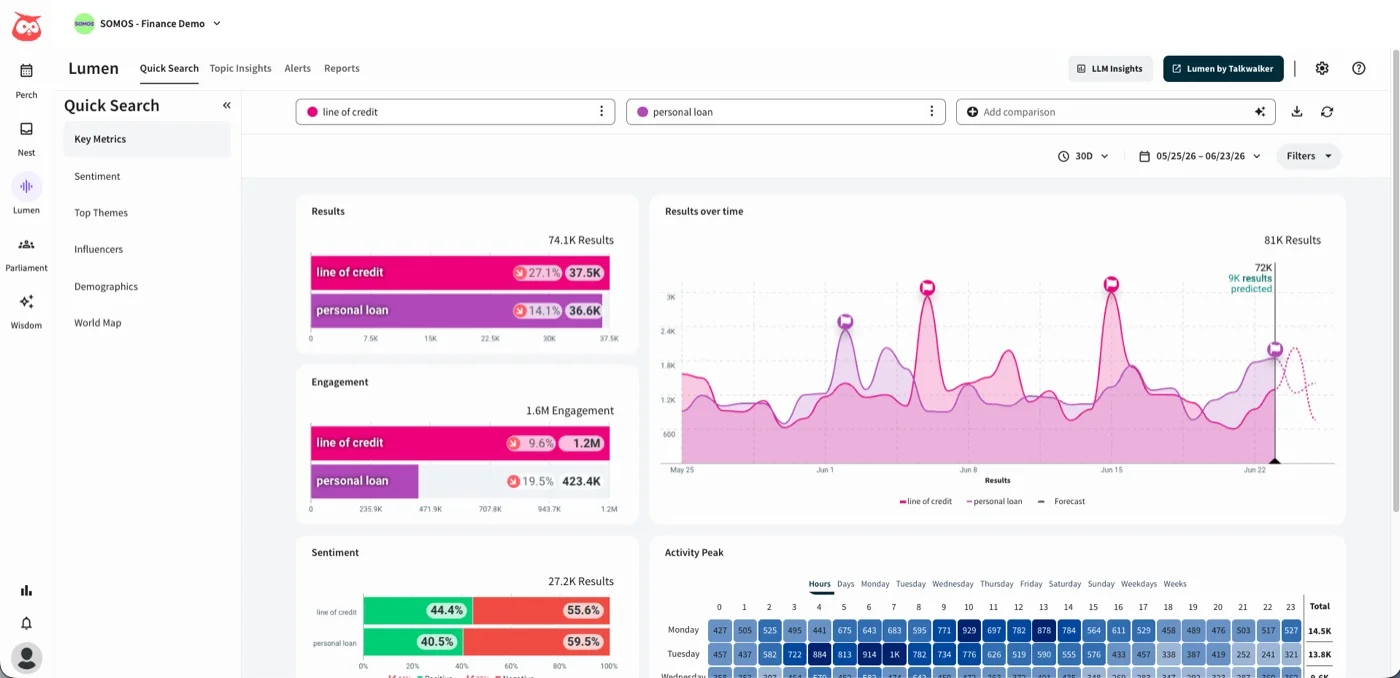
Talkwalker treats X as one channel among many it monitors for mentions, sentiment shifts, and trending conversations, built for organizations that need brand-wide visibility rather than a single account’s post performance.

John S., a G2 reviewer, said: “I have been using Talkwalker for more than 3 years now. I like the depth the tool can go into bringing results. Even when a nano influencer or small media website mentions your brand, Talkwalker’s web crawlers don’t disappoint you and show you the results in almost real time.”
Sentiment analysis examines the emotional tone behind mentions rather than just counting them, and CRM integration means X conversation data can feed directly into a broader customer relationship workflow instead of sitting in a separate dashboard.
Talkwalker doesn’t publish pricing on its site. Every plan is quote-based through a sales conversation, positioned toward the enterprise end of the market.
What running Talkwalker standalone requires: Buying Lumen by Talkwalker separately gets you the full listening engine: deep mention tracking, image recognition, and trend detection. Hootsuite users get a scaled-down taste of this at the Enterprise tier through Lumen Lite. You would need a real budget and a longer onboarding runway, since there’s no self-serve entry plan. A steep learning curve and a complex interface have come up in user feedback, so factor in setup time before expecting quick results.
11. Brandwatch
The AI-driven listening platform built to watch conversation volume and brand health at a scale most tools on this list aren’t designed for.
Coverage
- Analyse
- Analyse comparative
- Rapports
- Listening
- Multi-account
- Publication
Brandwatch combines sentiment analysis with publishing and workflow tools, built for teams that need to track what’s being said about a brand across X and the wider web, not just reply to mentions as they come in.
A G2 reviewer, Janvi B. described it this way: “What I like best about Brandwatch Consumer Intelligence is how easy it makes understanding consumer conversations and trends in real time. The platform provides detailed insights in a very user-friendly way, making social listening and audience analysis much more efficient.”
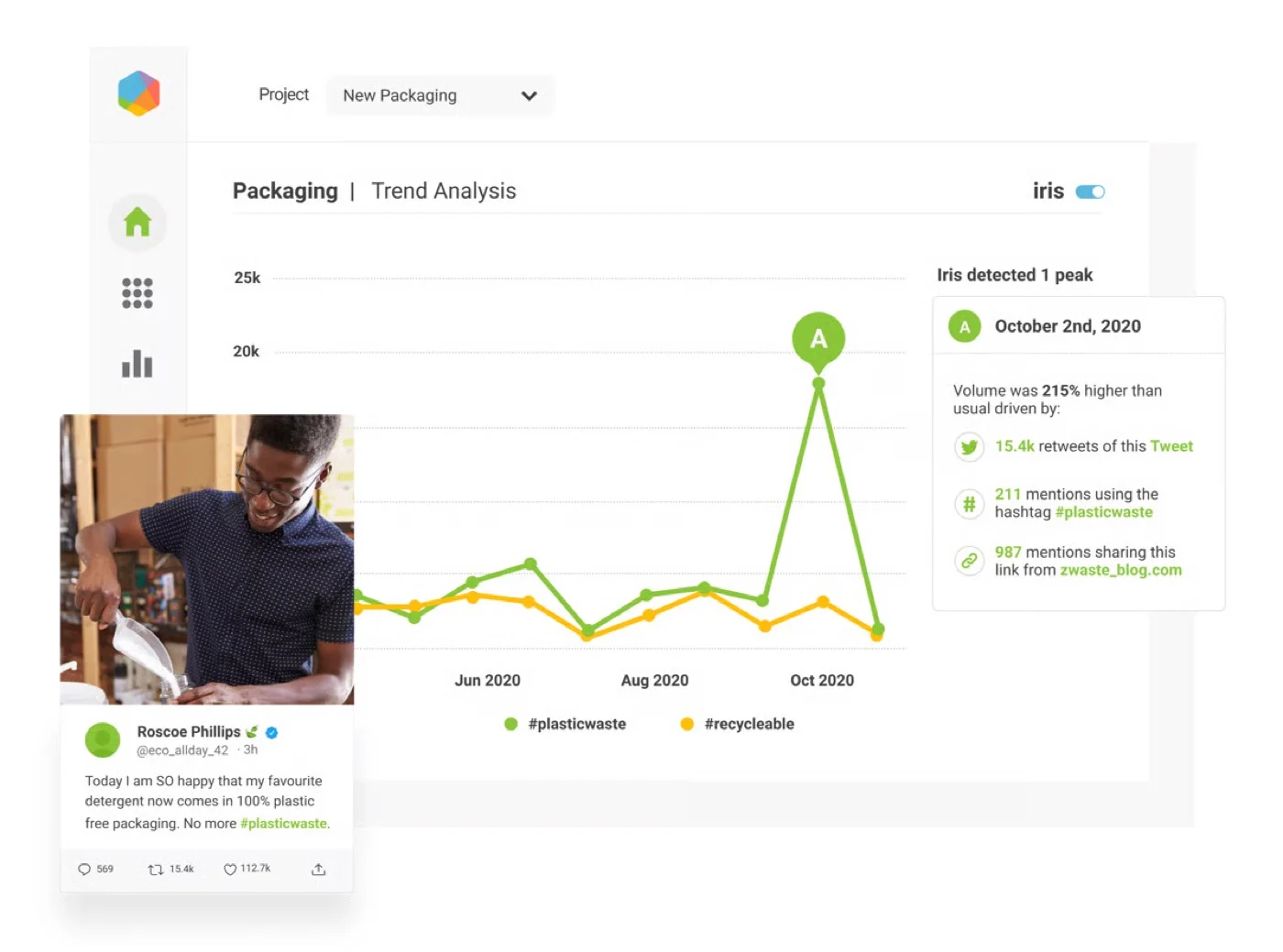
Its Iris AI assistant lets you ask questions about your data in plain language, cutting the time a research team spends digging through raw mentions by hand. Customizable dashboards make it easy to track whichever metric matters most, whether that’s sentiment, reach, or engagement.
Brandwatch doesn’t publish self-serve pricing. Every plan runs through a sales conversation, and it sits squarely at the enterprise end of the market.
What running Brandwatch standalone requires: Patience with occasional loading issues. Sarah K., a G2 reviewer, noted: “It takes a long time to load. The page is glitchy when I’m searching for my brand and keywords. I have to refresh constantly.” Teams outgrowing a smaller listening tool but not ready for Brandwatch’s price tag can check Alternatives à Brandwatch for options that scale up more gradually.
Questions fréquemment posées
Qu'est-ce que l'analyse X/Twitter ?
X/Twitter analytics refers to the tools and data that track your tweet performance, follower growth, audience demographics, and engagement over time. It shows which content resonates with your audience, when they're most active, and how a campaign is performing.
Quels sont les outils d'analyse X/Twitter gratuits disponibles ?
Native X Analytics offers basic tracking, though the full dashboard now requires X Premium. Among genuinely free Twitter analytics tools, Buffer's Free plan covers 3 channels, 1 user and Social Champ also has a free plan that covers 15 scheduled posts / 3 social accounts / 1 user.
Can I track competitor performance on X/Twitter?
Tools like RivalIQ, Sprout Social, and SocialPilot's Competitor Reports let you benchmark your tweets, engagement, and follower growth against named competitors. RivalIQ is built specifically around this use case, while the others offer it as one feature within a broader platform.
How do X/Twitter analytics tools help improve campaign performance?
They surface which tweets, hashtags, and posting times actually drive engagement, so you can adjust a campaign while it's still running rather than after it ends. Tools like Keyhole track a specific hashtag's reach and share of voice in real time, which is useful for measuring whether a launch is actually landing.
Comment choisir l'outil d'analyse X/Twitter adapté à mon entreprise ?
Match the tool to the job first. All-in-one platforms suit day-to-day account management, benchmarking tools suit competitor comparison, and listening platforms suit brand-wide sentiment tracking. Once you know the category, compare pricing, historical data limits, and whether reporting can be customized for how you actually share results.
What metrics should I monitor on X/Twitter?
Track engagement rate, tweet impressions and reach, follower growth, hashtag performance, and which individual tweets are outperforming the rest. For campaigns specifically, share of voice against competitors and conversion-related clicks matter more than raw impression counts.
How can I check Twitter analytics?
Visit x.com/i/account_analytics to see your native X analytics dashboard, which requires X Premium for full account-level data. For deeper or longer-term insights, connect your account to a third-party Twitter analytics tool from this list instead.
Can you get Twitter analytics for free?
Basic post-level engagement counts remain visible without Premium, so Twitter analytics free access still exists at a surface level. For a fuller free Twitter reporting tools option, you can try the free plan of Buffer or Social Champ.
What is the 4-1-1 rule on Twitter?
The 4-1-1 rule is a content ratio guideline: for every 6 tweets, post 4 pieces of curated or third-party content, 1 original promotional tweet, and 1 retweet or personal share. It's meant to keep an account from feeling like a constant sales pitch.
A propos de l'auteur











Social Listening and Brand Monitoring Tools
Neither of these two tools treats scheduling as its main job. Instead, they help you understand what people are actually saying about your brand on X and everywhere else, and whether that sentiment is shifting in a direction you need to react to.