
If you run an agency, freelance for a few clients or manage social for a brand, you already know where the day goes. A question sits in an Instagram DM, a complaint lands under a Facebook ad, and a Google review waits for a reply while you’re busy in another app. Miss enough of them and the followers you worked to win stop talking to you.
A social media engagement tool is software that pulls comments, DMs and mentions into one place so you can reply, sort and track them. The catch is that every tool covers a different mix of networks, and plenty of them hide the inbox behind a pricier plan.
So, we put 13 social media engagement tools through the same checks. Which networks does the inbox really answer? Do DMs and reviews come along? How do AI replies work, and what does the inbox cost once your team grows? Our own tool SocialPilot is also on this list and it goes through the same checks as the rest, gaps and all.
How We Evaluated These Social Media Engagement Tools
We judged every tool on the same ten points, inbox first, since replying is the job these tools exist for.
Our Testing Criteria
We spent a short time inside each tool, following the inbox setup to see where replies happen. That isn’t months of daily use, so the write-ups lean on help center walkthroughs, plan pages and user reviews.
| Criterion | What we checked |
| Inbox coverage | Which networks the inbox reads, and which of those it can actually reply on |
| DM | Whether private messages land in the inbox, network by network |
| Reviews | Whether Google Business Profile or other reviews can be answered from the same place |
| Triage | Tags, notes, statuses, assignment and filters for sorting a busy feed |
| Automation and AI replies | Keyword auto-replies, comment-to-DM, saved replies and AI-drafted responses |
| Pubblicazione | Whether you can schedule posts in the same tool you reply from |
| Analisi | Post reporting, plus response-time reports where they exist |
| Facilità d'uso | How many setup steps the vendor's own docs walk you through to get a working inbox, checked against our brief hands-on time |
| Assistenza | The channels and hours each vendor publishes |
| Cost as the team grows | Whether you pay per user, per plan or per channel, and what the bill does when you add people or accounts |
How We Fact-Checked Pricing and Features
Every price, with its plan name, monthly and annual figures and billing basis, comes from the vendor’s own pricing page. Sprinklr publishes none, so its entry says quote only.
Inbox coverage comes from each vendor’s help center, or from product and plan pages where the help center was blocked, and the entry says so. When two vendor pages disagreed, the help center won and the table marks the feature as not confirmed. Ratings are linked to G2 and Capterra scores.
Long-term reliability, such as missed comments or broken connections months in, only shows with sustained use, so we point to user reviews for it.
What Is Social Media Engagement (and Why It Matters)?
Social media engagement is every action someone takes on your content beyond scrolling past it, from a like to a DM. That covers:
- Reazioni
- Commenti
- Azioni
- Risparmio
- DMs (often questions about price or availability)
- Menzioni e tag
- Reviews on Google and elsewhere
Each one signals the platform and opens a conversation, which is how followers turn into customers.
Replying is the part you control. Across nearly 2 million posts, Rapporto sullo stato dell'impegno sui social media 2026 di Buffer found that posts where the account replied to comments beat unanswered ones on all six networks it measured, from +5% on Bluesky to +42% on Threads.
| Piattaforma | Engagement lift on posts with replies |
| Threads | +42% |
| +30% | |
| +21% | |
| +9% | |
| X | +8% |
| Bluesky | +5% |
Source: Buffer, State of Social Media Engagement 2026
Speed matters most when something goes wrong. In Sprout Social’s Q2 2026 Pulse Survey of 2,250 social users in the US, UK and Australia, 84% said a brand’s response speed directly affects how they view a crisis.
Meta also puts a clock on private replies. A business has 24 hours to answer a Facebook or Instagram message. That window stretches to up to 7 days when the chat started from a Click-to-Messenger or Click-to-Direct ad, or when a human agent replies. A private DM reply to a comment must go out within 7 days of that comment. All three rules are set out in Meta’s Messenger policy.
Instagram repeats the 7-day comment rule in its private replies guide.
Most teams measure it as engagement rate, total engagements divided by followers or reach, times 100. For the variations, here’s the engagement rate formula explained.
Social Media Engagement Tools at a Glance
Sprout Social, Sprinklr and Hootsuite cast the widest net, with X and TikTok in the inbox, but they charge per seat or by quote. Flat-priced tools such as SocialPilot, ContentStudio, Later and Sendible cover the Meta networks for one plan price, and Buffer and Metricool put their inbox on a free plan.
Engagement Features Side by Side
| Strumento | Best for (short) | Free option | Inbox networks | DM | Reviews | AI replies |
| SocialPilot | Agencies, SMBs, multi-location brands | 14-day trial, no card | Facebook, Instagram, LinkedIn |  |
 |
|
| Sprout Social | Enterprise social consultants | 30-day trial, no card | 10, incl. X, LinkedIn, TikTok, Reddit, WhatsApp | |
|
 |
| Hootsuite | Cross-team collaboration at scale | 14-day trial, no card | Facebook, Instagram, X, LinkedIn, TikTok, WhatsApp, Threads | |
|
|
| Later | Instagram-first visual planners | 14 giorni di prova | Instagram, Facebook, TikTok | |
|
|
| Buffer | Solo creators and small teams | Free plan, 3 channels | 10, comments only, incl. TikTok, Threads, YouTube | |
|
|
| Metricool | Analytics-led engagement tracking | Free plan, 1 brand | Facebook, Instagram, TikTok, LinkedIn, YouTube, Google Business, X (add-on) | |
|
|
| Sprinklr | Enterprise customer care | None published | 30+, incl. X, TikTok, WhatsApp, Reddit, review sites | |
|
|
| Publer | Budget-conscious small businesses | Free plan, 3 accounts | No inbox, comments post by post on 8 networks | |
|
|
| NapoleonCat | Automated comment moderation | 14-day trial, no card | Facebook, Instagram, TikTok, LinkedIn, YouTube, Google Business, app stores | |
|
|
| Zoho Social | Zoho ecosystem users | Free plan, 15-day trial | Facebook, Instagram, X, LinkedIn, YouTube, Google Business, 5 more listed | |
|
|
| Agorapulse | Agencies managing client engagement | 30-day trial, no card | Facebook, Instagram, Threads, LinkedIn, YouTube, TikTok, Google Business, X (add-on) | |
|
|
| ContentStudio | AI-assisted curation and replies | 7-day trial, no card | Facebook, Instagram, LinkedIn, YouTube, Google Business | |
|
|
| Sendible | Agencies avoiding per-seat fees | 14-day trial, no card | Facebook, Instagram (comments), LinkedIn, YouTube | |
|
|
Full
On the plan where the inbox starts
Partial or add-on
Needs a higher tier, works only in part, or the vendor’s docs don’t say
Non disponibile
What You Pay as Your Team Grows
How a tool bills moves your total more than its sticker price does. The lowest plan doesn’t always include the inbox, so check the fourth column before you budget.
| Strumento | Billing model | Monthly / annual entry (per month) | Cheapest plan with the inbox | What raises the bill |
| SocialPilot | Flat per plan | Essentials, $30 / $25.50 | Standard, $50 / $42.50 (15 accounts, 3 users) | More accounts or users: Premium $100 / $85 for 25 accounts and 6 users, or add-ons at $4 per account and $5 per user |
| Sprout Social | Per seat | Essentials, $99 / $79 per seat | Standard, $249 / $199 per seat | Every seat you add, and Automated Rules and AI replies need Advanced at $499 / $399 per seat |
| Hootsuite | Per user | Standard, $99 per user, billed annually (monthly rate not published) | Standard, $99 per user, billed annually | Every user you add, and routing needs Advanced at $399 per user, billed annually |
| Later | Per plan (social sets) | Starter, $25 / $18.75 | Growth, $50 / $37.50 (2 users) | Extra social sets at $11.25 and extra users at $3.75 a month, billed annually |
| Buffer | Per channel | Free, then Essentials $6 / $5 per channel | Free (comments only) | Every channel you add, and unlimited users need Team at $12 / $10 per channel |
| Metricool | Per plan, by brand count | Free, then Starter from $25 / $20 (5 brands) | Free (1 brand) | More brands, plus $10 a month per X account and LinkedIn only from Starter |
| Sprinklr | Quote only | Quote only | Not published | Not published |
| Publer | Per social account | Free, then Professional $5 / $4 per account | No inbox (comments handled per post) | Every account you add, with extra members priced separately |
| NapoleonCat | Per plan, by profile slots | Standard, $89 / $79 (5 profiles, 2 users) | Pro, $109 / $89 | More profiles and users: Expert with 10 profiles and 5 users is $249 / $209 |
| Zoho Social | Per brand | Free, then Standard $15 / $10 | Premium, $65 / $40 (3 members) | More brands (Agency is $320 / $230 for 10) or extra members at $12 / $10 |
| Agorapulse | Per user | Standard, $99 / $79 per user | Standard, $99 / $79 per user | Every seat, with ad comments and assignment on Professional at $149 / $119 per user, and X as a paid add-on |
| ContentStudio | Per plan | Standard, $29 / $19 | Advanced, $69 / $49 (2 users) | Add-ons at $10 per user, $5 per account and $10 per workspace a month, plus capped AI reply credits |
| Sendible | Per plan, by workspace, unlimited users | Core, $35 / $30 | Core, $35 / $30 | More client workspaces: Plus is $99 / $84 for 3 |
Prices come from each tool’s own pricing page, linked in its review below. Sprinklr publishes no prices.
The 13 Best Social Media Engagement Tools, Reviewed in Depth
Every tool below is written up the same way, with its coverage, a screenshot, how the inbox works, a review, pricing and the gap you’d have to fill.
One flat plan price on SocialPilot covers the whole team, and each client gets its own inbox for Facebook, Instagram and LinkedIn.
Coverage
- Posta in arrivo
- DM
- Reviews
- AI replies
- TikTok
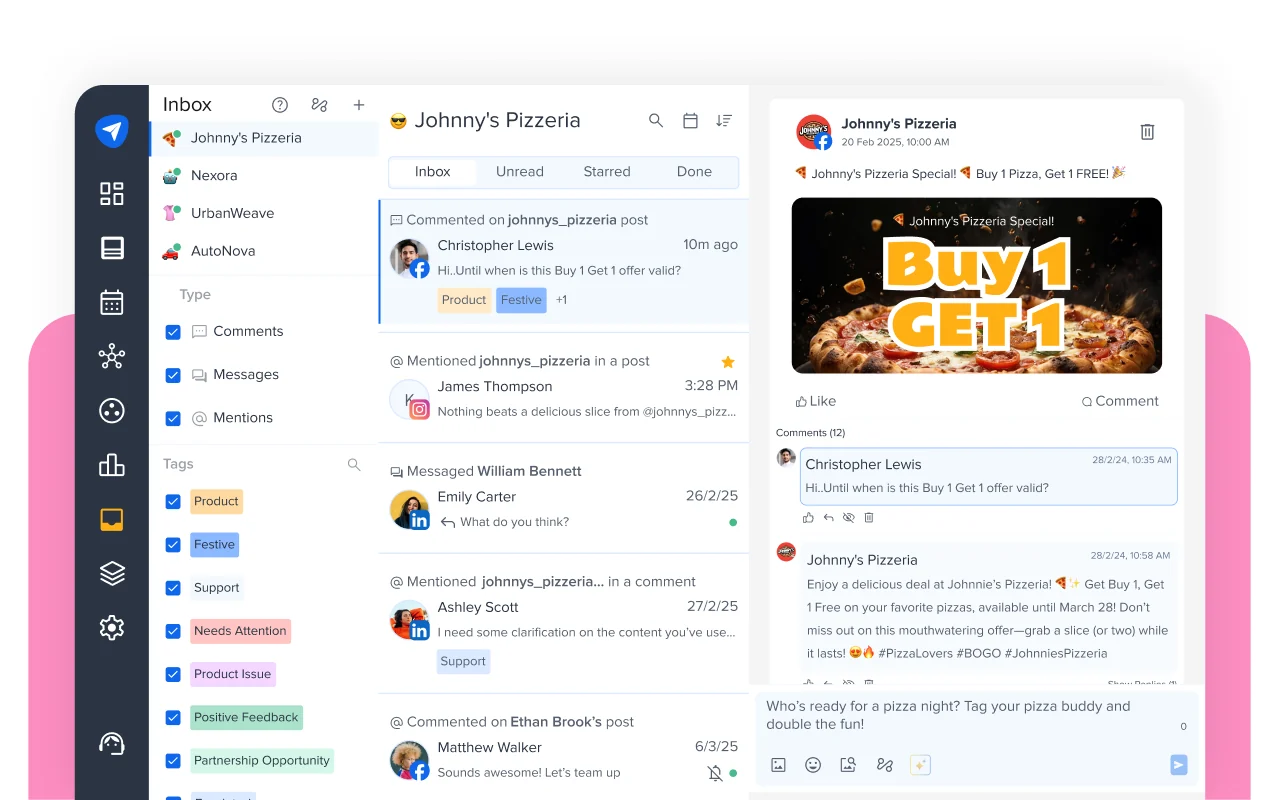
What it actually looks like: Setup starts with one inbox per client, where you connect a Facebook Page, an Instagram Business or Creator account and a LinkedIn Page, as our help center’s inbox setup guide explains. Instagram has to be linked through Meta Business Suite or Facebook first. Comments, DMs and mentions then share one feed, where you tag a thread, add a private note and mark it Done.
In un G2 review, Felice C. wrote: “I like that it handles creating, scheduling, and managing posts. It has greatly helped us increase social engagement and marketing.”
On G2, SocialPilot has a 4.5 out of 5 rating.
What it does well: In SocialPilot’s Instagram inbox, a keyword in a comment can send that person a private DM automatically, one automation per post. Keyword auto-replies to comments and DMs go out in your words or an AI tone such as Friendly or Empathetic. The mobile app handles every inbox job except adding inbox accounts.
You pay per plan, not per user. Essentials is $30 a month, or $25.50 billed annually, for 7 accounts and 1 user, with no inbox. The inbox starts on Standard, at $50 monthly or $42.50 billed annually for 15 accounts and 3 users. Premium is $100 or $85 for 25 accounts and 6 users, and Ultimate is $200 or $170 for 50 accounts and unlimited users. Enterprise is quote only. There’s no free plan, and the 14-day trial asks for no card. Visit SocialPilot’s plans page to learn more about the add-on rates.
What running SocialPilot standalone requires: Standard at the least, since Essentials has no inbox. TikTok, X and YouTube conversations never reach the inbox, so those get answered in each app. We also don’t support LinkedIn DMs yet, and we don’t offer social listening, so pair SocialPilot with a listening tool if you need one. For Google and Facebook reviews, SocialPilot Reviews is a separate product with direct replies.
Each seat on Sprout Social buys a Smart Inbox reaching ten networks, Reddit, Threads, and Bluesky included.
Coverage
- Posta in arrivo
- DM
- Reviews
- AI replies
- TikTok
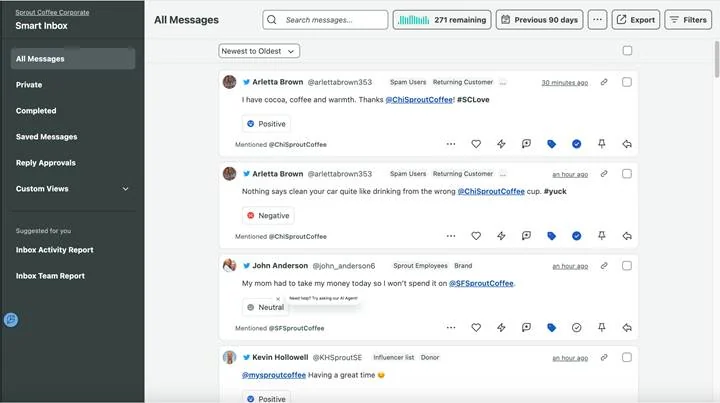
What it actually looks like: Your day starts in All Messages, where X, Facebook, Instagram, LinkedIn, TikTok, WhatsApp and YouTube share one stream, as Sprout’s introduction to engagement shows. You narrow it with a saved Inbox View and turn a tricky message into a case assigned to a colleague. Google, Facebook, Yelp and Trustpilot reviews wait in a separate Reviews tool, with direct replies.
In un G2 review, Lyberth K. wrote: “Sprout Social saves us a lot of time by simplifying scheduling, automating our weekly and monthly reports, and centralizing all our direct messages so we can access them quickly when we need to.”
On G2, Sprout Social has a 4.4 out of 5 rating.
What it does well: LinkedIn DMs sit beside Instagram and Facebook DMs, so a B2B lead never needs a second tab. The Inbox Team Report on Advanced gives each person’s average first reply time, and on Advanced, Salesforce, Zendesk and HubSpot Service Hub connect. Support runs 24 hours a day, Monday to Friday, by chat, phone and email.
Every Sprout Social’s plan is per seat. Essentials costs $99 a seat monthly or $79 billed annually for 5 profiles, with no inbox. Standard brings the inbox at $249 monthly or $199 billed annually, still 5 profiles. Professional is $399 monthly or $299 billed annually, and Advanced $499 monthly or $399 billed annually, both with unlimited profiles. Enterprise is quote only. There’s no free plan, but the 30-day trial needs no card. At Sprout’s per-seat rates, three people on Standard billed monthly pay $747 a month.
What running Sprout Social standalone requires: Advanced, if you want the inbox to sort itself. Automated Rules that tag, complete or hide messages live there, with spam detection and AI reply suggestions. TikTok ad comments from Business Center accounts can’t be answered because of an API limit. Keyword auto-replies and comment-to-DM are missing from Sprout’s AI and automation guide. If you are looking for any of these features then this guide compares different Alternative di Sprout Social.
When support, sales and social all answer the same accounts, Hootsuite‘s Inbox 2.0, now called Nest decides whose desk each message lands on.
Coverage
- Posta in arrivo
- DM
- Reviews
- AI replies
- TikTok
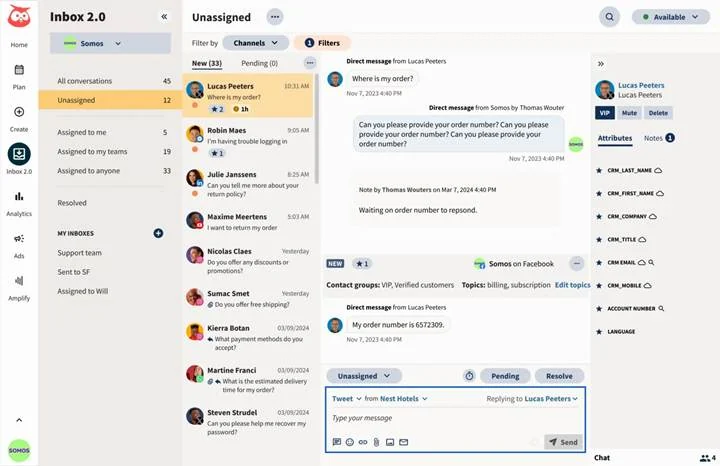
What it actually looks like: New messages from Facebook, Instagram, X, WhatsApp, TikTok, LinkedIn and Threads drop into an Unassigned queue under status filters. You open one, add a tag or internal note, and reply, even to a dark-post comment or a LinkedIn DM. TikTok Business Messages joined the feed in September 2025, per Hootsuite’s feature roundup, so TikTok DMs sit beside TikTok comments. On Advanced, auto-routing sends a refund question to support before anyone forwards it.
In un G2 review, Marcus E. wrote: “It’s helpful to capture comments, mentions, and messages from various platforms in one place which helps in not missing any customer inquiries.”
On G2, Hootsuite has a 4.3 out of 5 rating.
What it does well: Routing aside, the reply kit is broad, with AI smart replies from Professional up, saved replies, auto-responders and keyword-triggered Instagram comment-to-DM. The inbox works in the mobile apps, and Salesforce, HubSpot and Slack connect directly.
Hootsuite bills per user and prints only annual-billing prices; monthly billing exists, but the rate isn’t shown. Standard is $99 per user per month billed annually, with up to 10 social accounts and the basic inbox every plan includes. Professional is $199 per user per month billed annually, with unlimited accounts and automated inbox replies. Advanced, at $399 per user per month billed annually, adds approvals and routing. Enterprise is quote only. There’s no free plan, and the 14-day trial needs no card. This Guida ai prezzi di Hootsuite talks about all the pricing plans in great detail.
What running Hootsuite standalone requires: Advanced, if routing is the draw, which puts a three-person team at $1,197 a month billed annually. YouTube comments live in Streams outside the inbox, and Google reviews come in through a separate Google My Business app on the dashboard, not through Nest. Review monitoring on other sites needs Lumen, Hootsuite’s review and listening product sold by demo. Smaller teams can also weigh these alternative a Hootsuite.
Later puts the Instagram grid first, and a Social Inbox it still labels beta handles the replies.
Coverage
- Posta in arrivo
- DM
- Reviews
- AI replies
- TikTok
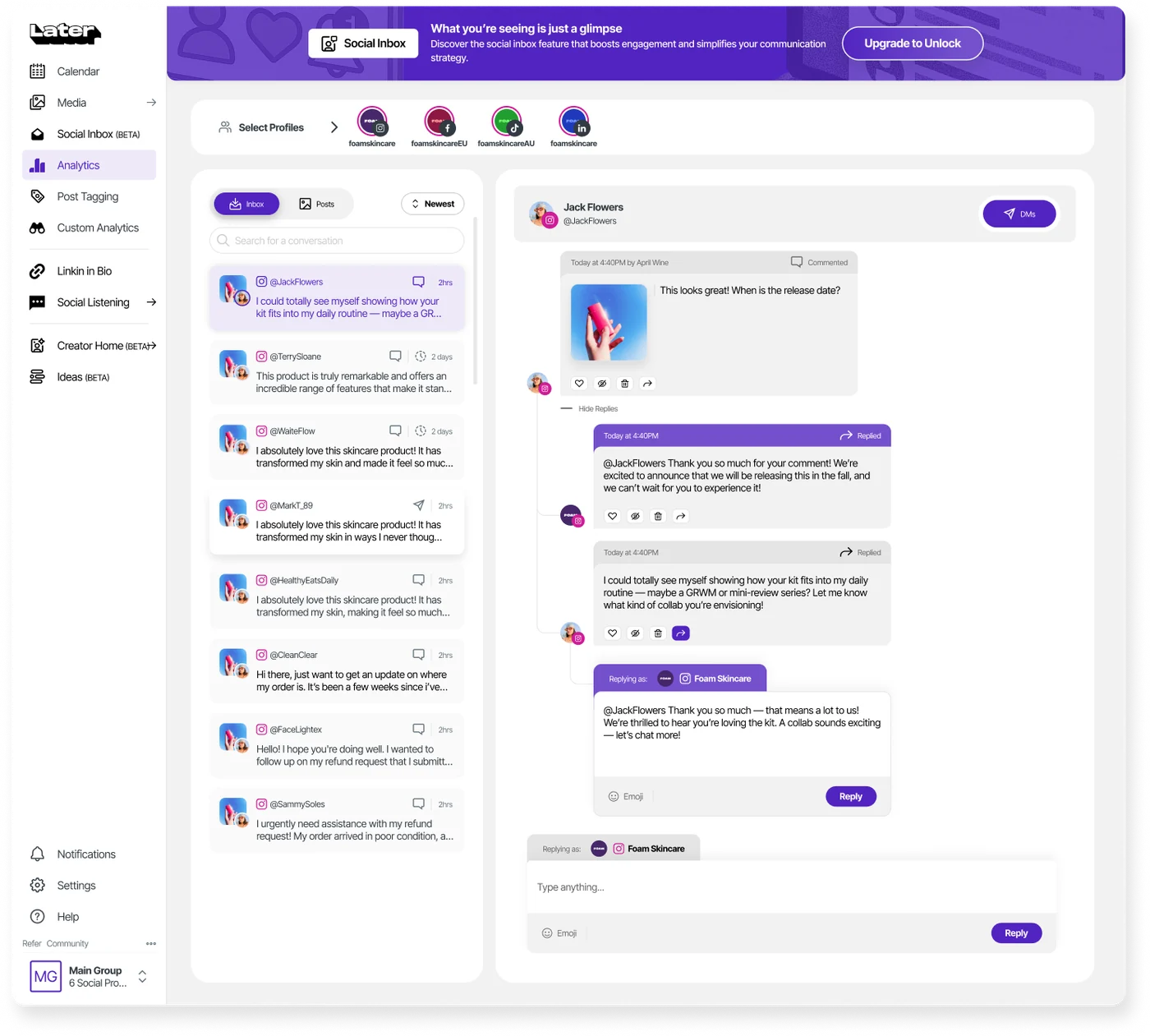
What it actually looks like: On a laptop, Social Inbox lists unread Instagram and Facebook comments and DMs, plus TikTok comments, in one prioritized feed. From the thread view you reply to a comment, hide it or delete it. Later’s Social Inbox guide notes that Instagram’s API only lets you answer DMs from the past 7 days, a Meta limit, so an older backlog stays stuck. The guide also says the inbox is desktop only, so the phone app won’t help.
In un G2 review, Colleen M. wrote: “Being able to post on Facebook, Instagram, and Threads simultaneously with multiple accounts is a feature I really appreciate because it saves me time.”
On G2, Later has a 4.5 out of 5 rating.
What it does well: Instagram, Facebook and TikTok, the networks an Instagram-led brand hears from most, land in one feed. The visual calendar plans posts for those plus Pinterest, LinkedIn, Threads, YouTube Shorts and Snapchat, with Shopify product tagging built in.
Later prices per plan, by social set of 8 profiles. Starter is $25 a month, or $18.75 billed annually, for 1 set and 1 user, with an inbox preview only. Growth is where the inbox starts, at $50 monthly or $37.50 billed annually for 2 sets and 2 users. Scale costs $110 monthly or $82.50 billed annually for 6 sets and 4 users. On annual plans an extra set is $11.25 a month and an extra user $3.75. There’s a 14-day trial and no free plan. Read through this Later’s pricing guide per saperne di più.
What running Later standalone requires: Growth at minimum, plus a second tool for anything past Instagram, Facebook and TikTok comments. The inbox guide lists no TikTok DMs and no LinkedIn, X or YouTube. The docs mention no auto-replies, saved replies or AI replies, because Later’s AI writes captions and ideas. For replies on the go, these top Later alternative include mobile inboxes.
Community, Buffer‘s comment feed, comes with the free plan and reads ten networks, but it stops at public comments.
Coverage
- Posta in arrivo
- DM
- Reviews
- AI replies
- TikTok
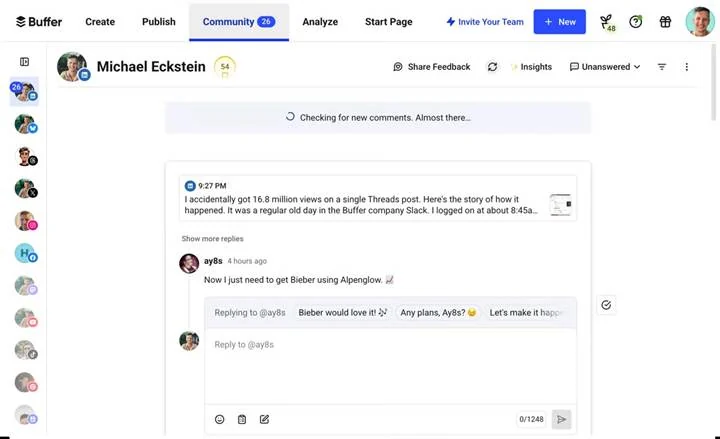
What it actually looks like: Sorting by “Unanswered first” puts the comments still waiting on you at the top. Each one sits under the post it came from, you reply in place, and bulk resolve clears a quiet week in one go, as Buffer’s Community guide shows. Reply suggestions draft an answer to edit, unlimited on paid plans and five a week on Free, though never on X. Google Business Profile reviews take text replies that publish to your profile.
In un G2 review, Navadeep V. wrote: “With Buffer, it’s much easier to post content across different platforms and engage with followers quickly from a single location.”
On G2, Buffer has a 4.3 out of 5 rating.
What it does well: Ten networks feed Community, from Threads, Bluesky and Mastodon to YouTube and Google Business Profile, and a three-channel creator pays nothing.
Buffer charges per channel. Free is $0 for up to 3 channels, 1 user and 10 scheduled posts per channel, with Community included. Essentials is $6 a channel monthly or $5 billed annually ($60 per channel per year) for 1 user, and Team is $12 monthly or $10 billed annually ($120 per channel per year) with unlimited users. Paid plans carry a 14-day trial. Our Guida ai prezzi di Buffer breaks down all these plans further.
What running Buffer standalone requires: A second home for private messages, since Instagram and Facebook DMs get answered in each app. Ad comments stay out too, because Buffer pulls comments from organic posts only. Unlimited users need Team, so a five-channel team pays $50 a month billed annually. If DMs are half your workload, these Alternative al buffer are definitely worth trying.
The reports are the reason people buy Metricool, and the inbox rides along on every plan, the free one included.
Coverage
- Posta in arrivo
- DM
- Reviews
- AI replies
- TikTok
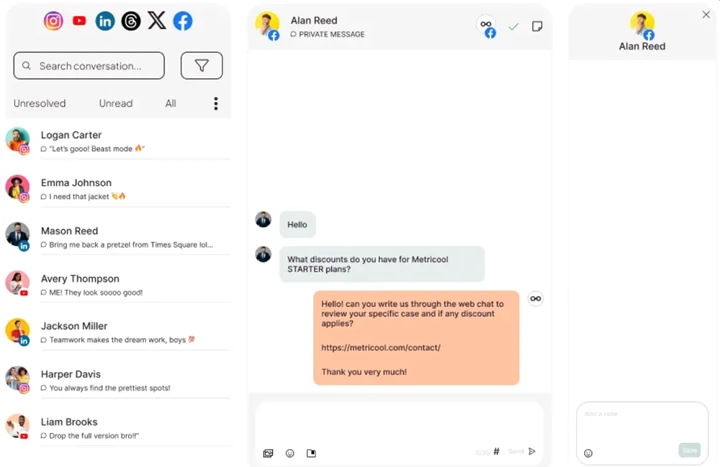
What it actually looks like: Three tabs, Unresolved, Unread and All, sit above the conversation list, with the open thread beside it. Facebook and Instagram comments and DMs, TikTok business-account comments, X DMs, LinkedIn comments and mentions, YouTube comments and Google Business Profile reviews all arrive here, per Metricool’s inbox manager guide. You leave a private note for whoever opens the thread next and answer from reusable templates. Facebook DMs stay open for 7 days, but Instagram accounts connected by direct login get only 24 hours.
In un G2 review, Celeste B. wrote: “It ensures we catch customer questions fast and avoid missed replies.”
On G2, Metricool has a 4.5 out of 5 rating.
What it does well: Reporting spans every connected network, with a Looker Studio connector on Advanced for custom dashboards. Even the free inbox covers Instagram, Facebook, TikTok, YouTube and Google Business Profile, on the web, iOS and Android.
Metricool prices per plan by brand count. Free covers 1 brand and includes the inbox. Starter runs from $25 a month, or $20 billed annually, for 5 brands, and $45 or $36 for 10. Advanced starts at $67 monthly or $53 billed annually for 15 brands, then $107 or $85 for 25 and $210 or $159 for 50. Custom is quote only. X is a $10 monthly add-on per account; and LinkedIn needs a Starter plan. For more details, read our Metricool’s pricing guide.
What running Metricool standalone requires: A workaround for teamwork, because the same guide lists no message assignment, automatic replies, hide or delete, or notifications. Ad comments can’t be answered, and Threads, Bluesky and Pinterest comments don’t reach the inbox, according to Metricool’s help center. If you need those pieces, weigh these Alternative Metricool per trovare l'adattamento migliore.
Social is one queue among many in Sprinklr, and you reach it through a demo and a procurement sign-off rather than a sign-up form.
Coverage
- Posta in arrivo
- DM
- Reviews
- AI replies
- TikTok
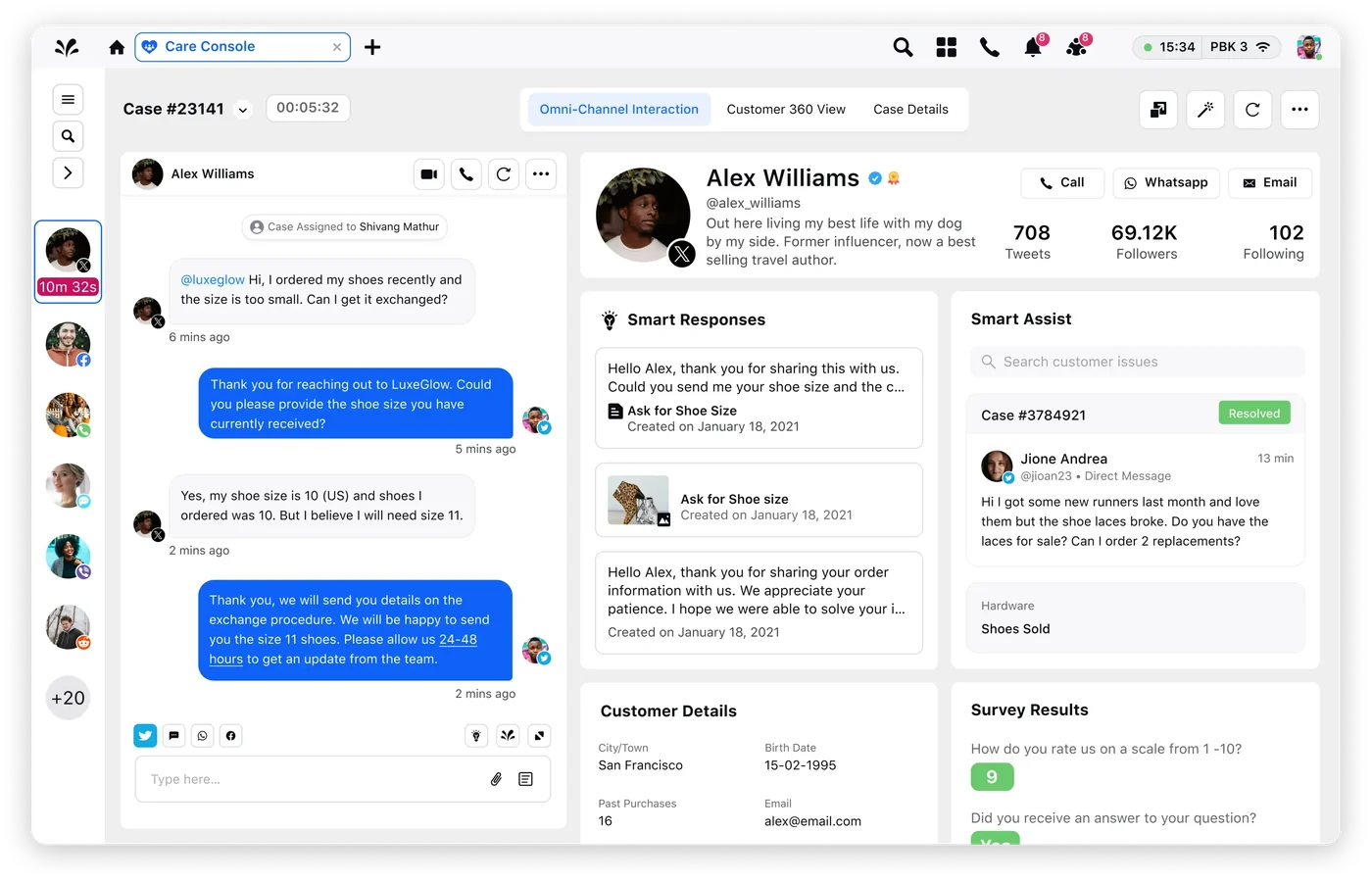
What it actually looks like: Messages are routed before you see them. Sprinklr routes comments by sentiment to the right team and hides comments with chosen keywords. The Sprinklr’s channel capability tables mark engagement as supported on Facebook, Instagram, X, LinkedIn, YouTube, TikTok, Pinterest, Reddit, WhatsApp and Google Business Messaging. TikTok comment replies are capped at 150 characters of text, and each Google Business review takes one public reply.
In un G2 review, lindokuhle n. wrote: “Its strongest feature, in my experience, is the unified inbox, which makes it much easier to manage conversations across multiple channels while keeping customer responses consistent.”
On G2, Sprinklr has a 4.1 out of 5 rating.
What it does well: Reviews from Google Business, Yelp, Trustpilot, Bazaarvoice, PowerReviews and Yotpo share the console with social messages, so a customer who moves from Instagram to Trustpilot keeps one history. Ad comment moderation covers Facebook, Instagram, X, LinkedIn, TikTok and Reddit. Salesforce and Microsoft Dynamics CRM are among its integrations, and a release note documents an SAP C4C connection.
Nothing is self-serve. Sprinklr’s product page publishes no price, plan names, billing basis or trial. Every route ends at “Demo” or “Contact Us”, so expect a custom quote.
What running Sprinklr standalone requires: A sales cycle and a setup project before anyone replies, and the same reviewer warns it “can feel complex and overwhelming, particularly during the initial setup.” TikTok keyword and spam filtering isn’t available, per Sprinklr’s TikTok limitations page. Two help articles disagree on TikTok DMs, so we don’t count on them. Ask the demo to show what its “AI-powered replies” actually draft. If you need to reply to customers, you can check out these Sprinklr alternatives for teams.
Publer charges by the social profile, so five accounts on Professional cost $25 a month, and that small number is most of the case for it.
Coverage
- Posta in arrivo
- DM
- Reviews
- AI replies
- TikTok
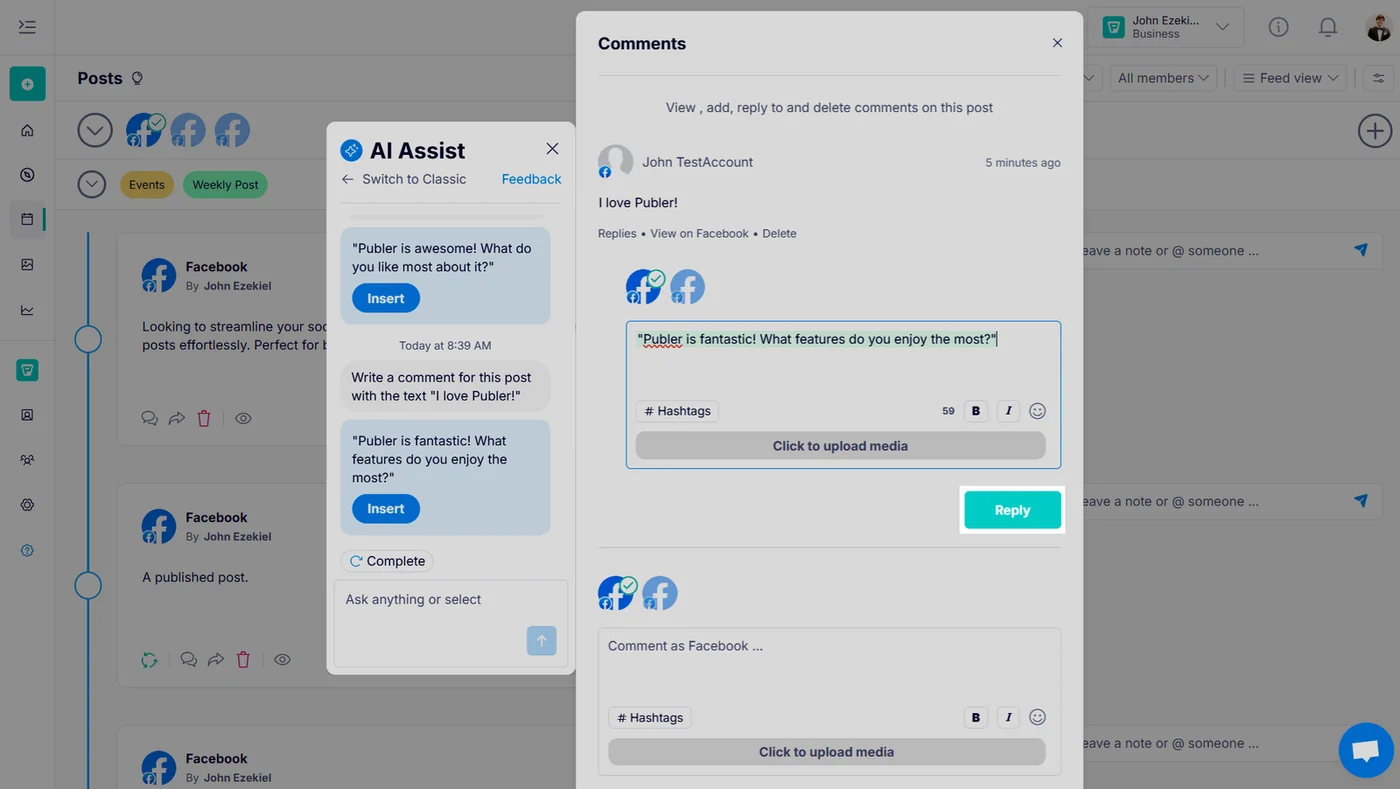
What it actually looks like: There’s no queue to open. You go to the Calendar tab, filter to Published and click the comment icon on one post to open its thread, as Publer’s comment management guide describes. You reply, add or delete comments, and AI Assist can draft a response to edit. It all needs the Admin role, and on Mastodon you can’t delete other people’s comments. Then you repeat the trip for the next post.
In un G2 review, Rebekah P. wrote: “I also use the Canva integration constantly, and being able to schedule the first comment and set different captions per platform is really helpful.”
On G2, Publer has a 4.7 out of 5 rating.
What it does well: Comment threads on eight networks sit behind one login: Facebook Pages, Instagram, X, Mastodon, LinkedIn, Threads, Bluesky and YouTube. Live chat is answered by human agents, and Canva, Unsplash, Google Drive and OpenAI are built in.
Billing is per social account per month. The free plan covers 1 user and 3 accounts (no X), with 10 scheduled posts each. Professional is $5 per account monthly or $4 billed annually, and Business is $10 or $8. Enterprise is quote-only with volume discounts. The free trials run 7 days on Professional and 14 on Business, no card. None of the plans on Publer’s plans includes an inbox.
What running Publer standalone requires: A second tool, the day customers start messaging you. There’s no unified inbox or DM replies, and Publer’s feedback board lists an inbox as “in development” under a separate product, Kibo. TikTok and Google Business reviews aren’t covered. If replying matters as much as posting, see these Publer alternatives worth comparing.
Spam piling up under paid posts is the mess NapoleonCat was built to clean, often before anyone on your team opens the inbox.
Coverage
- Posta in arrivo
- DM
- Reviews
- AI replies
- TikTok
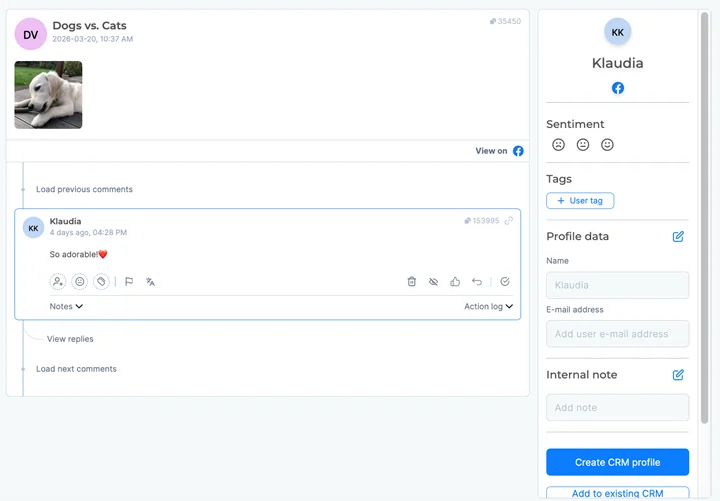
What it actually looks like: Each comment, message or review arrives as a ticket, as NapoleonCat’s Social Inbox guide shows. You open one beside a panel holding its sentiment, tags and notes, and assign it to a colleague by hand if it’s theirs. You answer from a saved template or an AI draft, and nothing is sent until a person approves it. The trial runs on Expert, so auto-moderation is there to test from day one.
In un G2 review, Ridha H. wrote: “Many glitches we may face during managing the comments like photos not appearing or can’t hide a comment”
On G2, NapoleonCat has a 4.7 out of 5 rating.
What it does well: Auto-moderation hides or removes spam and offensive comments on Facebook, Instagram, TikTok, TikTok Ads, YouTube and LinkedIn. Ad comments from Facebook, Instagram, and TikTok share the queue with organic ones, and Google Business, Google Play and App Store reviews land there too, handy for a brand with an app. Its docs name Slack, Bitly and a Messenger chatbot integration.
Plans are sized by profile slots (5, 10, 20, 40 or 60), starting at 5 profiles and 2 users. Standard is $89 a month or $79 billed annually, with no inbox. Pro, where the inbox starts, is $109 monthly or $89 billed annually, and Expert adds auto-moderation at $139 or $119. Enterprise (60+ profiles) starts at $465 a month billed yearly, monthly by agreement. Prices exclude VAT, and there’s no free plan but a 14-day trial with no card.
What running NapoleonCat standalone requires: Somewhere else to answer X, which NapoleonCat supports for publishing but leaves out of the inbox. TikTok comments come in, but the help center says there’s “currently no support for DMs”.
Already paying for Zoho CRM or Zoho Desk? Zoho Social connects to both, the main reason to choose it over tools with similar inboxes.
Coverage
- Posta in arrivo
- DM
- Reviews
- AI replies
- TikTok
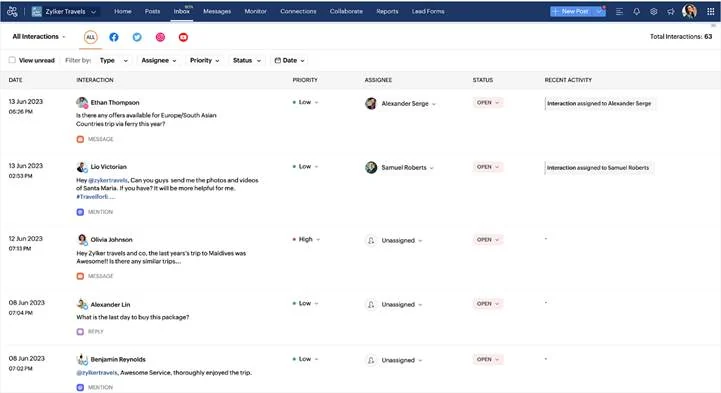
What it actually looks like: On Premium, Inbox gathers Facebook, Instagram, X, Google Business and YouTube interactions in one list, as Zoho’s inbox overview explains. You assign each item or let a rule route it, set Low, Medium or High priority and track its status. Replies start from a saved template or Zia, Zoho’s AI writer.
In un G2 review, Corban H. wrote: “The audience listening tools are definitely my favorite part, as they help track everything the audience is doing and figure out engagement levels, making it easier to reach out to them.”
On G2, Zoho Social has a 4.6 out of 5 rating.
What it does well: Facebook comes in deepest, with comments, ad comments, mentions, messages and page reviews. TikTok, Threads, Bluesky, WhatsApp and Telegram are also named as inbox networks, though Zoho doesn’t document which interactions they bring in. Zoho Desk joins on Premium, alongside Canva.
Zoho Social’s pricing is calculated per brand per month. The free plan covers 1 brand and 1 member. Standard is $15 monthly or $10 billed annually, and Professional is $40 or $30, each for 1 member. Premium, where the inbox starts, is $65 or $40 with 3 members. Agency is $320 or $230 for 10 brands, and Agency Plus is $460 or $330 for 20, both with 5 members. Extra members on Professional or Premium are $12 a month ($10 annually). The 15-day trial needs no card, then drops to free.
What running Zoho Social standalone requires: Premium, because Standard and Professional have no inbox. Professional only answers DMs on X, Facebook, Instagram and LinkedIn Pages through monitoring. Inside the inbox, each Google Business review takes one reply, and Instagram comments on posts you were mentioned in can’t be fetched. For one brand the Premium jump is hard to justify, so compare these Alternative a Zoho Social first.
Agorapulse charges per seat, which favors an agency where two or three people work through a long list of client inboxes.
Coverage
- Posta in arrivo
- DM
- Reviews
- AI replies
- TikTok
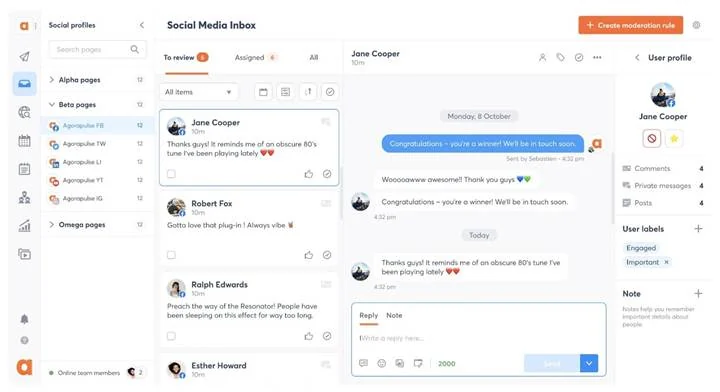
What it actually looks like: Comments, mentions, DMs and reviews fill one inbox, and Agorapulse’s inbox explainer lists what each network sends, with X only through the paid X Plus add-on. You work down the list assigning, labeling, hiding or marking items reviewed. TikTok DMs never show up, because they “can’t sync due to API limits”, and neither do comments on posts older than the 32-day history sync. A Standard trial also hides ad comments, assignment and the team report, which start on Professional.
In un G2 review, Alamgir H. wrote: “The Social Inbox has probably been one of my favorite features. Having comments, mentions, and messages all in one place makes it much easier to keep up without jumping between platforms.”
On G2, Agorapulse has a 4.5 out of 5 rating.
What it does well: Ad comments arrive from Facebook, Instagram, LinkedIn and TikTok, and Google Business reviews refresh every 5 minutes on Advanced and Custom. Support runs 24/7 on every plan, with first-response targets from under 6 hours on Standard to under 30 minutes on Custom. iOS and Android apps come with all plans.
Every plan is priced per user. Standard is $99 a month or $79 billed annually and includes the inbox. Professional, at $149 or $119, adds ad comments and assignment, and Advanced, at $199 or $149, adds saved replies and unlimited moderation rules. Custom is quote-only and is the only plan with AI reply suggestions. Annual billing saves up to 20%. There’s no free plan, and the 30-day trial needs no card. Our Guida ai prezzi di Agorapulse breaks down each plan.
What running Agorapulse standalone requires: A seat budget that rises with every hire. Three people on Professional come to $357 a month billed annually, before any X add-on, and AI drafting means a sales call for Custom. When headcount grows faster than retainers, weigh these Agorapulse alternatives for agencies.
Half of ContentStudio is finding things to post through feeds like Feedly, and the other half is a Reply with AI button in its inbox.
Coverage
- Posta in arrivo
- DM
- Reviews
- AI replies
- TikTok
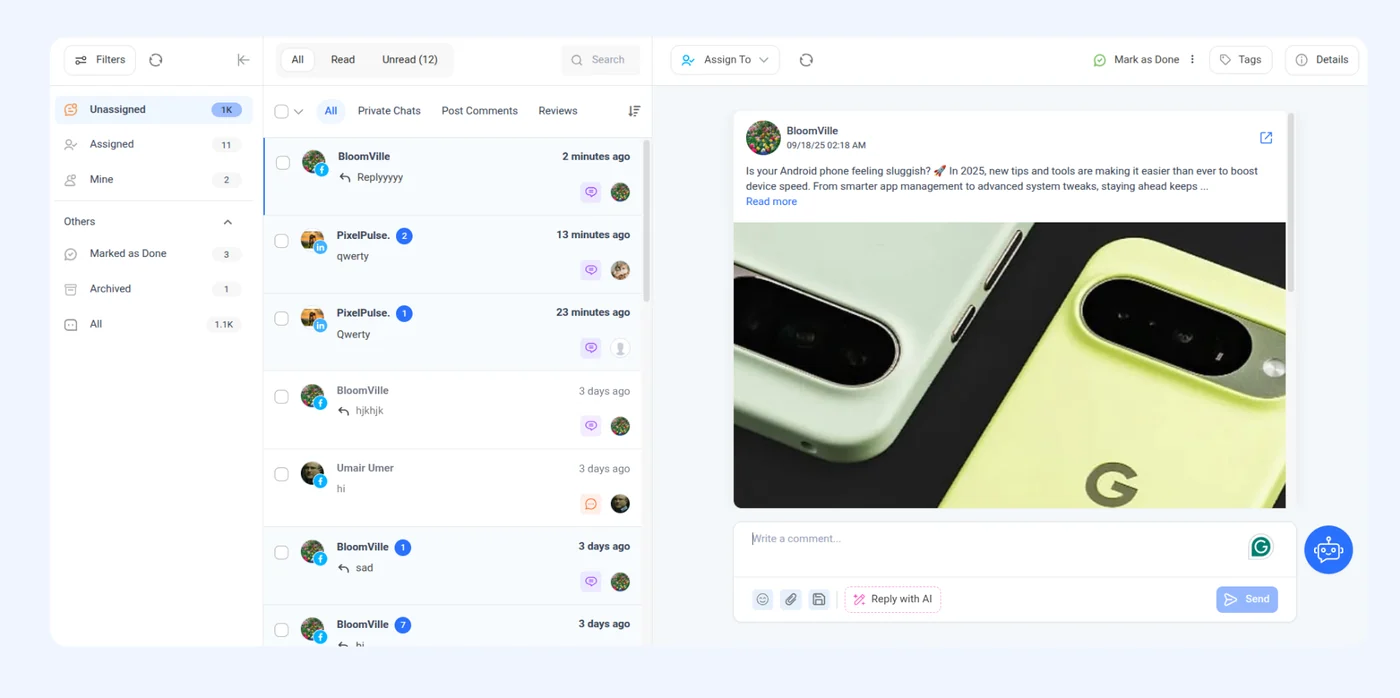
What it actually looks like: From Advanced up, the inbox opens on three views, Unassigned, Assigned and Mine, with Private Chats, Post Comments and Reviews on separate tabs. ContentStudio’s inbox walkthrough shows Reply with AI beside the reply box under every thread. You tag the conversation, leave an internal note for a teammate, and send. Each AI draft spends a credit.
In un G2 review, Munaza F. wrote: “Lately, I’ve also been using the Marketing Calendar to plan content, Social Media Analytics for easy reports, and Listening Tools to track mentions.”
On G2, ContentStudio has a 4.6 out of 5 rating.
What it does well: Google reviews and social messages share one inbox from $49 a month billed annually, and a review reply can be edited or deleted after it posts. Reply with AI drafts answers for Facebook and Instagram DMs and comments, LinkedIn comments and Google Business reviews. Canva, VistaCreate, Feedly, Bitly and Replug connect.
ContentStudio prices are per plan. Standard is $29 monthly or $19 billed annually for 5 accounts and 1 user, without the inbox. Advanced, where the inbox starts, is $69 or $49 for 10 accounts, 2 users and 100 AI auto replies. Agency Unlimited is $139 or $99, removes the workspace and user caps, and allows 250 AI replies. Enterprise is quote-only. Extra accounts are $5 a month, extra users or workspaces $10. There’s no free plan, and the 7-day trial needs no card.
What running ContentStudio standalone requires: Another tool for TikTok. You can publish there, but the ContentStudio’s supported channels list mentions that TikTok is “not currently supported” in the inbox and say support is “in the works”. The same page shows no DMs for LinkedIn or Google Business. On Advanced, 100 AI credits can also run out before a busy month does.
Every Sendible plan comes with unlimited users, so the price tracks client workspaces and freelancers cost nothing extra.
Coverage
- Posta in arrivo
- DM
- Reviews
- AI replies
- TikTok
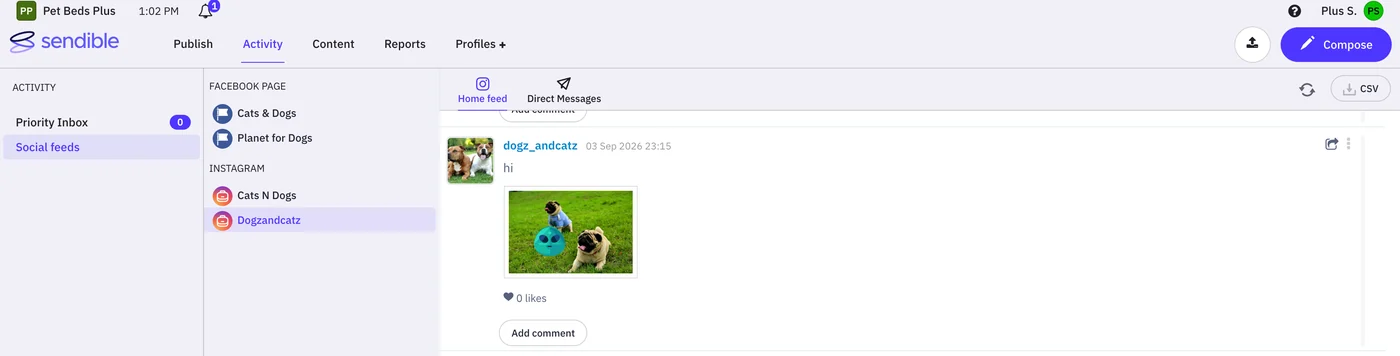
What it actually looks like: The Priority Inbox brings Facebook Page comments and DMs, Facebook ad comments, Instagram Professional comments, LinkedIn Company Page replies and YouTube comments into one feed. You sort it with sentiment dots and filters, then archive it or, from Plus, assign it to a teammate as a task. According to Sendible’s Priority Inbox overview Google Business and TikTok never reach this feed, and Instagram DMs are kept out of it too.
In un G2 review, Kandice G. wrote: “What I don’t like about sendible is it randomly disconnects my accounts”
On G2, Sendible has a 4.5 out of 5 rating.
What it does well: A client, a contractor and an intern can all log in on Core without moving the bill. Live chat runs from 9am to 10pm GMT on every plan, and Canva, Google Drive, Dropbox and Zapier connect.
Plans are sized by client workspace (6 profiles each), with unlimited users on every tier. Core, which includes the Priority Inbox, is $35 a month or $30 billed annually for 1 workspace. Plus is $99 or $84 for 3 workspaces, Premium $199 or $169 for 7, Elite $299 or $254 for 15, and Enterprise $750 or $638 for 50. Annual billing saves 15%. There’s no free plan, and the 14-day trial needs no card. For more details, check our guide on Sendible pricing.
What running Sendible standalone requires: A second tool for Google Business reviews and TikTok. According to Sendible’s Social Feeds overview Instagram and Facebook DMs sit in the Messenger tab of the separate Social Feeds view, where Facebook DMs can be answered only within 24 hours. Assistenza AI works only in the Compose Box, not in the Priority Inbox, and Sendible documents no mobile inbox. If those gaps rule it out, see these other Sendible alternatives.
Problemi di miglioramento dell'impegno sui social media
Most engagement problems trace back to too many places to watch and no record of what worked. Each one below comes with a tool that handles it.
1. Mantenere una presenza regolare
Showing up regularly is what keeps your brand in your followers’ feeds and on their minds. When posts arrive on a steady rhythm and questions get answered the same day, people learn that your account is worth following and worth talking to.
Two kinds of features make that rhythm sustainable. Scheduling and bulk upload tools in SocialPilot, Buffer and Publer let you plan a week of posts in one sitting. A unified inbox with a mobile app, as in SocialPilot, Agorapulse and NapoleonCat, means replies don’t wait for someone to get back to a desk.
2. Lotta per trovare nuove idee
Ideas run dry fastest for the person who also answers every comment, because planning time goes first. Yet a question five people asked this week is a post your audience has already told you they want.
Later’s AI turns that angle into a draft caption (it writes captions and ideas, not replies), and ContentStudio’s Feedly integration suits a team that builds posts around industry news.
3. Basso tasso di coinvolgimento
Fewer people comment at all, so each comment carries more weight. Socialinsider’s 2026 benchmarks put Instagram engagement at about 0.45% of followers in the first half of the year, and comments per post fell 16% on Instagram and 24% on TikTok.
An unanswered comment is reach you paid for and then dropped. Buffer’s Community view can sort by “Unanswered first”, and Metricool’s free plan already pulls in comments from Instagram, Facebook, TikTok business accounts and YouTube.
4. Mancanza di comprensione del pubblico
Follower counts tell you how many people are listening. What they want sits in DMs and comment threads spread across accounts, where nobody reads them as one set.
Agorapulse lets you label conversations and mark their sentiment, so a month later you can filter for every negative message about delivery times. Sprout Social offers tagging from its Professional plan for larger teams on more networks.
5. Difficoltà nel tracciare le prestazioni e dimostrare il valore
A day spent replying leaves nothing on paper unless the tool records it, and that record is what a boss or client asks for. Freelancers who manage client accounts need a record of every reply, because that record is what the client pays for.
Sprout Social’s Inbox Team Report shows Average First Reply Time on the Advanced plan. NapoleonCat tracks response times, ticket volumes and sentiment trends, and Agorapulse adds ROI reports for tying social work to revenue.
6. Gestione della reputazione del marchio
During a complaint, how fast you answer shapes the story. In Sprout Social’s Q2 2026 Pulse Survey of 2,250 social users, 84% said a brand’s response speed directly affects their view of a crisis, and 64% said it’s important for brands to respond publicly on social.
NapoleonCat pulls Google Business, Google Play and App Store reviews into the same feed, so a one-star review isn’t found a week late. Agorapulse catches spam with moderation rules, from one rule per profile on Standard to unlimited on Advanced.
7. Competitor Blind Spots
Your analytics can’t show whether a rival’s launch pulled your audience away last week, so a dip looks like your fault when the whole market moved.
Publer’s Business plan bundles competitor analysis with its analytics, a low-cost way to benchmark a handful of rivals. At the enterprise end, Sprout Social sells listening as a paid add-on from its Standard plan.
Come gli strumenti di coinvolgimento sui social media aiutano la vostra azienda
An engagement tool turns scattered replies into a routine you can measure and hand to someone else. Each of the six gains below ties to a feature from the reviews above.
1. Far notare e ricordare il proprio marchio
People remember brands that talk back, and everyone who opens the thread later reads your reply. Buffer’s Community feature handles comments on ten networks, Threads, Bluesky and Mastodon included, on the free plan, so a small brand can show up where newer audiences gather without logging into three more apps.
2. Costruire relazioni reali con i clienti
Relationships come from remembering people, and an inbox with notes gives your whole team that memory. Buffer’s March 2026 study of nearly 2 million posts (linked above) found that posts where the account joined the comment thread outperformed silent ones on all six networks it tracked, with Threads showing the widest gap.
Metricool lets you leave private notes on each conversation, so whoever opens the thread next sees that this customer asked about a refund on Tuesday.
3. Trasformare i social media in un centro di assistenza clienti
A customer who DMs about a late order expects a support-desk answer. Meta gives businesses 24 hours to answer most messages, or up to 7 days when the chat came from an ad, or a person replies under its Human Agent tag, so a weekend backlog can still expire.
Zoho Social assigns messages by rule and marks them Low, Medium or High priority, and Sprout Social connects to Zendesk and Salesforce for anything that needs a ticket.
4. Get Inside Your Customers' Heads
What people say about you when they don’t tag you is often more honest than what lands in your inbox. Sprout Social’s inbox pulls in Brand Keywords on X, so posts naming your product show up beside your direct mentions. NapoleonCat’s reports follow sentiment over time, and reading them once a month shows a recurring question before it turns into a recurring complaint.
5. Trasformare le conversazioni in vendite
A comment that just says “price?” is a buying signal, and comment-to-DM automation answers it privately. Meta allows one private reply to a commenter within 7 days of the comment, with follow-ups only after the person responds.
Hootsuite can send an Instagram DM when a comment contains a chosen keyword, and SocialPilot’s Auto DM for a Comment does the same on Instagram, with one active automation per post.
6. Cut Repetitive Replies and Spam
Most of the time drain is typing the same shipping answer for the fortieth time and deleting the same spam link every morning, and three features take that off your plate. Metricool stores saved replies as reusable templates. NapoleonCat’s AI drafts a first pass, and you decide what gets sent, and its Expert plan auto-hides spam and offensive comments across Facebook, Instagram, TikTok, YouTube and LinkedIn.
On a tight budget, Buffer’s free plan includes five AI reply suggestions a week.
Which Social Media Engagement Tool Should You Choose?
Choose the tool whose inbox reads the networks your customers actually reply on, then check how its price behaves when you add people.
| Your situation | Start with | Perché |
| Agency answering several clients | SocialPilot, Agorapulse or Sendible | A separate inbox per client on a flat plan, per-user seats with assignment, or unlimited users priced by workspace |
| SMB or multi-location brand | SocialPilot | One inbox per brand, with Facebook, Instagram and LinkedIn replies and three users on Standard |
| Creator individuale | Buffer | Comment replies on ten networks on the free plan |
| Small team, Instagram-led | Later | Instagram, Facebook and TikTok replies beside a visual planner, two users on Growth |
| Enterprise care team | Sprinklr or Sprout Social | Rule-based routing across 30+ channels, or a ten-network inbox with reply-time reports |
| Already on Zoho | Zoho Social | Connects to Zoho CRM and Zoho Desk, with the inbox from Premium |
| Budget or free | Buffer or Metricool | Both include their inbox on the free plan |
| Heavy comment moderation | NapoleonCat | Auto-hides spam and offensive comments, ad comments included, on Expert |
If You Need Agency-Grade Client Management
Pick SocialPilot if your clients engage on Facebook, Instagram and LinkedIn. You can set up a separate inbox for each client (there’s no limit), and Standard covers three users for one plan price. Choose Agorapulse when every reply must be assigned to a person, or Sendible when you’d rather not pay per seat at all.
If You're a Solo Creator or Small Team
Start with Buffer’s free plan if your audience mostly comments. Move to Metricool’s free plan once DMs matter, or to Later’s Growth plan for a two-person team working Instagram first.
If You Need Enterprise-Scale Engagement
Go with Sprinklr if social care sits inside a contact center and you need routing across 30+ channels. Sprout Social suits teams that want a ten-network inbox with reply-time reports, and Hootsuite fits when support, sales and social share the same accounts.
Pick the Engagement Tool That Matches Where Your Audience Talks
Pick the inbox that reads the networks where your customers talk back, priced the way your team grows. If those conversations live on Facebook, Instagram and LinkedIn, a flat-priced inbox costs the same whether one person replies or three. When TikTok, X or review sites carry the load, the per-seat tools earn their price, and Sprinklr fits once social care runs inside a contact center. With no budget, Buffer and Metricool both start free.
Before you commit, push a week of real comments and DMs through your top two picks, since that is when coverage gaps show up. If our inbox made your shortlist, SocialPilot’s pricing plans come with a 14-day free trial and no credit card, and the inbox is there from Standard up.
Domande frequenti
Which engagement tools have a free inbox?
Buffer and Metricool both include an inbox on their free plans. Buffer answers comments on ten networks but leaves DMs out. Metricool covers 1 brand and adds Facebook and Instagram DMs, plus Google Business Profile reviews.
Can any tool reply to TikTok DMs?
Yes, Hootsuite can. TikTok DMs joined its Nest inbox in September 2025. Agorapulse, NapoleonCat, Later, Buffer and Metricool bring in TikTok comments but not DMs.
Do engagement tools handle Google reviews?
Most do. Sprout Social, Agorapulse, Metricool, Buffer, NapoleonCat, ContentStudio, Zoho Social and Sprinklr reply to Google reviews from the inbox. Hootsuite uses a separate app, and Later, Sendible and Publer don’t cover them. SocialPilot’s inbox doesn’t take reviews either, but SocialPilot Reviews, a separate product, replies directly to Google and Facebook reviews.
Is SocialPilot a good alternative to Hootsuite?
Yes, if you engage mainly on Facebook, Instagram and LinkedIn and want flat pricing. For listening or TikTok and X replies, stay with Hootsuite, whose inbox covers both and whose Enterprise plan adds listening.
Which social media engagement tool is best for small businesses?
With no budget, start with Buffer, whose free plan answers comments on ten networks, or Metricool, whose free plan adds Facebook and Instagram DMs. For Facebook, Instagram and LinkedIn, SocialPilot Standard is $42.50 a month for three users, and Instagram-led shops can try Later Growth at $37.50 a month, both billed annually.
Sull'autore