
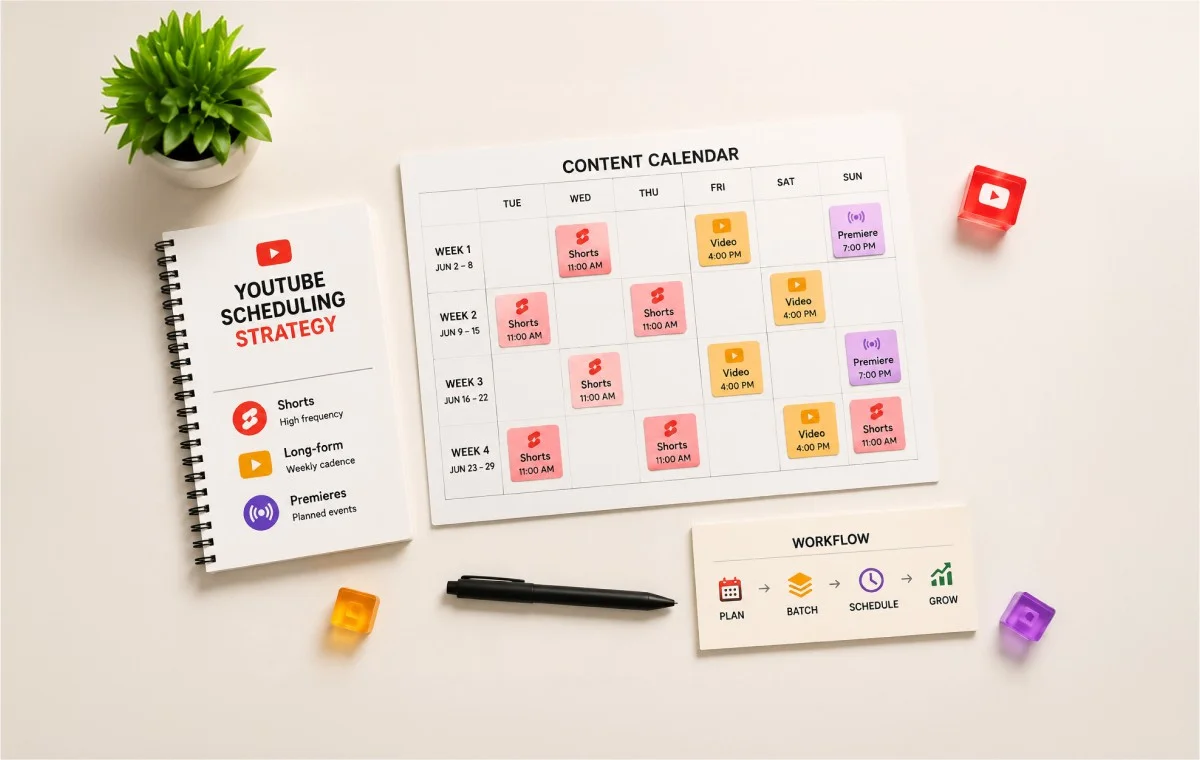
You already have a schedule to publish on YouTube. The calendar has slots, the videos go out, and at some point you tried a best time to post chart to see if a different Tuesday would change anything. It probably didn’t move the needle the way the chart promised, and now you’re left wondering what’s actually missing.
Here’s what’s missing: a system. Not a better hour to hit publish, but a real structure for how your channel handles cadence, format mix, and growth stage. That’s what a working YouTube scheduling strategy actually looks like, and it’s the part almost nobody writes about.
This piece is built for the person running that channel day to day, whether you’re an in-house social media manager handling one YouTube account or a boutique agency operator managing a handful of channels for different clients. You already know how to schedule a video. What follows is the part of your YouTube marketing strategy that decides whether that scheduled video actually adds up to something.
What a Real YouTube Publishing System Looks Like
A publishing system is the set of rules that decide when you post, how you batch, and how different formats fit together, all built to survive a busy month without falling apart. A schedule is just a list of dates. A system is what keeps that list realistic.
Consistency for Your Audience Comes First
Your audience builds a habit around your channel the same way they build a habit around a favorite show. When you show up on a rhythm they can predict, they come back on that rhythm too. That’s the actual reason consistency works, and it has nothing to do with hitting a specific hour on a specific day.
Miss that distinction and you end up chasing a posting time instead of building the habit that makes posting time irrelevant.
What YouTube’s Own Guidance Says About Staying Consistent
YouTube’s own help documentation puts it plainly:
“A consistent, sustainable release schedule is critical when building and fulfilling audience expectations and maintaining your well-being.”
That’s a platform telling you, directly, that the goal is a rhythm your audience can count on, not a specific slot on the clock.
YouTube’s recommendation system documentation goes a step further on timing specifically:
“Publish time is not known to impact a video’s long-term performance.”
Each video gets judged on how it performs once it’s live, not on the minute you hit publish. That’s not a new quirk of the YouTube algorithm 2026 updates brought in either. It’s been YouTube’s stated position across its own creator documentation for years.
That doesn’t mean timing is irrelevant to your workflow. It means the energy you’d spend hunting for the perfect hour is better spent on the system in the rest of this article. If you still want the detailed breakdown of best times to post on YouTube by format and industry, this guide covers that separately.
The Building Blocks of a YouTube Publishing System
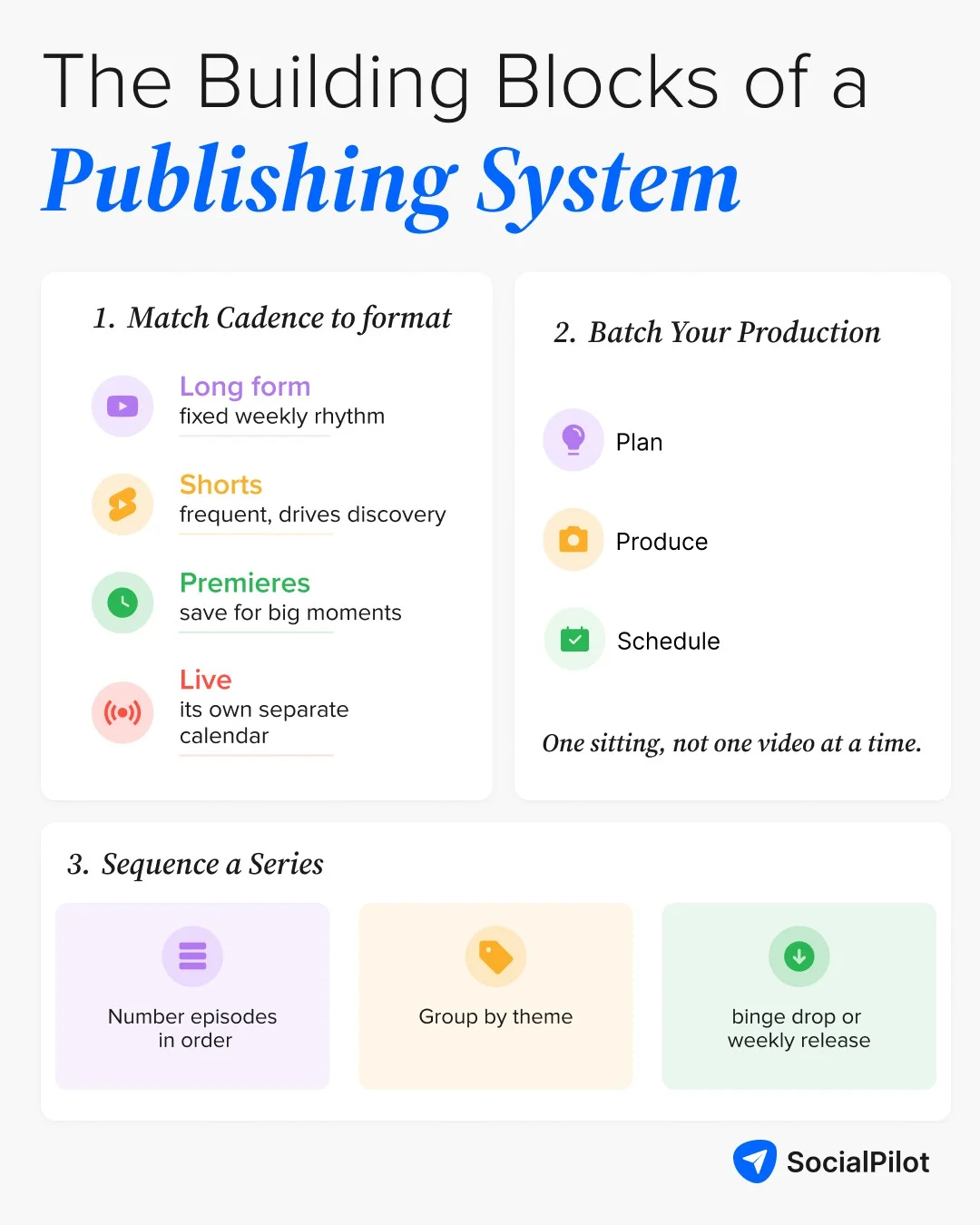
Once consistency is handled, three building blocks turn a bare schedule into an actual system:
- Matching cadence to format
- Batching your production, and
- Sequencing anything that runs as a series.
Get these three right and you have a YouTube growth strategy that holds up on a slow month, not just a good one.
Matching Cadence to Content Format (Shorts vs. Long-Form vs. Premieres vs. Live)
Not every format on your channel needs the same cadence and treating them as one undifferentiated upload stream is where most channels lose the thread of their own YouTube content strategy.
- Long-form video carries the weight of audience trust and watch time. It doesn’t need to go out often, but it needs a fixed rhythm your subscribers can set a reminder for.
- YouTube Shorts work on a faster, higher-volume cadence. They’re built for discovery, and they can safely run several times a week without competing with your long-form upload. A YouTube Shorts strategy that copies your long-form cadence wastes the one advantage the format actually has.
- Premieres work best as an event, not a default. Save them for releases that benefit from a live chat and a countdown, not for every routine upload.
- Live streams run on their own separate calendar entirely, tied to real-time audience availability rather than your production schedule.
The connective tissue between formats matters as much as the cadence itself. A Short that teases a question your long-form video answers gives both formats a job to do, instead of making Shorts feel like filler.
This is also where your broader social media content pillars framework earns its keep: it tells you what each format should actually be about, so your cadence decisions aren’t just about frequency, they’re about which pillar each upload is serving that week.
Batching Your Production Workflow
Batching is the single habit that separates channels with a real system from channels that are just trying hard. One creator described it exactly right on r/youtubers:
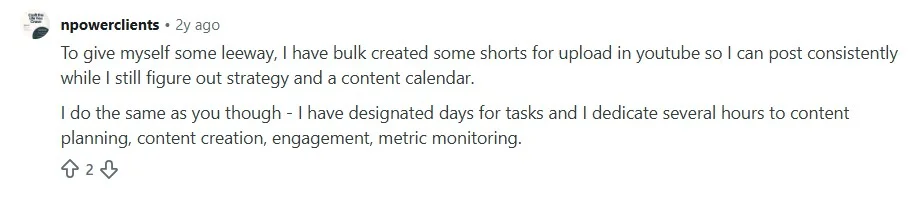
Notice what’s actually happening there: the batching isn’t just about filming several videos in one sitting. It’s about separating the “make it” step from the “publish it” step completely, so a busy week never turns into a missed upload.
A useful split when you’re batching:
- Planning session: Topics, titles, and hooks for the whole batch, done in one sitting before you touch a camera.
- Production session: Filming and editing, back-to-back, while the setup cost (lighting, audio, background) is already paid for.
- Scheduling session: Everything from that batch goes onto the calendar at once, not one video at a time as it’s finished.
That third step is where a real buffer gets built. A pile of finished files sitting on a hard drive isn’t a system. Videos scheduled and locked into the calendar are.
Sequencing a Series or Season Release
If any part of your channel runs as a series, spin-off, or seasonal arc, sequencing needs its own rules separate from your regular cadence. Here’s how you do it:
- Number episodes consistently so both viewers and YouTube’s recommendation system can follow the order.
- Group related episodes by theme rather than releasing them in a random order, so a viewer who finds episode four can still follow the thread back to episode one.
- Decide up front whether the series runs as a binge drop or a weekly release.
A weekly cadence gives you more total touchpoints with your audience over time; a binge drop rewards a launch moment but trades away those later touchpoints. Either choice works, but it needs to be a decision, not something that happens by accident because a few episodes were ready early.
If you’re managing more than one content format at once, a documented approach to building a social media content series around a defined arc keeps the sequencing decision from being remade every single week.
The Mechanics: Ways to Schedule YouTube Videos
Once the system is in place, the mechanics of actually scheduling a video are the easy part of your YouTube video strategy. You have two real paths:
- YouTube’s own scheduling tools, or
- A third-party tool that handles YouTube alongside everything else you manage.
Native YouTube Studio Scheduling
YouTube Studio is the free, built-in way to schedule, no extra tool needed. Here’s exactly how it works right now.
1. Sign in to YouTube Studio and click Create in the top right, then Upload videos.

2. Upload your video file, then add the title, description, and tags while it processes.
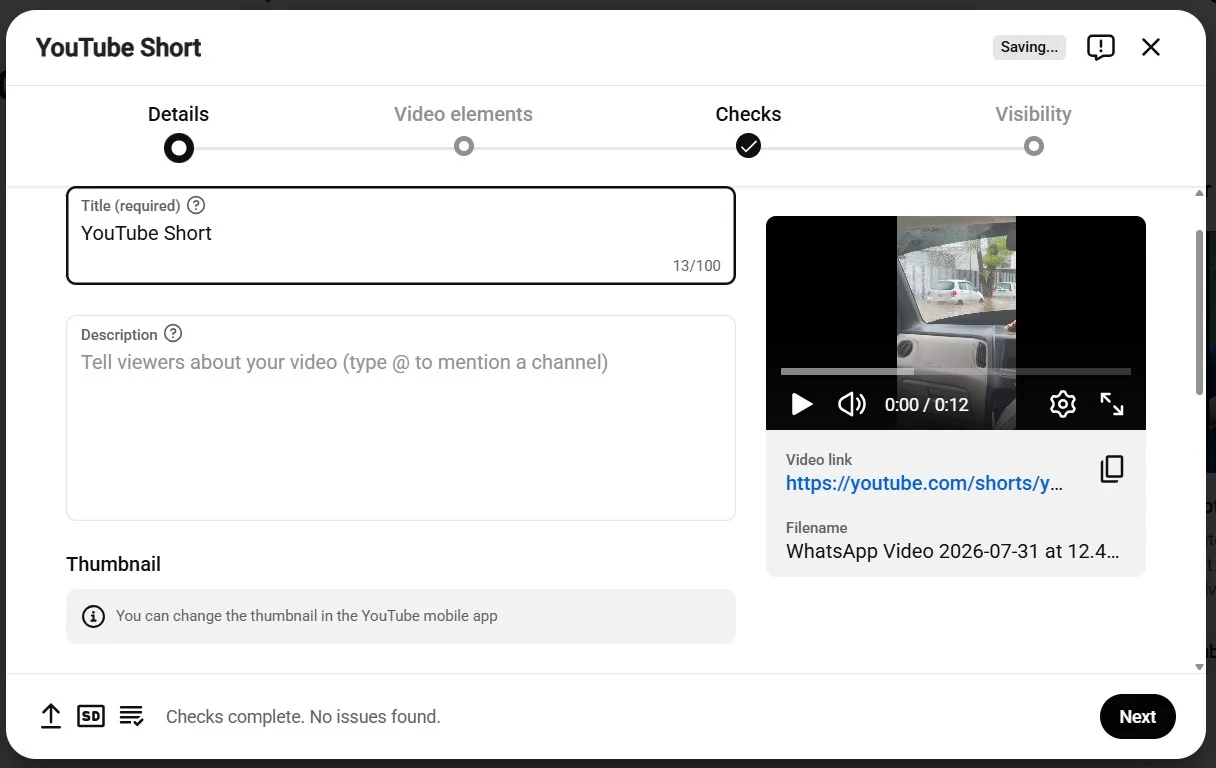
3. Add a thumbnail. Custom thumbnails, along with scheduling longer videos, need a verified account. Verify once under Settings > Channel > Feature eligibility, it’s a one-time phone confirmation, not a per-video step.

4. On the Visibility step, select Schedule instead of Public or Private, then set your date and time.
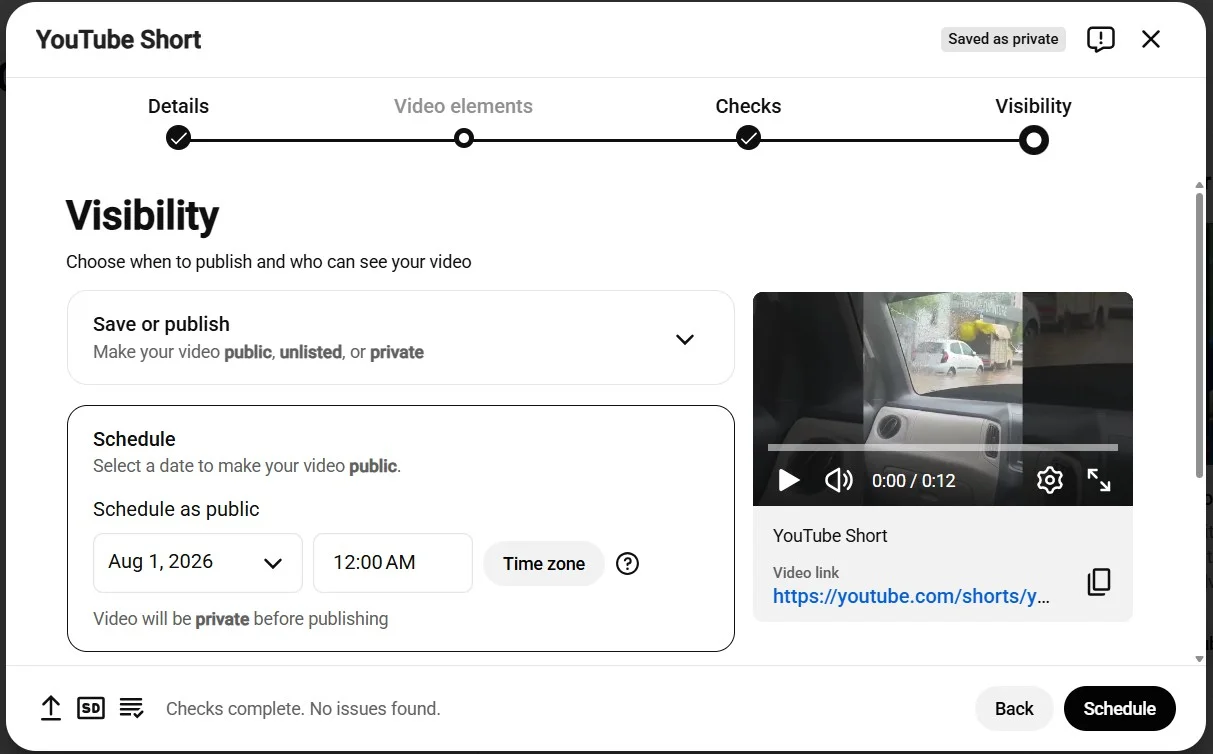
5. Click Schedule to confirm. The video sits in your Content tab with a clock icon until it goes live automatically.
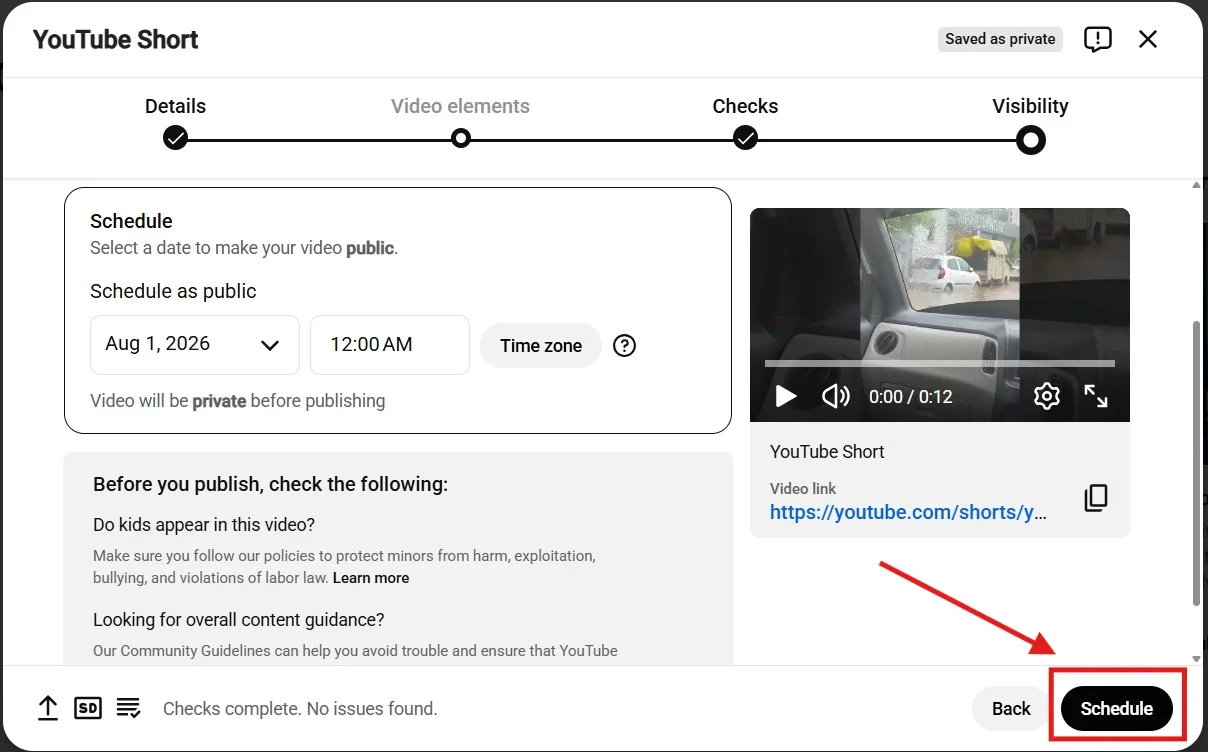
For a Premiere, use the same upload flow and toggle Set as Premiere instead of a standard schedule. That adds a countdown page and live chat for viewers when the video goes public.
Third-Party Scheduling Tools
A third-party tool earns its place once you’re managing more than one format, more than one channel, or a team that needs to see the same calendar. Here’s what that looks like using SocialPilot as the example.
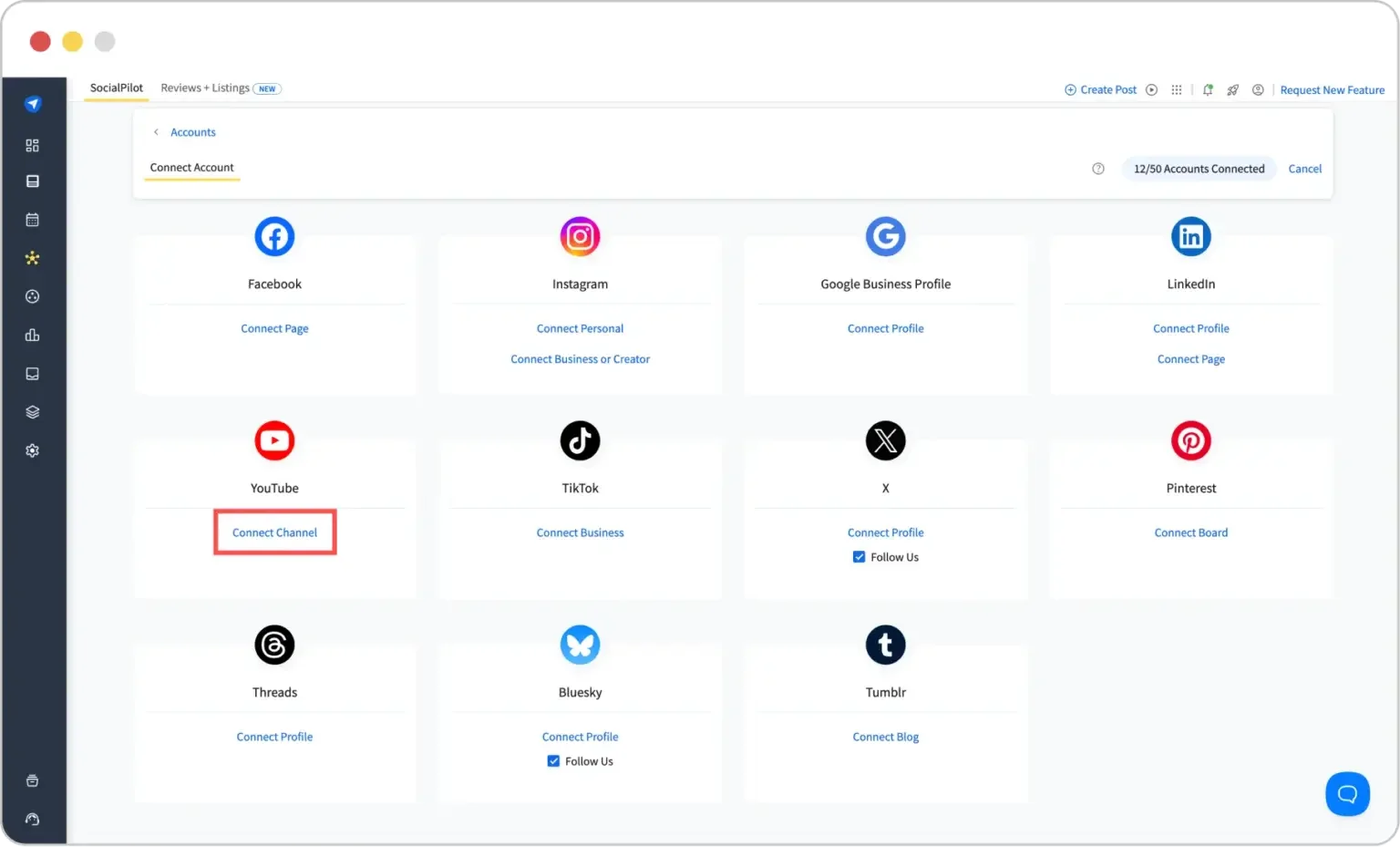
1. Connect your channel once, from Connect Account > YouTube, then sign in and grant access. You won’t need to repeat this per video.
2. Start a new post and switch the format tab to YouTube.
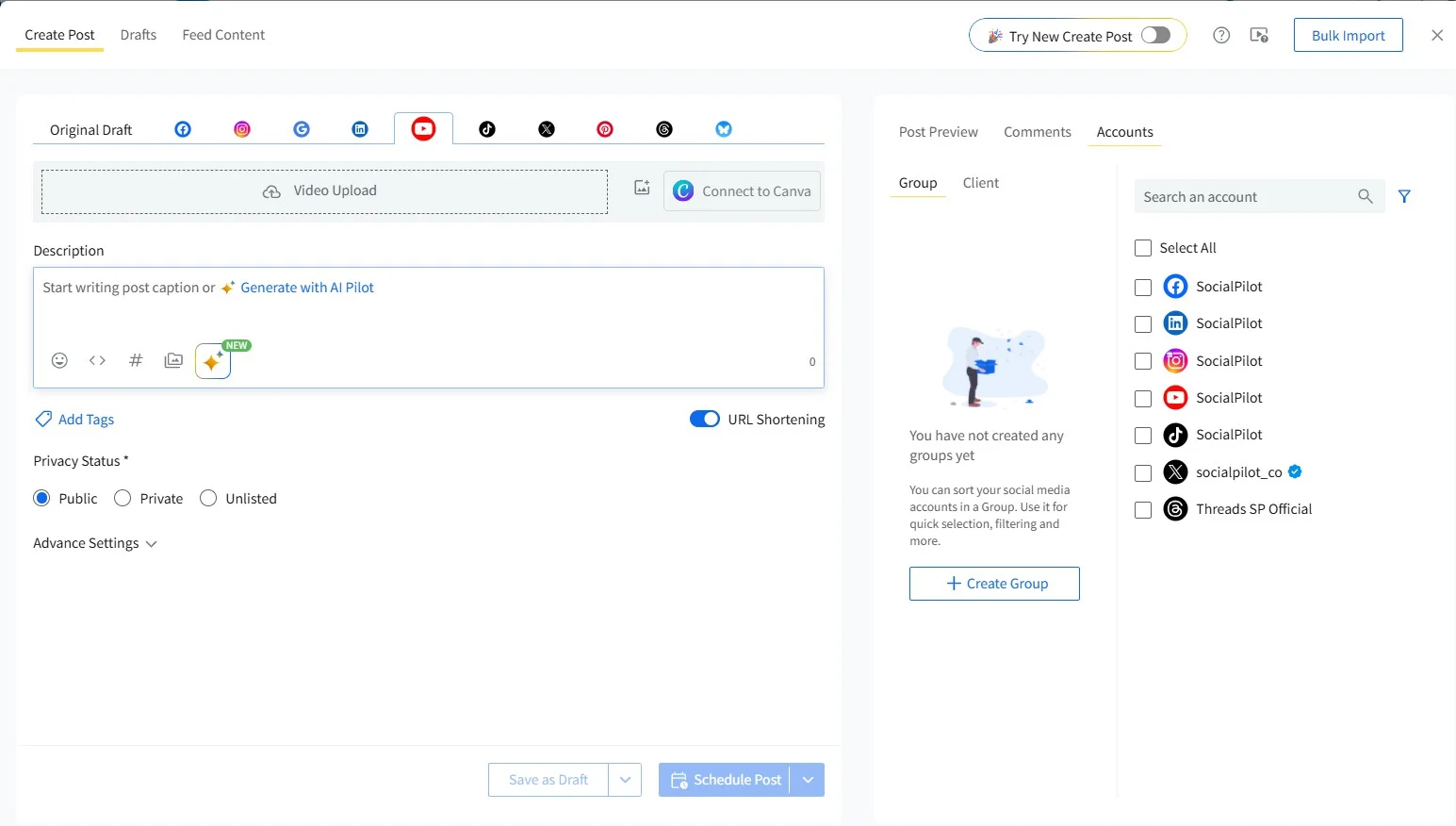
3. Upload your video or Short from your device or from Dropbox, Google Drive, or Box, then add your title and thumbnail.
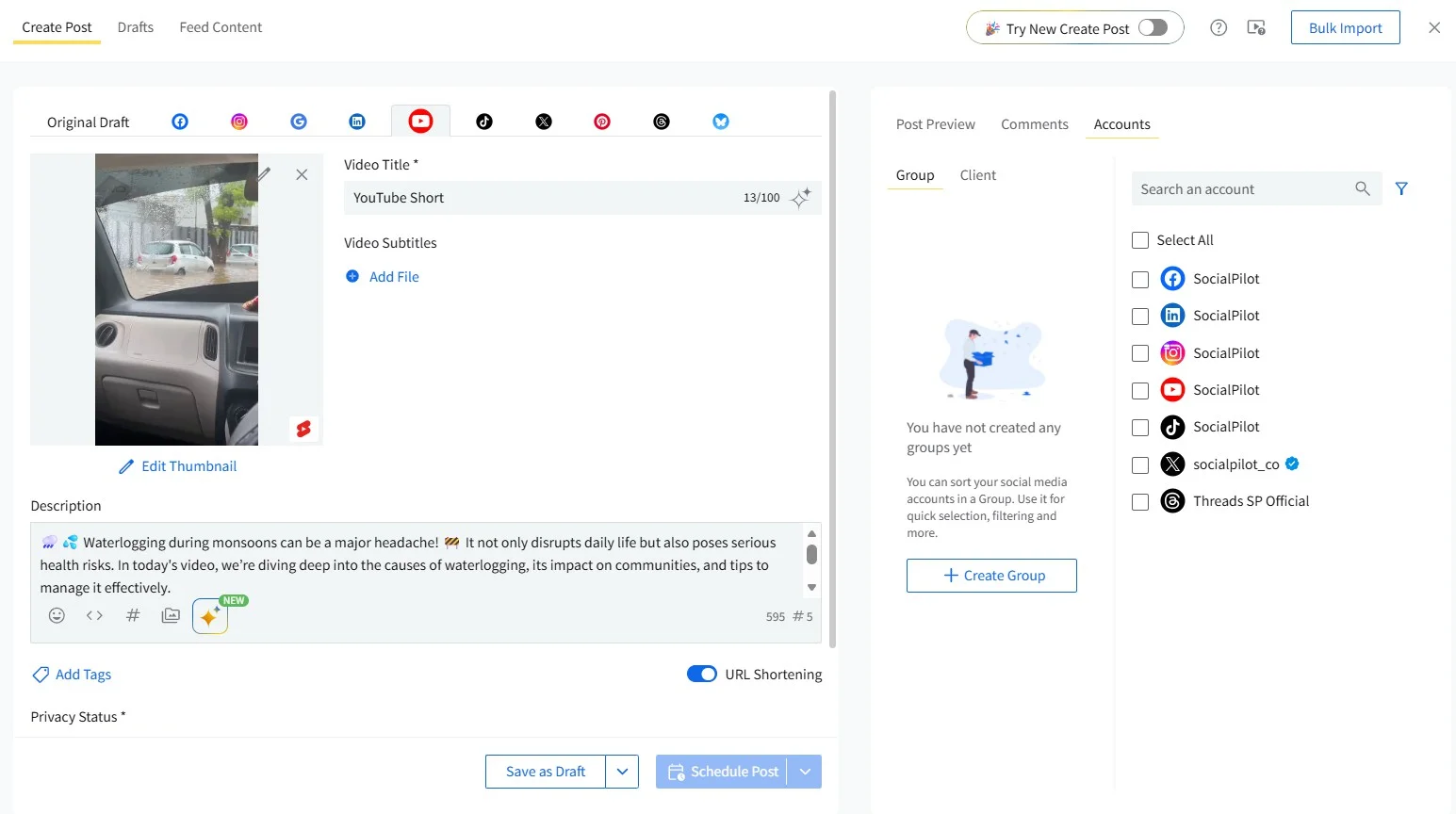
4. Write your description, then set your YouTube options: privacy, content category, license, playlist, and tags.
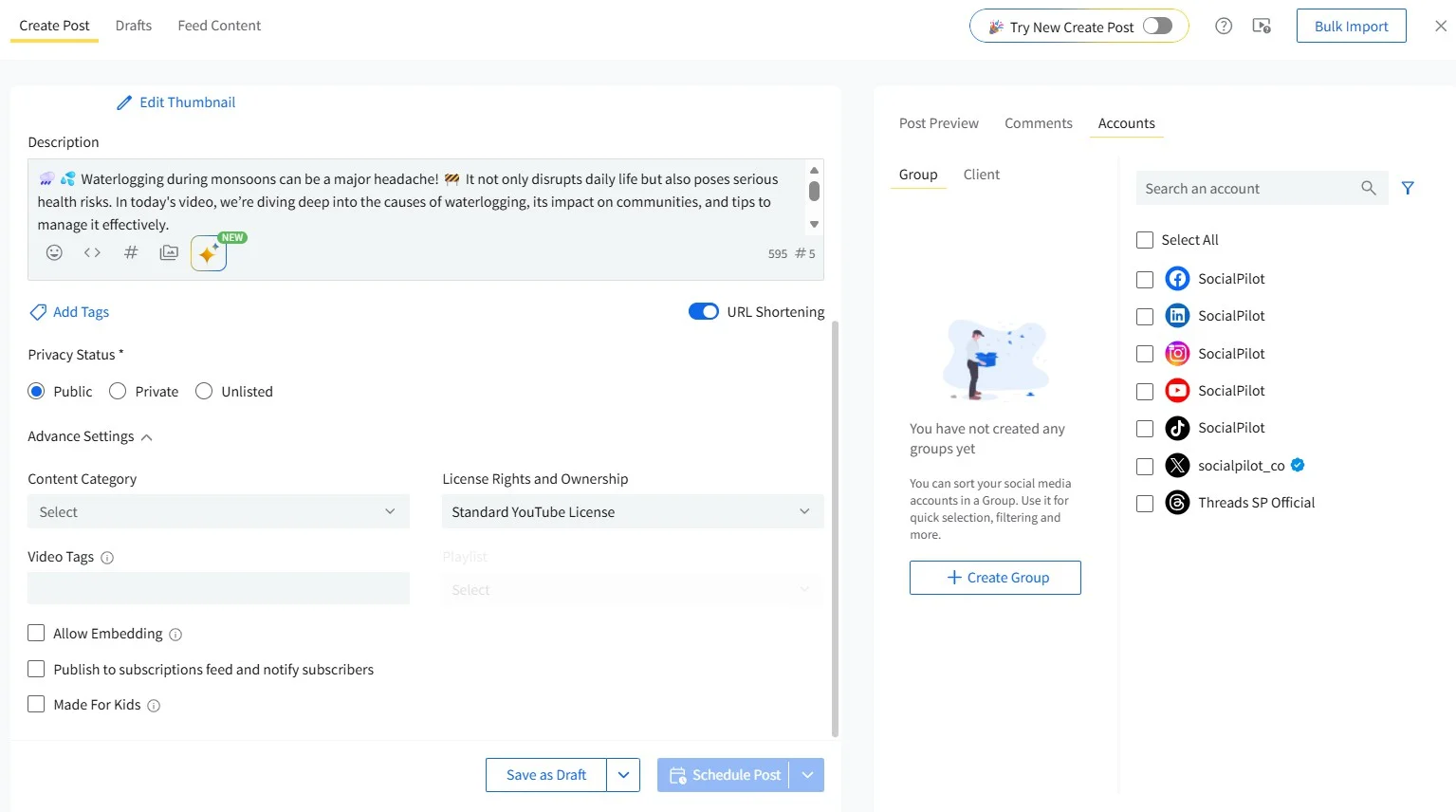
5. Adjust the extra settings, embedding, subscriber notifications, and made-for-kids status, if any apply to this video.
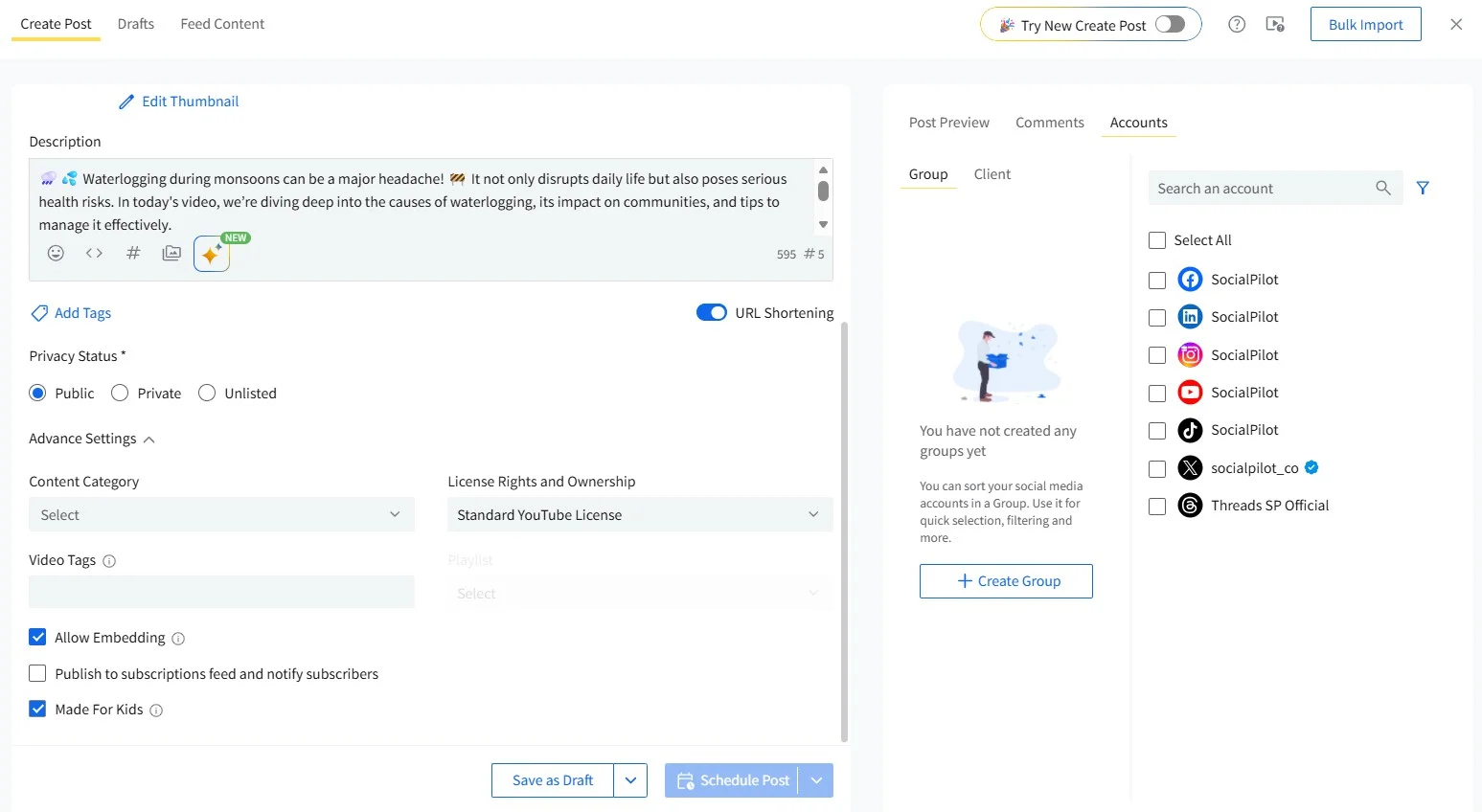
6. Pick your channel from the Accounts list, then choose Schedule Post, Add to Queue, or Share Now for the date and time you want.
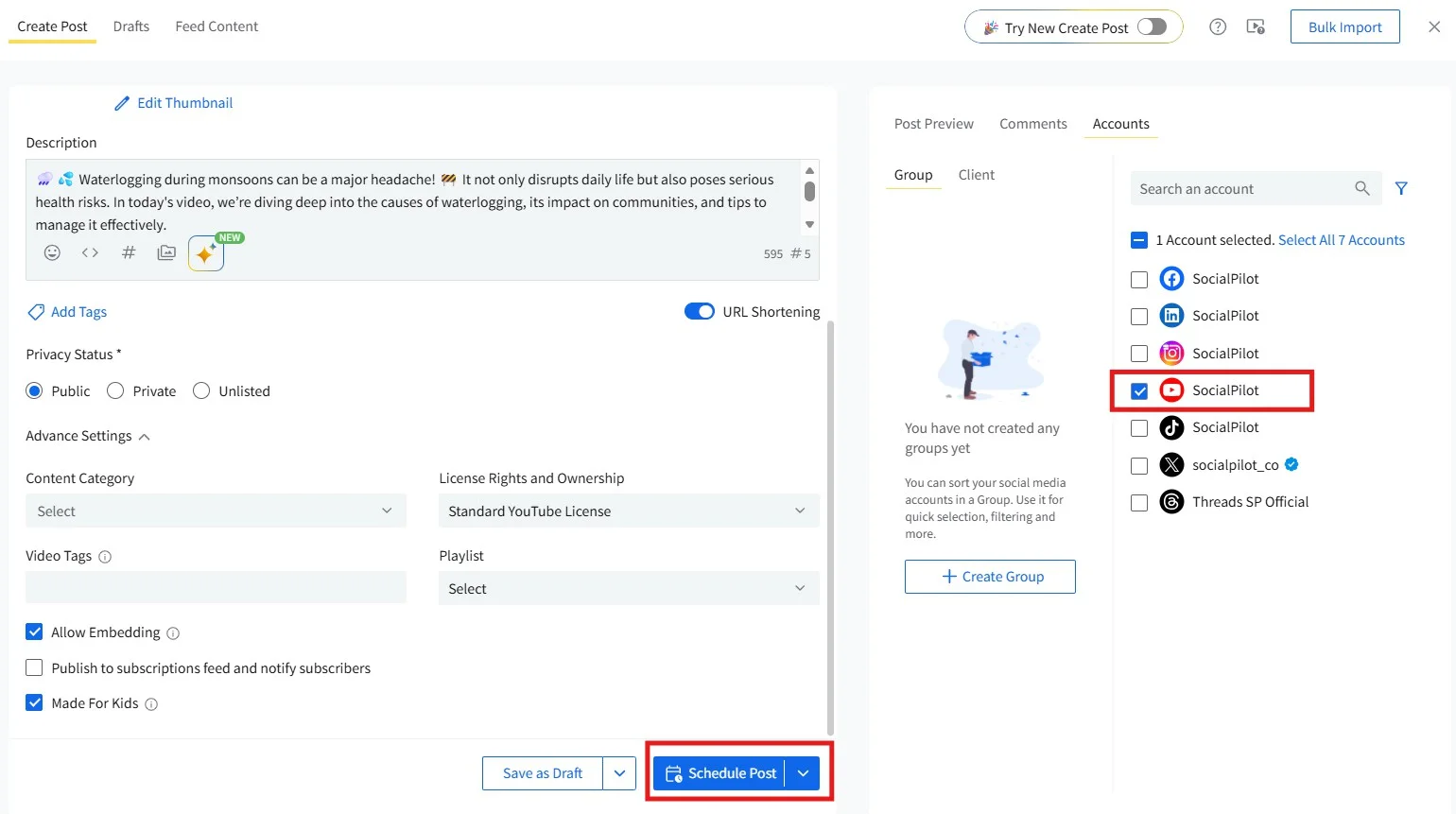
The real value isn’t the scheduling button itself, since YouTube already gives you that. It’s a shared calendar view across every format and channel, so cadence decisions are visible to everyone instead of living in one person’s head.
| Native YouTube Studio | Third-Party Tool | |
| Best for | A single channel, one person managing it | Multiple formats, multiple channels, or a team |
| Calendar visibility | Per-video, inside YouTube only | One shared view across channels and platforms |
| Team access | Limited to channel owner/managers YouTube grants access to | Role-based access without sharing account logins |
| Format handling | Manual toggle per upload | Often auto-detects vertical vs. horizontal on upload |
SocialPilot’s YouTube scheduling is ideal for multi-format scheduling on YouTube and its multi-channel calendar view gives you a bird’s-eye view of all your scheduled posts across all social platforms.
Matching the YouTube Publishing System to Your Stage of Growth
The right publishing system isn’t the same at every stage. What a brand-new channel needs to build trust looks nothing like what a channel with a full back catalog needs to protect it, and both look different again once you’re running the system across more than one channel.
| New Channels Building Trust | Established Channels With a Back Catalog | Agencies Managing Multiple Channels | |
| Primary focus | Building predictable audience expectations from a small base | Sustaining consistency without burning out a mature workflow | Standardizing a repeatable process across channels |
| Cadence approach | A modest, sustainable cadence held consistently over months | Cadence matched to an established audience, protecting quality over adding volume | A cadence template each channel’s team can execute independently |
| Batching priority | Batch a small buffer (2-3 videos) to protect the early streak | Batch around tentpole content and seasonal moments | Batch templates and briefs, not just finished videos |
| Format mix | Lean on Shorts for discovery while long-form trust develops | Long-form as the anchor, Shorts and Premieres as amplification | Format mix varies by channel goals; standardize the decision process, not the format |
| Common pitfall | Overcommitting to a cadence that isn’t sustainable | Coasting on an old cadence that no longer matches a grown audience | Applying one channel’s system to every channel without adjusting for stage |
New Channels Building Trust
At this stage, the job is to build an ICP-led social media community and create trust rather than chase volume. A small, reliably kept cadence does more for a new channel than an ambitious one that collapses after three weeks. Two or three videos held back as a buffer protects that early streak from a single bad week wiping out the momentum you just built.
Established Channels with a Back Catalog
Once you have a real audience and a back catalog behind you, the risk flips. The temptation is to coast on whatever cadence got you here, even after your audience, your production capacity, or your format mix has changed. Revisit the cadence on a set schedule (quarterly works for most channels) instead of assuming what worked at 10,000 subscribers still fits at 100,000.
Agencies Managing Multiple Channels
If you’re running the system across a handful of client or brand channels rather than just your own, the challenge shifts from “what’s the right cadence” to “how do I keep every channel’s cadence straight without it living in someone’s head.” One social media manager described exactly this bottleneck on r/socialmedia.

A repeatable template, not a repeatable memory, is what keeps a handful of channels from turning into a handful of separate improvised systems.
Common Mistakes That Break the Publishing System
Even a well-designed system breaks down in predictable ways. These five show up again and again across creators and teams running an otherwise solid YouTube channel growth strategy.
1. Sacrificing Quality to Hit a Frequency Target
Chasing a frequency number for its own sake is one of the fastest ways to undo real growth. One creator’s own experiment made the tradeoff clear:
“How Many Videos Should I Upload A Day in My Channel?”
The question many do ask. I have answered this in my program.
For those not in the program, here is my opinion.
I have seen some channels posting more than 1 video a day.
I have also posted more than 1 video a day on…
— LORA (@ChrisUkaNkem) January 14, 2025
A cadence only works if the quality holds at that pace. The moment it doesn’t, the fix is to slow down, not to push harder.
2. Treating a Necessary Break as a Setback
A lot of the fear around taking a break comes from believing YouTube quietly punishes channels that go quiet for a while. That belief doesn’t hold up against what YouTube’s own team has said. In an interview covering how YouTube’s recommendation system actually evaluates videos, Todd Beaupré, YouTube’s Senior Director of Growth and Discovery, described there being no penalty box for channels that post inconsistently: each video is judged on its own performance, not your recent upload history.
That’s not a license to be careless about consistency. It’s permission to take a planned break without treating it as damage you now have to repair.
3. No Batching Workflow, So Consistency Never Sticks
Without a batching habit, every single upload becomes its own small crisis: film, edit, publish, repeat, with zero buffer if any single week goes wrong. A five-person team managing several formats at once described exactly this problem on r/youtubers, where they had “a release schedule and are working on a filming schedule” but no shared system tying the two together.
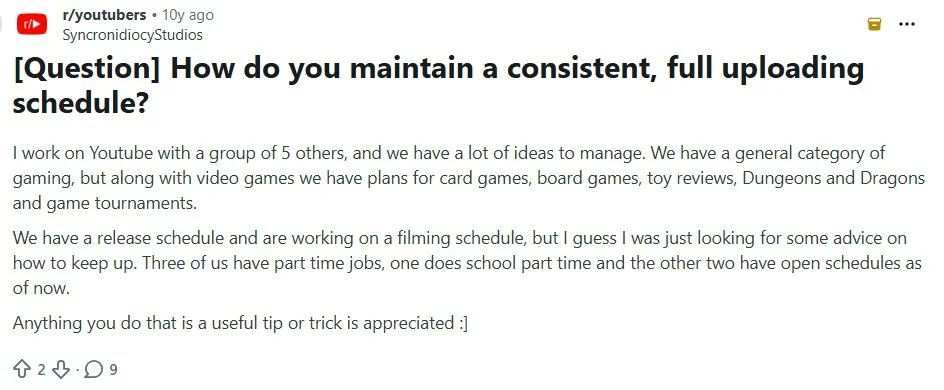
Consistency without batching is just discipline with no safety net. One missed week, and the whole streak is gone.
4. Ignoring Format-Specific Differences in Cadence
Treating Shorts and long-form as one undifferentiated upload stream, scheduled at the same cadence and often the same time, wastes the strength each format actually has. Shorts are built to run often and drive discovery. Long-form is built to run less often and build depth. Scheduling them identically means neither one gets to do its actual job.
5. Building a Schedule Around Guesswork Instead of Your Own Channel Data
Copying another creator’s exact cadence, down to the day and format mix, without matching their production capacity or audience is one of the most common ways a schedule falls apart within a month. Your YouTube posting frequency should come from what your own channel’s analytics show about your audience’s habits and your own team’s actual output capacity, not from a screenshot of someone else’s calendar.
Building This into Your Content Calendar
None of these building blocks matter if they only exist as ideas in your head. A working YouTube content calendar is what turns cadence rules, batching sessions, and format mix into a system someone else on your team can run the same way you would. A schedule tells you what goes out next. A system tells you why, and makes sure that stays true even when you’re not the one hitting publish.
That’s the part SocialPilot is built for. Its calendar shows every channel’s format, batch status, and scheduled date in one place, so cadence and batching stop being something only you remember and become something the calendar enforces for the whole team. See SocialPilot’s plans and pricing to find the plan that fits how many channels you’re running.




 Join 55,000+ social media managers


