
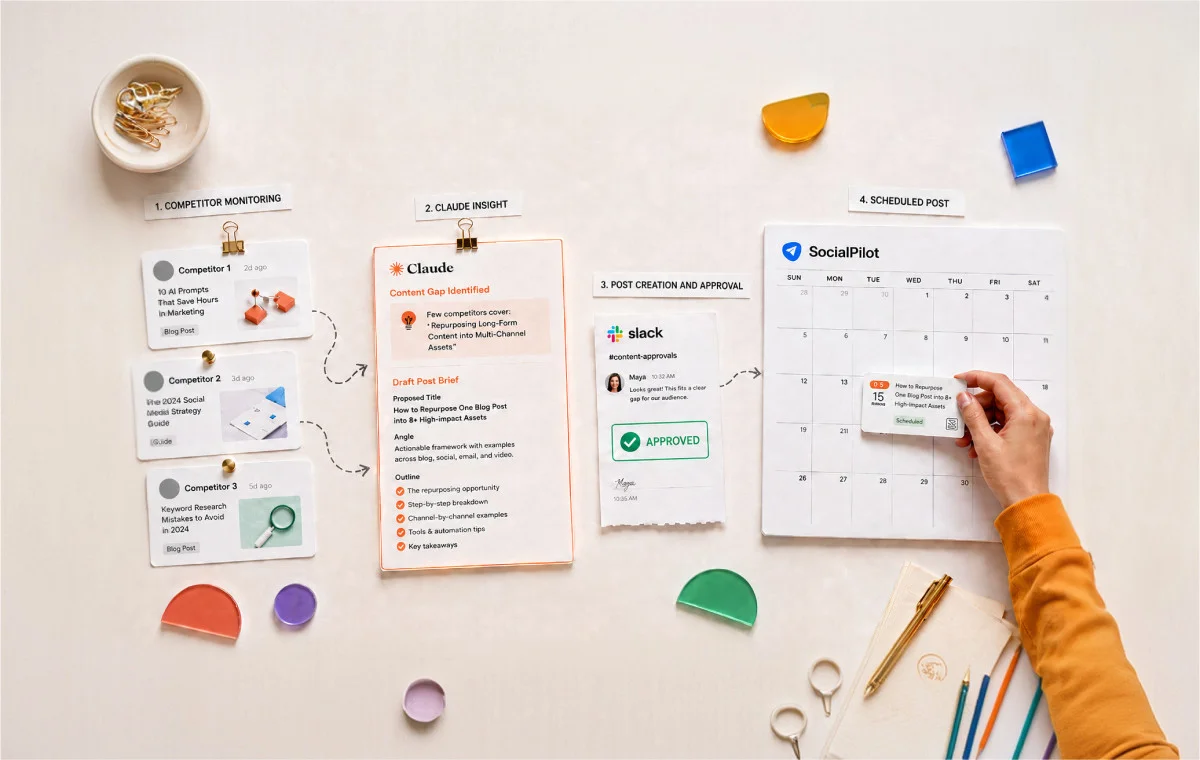
You already know your client’s competitors are doing something worth paying attention to. The problem isn’t visibility. The problem is that by the time you’ve collected the data, spotted the gap, written the brief, drafted the post, and routed it for approval, the moment has passed or the week has moved on.
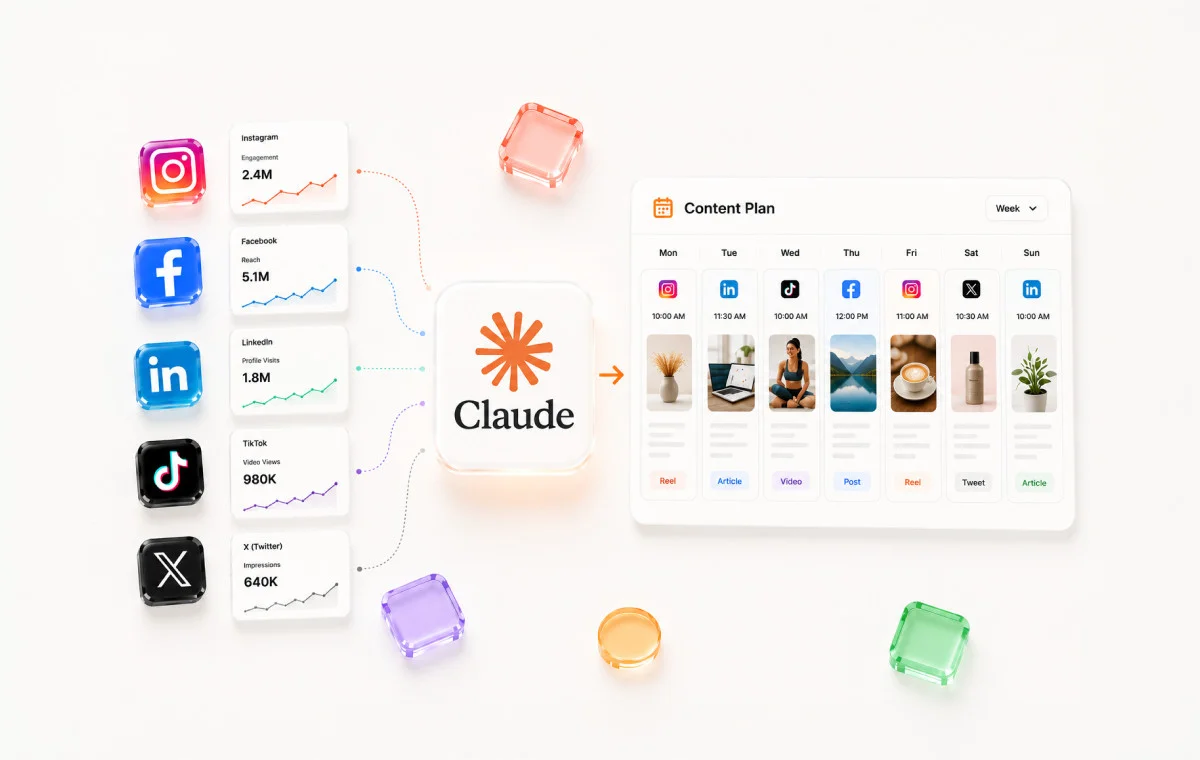
This article walks through an agency workflow that collapses all of that into a single connected process. Claude pulls competitor content, reads what your client has already published, identifies the gaps, delivers a brief to your team in Slack, and when you decide to act on it, drafts and schedules the post without ever leaving the conversation.
The workflow runs on three MCP integrations and can be packaged as a reusable Skill that runs across every client account with one command.
Why Competitive Analysis Never Makes It Into the Content Calendar
Most agencies pull competitor data, generate a document with observations, share it in a team channel, and then watch it go unread for weeks.
Even though the insight exists, the action never follows.
You can spot the gap. You just can’t act on it fast enough.
Manually performing the social media competitor analysis across three platforms for one client takes time. Organizing it into something actionable takes more. Writing a draft based on the gap analysis is a separate task that lands in a backlog. And scheduling the post requires yet another context switch into your publishing tool.
By the time a social media manager completes that full chain for one client, the competitive window that made the gap worth acting on has often already shifted.
The bottleneck in most agency competitive workflows isn’t analysis. It’s the distance between identifying a content gap and getting a post into the client’s queue.
Why the problem gets worse at 10 to 20 clients
At one or two clients, a manual competitor monitoring process is manageable. At ten clients, each with three to five competitors across two or three platforms, it becomes challenging. You’re not doing competitive analysis anymore; you’re managing a research operation.
Each client has a different competitor set, different brand voice, different posting cadence, and different audience sensitivities. Running the full monitoring-to-publishing loop manually for ten clients can be challenging.
Most agencies respond to this by running competitor analysis less often, not more efficiently. Quarterly becomes the default cadence not because it’s strategically sound but because it’s the only frequency the manual process can sustain. And quarterly data is rarely actionable by the time it’s ready.
What a connected workflow actually changes
A connected workflow doesn’t just make individual tasks faster. It changes the economics of how many clients you can run this process for, at what frequency, and with how much human involvement at each step.
When competitor monitoring, gap identification, brief generation, content drafting, and scheduling all happen inside one Claude conversation – connected through MCPs to the platforms that hold the data – the work that took three hours per client per quarter takes 45 minutes per client per week. And the output isn’t a document. It’s a scheduled post.
Agencies using this social media workflow can extend that structure into competitive intelligence without adding headcount or tool sprawl.
The System: Three MCPs, Two Phases, One Conversation
The architecture required to simplify this workflow involves three MCP integrations running inside a single Claude conversation. Each tool handles what it’s built for. Claude connects them.
Before anything else, make sure all the below MCPs are connected in Claude Desktop.
1. Apify MCP – Your data collection layer for social media competitor monitoring tools agencies already use manually. Once connected, Claude can call Apify’s scrapers directly from the chat window.
For competitor analysis, it handles:
- Pulling recent posts from competitor’s Instagram, TikTok, LinkedIn, and X handles
- Returning engagement data per post: likes, comments, saves, shares, etc.
- Scraping comment sections to surface recurring audience questions
- Running multiple account pulls in one request across different platforms
2. SocialPilot MCP – Your publishing and content layer. Claude connects directly to your client’s SocialPilot account to close the loop from competitor insight to scheduled post. It handles:
- Reading the client’s published post history so Claude knows what’s already been covered
- Accessing the content calendar and queue to check what’s already scheduled
- Pushing approved drafts directly into the client’s scheduling queue
- Routing posts to the correct client account across a multi-client workspace
3. Slack MCP – Your team communication layer, this MCP is useful when multiple team members need to see the gap output. It handles:
- Posting content gaps to a designated client channel
- Delivering weekly summaries to specific team members
- Keeping a searchable record of past competitive gap analyses per client
Apify pulls data. SocialPilot manages publishing. Slack delivers messages. With these 3 integrations you can look at a competitor’s last 20 posts, compare them against your client’s content, identify the gaps, and then draft a post that addresses it in your client’s voice.
That synthesis layer is what Claude provides. It’s not a better version of any individual tool. It’s the process that connects them.
What the Workflow Produces Each Week and Who Touches What
| Step | Who Acts | Output |
| Competitor posts pulled | Claude via Apify MCP | Raw post data per competitor account |
| Client content read | Claude via SocialPilot MCP | Published post history |
| Gap analysis run | Claude | Ranked gap opportunities in chat |
| Gap selected | Agency team | Decision on which gap to act on |
| Draft requested | Agency via prompt | Post draft in client voice |
| Review and iteration | Agency (and optionally client) | Approved draft |
| Post scheduled | Claude via SocialPilot MCP | Post in client’s content queue |
The agency makes two decisions: which gaps to act on, and whether the draft is ready to schedule. Everything else runs through Claude.
Phase 1: From Competitor Feeds to a Gap Brief in Your Chat
Phase 1 starts with pulling competitor posts and ends with a clear, ranked gap list delivered directly in your Claude conversation.
The one-time client setup
Before running the workflow for a client, give Claude the context it needs in one setup message. Do this once at onboarding and update it as and when required. Getting this done during the first 90 days with a social media client means the workflow is producing useful output before the account hits its first reporting cycle.
Copy and paste this prompt, fill in the brackets, and send it at the start of any new client conversation:
I’m setting up a competitor monitoring workflow for a client. Here is their context:
Client name: [Client Name]
Industry: [e.g. fitness equipment, B2B SaaS, food delivery]
Target audience: [brief description]
Competitor accounts to monitor:
– Instagram: [@handle1, @handle2, @handle3]
– LinkedIn: [@handle1, @handle2]
– TikTok: [@handle1]
Client brand voice: [paste 2-3 example posts from their account]
Content the client focuses on: [list 3-5 topic areas or content pillars]
Content they avoid: [any standing off-limits topics or tone guidelines]
Save this as the working context for all steps in this session.
Step 1: Pull competitor posts via Apify MCP
This prompt tells Claude to call Apify and retrieve recent competitor content. Paste it after your setup message, with the competitor handles filled in:
Use the Apify Instagram Scrapper to pull the 15 most recent posts from each of these
competitor accounts on Instagram:
[@handle1, @handle2, @handle3]
For each post, return:
– Caption (first 150 characters)
– Content format: Reel, carousel, static image, or text
– Likes, comments, and saves where available
– Date posted
Organize by account. Do not analyze yet, just collect and display the data.
Claude with pull posts from each of your competitor’s accounts and give you the results that will look something like this:
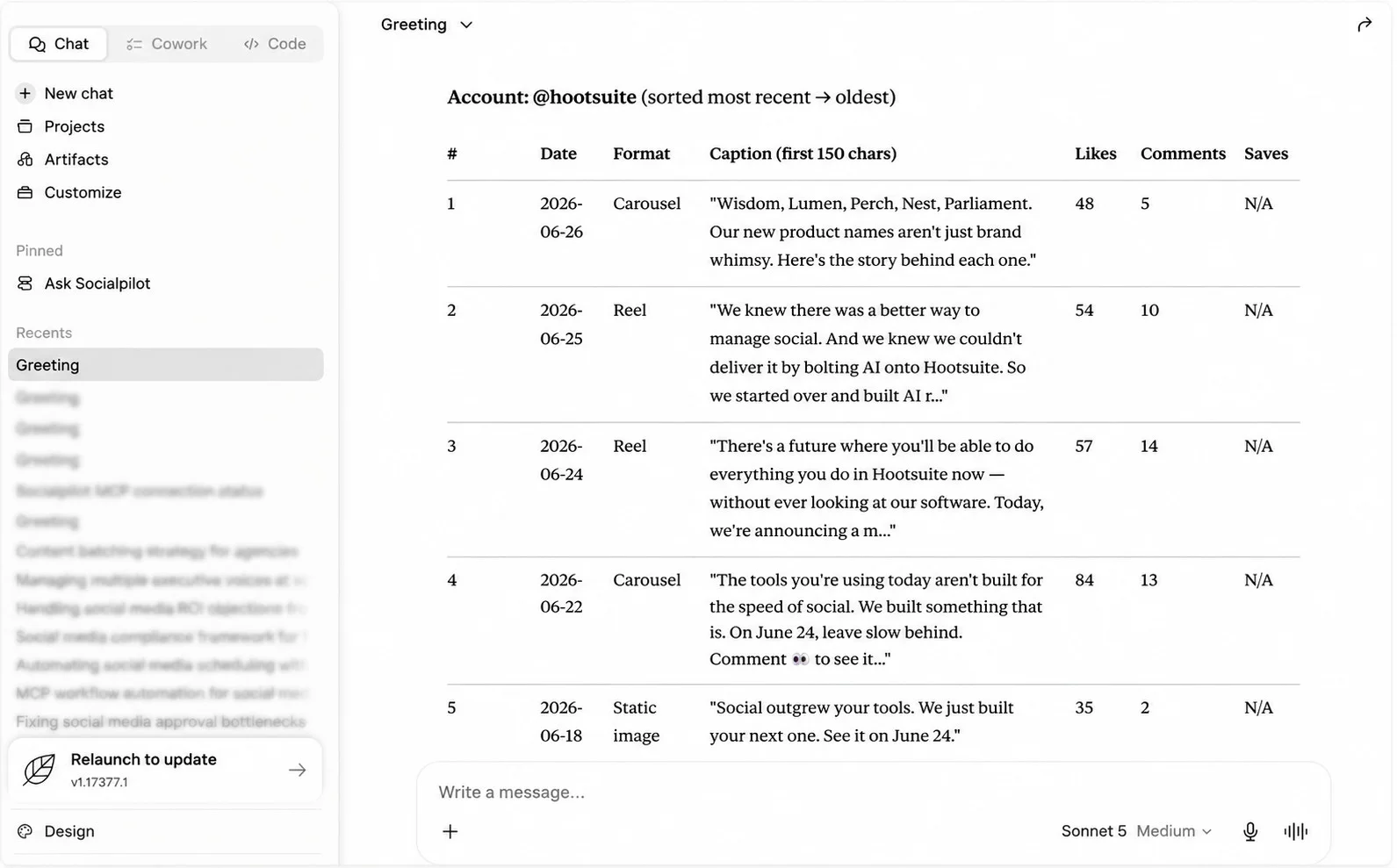
If you also want to pull posts from LinkedIn or TikTok at the same time, add those handles and specify the platform per account. Apify uses different scrapers per platform, so Claude will call the right scrapper automatically if your Apify MCP is connected.
Before Claude can identify gaps, it needs to know what the client has already posted. This step prevents the workflow from surfacing content the client published two weeks ago as a “gap.”
Use the SocialPilot MCP to pull [Client Name]’s last 30 published posts
from their Instagram account.
For each post return:
– Caption (first 150 characters)
– Format: Reel, carousel, static, or text
– Likes and comments
– Date posted
Do not analyze yet. Store this as the client’s content dataset for this session.
Claude will then use the SocialPilot’s MCP to provide you with your client’s content dataset as shown below.
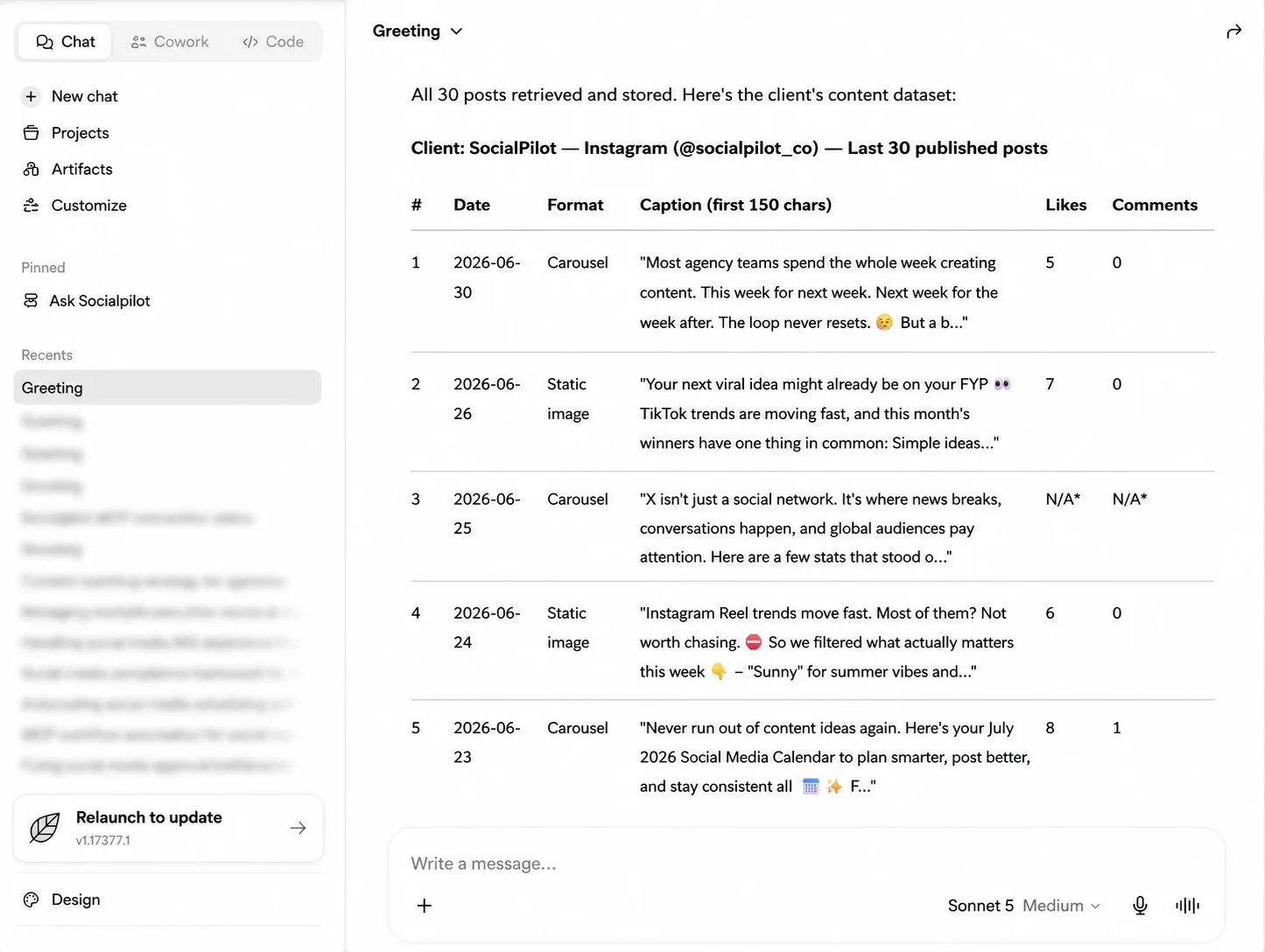
This also gives Claude a secondary signal: which of the client’s formats and topics are performing well, which helps it weight the gap recommendations more accurately.
Step 3: Run the gap analysis
This is the core of the competitor content gap analysis on social media. Claude compares the two datasets and identifies where the client has an opening. The four gap types to look for are topic gaps, format gaps, platform gaps, and depth gaps.
You now have two datasets:
1. Recent posts from [Client Name]’s competitor accounts
2. Recent posts from [Client Name]’s own account
Run a content gap analysis across four dimensions:
TOPIC GAP: What subjects are competitors covering consistently – with clear audience engagement – that [Client Name] hasn’t posted about recently?
FORMAT GAP: What content formats are competitors using that generate strong saves or shares, but [Client Name] hasn’t tested recently?
PLATFORM GAP: Are competitors building audience on a platform where [Client Name] is absent or underposting?
DEPTH GAP: Where are competitors posting surface-level content on a topic that comment sections show the audience wants more of? Look for recurring follow-up questions in competitor comments.
For each gap type, identify the top opportunity. Rank all four by signal strength. Ignore one-off viral posts – only flag patterns that appear across multiple posts or multiple competitor accounts.
Claude will then compare the client’s and competitor’s content and come up with the topic gaps, format gaps, platform gaps, and depth gaps.
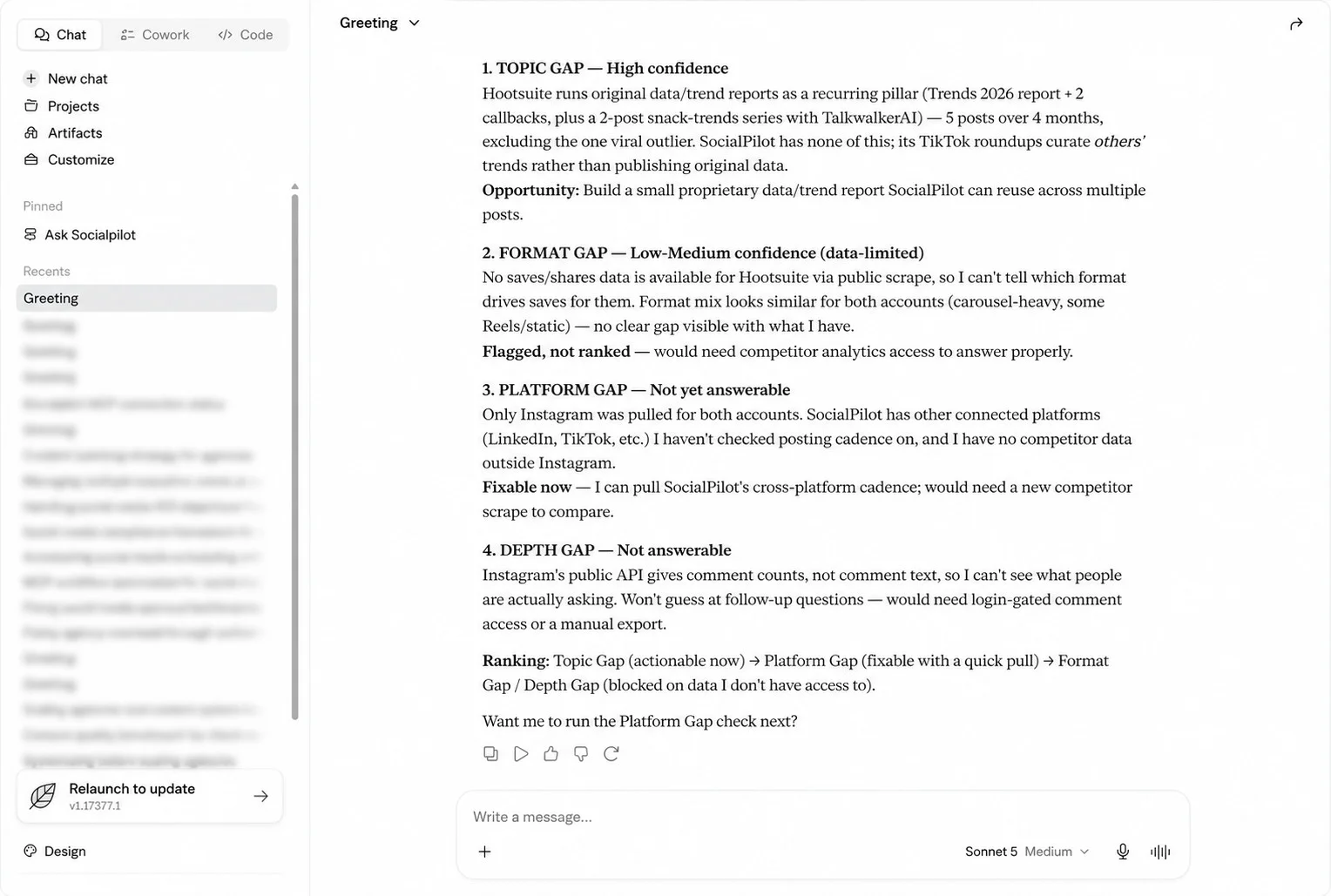
Agencies that run gap analysis across all these four dimensions, and not just topic monitoring, are the ones who find the opportunities competitors don’t realize they’re leaving open.
Step 4: Get the structured gap brief in chat
Once the analysis runs, ask Claude to format the output as a clean, actionable brief you can review and share directly from the chat:
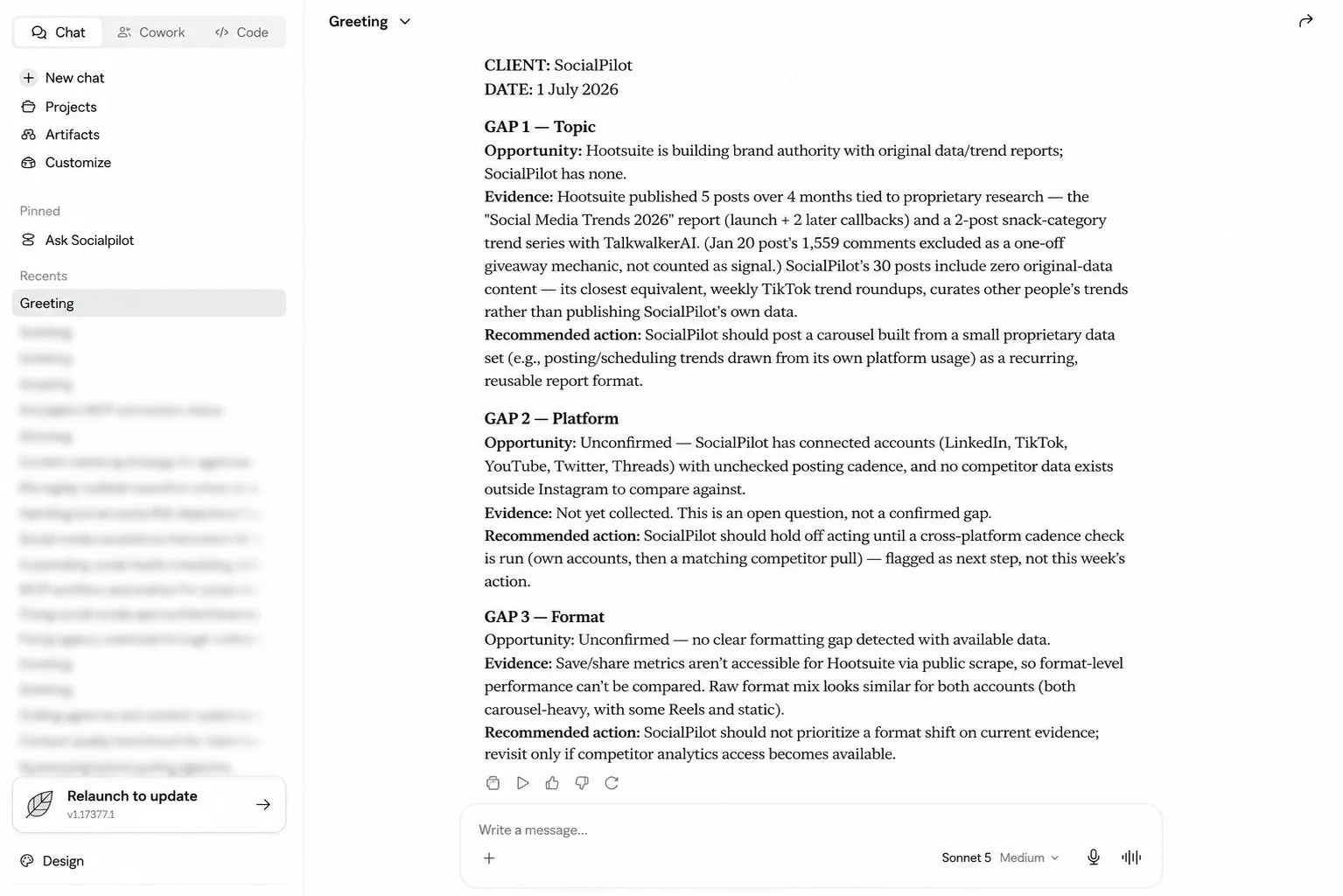
Format the gap analysis results as a structured brief with this layout:
CLIENT: [Client Name]
DATE: [today’s date]
GAP 1 – [Topic / Format / Platform / Depth]
Opportunity: [one sentence describing the gap]
Evidence: [which competitor, what content performed, what the signal is]
Recommended action: [Client Name] should post [format] about [topic]
GAP 2 – [repeat]
GAP 3 – [repeat]
End with a one-line summary of the single highest-priority gap and why it’s worth acting on this week.
Claude will then produce an analysis talking about the content gaps, opportunities, evidence, and recommended action. The image below shows the gap report produced by Claude.
Step 5: Send the Gap Brief to the Client via Slack MCP
Before Claude drafts anything, the client should have a say in which gap is worth acting on. This step routes the brief from Step 4 straight into the client’s Slack channel and lets Claude read their reply, so the topic gets a client sign-off before any copywriting time is spent.
Use the Slack MCP to send the following gap brief to [client’s Slack channel / direct message to client contact]:
CONTENT GAP BRIEF – [Client Name] – [Date]
[paste the ranked gap brief from Step 4 here]
Message to client: “Here are this week’s content gaps based on your competitors’ recent activity. Which of these would you like us to act on first?”
Once the client replies in the thread, read their response and confirm which gap number they’ve selected.
Claude posts the brief as a formatted message in the designated channel, the client replies in the thread with their pick, and Claude reads that reply back into the conversation – no tab-switching, no manually relaying the client’s answer into the chat.
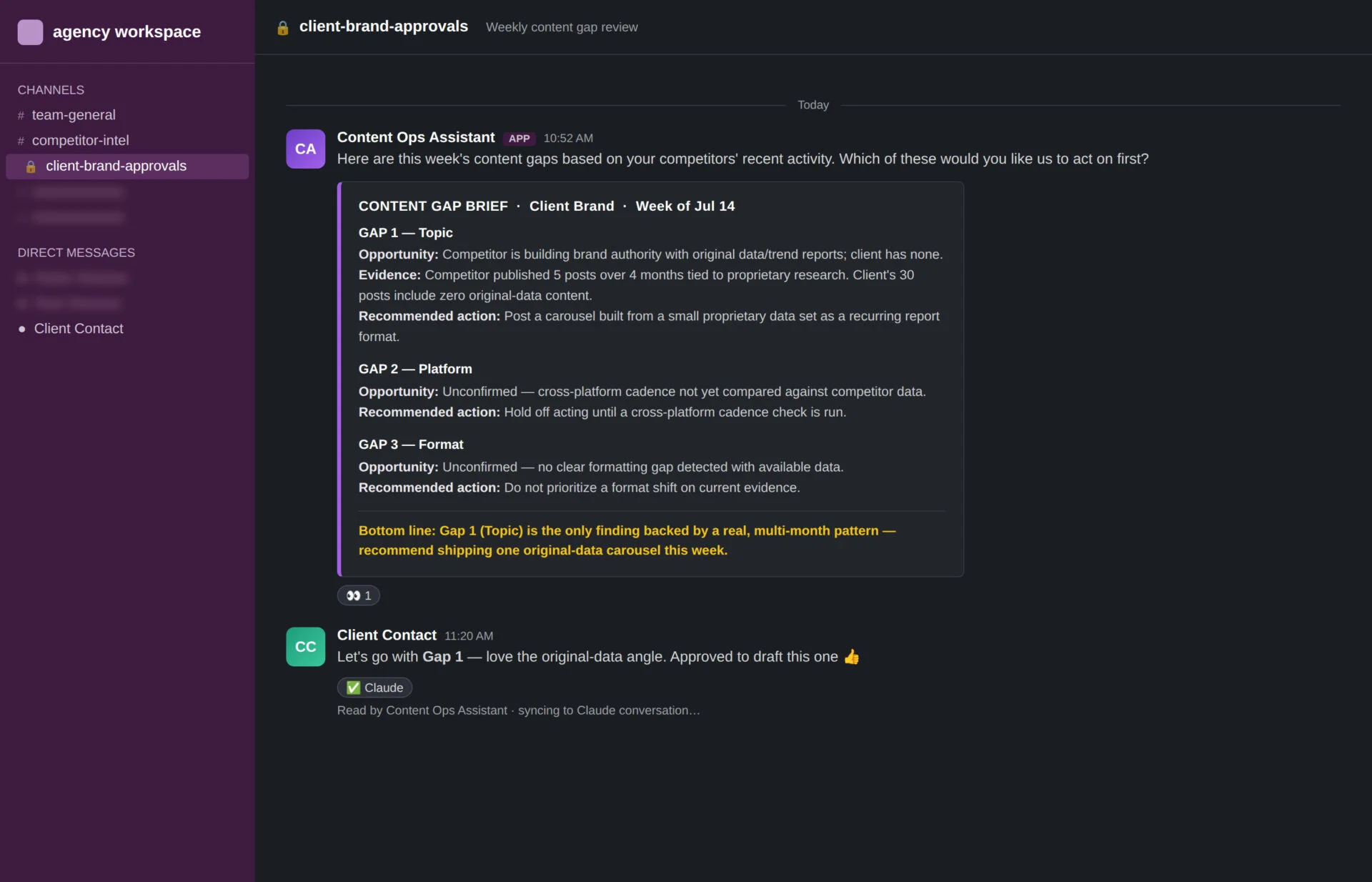
This is your decision point. Review the brief, pick one to three gaps worth acting on, and move into Phase 2.
Phase 2: From Gap Brief to Scheduled Post
Phase 2 starts when the client has reviewed the gap brief and decided which opportunity to act on. This is where the social media competitive analysis workflow for agencies closes the loop – from insight to drafted post to scheduled content.
Step 6: Request the draft
This prompt turns the selected gap into a content draft. Paste it with the chosen gap filled in:
Act on Gap [number] from the brief.
Using [Client Name]’s brand voice from the setup context,
write one [format: carousel caption / Reel script / single image caption /
LinkedIn post / text post] that addresses this gap.
Platform: [Instagram / LinkedIn / TikTok / X]
Do not reference the competitor directly.
Make the hook the first line – it should stop the scroll.
End with a CTA that fits how [Client Name]’s audience typically engages
on this platform.
Output the post copy only, ready to review.
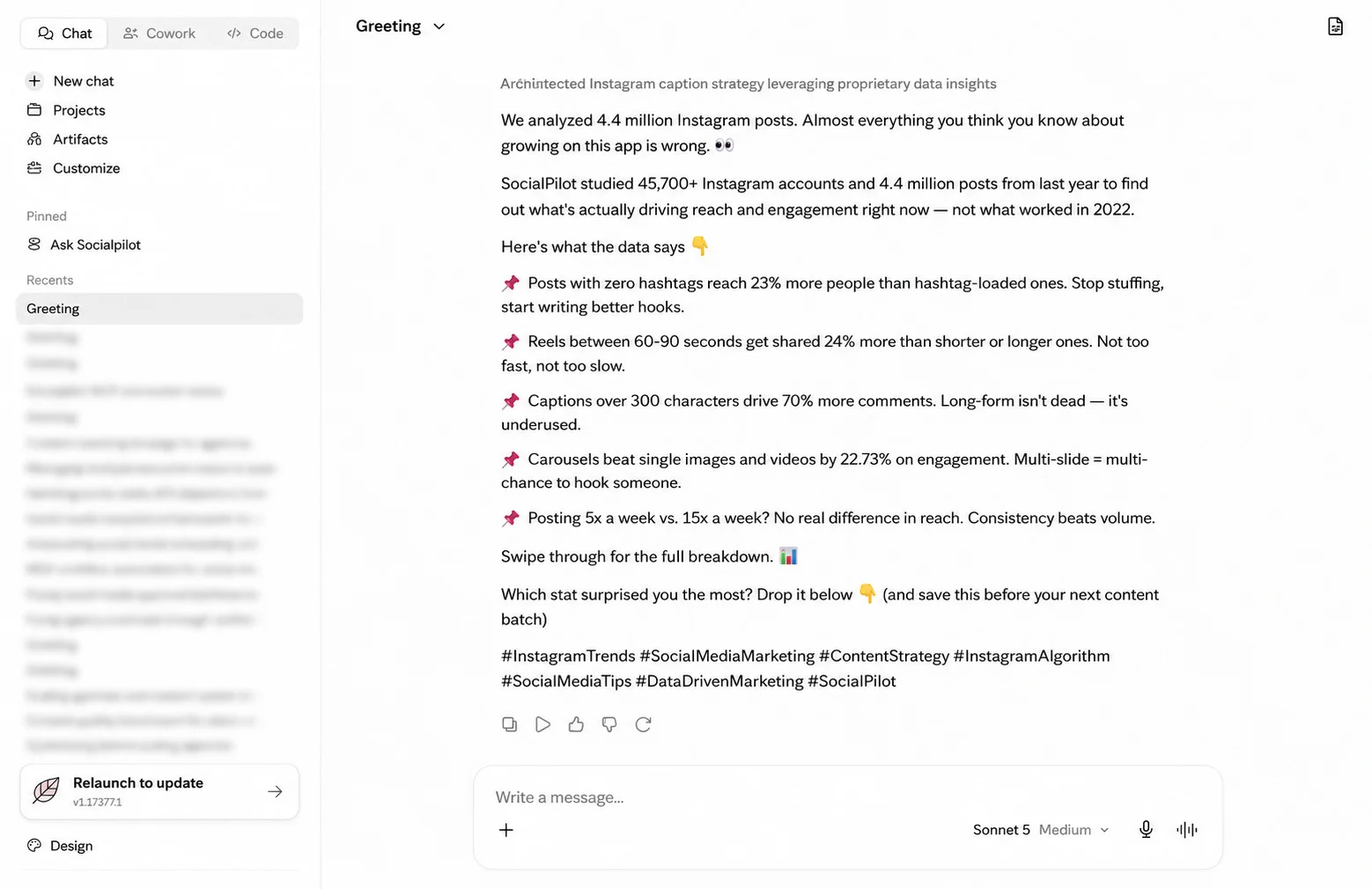
Claude will then come up with a social media post that addresses the gap in your existing content. Below you can see an Instagram post that Claude has generated by acting on Gap 1 – a post that builds SocialPilot’s brand authority with original data/trend reports.
Step 7: Review and iterate
Read the draft. If it needs adjusting, ask Claude to revise within the same conversation. Claude retains the full context: the gap, the brand’s voice, and the previous version.
Common revision prompts you can try:
- Make the hook more direct – lead with the problem, not the solution.
- The tone is too formal. Rewrite it to match the third example post
- from the brand voice I shared earlier.
- Shorten the caption by 30 percent and keep the core message.
Most drafts are ready after one or two rounds. Once the copy (and any accompanying graphic) is final, push it into SocialPilot and invite the client to review it there through Approval on the Go, instead of routing it through a separate channel. This keeps the copy and the visual together in the one place the client already checks for sign-off.
Use the SocialPilot MCP to push the following post to [Client Name]’s account as a pending approval, with the graphic attached, and invite [client contact] to review it via Approval on the Go:
POST DRAFT – [Client Name] – [Platform] – [Scheduled date]
[paste the approved draft copy here]
[attach the graphic for this post]
Set status to: Pending client approval
Learn more about SocialPilot’s Approval on the Go feature in this quick watch-through:
Claude pushes the draft and graphic into SocialPilot’s approval queue and notifies the client. The client reviews the full post – copy and visual together – directly inside SocialPilot, and approves or requests changes from there.
If you’re building a full content calendar from these gap briefs rather than scheduling one post at a time, the social media content plan with Claude walks through how to structure that planning layer.
Once the draft is approved, this prompt pushes it directly into the client’s SocialPilot queue without leaving the conversation:
Use the SocialPilot MCP to schedule the approved post for [Client Name].
Platform: [Instagram / LinkedIn / TikTok / X]
Scheduled time: [date and time, e.g. Tuesday July 8 at 10am]
Queue or draft: [queue for auto-publish / draft for final review]
Post copy:
[paste the approved draft here]
Once you run the above prompt, Claude will queue the post for auto-publishing on a pre-decided date and time.
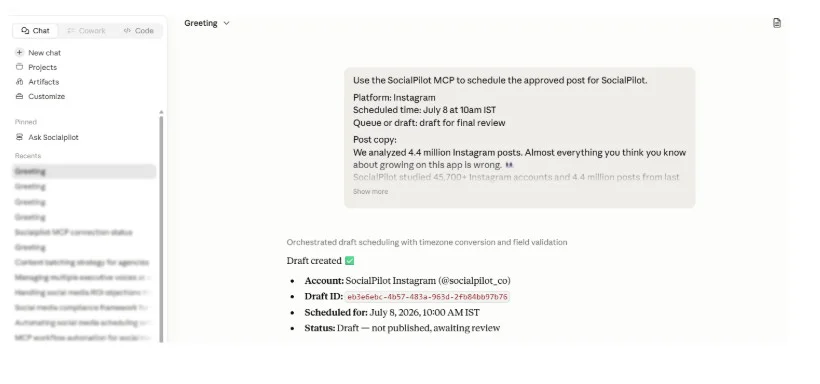
SocialPilot’s multi-client workspace keeps each client’s content separate. The post lands in the correct account with the correct platform targeting. If you want to schedule two or three posts in one session, repeat the same above prompt for each one.
This is how agencies can turn competitor insights into scheduled posts for their clients using this repeatable weekly process.
For more tips, read this guide on batching social media content for agencies, so you can schedule content for multiple client accounts in one focused session.
When the gap identification step and the scheduling step happen inside the same Claude conversation, the elapsed time from brief to queued post is under 20 minutes for most clients. When they happen across separate tools with manual handoffs, the same process takes most of a day.
Turning the Workflow Into a Reusable Skill
Agencies can package the above workflow as a skill to automate competitor analysis on social media at scale across a full client roster.
Why packaging this as a Skill changes the economics across clients
A Claude Skill is a saved instruction set that encapsulates a workflow. When you build the competitor gap process into a Skill, you remove the setup cost from every future run.
Without a Skill, starting the workflow for any client means pasting the setup context, the Apify prompt, the SocialPilot pull, the gap analysis prompt, and the brief format every single time. With a Skill, all of that is baked in. You trigger the workflow with one command and Claude already has everything it needs for that client.
What the Skill Contains: Full Phase 1 and Phase 2 Logic in One Command
The Skill file holds:
- Client context block: Competitor account list, platforms, brand voice examples, content rules, audience description
- MCP instructions: Which Apify scrapers to call, which SocialPilot account to read and write to
- Phase 1 analysis logic: The four gap types, ranking criteria, brief format
- Phase 2 drafting instructions: The post generation prompt, platform rules, iteration guidelines
- Scheduling instructions: How to call SocialPilot MCP to push the approved post to the right queue
Everything the workflow needs to run from trigger to scheduled post, specific to this client, in one place.
When you create it into a skill and run /competitor-gap [client-name] skill, here’s what fires automatically:
- Claude calls Apify MCP and pulls the competitor posts for that client
- Claude calls SocialPilot MCP and reads the client’s published content
- Claude runs the four-dimension gap analysis
- Claude outputs a structured gap brief and creates a post that can be directly sent to your client for approval via Slack MCP.
What the agency still controls:
- Which gaps to act on
- When to trigger Phase 2 and for which gaps
- Draft approval before scheduling
- Whether posts go to the publishing queue or the draft folder for a final check
The Skill handles the mechanical work. Editorial judgment stays with the agency. That’s the right division.
For the complete setup of the automated management layer, the walkthrough in automate social media management with Claude covers every step from MCP connection to production workflow.
One Conversation. From Competitor Feed to Content Queue
Most agencies already know what their clients’ competitors are doing. The gap isn’t information; it’s execution. Getting a content opportunity from spotted to scheduled before the moment passes is what separates agencies that act on competitive intelligence from those that file it away.
The workflow in this guide gives you that connection. SocialPilot’s competitor reports handle the benchmarking layer. Claude and the MCP integrations handle the analysis, drafting, client approval, and scheduling – all inside one conversation.
The gap you find on Monday becomes a queued post before Wednesday.
Explore SocialPilot’s plans and pricing to find the right tier for your client roster, start a 14-day free trial and run the full workflow with your first client this week.




 Join 55,000+ social media managers


