
Instagram is one of the most powerful business platforms in the world, with over 3 billion active users and more than 90% of users following at least one business. Instagram has become where brands are discovered, evaluated, and trusted. From startups and local stores to global enterprises, businesses are using Instagram to build visibility, spark conversations, and drive real revenue.
What makes Instagram truly valuable is its complete business ecosystem—content, creators, shopping, ads, and direct conversations. If your audience is online, chances are they’re scrolling Instagram right now.
In this guide, you’ll learn how to set up your business profile, create content that converts, use Instagram’s latest features effectively, and turn engagement into measurable growth—step by step.
Why Instagram Works for Business?
Instagram isn’t just a social platform anymore; it’s one of the most powerful marketing tools for any business. Whether you sell products, offer services, or build a personal brand, Instagram helps you get discovered, build trust, and convert followers into customers. Here’s why it works so well:
1. Massive User Base & High Engagement
According to Mark Zuckerberg, Instagram has over 3 billion monthly active users who spend a lot of time scrolling, liking, commenting, and sharing. That means your potential customers are already on Instagram, no matter what industry you’re in.
People also engage more with brands on Instagram than on many other social platforms, making it one of the best places to grow brand awareness and share content.
2. Visual-First Platform Advantage
Instagram is built around photos and Reels, making it perfect for showcasing your products, services, team, and day-to-day work. A great picture, a short video, or a fun Reel can explain your brand faster and better than long text to users.
If your content looks good, people notice you, remember you, and trust your brand more.
3. Works for Both Product-Based and Service-Based Businesses
Instagram isn’t just for fashion brands or food businesses; it works for everyone.
- Product businesses: Showcase items, tag products, run shoppable posts.
- Service businesses: Share client results, behind-the-scenes moments, tips, and testimonials.
- Local businesses: Promote offers, events, or direct people to your store.
- Creators & professionals: Build authority and attract clients.
So, any business can build a solid presence on this platform with the right content and consistency.
4. Supports Every Stage of the Customer Funnel
Instagram helps you guide customers from discovering your brand to engaging with your content to final purchasing.
Here’s how:
- Top of funnel: Reels, Explore page, trending content.
- Middle of funnel: Feed posts, Stories, highlights, testimonials.
- Bottom of funnel: DMs, product tags, Shop, ads, links, and CTAs.
You can attract new people, build relationships, and convert them, all within Instagram.
5. Competitive Landscape & Opportunities
Most of your competitors are already on Instagram, and your customers check Instagram profiles before buying from any brand. That means if you’re active, you can stand out. If you’re not, your competitors get all the attention.
Instagram also constantly launches new features (Reels, Shops, Stories, Collabs), giving businesses fresh chances to grow and get discovered for free.
Step-by-Step Guide to Set Up an Instagram Business Profile
A business profile gives you access to professional tools like Insights, ads, and contact buttons — everything you need to grow on Instagram. Follow these simple steps to set up your account correctly.
Create an Account or Convert Your Personal Profile
Start by either creating a fresh account for your business or turning your current personal profile into a business one.
Step 1: Open the Instagram app and tap “Sign Up”
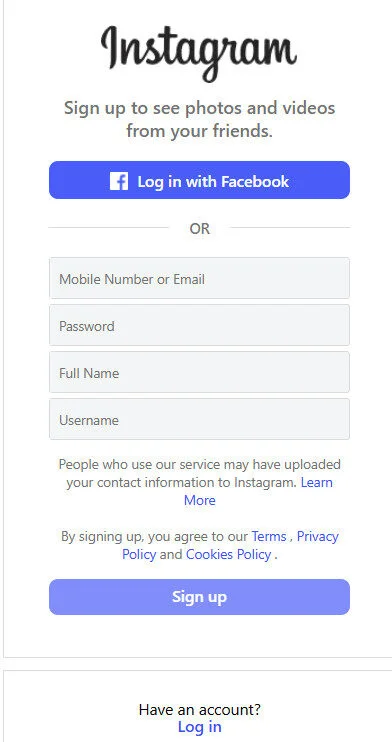
Step 2: Enter your email or mobile number
Step 3: Create a username and password
Step 4: Add your profile photo and basic details
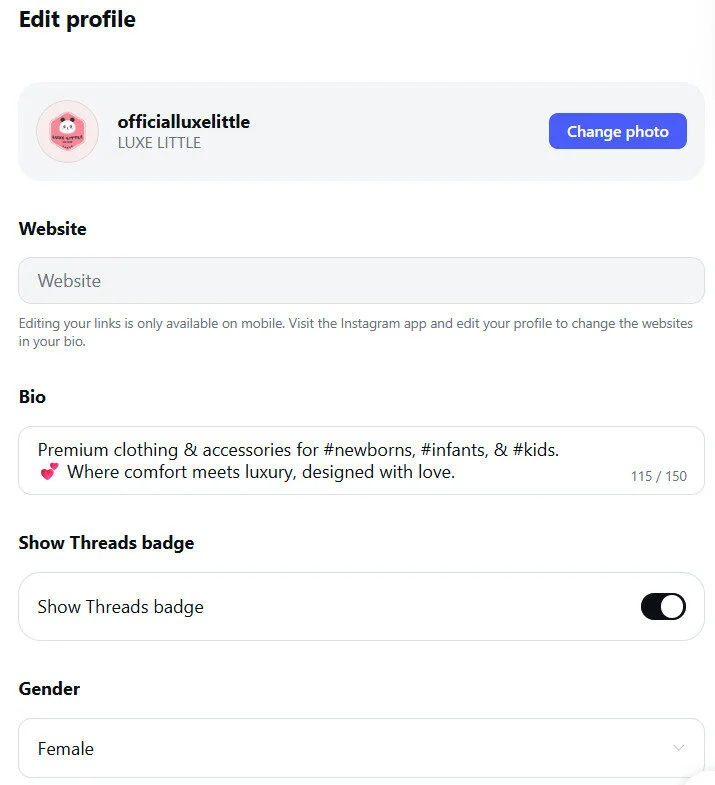
Step 5: Now go to your Instagram profile (Your account is created, and now convert it to a business account )
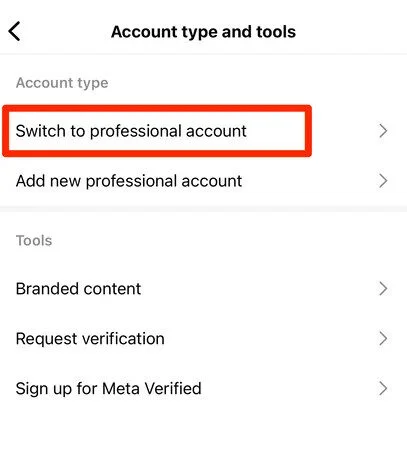
Step 6: Tap ☰ (Menu) and go to the “Settings and Privacy”
Step 7: Tap Account Type & Tools
Step 8: Select Switch to Professional Account
Now you can connect your Facebook page (optional but highly recommended).
Optimize Your Instagram Business Profile (Add Essential Business Details)
Once your Business account is active, update all your business details to get found by potential customers.
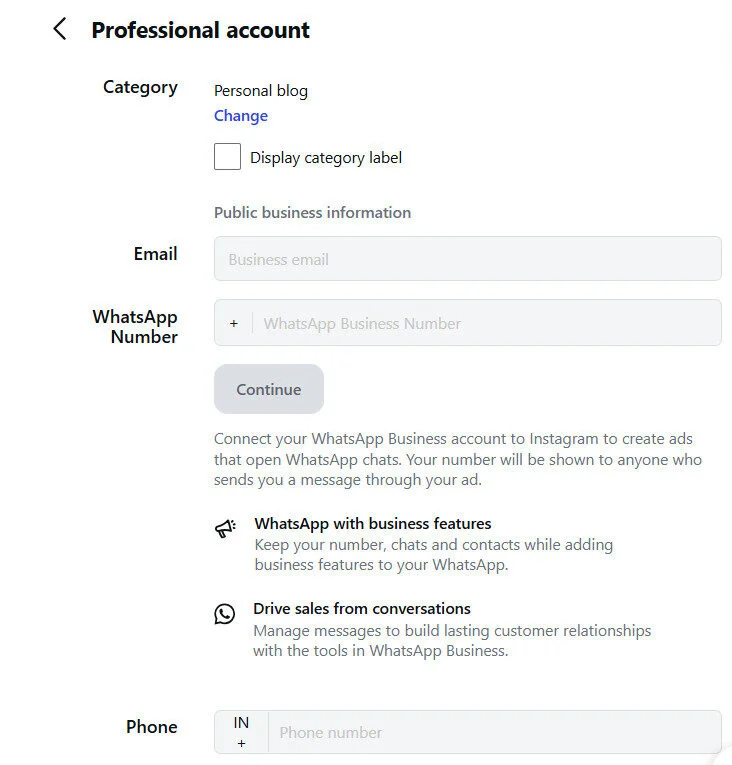
Step 1: Add Your Email
For customer support/sales.
Step 2: Add Your Phone Number
You can add either call or text.
Step 3: Add Your Physical Location
Include your store/office address so customers can get directions.
Step 4: Choose / Update Your Business Category
Select a Category (e.g., Clothing Brand, Restaurant, Coach, Agency), as Instagram publicly shows your category unless you hide it.
There are many other things you can update or optimize on your business profile:
1. Username: Keep it short and searchable, and avoid special symbols. And prefer your brand or business name as a username if available. For example, @GreenLeafBakery is GOOD, but @GreenLeaf_Official_123 is not ideal.
2. Profile name: This appears in Search, so optimize it with a targeted keyword. For example, “Green Leaf Bakery – Cakes & Desserts”.
3. Bio: Your bio should answer: what you do, who you serve, and why to follow you with a strong CTA. For example:
Handmade cakes & baked goodies 🎂
Orders across New York
DM to order | Menu ↓
4. Add Relevant CTA: Instagram allows you to add CTA buttons like: call, email, get directions, order now, and book a reservation.
How to Use Instagram for Business
Creating a business account on Instagram is like getting superpowers. Instagram’s popularity makes its use inevitable when it comes to using it for your brand. No matter what type of business you own, Instagram adds value to it. You don’t want to miss the bus and leave out on all the opportunities Instagram offers for your business.
Let’s learn in detail about how you can use Instagram for Business:
Post in Instagram Feed and build your brand
Wondering how to start using your superpowers? This is the first step. Post eye-catching images and videos related to your brand or products from time to time. These posts will appear on the feed of your followers as they scroll through. Consistent posting will help you get noticed and increase your following. This way, you can build brand awareness and also engage your followers.

In-feed posts allow your audience to like, comment, share, or directly message you. You can add your website link in the description to direct traffic to your webpage, too. Showcase your products, post how-tos, announce offers, or simply post a thank-you note for your followers.
Tagging products in posts can also encourage your followers to buy them. Use Instagram’s visuals-based interface to the fullest to promote your brand value. SocialPilot’s blog on the best time to post on Instagram offers some insightful tips.
To ensure your content performs well, follow proven Instagram best practices that maximize reach, engagement, and follower growth.
- When to use
- Best content types
Managing Instagram for business can quickly become overwhelming—especially when you’re handling content creation, scheduling, engagement, and analytics all at once. This is where a social media management tool like SocialPilot makes a real difference.
With SocialPilot, businesses and agencies can plan, schedule, and publish Instagram posts in bulk, saving hours of manual work. Its AI-powered caption and post generation help you create engaging content faster, even when ideas run dry. The Social Inbox allows you to manage comments and messages from one place, so you never miss an important interaction.
From performance analytics to team collaboration and multi-platform management, SocialPilot helps you stay consistent, organized, and growth-focused across Instagram and other social networks—all from a single dashboard.
Build Public Relations with Direct-to-Consumer Service
Do not ignore building a positive PR around your brand, no matter what size your business is. It can assist in building your brand identity and industry equity, resulting in establishing a long-term reputation for your brand. In the trying times of a post-COVID world, virtual media is the best game to put forward for running your business. Here is where Instagram for Business comes in.
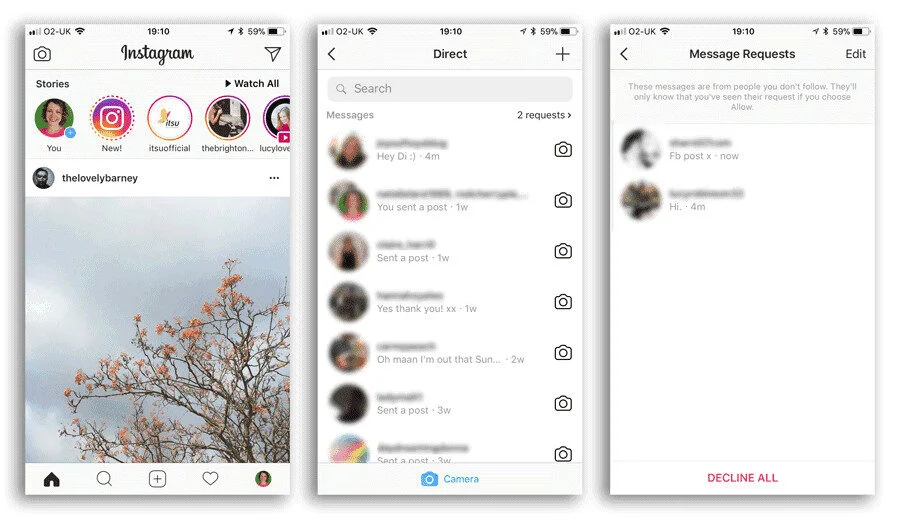
Based on Instagram’s user statistics, the majority of your customers are very likely to be on Instagram. Provide them with a Direct-to-Consumer service.
- Let them engage with your posts and always make sure to interact with them.
- Encourage them to DM (Direct Message) you with any queries or complaints. Tag your customers in your posts.
- Request that they tag your profile if they want to leave a review of your product. You can reshare their review posts in your feed, too.
- Do not ignore comments and make it a habit to reply to them as a professional courtesy.
- Additionally, follow your customers’ Instagram profiles and engage with their posts even if they have nothing to do with your brand.
You can also post some “Behind the scenes”, employee diaries, bloopers, and other shareable aspects of your business to create a connection with your followers.
Use Instagram Stories and get noticed
The Story feature on Instagram is a game-changer. It allows you to post daily content that disappears after 24 hours. Its placement at the top with an illuminating circle makes it an unmissable feature when a user opens the Instagram app. Around 500 million people use Instagram Stories daily. Can you imagine the reach you can get?

Instagram Stories offer many tools to engage with your audience and market your products. You can post images, videos, boomerangs, texts, live videos, stickers, emojis, location tags, temperature, hashtags, gifs, and so on. You can even post a question or poll to encourage interactivity and engagement.
How to Post a Story:
Step 1: Click on the “+” icon on the top left, encircled with your Display picture.
Step 2: Select an image or video from your camera roll or use Instagram’s built-in camera to click a picture or record a video.
Step 3: Use features such as Boomerang, layout, multi-capture, photo booth, superzoom, or others as needed.
Step 4: Add engaging tools like emojis, stickers, polls, text, music, and others to add to the fun.
Step 5: Post your Story with a nice caption.
Live Stream from your Instagram Business Account
Yes, you read that right. You can now live stream from your Instagram business account and interact with your followers in real-time. Showcase and sell your products, demonstrate their features, have a Question and Answer session, or teach something; the options are endless. The viewers can comment and engage instantly, and you can interact with them then and there.
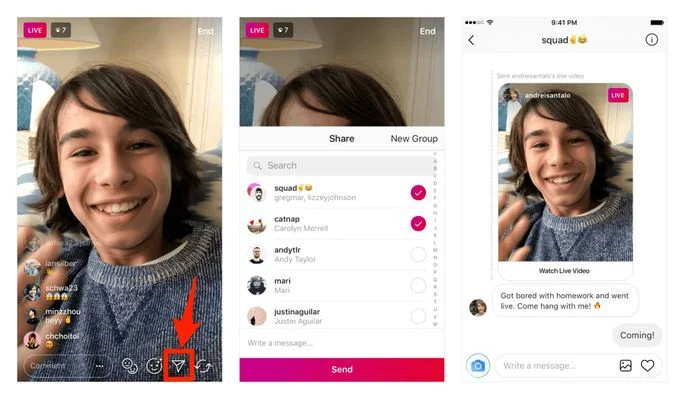
To live stream:
Step 1: Click on the “+” icon on the top left. It opens Instagram’s built-in camera.
Step 2: Go to the “Live” option.
Step 3: Write a description of your life. Tag people if you like.
Step 4: Start the Live.
We suggest you create some hype around your live session to get more viewers. Post countdowns, announce the time and date of the live for your followers.
Use Checkout on Instagram
What more would a potential customer like than to have an end-to-end shopping experience on Instagram without leaving the app? As a business owner, Instagram’s shopping feature lets you tag products in your posts. When users click on the tag, they are redirected to your brand’s shop, where they can browse through more of your products. They can select the products they want to buy, make payments, and check out from Instagram itself.
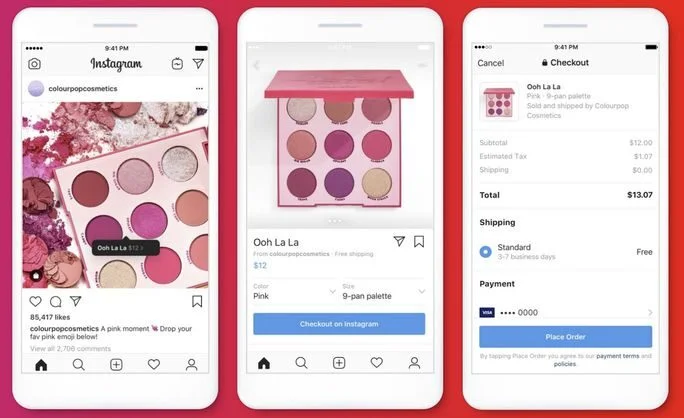
Additionally, you can check out SocialPilot’s guide on Instagram Marketplace to learn about this feature in detail.
Advertise on Instagram
You can avail of the advertising feature on Instagram only if you have a business account. However, Instagram does not have an advertising platform. It uses the parent company, Facebook’s Ad Manager, to create and run ad campaigns. For that, you have to link your Instagram business account to your Facebook account.
It has been discussed above why Instagram is an inevitable platform to market your business or products. Now let’s talk about how many types of Instagram ads are available for you and how you can use them.
Image Ads:
Instagram Image Ads let you post still photos representing your brand or showcasing your products. Use arresting images that literally stop the viewer’s thumb from scrolling. Add a compelling Call-To-Action button to engage or redirect your audience to your website. Other interactive tools like stickers, emojis, location tags, temperature, and polls add to your marketing strategy of personal branding or converting leads.
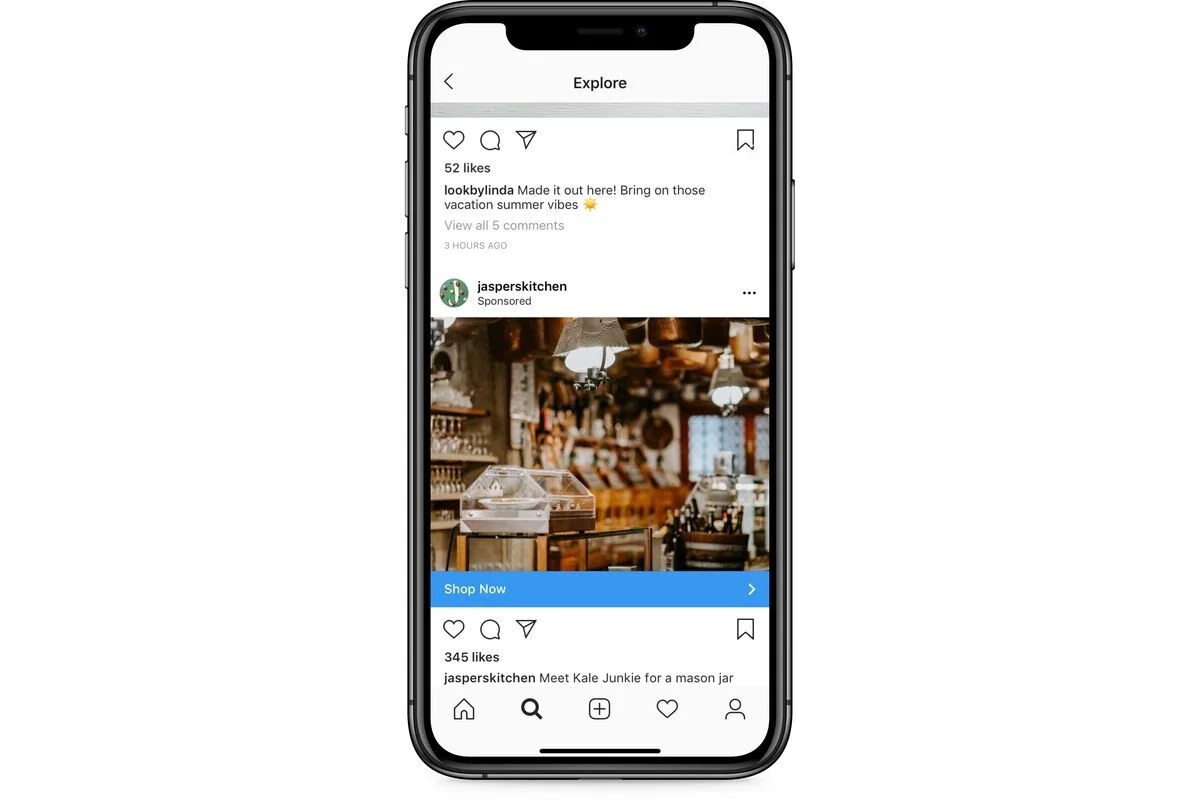
Image ads display for 5 seconds. It shows a “Sponsored” tag. We suggest you write a catchy text with the image to indicate what your business offers.
The placement options available are Instagram Feed, Instagram Stories, and Instagram Explore.
Video Ads:
Sponsored Video Ads on Instagram allow you to demonstrate your product or showcase a full product line. Effective CTAs are an important element of video ads. Make sure that your video is not pixelated or distorted, and add relatable audio. You can add Instagram’s add-on fun tools as well.
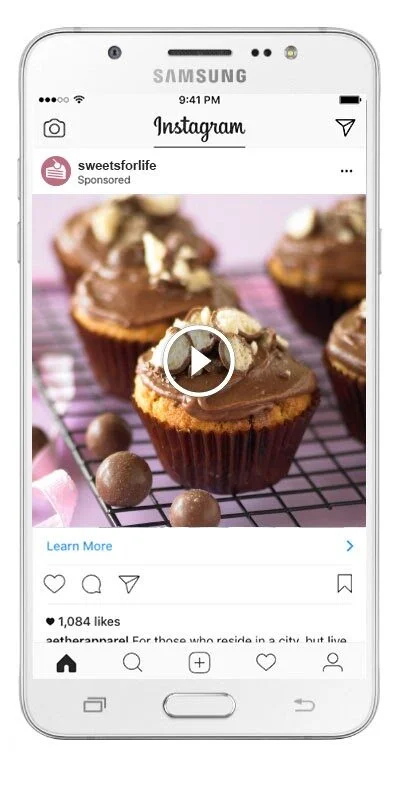
You can place your video ads on Instagram Feed, Instagram Stories, and Instagram Explore. The duration of the In-feed videos and Explore is up to 2 minutes. For Stories, they display the video for up to 15 seconds. If your video is longer than 15 seconds, Instagram automatically cuts the video into 15-second segments. The viewer has to click “ Continue Watching”.
Carousel Ads:
Use up to 10 images and videos in a single ad with Instagram’s carousel ad cards. Illustrate your products, launch a product line, tell a story about your brand, post instructions, the scope of using carousels is endless. However, carousel ads run as individual campaigns. You can’t club it with any other running campaign.
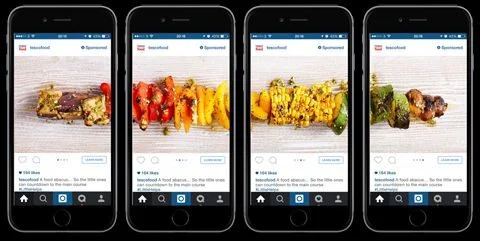
You can place Carousel ads on Instagram Feed and Stories. Viewers have to click “Expand Story” to view all the carousel cards.
Collection Ads:
Collection Ads allow businesses to build their product catalogue and let potential customers discover and browse through the brands they like. It is a full grid layout with a “Sell Products” caption.
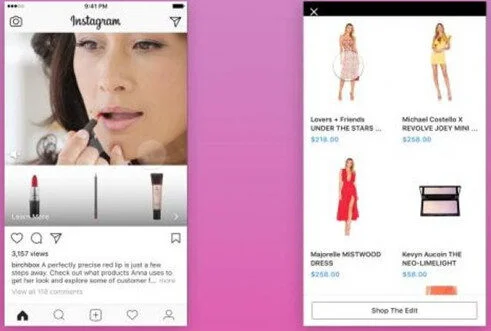
You can place your Instagram Collection Ads on both your Instagram Story and Feed. It includes a cover image or video, followed by three product images. When your customer clicks on a Collection ad, a full-screen landing page appears as an Instant Experience.
For creating any of these ads:
Step 1: You have to go to your Facebook account’s Ads Manager section.
Step 2: Name your ad campaign, select your target audience, set an ad budget.
Step 3: Select the ad placement you want.
Step 4: Upload the ad copy.
Step 5: Start the ad campaign.
Collaborate with Instagram Influencers
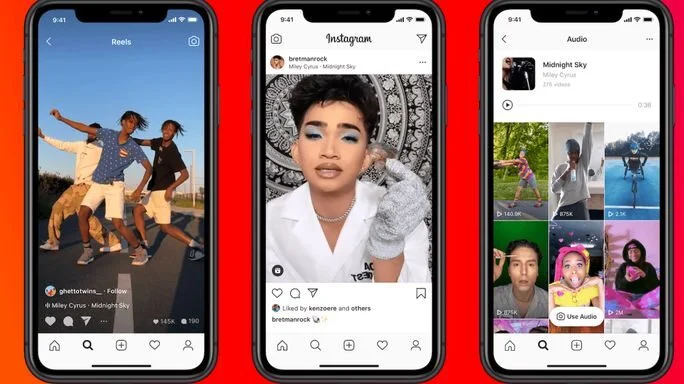
Social media influencers work on barter systems or payments. Do some research and find out which influencers have a solid following and can represent your brand. Get in touch with them, send them your goodies. They will post a photo or a video with your product. This way, their followers get aware of your brand.
While analyzing 45k + accounts for our Instagram Trends Report, we noticed that posts with 4-5 collaborators achieve 3.8 times more reach than standard posts, the significance of which highlights the potential of influencer collaborations to extend your brand’s visibility and engagement.
For a deeper understanding of strategies that grow followers and drive conversions on this social platform, check out our comprehensive Instagram marketing guide.
Instagram Business Profile Best Practices
A well-optimized Instagram Business Profile makes your brand look professional, improves discoverability, and increases conversions. Once your account is set up, follow these best practices to make the most out of your profile.
Keep Your Branding Consistent
Maintain consistent colors, tone, and visual style across your posts and profile. This creates a strong brand identity and helps users instantly recognize your content. Using the same filters, fonts, and design style will make your profile look unified and trustworthy.
Add Clear CTAs in Your Bio
Your Instagram bio should guide users toward the next action—whether that’s visiting your website, booking a call, or checking your latest offers. Use clear call-to-actions and link-in-bio tools to organize multiple links in one place so your audience can easily explore your brand.
Maintain a Clean, Cohesive Feed Layout
A visually pleasing feed encourages users to stay longer and explore your posts. Keep your layout clean, avoid random colors or clutter, and plan your posts in advance. Many brands use a grid style, color pattern, or theme to give their feed a premium look.
Post High-Quality Content
Quality always wins on Instagram. Use sharp images, clear videos, and well-designed graphics. High-resolution visuals not only attract attention but also reflect professionalism. Even simple posts can perform well if the quality is high and the message is clear.
Use Highlights Strategically
Highlights let you showcase your story content permanently. Create organized highlight categories such as “Reviews,” “Products,” “FAQs,” “Team,” or “Behind the Scenes.” Use branded highlight covers to give your profile a polished, organized feel.

Make it easy for customers to reach you. Add contact options like email, phone, or directions so users can connect with your business instantly. Clear contact buttons increase customer trust and reduce friction when someone wants to take action.
Test & Adjust Using Insights
Instagram Insights shows what’s working and what isn’t. Track metrics like reach, engagement, profile visits, and follower growth to refine your content strategy. Experiment with different types of posts and adjust based on performance trends.
Be Search-Friendly
Instagram SEO matters. Add relevant keywords to your name field, bio, and captions so users can find you through search. For example, instead of just “Sarah,” use “Sarah | Fitness Coach” or “Sarah Pilates Trainer.” This boosts visibility and helps the right audience discover you.
Benefits of Having a Business Account on Instagram
A business account has several advanced features that are not available for personal accounts, such as Instagram Insights, which help you understand your customers and drive more traffic to your website.
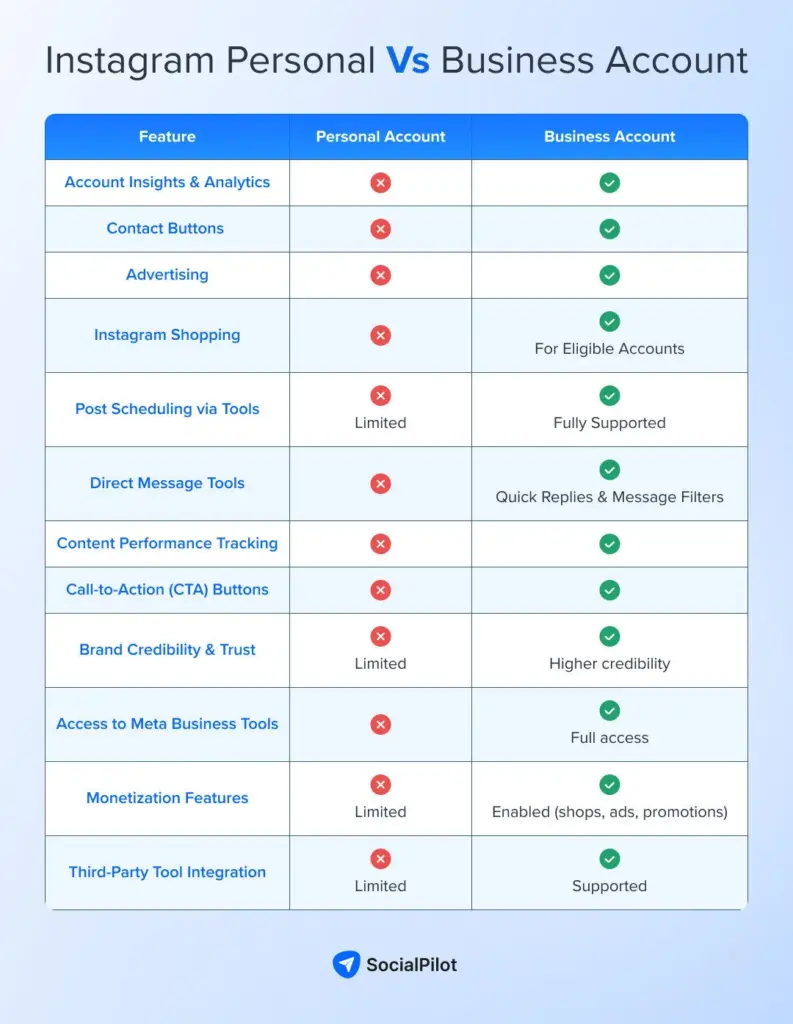
Here are the benefits of a business account:
1. You Can Schedule Posts
Business accounts can plan and schedule their posts in advance with the help of an Instagram post scheduler like SocialPilot. It helps in planning a consistent schedule to keep your audience engaged with your content. Plan and publish your content in a couple of clicks and save your time.
2. Bio Gets an Upgrade
Your profile gets a professional look. Business profiles have the option of adding additional details, such as contact information. If you want inspiration beyond contact details, check out these Instagram bio ideas for businesses to make your profile stand out.
3. Set up Shop
Instagram Shop is a customizable storefront allowing people to shop directly on business profile pages without leaving the app. To set up a shop, you need to have a business account on Instagram.
Steps to set up your Shop:
- Make sure you have an Instagram Business or Creator account.
- Connect your account to a Facebook Page.
- Upload and organize your product catalog using Facebook Commerce Manager or a supported e-commerce platform like Shopify.
- Submit your account for Shop approval.
- Once approved, enable Shopping from your Instagram settings.
When your Shop is active, you’ll be able to tag products, feature items in collections, and create a full storefront inside your profile.
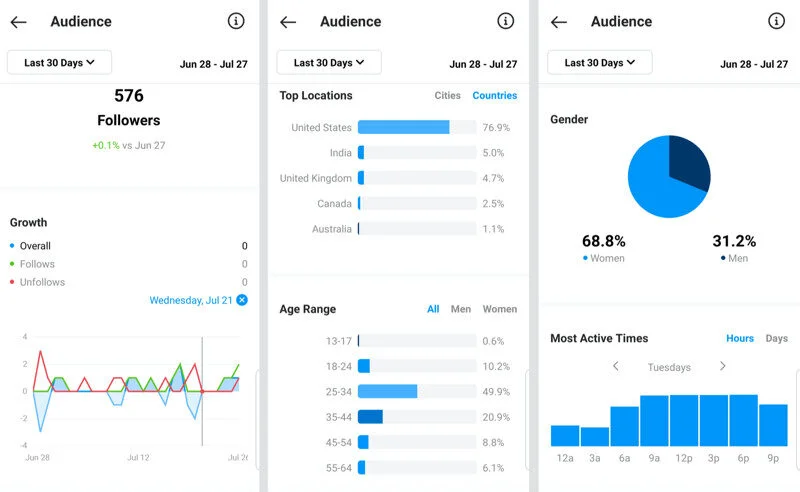
4. Access to Insights
Instagram business accounts have access to built-in insights about your account and its performance. Insights give you an idea about whether the content that you are sharing is working or not. It gives details about Accounts reached, Views, and Interactions on a particular post. These metrics offer an opportunity to analyze your profile’s success and performance and optimize your strategy if needed.
5. Advertising Options
Instagram ads are a great way to show your products to a larger audience who might not even know about your brand.
However, you need an Instagram business account to use the advertising features of Instagram. The account has to be connected to your Facebook page, as Instagram ads are created through Facebook’s ad manager. If you cannot reach your target audience, then paid ads can help you reach them and grow your following.
Did you know that 130 million people tap to reveal product tags in shopping posts each month? With your business account, you can turn your feed into an online shop. Shoppable posts allow businesses to add tags to the products in posts with links that have a product description, price, and an option to shop now or save for later.
7. Quick Reply
Creating an Instagram business account gives you the option of setting quick replies for your Instagram DM. Quick replies are pre-written answers to the most frequently asked questions by customers. These are connected to a shortcut word. Type in your shortcut word, and the autoreply will pop up. This tool saves time. Your business account also gives you the option to categorize your DM. This way, you can keep track of the most important leads.
8. Add links to Instagram Stories
You need more than 10k followers to get this feature activated. With this feature, you can add one URL to your Instagram Story. It can be the URL of your website, your blog, or whichever page you want the viewer to visit. It improves the chances of action by the users as they have the option to swipe up and open the link in the Story itself.
Building a Winning Instagram Content Strategy
A strong content strategy helps you stay consistent, attract followers, and build a memorable brand. Here’s how to plan content that engages and grows your audience.
Content pillars
Define 3–5 main themes you will post about, such as product showcases, behind-the-scenes, tips, customer stories, or educational content. These pillars help keep your content focused and meaningful.
Planning monthly content
Create a simple monthly calendar so you always know what to post. Planning ahead saves time and keeps your feed active, even on busy days.
Storytelling techniques
Tell stories that help people connect with your brand. Share how products are made, customer experiences, team moments, or the mission behind your business.
Branding & aesthetic consistency
Use consistent colors, style, fonts, or filters to make your Instagram feed look clean and recognizable. A strong visual identity builds trust and professionalism.
Using Reels, Stories & Posts effectively
- Reels: Reach new audiences and go viral.
- Stories: Share daily updates, polls, and behind-the-scenes moments.
- Posts: Build your permanent brand identity with high-quality images and videos.
Hashtag strategy
Use a mix of broad, niche, and branded hashtags to increase your reach. Keep them relevant and avoid using the same ones repeatedly.
Encouraging user-generated content (UGC)
Ask customers to tag you, share reviews, or post photos using your products. Reposting UGC builds credibility and creates a community around your brand.
Community Building & Growth: How to Use Instagram DMs for Business
Instagram DMs are one of the most powerful ways to build relationships, offer support, and convert followers into paying customers. When used correctly, your inbox becomes a direct sales channel and a trust-building tool.
Instagram DMs allow you to have private, personal conversations with customers, helping you build stronger relationships and close sales faster. They create a direct path for answering questions, solving concerns, and offering tailored recommendations.
Using Quick Replies: Quick Replies help you respond to common questions instantly without typing the same message repeatedly. This saves time and ensures that every customer receives clear, consistent, and professional communication.
Lead Nurturing via DMs: You can guide potential customers through the buying process by sharing the right information at the right time. Whether someone asks about pricing, availability, or product details, DMs allow you to nurture the lead until they’re ready to purchase.
Personalized Customer Support: DMs give you the ability to provide one-on-one assistance that feels human and caring. You can address complaints, answer doubts, and offer solutions quickly, which boosts customer satisfaction and trust in your brand.
Sending Product Links, Offers, & Recommendations: Inside DMs, you can directly send product links, discount codes, special offers, or personalized suggestions based on a customer’s needs. This makes the buying process easier and increases the chances of conversion.
Managing DMs at Scale: As your account grows, tools like filters, labels, Quick Replies, and inbox management platforms help you stay organized. These tools make it possible to handle high message volume without missing important conversations.
Turning Conversations Into Conversions: By being helpful, fast, and friendly, you can turn simple chats into real sales. Your goal in every DM conversation is to guide the customer from asking a question to confidently making a purchase.
Making Instagram Work for Your Business
Instagram has evolved into a powerful platform where businesses can build visibility, connect with their audience, and drive real results. From setting up a professional business profile to creating engaging content, using Stories and Reels, leveraging DMs, and exploring ads and shopping features, Instagram offers everything needed to support growth at every stage of the customer journey.
Success on Instagram does not happen overnight, but with consistency, creativity, and data-driven decisions, any business can thrive. Start small, experiment with different formats, track what works, and refine your strategy over time. When used the right way, Instagram can become one of the most valuable channels for growing your business in 2026 and beyond.
SocialPilot helps you plan, publish, analyze, and grow faster, explore flexible plans and start your free trial with no credit card required.