


Open Instagram Insights and look for impressions. On anything you posted after July 2024, it is gone. Meta replaced the metric with views, and plenty of tools still print the old label over the new data.
You would not catch it either, because Instagram keeps your account-level numbers for only ninety days. After that there is nothing left to check against. That is the real reason choosing between Instagram analytics tools is hard, and it is why this page sorts them by how long each one actually remembers.
Twelve tools, five jobs, and every price read off the vendor’s own page in September 2026, a check that turned up six wrong figures on the last version of this page. We make SocialPilot and it is one of the twelve, so where it loses, we say so by name.
The Five Jobs That Actually Separate These Tools
Every tool on this page reports post and Reel performance. Reach, views, saves, shares, engagement rate, watch time, skip rate. All twelve do it, so it is the floor rather than a reason to choose, and it is not scored below.
What varies is everything else. These five are the axes worth reading your own needs against.
Story Analytics
Reach, taps forward and back, exits, replies and link clicks. Stories vanish in 24 hours, so the data has to be captured before it goes. Ten of twelve do this properly.
La performance des hashtags
Which tags actually drove reach, rather than which tags you used. Real hashtag analysis is rarer than the feature lists suggest, and several tools count a tag list as analysis.
Analyse comparative des concurrents
How you compare to named rivals on growth, engagement rate and cadence. The most over-bought job here, and the one most often gated two tiers above the entry price.
Rapport en marque blanche
A branded document a client reads without asking who made it. Only Agorapulse includes it on its cheapest paid plan. Eight tools put it higher up the ladder or sell it as an add-on, and three do not publish it at all.
Data History Beyond 90 Days
How far back the tool remembers, which is the whole reason to leave native Insights. Six of the twelve publish a number. The other six are the all-in-one platforms, and not one of them says, whether it charges $19 a month or $99 a seat.
Which Jobs Do You Actually Need?
You need tools for the jobs you do every month, not all five. Here is how they map to four common situations.
| Your situation | Histoires | Hashtags | Concurrents | White-label | History |
| Solo creator, one account | Nice to have | Nice to have | Skip | Skip | Nice to have |
| In-house SMB team | Essentiel | En option | Nice to have | Skip | Essentiel |
| Small agency (up to ~10 clients) | Essentiel | En option | Nice to have | Essentiel | Essentiel |
| Larger agency or brand | Essentiel | Nice to have | Essentiel | Essentiel | Essentiel |
How to Read the Matrix
- Essentiel means you will hit a wall without it inside a month.
- En option means it pays for itself only at a certain volume.
- Nice to have means it saves time you may not be short of.
- Skip means the job does not apply to you yet.
Read your row, then read only the sections matching your Essential columns. A solo creator reading top to bottom will spend most of it on software built for someone else.
The Common Mistake
The expensive mistake is buying a $239 benchmarking platform when what you needed was a client report. The subtler one runs the other way: paying for two subscriptions because your all-in-one felt thin on reporting, when a single tier upgrade covered it.
Both come from shopping by category instead of by job. And there is a third mistake this page exists to prevent, which is assuming price tracks capability. On the axis that sends most people looking in the first place, how far back the tool remembers, the cheapest options on this page beat the most expensive ones outright.
Quick Comparison of the Top Instagram Analytics Tools
| Outil | Idéal pour | Histoires | Hashtags | Concurrents | White-label | Entry price |
| SocialPilot | Agencies running several accounts |  |
|
|
|
$25.50/mo |
| Sprout Social | Big in-house teams with budget | |
 |
|
 |
$79/seat |
| Agorapulse | Reporting and inbox together | |
|
|
|
$79/user |
| Hootsuite | Teams already on Hootsuite | |
|
|
|
$99/user |
| ContentStudio | Cheapest competitor analytics | |
|
|
|
$19/mo |
| Sendible | Agencies needing unlimited users | |
|
|
|
$35/mo |
| Social Status | Cheap branded client reports | |
|
|
|
$9/mo + free plan |
| Iconosquare | Instagram-only, five profiles | |
|
|
|
€33/mo + free plan |
| Metricool | One cheap tool that remembers | |
|
|
|
$20/mo + free plan |
| Minter.io | Solo creators wanting history | |
|
|
|
$8.25/profile |
| Rival IQ | Benchmarking-led, big budget | |
|
|
|
$203/mo |
| Socialinsider | Twenty-plus accounts, no publishing | |
|
|
|
$82/mo |
Covered
a real, native feature the tool does well
Partiel
present but limited, an add-on, or a higher-tier unlock
Not covered
you would need a second tool for this job
What This Table Does and Doesn’t Show
A ✓ means the tool does the job natively, inside a plan. A ◐ means it is there but limited, or sold as a paid add-on on top of your plan. A ✗ means you would need a second tool. What the marks cannot show is depth, so Iconosquare and Socialinsider both earn a ✓ on hashtags and are not equivalent products.
Read down the all-in-one rows and one thing stands out. SocialPilot is the only platform in that group with all four jobs marked covered. Sprout Social and Hootsuite publish no white-label option at all. ContentStudio charges $50 a month extra for it. Sendible charges a fee on top of its top two tiers. For an agency, that is the difference between one invoice and two.
It also does not price your actual setup. Sprout Social, Hootsuite and Agorapulse are sold per seat, so they look cheap for one person and climb fast for a team. Minter.io is per profile. Metricool is per brand. The entry price is a doorway, not a quote.
One thing the table deliberately leaves out is memory. Six of these twelve publish how far back their data goes and six say nothing at all, and the six that stay quiet are the all-in-one platforms. If a year-over-year comparison is the specific thing you need, read the analytics-first sections first and check the retention window before you sign.
All-in-One Platforms with Built-In Instagram Analytics
These six schedule, publish and report. Analytics is one module rather than the whole product, which usually makes it good enough for a client report and rarely as deep as a dedicated tool. Start here if the alternative is paying for two subscriptions. Note before you do: not one of the six publishes a data retention window.
1. SocialPilot
Multi-account Instagram reporting with white-label exports, built for teams running more than one brand.
Coverage
- Histoires
- Hashtags
- Concurrents
- White-label
What it actually looks like: One Analytics view holding every connected Instagram account, filtered by client, covering post and Reel performance, audience demographics and hashtag results. Competitor Reports sit beside your own numbers rather than in a separate module, so a client account and the two rivals it worries about appear on the same screen. White Label Reports export under an agency’s own name with nothing to edit afterwards, and can be scheduled to send weekly or monthly.
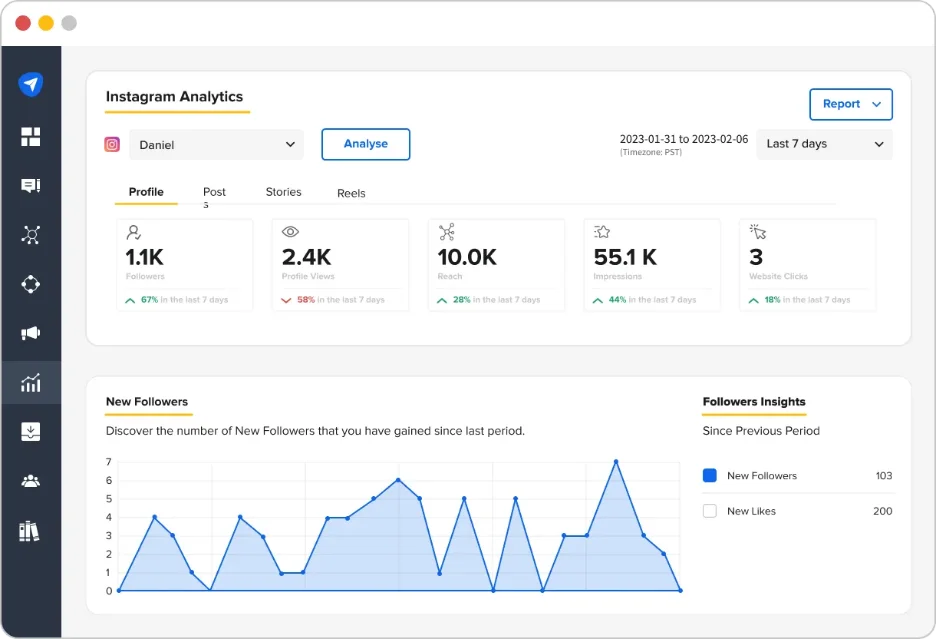
On Capterra, Jess W., a marketing manager in telecommunications, praises the “excellent value, great analytics, bulk scheduling, flexible schedules,” then names a real gap: she cannot schedule Twitter threads.
That combination is the reason to look here first. Of the six all-in-one platforms on this page, SocialPilot is the only one that covers Story reporting, hashtag performance, competitor benchmarking and white-label exports as native features rather than paid add-ons. Sprout Social does not publish white-label at all. Hootsuite does not either. ContentStudio charges $50 a month extra for it, and Sendible bills it on top of a $349 plan.
The pricing follows the same logic, because everything scales on accounts and users rather than per seat. Competitor Reports cost $299 a seat on Sprout Social and $199 a user on Agorapulse, so three people on Sprout Professional is $897 a month for work that sits inside one flat SocialPilot plan.
The fair criticism is history. SocialPilot does not publish a data retention window. Iconosquare states a year on its €33 plan and Minter.io keeps everything from $8.25 a profile, so if a year-over-year Instagram comparison is the specific thing you are buying, ask before you commit. There is no paid ad analytics either, which matters if proving Instagram ad ROI is part of the job.
For the full metric list, see SocialPilot’s Instagram analytics.
None of which shows up in the bill, and that is where the case gets easy to make. Essentials covers scheduling and core Instagram reporting at $25.50/month on annual billing.
Standard is $42.50 for 15 accounts and 3 users. Premium at $85 is the one most agencies land on, because it carries both Competitor Reports and White Label Reports, and an equivalent client-facing setup costs $99 on ContentStudio once its white-label add-on is counted, or $299 a seat on Sprout Social. Extra accounts are $4 a month, extra users $5, on a 14-day trial with no card. Current tiers sit on SocialPilot’s plans page.
| Ultimate | Premium | Standard | Essentials |
$170.00/mois$200
Facturation annuelle (Économisez 15 %)
|
$85.00/mois$100
Facturation annuelle (Économisez 15 %)
|
$42.50/mois$50
Facturation annuelle (Économisez 15 %)
|
$25.50/mois$30
Facturation annuelle (Économisez 15 %)
|
|
Simplifiez la gestion des réseaux sociaux
|
|||
2. Sprout Social
Sprout Social has the deepest reporting on this page. It is also sold per seat, which is where it gets expensive.
Coverage
- Histoires
- Hashtags
- Concurrents
- White-label
What it actually looks like: A report-first dashboard polished enough to send to an executive without editing. Profile Performance rolls Instagram up beside every other network, paid and organic sit together, and report building is close to drag and drop. Competitor and tag insights live in their own module on the higher tiers.
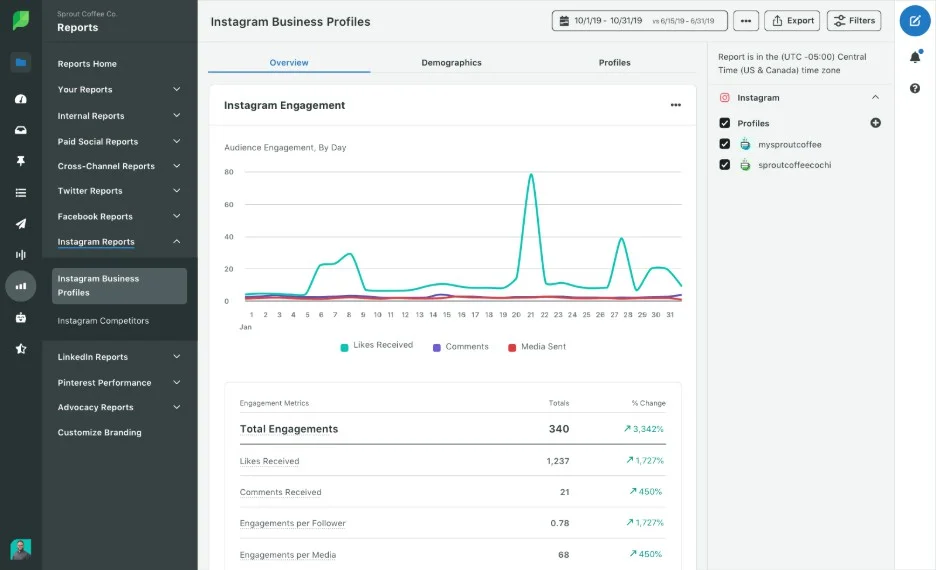
On Capterra, Zach P., a marketing coordinator, says “the reporting tools are top tier and it is incredibly simple to generate visually appealing reports,” then adds the catch: “it can get quite expensive if you require several user licenses.”
That review is the whole entry. The depth is real and so is the bill, because everything is per seat. Four people on Standard is $796 a month before a client is added, and competitor insights wait until Professional at $299 a seat. Sprout also does not publish a data retention window, so the most expensive reporting here comes with no stated memory.
Worth correcting the record: the previous version of this page listed Sprout as starting at $199. That is the Standard tier. Essentials now starts at $99 a seat.
Priced out properly, that means Essentials at $79 per seat/month on annual billing, or $99 month to month, covering five profiles. Standard is $199 a seat, Professional $299 and Advanced $399, on a 30-day trial. Multiply by heads before you compare any of it.
What running Sprout Social standalone requires: Very little on coverage, since it reports on everything. What it requires is headcount discipline, because nothing in the product softens per-seat pricing. If two people need logins and the reporting depth is the only reason you are here, Socialinsider does benchmarking for $82 flat and Social Status does client reports for $29.
If per-seat pricing is the blocker, our roundup of Alternatives à Sprout Social works through the cheaper options in detail.
3. Agorapulse
Agorapulse is unusual in putting branded exports on its cheapest plan, then keeping the reporting you came for two tiers above it.
Coverage
- Histoires
- Hashtags
- Concurrents
- White-label
What it actually looks comme : Publishing and a unified inbox at the center, with Instagram reporting that improves sharply as you climb. Its competitor reports put your account beside named rivals and split engagement by post type, so Reels and carousels are compared rather than lumped together, and branded report exports are available from the entry plan, which almost nothing else here does. ROI reporting on Advanced ties Instagram activity to outcomes rather than stopping at engagement.
On Capterra, Sari G., a marketing director, rates the “Inbox and social monitoring features [as] excellent,” but flags the pricing: the “free analytic tools are very limited” and a proper year-in-review needs “Power Reports which nearly doubles the price.”
That is the shape of it. Branded exports arrive early and the good analytics arrive late, on Advanced at $149 a user billed annually. Agorapulse calls its own entry-tier reports basic, which is fair, and it publishes no retention window either.
The previous version of this page showed $149 in one place and $49 in another as the starting price. Neither was.
Corrected, the ladder starts at $79 per user/month when billed annually, or $99 month to month, for 10 profiles. Professional is $119 and Advanced $149 on that same annual basis, or $149 and $199 if you pay month to month, and Advanced is where the reporting you actually came for lives. Custom is quote-only, extra profiles run $10 to $15 a month, and the trial is a generous 30 days with no card.
What running Agorapulse standalone requires: Not much on Advanced. On the entry plan you will want dedicated analytics beside it, and at that point two subscriptions cost more than the tier upgrade. Price both before choosing.
If Advanced sits outside the budget, our Alternatives à Agorapulse page covers what else does the same job.
4. Hootsuite
Hootsuite throws in industry benchmarking from the entry plan, charges per seat for it, and stays thin on Instagram specifics.
Coverage
- Histoires
- Hashtags
- Concurrents
- White-label
What it actually looks like: A familiar streams-and-calendar interface with something unusual attached: benchmarking against an industry average is included from the entry plan, not gated. You pick a vertical and your post impressions, audience growth rate and engagement plot against it. Professional lifts the account cap entirely and adds custom report building.
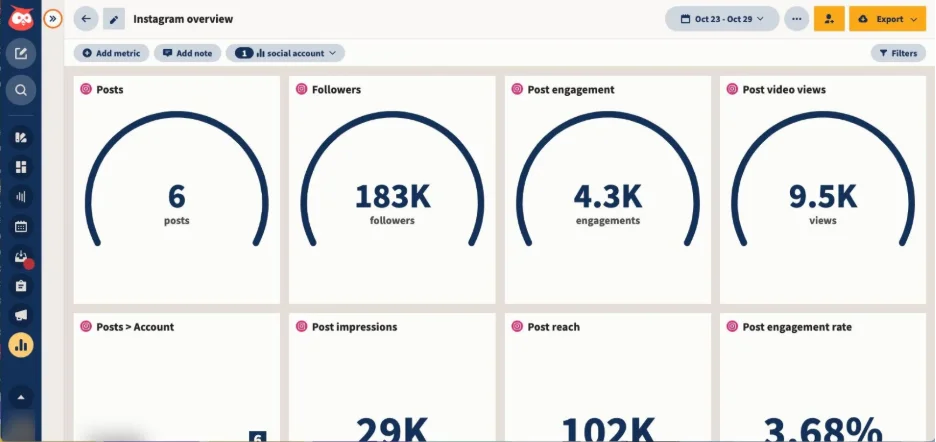
On Capterra, Taylor S., a students director, calls the “integration across practically all platforms… a great one-stop shop,” while noting the interface “is not the most easy to use/user-intuitive for new users.”
Industry benchmarking on the cheapest plan is genuinely useful, and it answers a different question from competitor benchmarking: not how you compare to three named rivals, but whether your numbers are normal. Rival IQ and Socialinsider do the named-rival version far better.
Against that, it is sold per user, so team cost climbs quickly, the Instagram-specific depth does not match a dedicated tool at a fifth of the price, and no retention window is published. The previous version of this page listed two tiers at $99 to $249, wrong on both count and ceiling.
Budgeting it honestly means counting seats before tiers. Standard is $99 per user/month for up to 10 accounts, Professional $199 a user for unlimited accounts, Advanced $399 a user, and Enterprise quote-only, on a 14-day trial with no card. Hootsuite confirms on its own pricing page that plans are sold per user, so a four-person team on Professional is $796 a month.
What running Hootsuite standalone requires: Little on coverage and a lot on budget. If Instagram reporting depth is the actual job, Minter.io at $8.25 a profile or Iconosquare at €33 alongside a cheaper scheduler beats this comfortably.
If the per-seat maths does not work, our Alternatives à Hootsuite roundup goes through the cheaper options in depth.
5. ContentStudio
ContentStudio gets you real competitor analytics for less than anything else here, provided you read the add-ons first.
Coverage
- Histoires
- Hashtags
- Concurrents
- White-label
What it actually looks like: Instagram Competitive Analytics puts a comparative table of rival accounts beside a scatter plot of followers against engagement rate, so you can see who is large and who is actually engaging. Campaign and label reporting and Meta Ads analytics arrive on the same tier, which nothing else at this price does.
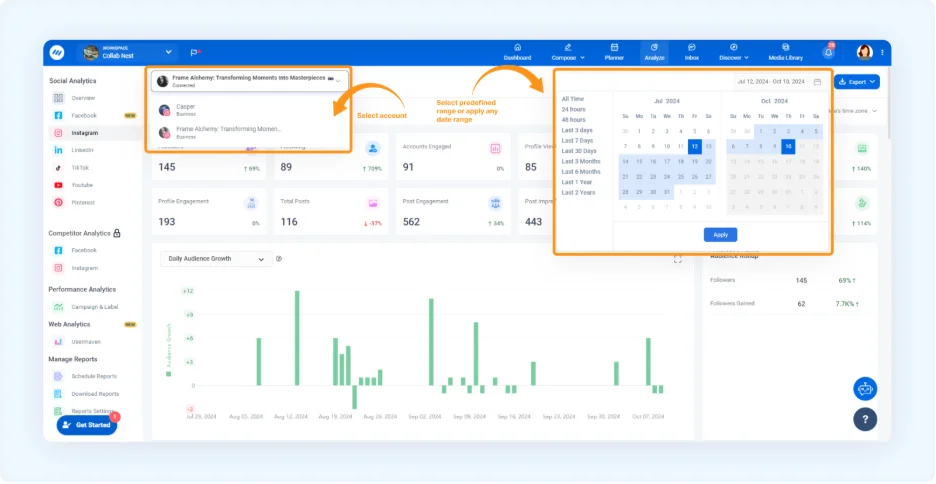
The Advanced tier at $49 is the value pick of this whole category, covering competitor and ad analytics for a fraction of what the same pair costs elsewhere. Read the add-ons before you commit, though. The entry plan gives 5 accounts, one user and no competitor data at all. White-label is $50 a month on top and social listening another $99, so a client-facing agency setup lands well above the headline price.
No retention window is published, and the previous version of this page showed $49 in one place and $25 in another. Neither matched the real entry price of $19.
Add the pieces up before you commit, because the headline is only the start. Standard is $19/mois billed annually for 5 accounts and one user. Advanced at $49 is where competitor and ad analytics arrive, Agency Unlimited is $99, and Enterprise is quote-only. Layer the $50 white-label add-on onto Advanced and a client-facing setup reaches $99 a month, on a 7-day trial with no card.
What running ContentStudio standalone requires: Nothing extra for a small team on Advanced. For client work, budget the white-label add-on from the start rather than discovering it in month two. If a branded report is the whole job, Social Status includes one at $29.
6. Sendible
Sendible is the only platform here with unlimited users on every plan, and it has the weakest analytics of the six all-in-ones.
Coverage
- Histoires
- Hashtags
- Concurrents
- White-label
What it actually looks like: Each client gets a workspace, and you switch between them from a dropdown rather than logging out. Every plan includes unlimited team members, which is the one decision that changes the maths against every per-seat tool on this page. Reporting is standard on the lower plans and custom-built from Premium.
On Capterra, Mysty S., a founder, praises the “realistic pricing and ease of use,” then names the weak spot directly: “the reporting could be stepped up a bit… a little bit limiting for my taste, so I use an ancillary reporting software.”
That last clause is the most useful sentence on this page, because it describes what actually happens. Unlimited users at $35 beats everything here on that axis, and analytics is where Sendible runs out. Custom report building needs Premium, white-label is an extra fee on the top two tiers only, Instagram competitor benchmarking is not advertised at all, and no retention window is published.
What you are really buying here is seat count, and on that axis nothing else comes close. Core is $35/month for one workspace and six social profiles. Plus is $99 for three workspaces, Premium $199 for seven, Elite $299 for fifteen and Enterprise $750 for fifty, at six profiles per workspace throughout. Every plan carries unlimited users, on a 14-day trial with no card. White-labelling is the exception to that simplicity, because it is an extra fee on Elite and Enterprise only, and Sendible’s own pricing FAQ puts a white-labelled Elite at $349 a month and Enterprise at $800.
What running Sendible standalone requires: A second tool, often, and the reviewer above already named it. Pair Sendible with Minter.io at $8.25 a profile or Social Status at $29 rather than climbing its tiers for reporting alone. Sendible remains the better anchor if headcount is your constraint.
If the reporting is what gives you pause, our Alternatives à Sendible page compares platforms with stronger analytics.
Analytics-First and Dedicated Reporting Tools
These four do not schedule anything. They exist to measure, and it shows: all four publish how far back their data goes, and three of them beat every all-in-one on this page for a fraction of the price. Start here if publishing is already handled.
7. Social Status
Social Status splits its reporting into four separate products and states a data window on every plan, which nobody else here does.
Coverage
- Histoires
- Hashtags
- Concurrents
- White-label
What it actually looks like: Organic, paid, competitor and influencer analytics are four distinct products in one left rail, rather than one dashboard trying to be all of them. Profile Analytics summarises post impressions, video views, post engagement, growth and link clicks on a single screen. Every tier states its data history up front, from one month on the free plan to unlimited on Enterprise.
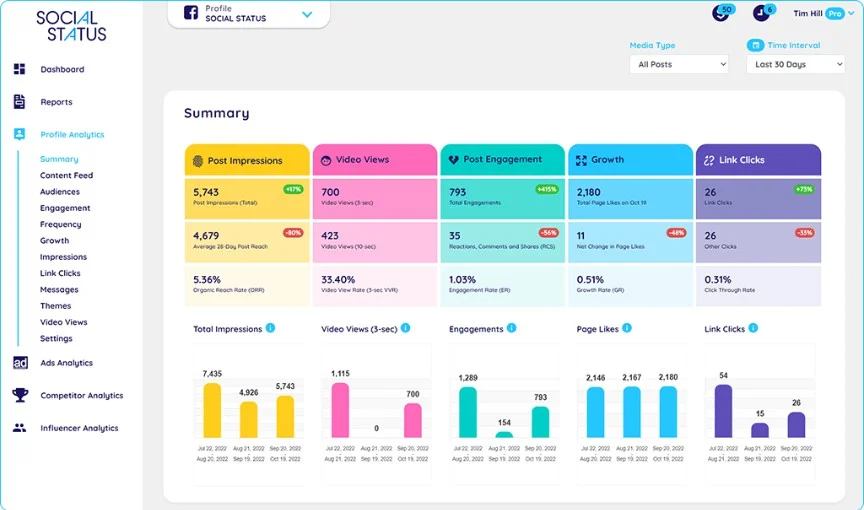
Two things make it worth the click. The free tier is real rather than a trial, and white-label client reports start at $29, which undercuts every all-in-one here by a wide margin. If a branded PDF is the entire reason you are shopping, this is the cheapest honest answer on the page.
The catch is where the interesting analytics sit. Competitor, influencer and ads reporting all wait until Bronze at $99. Below that it is a reporting tool and nothing more, so the cheap tiers solve the client-report job and not the benchmarking one. Note too that Basic gives three months of history and Essential six, so a year of data means $99 as well.
The ladder makes that trade explicit rather than burying it. Free covers one plan quota, 3 users and a month of history. Micro is $9/month, Basic $29 with white-label reports and three months of data, Essential $49 with six. Bronze at $99 unlocks competitor, influencer and ads analytics with a full year, then Silver $199, Gold $399, Platinum $799 and Enterprise $1,499.
What running Social Status standalone requires: A scheduler, because it does not publish. Pair it with whatever you already post from, which is exactly how the Sendible reviewer above ended up working.
8. Iconosquare
Iconosquare will hold a year of your Instagram history for €33, billed in euros, which a US buyer should factor in.
Coverage
- Histoires
- Hashtags
- Concurrents
- White-label
What it actually looks like: Built Instagram-first and still deepest there, with metrics that map to how Instagram actually works rather than a generic cross-network schema. Dashboards are assembled from widgets, reach splits by post type across Reels, Stories and carousels, and the free tier is real rather than a trial at two profiles and ten posts a month.
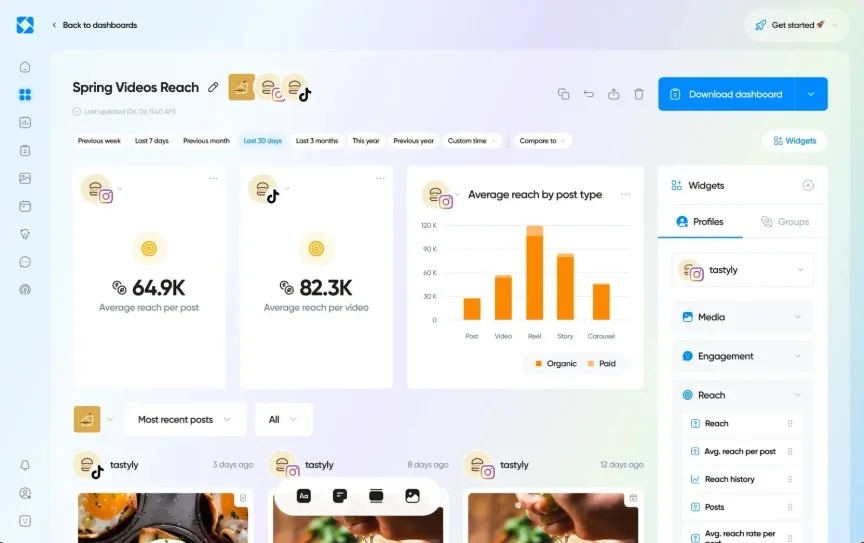
On Capterra, Jordan S., a director of content and communication strategy at a non-profit, states this article’s whole argument without being asked: “It’s so helpful with Instagram, who only shows you 30 days of data. It allows you to see your growth in realtime.” Then the catch: “It often has trouble staying connected to your social media accounts. You have to reconfirm the connection many times.”
History is the real differentiator, and it is the thing this category usually hides. Launch states a year at €33, Scale two years at €69, Excel unlimited at €116. Compare that to any all-in-one on this page, all six of which publish nothing at all, and the cheap Instagram-only tool turns out to have the better memory.
Against it, every paid tier caps at five social profiles until Custom, which is a hard ceiling for an agency regardless of budget, and extra users cost €16 a month each. Competitor benchmarking waits for Scale, white-label for Excel. Euro-only billing also means a US buyer carries exchange-rate drift. The previous version of this page listed €33 as $59.
In euros, that depth runs €33/month on Launch for 5 profiles, one user and a year of history. Scale is €69 for 3 users, competitor benchmarking and two years. Excel is €116 for 6 users, white-label reports and unlimited history. Custom is quote-only, the trial runs 14 days, and extra users cost €16 a month each.
What running Iconosquare standalone requires: A scheduler for anything past its own light publishing, and a different anchor tool entirely once you pass five profiles. Past that ceiling, Socialinsider gives twenty profiles for $82.
9. Metricool
Metricool keeps unlimited history on a $20 plan, with channel add-ons that are easy to miss on the way in.
Coverage
- Histoires
- Hashtags
- Concurrents
- White-label
What it actually looks like: Priced by number of brands rather than seats. Reels analytics breaks organic summary and organic interactions out across a period and lists every Reel beneath with reach, saves and interactions per row. Best-hour heatmaps, competitor tracking and customisable report templates come with it, and Advanced adds a Looker Studio connector if Instagram is one panel in a wider dashboard.
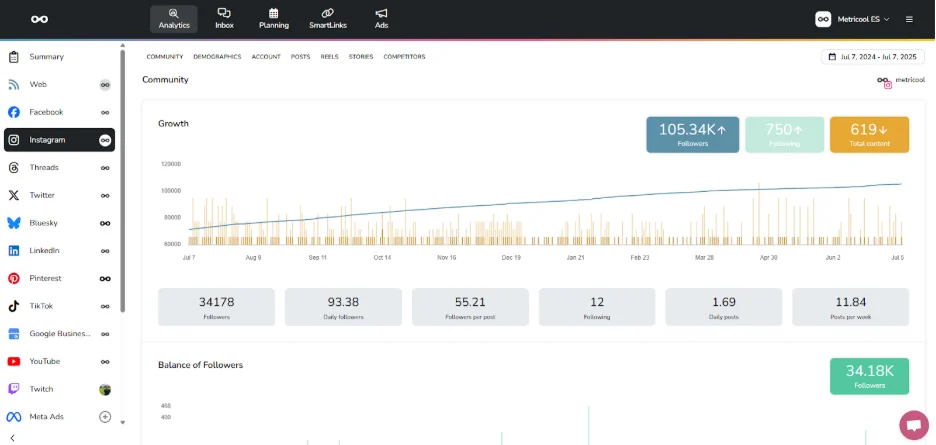
On Capterra, one reviewer likes the ease of scheduling, down to the option to “schedule the first comment too,” but dislikes that “you need to pay if you wish to connect your LinkedIn page,” one of several channels billed as an add-on.
That add-on billing is the thing to check, and for Instagram specifically it barely bites. What does matter is the history: every paid tier states unlimited, from $20. Together with Minter.io, this is the cheapest long memory on the page, and it comes attached to a scheduler.
The free plan is the strongest here because it tracks five competitor profiles, which no other free tier does. It caps analytics at 30 days though, which is shorter than Instagram’s own ninety, so treat it as a look at the interface rather than a solution. White-label needs the Custom tier, and rates rise with brand count. The previous version of this page showed $38, which was wrong.
Paid, it stays remarkably cheap for what it holds. Starter runs from about $20/mois for up to 10 brands, 100 competitor profiles and unlimited history. Advanced starts around $53 for up to 50 brands and adds the Looker Studio connector, and only Custom brings white-label. Rates climb with brand count, so price your own number rather than the headline.
What running Metricool standalone requires: Very little for an SMB. It schedules and reports, so for a single brand it can be most of a setup on its own, which is unusual in this half of the page.
If you outgrow the brand limits, our Alternatives à Metricool roundup covers where to go next.
10. Minter.io
Minter.io remembers every day your account has ever had for $9, and does nothing else at all.
Coverage
- Histoires
- Hashtags
- Concurrents
- White-label
What it actually looks like: A single-purpose Instagram analytics dashboard priced per profile. You pick any date range and it holds, because there is no retention cap on any tier: posts split by photo, video, carousel and Reel across the period, with likes and engagement charted underneath and an export button on the header. Stories and Reels are covered on the cheapest plan.
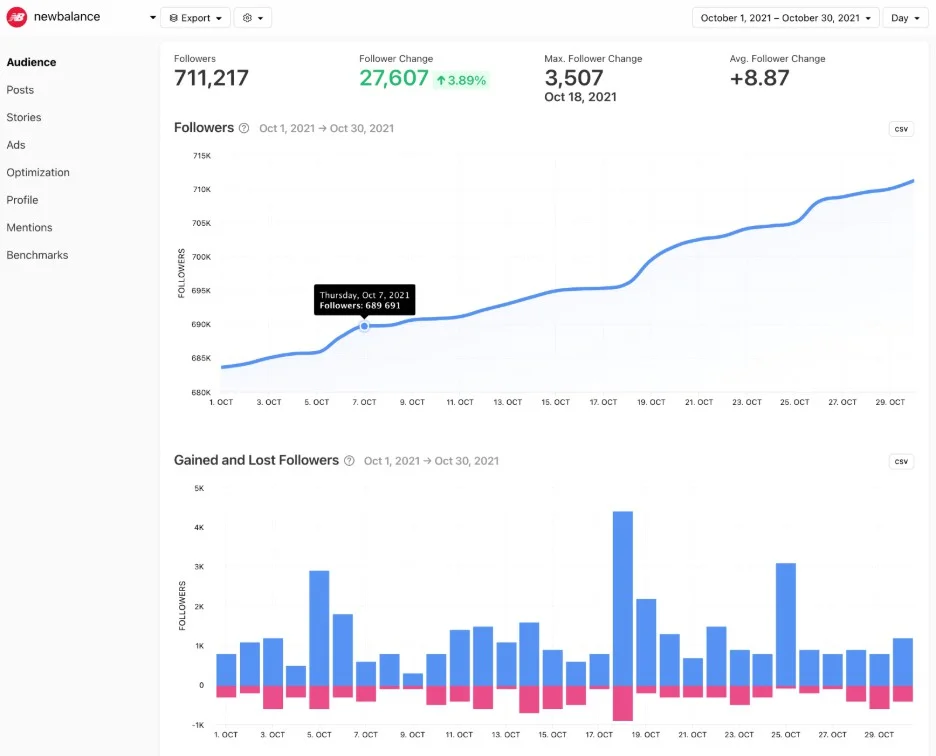
Full history from $8.25 a profile is the headline and it deserves to be. Six of the twelve tools here publish no retention window at all, and the ones that do tier it as a feature. Minter.io simply does not, on any plan, which makes it the cheapest way on this page to answer a year-over-year question.
The scope is the trade. There is no competitor benchmarking of any kind, hashtag analytics covers one tag per profile even on the top tier, and per-profile pricing turns expensive fast: five profiles start at $180 a month, where Socialinsider gives you twenty for $82.
Priced per profile, that narrow scope comes cheap. Silver is $8.25 per profile/month billed annually, or $9 month to month. Gold is $19 a profile and Platinum $39, where hashtag analytics and branded reports appear. Five or more profiles start at $180 a month with unlimited team members, on a 14-day trial with no card.
What running Minter.io standalone requires: A scheduler, and a second tool the moment benchmarking matters. This is a specialist you add to a setup, never the setup itself.
Competitive Benchmarking Tools
Both tools here answer one question: how do you compare to named competitors? That is a different job from measuring your own performance, and it is priced accordingly. Only look here if benchmarking is the reason you are buying.
11. Rival IQ
Rival IQ has the strongest competitive intelligence on this page, at the highest entry price, and your history only starts the day you subscribe.
Coverage
- Histoires
- Hashtags
- Concurrents
- White-label
What it actually looks like: You define a landscape of competitor accounts and it audits you against them. Instagram engagement share arrives as a share-of-voice pie, Instagram follower growth as a ranked league table with your own brand highlighted in the middle of it, and email alerts fire when a rival moves. It tracks companies rather than profiles, which is the right shape for this job, and it does not publish or schedule anything.
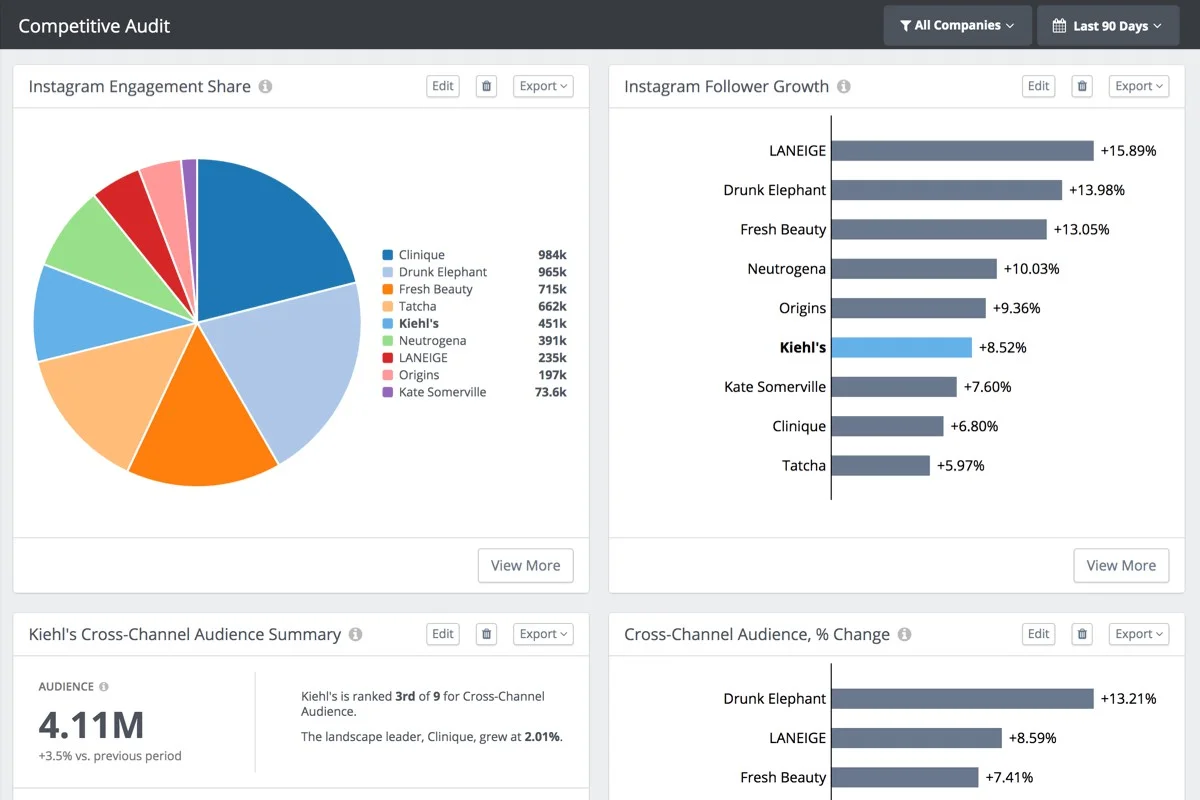
On Capterra, Brendan B., an athletics communications coordinator, calls a “snapshot of our competition across the league… invaluable,” while flagging the “lack of an archive for data prior to your subscription” and search that “could be improved to locate specific posts.”
That archive limitation is the one to weigh, because it is the opposite of what the price suggests. Drive states six months of history, Engage twelve and Engage Pro twenty-four, but none of it is backfilled: the clock starts when you sign up. An $8.25 Minter.io plan will tell you more about last year than a $239 Rival IQ plan will in its first month.
What you are paying for is the comparison, not the memory, and on that it is the best here. Story data is retained across all tiers rather than gated, the landscape reports are genuinely readable, and the alerts are useful rather than noise.
That comparison is priced like the enterprise software it is. Drive is $203/month annually, or $239 month to month, for 10 tracked companies, one user and six months of history. Engage is $349 for 20 companies, two users, twelve months and branded reports. Engage Pro is $559 for 40 companies, five users and twenty-four months, on a 14-day trial.
What running Rival IQ standalone requires: A lot. It benchmarks and reports and nothing else, so scheduling and day-to-day management need other tools. If the budget will not stretch, Socialinsider does the same job for a third of the price with more profiles.
12. Socialinsider
Socialinsider covers twenty profiles and full benchmarking at $82, with three months of history, and that is the limit to watch.
Coverage
- Histoires
- Hashtags
- Concurrents
- White-label
What it actually looks like: No publishing at all. It connects accounts, reports on them, benchmarks them against competitors and exports. An Instagram benchmark puts your own account and named rivals in one table across followers, growth, engagement and reach, with a written summary of what those numbers mean underneath. Engagement also breaks down by content format, so you can see whether Reels genuinely beat carousels for you, and twenty accounts come on the entry plan, four times what Iconosquare allows below Custom.
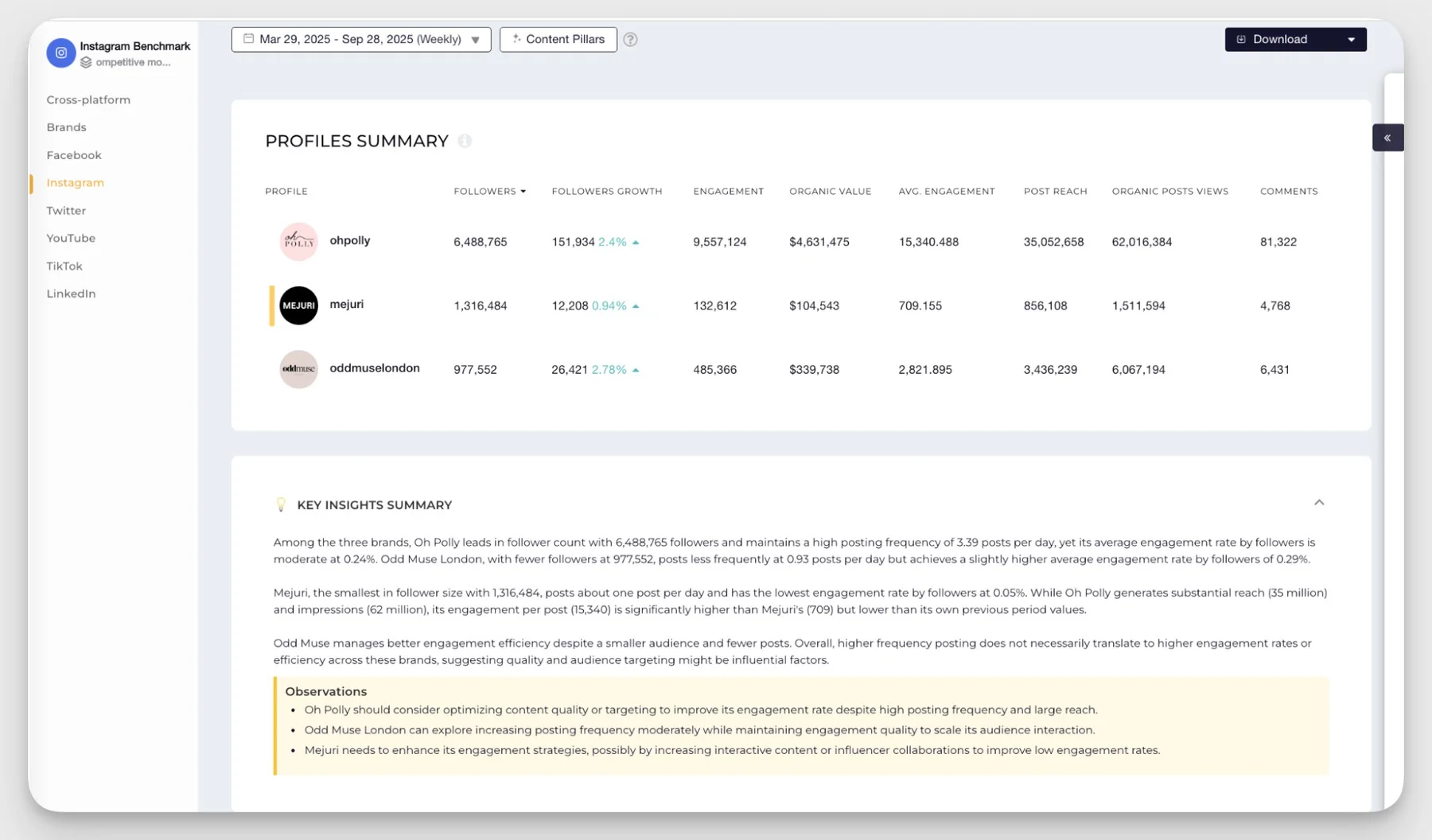
On Capterra, Dorra L., a director in marketing and advertising, values the “consolidated reporting for our clients and their competitors,” then asks for what is missing: “would love to see Pinterest reporting added.”
Worth reading that review corpus with clear eyes. Several reviewers list no downsides at all, which reads more like a happy niche than a flawless product. The sharpest criticism comes from a web analyst on the same page, who finds it “messy, its metrics are not clear, you can’t configure dashboards.”
The structural limitation is simpler than either. Historical data is tiered as a feature: three months on Adapt, six on Optimize, twelve on Predict. So the $82 entry plan gives you barely more history than Instagram’s free ninety days. If year-over-year comparison is why you are buying, your real entry price is $199, not $82, and a $20 Metricool plan states unlimited.
Benchmarking is not gated by tier, which is the right call and the main reason to pick it over Rival IQ. The entry plan is single-user, so a two-person team lands on $124, and white-label reporting is not published as included.
Which makes the ladder unusually simple to read, because you are only ever buying more profiles and more history. Adapt is $82/month for 20 profiles, one user and three months. Optimize is $124 for 30 profiles, two users and six months. Predict is $199 for 40 profiles, five users and twelve months, with Enterprise quote-only, on a 14-day trial with no card.
What running Socialinsider standalone requires: A scheduler, always, because publishing is absent by design. Pair it with SocialPilot or Sendible, and check white-label before you promise a client a branded document.
Where Instagram’s Own Native Tool Already Has You Covered
Before paying anything, it is worth knowing exactly what you already have. Instagram Insights is free with a professional account and for a lot of accounts it is enough.
What Instagram Insights Actually Shows
Reach, views, profile visits, follows, likes, comments, shares, saves and total interactions at the post level. Reels add average watch time and skip rate. Stories add navigation, replies and link clicks. Audience demographics and active times are there too.
The impressions change matters here. Meta’s own developer documentation for media insights states that “for media created after July 2, 2024, this metric is deprecated,” and views replaced it. Any tool still showing an impressions column for recent posts is relabelling views data.
Why It Runs Out for Serious Growth
Three limits, all confirmed in Meta’s Instagram Insights documentation.
Ninety days. Account-level metrics are stored for up to 90 days. There is no year-over-year comparison to be had from Insights at all. This is the single most common reason people upgrade, and it is why the analytics-first tools further up this page make a point of publishing how far back they go.
A follower floor. Some metrics are not available on accounts with fewer than 100 followers.
One account, no comparison. No competitor benchmarking, no cross-account view, no client-ready export. If you manage more than your own account, that is where it stops.
For what each of those metrics actually means, our Guide de l'analyse Instagram covers the definitions.
If publishing sits on your list alongside reporting, our Outils de gestion Instagram roundup covers the wider category.
When a Third-Party Tool Is Still Worth It
Pay when one of these is true.
- You need data older than ninety days.
- You report to someone who wants a branded document.
- You manage more than two accounts.
- You need to know how you compare to specific rivals.
If none apply, stay free a while longer.
Why Your Tool’s Numbers Will Not Match the Instagram App
This catches most people in the first week, and comparison pages rarely mention it. Your new tool will show different figures from the app. That is not a bug.
Different data sources. The app reads Meta’s internal data. Every third-party tool reads the public Insights API, which is a smaller and partly deprecated surface. The app will often show higher reach and view figures as a result.
Different engagement-rate maths. Most tools divide engagement by follower count. Instagram leans on reach. Same post, two percentages, neither wrong. Check which denominator your tool uses before reporting the number to anyone.
Organic and paid handled differently. Depending on API access, a tool may separate organic from paid, merge them, or leave paid out. Few say which they chose.
The impressions migration. Covered above. A tool showing impressions for recent content is showing views under an old label.
Refresh timing. Tools pull on different schedules, so the same date range can disagree by a point or two because one synced earlier.
What to do about it: pick one source as your reporting truth and stay with it. Comparing this month’s tool figure against last month’s app figure will produce a trend that does not exist.
The Free Instagram Analytics Tools Actually Worth Using
Four options here are genuinely free rather than trial-limited. The limits are real, so here they are plainly.
- Instagram Insights. Free with a professional account. Ninety-day window, one account, some metrics need 100 or more followers.
- Metricool Free. One brand, 30 days of analytics, 5 competitor profiles, 20 posts a month. The only free tier that tracks competitors.
- Social Status Free. One plan quota, 3 users, one month of history. No competitor, influencer or ads analytics.
- Iconosquare Free. Two profiles, one user, basic analytics, 10 posts a month each, after a 14-day trial.
Note what all four have in common: a data window at or below Instagram’s own. Free tiers let you try an interface, not escape the ninety-day wall. The cheapest fix for that starts at $8.25 a profile.
How to Choose the Right Instagram Analytics Tool
Start With One Job, Not a Category
Name the single job you cannot do right now and let it pick the tool.
A client report points at Social Status at $29, or an all-in-one with white-label on a plan you can afford.
Named-rival benchmarking points at Socialinsider or Rival IQ and nothing else.
A year-over-year question points at Minter.io, Metricool or Iconosquare, and costs less than either of the other two answers.
Then check how you are billed, because it moves the answer more than features do. Per-seat pricing looks cheap for one person and expensive for four. Per-profile inverts it. Per-brand inverts it again. Multiply by your real headcount and account count before comparing headline numbers.
Two things are worth testing during a trial rather than discovering after it.
First, whether Reel reporting goes as deep as you need, since that is where these tools differ most. Our guide to Analyse des moulinets Instagram sets out what to look for.
Second, whether the hashtag reporting is real analysis or just a list of the tags you already used. Our Guide d'analyse des hashtags sur Instagram covers the difference.
Combinations That Actually Work
Most people need one tool. Three pairings come up often enough to name.
Scheduler plus long memory. Whatever you already publish from, plus Minter.io at $8.25 a profile or Metricool at $20 for unlimited history. Usually cheaper than upgrading two tiers, and it fixes the one thing tier upgrades often do not.
All-in-one plus benchmarking. Scheduling and client reports in one place, with Socialinsider at $82 for competitive position. The specialist does the job no built-in module does properly.
Native Insights plus one free tier. For a single account, Instagram Insights with Metricool’s free plan for competitor tracking costs nothing and covers more than people expect.
Managing more than Instagram? The same job-based logic holds across every network, and our wider roundup of outils d'analyse des médias sociaux applies it at that scale.
We have run this same comparison for Outils d'analyse de Facebook, et le Outils d'analyse LinkedIn roundup follows the same structure.
How We Checked These 12 Instagram Analytics Tools
Every price, tier, profile limit, trial length and data window here was read off the vendor’s own pricing page in September 2026, not from a review aggregator. That check corrected six prices the previous version of this page had wrong, at ContentStudio, Metricool, Agorapulse, Iconosquare, Hootsuite and Sprout Social, plus two data windows we had called unpublished when the vendors do state them. Each correction is named in the tool section it belongs to rather than quietly fixed.
The native Insights claims come from Meta’s developer documentation rather than secondary blogs, including the ninety-day window, the 100-follower threshold and the July 2024 impressions deprecation.
Three tools came off the roster. Bitly measures bio-link clicks and has no access to Instagram engagement or reach. Emplifi has moved into broad enterprise customer-experience software. Keyhole was acquired by Muck Rack in September 2024, and what remains is social listening for PR teams rather than Instagram account analytics. Minter.io, Rival IQ and Socialinsider replaced them.
What we did not do: run twelve paid trials side by side. This is a pricing, capability and positioning comparison built from vendor documentation and published user reviews, and three tools carry no user review because we could not source one worth quoting. No star ratings appear for any tool, including ours, because review scores move weekly and none of them would still be accurate by the time you read this.
So, Which One Earns Its Place?
Twelve tools, and not one of them is the answer on its own. The right one is whichever covers the job you cannot do today, which is why the shortlist looks different for a solo creator than for an agency running ten clients.
If that job is a client report with your name on it, several accounts on one calendar and competitor numbers beside your own, an all-in-one platform ends the search, and only one of the six here delivers all of that without a second invoice.
If instead it is a single question about last September, buy memory rather than a platform. Minter.io at $8.25 a profile remembers everything. Instagram, by contrast, remembers ninety days and then quietly forgets.
Here is the part worth sitting with. If you could see two years of your own Instagram instead of ninety days, what would you actually change? Most people cannot answer straight away, which is exactly why the ninety-day wall never feels urgent until the quarter it costs you something.
If your row came out as several accounts, more than one person on the calendar and a client who expects the report to carry your logo, that is the shape SocialPilot was built for, from $25.50 a mois. Commencez votre essai gratuit de 14 jours dès aujourd'hui and pull a full month of Instagram reporting before you commit to anything.
Questions fréquemment posées
Quel est le meilleur outil d'analyse Instagram ?
There isn’t one, because the category splits by job. For scheduling, competitor reports and white-label client reporting together in one place, SocialPilot from $25.50. For dedicated benchmarking, Socialinsider at $82. For history on its own, Minter.io from $8.25 a profile. Pick by the job, not the brand.
What is the 5-3-1 rule for Instagram?
It’s an informal daily engagement habit: like five posts, comment on three, follow one new account in your niche. Instagram has never published it, and the engagement-boost figures attached to it online have no traceable source. It’s a routine, not a metric, and no analytics tool measures it.
Can ChatGPT analyze my Instagram?
Not directly. ChatGPT cannot connect to your account or pull Insights data, because no such integration exists. It can interpret data you export and paste in, such as a CSV from Insights or from any tool on this page. The measurement still has to come from somewhere else entirely.
Is there a way to see Instagram analytics?
Yes. Switch to a professional account, Business or Creator, and Insights appears free in the app under the Professional dashboard. It covers reach, views, interactions, demographics and per-post performance for the last ninety days. Past that window you need a third-party tool to keep the record.
How far back can a tool pull my Instagram data after I connect it?
It depends on the tool, and most do not backfill at all. Rival IQ states plainly that there is no archive before your subscription starts. Minter.io and Metricool are the exceptions, pulling everything available. Connect early if you think you will want that history later on.
Why does my Instagram engagement rate differ between two tools?
Because they divide by different things. Most third-party tools calculate engagement against follower count, while Instagram leans on reach. Same post, two percentages, neither of them wrong. Check which denominator your tool uses before you report the figure to a client or a director.
Can I track a competitor’s Instagram account without following them?
Yes, for public professional accounts. Benchmarking tools read publicly available data through Instagram’s API, so no follow is needed and the competitor is never notified. You see follower growth, posting cadence and engagement rate, but never their private Insights figures like reach or saves.
A propos de l'auteur











Where SocialPilot Fits in This List
SocialPilot sits in the All-in-One Social Media Management category, alongside Sprout Social, Agorapulse, Hootsuite, ContentStudio, and Sendible. It’s built for teams and agencies that want scheduling, publishing, and Instagram analytics together in one platform, not a dedicated single-purpose tool. If your primary need is dedicated analytics-first reporting, competitive benchmarking, or campaign/hashtag tracking, the categories further up this page are a better starting point than an all-in-one platform like SocialPilot.
Against the five jobs, that is four covered natively and one left open:
So the fair summary is this. No other all-in-one platform on this page covers as many of the five jobs without an add-on invoice, and none of them prices it flat rather than per seat. If you need to answer a question about last September, though, buy Minter.io from $8.25 a profile or Metricool at $20 and keep whatever you schedule with. We would rather tell you that than sell you the wrong thing.