

Most guides to nonprofit social media boil down to the same instruction: post more, and post it consistently. That’s rarely the actual problem, and treating it as the only one is why so much of this advice doesn’t land once you try to use it.
I run a small agency in Harrogate called Artus Digital. We work across industries as different as accountants and grass seed suppliers, and a decent handful of our clients are charities. That’s not a sales pitch, it’s just where everything below actually comes from.
If social media landed on your desk at a nonprofit with no handoff and no one to ask, the nine things below are what I’d tell you to do, and roughly the order I’d tell you to do them in. Some of it will contradict advice you’ve already been given, and I’ll say where, and why.
None of this replaces the basic work of building trust with your audience before you ask them for anything. It just makes that work sustainable for a team of one.
Here they are, numbered in the order I’d actually work through them with a new charity client, not the order a textbook would put them in. Skip ahead if one of them clearly doesn’t apply to where your organization is right now but read them in this order the first time through, because a few of the later ones only make sense once the earlier ones are already in place.
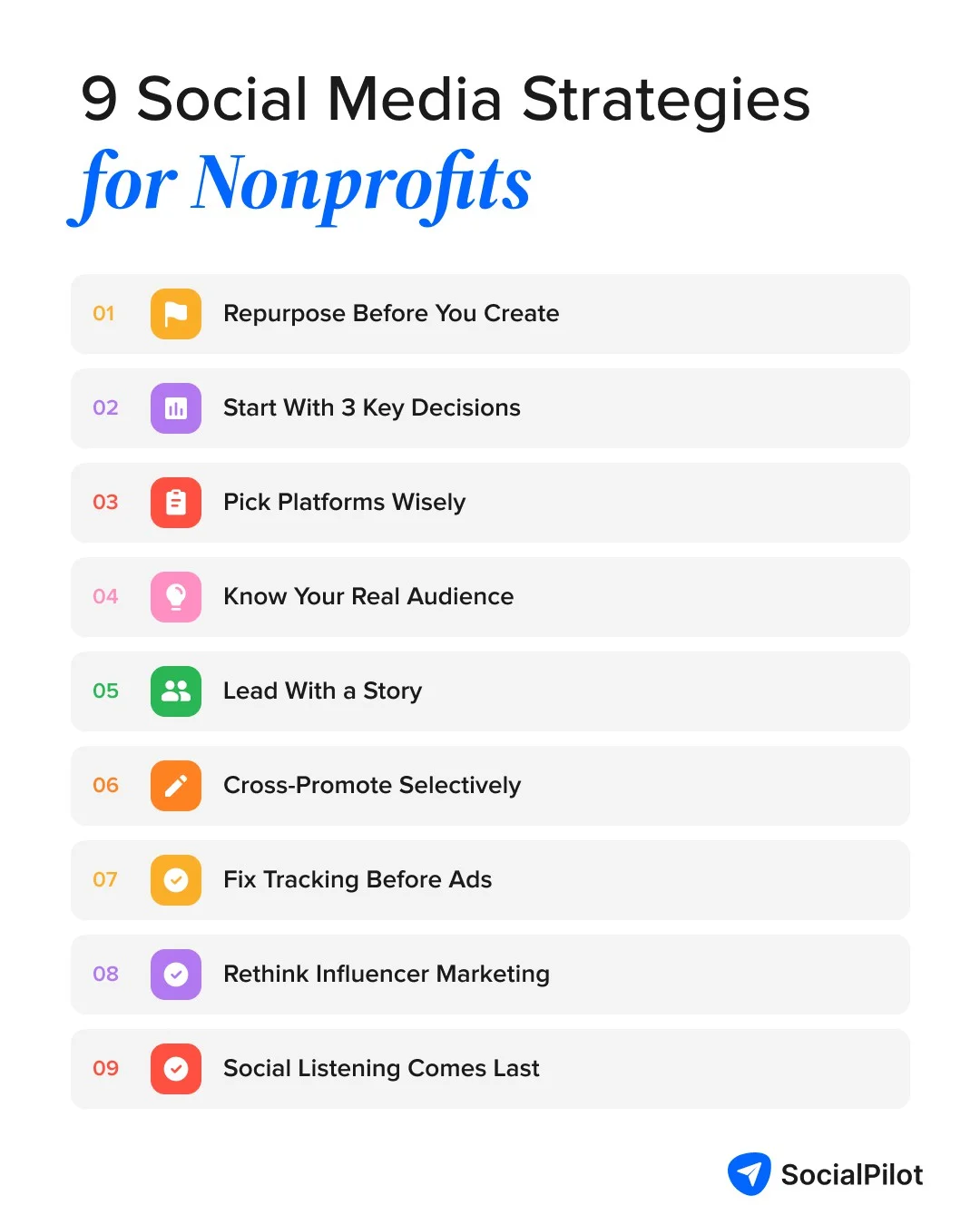
1. Repurpose Everything Before You Create Anything New
The first thing I check when we take on a new charity client’s account isn’t their strategy. It’s their content, or usually, how little of it there is, because every post started from a blank page and a blinking cursor.
Think of it like a Sunday roast. One good piece of content is the joint of meat. The strategy post, the quote graphic, the short clip, the caption pulled from someone’s own words: that’s Monday’s sandwich, Tuesday’s soup, and Wednesday’s hash, all from the same protein, just plated differently each time.
charity: water is the clearest large-scale example of this habit I know of. Their Instagram feed has long worked as a holding pen for images and video that get reused across their other channels, rather than a place where content goes to be posted once and forgotten.
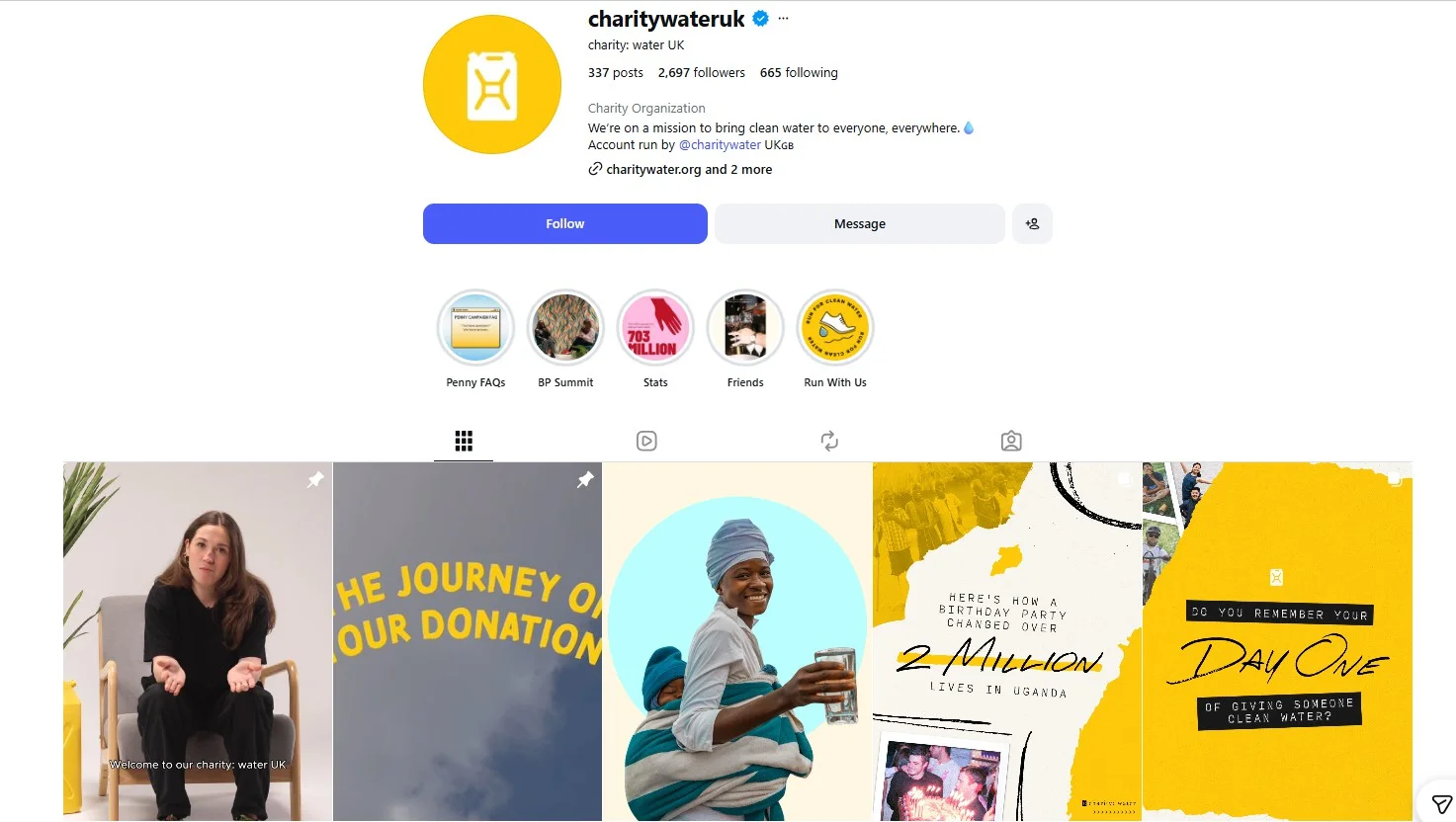
They were also one of the first charities on Twitter and built a following in the millions doing it, which tells you the habit scales well past a two-person marketing team.
1.1 Turn One Story into a Week of Posts
When a charity client hands us a single volunteer testimonial video, we don’t post it once and move on. We pull the strongest few seconds for a short clip, lift the best line for a quote graphic, use the volunteer’s own words as a caption, and turn the numbers behind the story into a separate fact post the following week.
One recorded conversation turns into four different posts, spread across ten days.
This isn’t a trick unique to us. This breakdown on how to repurpose content for social media walks you through the same idea in more formats than I’ve got room for here, and it’s worth fifteen minutes if you want the fuller version.
1.2 Where the Scheduling Actually Happens
We do all of that repurposing in one sitting and load the whole batch into SocialPilot social media scheduler at once, so a single afternoon of cutting and captioning covers two weeks of posting across whichever platforms that client has actually chosen to keep up.
Here is a complete breakdown of SocialPilot’s bulk scheduling feature.
Nobody has to remember to log in every morning and post something from scratch.
This is the section I’d want you to take most seriously if you only have time for one. Every nonprofit account I’ve worked on that felt sustainable had this habit running underneath it somewhere.
2. Skip the Strategy Document, Make These Three Decisions Instead
A well-defined mission matters, and that part of the standard advice is fair.
Where I part ways with it is the size of the document that supposedly needs to exist before you post anything. You don’t need a strategy deck. You need three answers:
- Who you’re writing for,
- What you want them to do next, and
- Which one or two platforms you’re actually going to keep up with.
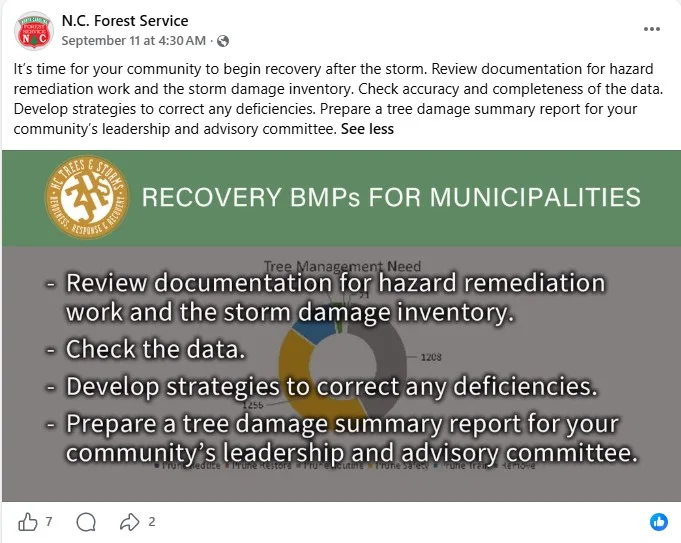
The N.C. Forest Service runs a decent public example of this working, on both Facebook and X. Its feed consistently ties back to one clear goal, sustainable forest management, rather than trying to be everything to everyone.
Here is a post from their Facebook page that shows exactly what that looks like in practice. No mission language anywhere in it. Just a plain checklist tied to one goal: helping a community recover after a storm.
I’ve sat through kickoff calls that spent ninety minutes on mission language and zero minutes on who was actually going to open the scheduling tool on a Tuesday.
Get those three decisions right first, put them in writing if it helps you remember them, and let the bigger document come later, if it comes at all. Having a clear social media content calendar does more for you at this stage than a mission statement does.
Once you’ve made those three decisions, group your content into two or three recurring themes rather than treating every post as its own invention.
3. Which Platforms Actually Deserve Your Time
Every guide on this topic tells you to pick three or four platforms and “focus your efforts.” Almost none of them tell you which ones are worth focusing on right now, or why that answer has changed since the last time you read one of these guides.
According to M+R’s 2026 Benchmarks report, which surveyed nonprofits on their 2025 activity, follower counts on X fell 3% that year, the only platform in the study to show a decline. TikTok audiences grew 34% over the same period, the fastest of any platform tracked. Facebook still carries the largest average following by far, as 98% of nonprofits use this platform, and that’s worth remembering before anyone tells you Facebook is dead for nonprofits.
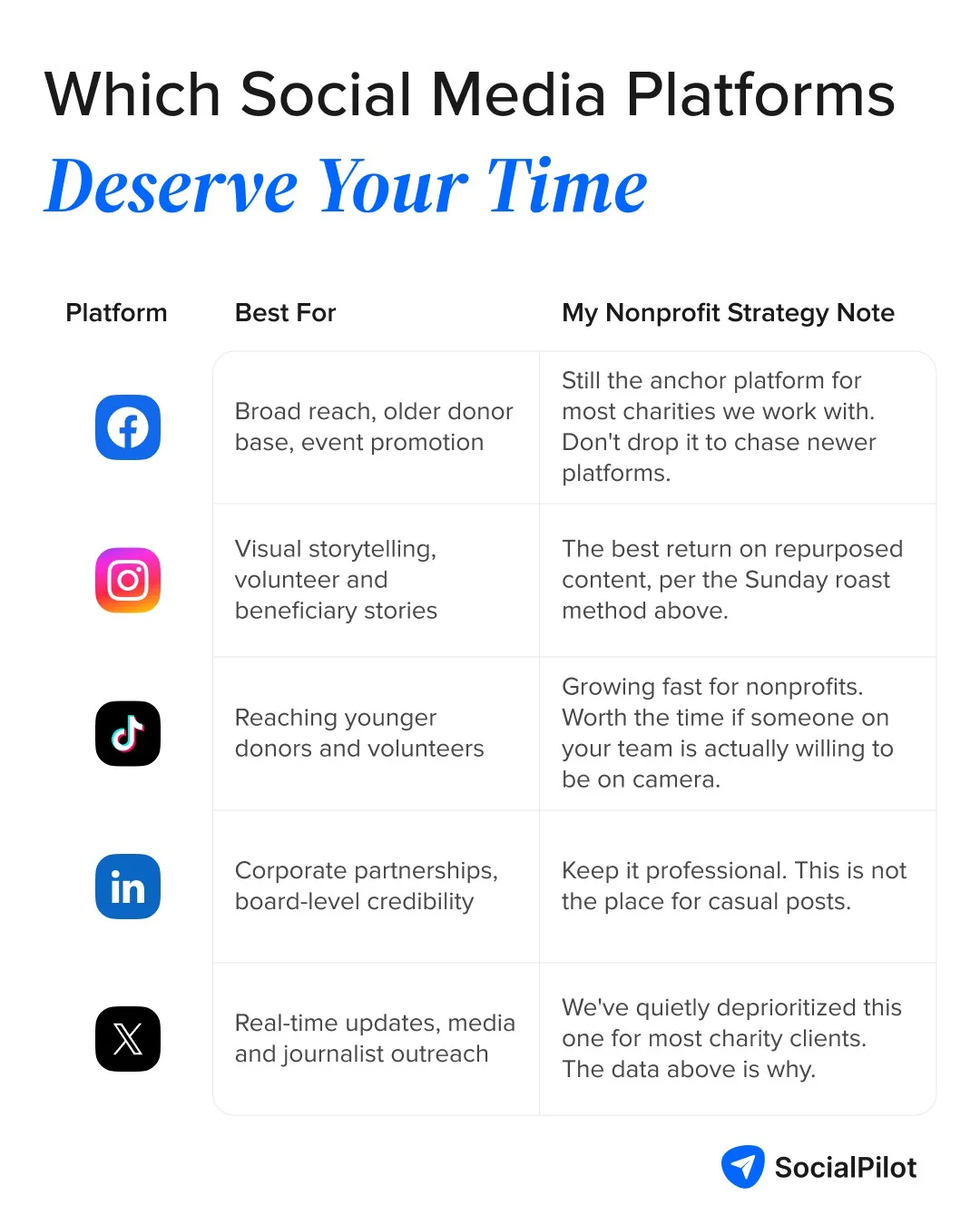
If you want to see the TikTok row of that table in action, UNICEF’s TikTok account mixes short explainer clips with more polished campaign videos, and it’s built a following of hundreds of thousands doing it.
Here is an example of a “short explainer clip” from their TikTok page, which is a simple whiteboard/marker DIY-style clip
Similarly, here is a “polished campaign video” from their page, which is an on-location interview format tied to International Women’s Day
That’s a genuine contrast, but this contrast has worked really well for them on TikTok.
You’re not UNICEF, and you don’t need their production budget to borrow the format: short, handheld, and explained in plain language beats polished and expensive on this particular platform.
LinkedIn is the one platform most nonprofit accounts underuse, and it’s the one I’d argue hardest for you to reconsider. I also do PR work for our local Chamber of Commerce, and I see the same pattern from the other side of the table constantly: businesses looking for a cause to sponsor almost always find one through LinkedIn first, because that’s where the decision-makers already are during working hours. A nonprofit that posts there consistently, even just once a week, gets found by exactly the people who can write a corporate donation into next year’s budget.
Finally, pick your platforms based on where your actual audience already spends time, not on where the loudest voices in your sector tell you to be. If you haven’t done that homework yet, this breakdown on social media platforms for businesses is a reasonable place to start.
4. Know Who You're Actually Talking To
Knowing your audience’s basic demographics is a start. It isn’t the same as knowing what they actually need from you, and treating the two as interchangeable is where a lot of nonprofit content goes flat.
I see this most clearly with university foundations. Their donors want to see impact, not course catalogues. The Astronaut Scholarship Foundation, for example, ties its scholarship program to NASA milestones and its own scholars’ careers instead of describing the scholarship in the abstract.
Here’s something most social media audience analysis guides skip: don’t just profile your audience, ask them what they actually want to see. A short poll or a single direct question in your Stories does the job just as well as a formal survey.
I’d also point out that a donor and a volunteer aren’t the same audience, even when they’re the same person. A donor wants proof that their money did something specific. A volunteer wants to see the community they joined, and feel like their Saturday morning mattered to more than just the person running the sign-up sheet.
We ask every new charity client to write down which of those two they’re actually talking to in a given post. Most accounts default to donor-facing content even when volunteers make up half the audience, and that mismatch is usually what’s behind the flat engagement nobody can quite explain.
5. Lead With Story, Every Single Time
Storytelling is the one piece of advice every nonprofit social media guide gets right, and that part deserves to stay exactly as it is.
I’ve seen what social media storytelling looks like when it’s done by people with almost no production budget, and the best piece of content we’ve ever gotten out of a charity client wasn’t scripted at all.
It was a two-line voice note a volunteer sent over WhatsApp after a shift. We turned it into a caption under a still photo taken on someone’s phone. There was no script, no lighting, and no second take, and it still outperformed the polished graphic we’d made that same week.
St. Jude Children’s Research Hospital runs the same principle at a much bigger scale. Their own patient stories page is worth a look if you want to see how a single patient’s story gets told with restraint instead of melodrama.
One specific example: their “St. Jude Patient Story: Tess” video follows one girl through her treatment in her own words, not a narrator’s.
Nothing about the format is complicated. A name, a photo, and one specific detail about that child’s treatment does more than a general appeal about “kids with cancer” ever could, and the same principle scales all the way down to a single volunteer’s WhatsApp voice note.
I combine this storytelling habit with the repurposing habit we talked about earlier, and one good story ends up carrying an entire week of posts. This social media content strategy works far better than posting one-off graphics nobody remembers by lunchtime.
6. Cross-Promotion Only Works If You Stop Doing All of It
Every list of cross-promotion tactics reads the same way. Respond to comments, join hashtag conversations, tag partners, start a private group, host a joint event, share other nonprofits’ posts, and treat all of it as equally worth your Tuesday afternoon.
They’re not equally worth it, and I’d rather tell you which ones to skip than hand you the full list and let you find out the hard way.
Starting a private social media group is a real commitment. Someone has to moderate it forever, and I’ve watched most of these go quiet within three months.
Hosting a joint conference or summit takes weeks that most lean teams simply don’t have. Skip both unless a partner organization is already doing the heavy lifting for you.
What’s actually worth the time:
- Joining hashtag conversations your audience is already having,
- Tagging partner organizations in your posts so their followers see you
- Sharing other nonprofits’ content the way you’d want yours shared.
All three take minutes, not weeks, and they compound because they put your name in front of an audience you didn’t have to build from nothing.
The upper limit of what a well-timed hashtag can do is bigger than most people assume. World Wildlife Fund’s #LastSelfie campaign turned a single hashtag on a since-shuttered Snapchat feature into one of the most widely covered social campaigns of that year.

I know that you won’t be able to replicate the same reach with a charity newsletter’s budget, and you don’t need to. The mechanism is the same one available to you at any size: a hashtag people want to join costs nothing and travels on its own.
Scaled down to a one-person nonprofit account, that same mechanism looks like tagging the three or four local organizations you already work alongside and showing up in the comments of the bigger nonprofits in your sector with something genuinely useful to add. Neither takes longer than the ten minutes you’d otherwise spend scrolling past both of them.
7. Skip the Ad Debate, Fix Your Tracking First
Whether to spend money on social ads at all is a real question for a nonprofit with almost no marketing budget, and platform ad-buying mechanics aren’t where our team spends most of its time. I could turn this section into a lecture on bid strategies and audience overlap. I won’t, because that’s not what anyone opened this article for.
What I will say plainly: don’t spend money buying followers. Your count goes up, your engagement doesn’t, and anyone who checks your ratio will notice within about thirty seconds.
The thing worth your attention instead is the Google Ad Grants program, which gives eligible nonprofits up to $10,000 a month in free Google Search advertising. It’s not social media, but it’s real budget most charities never claim.
Google publishes its own nonprofit success stories from organizations using the Grant, including Action Against Hunger, which generated 158,000 website visits and raised over $66,000 through it in a single year. Worth a browse before you decide the program isn’t relevant to an organization your size.
Whatever you spend or don’t spend, none of it means anything if you can’t see what worked. We build a monthly one-page report for every charity client, using SocialPilot’s white label solution, because a board member who gets a twenty-tab spreadsheet will read none of it, and a board member who gets one page with three numbers on it will read all of it.
The three numbers we pick are almost never the ones a marketing textbook would tell you to lead with. We skip impressions, because a board doesn’t know what to do with a number that big and vague.
We keep:
- Engagement rate on the post that actually drove a donation link click,
- Follower growth against the same month last year, and
- Whichever single post did the most work.
That last one matters more than people expect, because it tells you what to make more of, which is the entire point of tracking anything. A fuller rundown of which social media metrics are actually worth tracking is a good gut check if you’re not sure which numbers you’d pick.
Whatever you end up tracking with, check for three things:
- Whether it shows results across every platform you actually use in one place,
- Whether it can produce something a non-technical board member can read in under a minute,
- Whether it can do that without you rebuilding the report from scratch every month.
8. Influencers Help, But Not the Way You Think
When people hear “influencer,” they picture someone with a verified badge and a rate card. That’s one option, and it’s rarely the right first one for a nonprofit with a small budget.
The same M+R Benchmarks study, 2026, found that 58% of participating nonprofits worked with outside influencers in 2025, and paid partnerships clearly move the needle on reach. I won’t argue with that finding. But the same report shows plenty of that activity running through unpaid partnerships, not just paid ones, and unpaid is where most lean teams should start.
Your volunteers, your regular donors, and even your board members are citizen influencers already, and they’ll usually share your content for free if you make it easy to share.
If you want proof of how far unpaid, peer-driven sharing can travel, look at the ALS Ice Bucket Challenge. Nobody at the ALS Association paid a single participant.
It was ordinary people nominating other ordinary people, and it became one of the largest unpaid influencer moments nonprofit marketing has ever produced. That’s the ceiling for what citizen influencers can do when the ask is simple enough to pass along.
However, if you would also like to test paid partnerships, this guide to finding the right social media influencers is a reasonable next stop.
Social listening tools tell you what people are already saying about your cause without you having to search every platform manually. That’s a genuinely useful capability, and I’m not going to pretend otherwise.
It’s also the last item on this list for a reason. I’ve seen nonprofit teams invest in listening software before they’d nailed the basics above, and it produces a dashboard nobody has time to read. Get your content, platform choice, and reporting habits sorted first. Once those are running on their own, look for a social media tool with listening features, because then you will actually have the time to act on what these tools tell you.
The version of this that costs nothing is simpler than any tool: search your organization’s name and your cause’s main hashtag once a week, by hand, and note who’s talking about you without being asked. It takes fifteen minutes and it’s usually enough for a one or two person team. Automate it once that fifteen minutes starts costing you more than it’s worth.
That’s the full list, the nine things I’d actually walk a new charity client through, roughly in the order I’d walk them through it. You don’t need all nine running by next Monday. Most of the nonprofit accounts I’ve worked on made more progress picking two or three of these to fix this month than trying to overhaul everything at once.
If only one of them sticks, make it the repurposing habit from the top of this list. It’s the one I’ve watched change the most for a team of one, and everything else on here gets easier once that one’s actually running.
What This Actually Costs, and What It Doesn't
If you have no budget at all, you can still do everything in this article. Repurposing existing content, picking two platforms instead of five, and tagging partner organizations costs nothing but time you’re already spending, most likely badly.
If you have access to free tools, most scheduling platforms offer a free tier that covers one or two accounts, and the Google Ad Grant above is free money most charities leave unclaimed year after year.
A paid tool starts earning its place once you’re juggling three or more platforms, or once someone above you starts asking for a report you can’t build by hand in under an hour.
We use SocialPilot for exactly that at Artus, across our own charity clients and everyone else on our books, because it’s the one part of the job we didn’t want to keep doing manually.
Using SocialPilot for NGOs has also helped us treat a charity client’s account with the same care as a full-fee one, because nobody on our side has to remember which account gets the manual treatment. That consistency has done more for those relationships than any pitch about impact ever could.




 Join 55,000+ social media managers


