
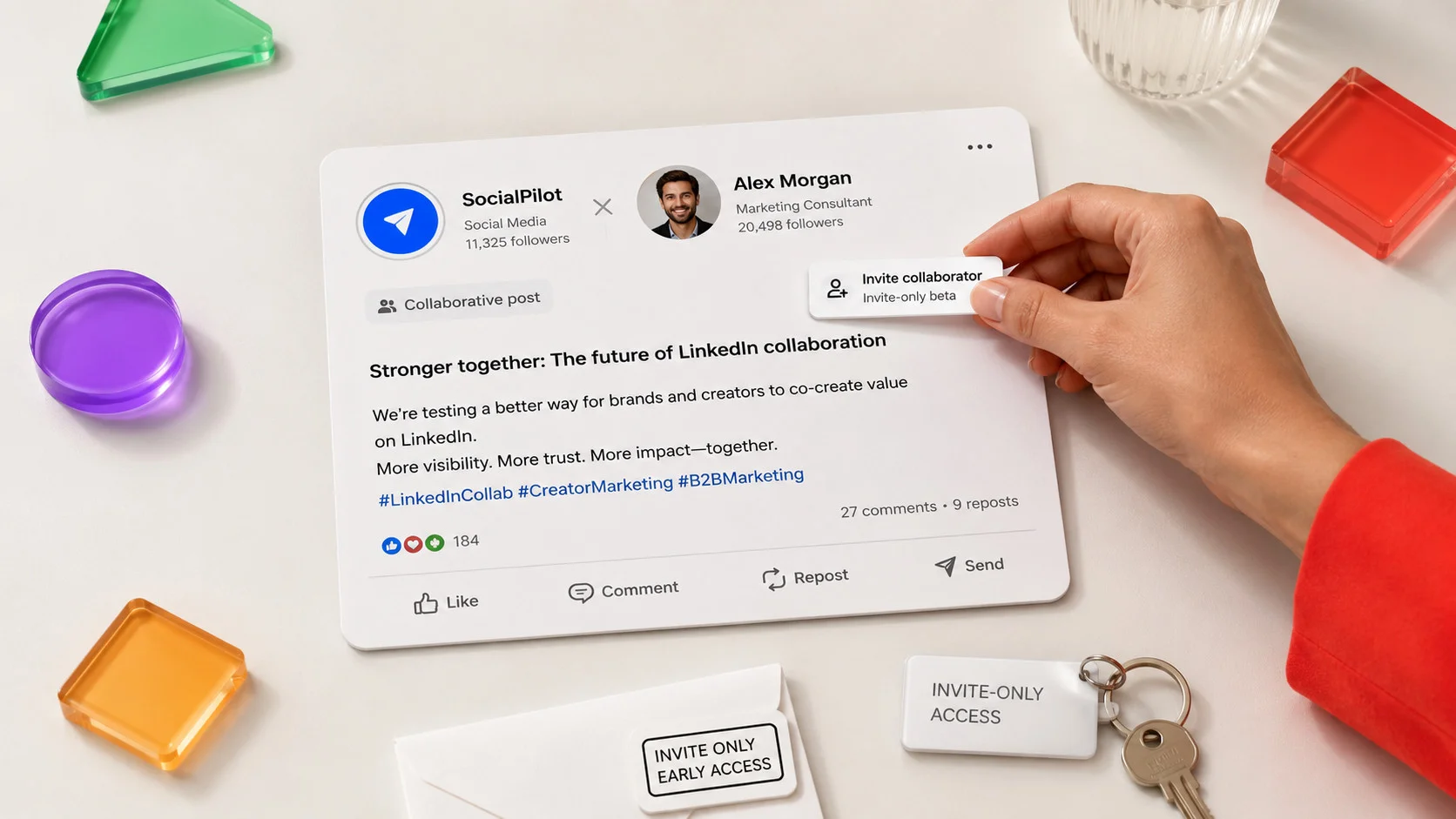
Your CMO sends you a screenshot of a LinkedIn post with two names at the top and asks one question. Should we be doing this?
You have seen LinkedIn collaborative posts in your feed for a few weeks now. Usually it is a brand and a person sharing one post together. And you are not sure if it is a real way to reach more people or just the latest engagement trick.
That doubt is fair. Under LinkedIn’s own announcement, plenty of marketers asked the same thing: is this real teamwork, or Collaborative Articles all over again? The last feature with “collaborative” in the name did not go well, so the worry makes sense.
Here is the honest version:
- The feature is new and still in a limited test.
- A lot of what has been written about LinkedIn collaborative posts is guesswork, copied from one article to the next.
- This guide splits what LinkedIn has actually confirmed from what the press is still guessing.
It also covers the part almost no one else does: how to use LinkedIn Collaborative Posts features when you run more than one brand.
What Are LinkedIn Collaborative Posts (and How They Differ from Collaborative Articles)
A LinkedIn collaborative post is one post shared by two or more accounts. Every name shows at the top, and the post lands in each person’s followers’ feeds. Nothing goes public until the invited account says yes, so no one gets added without agreeing first.
Both personal profiles and Company Pages can take part, according to LinkedIn’s Help Center.
LinkedIn shared the feature through its own “LinkedIn Guide to Creating” post in late June 2026, not a formal press release. It started by testing with a small group of creators and brands at Cannes Lions. The idea is simple: two accounts, one shared post, seen by both networks.
The confusion starts with the word “collaborative,” because LinkedIn already uses it for something else. So let’s clear up both mix-ups first.
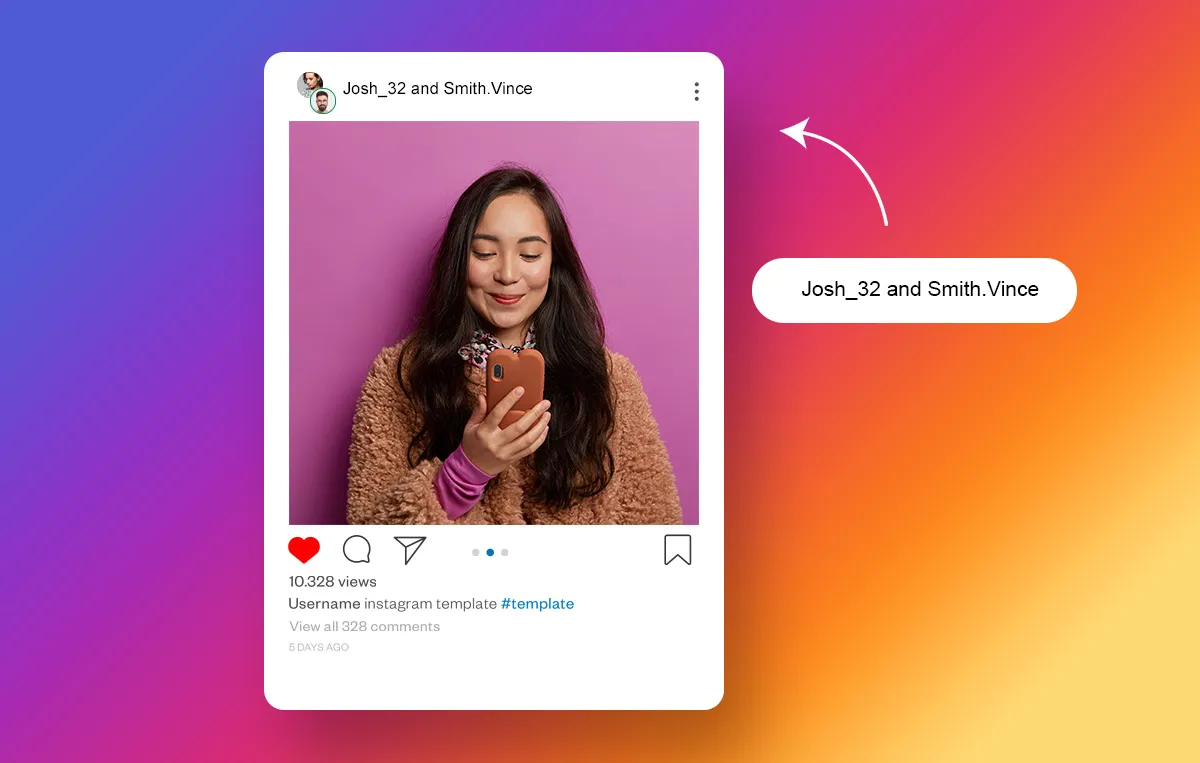
Collaborative Posts vs Tagging and @Mentions
Tagging and collaborative posts look similar but do opposite things.
When you tag or @mention a brand:
- You are still the only author.
- The post lives on your profile, and the reach is yours.
- The tagged account just gets a notification. It may not even show up in their feed.
A collaborative post is shared ownership:
- Both names sit at the top as authors.
- The post goes to both audiences on purpose.
The simplest way to think about it: a tag says “I mentioned you,” and a collaborative post says “we made this together.”
Collaborative Posts vs LinkedIn’s Collaborative Articles
This is the mix-up that trips up almost everyone. The two features share nothing but a word.
Collaborative Articles are AI-prompted knowledge pieces:
- LinkedIn’s team and AI pick a topic and write prompts.
- Invited members add a comment in the margins to earn a Top Voice badge.
According to LinkedIn’s Collaborative Articles FAQ, that’s exactly how the feature works.
Collaborative posts are the opposite:
- No AI prompt and no shared article.
- Just two accounts you pick, sharing one normal feed post under both names.
If you remember the older feature being mocked as low-value filler, that reputation belongs to Collaborative Articles, not this. Judge collaborative posts on their own.
Is This Available to You Yet (Beta Status and Rollout)?
For most brands, the honest answer is no, not yet. Collaborative posts are still an invite-only test, and only accounts in the early access group can make one right now.
LinkedIn’s own Help Center says the feature is rolling out gradually and that only members in the early access program can create one. That is the clearest sign it is not open to everyone.
Part of why it feels unclear is how it arrived. There was no press release with full details, just a post for creators and a test at Cannes Lions. So a lot of early coverage was built on screenshots and guesses, which is why write-ups can flatly disagree on basic facts.
Who Has Access Right Now?
Access started with the small group of creators and brands LinkedIn tested with at Cannes Lions, and it has grown slowly since.
A few things to know:
- If you do not see an “Add Collaborators” option in your composer, you are not in the test group yet.
- There is no waitlist and no setting that unlocks it early.
- It is not a bug or a country block, just a slow rollout.
- Access can differ even between accounts on the same team.
What We Know and Don’t Know About Wider Rollout
What we know is short:
- The feature exists.
- It works for both profiles and Pages.
- LinkedIn is opening it up over time.
What we do not know is when it reaches everyone. LinkedIn has not given a firm date.
So, brands hold back for a good reason. You are being asked to plan around a feature you may not touch for months. The smart move is not to wait or to over-invest, but to get ready. That starts with knowing exactly how it works.
How to Create a Collaborative Post Step by Step
Making one uses a simple invite-and-accept flow. The steps differ a little for a personal profile versus a Company Page. Nothing is public until the other side accepts, so you can set it up without locking anyone in.
As an Individual Profile
If your account is in the early access group, the flow is short:
- Open the composer and start your post as usual.
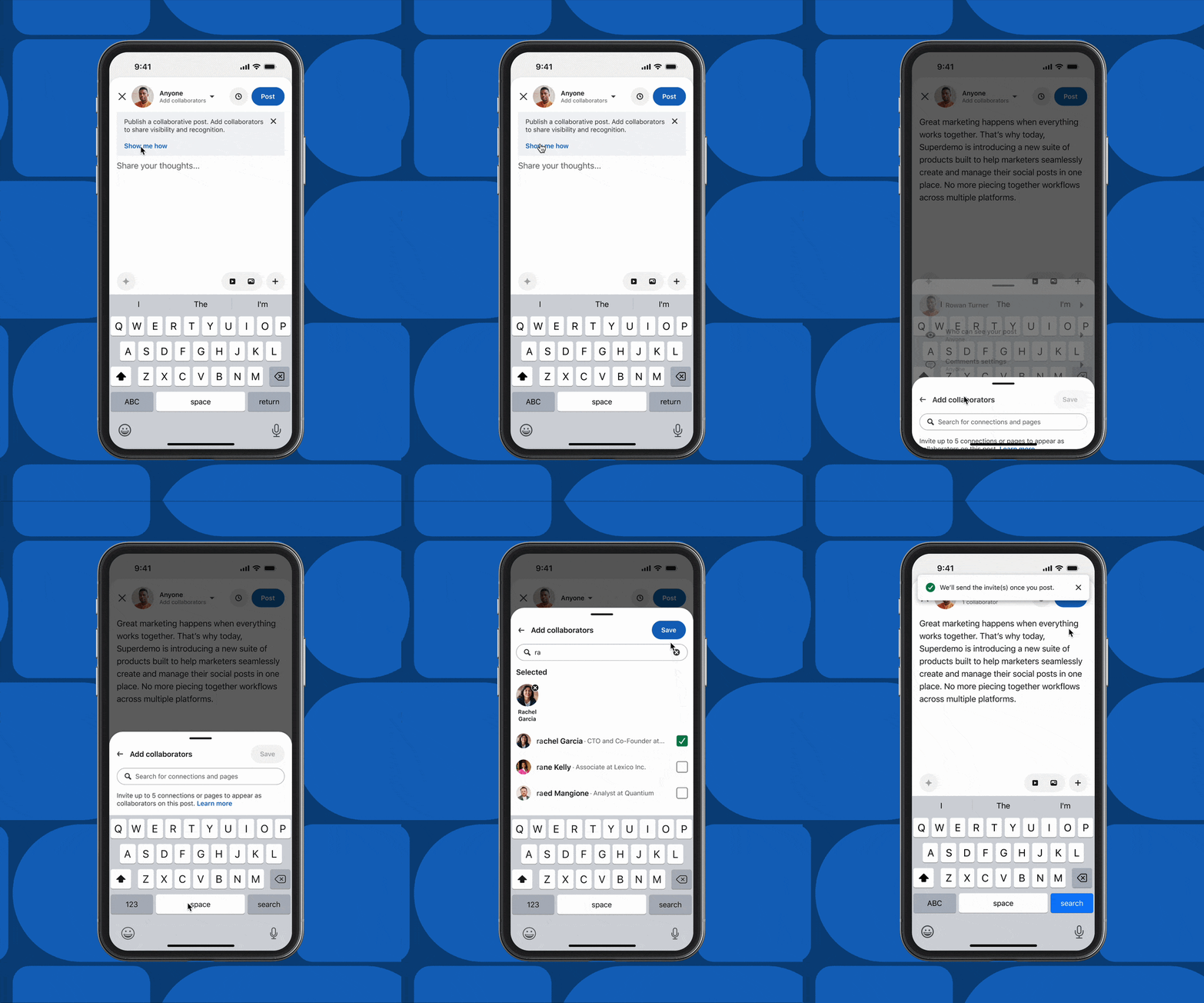
- In the post settings, tap “Add Collaborators.”
- Search for the profile or Page you want to team up with and send the invite.
- Finish writing and publish. The post stays hidden until the invitee accepts.
- Once they accept, both names appear at the top and the post lands in both feeds.
Because both networks see it, the format matters more than usual. Build the post around one of your stronger LinkedIn content format ideas, not a throwaway text update, since two audiences are judging it at once.
As a Company Page (Super Admin Must Opt in First)
A company page cannot be added as a partner until a super admin turns the feature on. This is the step that quietly blocks most brand attempts.
The super admin turns it on like this:
- Go to Me, then Settings.
- Open Notifications, then Collaborations.
- Turn it on for the Page.
LinkedIn explains this in its guide to enabling collaboration for Page posts. Only then can the Page accept an invite or show up on a shared post.
One catch: LinkedIn says this setting is still rolling out too, so some admins do not see it yet. If your Page qualifies but the option is missing, you are waiting on the same slow rollout as everyone else.
Rules You Can’t Get Around
Collaborative posts must be public. LinkedIn’s Help Center states there is no “connections only” or limited-audience option, which surprises people who expect the usual privacy controls.
That is on purpose, since the whole point is to reach both networks. If a post needs to stay inside a small audience, a collaborative post is the wrong tool.
Why Brands and Creators Are Using Collaborative Posts
The appeal is simple. A collaborative post puts your content in front of a second audience you did not have to build, with both names on it that read like a vote of confidence, not an ad.
It works best when the partner truly fits, and it backfires when they do not. Treat it as one part of a broader LinkedIn marketing strategy, not a standalone trick.
Here are the three clearest ways brands are using it, drawn from the use cases LinkedIn named in its announcement.
Creator and Brand Partnerships
This is the best fit. A brand shares a post with a creator or expert whose audience overlaps with its own but is not the same.
- The brand borrows the creator’s trust and reach.
- The creator gets tied to the brand.
The risk is a bad match. If the partner does not clearly make sense to both audiences, the shared post feels forced and costs you trust instead of building it. A logo added just to look impressive can do more harm than good.
Your leaders’ and employees’ personal profiles usually reach more people than your Company Page. A collaborative post lets the Page and a leader post together, so:
- The Page gets the reach of a personal profile.
- The leader gets the backing of the brand.
LinkedIn named executives sharing company news as a main use case. This is also where ground rules matter, because the Page name now sits next to a person’s name for good. That is worth a quick sign-off before you accept, not after.
Co-Marketing and Event Recaps
Two brands running a joint webinar, a shared report, or an event can post one recap under both names, instead of two competing posts that split attention. Teammates marking a company milestone fit here too.
The win is that the moment lands once, for both audiences, instead of being spread thin across separate feeds fighting for the same reactions. The collab post itself is published on LinkedIn, but you can still plan and queue the supporting posts in a tool like SocialPilot so both sides post in sync.
Managing Collaborative Posts in an Agency or Multi-Client Workflow
If you run LinkedIn for more than one brand, collaborative posts add a coordination problem that single-brand guides skip. The post is co-owned, so one invite can put another client’s name, or a partner you have not checked, at the top of a public post for good. So the process around the post matters more than the post itself.
Start with invites. Every incoming invite is a decision, not a formality, because saying yes puts your client’s name next to someone else’s.
Set one simple rule: no invite is accepted until you have checked the account for brand safety. That means looking at:
- Their recent posts
- How they position themselves
- Who their audience is
Then the sign-off. On a shared post, your client’s voice shares space with a partner’s, so a quick review before you accept protects both sides. It is the same habit you already use for a cross-team content approval workflow, just applied to a post you do not fully control. Agree up front on who approves it, what it says, and which account hits publish.
Can You Schedule a Collaborative Post Through a Third-Party Tool?
Probably not at launch, and here is the honest reason.
- LinkedIn has kept some newer formats out of outside scheduling tools in the past, because its system does not open them up.
- The collab post flow needs a live invite-and-accept between two accounts.
Based on that pattern, collaborative posts likely cannot be scheduled through outside tools at first. That is an educated guess from how LinkedIn has handled similar formats, not a statement from LinkedIn. Treat it as a working assumption and check your own account before you plan around it.
That gap is where a planning tool helps. When you coordinate a collab post across clients, the hard part is not the post itself. It is planning the launch, getting every supporting asset approved, and proving afterward that it worked.
SocialPilot’s content calendar and approval workflow let you line up the supporting posts by client, send them for a quick review, and track results in one place. It does not publish the collab post for you, since that happens on LinkedIn. But it handles everything around it, so the launch lands together instead of in pieces.
What’s Still Unconfirmed About Collaborator Caps, Analytics and Edit Rights
Three of the questions brands ask most have no firm answer yet. Here is where LinkedIn’s own guidance runs out, so you can plan without getting burned by a “fact” that is really someone’s guess.
How Many Collaborators Can You Actually Add
LinkedIn’s Help Center says you can invite up to five collaborators per post. That is the number to plan around.
The one caveat: because the feature is still in early access, that limit has not been widely tested in the real world yet. So, treat five as LinkedIn’s stated cap, not a hard promise, and do not build a campaign that breaks if it turns out to work differently.
Unknown. LinkedIn has not documented whether both partners see the same numbers, whether each see only their own, or whether the data is combined. Anyone stating this for sure is filling a gap LinkedIn left open.
The safe approach: track your own baseline and compare the collab post against your usual posts, the same way you handle tracking LinkedIn performance metrics elsewhere. Do not promise a client a report view that may not exist yet.
Can You Edit or Delete a Live Collaborative Post
Also undocumented. LinkedIn has not published a clear rule on who can edit a live collaborative post, who can delete it, or what happens if one partner removes it from their side.
Because two accounts own the content together, this is a real gap, not a small detail. Until LinkedIn spells it out, agree with your partner in advance on who handles edits and takedowns. That way a disagreement later does not turn into a public mess.
LinkedIn vs Instagram vs Facebook Collaborative Features Compared
If Instagram Collabs are your mental model, that instinct is roughly right. LinkedIn’s version uses the same invite-and-accept pattern. But the details differ enough to matter, especially how mature each one is and how much is actually confirmed.
| LinkedIn Collaborative Posts | Instagram Collabs | Facebook Collabs | |
| Status | Limited beta, invite-only (since June 2026) | Fully available, mature | Available, narrower scope |
| Content types | Public posts | Feed posts, carousels, Reels (not Stories) | Mostly video and Reels via Meta Business Suite |
| Max collaborators | Up to 5 per LinkedIn Help (press disputes) | Up to 5 plus original poster | Not confirmed |
| Acceptance required | Yes | Yes | Yes |
| Analytics visibility | Unconfirmed or inconsistent | Each sees own Insights, engagement combined | Not confirmed |
Instagram is the benchmark. Its collab feature is fully live, works across feed posts, carousels, and Reels but not Stories, and combines engagement while each account keeps its own Insights, as documented in Instagram’s Help Center and backed up across many platform guides.
Facebook’s version is narrower and leans toward video and Reels through Meta Business Suite, though its exact limits are less clear, so treat that column as the loosest of the three.
So, Should You Jump in Yet
Here is the whole picture in plain terms:
- Collaborative posts are real. Two accounts share one post across both audiences, and LinkedIn has confirmed the basics of how it works.
- It is still an invite-only test with no firm rollout date.
- The answers on collaborator caps, analytics, and edit rights are not settled.
Most of what reads as certain online is a guess, so keep the confirmed and the unconfirmed apart.
Your next step is not to wait and not to over-invest. It is to get ready:
- Decide which partners actually fit.
- Agree on your approval and brand-safety rules now.
- Map the launches and milestones where a shared post would truly help.
Then you can move the moment the feature reaches your account.
The coordination around all of that, planning the content, getting approvals across brands, and checking whether the collab post beat your normal posts, is the part you can build today. If you want that in place before the rollout catches up, SocialPilot’s plans are on its pricing page. A new feature only helps if you are ready when it arrives.



 Join 55,000+ social media managers


