

Your client wants to know what social media actually drove last quarter. You pull up three reports. None of them agree.
Meta says 200 conversions. GA4 records 50. The CRM has a third number. You have 48 hours before the reporting call.
This isn’t a social media performance problem. Your social is probably doing more than any of those dashboards shows. The gap is attribution: which touchpoints get credit, how each platform measures them, and why GA4’s default setup was never built for how social actually works.
This article breaks down every attribution model, shows you which one fits your situation, and walks through the infrastructure that makes social’s contribution provable instead of theoretical.
Key Takeaways:
- GA4’s default last-click model is actively underrepresenting social, and most teams never change it
- The attribution model you pick matters less than the system behind it (UTM taxonomy, lookback windows, CRM connection)
- Dark social (WhatsApp forwards, Slack shares, email links) is where most B2B content actually travels, and all of it shows up as “Direct” in GA4
- Attribution and incrementality answer different questions; using one as a substitute for the other is where most budget decisions go wrong.
The model isn’t lying to you. It’s faithfully answering a question you never explicitly asked. That distinction matters, because the fix isn’t a different model. It’s asking the right question first.
Here’s what’s actually happening inside the customer journeys you’re trying to measure.
The Last-Click Problem
GA4’s default attribution model gives 100% of the credit to the last touchpoint before a conversion.
Think about what that does to a typical social-influenced sale. Someone sees your client’s product in a TikTok video. They don’t click. Three days later, they Google the brand name. They visit the site. They sign up for the email list. A week later they click an email link and buy.
Under last-click, email gets all the credit. TikTok gets zero. The view, the save, the brand search it triggered. All invisible. Your social media metrics simply don’t exist in that report.
That’s not the model lying. That’s the model answering: “What was the last thing they clicked?” You asked the wrong question.
Platform Self-Reporting Bias
Every native dashboard grades its own homework.
Meta Insights uses a 7-day click, 1-day view attribution window. LinkedIn uses 30-day click windows. TikTok has its own framework. None of them communicate with each other. So when a client asks why Meta says 200 conversions and GA4 shows 50, neither number is wrong. Both are just incomplete, measured against different rules, over different time windows.
There’s no setting you can change to fix this. It’s structural.
The Cross-Device Gap
GA4 identifies users by cookies and device sessions. Your client’s customer sees an Instagram ad on their phone, does research on their laptop at lunch, and buys on their desktop that evening. Without cross-device tracking enabled, that’s three separate anonymous users in GA4, and the purchase has no social touchpoint attached to it at all.
This is why social consistently underperforms in reports compared to what clients feel is happening. It’s not anecdote versus data. It’s good data being collected through a broken lens.
The Question You Need to Answer Before Choosing a Model
Most teams pick the model first. That’s the wrong order, and it’s why the model they pick often generates more confusion than clarity.
Before you change a single GA4 setting, answer this: what decision is this attribution data going to inform?
Two Questions, Two Very Different Tools
Attribution is really only designed to answer one of two things, and they require completely different approaches.
“What closed this conversion?” That’s what attribution models answer. They look at the recorded touchpoints in a user’s journey and distribute credit according to a set of rules. Useful for understanding which content and channels show up in winning customer journeys.
“What would have happened without this channel?” That’s incrementality testing. You pause a channel for 30 days, hold out a control group, and watch what changes in conversions, branded search, and direct traffic downstream. Harder to run. But it’s the question that actually tells you whether social is moving the needle, or just getting credit for sales that would have happened anyway.
Most teams never run incrementality tests. They pick a model, stare at the credit percentages, and make budget decisions. That ordering causes most of the distortion.
Match the Question to the Decision You’re Making
If you’re allocating budget between channels, you need incrementality data, not attribution. Attribution tells you who got credit. Incrementality tells you what actually caused the conversion.
If you’re deciding which content formats to prioritize, attribution model data is useful, as long as the model matches your sales cycle length.
If you’re reporting to a client who wants to know whether social is working, you need both: attribution data to show the touchpoints, and leading indicators (branded search trends, direct traffic growth, conversion rate shifts after campaigns) to triangulate whether social is the cause.
The right model matters. But the right question comes first.
Every attribution model is a rule for distributing credit. Each one bets on something different: that the first touch matters most, that the last click closes deals, that all touches are equal. None of them are universally right. But some are systematically wrong for specific situations.

First-Touch Attribution
All the credit goes to the first recorded touchpoint. Every interaction that follows gets nothing.
This model answers one question well: what’s driving discovery? Which channels are bringing genuinely new people into your funnel? If you’re running awareness campaigns and need to show which platform is generating net-new audience, first-touch gives you that.
What it can’t show you is everything that happens next. If someone finds you through Instagram, then converts three weeks later after reading four blog posts and clicking a retargeting ad, those nurture touchpoints simply don’t exist in a first-touch report.
Last-Touch Attribution
All the credit goes to the final touchpoint before conversion. Everything before it gets nothing. And it’s GA4’s default, which means it’s already deciding your social media budget.
Research from Sellforte found that last-click attribution undervalues Meta channels by 2–9x and TikTok by roughly 17x for e-commerce. That’s not a slight distortion. That’s the model erasing the channels doing the awareness work.
Last-touch makes sense for direct-response paid campaigns where the click-to-conversion path is short and the channel doing the closing is genuinely the channel that deserves credit. Outside that narrow context, it misrepresents almost everything.
Linear Attribution
Equal credit to every touchpoint, first to last. Four touches, 25% each.
This is the most honest model for long B2B sales cycles where you want full-funnel visibility. You’re not betting that the first touch mattered most, or that the last click closed the deal. You’re saying every touchpoint in a winning path gets equal weight.
The limitation is obvious: not all touchpoints are equal. The TikTok video that sparked someone’s interest and the demo request page that closed them both get 12.5%, the same as every passive mid-funnel touchpoint in between.
Time-Decay Attribution
Recent touchpoints get more credit. Earlier ones get progressively less. The final 24 hours before conversion typically absorb 40–50% of the total credit.
For short sales cycles, this makes intuitive sense. What someone clicked last week is more predictive of their purchase than what they saw two months ago. But for a B2B client with a 90-day sales cycle, time-decay turns your awareness-stage social content into almost worthless data. The LinkedIn post that started the relationship three months ago gets a fraction of the credit the retargeting ad that ran the day before conversion receives.
Position-Based (U-Shaped) Attribution
40% to first touch. 40% to last touch. The remaining 20% split equally across everything in between.
This is the most useful starting model for most agencies. It acknowledges that discovery matters and that closing matters, while giving some credit to the nurture touchpoints connecting them. If a client asks you to show what’s driving awareness and what’s converting it, this model gives you something to show.
The blind spot is middle-funnel content. If your social strategy does a lot of retargeting and consideration-stage work, that work shows up at 20% total, divided however many ways across the touchpoints in between first and last.
Data-Driven Attribution
Machine learning distributes credit based on actual patterns in your conversion data, not a fixed rule you set. In theory, the best model. In practice, it requires volume most clients don’t have.
Roughly 400 conversions per month to produce reliable patterns. Below that threshold, the model doesn’t have enough signal to find anything meaningful, and the output becomes unstable in ways that are hard to explain to a client. Available in GA4 for accounts that hit the volume threshold. If you’re managing high-spend paid social accounts or large B2C clients, it’s worth testing once you get there.
There’s no universal right answer. But there are clearly wrong answers for specific situations, and the most common wrong answer is using GA4’s default last-click model for a B2B client with a six-month sales cycle.
One number worth sitting with: according to Dreamdata’s 2026 B2B benchmarks, the average LinkedIn-attributed buyer journey spans 272 days across 88 touchpoints. GA4’s default attribution window is 30 days. That means for most B2B clients, you’re cutting off attribution data for 240+ days of the actual sales cycle before it even registers.
| Attribution Model | Sales Cycle Length | Primary Goal | Attribution Window | What It Misses |
| First-Touch | Any | Awareness & discovery | 90 days (B2B) / 30 days (B2C) | All nurture and conversion content |
| Last-Touch | Short (1–7 days) | Conversion & close | 7–30 days | All awareness and nurture content |
| Linear | Long (30–180 days) | Full-funnel visibility | 90–180 days (B2B) / 30 days (B2C) | High-impact vs low-impact touchpoints |
| Time-Decay | Short to medium (1–30 days) | Recent conversion drivers | 7–30 days | Top-of-funnel awareness content |
| Position-Based (U-Shaped) | Medium to long (30–180 days) | Discovery + close visibility | 90 days (B2B) / 30 days (B2C) | Middle-funnel nurture content |
| Data-Driven | Any (requires volume) | Algorithmic accuracy | Set to match sales cycle | Unreliable below 400 conversions/month |
Quick Selectors by Business Type
B2B SaaS client with a 90–180 day sales cycle and multiple decision-makers: start with position-based (U-shaped) and set your lookback window to 90 days minimum. It shows what drove discovery and what drove conversion, the two data points that matter in a renewal conversation.
B2C e-commerce client with a 1–14 day purchase cycle: time-decay or last-touch. Purchases happen fast. What someone clicked in the last 24–48 hours is genuinely more predictive than what they saw three weeks ago. This is one context where last-touch is defensible.
Local service business: linear with a 30-day window. Journeys are short but multi-touch. Google, Facebook, and direct visits all play a role, and equal credit gives you a more honest read than defaulting to last-click.
Agency managing B2B and B2C clients on the same roster: don’t use the same model across all accounts. Set the attribution model at the GA4 property level per client. Standardize your UTM naming convention so you can compare content performance across the portfolio, but let the model reflect each client’s actual sales cycle.
How to Build Attribution Infrastructure That Actually Works
Meta Insights tells you what happened on Meta. LinkedIn Analytics tells you what happened on LinkedIn. Neither of them can follow a user off the platform, through a weeks-long sales cycle, and into your client’s CRM.
That’s not a flaw you can patch by switching dashboards. Native platform analytics are structurally limited to on-platform behavior. To connect social activity to revenue, you need an attribution layer that lives outside the platforms, and GA4 is the minimum viable place to build it. A good comparison of social media analytics tools can point you toward tools that extend GA4’s capabilities where native integrations fall short.
UTM Parameter Taxonomy
UTM parameters are the tags you append to every link you share on social. Without them, social traffic arrives in GA4 as a vague “social” source with no campaign context, or worse, as direct traffic with no source at all.
Here’s the standard structure with social-specific examples:
| Parameter | Purpose | Social Example |
| utm_source | Where the traffic comes from | Instagram, LinkedIn, Facebook, TikTok |
| utm_medium | The marketing channel | social, social-organic, social-paid, cpc |
| utm_campaign | The campaign name | q3-brand-awareness, product-launch-june |
| utm_content | Which specific post or creative | carousel-post-1, video-reel-3, link-bio |
| utm_term | Audience segment (paid) | retargeting-warm, lookalike-us |
The parameter most commonly skipped is utm_content. Skip it and you know a campaign drove traffic. You just can’t tell which post within that campaign did the work. That distinction is the difference between “social worked” and “here’s exactly what worked.” For a deeper guide on implementing this in GA4, see how to set up UTM tracking for social media.
GA4 Configuration Essentials
Out of the box, GA4 is set up for direct-response advertising, not for the multi-touch, long-cycle reality of social media. Here’s what to change before you run a single attribution report:
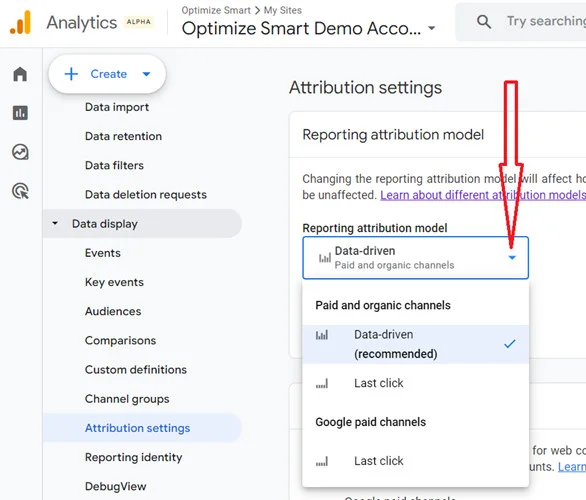
- Switch the attribution model. Go to Admin > Attribution Settings and change from last-click to data-driven (if you have the conversion volume) or position-based. This affects all historical data in your reports, so do it before you start presenting numbers to clients.

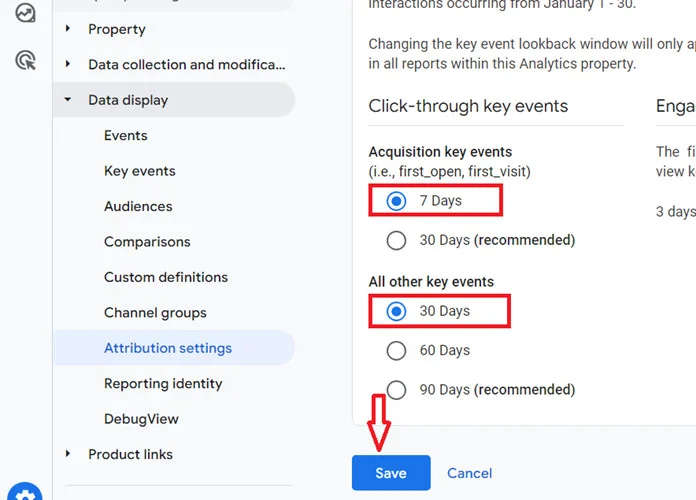
- Set the correct lookback window. The default is 30 days. For B2B clients, change this to 90 days in Admin > Attribution Settings > Lookback Windows. The model can only credit touchpoints it can see.
- Enable enhanced measurement. This automatically captures scrolls, outbound clicks, file downloads, video engagement, and site search. Each of these is a signal that social content drove engagement, not just a pageview.
- Mark your conversion events. GA4 tracks pageviews by default. Form fills, demo requests, and purchases won’t register as conversions until you toggle them explicitly. Go to Admin > Conversions.
- Connect GA4 to your CRM. For B2B clients, the form submission in GA4 and the closed deal in the CRM may be months apart. Use GA4’s data import or your CRM’s native integration to pass closed-won revenue back into GA4, so you can see which social campaigns actually contributed to pipeline.
Dark social (private sharing via WhatsApp, Slack direct messages, and email forwards) accounts for the majority of online content sharing globally, and every single share arrives in GA4 as “Direct” traffic with no source, no campaign, and no social touchpoint. No attribution model touches it. No platform reports it. It’s the largest invisible layer in most marketing stacks.
Here’s the scenario. A prospect sees your client’s LinkedIn post about a pricing guide. They copy the link and paste it into a Slack message to their manager: “Check this out — might be useful for Q3.” The manager clicks the link from Slack. GA4 records it as direct traffic. No source. No campaign. No social touchpoint.
Two weeks later, that manager fills out a demo request form. GA4 attributes the conversion to direct. Your client thinks it was someone who already knew them. The social post that started the whole conversation gets nothing.
This is the dominant share of how B2B content actually moves inside organizations. It’s why the gap between what Facebook says it drove (200 conversions) and what GA4 records (50) is only partly explained by attribution window differences. A meaningful share of those missing conversions traveled through dark social paths and arrived wearing no label.
Why This Problem Got Worse After 2021
Before April 2021, Meta’s default attribution window was 28-day click, 28-day view. Apple’s App Tracking Transparency framework changed that. Most iOS users didn’t opt in to cross-app tracking. Meta was forced to cut its default window to 7-day click, losing more than three weeks of attribution data overnight.
Third-party cookies started disappearing at the same time. Safari and Firefox had already blocked them. Chrome’s deprecation timeline followed. The cross-site tracking that attribution relied on is now structurally broken for a growing share of your audience.
First-party data strategies aren’t a nice-to-have anymore. The three main replacements:
- Server-side tracking: Moves the tracking code from the browser (where it gets blocked) to your server, where it can’t.
- Meta Conversions API (CAPI): Sends conversion data directly from your server to Meta. Advertisers using both Pixel and CAPI see an average 17.8% lower cost per result. For any client running paid social, this is now baseline infrastructure.
- Consent mode (Google): Adjusts how GA4 tags behave based on cookie consent choices, with modeled data filling the gaps where consent isn’t granted.
You can’t measure dark social directly. But you can estimate it, and the estimate alone is often enough to make the argument.
- Pull your Direct traffic data in GA4 for the past 90 days and establish the baseline daily volume.
- Overlay your social campaign calendar. Mark every major campaign launch and high-performing post.
- Look for Direct traffic spikes in the 24–72 hours after a social campaign launch, with no corresponding email send or paid search bump that would explain them.
- The difference between baseline direct traffic and those spikes is your dark social estimate for each campaign.
- Track this consistently. If direct traffic spikes predictably after LinkedIn posts but not after Instagram posts, that’s real signal about where your audience shares content privately.
It’s triangulation, not precision. But triangulation is exactly what you need when the client’s CRM says social drove nothing and your instinct says otherwise.
UTM Strategies for WhatsApp and Slack Sharing
For B2B brands, private channel sharing is almost a certainty. You can capture a meaningful percentage of it by building dedicated tracking URLs for content likely to be forwarded.
Use a URL shortener that supports UTM parameters (Bitly, short.io, or a custom-branded domain) and build links with dark social sources tagged explicitly:
https://short.io/xyz?utm_source=whatsapp&utm_medium=dark-social&utm_campaign=product-launch-june
Add share buttons to blog posts and landing pages that pre-populate these tagged links. When someone clicks “Share via WhatsApp,” their contact receives a link with attribution data already embedded. GA4 records the source. The visit stops registering as direct.
It won’t capture every dark social visit. But it captures the ones that go through share buttons, and it moves the baseline.
Post-Purchase Surveys as a Triangulation Layer
The most underused attribution tool in most stacks costs almost nothing: one question on a thank-you page or post-demo email.
“How did you hear about us?”
Post-purchase surveys run at 40–80% response rates when kept to one or two questions. Customers who just bought something are cooperative. When 40% of respondents say they first saw you in a LinkedIn post or heard about you from a colleague in Slack, that data doesn’t belong in GA4, but it triangulates powerfully against everything GA4 is telling you.
Set it up in Typeform, your CRM, or a post-conversion popup. Route responses into a shared sheet. Review it monthly next to your attribution data. The combination of quantitative model data and self-reported attribution is more reliable than either one alone.
What Do You Do When No Single Model Gets It Right
No single attribution model gives you the full picture. The ones that try (data-driven, algorithmic) require data volumes most clients don’t have. The ones that are accessible are all making deliberate tradeoffs.
The goal isn’t a perfect model. It’s a system where three different signals point in the same direction. Stop chasing the perfect model. Triangulate instead.
Signal 1 — Attribution Model Data (With Known Limitations)
Run your attribution reports in GA4 and treat them as one input, not the answer. Go in knowing the limitations: last-click undervalues social, first-touch ignores nurture, a 30-day window cuts off attribution for any B2B journey running longer than a month.
Use this signal to answer a narrow question: which channels and content types appear most frequently in converting paths? That tells you where to invest attention, not where all the credit belongs.
Signal 2 — Leading Indicators
These move before revenue does. If social campaigns are working, you’ll typically see:
- Branded search volume rising after campaign launches. More people Googling the brand name directly is a strong signal that social is building awareness that converts later.
- Direct traffic baseline creeping up over time. It means more people are returning to a site they already know. Social built that recognition.
- Conversion rate improving on organic traffic in the weeks after a campaign. Social warmed the audience before they arrived.
None of this shows up in an attribution report. It requires overlaying GA4 trends against your social publishing calendar, which is exactly the kind of analysis behind presenting social media ROI to clients in a way that actually lands.
Signal 3 — Holdout Tests
Pause one social channel for one client segment for 30 days. Keep everything else the same. Watch what drops.
If branded search falls, direct traffic dips, and conversion volume decreases, social was doing work that wasn’t showing up in any model. That’s incrementality evidence. It’s hard to argue with.
The obstacle is internal: most clients want weekly performance data, not a 30-day blackout. Holdout tests are worth the fight before budget reviews and retainer renewals. Not for monthly reporting. Leading indicators fill the gap in between.
When all three signals agree, you have a story. When they diverge, you have something worth investigating.
How Agencies Track Attribution Across Multiple Client Accounts
One client with a broken attribution setup is a problem. Fifteen clients with fifteen different broken setups (different CRMs, different sales cycles, different UTM conventions invented by whoever onboarded them) is a system failure.
The agencies that solve this don’t rebuild attribution for each new client. They build a framework once and apply it consistently.
Step 1 — Standardize Your UTM Naming Convention
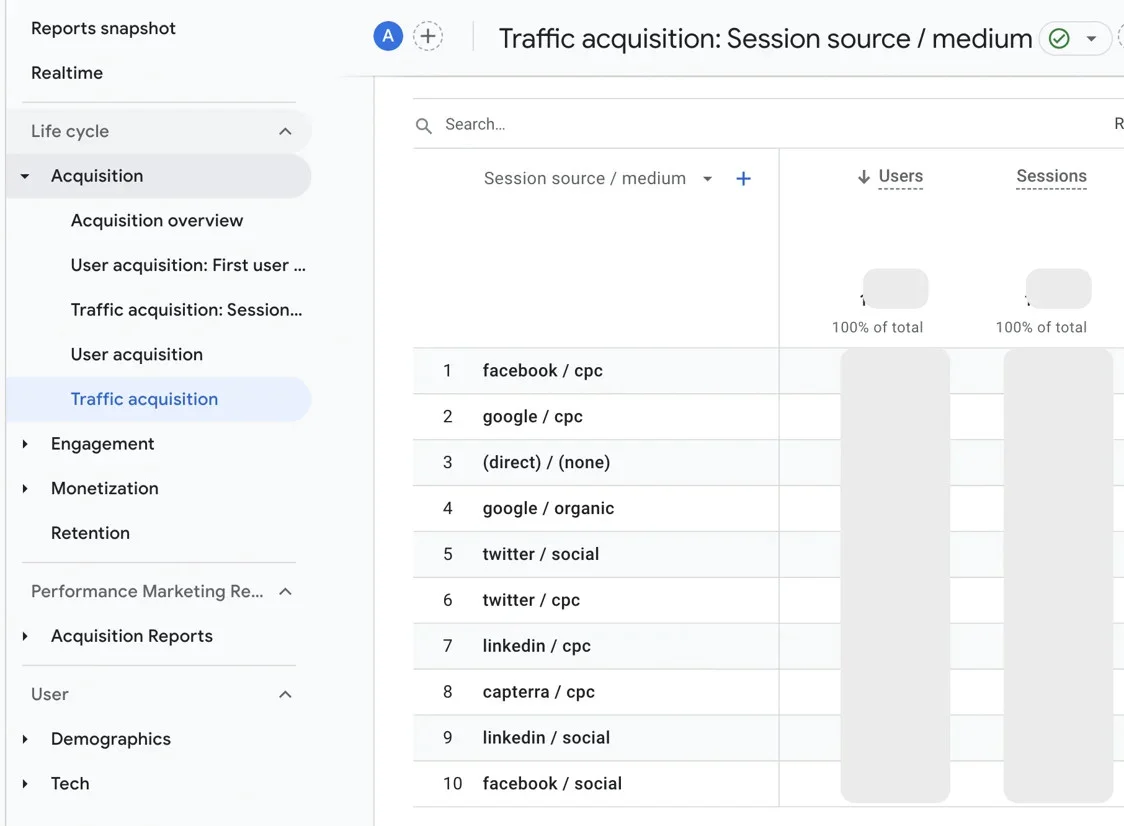
This is the single highest-leverage decision in multi-client attribution. Agree on one naming format, document it, and use it for every client, every platform, every campaign, before the first post goes live.
The most practical format:
[client-id]-[platform]-[campaign-type]-[content-type]-[date]
Example: acmecorp-ig-awareness-carousel-2026q3
With this structure, you can filter all of one client’s traffic in GA4 by their prefix. You can compare campaign types across platforms. You can sort by quarter without building custom logic in every report. And when a new client joins, you’re not inventing a convention from scratch.
Put this in your onboarding SOP. Make it the first thing that gets set up, not the last.
Step 2 — Match Attribution Windows to Each Client’s Sales Cycle
A B2B SaaS client and a B2C e-commerce client should not share the same 30-day default attribution window. One is cutting off two-thirds of its sales cycle. The other is potentially overcounting.
Set the window at the GA4 property level per client:
- B2B SaaS: 90 days minimum. If the sales cycle runs longer, and most do, push to 180 days.
- B2C e-commerce: 7–30 days. Purchases happen fast; a 90-day window introduces noise.
- Local service businesses: 30 days covers the journey without overcounting.
Review these settings at every annual strategy session. Sales cycles evolve as products and audiences change.
Step 3 — GA4 Configurations That Scale Across a Portfolio
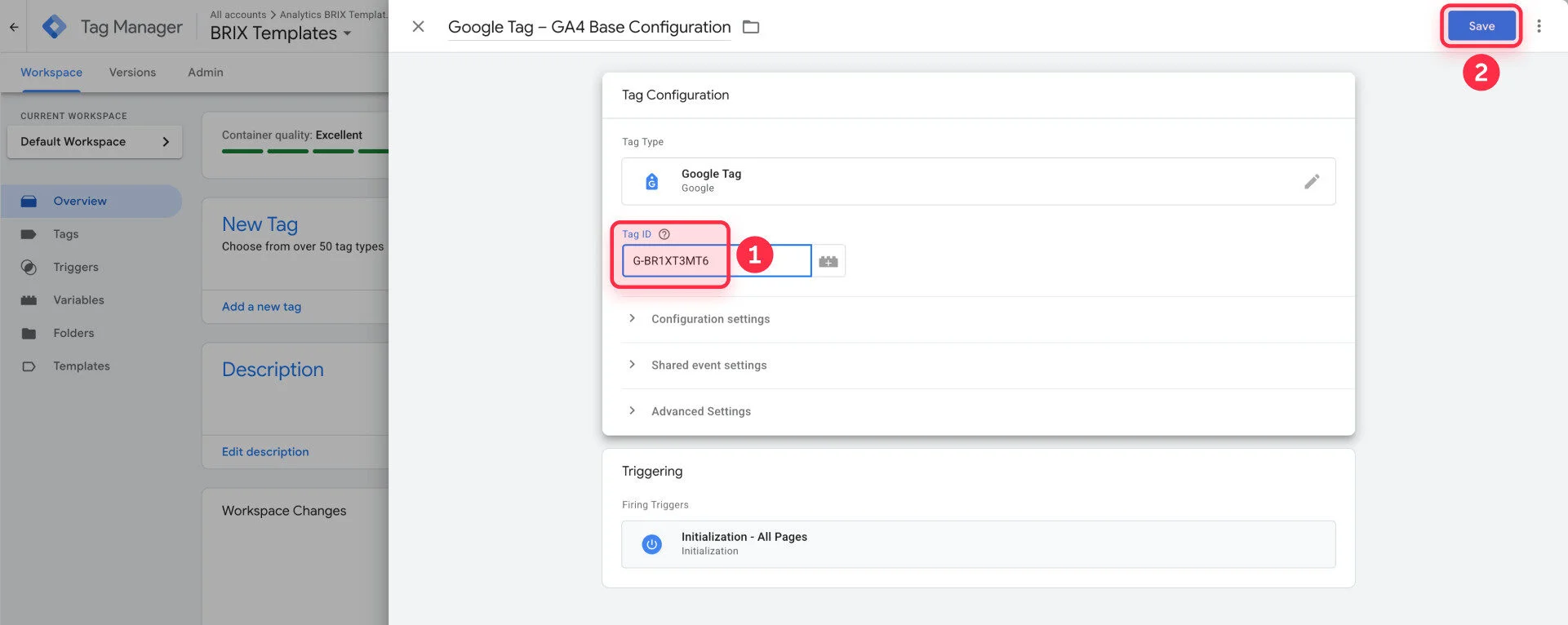
One GA4 property per client, always. Sharing a property across clients contaminates data and creates compliance exposure.
Within each property, standardize event names. If one client’s form submission is generate_lead and another’s is form_submit, you can’t benchmark across your portfolio. Pick a taxonomy and use it from day one for every new client.
That consistency is what eventually lets you make portfolio-level observations: “clients in this vertical convert social traffic at twice the rate of clients in that one.” Observations that are only possible when the underlying data structure is identical across accounts.
Step 4 — Automate UTM Tagging Across All Posts
Here’s the problem nobody wants to say out loud: across 15 clients and hundreds of posts per month, UTM parameters don’t get added manually. Not consistently. Links go out untagged. Organic social traffic lands in GA4 as direct. The attribution data you need to prove social’s contribution simply isn’t there.
The fix isn’t to hire someone to check every link. It’s to remove the manual step entirely.
SocialPilot’s custom UTM parameters let you define your UTM taxonomy once and apply it automatically to every scheduled post across every client account. Every organic link goes out carrying the right source, medium, campaign, and content parameters, without anyone touching them post-by-post.
When you pull attribution reports across a full client roster a month later, the data is complete. Not just for the clients whose account manager remembered to tag links on a good day.
Step 5 — Client-Facing Reporting
Attribution data at this scale is worthless if you can’t communicate it. For social media reports that clients actually understand, translate attribution model outputs into business language: pipeline influenced by social, conversion volume by channel, branded search trends plotted against campaign dates.
A standard report template with UTM naming convention filters already built in makes monthly reporting consistent, and cuts the time spent rebuilding from scratch each month.
For the broader toolkit, see social media management tools built for agencies.
Before You Change the Model, Build the System
Here’s the uncomfortable truth: most clients don’t trust their social data because no one ever built the infrastructure to make it trustworthy. And most agencies never built the infrastructure because it didn’t feel like their job.
It is.
The social teams that win budget reviews don’t have better social strategies. They have better attribution infrastructure. The data does the defending for them. The conversation shifts from “why should we keep spending on social” to “where exactly should we spend more.”
You can keep explaining the discrepancy between Meta’s numbers and GA4’s numbers. Or you can build the system that makes the explanation unnecessary. At some point, one of those starts to look like a liability.
Start your 14-day free trial of SocialPilot : UTM tagging on every post, every client, every platform, from day one.





 Join 55,000+ social media managers


