
For years, being trusted on social was free. You posted, people decided.
In September 2026, the platforms started selling trust and scoring it.
Meta now charges for a verified badge and for clickable links in organic posts. LinkedIn tells you when members flag your post as AI slop. YouTube auto-labels brand deals you didn’t disclose. X shows you when your reach was cut.
Here’s your filter for September. If a change helps people see you’re a real, accountable brand, adopt it now. If a change punishes generic AI output or hidden sponsorships, treat it as a rule, not a suggestion.
This Month at a Glance
- Facebook: Meta One business plans arrive, from $14.99 to $499 a month, with verification, long-range scheduling, and organic links.
- Instagram: Clickable links in organic posts and Reels finally exist, but only on paid Meta One plans.
- X (Twitter): Trade straight from Cashtags in the US, and see when legal demands limited your reach.
- YouTube: Shorts get seasons and episodes, and Studio adds AI titles, thumbnails, and thumbnail testing.
- TikTok: Comments get voice notes, polls, and photo carousels.
- LinkedIn: The AI post writer is replaced by a proofreader, and AI-slop flags now show in your analytics.
- Threads: Podcasters get a full promotion toolkit, with episode cards and Podcast Insights.
Every major platform moved on trust in September. Some made it a paid feature, like Meta One’s badge and organic links. Others made it a ranking rule, like LinkedIn’s slop classifiers and YouTube’s automatic branded-content labels. Either way, looking real now costs money or effort, and generic or undisclosed content loses reach.
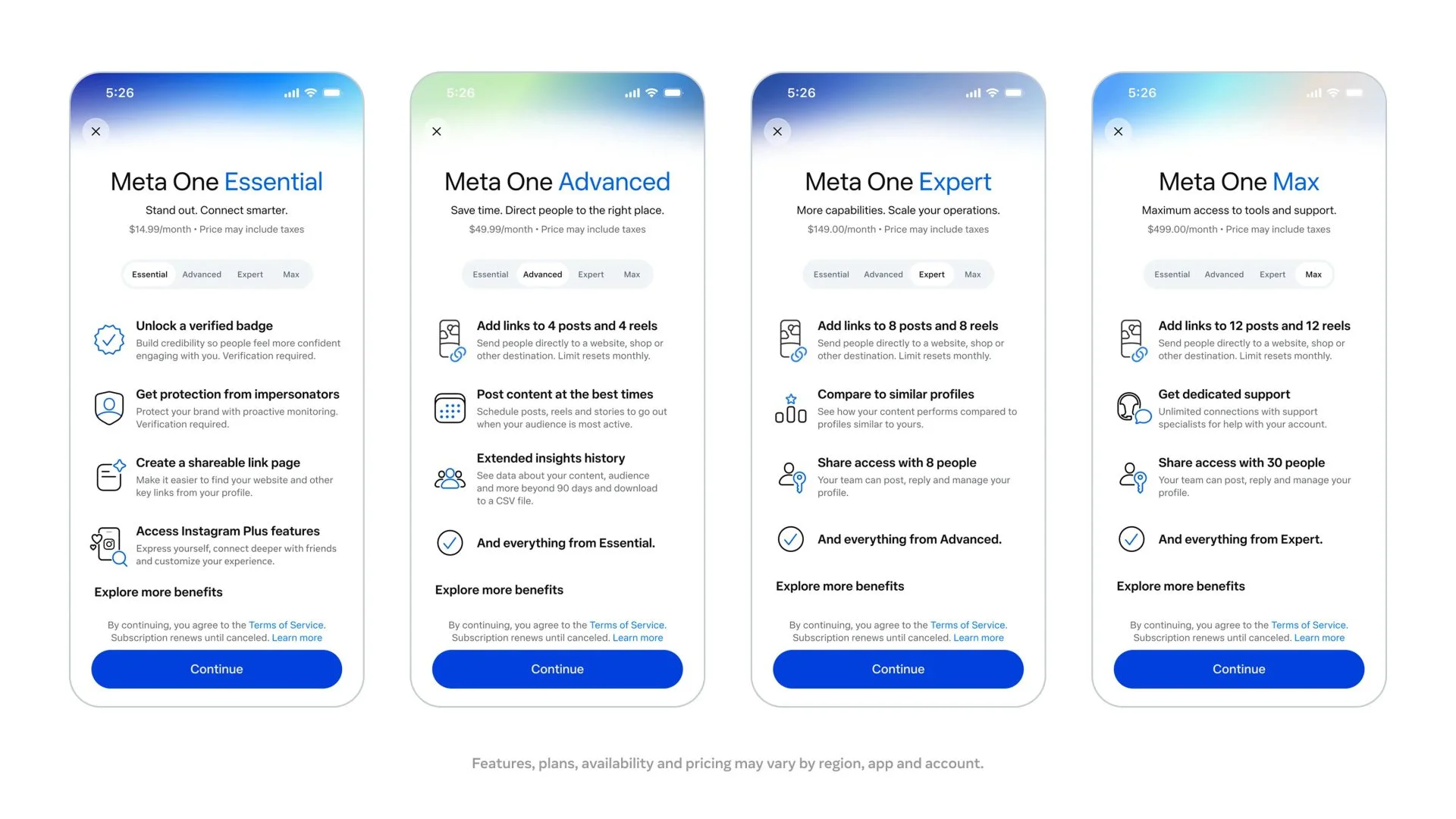
Meta One plans for businesses. Meta launched four paid business plans: Essential ($14.99/month), Advanced ($49.99), Expert ($149), and Max ($499). Essential adds a verified badge and impersonation protection. Advanced and up add links in organic posts and Reels, scheduling Reels and posts up to a year ahead, and Stories up to 30 days ahead. Plans are rolling out globally to eligible businesses, and pricing varies by region.
Source: Meta for Business
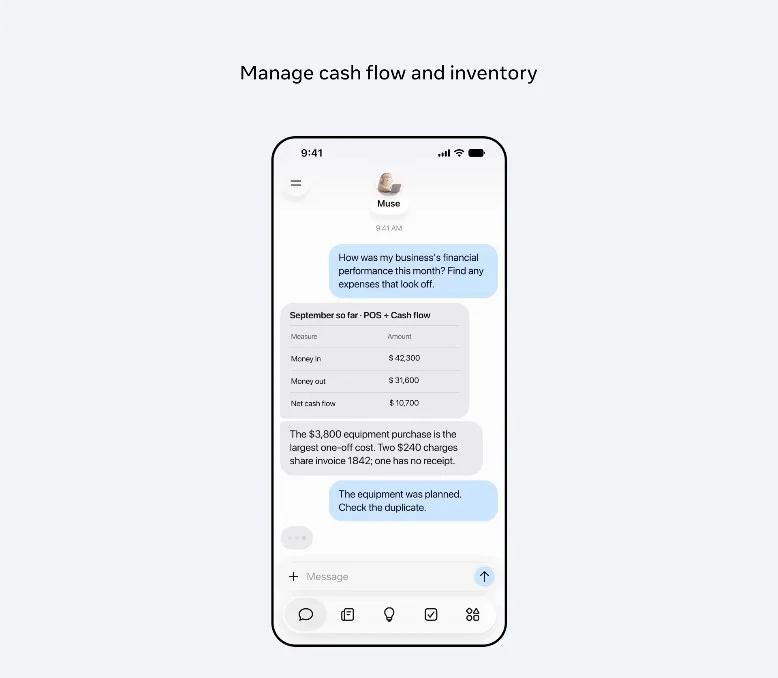
Muse for Small Business. Meta’s AI agent now connects to your Facebook Pages, Instagram professional analytics, and Meta ad accounts, plus tools like Shopify, Canva, Slack, and Stripe. It reads your performance and drafts campaigns, but nothing publishes, sends, or spends without your approval. It’s live in the US and Canada, free with usage limits.
Source: Meta Newsroom
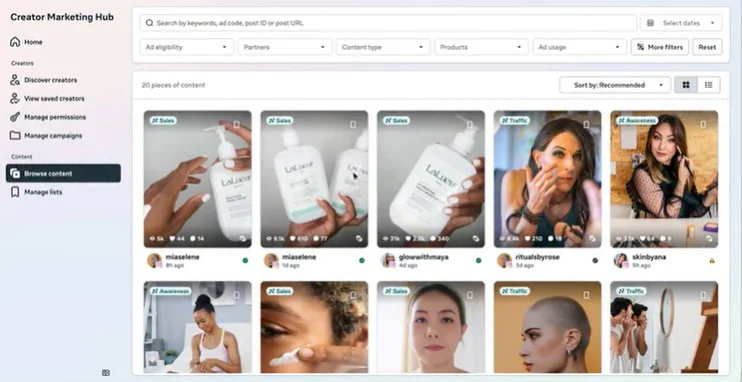
Creator Marketing Hub goes global. Meta merged Creator Marketplace and the Partnership Ads Hub into one Creator Marketing Hub, launching globally. You get creator discovery filters, content permissions with expiry dates, and one-click partnership ads. Facebook creators also join the Creator Marketplace API.
Source: Meta for Business
Remember: Price out Meta One against what you already pay for verification, scheduling, and link-in-bio tools before you subscribe.
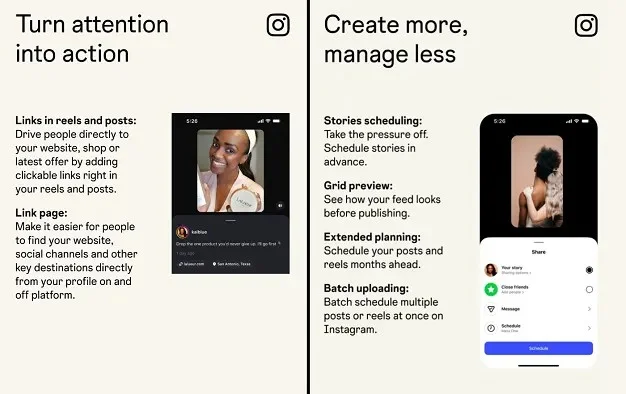
Clickable links in organic posts and Reels. For the first time, Instagram lets you add clickable links to organic posts and Reels. The catch: it’s part of Meta One’s Advanced plan and up, rolling out gradually worldwide. If link-in-bio traffic matters to you, this is the biggest Instagram change of the year.
Source: Social Media Today
Live video Partnership Ads. Brands can now turn a creator’s live broadcast into a paid Partnership Ad that runs in Stories, Reels, and Feed. It lets you push a creator’s live session to people who don’t follow them, with general availability from September 29.
Source: Meta for Business
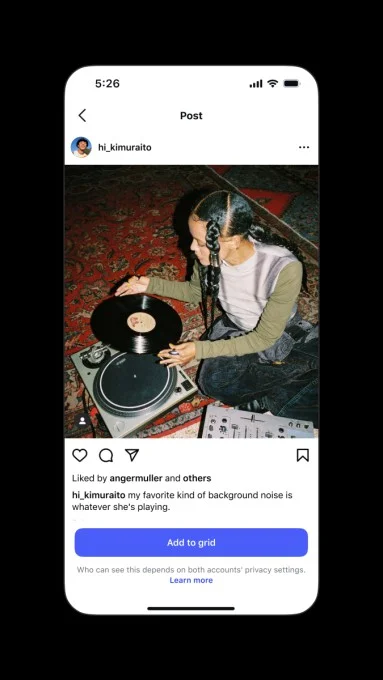
Add tagged posts to your grid. You can now add a post you’re tagged in to your own profile grid, from the Tagged tab, the post, or the notification, without reposting it. For salons, stores, and venues, customer and creator content can now sit on your main grid.
Source: TechCrunch
Remember: Pick your three best customer posts you’re tagged in and add them to your grid this week. It’s free social proof.
X (Twitter)
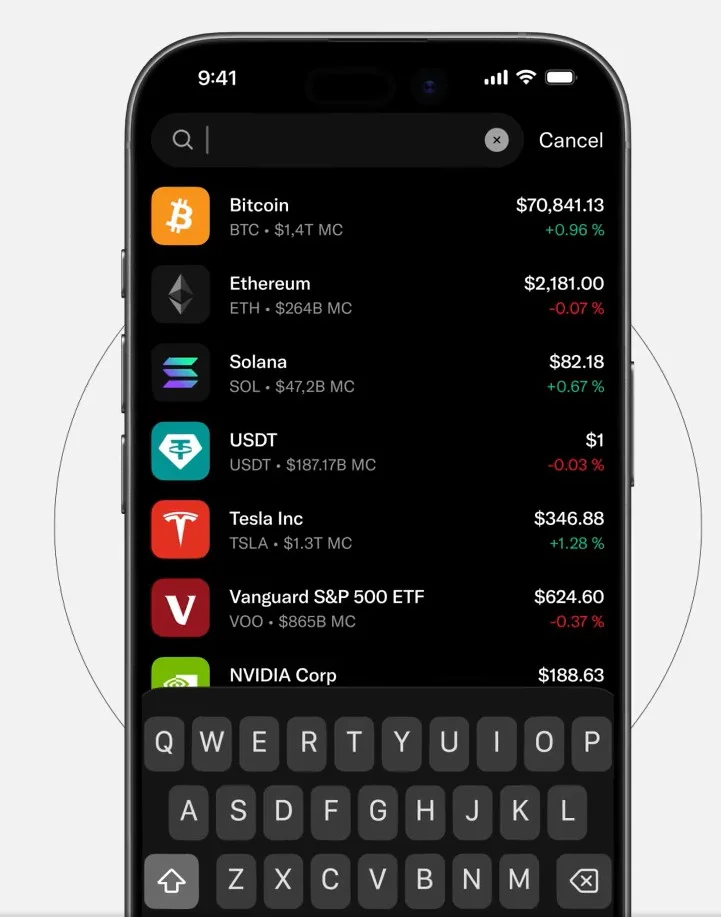
Trade from Cashtags. US users can tap a stock or crypto Cashtag, see a price chart and related posts, then tap “Trade” to buy through a partner broker such as Interactive Brokers, Moomoo, Gemini, Kraken, or Coinbase. X isn’t the broker. For finance brands and creators, Cashtags just became a conversion point.
Source: X News
See when legal demands limit your reach. X’s post performance report now shows when a post or account had its reach limited, or a post was withheld in a country, to comply with local law. It names the country that made the request.
Source: X
X Numbers for DMs. You can create a private 10-digit code that lets anyone who has it message or call you, with no follow or message request needed. Codes can be reset or turned off. It’s a cleaner way to open DMs for events or VIP customers.
Source: X
Rebuilt livestream API. X rebuilt its livestream API so third-party streaming tools can create, schedule, and monitor X broadcasts, keep stream keys between shows, and moderate chat. If you stream through outside software, X is now easier to add as a destination.
Source: X
Remember: Check your post performance reports for any reach limits, especially if you post in multiple countries.
YouTube
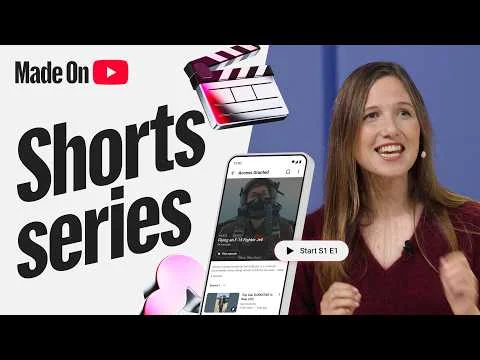
Shorts series. At Made on YouTube, YouTube started rolling out Shorts series. You can group Shorts into a show with seasons and episodes, and viewers get a “watch series” button that plays them in order. It suits recurring brand formats and keeps viewers watching your next episode.
Source: YouTube
AI tools in YouTube Studio. Studio now has a trending-research feed, AI feedback on draft videos, titles and thumbnails generated in your channel’s style, and dynamic thumbnails that show up to three options to different audiences. You get built-in thumbnail testing without a third-party tool.
Source: YouTube
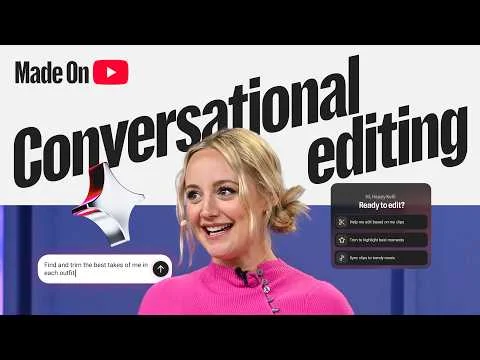
More ways to find brand deals and sell. YouTube Creator Partnerships is now available in 20 countries, new Affiliate Campaigns help brands and creators find each other, and affiliate links now localize to each viewer’s country. The Shopping affiliate program expands to 35 countries by the end of the year.
Source: YouTube Blog
“Paid promotion” becomes “branded content.” YouTube renamed its sponsorship policy, redesigned the disclosure label, and added age and location controls when you declare sponsored content. Automatic labeling of undisclosed brand deals is rolling out on new uploads.
Source: Social Media Today
Remember: Re-check every sponsored video you have scheduled. If the disclosure box isn’t ticked, YouTube may label it for you.
TikTok
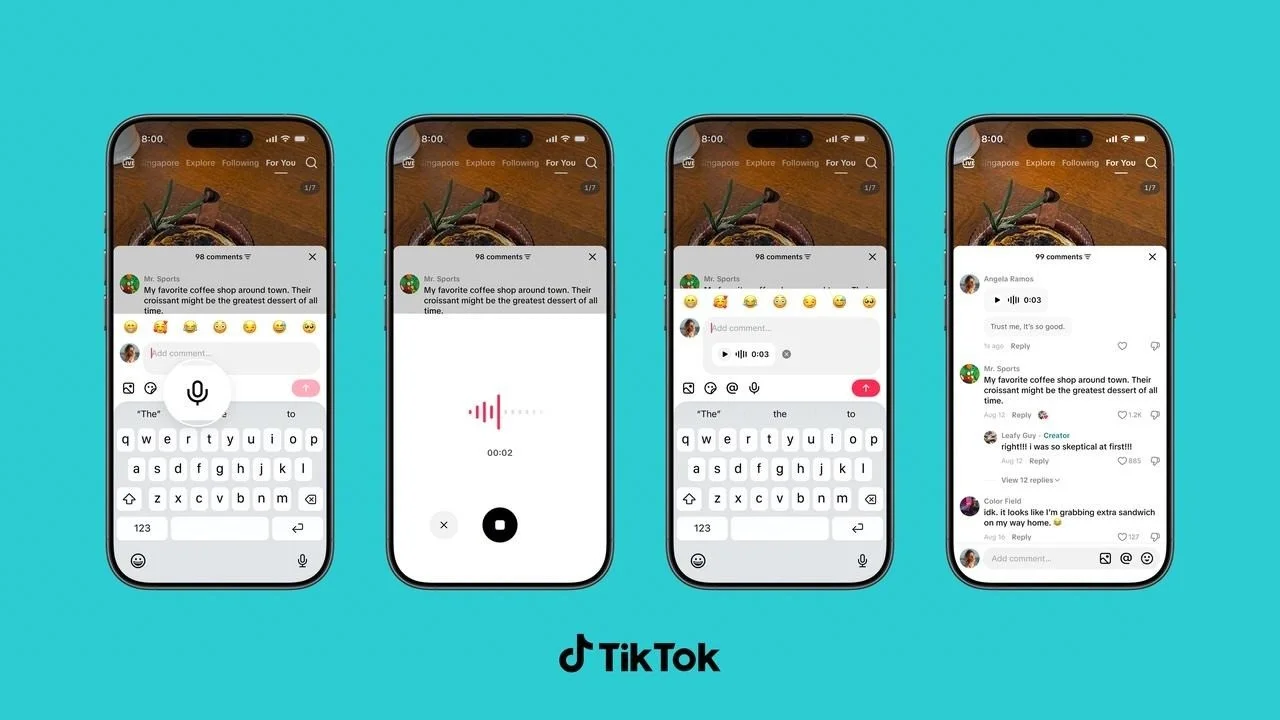
Voice, poll, and photo comments. TikTok added Voice Comments up to 60 seconds, rolling out globally to accounts 18+. Creators can pin Comment Polls with up to five options, available globally now. Photo Carousel Comments allow up to nine images and are rolling out, and Live Photo comments are available now.
Source: TikTok Newsroom
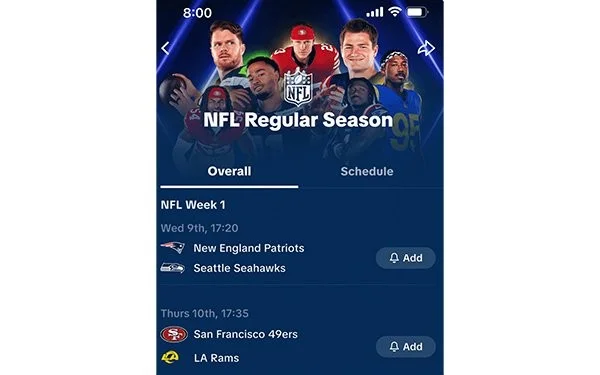
NFL hubs and Pulse Premiere for clubs. TikTok renewed its multiyear NFL deal, adding an official NFL hub in Search with live scores, schedules, and official content. Pulse Premiere, the premium ad placement next to league content, now extends to individual NFL clubs.
Source: TikTok Newsroom
Premier Agency Partner tier. TikTok’s Agency Badging Program now has two tiers, Agency Partner and Premier Agency Partner. Brands can browse badged agencies in the TikTok Partner Directory.
Source: TikTok for Business
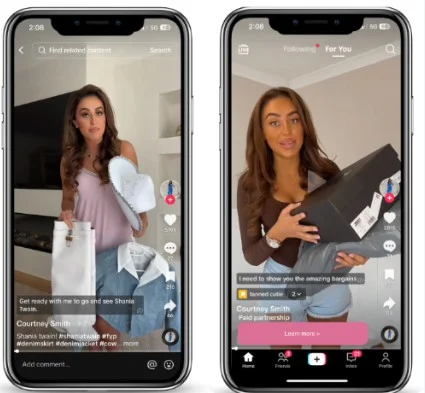
ShopMy Spotlights become Spark Ads. Through TikTok’s Content Suite API, brands on ShopMy can turn their best-selling affiliate creator posts into Spark Ads. It’s a fast way to put paid budget behind content that already sells.
Source: TikTok for Business
Remember: Pin a Comment Poll on your next post. It’s the quickest free audience research TikTok has given you.
Post Proofreader replaces the AI post writer. LinkedIn swapped its AI “enhance your post” rewriter for Post Proofreader, a Premium tool that suggests grammar and clarity fixes with tracked changes. You accept or skip each one, and it won’t rewrite your voice.
Source: LinkedIn News
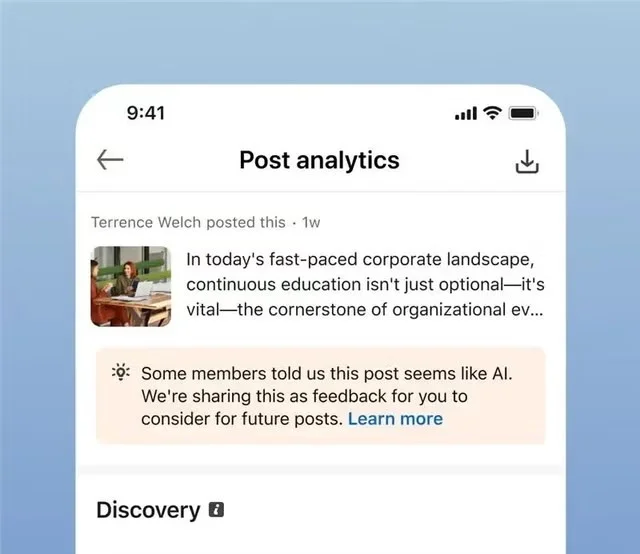
AI-slop flags now show in your analytics. When enough members flag your post as AI slop, LinkedIn now tells you in post analytics. New classifiers also cut reach for low-quality, automated content. LinkedIn says more than 1 million members have used the button and views of slop dropped 40%.
Source: LinkedIn News
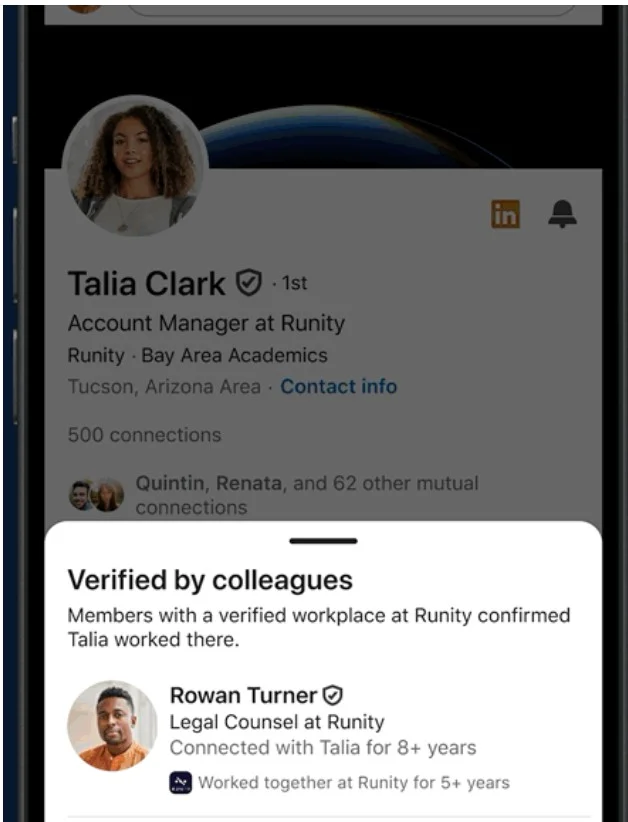
Brand protection for verified Company Pages. Admins of verified Company Pages can now remove people who falsely claim to work there, so fake profiles stop linking to your Page. LinkedIn verification badges also now show on Truecaller and PeerSpot.
Source: LinkedIn News
Remember: Check your Company Page’s employee list and remove anyone who doesn’t actually work for you.
Threads
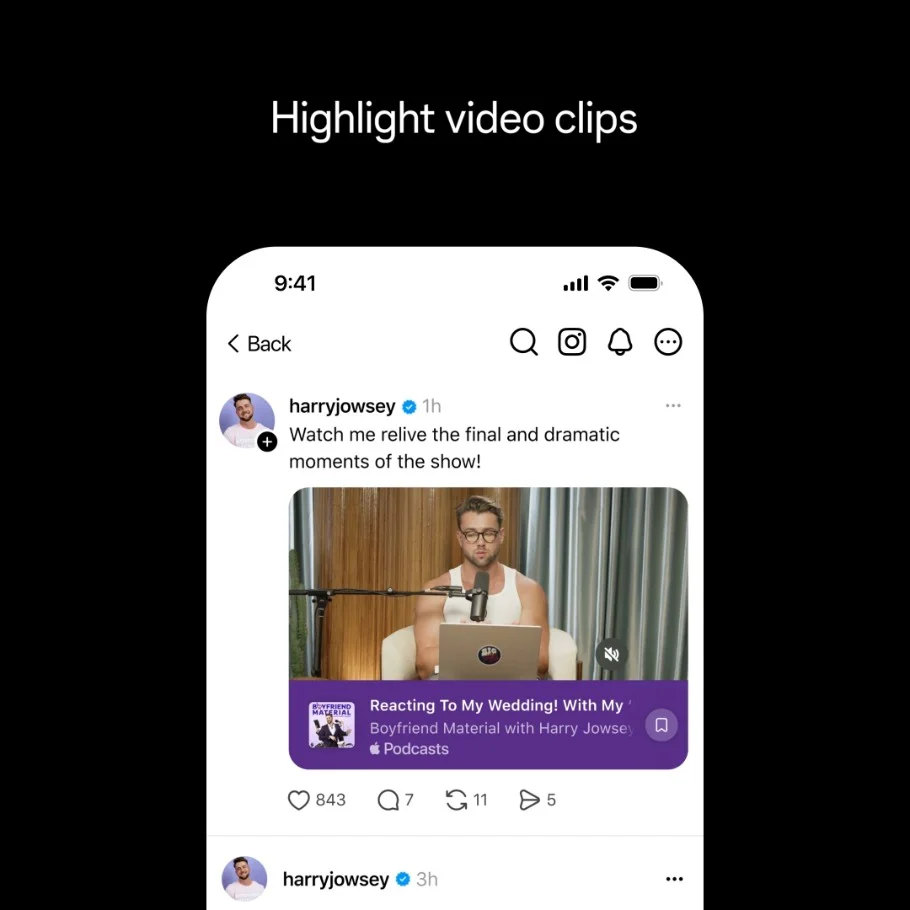
Podcast toolkit. Threads rolled out tools for podcasters: profile and post banners, episode link cards, saved episodes for listeners, new-episode reminders, and Podcast Insights for reach, clicks, and saves. If your brand runs a podcast, Threads is now a real promotion channel.
Source: Meta Newsroom
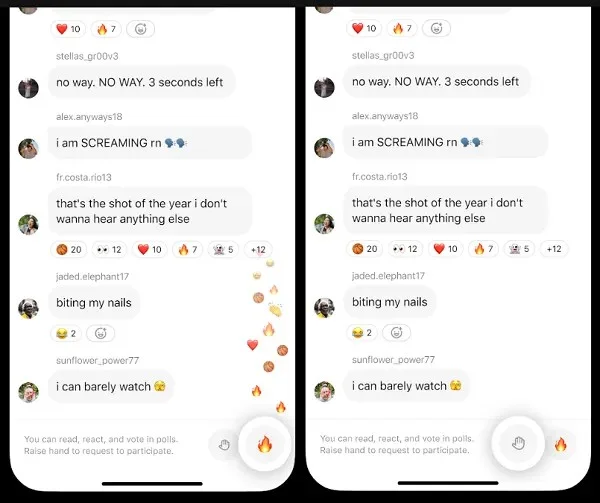
Raise Hand and Live Reactions in Live Chats. Viewers can now raise a hand to ask to join a Threads live chat, and emoji reactions float up for everyone to see. Threads messaging, including live chats, also launched in Australia.
Source: Social Media Today
Remember: If you have a podcast, set up the Threads banner and episode cards before your next release.
A standalone Creator Studio app. Facebook officially rolled out a separate Creator Studio iOS app (US and Canada) with an AI creator assistant that gives personalized growth tips and an AI comment tool that drafts replies in your own tone. It moves Facebook’s creator workflow into a dedicated, AI-first app.

Source: TechCrunch,
First Draft auto-assembles your Reels. Instagram’s First Draft automatically trims your clips and cuts pauses to assemble a rough first cut in under 10 seconds, on iPhone first. Everything is reversible, so it saves the tedious first pass without taking creative control away.
A redesigned Instagram wordmark. Instagram changed its text logo for the first time in a decade, unveiling a bolder, tighter, more geometric wordmark plus three new typefaces. It’s cosmetic, but it’s the platform’s biggest brand refresh in ten years, so expect it across the app and co-branded assets.
AI-generated profile label. Instagram renamed its “AI creator” label to “AI-generated profile” to make it clearer when an account features an AI-generated person. The label appears on profiles using AI-generated people, giving users more transparency about who—or what, they’re interacting with.

X (Twitter)
Revenue sharing out, Original Content Rewards in. X replaced its ad-revenue-sharing payout with a program that pays on qualified impressions from Premium users on original posts. The old program’s final earning period ends September 7 and applications for the new one open September 8, so creators who monetize should re-read the terms.
Video overlays. X added a native tool that lets iOS users place text and emoji directly over video clips before posting. It closes part of X’s gap with rival video editors and gives creators a built-in way to caption and annotate the feed’s fastest-growing format.
A rebuilt Chat composer. X rolled out a revised DM composer with a simpler interface, new voice-message gestures and haptics, and drafts that now save attachments alongside text. It pushes X’s messaging closer to a full-featured chat app.

Source: Social Media Today
YouTube
Higher Partner Program monetization bar. YouTube announced new creators will need 8,000 qualified watch hours in the past year, up from 4,000, or 20M qualified Shorts views in 90 days, to start earning, effective February 1, 2027. It raises the bar for new creators to reach monetization.
Source: YouTube Blog
Public views now count from the first frame. From August 24, YouTube counts a public “view” from the first frame with no minimum watch time across long-form, Shorts, and live, renaming the old metric “Engaged Views” in Analytics. Public view counts will climb faster while monetization rules stay unchanged, so don’t misread the jump.
Source: YouTube help
Live Practice Mode for vertical streams. YouTube added Practice Mode for vertical livestreams, letting you rehearse chat, polls, stickers, and green screens with no audience watching, then go live with one tap. It’s the on-ramp for anyone who avoids live video because the stakes feel too high.
TikTok
Music on Stage returns to TikTok LIVE. TikTok relaunched Music on Stage, its global live-music discovery program on TikTok LIVE and SoundOn, spanning 20-plus regions with Global Finals in September. Last year’s run drove 8.2 billion impressions, a large branded-moment surface for music and entertainment marketers.
Source: TikTok Newsroom
AI-generated LIVE intros. TikTok added a tool in the LIVE composer that generates a short summary of the host and the broadcast to give viewers context when they join. It’s an automated way for live creators to onboard new viewers mid-stream.
Source: Social Media Today
Legacy account options. A new setting lets users decide what happens to their profile after they die, either naming a legacy contact who can manage the profile or having it deleted. It’s TikTok’s first digital-afterlife control, relevant for anyone managing long-lived brand or personal accounts.
Source: Social Media Today
AI-powered event highlights. LinkedIn rolled out AI-recommended clips and auto-generated chapters for Live recordings, surfacing key moments and quotes that hosts can trim and reuse as short-form content. It turns long event recordings into ready-to-share clips.
Source: LinkedIn Pulse Article
Personalized comment ranking. LinkedIn changed the feed to rank post comments by relevance to each viewer, using professional interests, connections, and engagement, so different users now see different comment orders. Comment ordering is now personalized to drive more in-app conversation.

Source: Social Media Today
Platform-Specific Updates for July 2026
Clearer AI labels on ads. Meta updated its disclosure tags and now auto-labels ad creative made or edited with generative AI. If you run AI-touched ads, plan for the label to appear, and decide how you’ll frame AI-assisted work before the campaign goes live.
Muse Image, a native Meta AI image model. Meta launched Muse Image, its first image model from Meta Superintelligence Labs, inside Meta AI and WhatsApp. It’s a way to generate on-brand visuals without leaving Meta’s tools, with plans to bring it into Advantage+ ad creative. Live since July 7.
Replace Audio on published posts. Instagram now lets you swap the audio on a live feed post or carousel without deleting and reposting. A licensing takedown or the wrong track becomes a two-tap fix, and the likes, comments, and reach on your winning post all stay put. Live since July 21.
Reels AI translation in five new languages. Reels AI translation added Japanese, Korean, French, German, and Italian. One Reel now reaches viewers across more markets with no re-recording or re-captioning, which lowers the cost of going multilingual for creators and brands with global audiences.
New Stories formats for Meta AI glasses. Meta added Multi-cam and Spin View Stories formats, plus Audio Cleanup and Speed editing tools, for content captured on Meta AI glasses. It’s an early look at how hands-free, first-person capture will start showing up in everyday Stories.
X (Twitter)
A desktop livestream studio. X launched a desktop livestream studio that lets you schedule and run live broadcasts in-app with real production controls. Live video on X becomes something you plan and produce, not something you gamble on from a phone. Live since July 1.
A video editor with green screen. X rolled out an in-app video editor with green-screen recording and multi-language captioning in the same update. It’s fewer trips to third-party tools before posting, and a sign X wants full video creation to happen natively. Rolled out July 6.
Mention Boosts for Premium Business. A new ad option lets brands turn organic customer call-outs and reviews into promoted posts. Your best social proof can now buy reach, so start saving strong customer mentions to have real praise ready when you spend. Live since July 15.
YouTube
Three content types lost monetization. YouTube named three kinds of content that can no longer earn revenue: generic or template-based videos, unsatisfying or off-putting content, and AI personas advising on sensitive topics like health or finance. It’s a clarification, not an AI ban, since AI-assisted videos with original commentary stay monetizable. (YouTube, July 16)
Custom thumbnails for Shorts. Partner Program creators can now set a custom thumbnail for Shorts, with three suggested frames offered on desktop. Shorts finally get the same click-through control long-form videos always had, which matters as Shorts become a bigger share of discovery. Announced July 24.
A redesigned YouTube Studio. YouTube refreshed Studio and updated its creator guidance, grouping related metrics and adding AI-assisted summaries for eligible creators. The result is a faster read on what’s actually working, so you spend less time hunting through tabs to find the number that matters. (YouTube, July 2026)
TikTok
Smart Split and AI Outline. TikTok added Smart Split, which clips, reframes, and captions a long video into several short ones, plus AI Outline for titles, hashtags, and hooks. One recording becomes a week of posts, the fastest way to reuse work you’ve already done.
More AI tools for TikTok Shop. TikTok expanded its Shop toolkit, widening access to the Seller Assistant chatbot and adding an automated sample-approval workflow for creator requests. It cuts the busywork between having a product and getting it into creators’ hands for content.
Collaborative Posts. You can now publish a post jointly with up to five members or Company Pages, credited at the top, across text, video, images, documents, polls, and events. It’s built for launches, partnerships, and team milestones where several accounts want shared credit. Live since July 23.
AI ad tools and a Brand Kit. LinkedIn rolled out AI ad tools plus a Brand Kit, so you set your colors, fonts, logo, and voice once and every AI-generated ad starts on-brand. Copy and ad variants now come from a single campaign setup.
June 2026 Updates
AI Mode search tab. Meta launched an AI-powered search tab that answers questions using public posts, opinions, and recommendations across Facebook, Groups, Reels, Instagram, and Threads instead of returning plain links. Brands should watch how their content and category surface inside those AI answers. June 15.
AI creative editing tools and photo presets. Meta added AI video montage editing, camera-roll collage templates, and AI photo presets that restyle clothing, hair, and accessories, including virtual jersey try-ons. It’s a batch of in-app production tools aimed at helping creators make more content faster. June 15.
AI creator assistant. Meta introduced an AI assistant for Facebook creators that gives personalized recommendations based on your content style, performance, community, and goals. Instead of guessing your next post, you get a starting suggestion grounded in how your channel actually performs. June 4.
Profile grid reordering. Instagram rolled out the long-requested ability to drag and drop posts on your profile grid on iPhone and Android, without deleting or reposting and without changing a post’s date, reach, or likes. Brands can finally curate a profile’s look and keep top content up front. June 8.
Edits desktop version and AI assistant. Meta launched a desktop version of its free Edits video app with cross-device project sync, plus an AI assistant that reads your Instagram performance and suggests what to make next based on trending audio. It extends serious editing beyond the phone. June 11.
YouTube
In-app messaging and video sharing. YouTube launched in-app messaging via invite links for users 18+ in the US, UK, Brazil, and Singapore, letting people share long-form videos, Shorts, and live streams and discuss them without leaving the app. It keeps sharing, and the engagement it drives, inside YouTube. June 10.
Studio Content tab redesign with estimated revenue. YouTube redesigned the Studio Content tab, adding a per-video estimated revenue column and a Notices column that replaces the old Monetization and Restrictions columns. Creators can now see which videos are actually earning, and flag issues, far faster. June 23.
TikTok
TikTok Shop expands to four new EU markets. TikTok Shop launched in Austria, Belgium, the Netherlands, and Poland, with a “Sell Across Europe” tool that lets one seller registration cover multiple EU markets. It opens new commerce territory for brands and sellers already active on the platform. June 15.
TikTok x Strava Local Movement Fund. TikTok and Strava launched a €100k pan-European Local Movement Fund, giving funding and ad credits to 20 creator-ambassadors who support local fitness communities. It signals TikTok’s investment in fitness creators and offline community activation. June 23.
Growth Max for Mini Dramas. TikTok launched an ad solution that lets brands build, publish, and promote serialized 60–90 second episodic content natively through a Drama Center on their own account, with paid unlocks and embedded ads. It’s a new branded-storytelling and commerce format. June 29.
Creator Marketplace and BrandWorks. LinkedIn launched a Creator Marketplace inside Campaign Manager (US and Canada first) that lets B2B brands search, vet, and contact creators by topic and expertise, alongside BrandWorks for managed strategy. It’s a direct B2B influencer-partnership pipeline for marketers and agencies. June 10.
In-network vs out-of-network reach analytics. LinkedIn added a reach breakdown in post analytics showing what share of impressions come from existing followers versus people found through recommendations, reshares, and search. It finally lets you measure the content that wins genuinely new audiences. June 14.
Threads
500M users, communities out of beta, and Your Algo. To mark 500 million monthly users, Threads graduated communities out of beta with custom icons and champion recognition, and launched Your Algo, a personal control to see more or less of chosen topics. More discovery for brands. June 16.
Live Chats upgrades. Threads expanded Live Chats to all Community Champions and added real-time translations, new host tools, and the ability to invite up to three co-hosts per chat. It makes running live, real-time audience conversations on Threads far more practical at scale. June 30.
Meta One consumer subscriptions launch globally. Meta launched paid consumer tiers, Facebook Plus and Instagram Plus at $3.99/mo and WhatsApp Plus at $2.99/mo, bundling extras like profile customization and story insights under the “Meta One” brand. It creates a lower-ad-exposure audience segment brands should factor into reach planning. May 27.
Business, creator, and AI subscription tiers in testing. Alongside the consumer launch, Meta began testing professional, creator, and AI-focused plans. It signals new paid capabilities aimed squarely at creators and businesses, hinting that some future tools will sit behind a subscription rather than ship free to everyone. May 27.
AI Creator label. Instagram introduced an opt-in, account-level “AI creator” label that appears on profiles and next to posts, reading that the account posts AI-generated or AI-modified content. Creators and brands producing AI-assisted work now have a clear way to manage transparency with their audience. May 4.
Instants. Meta rolled out Instants, a low-pressure way to send quick, disappearing photos that auto-delete after 24 hours to Close Friends or mutual followers, straight from the DM inbox. It’s a casual-engagement surface creators can use to build closer community. May 13.
X (Twitter)
X Communities shut down. X permanently removed its Communities feature, citing usage under 0.4% and heavy spam, and pointed admins toward revamped XChat group chats. Brands and agencies that ran Communities had to migrate their audiences elsewhere. Removal effective May 30 (announced April 23).
YouTube
Brandcast 2026 ad and creator tools. At its Brandcast upfront, YouTube unveiled AI Custom Sponsorships, Creator Show Sponsorships, affiliate-linked content support, and a Masthead upgrade with custom video shelves. Together they deepen brand-creator partnerships and give advertisers new ways to sit inside popular creator series. May 13.
Likeness detection expanded to all creators 18+. YouTube widened its AI likeness-detection tool, which finds deepfakes of a creator’s face and enables removal requests through Studio, beyond the Partner Program to any channel owner aged 18 or older. It’s a new protection layer for talent and brands. May 17–19.
TikTok
TikTok GO. TikTok launched TikTok GO in the US, letting users discover and book local services like hotels, tours, and attractions directly in-app through videos and location pages, with partners including Booking.com, Expedia, and Viator. It opens a bookable-commerce surface for travel and local brands. May 12.
TikTok World 2026 ad tools. At its annual summit, TikTok announced new advertising and AI tools, including TopReach with creative sequencing, AI-powered ad creation, Creator AI Search, and an expanded Content Suite under TikTok One. It’s a major toolkit refresh for advertisers and agencies. May 13.
Off-Platform Event Ads. LinkedIn expanded Event Ads so marketers can promote events hosted anywhere, external webinar pages, registration forms, or livestreams, directly in the feed while keeping their own CRM and event stack, with registration tracking in Campaign Manager. It reached all advertisers May 6.
LinkedIn Ads Agency Certification. LinkedIn introduced an agency certification that qualifies agencies on demonstrated campaign performance, not just a knowledge test, and lists certified agencies in a partner directory advertisers can browse. It gives agencies a credible way to market their LinkedIn expertise. May 2026.
Threads
Web messaging (DMs on desktop). Threads brought one-on-one and group direct messaging to its web and desktop experience, its most-requested feature since DMs launched on mobile in 2025. It’s a real help for creators and social managers who run Threads from a desk. May 5.
Meta Account. Meta rolled out an improved, centralized Meta Account for signing in and managing all its apps and devices, Facebook, Instagram, Threads, Meta AI, Quest, and AI glasses, with passkeys, 24/7 threat protection, and unified settings. It changes how audiences authenticate and manage ad preferences across Meta. April 22.
Opt-in Camera Roll Suggestions (EU/UK). Facebook began rolling out an opt-in feature that surfaces standout camera-roll photos and videos and suggests edits and collages, all kept private until you choose to post. It’s a gentle prompt to publish content people already have sitting on their phones. April 16.
Originality rules extended to photos and carousels. Instagram expanded its original-content policy beyond Reels, so accounts that mainly repost others’ photos and carousels are no longer eligible for recommendations across Feed, Explore, and search. Judged at account level over about 30 days, it pushes brands toward genuinely original work. April 30.
X (Twitter)
Smart Cashtags. X added live stock and crypto price data, interactive charts, and asset-specific conversation tracking to cashtags for US and Canada iPhone users. It deepens X’s push to be a real-time finance hub, and a useful surface for finance and market-focused brands. April 14.
Grok-powered Custom Timelines. X launched AI-curated topic feeds across 75 topics that let Premium users on iOS pin niche interests to their home tab, with Grok reading and labeling every post instead of relying on keywords or hashtags. It’s a real shift in how content gets discovered. April 22.
XChat standalone iOS app. X released XChat as a separate encrypted messaging app for iPhone and iPad, with disappearing messages, editing, video calls, and group chats up to 350 people, replacing legacy DMs. It signals X treating messaging as a product in its own right. April 24.
YouTube
Livestream monetization bundle. YouTube announced four connected live features: Gifts on horizontal streams, automatic ad-free windows when fans send Super Chats, community-wide ad holdback during peak chat, and simultaneous vertical-plus-horizontal broadcasting with shared chat. Together they expand how creators earn from going live. April 13.
Shorts daily time limit, including zero minutes. YouTube let viewers cap their daily Shorts viewing, or set a 0-minute limit to effectively hide Shorts from their feed. It’s a viewer wellbeing control that also affects how much Shorts reach and discovery a creator can count on. April 15.
SiriusXM audio ads partnership. YouTube teamed with SiriusXM to sell and manage audio ads for podcasts, music, and other audio-first content in the US. It opens a fresh monetization channel for podcast and music-adjacent creators, and a new inventory line for advertisers. April 22.
Likeness detection expansion. YouTube widened its AI likeness and deepfake detection tool to more actors, athletes, musicians, and creators, helping talent and brands find and manage unauthorized AI use of their face and voice before it spreads. April 2026.
TikTok
Wix integration for SMB ecommerce. TikTok launched an updated global Wix integration that lets small and mid-size brands set up TikTok Pixel, Events API, and catalog sync and manage campaigns from one place, reporting average lifts of 19% in incremental events and 15% in CPA. April 9.
Dreamina Seedance 2.0 in Symphony. TikTok added ByteDance’s next-gen AI video model to its Symphony ad suite, letting advertisers generate more consistent, natural-motion video with synced audio at up to 2K and 15 seconds directly inside Ads Manager. It raises the ceiling on AI-made ad creative. April 13.
AI conversational search for all users. LinkedIn expanded its natural-language search from Premium to everyone, letting users describe who or what they want in plain language, with verification badges and AI-generated “why this result” summaries in listings. It changes how members, leads, and creators get discovered. April 15.
Threads
Live Chats. Threads launched real-time group conversations tied to cultural and sports moments, debuting during the NBA Playoffs, supporting text, photos, videos, links, and reactions for up to 150 active participants. It gives creators a new live-engagement format around big shared events. April 22.
Web redesign with DMs. Meta redesigned Threads on the web, finally bringing direct messages to desktop and adding left-rail shortcuts for saved posts, insights, activity, and easier navigation between feeds. It’s a meaningful upgrade for anyone managing Threads from a computer. April 16.
Meta AI selling tools on Marketplace. Sellers can now upload item photos and let Meta AI draft the listing, suggest a price from comparable local items, auto-reply to buyer questions, generate shipping labels, and write seller-profile summaries. It sharply cuts listing effort for brands and sellers on Marketplace. March 12.
New scam-protection alerts. Facebook now warns users when they send or receive a request from an account showing suspicious activity, surfacing account age, location, and mutual connections. It’s a useful signal for brand and community managers vetting inbound contacts and partnership DMs. March 11.
Creator tools opened to all public accounts. Instagram made content scheduling, the insights dashboard, and trending-audio access, previously Professional Mode only, available to every public account. Smaller creators and brands can now plan and measure content without switching account types first. March 1.
Reorder carousel slides after publishing. Instagram lets users long-press and drag to rearrange photos and videos in an already-published carousel, and edit captions, tags, alt text, and location, without losing existing likes, comments, or shares. It fixes one of the platform’s most-cited carousel pain points. March 23.
X (Twitter)
Exclusive Threads and expanded creator subscriptions. X let creators paywall parts of a thread, show perks in a tap-to-subscribe pop-up, share a subscriptions card, and surface subscriber-only posts in the main feed, with two-step onboarding. It gives creators more concrete ways to monetize a loyal audience. March 8.
Grok-powered “Listen” audio for long-form articles. Long-form articles now show a Listen button that reads the piece aloud using xAI’s Grok voice. It hands publishers and long-form creators an audio version of their writing without any extra production work. March 8.
YouTube
Creator Partnerships unified platform. YouTube merged BrandConnect and the Creator Partnerships Hub into one platform, in Studio for creators and Google Ads for advertisers, with AI-powered brand matching, direct outreach, and channel-insight sharing. It streamlines how sponsorship deals get found and closed. March 23.
Shopping Affiliate Program threshold lowered to 500 subscribers. YouTube cut the minimum from 1,000 to 500 subscribers, letting more creators tag and earn commission on products across Shorts, VOD, and Live. It widens access to affiliate revenue for smaller, growing channels. March 25.
TikTok
NewFronts ’26 high-impact ad solutions. TikTok unveiled new brand ad formats including TopReach (one buy combining TopView and TopFeed for full-day reach), Logo Takeover, Prime Time (up to three sequential ads in a 15-minute window), and Pulse Mentions. They’re premium visibility plays for brands chasing scale. March 24.
Feed algorithm rebuilt with LLMs. LinkedIn replaced its multi-source feed system with an LLM-based retrieval and transformer ranking model that reads a post against your profile and history, surfaces fresh content faster, and downranks engagement bait and recycled thought-leadership. Original, specific posts now win more reach. March 12.
New creator-partnership tools for brands. LinkedIn added Premium Creator Sponsorships with Top Voices 360, expanded BrandLink with self-serve campaigns, a Stripe-powered creator payout system, and CTV ad buying. Together they deepen B2B influencer marketing on the platform. March 18.
Threads
Threads Marketing API update. Meta added global app-ads support, covering app installs plus event optimization for link clicks and conversions, and view, hide, and reply moderation for Threads ads via third-party platforms. Marketers can now manage Threads promotions from their existing ad stacks. March 25.
Animated profile pictures. Meta AI now turns a still profile photo into a short animation using presets like wave, party hat, confetti, and heart. It’s a low-effort way for brands and creators to refresh how their presence looks without commissioning new photography. February 10.
Restyle for Stories and Memories. Users can transform the look of an image in Facebook Stories and Memories using preset styles or their own text-based AI prompt. It’s a fast route to on-brand, seasonal creative from photos you already have. February 10.
Animated backdrops for Feed text posts. Text posts can now carry animated backgrounds like falling leaves or ocean waves, making plain updates more eye-catching in the Feed. It’s a small but useful way to make a text-only announcement stop the scroll. February 10.
Instagram had no standalone feature officially released in February 2026; its notable activity that month was still in testing.
X (Twitter)
Grok Imagine 1.0 adds video generation. xAI’s Grok Imagine gained text-to-video and image-to-video with native audio sync, producing 720p clips up to 10 seconds. It hands X marketers a built-in AI video creation tool, tightening the loop between idea and postable clip on the platform itself. February 2.
$1 million Grok Super Bowl video contest. X invited users to create 30-second Grok-made videos for a shot at $1M, $500K, and $250K prizes and a spot in X’s Super Bowl ad. It was a high-profile push to get brands and creators using Grok’s new video tools. February 5.
YouTube
Voice replies expanded to all creators. Every creator can now reply to comments with a recorded voice clip of up to 30 seconds, from the main app or Studio Mobile. It’s a more personal way to engage an audience than typing, and a light way to show personality. February 27.
New Shorts remix options. YouTube rolled out additional remix tools for Shorts, giving creators more ways to build on existing content. Remix formats tend to travel well in the Shorts feed, so it’s a practical reach lever for creators chasing discovery. February 27.
TikTok
Local Feed launched in the US. TikTok launched an opt-in, location-based feed surfacing nearby travel, news, events, shopping, and dining. Precise location is off by default and limited to users 18 and older, but it opens a genuine local-discovery channel for small and location-based businesses. February 11.
TikTok Shop new AI seller tools. TikTok added wider Seller Assistant chatbot access, a “Creator Picks” tag that recommends creators for collaborations, automated sample approvals, and auto-posting of live-stream clips. Together they cut seller admin and speed up creator partnerships. February 17.
New measures against engagement pods and automated comments. LinkedIn said it will strip automation-posted comments from the default “Most Relevant” view, may limit their reach to the poster’s direct connections, and can restrict repeat offenders. It reshapes the organic-reach tactics many marketers had relied on. February 16.
Threads
Dear Algo. Threads launched Dear Algo, an AI feed control where you post publicly starting with “Dear Algo” to temporarily see more or less of a topic for three days, and can repost others’ requests. It’s a new, public lever for tuning feed relevance. February 11 (US, UK, AU, NZ).
Meta AI business assistant for advertisers. Meta launched an AI business assistant to help advertisers with campaign optimization and account support, part of its push to make AI the core engine behind ad performance and content recommendations. For advertisers, it’s a always-on helper inside the ad workflow. January 28.
Stronger distribution for original content. Meta detailed that its AI now detects original uploads versus duplicated or recycled video and gives originals stronger distribution, with 75% of recommendations coming from original posts. It’s an early, clear signal that reposting others’ work would keep losing reach. January 28.
AI dubbing expanded to nine languages. Meta expanded AI dubbing to nine languages, with hundreds of millions of people watching auto-translated videos daily. It lets creators and brands reach audiences across languages without re-recording, lowering the cost of a genuinely global content strategy. January 28.
“Your Algorithm” opened to all English-speaking users. Instagram rolled out its manual algorithm control to all English-speaking users, letting people add or remove Reels interest topics and pick three top interests to prioritize. It gives audiences, and the creators chasing them, more say over feed relevance. January 13.
Major Edits app update. Instagram’s Edits video app gained in-app links to other accounts and Reels, 10 weekly custom content ideas, 25 new video effects, and multi-take storyboard editing. It’s a clear bid to keep more Reels creation happening inside Meta’s own tools. January 14.
X (Twitter)
Priority notifications tab. X added a Priority notifications tab on iOS and web that surfaces interactions from mutual follows and when large accounts engage with your posts, replacing the old Verified mentions view. It helps creators and brands spot the interactions that actually matter. January 11.
Improved cashtags. X upgraded $cashtags to show more active asset listings with real-time pricing and mention access when users tap through. It was an early sign of the finance-hub push that would deepen through the spring, useful for finance and market-focused brands. January 11.
Open-source algorithm pledge. Elon Musk announced X would publish all algorithmic code for its feed and ad ranking within a week, with developer notes and updates every four weeks. For marketers, it promised rare transparency into how distribution actually works. January 11.
YouTube
Image posts coming to the Shorts feed. In his 2026 creator letter, CEO Neal Mohan announced YouTube is bringing image (photo) posts directly into the Shorts feed, giving creators a lightweight new format to connect with audiences between videos. It signals Shorts becoming a broader content surface, not just video. January 21.
AI Shorts using your own likeness. YouTube announced AI creation tools that let creators generate Shorts with their own likeness, produce games from a text prompt, and experiment with music, noting over a million channels already use AI creation tools daily. It’s AI creation moving into the mainstream. January 21.
Frictionless in-app shopping and brand links in Shorts. YouTube announced in-app purchasing without leaving the platform, the ability to add brand website links in Shorts, and swapping out branded segments after deals end. Together they expand how creators and brands sell directly inside content. January 21.
TikTok
“TikTok Next” 2026 trend predictions. TikTok released its annual trend report for marketers, naming three 2026 shifts, Reali-TEA, Curiosity Detours, and Emotional ROI, with hashtag recommendations, brand case studies, and campaign strategies. It’s the planning document many social teams build their TikTok calendar around. January 14.
New streaming ad formats. TikTok launched Streaming Ads, a performance format that converts viewers into subscribers, and New Title Launch Ads that reach high-intent users by genre and price sensitivity. Both target streaming and VOD advertisers looking to drive sign-ups. January 21.
Phasing out Custom Identity for advertisers. TikTok announced it is retiring the Custom Identity ad option, requiring all advertisers to run ads through a verified TikTok profile, and shared its F.I.R.S.T framework to guide the switch. It pushes brands toward a real, consistent on-platform presence. January 7.
Generative AI qualifications on profiles. LinkedIn introduced Gen AI qualifications members can display in their Licenses and Certifications section, validated by partner tools based on real usage rather than a test, starting with a “Vibe Coding” credential. It’s a new signal for professionals and the brands recruiting them. January 28.
“Jobs on the Rise” 2026 report. LinkedIn published its annual data report on the fastest-growing job roles, based on platform activity. It’s a useful reference for recruiters, marketers, and brands tracking where the workforce, and their audience, is heading in 2026. January 7.
Threads
Ads rolled out to all users worldwide. Meta announced the global expansion of ads on Threads, opening it to all existing Meta advertisers via Advantage+ and manual campaigns, with image, 4:5 video, and carousel formats managed alongside Facebook, Instagram, and WhatsApp, plus third-party brand-safety verification. Threads became a real paid channel. January 21.
Monthly Trend Spotlight
The trend cutting across every platform in September is paying to look trustworthy. Meta One sells the verified badge and organic links, LinkedIn verification now travels to Truecaller and PeerSpot, and TikTok badges the agencies it trusts most.
Why now? AI made fake accounts and generic content cheap, so proof of being real became valuable. The move that protects you: verify the accounts that drive revenue, and make every post look like a person stands behind it.
Features Going Away This Month
- X’s standalone XChat app. The XChat app was removed from the Apple App Store and Google Play, with messaging now inside the main X app. X hasn’t commented officially. (Reported September 21)
- X Creator Revenue Sharing. The old ad-revenue-sharing program’s final earning period ended September 7, and Original Content Rewards applications opened September 8. (Announced August 8, ended September 7)
- LinkedIn’s AI “enhance your post” writer. It’s been replaced by Post Proofreader, which suggests edits instead of rewriting your post. (Replacement announced September 15)
What These Updates Mean for Your Strategy
- If you’re an agency: Meta One and TikTok’s Premier tier change what clients expect you to provide. Decide which client accounts need Meta One’s links and scheduling, and price it into retainers. If you work on TikTok, apply for an agency badge, because brands now browse the Partner Directory.
- If you’re a small business: Start with the free wins. Add tagged customer posts to your Instagram grid, pin a TikTok Comment Poll, and try Muse to read your analytics if you’re in the US or Canada. Only pay for Meta One once you know links in posts will drive sales.
- If you manage multiple locations: Verification matters more when you run many Pages. Use LinkedIn’s new Company Page tools to remove fake employees, and check whether Meta One’s impersonation protection is worth it for location Pages that get copied.
- For everyone: Write like a person and disclose every deal. LinkedIn and YouTube now actively detect slop and undisclosed sponsorships, and both cost you reach.
Take This into October
September’s pattern points one way. Platforms will keep turning trust and reach into paid tiers, and keep penalizing content that looks automated or hides a sponsor. Expect more features locked behind Meta One–style plans, and more AI detection showing up in your analytics.
Do one thing before October gets busy. Audit your accounts for trust signals: verification status, sponsorship disclosures on scheduled posts, and any posts that read like unedited AI. Fix the gaps now, before Q4 campaigns go live.
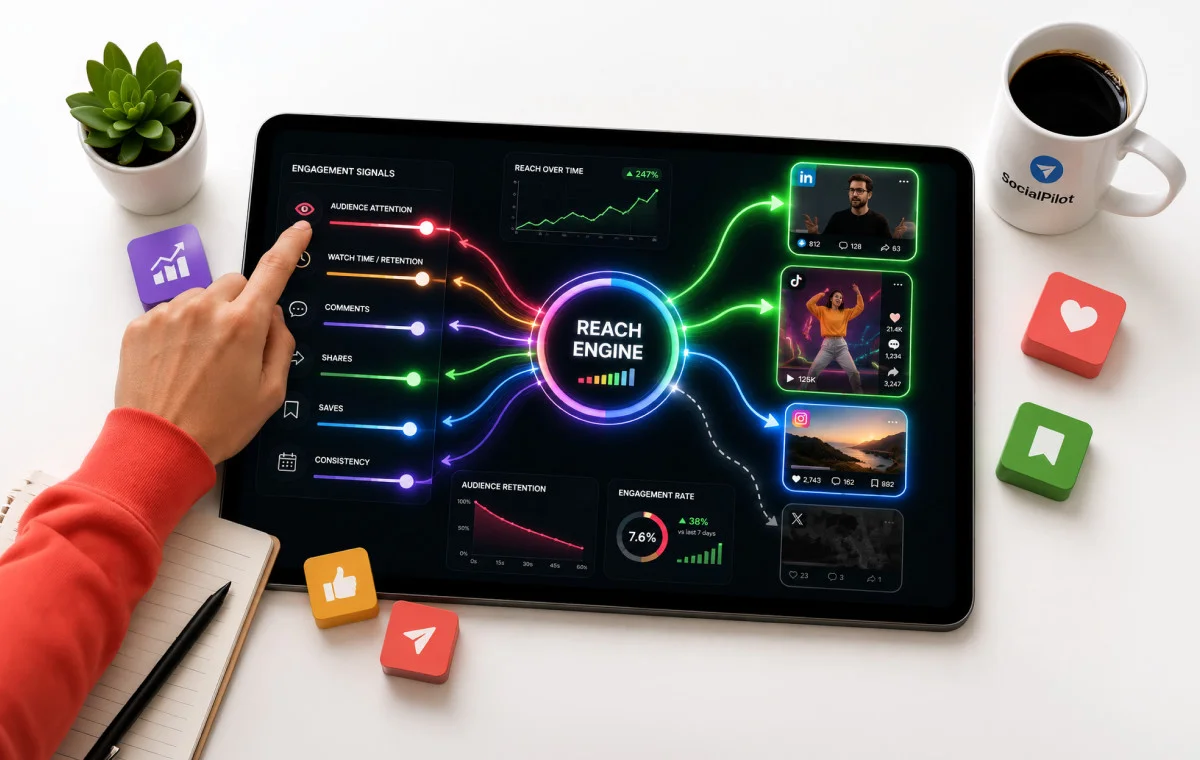
The hard part is that these rules now differ by platform, and your Q4 calendar is already full. Planning and checking posts for every account in one place, the way you can in a tool like SocialPilot, makes it easier to catch a missing disclosure or a generic caption before it publishes.
Start your 14-day free trial today and see the difference for yourself.



 Join 55,000+ social media managers


