

YouTube Studio shows you the exact second viewers leave your video. But it won’t explain why a competitor’s video on the same topic gets ten times more views. With more than 20 million videos uploaded every day, finding those insights takes more than scrolling through YouTube.
That’s where YouTube analytics tools come in. Some help you track channel performance, while others focus on SEO, competitor research, or finding videos that outperform expectations. This list covers eight tools across these areas, along with a direct vidIQ vs. TubeBuddy comparison and a look at what YouTube Studio already offers for free.
SocialPilot is included for a different use case: managing YouTube alongside other social networks. It offers performance reports, scheduling, and white-label client reports, but doesn’t cover keyword research or outlier discovery. If those are your priorities, you’ll need a dedicated tool alongside it.
YouTube Analytics Tools at a Glance
Here are all eight tools side by side, with who each one suits, what it costs to start and how you can try it. Use it to narrow your shortlist, then jump to each entry for the detail.
| Tool | Best For | Entry price (annual billing) |
Rating | Trials/Free Plan |
| SocialPilot | Agencies reporting YouTube for several clients | $35/mo (Standard) | 4.5/5 on G2 | 14-day free trial, no card |
| Iconosquare | Brand managers with 5 to 20 profiles, mostly Shorts | $10/mo | 4.4/5 on G2 | Free plan (2 profiles), 14-day trial |
| TubeBuddy | Solo creators or two-person teams uploading weekly | $16/mo per channel | 4.6/5 on G2 | Free plan, 30-day refund |
| vidIQ | Creators deciding what to film next | $16.58/mo per channel | 4.5/5 on G2 | Free plan (150 AI credits a month) |
| Tubular Labs | Media companies proving reach to advertisers | Quote only | 4.3/5 on G2 | No free plan or trial, demo first |
| Quintly | Analytics leads reporting on 5 to 20 profiles | Quote only | 4.7/5 on G2 | No free plan, 7-day trial after a demo |
| Rival IQ | Agencies running monthly competitive reports | $199/mo | 4.5/5 on G2 | 14-day free trial |
| ViewStats | Solo creators or small teams finding outlier videos | $49.99/mo | 3.8/5 on the Chrome Web Store | Free account, no trial |
All-in-One & Multi-Platform Suites with YouTube Analytics
These two put YouTube on the same screen as the other networks you run. Neither will tell you which keyword to target. What they give you instead is one login and one monthly answer to “what moved on YouTube” sitting next to Instagram, LinkedIn and Facebook.
1. SocialPilot – Best for Branded YouTube Reports Across Every Client
If YouTube is one of five networks you report on every month, SocialPilot is built around the client report you send at the end of it.
Platforms Supported: YouTube, Facebook, Instagram, X (Twitter), LinkedIn, and TikTok
Key Features:
- YouTube channel analytics: subscribers, watch time, Videos vs Shorts views and demographics
- Video and Shorts scheduling
- Reports across nine other networks
- White-label client reports from Premium
- Scheduled report emails
What it actually looks like: Open Analytics and pick YouTube. A dropdown lists every connected channel, so you choose the client, set the range to Last 7 days and click Analyze. The top row fills with Subscribers Gained, Subscribers Lost and Channel Watch Time, each showing its change against the previous period. Scroll down and Views on Videos and Shorts plots both formats on one chart, and further down, SocialPilot’s YouTube analytics split views by age, device and location. When the view looks right, click Report at the top right to turn it into something you can send.
Danielle, a Trustpilot reviewer from South Africa, wrote: “We’ve been working with SocialPilot for over a year now, and it has made our work and our clients’ work much easier!”
On G2, SocialPilot is rated 4.5 out of 5 across about 846 reviews.
What it does well: The report and the publishing calendar share a login. You schedule YouTube videos and Shorts for the same client whose numbers you just pulled, then set that report to arrive by email on a schedule, white-labelled with your agency’s colours from Premium up.
SocialPilot offers a 14-day free trial and access to all premium features (no credit card required & cancel any time). Choose a plan that fits your needs.
| Ultimate | Premium | Standard | Essentials |
$170.00/mo$200
Billed annually (Save 15%)
|
$85.00/mo$100
Billed annually (Save 15%)
|
$42.50/mo$50
Billed annually (Save 15%)
|
$25.50/mo$30
Billed annually (Save 15%)
|
|
Streamline Social Media Management
|
|||
What running SocialPilot standalone requires: A second tool for everything that happens before you film. There’s no keyword research, no title or tag scoring, no outlier discovery, and no estimates for channels you don’t manage. When a client asks why a competitor’s upload got ten times the views, you’ll be opening vidIQ or ViewStats to find out.
2. Iconosquare – Best for Deep Analytics on Shorts-Heavy Brand Channels
Analytics run deep in Iconosquare, with 40+ YouTube metrics on every plan, while publishing to YouTube goes only halfway.

Platforms Supported: YouTube plus seven other social networks, all on every plan.
Key Features:
- 40+ YouTube metrics, including watch time, retention and Shorts
- YouTube Shorts scheduling (no long-form videos)
- Uma, a built-in AI analyst that explains why a video rose or sank
- Scheduled reports to a team inbox from Launch
- Competitor monitoring on Scale, with two years of history
What it actually looks like: In Iconosquare, you go to Analytics, then Overview. Every connected profile sits as an avatar along the top, with a red YouTube badge on each channel. Click one and the cards below fill with Subscribers and Views plus the percentage change for the period. From there you drill into channel, video and Shorts views, where watch time and audience retention live.
Amanda Snape, a Trustpilot reviewer from the US, wrote: “I have the paid version of Iconosquare and the information it gives me is reallllllly useful!”
On G2, Iconosquare is rated 4.4 out of 5.
What it does well: It explains numbers as well as showing them. Uma tells you why one video beat its neighbours or sank, and from Launch up you can schedule reports straight to a team inbox. Scale keeps two years of history, which matters when a client wants this November against last.
Iconosquare is free for 2 profiles. Paid plans are priced by profile count, from Starter at $13 a month for 5 profiles ($10 billed yearly) to Scale at $95 a month ($79 yearly) for 20 profiles. White-label reports need the Custom plan, and there’s a 14-day trial.
What running Iconosquare standalone requires: Every long-form upload still goes through YouTube Studio, because Iconosquare schedules YouTube Shorts only. That’s fine while a client posts vertical clips, and awkward the week they launch a twenty-minute product walkthrough. You’d still need a creator tool for keyword and thumbnail work.
SEO & Optimization Tools
TubeBuddy and vidIQ live inside YouTube, as browser extensions and web apps that score keywords, titles and thumbnails before a video goes out. They only know YouTube, and that’s the reason to buy them. If you want the groundwork first, our guide to YouTube SEO covers how search ranking on the platform works.
3. TubeBuddy – Best for Keyword Scores and Bulk Edits Inside YouTube
Install the Chrome extension and TubeBuddy’s buttons appear inside YouTube itself, next to the upload fields you already fill in, one channel per license.
Platforms Supported: YouTube only.
Key Features:
- Keyword Explorer and SEO Studio for keyword research
- Tag rankings and search rank tracking
- Thumbnail A/B testing on Legend and up
- Competitor Scorecard and Competitor Upload Alerts
- Niche Leaderboard and Next Video Ideas
- Bulk end screen, card and description editors
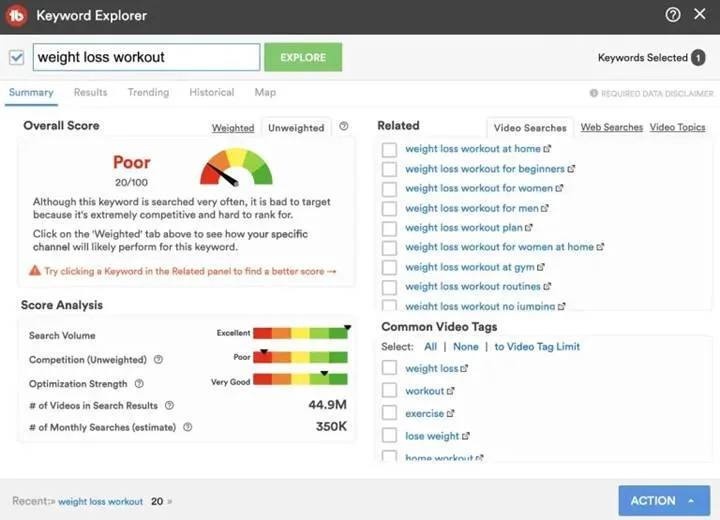
What it actually looks like: You type a phrase into TubeBuddy‘s Keyword Explorer, say “weight loss workout”, and click Explore. The Overall Score dial reads Poor, 20 out of 100, with a note under it saying the term is searched often but too crowded to rank for. Switch from Unweighted to Weighted and the score recalculates for your own channel. On the right, related searches and the common tags on ranking videos each carry a checkbox, so you build a tag list as you read.
Cole Noel, a Trustpilot reviewer from the US, wrote: “TubeBuddy has helped me look at my channel and YouTube growth in a totally different way.”
On G2, TubeBuddy is rated 4.6 out of 5.
What it does well: It handles upload-day chores in bulk. The bulk end screen and card editors, plus Bulk Find, Replace & Append across descriptions, turn changing one link across every description from an afternoon into a single job. Legend adds thumbnail A/B testing and Click Magnet on top.
TubeBuddy is priced per channel. Pro is $16 a month. Legend is $34a month and adds thumbnail A/B testing. Businesses and 3+ channels need an Enterprise quote. There’s a 30-day refund and no trial stated.
What running TubeBuddy standalone requires: Something else for every network that isn’t YouTube, and an Enterprise quote the moment you manage channels as a business. Pro and Legend are sold to individual creators only, so several channels, 50k+ subscribers, three or more channel managers or 50+ employees all push you to Enterprise. Value can also be hard to see from the inside: one paying member of over a year titled his review “I am not sure TubeBuddy is any benefit…”.
4. vidIQ – Best for Spotting Outlier Videos in Your Niche
vidIQ starts free and is priced per channel, and the most useful thing it does is about somebody else’s channel: which of their videos got far more views than usual.
Platforms Supported: YouTube only.
Key Features:
- Outlier Score on breakout videos, plus niche trends
- Keyword ideas
- Compare Performance across the channels you follow
- Title and thumbnail optimization, with AI thumbnail generation
- MCP connection that pulls channel data into Claude or ChatGPT, on every plan
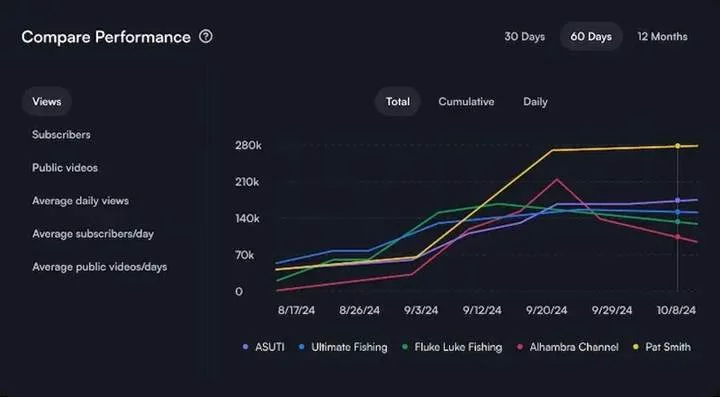
What it looks like: In vidIQ, you add the channels you follow and open Compare Performance. Pick a metric from the left rail (Views, Subscribers, Public videos, Average daily views), choose 30 days, 60 days or 12 months, and each channel draws its own line. Toggle Total, Cumulative and Daily to see whether a jump was one video or a steady climb. Each video that breaks out carries an Outlier Score, its views measured against that channel’s normal.
Stephen Marks, a Trustpilot reviewer from Israel, wrote: “Impossible to cancel subscription. No customer service. Avoid and use better more honest alternatives.” That complaint is about leaving rather than the data, which is worth knowing before you put a card on file.
On G2, vidIQ is rated 4.5 out of 5.
What it does well: The free plan does real work. It includes 150 AI credits a month, niche trends and content ideas, and vidIQ’s MCP connection is on every plan, Free included. Paid plans add the deep thinking AI Coach and thumbnail generation, drawing on a shared monthly credit balance.
vidIQ has a free plan with 150 AI credits a month. Boost is $19 a month, or $16.58/mo billed annually ($199 a year), with 2,000 AI credits. MAX is $49 a month, or $39/mo billed annually ($468 a year), with 6,000 AI credits.
What running vidIQ standalone requires: A separate scheduler and a separate client report, since nothing here covers Instagram or LinkedIn. Past three channels, or once a second team member needs access, you’re on Enterprise and a sales call.
vidIQ vs. TubeBuddy, Which Should You Choose?
For most channels, start with vidIQ. The free plan is enough to find out whether you’ll use it, and its strongest feature answers what to make next, the question that stalls most creators. TubeBuddy is the better buy for a channel with a big back catalogue and a weekly upload routine, where it pays you back in hours saved on upload day.
Price per channel or license:
| vidIQ | TubeBuddy | |
| Free option | Free plan, 150 AI credits a month | Free plan exists, contents not listed on the pricing page |
| Entry paid plan | Boost $19/mo, or $199/year | Pro $16/monthly |
| Top creator plan | MAX $49/mo, or $468/year ($39/mo) | Legend $34/monthly |
| Thumbnail help | AI thumbnail generation on Boost and MAX | A/B testing on Legend and Enterprise only |
| When a quote takes over | More than three channels, or a team | Any business (several channels, 50k+ subscribers, three or more channel managers, or 50+ employees) |
Billed yearly, TubeBuddy Pro works out to $144 a year against $199 for vidIQ Boost, so TubeBuddy is the cheaper paid entry by $55.
Where vidIQ Wins
vidIQ is better at looking outward. Its Outlier Score flags videos that pulled far more views than their own channel usually gets, and Compare Performance lines your channel up against the ones you follow on views and subscribers over 30 days, 60 days or 12 months. Both run on public counts, so treat them as signals, not the other channel’s real analytics.
Its free tier is the more useful one, too, with niche trends and content ideas and no card on file. The MCP connection that feeds your channel data into Claude or ChatGPT is on every plan, Free included. Boost and MAX add the AI Coach and thumbnail generation, all drawing on one shared monthly credit balance, so heavy AI use is what pushes you up a tier.
Where TubeBuddy Wins
TubeBuddy is built for the videos you’ve already published. Bulk end screen and card editors, plus Bulk Find, Replace & Append across descriptions, turn swapping a sponsor link on every old video into one job instead of an afternoon of edits.
Its keyword scoring is more personal, too. Keyword Explorer’s Weighted view recalculates a term’s score for your channel’s size, which tells a small channel more than a raw competition score. On Legend you get thumbnail A/B testing, Click Magnet and bulk thumbnail overlays, plus a second user seat, for about $16 a month less than vidIQ MAX on monthly billing.
If thumbnail tests are the only reason to buy Legend, try YouTube Studio’s Test & compare first. It runs up to three titles, thumbnails or both on a long-form video for free.
Our Recommendation by Use Case
| Your situation | Pick | Start on |
| You don’t know what to film next | vidIQ | Free, then Boost at $19/mo |
| You want to watch rival channels for breakout videos | vidIQ | Boost |
| You upload weekly and keep editing old descriptions and end screens | TubeBuddy | Pro at $16/mo |
| Two people work on one channel | TubeBuddy | Legend, which includes two seats |
| You only want thumbnail tests | Neither yet | YouTube Studio’s Test & compare |
| You manage several client channels as a business | Neither creator plan | A quote from either vendor’s Enterprise plan |
If a client asks you whether vidIQ is worth it, the honest answer is yes for idea research and no as a reporting tool. Put them on the free plan for a month and upgrade only if they open it before every upload.
Tools for YouTube Analytics on Other Channels
YouTube Studio tells you how your own channel did. The three tools below tell you how it did against everyone else, which is the question a brand manager or media seller gets asked in every quarterly review. They are priced for teams, mostly by quote, and none of them publishes a video for you, so if you only need the manual version, start with our guide to YouTube competitor analysis.
5. Tubular Labs – Best for Cross-Platform Audience and Creator Intelligence
Tubular Labs measures YouTube the way a TV network measures an audience, including creators and publishers you have never worked with.
Platforms Supported: YouTube plus other social video platforms, including Facebook.
Key Features:
- Viewpoint dashboards with your channels beside the competition’s
- Audience Also Watches, mapping related creators by affinity and overlap
- Category trends and rising creators
- Cross-platform audience data
- Role-based suites: Media Sales, Content Strategy, Social Listening, ROI Insights, Sponsors & Partnerships
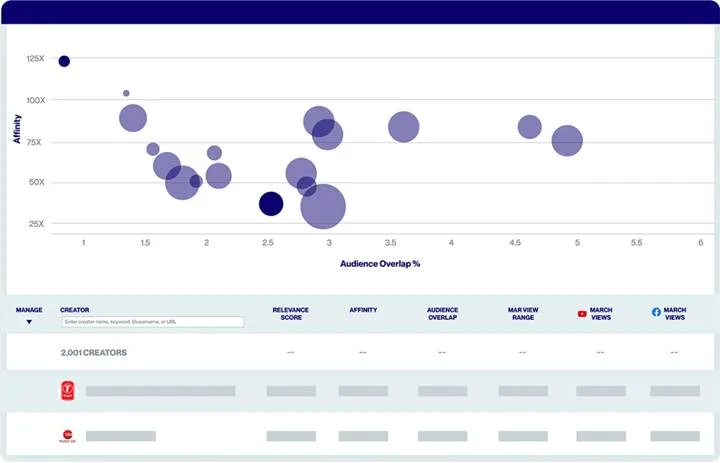
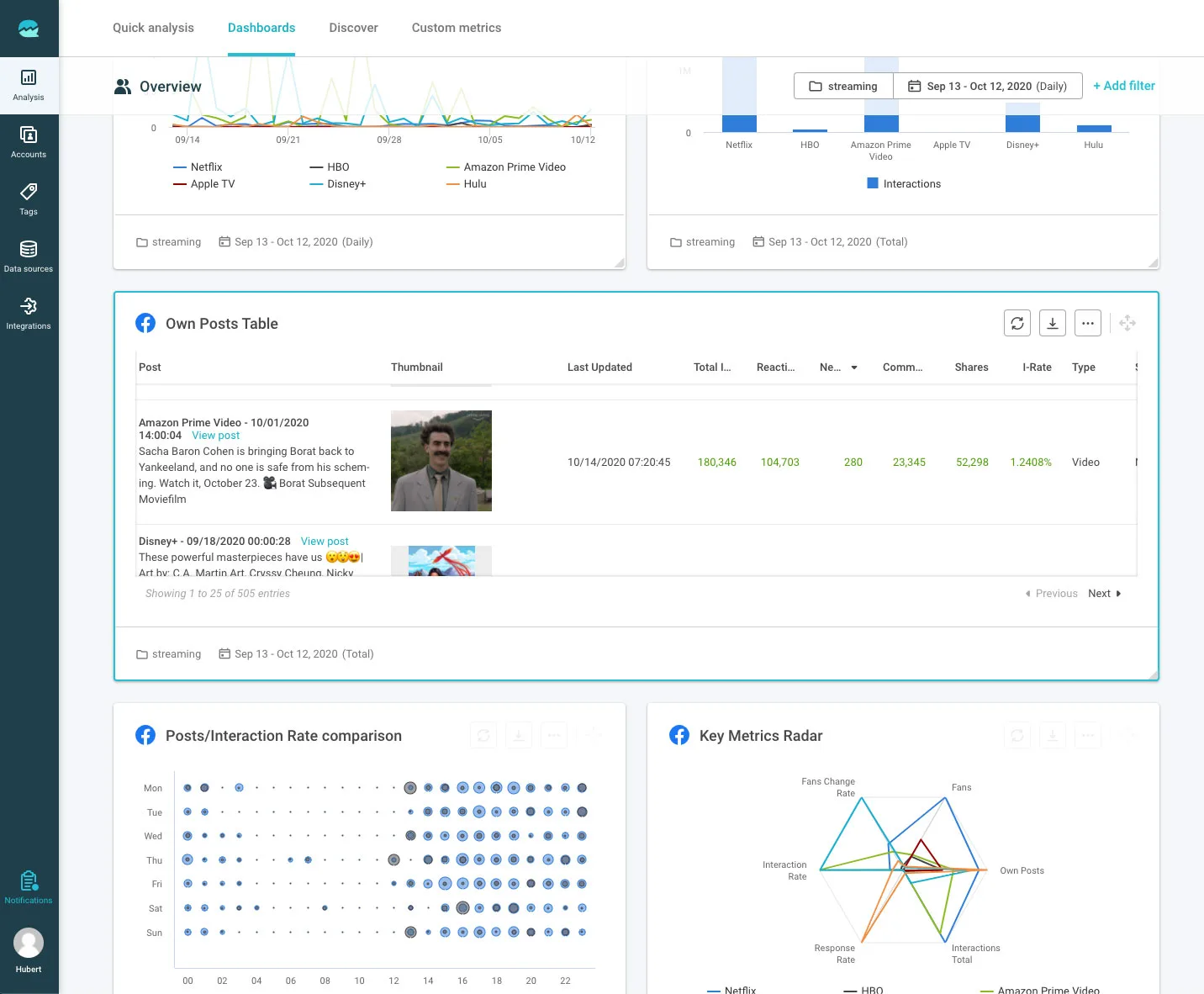
What it actually looks like: In Tubular Labs, you search for a creator or a show and open Audience Also Watches. A chart plots every related creator by affinity against audience overlap, so the channels your viewers actually binge separate from the ones that merely share a topic. Underneath, a creator table turns that chart into a sponsorship shortlist you can sort and export.
A verified user, Gia R. on G2 mention, “Data and insight gathering for our clients and the people we work with in Tubular are great. Easy conversations and coordination for monthly reports.”
On G2, Tubular Labs is rated 4.3 out of 5.
What it does well: Tubular tells you what else your audience watches, a question no channel-level tool in this list can answer. That makes it the data a media sales team brings to an advertiser pitch, and the shortlist a partnerships team builds before it pays a creator. Its Viewpoint dashboards put views, engagement and uploads for your channels beside your competitors’ in one screen, so the weekly check does not need an analyst.
Tubular has custom pricing, quote only, sold per seat as Flex Plans with Viewpoint dashboards included. No price, free plan or trial are not public, and a demo comes first.
What running Tubular standalone requires: A separate tool to schedule and publish, and another for titles and keywords, because Tubular Intelligence is audience and market data only. Budget a sales cycle too: there is no number to put in a spreadsheet until someone sends you a quote.
6. Quintly – Best for Custom Metrics and Multi-Network Reports
Quintly (now Facelift Data Studio) is built for the analyst who would rather rewrite a metric than accept the vendor’s definition of it.
Platforms Supported: YouTube alongside the other social networks in your reports.
Key Features:
- 700+ predefined metrics, including YouTube channel and video metrics
- Custom metrics in QQL, Quintly’s own query language
- YouTube channels and videos benchmarked against any public profile
- Scheduled XLSX, CSV or PDF reports and password-protected live client links
- Unlimited users on every plan
What it actually looks like: In Quintly, you start from a predefined dashboard grouped by network or use case, add your YouTube channel and a few competitors, and pick from more than 700 predefined metrics. When a metric does not match how your team counts engagement, you open it in QQL and change the formula. Then you schedule the dashboard as a daily, weekly or monthly XLSX, CSV or PDF email, or send a password-protected live link to the client.
Ana P., a verified G2 reviewer said, “I like how easy it is to compare accounts and I love the variety of charts available. It’s simple to learn how to use it first. The price is somewhat high and with the trial/educational version, not much can be done.”
On G2, Quintly is rated 4.7 out of 5.
What it does well: Every plan has unlimited users, which matters when a report goes to a whole client team and nobody wants to share one login. Custom metrics come with support help on every tier, and the Q and L plans add API access, so the numbers can feed your own BI stack or the Google Data Studio connector. A client authorises their profile through a unique link, so nobody emails a password.
All three Quintly plans (S for 5 profiles, Q for up to 20, L for 21+) are priced on request, with unlimited users on each. There’s no free plan, and a 7-day trial follows a demo.
What running Quintly standalone requires: A second product for publishing, since Data Studio is sold standalone or bundled with Facelift’s social media management tool. There is also nothing here for YouTube keywords or thumbnails, and every plan is priced by quote, so you won’t see a number until after a demo.
7. Rival IQ – Best for Agency Competitive Benchmarking Reports
Every brand you track, your own included, becomes one row in Rival IQ’s league table, which suits a monthly “where do we rank” report.
Platforms Supported: YouTube, Facebook, Instagram, X (Twitter) and LinkedIn.
Key Features:
- 10 to 40 tracked companies, one handle per network each
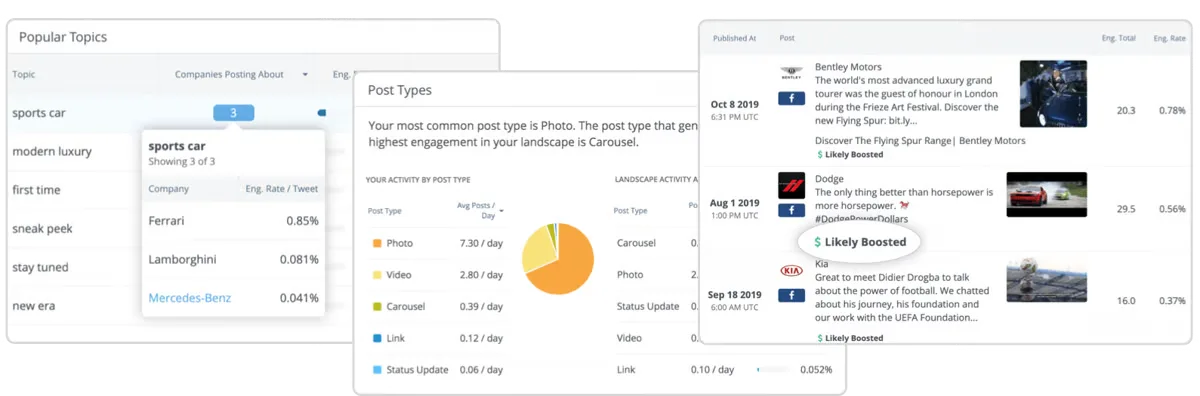
- YouTube post grid with a Post Details panel for every video
- Content analysis by hashtag, topic and posting time
- Custom branded PowerPoint and PDF reports
- Email alerts on competitor spikes, with metrics refreshed every 12, 6 or 3 hours
What it actually looks like: In Rival IQ, you build a landscape of tracked companies, switch the channel to YouTube, and every recent video from every brand lands in a single post grid. Click a thumbnail and the Post Details panel slides open beside it with that video’s numbers, so you can see why a competitor’s upload beat yours without leaving the grid.
A verified G2 review by Hanna P., “The tool gives us a good view of the competitive landscape and cuts down on manual research time. The data available has been pretty stagnant over the last couple years, feel like there’s opportunity specifically on the paid social side.”
On G2, Rival IQ is rated 4.5 out of 5.
What it does well: The tracked-company model suits agencies that pitch. You can swap every company in the account once a month, so this month’s prospect set replaces last month’s without an upgrade. Custom branded reports put your client’s logo on PowerPoint and PDF exports, and email alerts flag a competitor spike before the client spots it.
Rival IQ is priced by tracked companies. Drive is $239/month/ 1user ($199 billed annually) for 10 companies and 1 user. Engage is $349/mo/2 users ($299 on annual billing), and Engage Pro is $559/mo/5 users ($469 annual) for 40 companies. There’s a 14-day free trial.
What running Rival IQ standalone requires: On YouTube you are working from public data. Private data analysis covers Facebook, Instagram, Twitter and LinkedIn handles only, so watch time, retention and revenue for your own channel still live in YouTube Studio. Scheduling and keyword research need other tools as well.
Trend and Outlier Discovery
Outlier tools answer a narrower question than the rest of this list: which videos in your niche are beating their own channel’s average right now, and what do they have in common. That is idea research, not reporting, so expect it to sit beside your analytics tool rather than replace it.
8. ViewStats – Best for Finding Outlier Videos in Your Niche
ViewStats sells itself as the MrBeast formula turned into tools, and the whole product turns on one number: how far a video beat its own channel’s usual performance.
Platforms Supported: YouTube only.
Key Features:
- Outlier scores on any video, with niche tracking and alerts
- Views and subscribers for any channel, with revenue shown as an estimate
- Views, subscribers and estimated revenue over time for competitors
- Thumbnail search
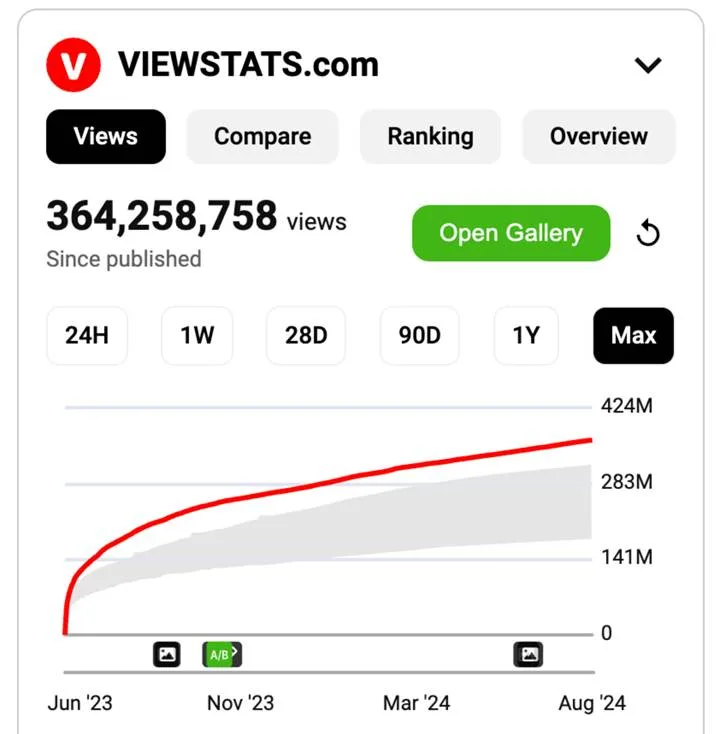
- Chrome extension with Views, Compare, Ranking and Overview tabs
What it actually looks like: You install the ViewStats Chrome extension and keep browsing YouTube as normal. A panel sits beside the video with Views, Compare, Ranking and Overview tabs, and each video carries an outlier score. A 204x outlier means that video drew roughly 204 times the average views of the channel’s previous ten uploads at the same point, so a small channel’s breakout can rank above a giant’s routine upload in your idea list.
Muhammad Shoaib, a Trustpilot reviewer from Pakistan, wrote in March 2025: “Very very bad experience, They told us that it has outliers from all categories.” The handful of reviews ViewStats has on that site lean negative, and his complaint about what counts as an outlier is the typical shape.
On the Chrome Web Store, the ViewStats extension is rated 3.8 out of 5.
What it does well: The outlier score fixes the problem with sorting a niche by raw views, where the biggest channels win every time. Because each video is measured against its own channel’s baseline, a small creator’s breakout shows up next to the giants, and that is where repeatable formats are found. Thumbnail search lets you see how a topic has been packaged before you brief your designer, and alerts tell you when a tracked channel posts something that takes off.
ViewStats has a free account, though the page doesn’t list what it includes. Pro is $49.99 a month, billed monthly only. Business starts at $249 a month for teams and agencies, sold through a call.
What running ViewStats standalone requires: Treat every number on a channel you do not own as an estimate. ViewStats labels revenue in its Channelytics view as estimated revenue, and only the channel owner sees the real figure in Studio. You also still need YouTube Studio for your own retention and earnings, and a separate tool for scheduling and client reports.
Where SocialPilot Fits in This List
Of the four jobs on this list, we do one well, and you should know which before you start a trial.
All-in-one management is our home ground. You connect YouTube next to Instagram, LinkedIn, TikTok and the rest, publish from one calendar, and the YouTube report sits beside every other network, down to end-screen impressions and clicks. On Premium and above, that report goes out under your agency’s logo, which is the page your client actually opens. Pricing is flat per plan rather than per channel. Analytics start on Standard at $50 a month, or $42.50 a month billed annually, because Essentials ($30) covers publishing only.
SEO and optimization is a clear gap. There is no keyword research, no tag scoring, no title suggestions and no thumbnail A/B testing. When a client asks why a video isn’t ranking for a search term, our reports can’t tell you.
We don’t benchmark YouTube competitors either. Reports cover only the channels you’ve connected, so you get no estimates of views, subscribers or revenue for someone else’s channel, which is the whole reason Tubular Labs and Rival IQ exist.
Nothing in the product flags a video that is beating its channel’s usual numbers, in your niche or anyone else’s, so trend and outlier discovery is out too.
Those gaps are cheap to fill. Keep publishing and client reporting in one place with SocialPilot’s YouTube scheduler. Then add vidIQ Boost at $19 a month per channel for keywords, or ViewStats Pro at $49.99 a month for spotting outliers. Nobody needs an enterprise suite to answer a question a $19 plugin handles.
What YouTube Channel Analytics in Studio Already Covers
If you only need to know how your own channel is doing, YouTube Studio already answers most of it, for free. It shows who watched, how they found each video and, if you’re in the Partner Program, what you earned. You pay for a third-party tool when the question is about someone else’s channel, about which keywords are worth chasing, or about a report that has to sit next to four other networks.
What Native YouTube Analytics Actually Shows
Start with the name, because it changed. On desktop, YouTube Studio’s “Analytics” is now called Insights. Then, click it in the left menu for the channel, or open Content, point at a video and pick Insights for one upload.
| Tab | Where | What you see |
| Overview | Channel and video | Realtime numbers and how a video is doing against your typical performance |
| Content | Channel | How impressions turn into watch time, for new and returning viewers |
| Reach | Video | Impressions, impressions click-through rate, views and unique viewers |
| Engagement | Video | Watch time, average view duration and engaged views |
| Audience | Channel and video | How many viewers are new, casual or regular |
| Revenue | Channel and video, Partner Program only | Estimated revenue |
| Trends | Channel | What viewers across YouTube are searching for |
Advanced Mode opens the expanded report where you compare performance and export data.
Studio also runs its own packaging tests now. Test & compare lets you try up to three titles, thumbnails or both on a long-form video, on desktop with advanced features turned on, and picks the winner by watch time share rather than clicks.
Our guide on how to use YouTube analytics walks through each report.
Why It’s Not Enough for Serious Growth
Studio only shows channels you own or have been given permission to access. The channel that keeps beating you in your niche stays a black box, so you can’t see its retention, its click-through rate or where its traffic comes from.
It doesn’t score keywords either. The Trends tab tells you what people search for, but not how many videos already compete for a term or how hard it would be to rank for it. That scoring is exactly what TubeBuddy and vidIQ sell.
Studio won’t even estimate a competitor’s numbers. Third-party tools rebuild those from public data such as views and upload cadence, which helps as long as you read them as estimates rather than the channel’s real analytics.
And if you report YouTube next to Instagram, LinkedIn and Facebook for several clients, Studio’s answer is one export per channel from Advanced Mode and a spreadsheet you stitch together by hand. Nobody has ever enjoyed merging five CSV files on the last afternoon of the month.
When a Third-Party Tool Is Still Worth It
A monthly client report that covers YouTube plus other networks calls for an all-in-one management suite like SocialPilot or Iconosquare.
If you publish weekly and want topics and tags that can actually rank, that’s the SEO and optimization group, TubeBuddy and vidIQ. If thumbnail testing is the only reason you’re looking, try Test & compare in Studio first.
When a client asks how their channel stacks up against three competitors, or against their whole industry, that’s competitive benchmarking, the job of Tubular Labs, Quintly or Rival IQ.
ViewStats is built for trend and outlier discovery, spotting which videos in your niche are pulling far more views than their channel normally gets. If none of those sounds like your week, stay in Studio. It’s the only place your real numbers live.
If YouTube is one network among other Social platforms in your monthly reports, the guide to broader social media analytics tools compares suites that measure every channel side by side.
How to Choose the Right YouTube Analytics Tool
Match the Tool to the Job, Not Just the Platform
Every tool here says it does YouTube analytics, and they mean four different things by it. Sort them by the question each one answers and the shortlist shrinks fast.
- All-in-one management answers “how did this week go across every network, and can the client have a report by Monday?”
- SEO and optimization answers “what should this video be called, and which thumbnail wins?”
- Competitive benchmarking answers “how do we compare with the channels we’re up against?”
- Trend and outlier discovery answers “what is working in this niche right now?”
The four feed each other. Discovery tells you what to make, SEO helps it get found, an all-in-one tool publishes and reports on it, and benchmarking tells you whether you’re gaining on the channels you care about. Few teams need to pay for all four, and the table below shows which matter for whom.
| Team type | All-in-one management | SEO & optimization | Competitive benchmarking | Trend & outlier discovery |
| Solo creator | Optional | Essential | Not needed | Optional |
| In-house brand marketer | Essential | Optional | Optional | Optional |
| Agency managing client channels | Essential | Optional | Optional | Optional |
| Media or enterprise insights team | Optional | Not needed | Essential | Essential |
A solo creator lives and dies by search and click-through, so SEO is the one paid job worth covering first. A brand marketer or agency runs YouTube next to other networks and owes someone a report, which makes the all-in-one tool the anchor. An insights team is paid to know what the market is doing, so benchmarking and discovery come before anything else.
Budget and Team Size
Each vendor bills by a different unit, and that changes the maths more than the headline number does. vidIQ and TubeBuddy charge per channel, SocialPilot charges a flat price per plan, Iconosquare prices by the number of profiles, and Rival IQ charges by the number of companies you track. Prices below were checked on each vendor’s pricing page on November 18, 2026.
| Team type | Recommended setup | What it costs |
| Solo creator | YouTube Studio plus vidIQ Boost or TubeBuddy Pro | vidIQ Boost $19/mo or $199/year, per channel. TubeBuddy Pro $16/mo one channel per license |
| In-house brand marketer | SocialPilot Standard, with vidIQ’s free plan for keyword checks | $50/mo or $42.50/mo billed annually, flat per plan (15 social accounts, 3 users). vidIQ free plan $0 |
| Agency managing client channels | SocialPilot Premium for publishing and white-label reports, plus ViewStats Pro for outlier research | $100/mo or $85/mo billed annually, flat per plan (25 social accounts, 6 users). ViewStats Pro $49.99/mo |
| Media or enterprise insights team | Rival IQ or Tubular Labs for benchmarking, plus ViewStats Business for discovery | Rival IQ Drive $239/mo or $199/mo billed annually (10 tracked companies). Tubular Labs custom pricing, quote only, per seat. ViewStats Business from $249/mo |
TubeBuddy’s Pro and Legend licenses are for creators only, so a business running several channels or with three or more channel managers has to buy its Enterprise plan, which is custom pricing, quote only. vidIQ also moves teams with more than three channels to a quoted Enterprise plan.
Tools that try to cover all four jobs either charge enterprise prices or do the YouTube parts thinly. A reporting suite plus one specialist, picked for the job your team does every week, usually costs less and covers more. For the wider set, our broader YouTube tools roundup goes beyond analytics
How We Analyze and Select These Tools
What We Actually Tested
For this revamp we re-checked every tool on November 18, 2026. We read each vendor’s live pricing page with both the monthly and annual billing toggles wherever the page had them.
We pulled each tool’s rating from its G2 page, or from the Chrome Web Store for ViewStats, and read the user reviews we quote on their own pages. We used vendor help-centre and product-page screenshots of each tool’s YouTube reporting.
We didn’t open paid accounts for every tool, so product descriptions lean on vendor documentation, screenshots and user reviews rather than hands-on use.
What We Couldn’t Independently Verify
- Three entries have no user quote. Tubular Labs, Quintly and Rival IQ ship without one because we found no review we could read in full and link.
- Review counts are approximate. G2 review counts came from search results for each G2 page, not from the page itself, so they may be off by a few.
- Some quotes are from Trustpilot. Several quotes come from Trustpilot, where each review has its own link. Those show the reviewer’s country instead of a job title.
- ViewStats’ rating is for its Chrome extension. ViewStats has no G2 page, so the score is the Chrome Web Store rating for its browser extension, not a rating of the web app.
- Numbers about other people’s channels are estimates. Any figure a tool shows for a channel you don’t own is rebuilt from public data. Only the owner sees the real numbers.
Conclusion
Decide which question your team asks most often and buy for that one. For “what should we film next”, vidIQ’s free plan is the cheapest test of whether outlier research changes your ideas, and ViewStats goes further for teams that plan around it. For “will this video get found”, TubeBuddy or vidIQ will score the title before it goes out. A client who wants to see how they stack up against rivals needs Rival IQ, Quintly or Tubular Labs, at a price to match.
If your week is mostly YouTube reporting next to Instagram, LinkedIn and Facebook, an all-in-one suite saves you the monthly spreadsheet. Pair it with one specialist, and keep YouTube Studio open for the numbers only the channel owner can see.
For that kind of week, see what each plan includes in SocialPilot’s pricing and start a 14-day free trial without a card.
Frequently Asked Questions
What is the best tool for YouTube analytics?
YouTube Studio is the best tool for your own channel, because it's the only place your real watch time, retention and revenue live. Past that, pick by job: vidIQ suits keyword and outlier research, SocialPilot suits reporting YouTube next to other networks, Rival IQ or Tubular Labs suit benchmarking, and ViewStats suits finding breakout videos in a niche.
How do I access my YouTube analytics?
Open YouTube Studio on a desktop and click Insights in the left menu. That page used to be called Analytics, so older guides still use the old name. For one video, go to Content, point at the video and choose Insights. Advanced Mode opens the full report, where you can compare periods and export the data.
What is the best free YouTube analytics tool?
YouTube Studio is the best free tool, and nothing paid replaces it for your own channel's data. For a second free tool, vidIQ's free plan adds niche trends, content ideas and 150 AI credits a month. Iconosquare's free plan covers two profiles with one month of history, which suits a quick YouTube and Instagram check.
How many views do I need to make $10,000 a month on YouTube?
Divide $10,000 by your RPM and multiply by 1,000. RPM is what you earn per 1,000 video views, after YouTube's share, counting ads, memberships and Premium revenue. Assuming a $5 RPM, you'd need 2 million views a month, and assuming $10, 1 million. Plug in your own RPM rather than an example figure.
About the Author