

It’s the first week of the month and the report is due on Friday. You’ve copied reach from Instagram, impressions from LinkedIn and views from TikTok into one slide, and you already know the three numbers don’t measure the same thing. A social media analytics tool is meant to fix that.
The catch is that almost every scheduler now says it “does analytics”, and the phrase covers everything from 30 days of free insights to two years of history with competitor benchmarks and white-label reports. The plan you buy decides which of those you actually get. One Sprout Social user put it plainly on Capterra: competitor-level features “all cost extra, so we mostly get the bare-bones analytics.” (Molly L.)
So, we went through 9 tools plan by plan. We read every pricing page and the help articles behind it to find the exact plan where reports, competitor benchmarking and white-label exports switch on, and we noted how each one bills. A per-seat tool that looks cheap for one person can cost ten times as much once five people need to see the numbers. Our own product, SocialPilot, gets the same treatment as the other eight, weak spots included.
Social Media Analytics Tools and Platforms at a Glance
Paid entry plans on this list start at $5 a channel (Buffer) and reach $99 a user (Hootsuite), all on annual billing. The billing model matters more than the entry price: a flat plan keeps one price as your team grows, while a per-seat plan charges again for every person who opens a report.
| Tool | Best For | Entry Price | Free Plan | Pricing Model | Analytics Start On |
| SocialPilot | Teams of 3 to 6, agencies up to 25 client accounts | $25.50/mo | 14-day free trial, no card | Flat per plan | Standard ($42.50/mo) |
| Vista Social | Two-person teams with up to 15 profiles | $ 79 / mo | 14-day trial, no card | Flat per plan, capped users | Professional ($80/mo) |
| Buffer | Solo marketers on 3 to 5 channels | $5/channel/mo | Free plan, 14-day trial | Per channel | Free – ( basic analytics data , 1 mo. history ) |
| Metricool | Solo freelancers or owners with 1 to 5 brands | $20/mo | Free plan, no trial | Flat per plan, banded by brands | Free – (basic analytics data , 1 mo. history ) |
| Sprout Social | Teams of 10+ handling high message volume | $79/seat/mo | 30-day trial, no card | Per seat | Essentials ($79/seat) |
| Hootsuite | Enterprise teams of 10+ needing monitoring and ads | $99/user/mo | 14-day trial | Per user | Standard ($99/user) |
| Agorapulse | Bes t for large teams or enterp rises | $79/user/mo | 30-day trial, no card | Per user | Standard ($79/user) |
| Socialinsider | Brand teams benchmarking against competitors on six networks | $990/yr (about $83/mo) | 14-day trial, no card | Flat per plan, capped profiles and seats | Adapt ($83/mo) |
| AgencyAnalytics | Agencies reporting social, SEO and ads to many clients | $20/client/mo | 14-day trial, no card | Per client | Every client, one plan |
Entry prices are monthly rates on annual billing, checked on each tool’s pricing page in November 2026.
All-in-One Tools with Analytics, Priced for Growing Teams and Agencies
These two put publishing and reporting under one login, and their base price covers a set of people. Pick one if you report to clients or a manager every month and want the bill to stay put as more people read the numbers.
1. SocialPilot – Best for Agencies and Small Businesses
Competitor benchmarks, white-label reports and two years of history come on one flat-priced plan.
Platforms Supported: Facebook, Instagram, X, LinkedIn, TikTok, YouTube, Pinterest, Threads, Bluesky, and Google Business Profile.
Key Features:
- Competitor Reports for Facebook and Instagram.
- 2 years of historical data for each account
- Custom reports that combine several accounts, with your own notes and images
- Report templates you can save, duplicate and reuse across clients
- Scheduled PDF reports by email, or shared as a live link
- White-label reports with your agency’s branding
- MCP server for working in SocialPilot from Claude or ChatGPT
What it looks like: In SocialPilot analytics, you pick an account and read page-level or post-level data, with numbers shown rounded or in full. When it’s time to report, you pull metrics from several accounts into one report, add a title and notes to explain them, and save the layout as a template, so the next client’s report is a Duplicate away.
Competitor Reports line up a rival’s follower growth, posting frequency by format, engagement rate per post and best posts for any range in the last 90 days, and export as a branded PDF. Through the MCP server, Claude or ChatGPT can also create and schedule posts in your account straight from a chat.
Felice C., a G2 reviewer, wrote: “I like that it handles creating, scheduling, and managing posts. It has greatly helped us increase social engagement and marketing. I also like that it comes with flawless analytics features.”
On G2, SocialPilot is rated 4.5 out of 5 across 846 reviews.
What it does well: Competitor benchmarking, custom reports and white-label exports switch on in the same plan as unlimited client seats, so an agency gets client-ready reporting and client approvals for one flat price.
Pricing: SocialPilot Essentials costs $25.50 a month billed annually ($30 month to month) for 1 user and 7 accounts.
Standard, at $42.50 annually or $50 monthly, is where analytics start: 3 users, 15 accounts, detailed analytics, post-performance, PDF reports and reports scheduled by email.
Premium runs $85 or $100 for 6 users and 25 accounts, and adds custom reports, Competitor Reports and white-label reports, plus unlimited client seats.
Ultimate costs $170 or $200 for 50 accounts, unlimited users and advanced white label, and Enterprise is quote only. See SocialPilot plans for current details.
Billing model: flat per plan, not per seat. The bill moves only when you add a user ($5 a month on Standard and Premium) or an account ($4 a month). Five people on Standard cost $52.50 a month on annual billing. The same five on Sprout Social’s Standard plan cost $995.
2. Vista Social – Best for Small Teams and Local Businesses
Competitor reports, Google Analytics traffic and review reports all come on the cheapest plan, with room for exactly two people to use them.
Platforms Supported: Facebook, Instagram, X (Twitter, paid add-on), LinkedIn, TikTok, YouTube, Pinterest, Threads, Bluesky, Google Business Profile, Snapchat and Tumblr.
Key Features:
- Competitor analysis report on the lowest plan (Facebook and Instagram)
- Google Analytics website traffic inside social reports
- Review and listener reports alongside social performance
- Scheduled reports to any email address, no seat needed
- Paid vs organic split and BI connectors from Advanced
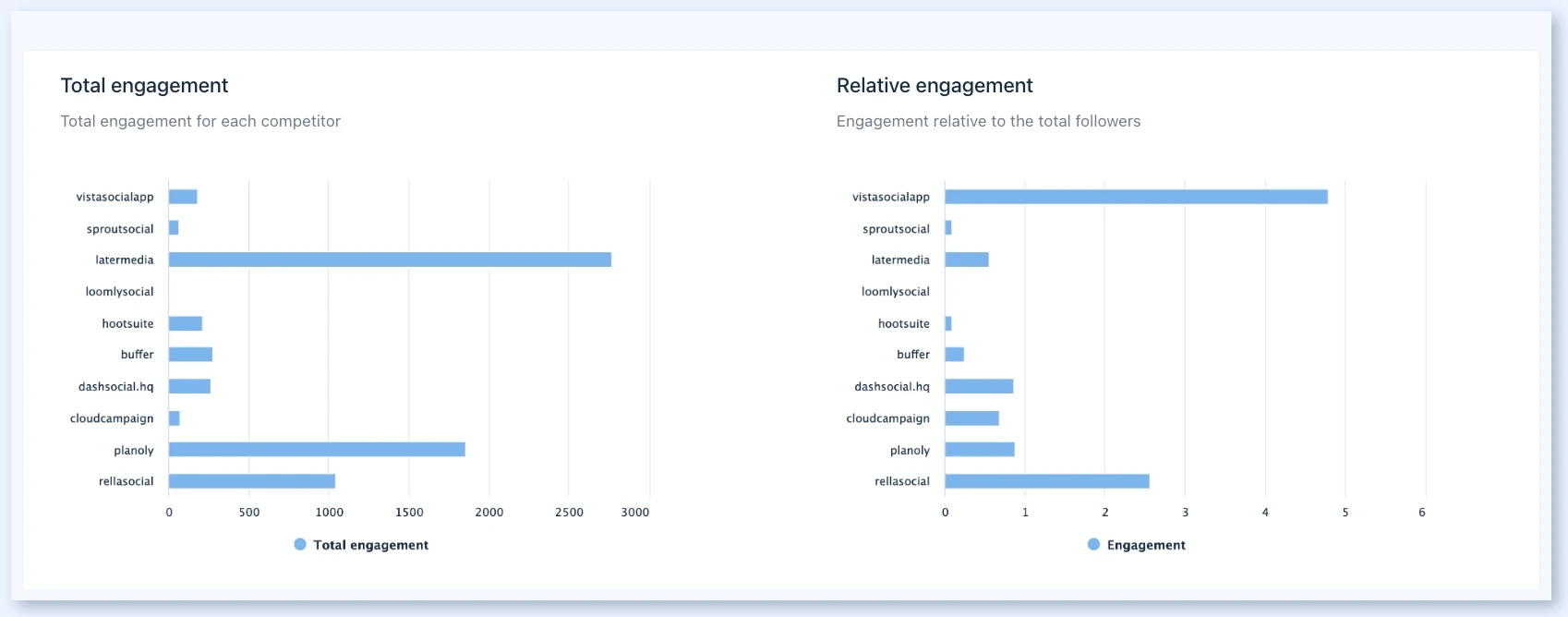
What it looks like: Open Reports in Vista Social’s left menu and choose a report type, with Profile and Post performance at the top and Competitor analysis, Paid performance and the rest below. Set the date range and comparison period at the top right, then export as PDF, CSV or a shareable link.
Schedule report sends it weekly or monthly as a PDF, a link or both, to people outside Vista Social.
Ryan A., a social media manager, wrote on Capterra that “Reporting is clear and professional, which makes presenting performance results to clients much easier,” while wishing for “more advanced customization options in analytics reports, especially for tailoring metrics to specific client needs.”
On G2, Vista Social is rated 4.8 out of 5 across 1100+ reviews.
What it does well: Professional covers competitor, web-traffic, review and scheduled reports, which most tools here split across two or three plans.
Pricing: Vista Social’s Professional costs $79 a month billed yearly ($950 a year) or $99 monthly for 15 profiles and 2 users, with profile, post, competitor (3 per profile), review and web-traffic reports, plus scheduled reports.
Advanced, at $159 ($1,910 a year) or $199, gives 30 profiles and 3 users, and adds custom reports, your logo on reports, ads reporting and BI connectors.
Scale runs $359 ($4,310 a year) or $449 for 70 profiles, 4 users and advanced white label, and Enterprise is quote only. Each X profile costs $29 a month extra.
Billing model: flat per plan, with a hard cap on users. Report readers don’t need a seat, but a third or fourth person working in the tool means moving up a plan, since extra users are sold only on Scale.
What running Vista Social standalone requires: Advanced at $159 a month before your logo goes on a report or ad spend shows beside organic. Every plan backfills 60 days on connection, and two years needs Scale on annual billing or Enterprise.
Lean Analytics for Solo Marketers and Small Brands
These two start free, so you can see your numbers before you pay. Pick one if one or two people run the accounts and a monthly report for yourself or your boss is the goal.
3. Buffer – Best for Solo Entrepreneurs and Creators
Two years of history cost $5 for a channel, and nothing on any plan compares you with a competitor.
Platforms Supported: Facebook, Instagram, X (Twitter), LinkedIn, TikTok, YouTube, Pinterest, Threads, Bluesky, Google Business Profile, Mastodon and Substack. Google Business Profile isn’t covered in Insights.
Key Features:
- Insights with 30 days of history free and 2 years on paid plans
- Period comparisons, including the same period last year
- Tag filters to report on a campaign
- AI Takeaways with performance tips
- Exports to CSV, PDF or Markdown
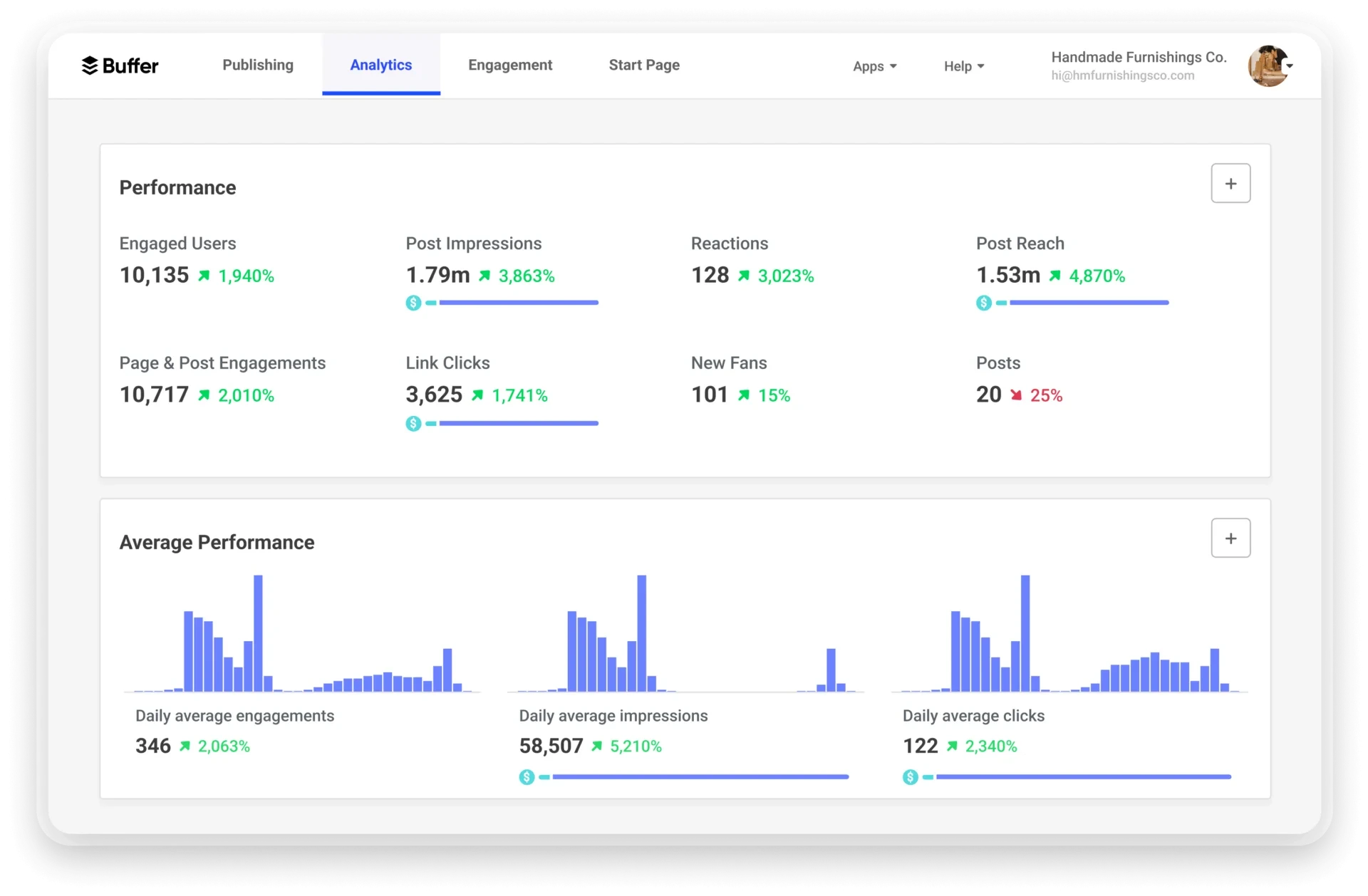
What it looks like: Click Insights in Buffer’s left sidebar for All Channels or pick a single channel. Set the date range, Tags, Channels and Compare along the top, then read down from Summary to Performance per Post and a Metrics chart, with Takeaways at the bottom. Export sits at the top right.
Chelsea W., a social media manager reviewing Capterra, wrote: “While the simplicity is great, I’d ideally like more advanced reporting, analytics and content management options, particularly when managing multiple brands and accounts.”
On G2, Buffer is rated 4.3 out of 5 across roughly 1,023 reviews.
What it does well: Paid plans keep two years of Insights, so a year-on-year comparison is a dropdown, not an export.
Pricing: In Buffer, you pay per channel, per month. The Free plan covers 3 channels and 1 user with 30 days of Insights and no exports.
Essentials runs from $5 per channel on annual billing or $6 monthly for 1 user, and adds 2 years of history, custom date ranges, tag filters and CSV and PDF exports.
Team runs from $10 per channel annually or $12 monthly with unlimited users also includes branded PDF reports. Paid plans come with a 14-day free trial. See our Buffer pricing guide for current plans.
Billing model: per channel. Every profile you connect is another charge, so 10 channels on Essentials come to $60 a month on monthly billing.
What running Buffer standalone requires: A separate tool for competitor, ads or listening analytics, and a manual send each month, since Buffer doesn’t document scheduled report emails. Past ten channels, price the Buffer alternatives that bundle accounts into a flat plan.
4. Metricool – Best for Freelancers and Small Agencies
Metricool sells reporting first and scheduling second, and you can track five competitors before you pay anything.
Platforms Supported: Facebook, Instagram, X (Twitter, paid add-on), LinkedIn (paid plans), TikTok, YouTube, Pinterest, Threads, Bluesky, Google Business Profile and Twitch.
Key Features:
- Competitor tracking on the free plan, up to 100 on paid plans
- Unlimited analytics history from Starter (X capped at 30 days)
- Facebook, Google and TikTok Ads reported beside organic
- Automatic monthly PDF or PPT report by email
- Looker Studio connector and API on Advanced
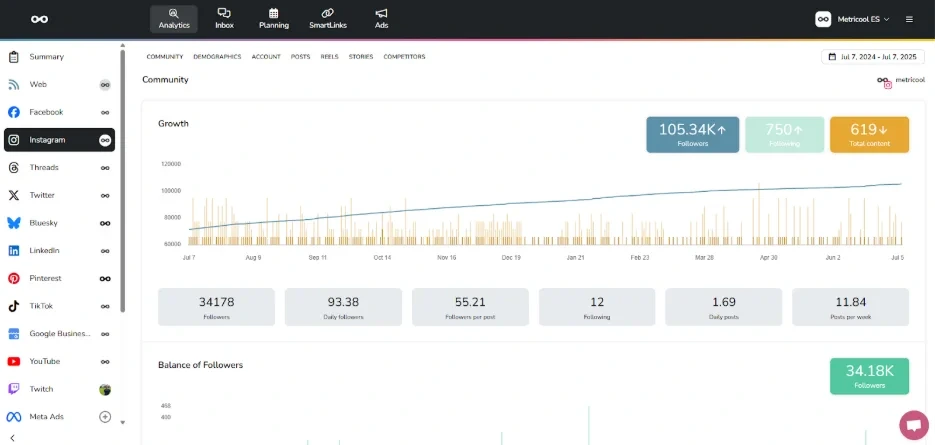
What it looks like: In Metricool, Analytics > Competitors lays every rival out in one table with followers, posts, average interactions and engagement, with a Download CSV button. For clients, Reporting > Reports lets you pick the month and networks, add your logo and download a PDF or PPT, and the Automatic monthly report section sends it on a set day.
Emma H., a communications coordinator, wrote on Capterra that “Metricool has helped us level up our social media management capability by merging the data/analytics with planning, content management, scheduling, and a multi-step approval process.”
On G2, Metricool is rated 4.5 out of 5 across 111 reviews.
What it does well: Competitor tracking, ads reporting and website analytics are all on the free plan, which no other tool here offers.
Pricing: Metricool prices each plan by how many brands you manage (a brand is one profile per network), and VAT is extra. Free covers 1 brand and 30 days of analytics with 5 competitors, but no LinkedIn, X or downloadable reports.
Starter is $20 a month annually or $25 monthly for 5 brands ($36 or $45 for 10) for a single login, and adds unlimited history, automated reports and up to 100 competitors.
Advanced adds unlimited team members, custom report templates, Looker Studio and the API at $53 or $67 for 15 brands, up to $159 or $210 for 50. Full white label is on Custom, quote only, and each X account adds $12 a month. See our Metricool pricing guide for current plans.
Billing model: flat per plan, banded by brands. You don’t pay per seat, but Starter has no team members at all.
What running Metricool standalone requires: Advanced before anyone else can log in, and a Custom quote for fully unbranded reports. Agencies that need white label at a published price can check our list of Metricool alternatives .
Per-Seat Suites with Listening and Deep Reporting
These three suit brands with many locations, regions or sub-brands that need listening or leadership-grade reports. They charge per person, so the analytics bill follows the headcount.
5. Sprout Social – Best for Enterprises & Multi-Location Brands
Sprout’s reports are some of the most polished here, and the price climbs with every seat that needs to read them.
Platforms Supported: Facebook, Instagram, X (Twitter), LinkedIn, TikTok, YouTube, Pinterest, Threads, Bluesky, Google Business Profile, Reddit, Snapchat and WhatsApp.
Key Features:
- Cross-network and per-network report sets
- Google Analytics report on every plan
- Competitor reports for Facebook, Instagram and X (Professional)
- Tag Performance report for campaigns (Professional)
- Trellis AI summaries of reports and competitor comparisons
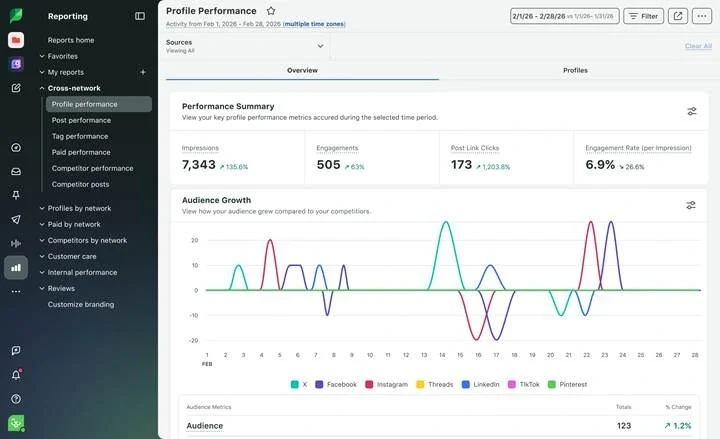
What it looks like: Click Reports in Sprout Social and the left nav lists Cross-Network Reports, Profiles by Network, Paid by Network and Competitors by Network. Competitor Performance opens on an Overview tab with followers and engagement averaged across your rivals. The Share menu at the top right sends a PDF, schedules a delivery or creates a link, depending on your plan.
Zach P., a marketing coordinator, wrote on Capterra that “the reporting tools are top tier, and it is incredibly simple to generate visually appealing reports,” then added the catch: “it can get quite expensive if you require several user licenses.”
On G2, Sprout Social is rated 4.4 out of 5 across 7,588 reviews.
What it does well: A Google Analytics report is included even on Essentials, so web traffic from social sits beside engagement from the first plan.
Pricing: Sprout’s Essentials costs $79 per seat a month billed annually or $99 monthly, with 5 social profiles and profiles, post, cross-network and Google Analytics reports.
Standard is $199 a seat annually or $249 monthly and is the first plan that can add Premium Analytics or Listening, both priced on request.
Professional, at $299 or $399 a seat with unlimited profiles, adds competitor reports, paid performance and tag reports, and your logo on reports.
Advanced, at $399 or $499, adds scheduled report delivery, and Enterprise is quote only. Custom-built reports need the Premium Analytics add-on on any plan. The 30-day trial needs no card. Check our Sprout Social pricing guide for current plans.
Billing model: per seat. Every person who logs in to read a report needs a seat, so five people on Professional, the first plan with competitor reports, cost $1,495 a month on annual billing.
What running Sprout Social standalone requires: A budget for add-ons, since custom reports and full listening are priced on request. Teams that hit that ceiling usually compare Sprout Social alternatives priced per plan rather than per person.
6. Hootsuite – Best for Enterprises & Large Brands
Competitor benchmarks and ads analytics come on the cheapest plan, and the bill multiplies by every user who opens them.
Platforms Supported: Reports cover Facebook, Instagram, X (Twitter), LinkedIn Pages, TikTok, YouTube, Pinterest, Threads and Reddit.
Key Features:
- Competitive analysis for 5 competitors on Standard, 20 from Professional
- Industry benchmarking on every plan
- Ads analytics for Facebook, Instagram, LinkedIn and X
- Report templates grouped by goal: Awareness, Conversion and Engagement
- Lumen listening with sentiment and AI summaries, available only on enterprise plan.
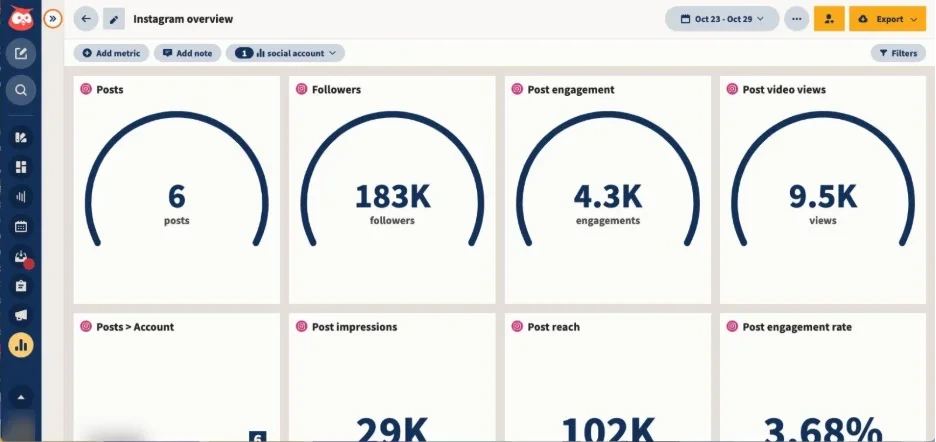
What it looks like: Analytics in Hootsuite’s main menu opens My reports, and create a report offers demo reports, templates by goal or by network, and a custom report. Under Benchmarking, Competitive analysis lines up your rivals’ posting frequency, engagement and audience growth. Each report’s toolbar lets you change the date range, export, or share with teammates.
Carlette B., a G2 reviewer, wrote: “There’s not much we dislike about the platform, but it can be expensive and a bit clunky for a small team. Occasionally, the connection to a social media platform drops.”
On G2, Hootsuite is rated 4.3 out of 5 across 7,757 reviews.
What it does well: Competitive analysis, industry benchmarks and ads analytics are on Standard, which the other per-seat suites here don’t include at entry level.
Pricing: Our Hootsuite pricing breakdown walks through each tier. Monthly billing exists at a higher rate it doesn’t print.
Standard is $99 a user a month on annual billing with 10 accounts, report templates, industry benchmarking, 5 competitors and ads analytics.
Professional, at $199, adds unlimited accounts, custom reports, report exports, scheduled reports and 20 competitors.
Advanced, at $399, adds your logo on reports, CSV and XLSX exports, and scheduled reports to outside email addresses.
Enterprise is quote only and adds ROI reporting and Google Analytics. Taxes are extra, and there’s no free plan.
Billing model: per user. Five people on Professional cost $995 a month on annual billing, and a flat-priced tool such as SocialPilot or Vista Social holds its price as your team grows.
What running Hootsuite standalone requires: Enterprise before social clicks can be tied to conversions, since Google Analytics and ROI reports sit there. If that’s where you’re stuck, set the Enterprise quote against Hootsuite alternatives.
7. Agorapulse – Best for Large Teams & Enterprises
White-label reports and an ROI report come on the cheapest plan, but how far back your data goes depends on what you pay.
Platforms Supported: Facebook, Instagram, X (Twitter, paid add-on), LinkedIn, TikTok, YouTube, Pinterest, Threads, Bluesky and Google Business Profile.
Key Features:
- White-label PDF reports from the cheapest plan
- Social Media ROI reports tied to Google Analytics
- Community Management report on reply speed per teammate
- Competitors report for Facebook and Instagram
- Report Studio custom report builder (Advanced)
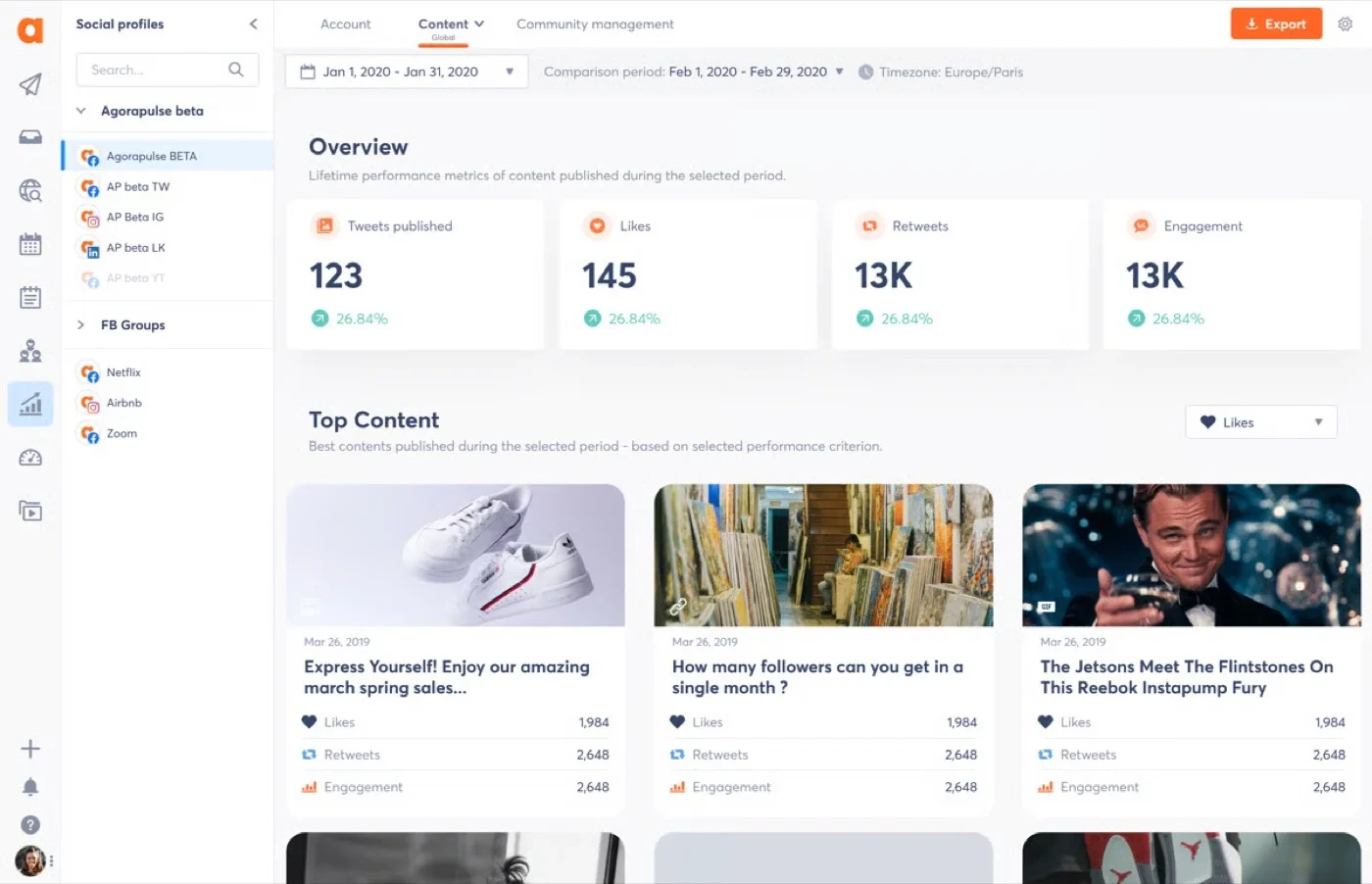
What it looks like: Click the Analytics icon in Agorapulse, pick a profile, and choose a report such as Posts Performance, Community Management or Competitors. In Competitors, Manage competitors adds a rival, and the report runs from a Competitors benchmark to Top content and Engagement per post type. The orange Export button gives a PDF preview with an optional AI summary.
Sandra H., a G2 reviewer, wrote that Agorapulse makes it “easy for me to schedule posts, engage with our audience, and track performance across multiple platforms.”
On G2, Agorapulse is rated 4.5 out of 5 across 979 reviews.
What it does well: The ROI report connects posts to Google Analytics traffic on every plan, which Hootsuite keeps for Enterprise.
Pricing: Agorapulse charges per user, per month, and every listed plan includes 10 social profiles. Standard is $79 on annual billing or $99 monthly, with white-label reports, a basic ROI report, Google Analytics, exports, 1 competitor and 6 months of data.
Professional, at $119 or $149, adds paid metrics in reports and 12 months of data. Advanced, at $149 or $199, adds Report Studio, scheduled report emails, Ads reports, 6 competitors and 24 months of data.
Custom, quote only, adds Looker Studio and the reports API. Extra profiles cost $10 each a month on annual billing, and X reporting needs the X Plus add-on at $69 per profile.
The trial runs 30 days and can be extended once for a total of 30, with no card. See our Agorapulse pricing guide for current plans.
Billing model: per user. Anyone who opens Analytics needs a paid seat, so five people on Advanced, the first plan with scheduled reports, cost $745 a month on annual billing.
What running Agorapulse standalone requires: Advanced for two years of history, scheduled reports or more than one competitor, and $69 a month for every X profile. Our Agorapulse alternatives roundup lists tools that publish a flat price.
Dedicated Analytics and Reporting Tools
These two don’t publish anything. One measures against competitors; the other turns every channel into a client report. Run either one beside the tool you post from.
8. Socialinsider – Best for In-House Brand Teams
Every plan benchmarks you against competitors on all six networks it supports, starting at $83 a month when billed annually.
Platforms Supported: Facebook, Instagram, LinkedIn, TikTok, YouTube and X
Key Features:
- Competitor benchmarking on all six networks, on every plan
- Industry averages beside your own and competitors’ results
- Brands view that rolls one company’s profiles into a single report
- AI content pillars and competitor content analysis (from Optimize)
- Automated reports and exports to PDF, PPT, XLS and CSV
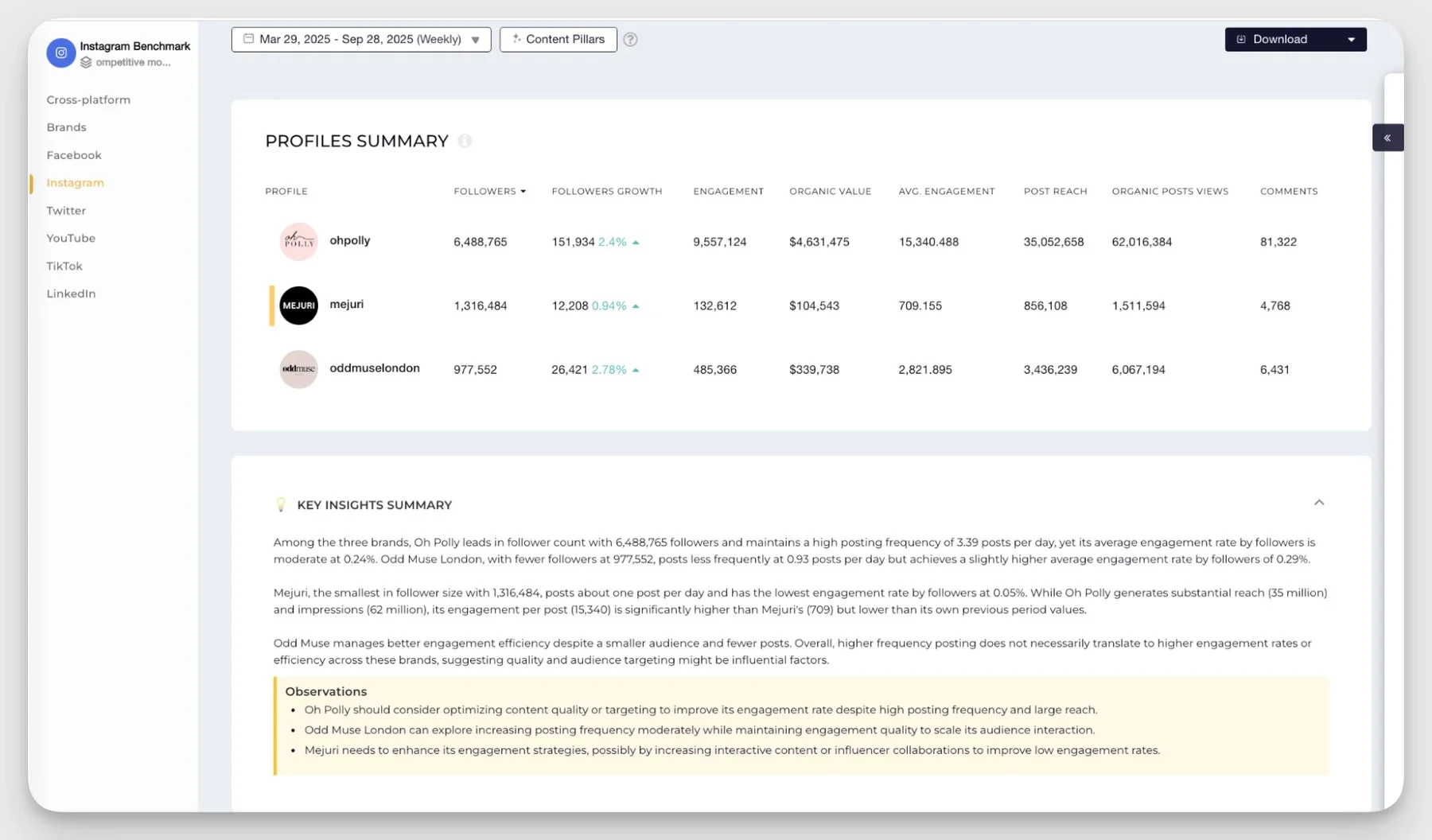
What it looks like: Socialinsider’s Home lists profiles on the left and brands on the right, and Add Social Profiles brings in competitors by URL. In Benchmarks, choose a network, tick the profiles to compare, pick your metrics and hit Apply, and engagement rate, follower growth and posting frequency line up side by side.
Dorra L., a marketing and advertising director, values the “consolidated reporting for our clients and their competitors,” then asks for what’s missing: “would love to see Pinterest reporting added.”
On G2, Socialinsider is rated 4.7 out of 5.
What it does well: Benchmarking isn’t a higher-tier upsell, because the entry plan tracks competitors on every network Socialinsider supports.
Pricing: Socialinsider’s Adapt costs $990 a year (about $83 a month) or $99 monthly for 20 social accounts, 1 seat and 3 months of post history, with competitor benchmarking, automated reports and unlimited exports.
Optimize, at $1,490 a year or $149 monthly, gives 30 accounts, 2 seats and 6 months, and adds AI insights and post-level exports.
Predict runs $2,390 a year or $239 monthly for 40 accounts, 5 seats and 12 months, and is the first plan with branded reports. Enterprise is custom. Extra profiles cost $5 a month.
Billing model: flat per plan, with set profile and seat counts. You pay more only past the plan’s limits.
What running Socialinsider standalone requires: A separate tool to publish and reply, since it does neither, and you need Predict before reports carry your branding. Followers history starts the day you add a profile.
9. AgencyAnalytics – Best for Digital Marketing Agencies
One plan, priced per client, with the white-labeled client portal included from the first client.
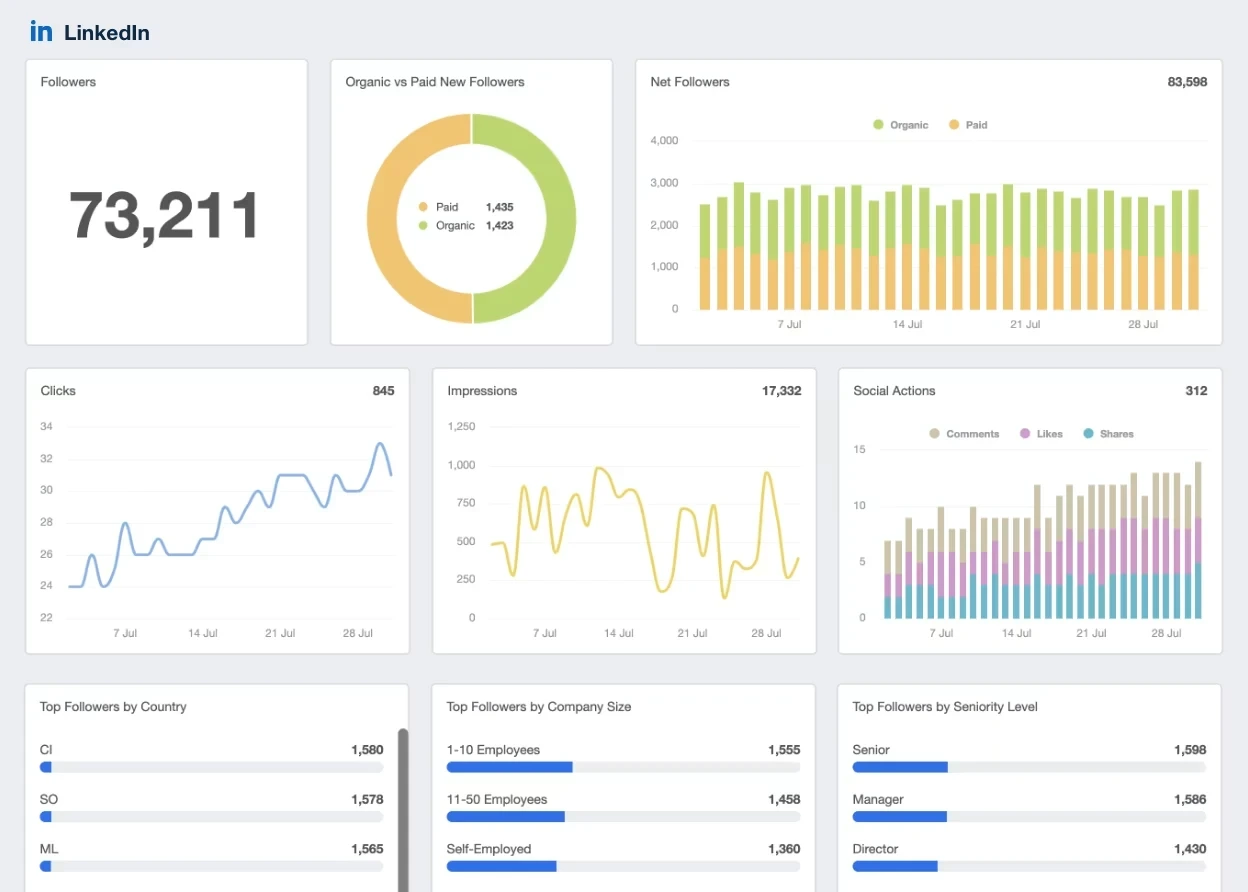
Platforms Supported: Facebook, Instagram, LinkedIn, Pinterest, TikTok, Vimeo and YouTube, plus Meta, LinkedIn, Pinterest, TikTok and X Ads. No organic X or Threads.
Key Features:
- White-labeled client portal with client logins and a custom domain
- Report scheduling from daily to annual
- AI Summary for client-ready commentary
- Goals, alerts and anomaly detection
- Social, SEO and ads data in one report
What it looks like: Inside a client in AgencyAnalytics, you click Reports, then Create Report, and start from a Smart Report built from that client’s connected sources, a template, or a copy of last month’s. Add Page brings in preset Instagram or Facebook pages, and scheduled reports sit under the Scheduled tab.
Feraud O., an agency owner, says the live dashboards mean “we can show them real time stats in a easy to view way,” which cuts down check-in calls.
On Capterra, AgencyAnalytics is rated 4.8 out of 5 across 117 reviews.
What it does well: Every feature is on the one plan, so a two-client freelancer gets the same white-label portal as a 50-client agency.
Pricing: AgencyAnalytics has a single plan at $20 per client for a month billed annually, or $25 monthly. Each client includes unlimited data sources, reports, dashboards, staff and client users, the white-labeled portal, a custom domain, scheduled reports, and AI summaries. Agencies with 25+ clients can ask for volume pricing. There’s a 14-day trial with no card.
Billing model: per client, with unlimited users. Teammates and client logins cost nothing, but every new client adds $20 a month on annual billing.
What running AgencyAnalytics standalone requires: A social media tool to publish and reply, and another source for organic X or Threads.
Where SocialPilot Fits in This List
Our own tool belongs with the all-in-one tools for growing teams and agencies. It suits you if you want to publish, client reports and competitor benchmarks under one flat monthly price.
A 5-person team with 12 profiles that need scheduled PDF reports fits on Standard with two extra users, about $52.50 a month on annual billing. Add competitor benchmarking and white-label reports, and the same team moves to Premium at $85 a month, which already includes 6 users and 25 accounts. To get competitor reports on a per-seat suite, that team pays $1,495 a month on Sprout Social Professional or $495 on Hootsuite Standard.
What No Analytics Tool on This List Can Show You
Every tool here reads your data through the same platform APIs, so they share the same blind spots.
| Limit | What it means for your reports |
| History starts the day you connect | Most tools can't import past follower counts, and post backfill ranges from none to two years (Socialinsider) |
| Numbers won't match the native app exactly | API data can lag, some metrics are estimates, and paid vs organic splits differ (Buffer) |
| Competitor data is public data | For accounts you don't own, tools see likes, comments, followers and posts, not reach, saves or demographics |
| No LinkedIn competitors | LinkedIn's API doesn't share other companies' page data, so most tools, Rival IQ and Hootsuite among them, skip LinkedIn competitors. Socialinsider covers them |
| Instagram Impressions are gone | Meta replaced Impressions with Views in 2025, so year-on-year comparisons across that change measure different things (Meta) |
Connect your accounts the week you start, pick one source for each metric and name it in the report, and compare trends rather than exact counts. Our breakdown of Instagram’s switch from impressions to views covers that change in detail.
How to Choose the Right Social Media Analytics Tool
List the reports you send each month and count who reads them, then pick the plan that switches those reports on at the lowest price for that headcount.
Match the Tool to Your Team
| Your team | Shortlist | Features you won't need |
| Agencies managing client brands | SocialPilot & AgencyAnalytics | Enterprise listening, per-market approval chains |
| Small businesses and startups | SocialPilot & Metricool | Data warehouse connectors, paid listening |
| Local businesses and small teams | V ista Social & SocialPi lot | Custom dashboards, multi-brand roll-ups |
| Solo entrepreneurs and creators | Buffer & Metricool | Client access, white-label reports |
| In-house brand teams benchmarking competitors | Socialinsider | Publishing, inbox |
| Enterprises and large teams | Sprout Social, Hootsuite & Agorapulse | Free plans, single-user plans |
What Analytics Cost at Your Team Size
We priced three setups on the cheapest plan that includes the reports each needs. Solo is 1 user and 5 profiles reporting on their own numbers.
The marketing team is 5 users and 12 profiles needing competitor benchmarking and scheduled reports.
Agency is 6 users and 45 profiles across 15 client brands needing white-label reports and competitor benchmarking. Figures are monthly on annual billing, month-to-month in brackets.
| Tool | Solo (1 user, 5 profiles) | Marketing team (5 users, 12 profiles) | Agency (6 users, 45 profiles) |
| SocialPilot | $42.50 ($50), Standard | $85 ($100), Premium | $165 ($180), Premium + 20 accounts at $4 |
| Vista Social | $80 ($99), Professional | Not on public plans (5 users exceeds every public tier) | Quote only |
| Buffer | $25 ($30), Essentials, 5 channels | Not available (no competitor reports) | Not available (no competitor reports) |
| Metricool | $20 ($25), Starter | $53 ($67), Advanced | Quote only (full white label is Custom) |
| Sprout Social | $79 ($91), Essentials | $1,995 ($2,495), Advanced × 5 seats | $1,794 ($2,394), Professional × 6 seats |
| Hootsuite | $99, Standard (monthly price not published) | $995, Professional × 5 users | $2,394, Advanced × 6 users |
| Agorapulse | $79 ($99), Standard | $765 ($1,025), Advanced × 5 users + 2 profiles | $824 ($1,119), Standard × 6 users + 35 profiles (1 competitor) |
Socialinsider and AgencyAnalytics are left out because you’d buy them on top of a publishing tool.
Per-seat tools multiply with every reader: Sprout Social goes from $79 for one person to $1,995 for a five-person team that wants competitor reports on a schedule. Flat plans hold one price until you pass their limits, so the same team pays $85 on SocialPilot.
Hidden costs to check before you sign:
Report readers. Ask whether someone who only reads reports needs a paid seat. On Agorapulse they do.
Analytics add-ons. Sprout Social’s Premium Analytics and Listening are priced on request.
Network add-ons. X reporting costs $29 a profile on Vista Social, $69 on Agorapulse and $10 on Metricool.
History. Plans cap how far back you can look, from 30 days on free plans to two years on paid ones.
What to Test During Your Free Trial
Connect every account on day one and note how much history each network brings in.
Compare one post’s reach in the tool against the app, and ask support to explain any gap.
Rebuild last month’s report and time how long it takes.
Schedule it to your own inbox and check what an outside reader sees.
Ask support, in writing, which plan you’d need for each report you built.
How We Analyze and Select These Tools
We judged every tool on which plan gives a team your size the reports it needs for the least money. Prices, plan gates and features came from vendors’ own pricing pages and help centres, and reviews from G2 and Capterra.
What We Actually Checked
Pricing pages. We read every pricing page and plan table, noting the first plan with analytics, competitor reports, scheduled reports and white-label reports.
Help centres. We followed each tool’s reporting steps in its help articles and noted documented data limits, such as history on connect.
Billing models. We recorded whether each tool bills per seat, channel, client or plan, and who needs a seat to read a report.
Reviews. We read named reviews on G2 and Capterra that discuss reporting and analytics.
What We Couldn't Independently Verify
Long-term data accuracy. How closely each tool tracks native numbers shows only after months of use.
Quote-only tiers and add-ons. Enterprise plans and Sprout Social’s Premium Analytics aren’t priced publicly.
Moving numbers. Review counts and prices change often, so confirm both before you buy.
Which Social Media Analytics Tool Should You Start With?
The right analytics tool is the one whose plan includes the reports you send, at a price that still makes sense once everyone who reads them is counted.
Solo marketers can start free with Metricool or Buffer. Teams and agencies that need competitor benchmarks and client-ready reports to get the most from flat-priced all-in-one plans, where a new reader doesn’t add a seat. Brands that need deep competitor tracking across every network should pair their publishing tool with Socialinsider, and enterprises that need listening should budget per seat for Sprout Social or Hootsuite.
The quickest way to know if a tool is fit to build your next report in it. Start your free SocialPilot trial and ran last month’s report, no card required.
Frequently Asked Questions
What are social media analytics tools?
Social media analytics tools collect performance data from your social accounts, such as reach, engagement, follower growth and clicks, and show it in dashboards and reports. Most also compare periods, benchmark competitors, and send scheduled reports, so you don't copy numbers out of each app by hand.
Which social media analytics tool is the most cost-effective?
For one person, Metricool and Buffer start free. For teams and agencies, flat-priced plans cost least once several people read the reports: SocialPilot Premium includes competitor reports, white-label reports and 6 users for $85 a month on annual billing, while per-seat suites charge again for every reader.
Do I need an analytics tool if Instagram and LinkedIn already show my numbers?
Not for one or two accounts, because native analytics are free and come straight from the platform. A tool earns its price once you report across networks or clients, need competitor benchmarks, or want reports that send themselves every month.
Why don't my analytics tool's numbers match the native app?
Third-party tools read data through each platform's API, which can lag behind the app, estimate some metrics, and split paid and organic results differently. Compare trends rather than exact counts and use one source per metric in your reports.
What's the difference between per-seat and flat pricing for analytics tools?
Per-seat tools such as Sprout Social, Hootsuite and Agorapulse charge for every person who logs in, so reporting to a bigger team multiplies the bill. Flat plans such as SocialPilot and Metricool include a set of users and accounts for one price, so adding a reader costs little or nothing.
About the Author