
Nobody goes shopping for a new social media tool on a good day. It is usually the morning you onboard client number two and find out that every Zoho Social business plan, right up to the most expensive one, covers exactly one brand.
That is the moment most teams start looking for Zoho Social alternatives. Here are the ten worth your time, priced off vendor pages and checked against real-life reviews.
Why Look Beyond Zoho Social
Every Zoho Social business plan caps at one brand. Free, Standard, Professional and Premium all include a single brand, up to Premium at $65 monthly, $40 on annual billing, which buys 14 channels and 3 team members.
Then you sign client number two. The choice is a per-brand add-on, $17 monthly on Professional and $23 monthly on Premium, or the Agency plan at $320 monthly, $230 on annual billing, for 10 brands and 5 team members. That is five times Premium, and our Preços do Zoho Social breakdown walks the whole ladder.
Here is the fork, for an agency with three clients.
| Route on Zoho Social | Monthly cost, billed monthly | What you actually get |
| Premium plus two extra brand add-ons | $111 | 3 brands, 3 team members |
| Plano da agência | $320 | 10 brands, 5 team members |
The add-on route gets fiddly past three or four clients, and the Agency route sells you ten brands when you have three. That gap starts the search.
Three Reviewers Who Rate Zoho Highly, and Still Named a Limit
Zoho Social has almost no angry reviewers, fewer than one in a hundred ratings at one or two stars, and no low-star critic writing under a real name. The criticism below comes from the Cons fields of four and five-star reviewers.
First, analytics depth, the complaint we saw most.
Patrick P.
What I like least about Zoho Social is the limited advanced analytics. While the basic metrics are helpful, the platform lacks more in-depth analysis tools, such as sentiment tracking or competitor benchmarking. This can be a drawback when trying to gain deeper insights into our social media performance or when making more strategic decisions.
Second, one post pushed everywhere unchanged.
Morgan B.
Limited in that you have to limit your post content to post across platforms
Third, what happens after the post goes out.
Fernando P.
I wish there were more features for community management, such as auto-responders and message etiquettes.
Now the other side. Zoho averages 4.6 across 2,963 reviews on G2 and 4.7 across roughly 3,467 on Software Advice, which draws on the same pool as Capterra. The free plan is genuine, and if your business runs on Zoho CRM, Desk or Campaigns, the integration is the tightest here.
So, this is not a bad product. There are three limits: the one-brand ceiling on every business plano , analytics that stop at the basics , e client access that only appears at Agency pricing.
How We Compared These Zoho Social Alternatives
Nineteen tools went through the same process. Every price here came off the vendor’s own pricing page, and where a vendor renders its prices in the browser, off the pricing data file or API that its own page calls. That is a higher standard than the aggregator figures most comparisons repeat, and several of the numbers below differ from what circulates elsewhere because of it.
What We Checked
Four rules covered all of them.
Prices read at source. Where a vendor renders prices with JavaScript, we read the same data the page reads, Zoho’s from zohowebstatic.com, Statusbrew’s from its products endpoint, and Later’s monthly column after the billing toggle fires.
Every tier read line by line. Account and profile caps, channel limits, seat and user counts, brand and workspace numbers, and which features each tier gates.
Every quote a published review. A named reviewer, a star rating where the site publishes one, and a link to the review it came from. Never a paraphrase, and never an unnamed claim about what buyers think.
Every tool measured against Zoho Social’s equivalent tier. A price only means something next to the plan it replaces.
How We Verified Every Number
Prices were cross-read against each vendor’s own monthly and annual figures, and any arithmetic that did not hold was thrown out. That is how we caught the widely repeated claim that Statusbrew starts at $129 monthly. It does not. That figure is Standard on an annual commitment. The same check turned eClincher’s $300 entry price back into what it actually is, an add-on sold separately from every plan.
What This Comparison Does Not Cover
Two things sit outside it.
Enterprise tiers behind a sales quote. Sprout Social’s Enterprise, Agorapulse’s Custom and Statusbrew’s Enterprise publish no figure anywhere, and neither does eClincher, for any plan. Those cells say so rather than guessing.
Long-term reliability. Whether a scheduler still publishes on time in month nine is a different question from what it costs and what it gates. The recent one and two-star reviews on each product page are where to answer it.
Zoho Social Alternatives at a Glance
Star ratings are the averages published on the site linked in the header, and each is linked again inside its entry.
| Ferramenta | Melhor Para | G2 Rating | Preço inicial | Plano gratuito | Caixa de entrada | Fluxo de trabalho de aprovação | White Label |
| Zoho Social (the baseline) | One brand inside the Zoho suite | 4.6 | Free, then $15 monthly, $10 annually | Yes, 1 brand and 6 channels | Sim | Sim | Agency tiers only |
| SocialPilot | Agencies juggling client brands | 4.5 | $30 monthly, $25.50 annually | No (14-day trial) | Yes (Standard+) | Yes (Premium+) | Yes (Premium reports, Ultimate advanced) |
| Hootsuite | Enterprises that already run on it | 4.3 | $99 per-seat monthly, billed annually. Monthly rate not published | Não | Sim | Yes (Advanced+) | Não |
| Sprout Social | Deep reporting and listening | 4.4 | $99 per-seat monthly, $79 annually | No (30-day trial) | Yes (Standard+) | Sim | Add-on, price not published |
| SocialBee | Evergreen content libraries | 4.7 | $29 monthly, $24.20 annually | No (14-day trial) | Não | Yes (Accelerate+) | Não |
| Agorapulse | Comment and DM volume | 4.5 | $99 per-user monthly, $79 annually | No (30-day trial) | Yes, strongest here | Sim | Não |
| Statusbrew | Review moderation and rules | 4.8 | $89 monthly, $69 annually | No (14-day trial) | Sim | Yes (Premium only) | Link-in-bio branding removal (Premium) |
| Sendible | Agencies reselling under their own brand | 4.5 | $35 monthly, $30 annually | No (14-day trial) | Sim | Yes (Plus+) | Paid add-on, price not published |
| Later | Instagram-led brands and creators | 4.5 | $25 monthly, $18.75 annually | No (14-day trial) | Yes (Growth+) | Yes (Growth+) | Não |
| eClincher | Auto-posting queues and reviews | 4.6 | No plan price published anywhere | No (14-day trial) | Sim | Enterprise workflow only | Não |
| Buffer | One person, a handful of channels | 4.3 | $6 per-channel monthly, $5 annually | Yes, 3 channels | Community inbox | Yes (Team) | Não |
Two cells do real work. Hootsuite publishes no monthly-billed rate, and eClincher no plan price at all. Both are explained below.
The 10 Best Zoho Social Alternatives, Reviewed in Depth
$25.50 per month (Essentials tier, billed annually)
Classificações
4.5 on G2 across 846 reviews, and 4.4 on Capterra across 375.
Aplicações
Android, aplicação móvel iOS e versão Web.
Plataformas de redes sociais suportadas
Facebook, Instagram, TikTok, X (Twitter), LinkedIn, Threads, Bluesky, YouTube, Pinterest, and Google Business Profile.
SocialPilot leads this list, and the reason is the pricing basis. Priced by social account and user rather than by brand, the tool does not move you up a tier when you sign client two. Client seats, approvals and white-label reports arrive inside a plan rather than as an agency upgrade.
Principais Recursos:
- Bulk scheduling of up to 500 posts per batch through CSV import, with per-post tagging and First Comment scheduling
- A unified social inbox with AI-assisted reply drafting
- Custom analytics and reporting across every connected account
- A white label dashboard, with branded reports at Premium and full custom-domain branding at Ultimate
- A content library plus holiday-calendar content suggestions
- The AI-Pilot content assistant and dedicated TikTok analytics
- Um MCP server that lets AI agents like Claude and ChatGPT draft, schedule, and publish posts directly, with account groups and approval workflows built in for agencies
Pricing, Tier by Tier
Read from the SocialPilot plans page, where annual billing takes 15% off every tier.
| Nível | Mensal | Annual | What You Get |
| Essentials | $30 monthly | $25.50 monthly, billed annually | 7 accounts, 1 user, 500 credits |
| Standard | $50 monthly | $42.50 monthly, billed annually | 15 accounts, 3 users, 1,000 credits, inbox |
| Premium | $100 monthly | $85 monthly, billed annually | 25 accounts, 6 users, unlimited client seats, 5,000 credits, approvals, white-label reports |
| Ultimate | $200 monthly | $170 monthly, billed annually | 50 accounts, unlimited users, client seats and credits |
Add-ons are flat, $4 per-account monthly in bundles of 5 and $5 per-user monthly below Ultimate. The 14-day trial needs no card and there is no free plan.
Where the Brand Ceiling Disappears
Nothing in the pricing counts brands. Zoho Premium at $65 monthly covers one brand and 14 channels, and brand two costs $23 monthly more. SocialPilot Premium at $100 monthly buys 20 accounts across any number of clients. Sentiment tracking is not what our analytics does either, and what it adds instead is the client-facing half Patrick P. never gets on Zoho, reporting history, competitor reports and white-label exports.
Who Should Actually Use This
Stronger fit if you run more than one brand and need client seats, approvals and white-label reports, which Zoho puts behind its $320 Agency plan. Weaker fit for one person on a zero budget running a single brand, where a free plan wins on price alone, and the SocialPilot comparison hub has us against every name here.
A Realistic Scenario
A four-person studio runs 6 client brands across 22 social accounts with client sign-off. Six brands means Zoho Agency at $320 monthly, $230 on annual billing. On our Premium plan, 22 accounts is the 20 included plus a bundle of 5 at $4 each, so $120 monthly, or $105 on annual billing.
Prós
- Priced by account and user, not by brand, so adding a client does not force a tier jump.
- Unlimited client seats and approvals from Premium up, both behind Agency pricing on Zoho.
Jess W.
I love this platform. It’s excellent value, provides great analytics, bulk scheduling, flexible schedules, high quality pot appearance (for instance I love the carousel feature on FB.)
Contras
- No free plan, though the 14-day trial runs without a card, so putting a real client list through it costs nothing.
- No social listening and no sentiment scoring at any tier. The analytics here are built to prove client results, reporting history, competitor reports and white-label exports, and listening is normally bought as its own tool when a client asks for it.
- Client seats start at Premium, so client access starts at $100 monthly. That tier then includes them without limit rather than metering them, and Zoho only opens client access at its $320 Agency plan.
Nyika S.
Pricing packages are slightly rigid- I am in between packages but I have to go with the more expensive one so I don’t miss out on features. There is an inability to add a channel the same way you add a team member.
Verified Software Advice Review
Her point is about the ladder rather than the product, and the add-ons exist for exactly that spot between tiers, $4 per-account monthly in bundles of 5 and $5 per-user monthly below Ultimate.
Company Snapshot: 375 people have reviewed it on Capterra at a 4.4 average, alongside 846 reviews on G2 at 4.5.
What Sets It Apart: Unlimited client logins, approvals and white-label reports from Premium up, priced by account rather than by brand or by seat.
$99 per-seat monthly on the Standard tier, billed annually. Hootsuite does not publish a monthly-billed rate.
Classificações
4.3 on G2 across 7,437 reviews, and 4.4 on Capterra across 3,801.
Aplicações
Android, iOS and web.
Plataformas de redes sociais suportadas
Instagram, Facebook, TikTok, YouTube, X (Twitter), LinkedIn, Threads, Pinterest, WhatsApp, and Bluesky.
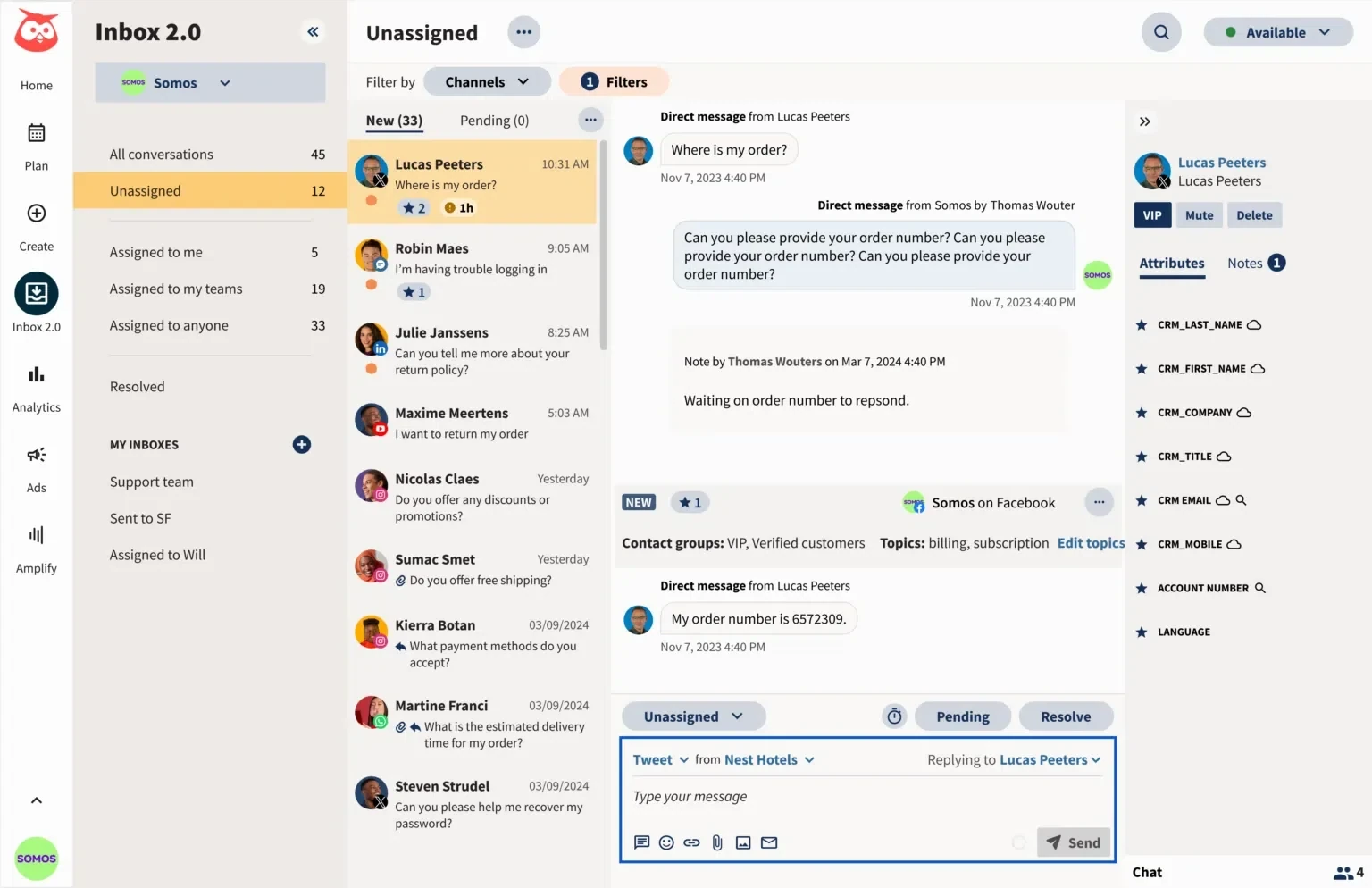
Hootsuite is the oldest name here and the one most likely to be in your procurement system already. Zoho counts brands and gives you cheap seats. Hootsuite ignores brands and charges per seat, so a five-person team pays five times the listed rate. It starts at $99 a seat, and Hootsuite publishes no monthly-billed rate at all, so three seats cost more than Zoho’s entire Agency plan and you are still capped at 10 accounts.
Principais Recursos:
- Standard connects up to 10 social accounts. Professional, Advanced and Enterprise connect unlimited accounts.
- The product splits into modules, Perch for publishing, Nest for the inbox, Lumen for insights and listening, Wisdom for AI, and Parliament for advocacy, sold separately.
- Wisdom AI comes with every paid plan, and trend forecasting runs 90 days ahead from Professional up.
Who Should Actually Use This
Stronger fit for a one-brand organisation with a large channel count and few people logging in. Weaker fit for agencies and any team where more than three people need access, which our Alternativas ao Hootsuite page covers, alongside Zoho Social vs Hootsuite.
Prós
- Unlimited social accounts from Professional up, which no Zoho business tier offers at any price.
- Listening, compliance and single sign-on at Enterprise, for organisations with a legal team.
Contras
- No free plan, no published monthly rate, and a trial with daily posting limits.
- Per-seat pricing punishes the teams Zoho’s three-member Premium tier already frustrates.
Nicole B.
The price makes it absolutely unaffordable for small businesses, freelancers and people just starting out. Maybe for people/businesses who post multiple times a day there’s some value in the time saved, but for folks who only want to post a couple times a week, $1,200USD per year means you’re paying more than $10 per post.
Company Snapshot: Its published platform list runs to WhatsApp and Bluesky alongside the majors, one of the broader channel lists here. Our Preços da Hootsuite breakdown goes tier by tier.
What Sets It Apart: Unlimited social accounts from the second tier up, if you can absorb the seat cost.
$249 per-seat monthly on the Standard tier, or $199 per-seat on annual billing
Classificações
4.4 on G2 across 6,876 reviews, and 4.4 on Capterra across 608.
Aplicações
Android, iOS and web.
Plataformas de redes sociais suportadas
Bluesky, Facebook, Instagram, LinkedIn, Pinterest, Reddit, Snapchat, Threads, TikTok, X (Twitter), and YouTube, plus Facebook Messenger and WhatsApp as messaging channels.
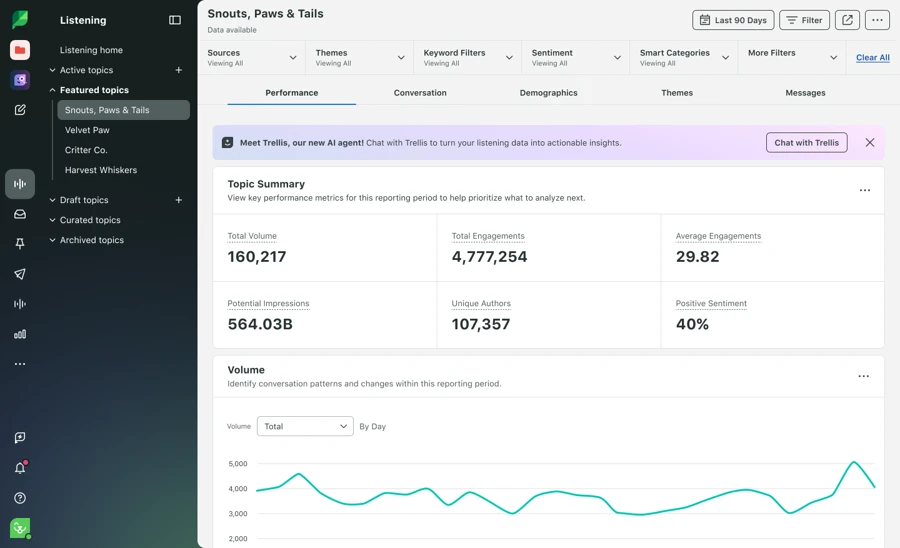
Sprout Social is the reporting tool on this page. If Patrick P.’s complaint about Zoho, no sentiment tracking and no competitor benchmarking, is why you are here, Sprout is the direct answer.
The catch is the price, and the tier it sits in. Seats start at $249 monthly, already more than Zoho Premium for one person, and the sentiment scoring Patrick P. is missing does not arrive until the fourth tier. The two cheaper tiers cap you at 5 profiles, fewer than Zoho’s free plan gives away.
Principais Recursos:
- Trellis AI agent with 100 monthly AI credits per seat on every tier, and a Trellis Plus upgrade at $28 per-user monthly on annual billing, $35 monthly.
- Unlimited social profiles from Professional up. Essentials and Standard cap at 5.
- Brand keywords are tiered, none on Essentials, 10 per group on Standard and Professional, 20 on Advanced.
Who Should Actually Use This
Stronger fit for a brand team that reports upward and has a budget line for benchmarking and sentiment. Weaker fit for agencies and small teams, so our Alternativas ao Sprout Social page lists cheaper routes, with Zoho Social vs Sprout Social side by side.
Prós
- The deepest reporting on this page, including competitor benchmarking and paid insights, with that depth on the top two tiers.
- Unlimited social profiles from Professional up.
Contras
- Per-seat pricing at every tier, with the useful reporting near the top of the ladder.
- Essentials and Standard cap at 5 profiles, fewer than Zoho’s free plan.
- Listening and Premium Analytics are unpriced add-ons, so the tier price is a floor, though teams that genuinely need sentiment work often budget for them anyway.
Matt V.
They will not let me out of the contract. They auto-renewed me after a year for another year and we have since moved all our accounts elsewhere but they are still charging us $400/ month.
Company Snapshot: Its published network list includes Reddit and Snapchat, which almost nothing else here supports. Our Preços do Sprout Social breakdown covers the add-on maths.
What Sets It Apart: Sentiment scoring and competitor benchmarking depth nothing else here matches, sold at a price that matches.
$99 monthly, or $82.50 on annual billing, for the Pro tier
Classificações
4.7 on G2 across 477 reviews, and 4.4 on Capterra across 39.
Aplicações
Android, iOS and web.
Plataformas de redes sociais suportadas
Facebook profiles, pages and groups, Instagram, Threads, LinkedIn profiles and company pages, X (Twitter), Pinterest, TikTok, YouTube, Google Business Profile, and Bluesky, with Universal Posting through the mobile app adding WhatsApp, Telegram, Mastodon and Quora.
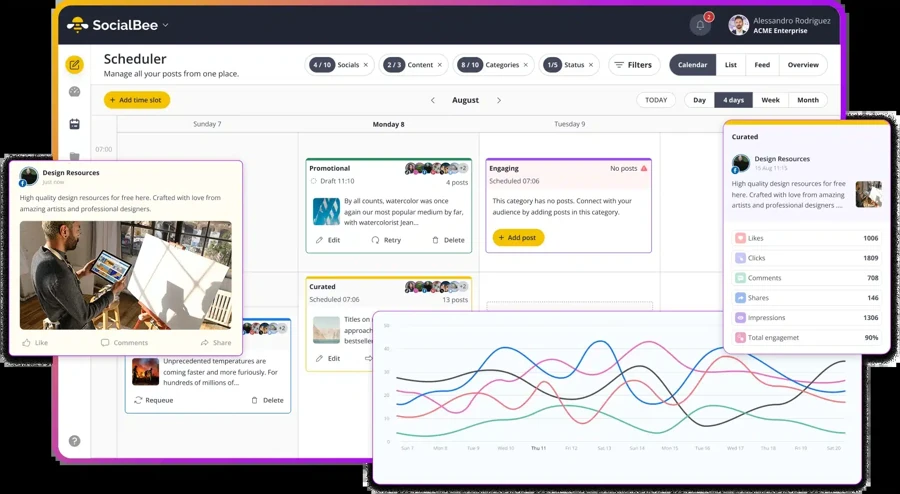
SocialBee organises everything around content categories rather than a calendar, and posts inside a category get recycled on a schedule. Zoho’s SmartQ picks the best time to post what you wrote. SocialBee’s queues keep re-posting what you wrote six weeks ago, which is the point if your value sits in an evergreen library. The multi-client tier runs $99 monthly for 25 profiles across 5 workspaces, so for five clients or fewer it undercuts Zoho’s $320 Agency plan outright. The catch is seats, because the two cheaper tiers give you one user against Zoho Premium’s three.
Principais Recursos:
- Category-based evergreen recycling, with posts set to expire after a number of shares or on a date.
- A real ceiling on posts per category, 1,000 on Bootstrap and 5,000 on Accelerate and Pro.
- Workspaces for client separation, 1 on the two cheapest tiers, 5 on Pro, 10 to 30 on Agency plans.
Who Should Actually Use This
Stronger fit if you have a library of evergreen posts you want cycling without touching the calendar. Weaker fit if you need a shared inbox, which SocialBee does not publish, and our Alternativas ao SocialBee page covers where people move.
Prós
- Evergreen recycling by category, which nothing else on this page does as its core model.
- Unlimited AI content generation on every tier rather than metered credits.
Contras
- One user on Bootstrap and Accelerate, against Zoho Premium’s three.
- No shared social inbox published on any tier, which matters less if engagement already happens natively in each app.
- Posts-per-category ceilings are real, 1,000 on Bootstrap, and easy to hit with a big library.
Michael S.
They stop posting if one post has a problem. Posts are divided into categories and categories are scheduled. However if there is one misconfigured post in the category then the category stops posting. So the schedule grinds to a halt – there is no notification of this.
Company Snapshot: Its Capterra base is thin, 39 reviews at a 4.4 average on Capterra against Zoho Social’s roughly 3,467, so weight the G2 score accordingly.
What Sets It Apart: Content categories that recycle themselves, turning a back catalogue into a posting schedule.
$99 per-user monthly on the Standard tier, or $79 per-user on annual billing
Classificações
4.5 on G2 across 974 reviews, and 4.6 on Capterra across 713.
Aplicações
Android, iOS and web.
Plataformas de redes sociais suportadas
Facebook, Instagram, LinkedIn company pages and personal profiles, TikTok, X (Twitter), YouTube, Threads, Pinterest, Bluesky, and Google Business Profile.
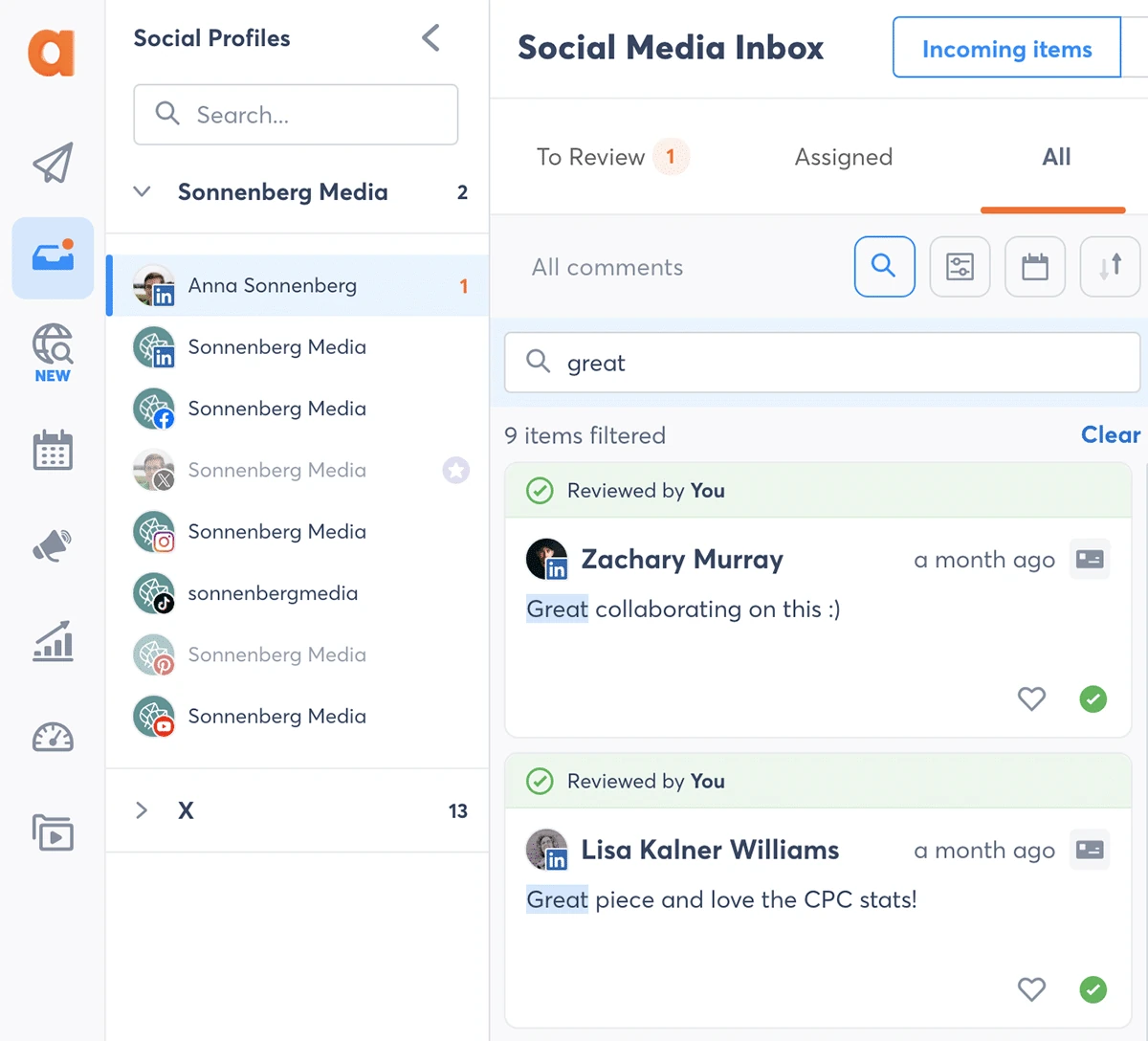
Agorapulse is the inbox tool here. Fernando P.’s complaint about Zoho, that community management needs auto-responders and better message handling, is answered better here than anywhere on this list, ours included. What it does not answer is the multi-client publishing and white-label client reporting the same agency still needs, and what you pay for the inbox is a per-user price and a fixed profile limit.
That price starts at $99 per user monthly, and every published tier includes exactly 10 profiles, so paying twice as much buys features, not profiles. Zoho Premium covers 14 channels and three team members for $65.
Principais Recursos:
- The profile limit is flat at 10 across all three published tiers, and overage runs $10 per-profile monthly on annual billing, $15 monthly. Only the quote-only Custom tier lifts it.
- Automated moderation rules, one free rule per profile on the published tiers, unlimited only on Custom.
- Bulk scheduling of 200 posts from one CSV, with library caps of 10 images and 2 videos below Advanced.
Who Should Actually Use This
Stronger fit for a community-heavy brand whose bottleneck is comments, DMs and ad comments rather than publishing. Weaker fit for agencies with many client profiles, and our Alternativas ao Agorapulse page maps cheaper options, with Agorapulse vs Zoho Social side by side.
Prós
- The strongest inbox here, with comments, DMs and reviews in one queue and rule-based moderation.
- Ad comment monitoring and reply from Professional up, which almost nothing else here offers.
Contras
- Ten profiles on every published tier, fewer channels than Zoho Premium, with paid overage above that.
- Per-user pricing, so a three-person team triples the bill before adding a profile, predictable enough if headcount is stable.
- Sentiment, single sign-on and unlimited moderation rules sit on the unpriced Custom tier.
Adam C.
If accurate Instagram Stories reporting is mission-critical, validate it thoroughly during a trial and get remedy terms in writing. Our ROI was negative due to unreliable data and added manual work.
Company Snapshot: 713 people have reviewed it on Software Advice at a 4.6 average, with value for money lowest of its sub-scores at 4.4. Our Preços da Agorapulse breakdown covers the per-user maths.
What Sets It Apart: Moderation rules that treat comments as a queue to be worked, not a feed to be watched.
$89 monthly, or $69 on annual billing, for the Lite tier
Classificações
4.8 on G2 across 251 reviews, and 4.8 on Capterra across 86.
Aplicações
Android, iOS and web, through the Statusbrew Companion App.
Plataformas de redes sociais suportadas
Facebook, Instagram, Threads, TikTok, X (Twitter), LinkedIn, YouTube, Pinterest, Bluesky, Google Business Profile, WhatsApp, and LINE, with review channels covering the Apple app store, Google’s Play store and Facebook Page reviews.
Statusbrew sells rules. Comments, DMs and app store reviews land in one place and a rule engine decides what happens to each, a different job from Zoho Social’s inbox. It also supports WhatsApp and LINE, which almost nothing else here does.
Lite runs $89 monthly for 5 channels against Zoho Standard’s $15 for 12, the tightest entry tier here, and the $129 starting price quoted elsewhere is really the middle tier on an annual commitment.
Principais Recursos:
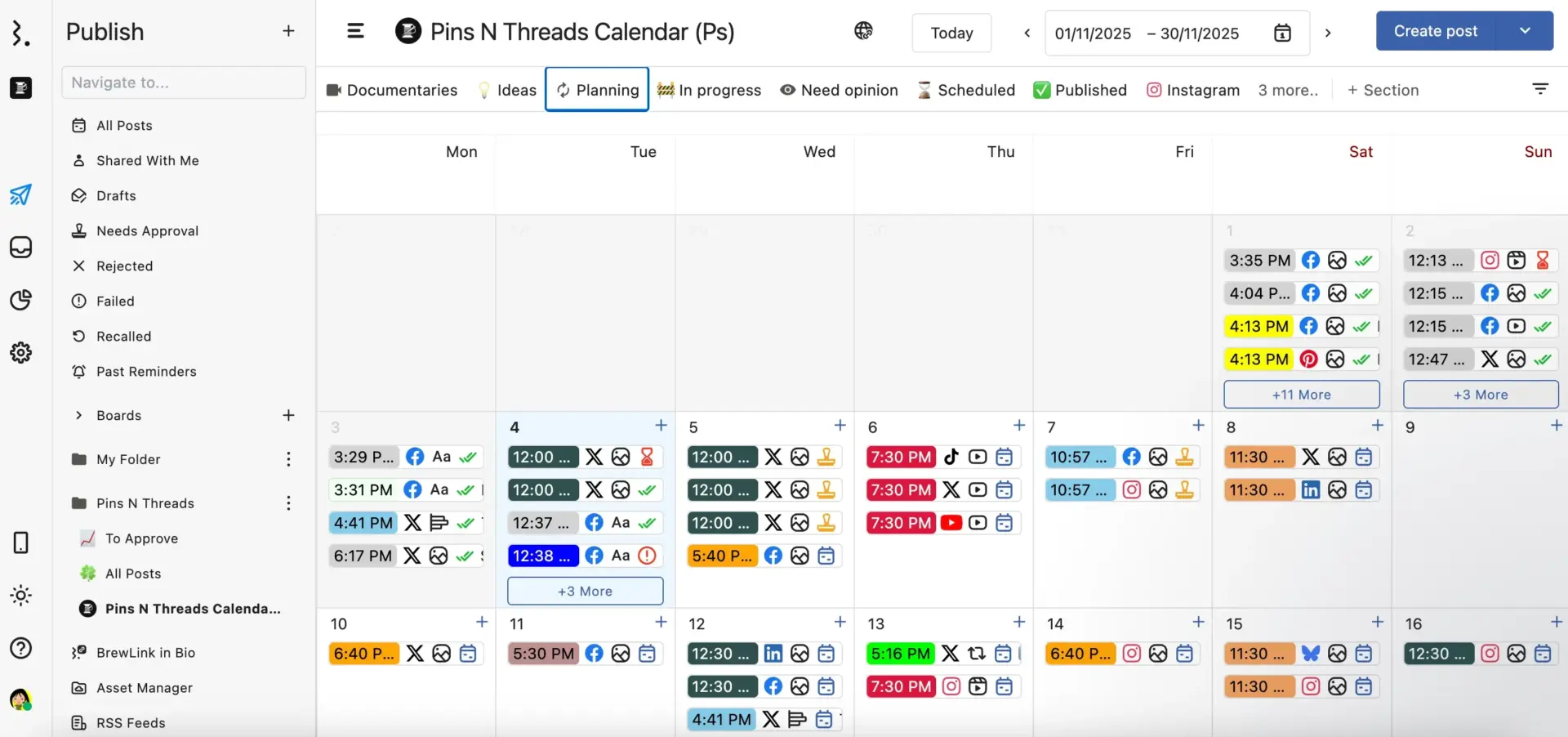
- Channel and seat caps are hard, 5 channels and 1 user on Lite, 10 and 3 on Standard, 15 and 6 on Premium. Only Enterprise is uncapped.
- A rule engine for inbox automation from Lite up, with advanced filters and time-scheduled rules on Premium only.
Who Should Actually Use This
Stronger fit for a brand moderating reviews alongside social, or a team that wants inbox routing done by rules rather than a person watching a queue. Weaker fit if you need many channels cheaply, because 5 on Lite and 15 on Premium is a tight ladder and approvals start at $299 monthly.
Prós
- Review moderation across Google, the app store, Play Store and Facebook reviews, in one queue with comments.
- A rule engine on every tier, including the cheapest one.
Contras
- Five channels and one seat on Lite, at $89 monthly, is the tightest entry tier here.
- Approvals, sentiment and collision detection are Premium only.
- The criticism on record is scarce and old, and the one recurring soft complaint across its 251 G2 reviews is a learning curve.
Marcia J M.
It would be helpful if media stored in Statusbrew’s asset manager could be shared externally
Verified Software Advice Review
That is the strongest recent named criticism on record here, a feature request from a five-star reviewer.
Company Snapshot: 86 people have reviewed it on Capterra at a 4.8 average, with no one or two-star ratings among them.
What Sets It Apart: App store review moderation in the same inbox as social comments.
$199 monthly, or $169 on annual billing, for the Premium tier
Classificações
4.5 on G2 across roughly 900 reviews, and 4.6 on Capterra across 137.
Aplicações
Android, iOS and web.
Plataformas de redes sociais suportadas
Facebook, Instagram, X (Twitter), LinkedIn, YouTube, Google Business Profile, TikTok, Threads, and Bluesky, plus WordPress as a blogging destination.
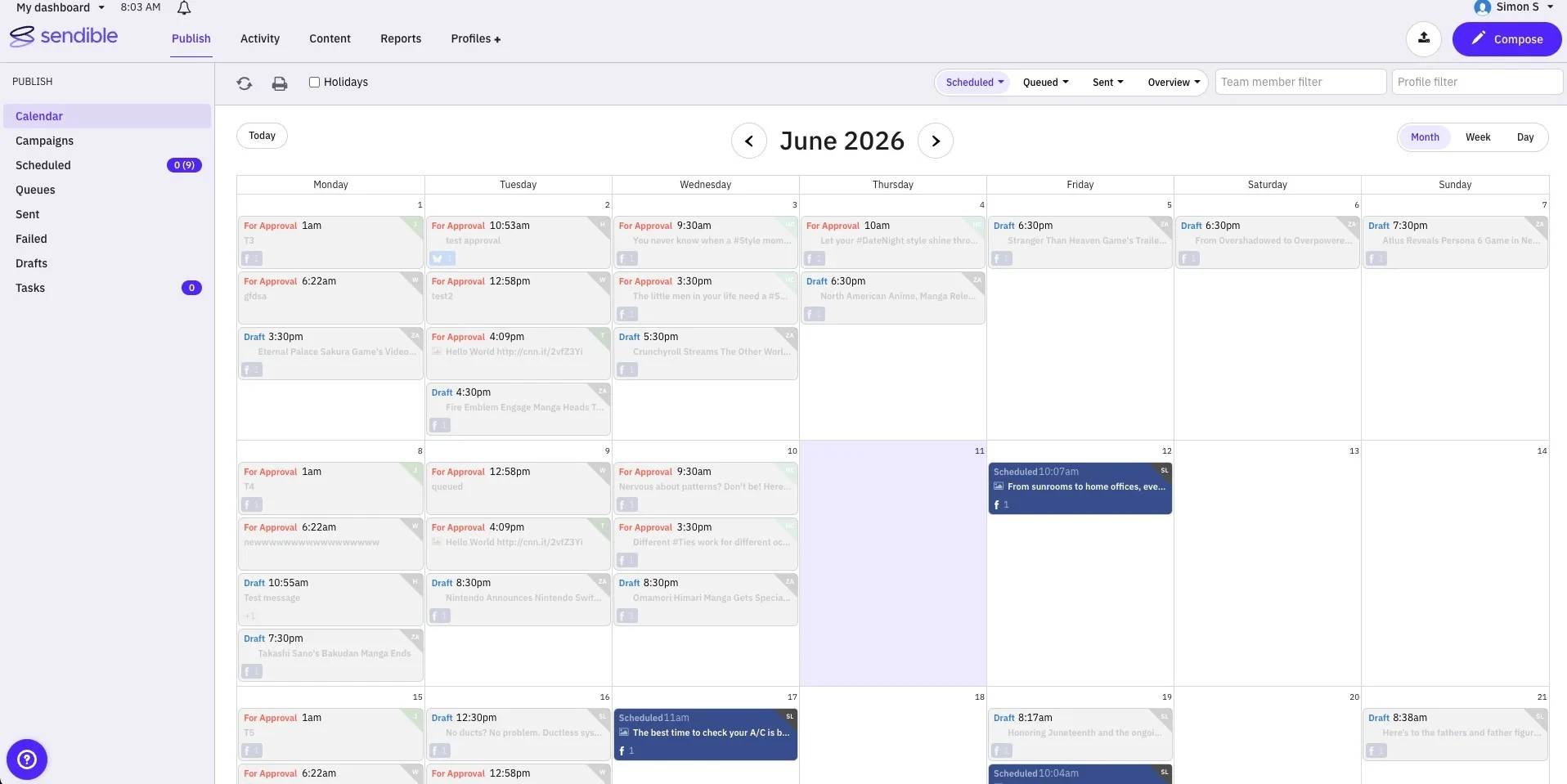
Sendible is built for agencies that sell social media under their own name. Its unit of scale is the workspace, one per client, each bringing six social profiles, and users are unlimited on every tier, the opposite of Hootsuite, Sprout and Agorapulse.
A seven-client agency pays $199 monthly against Zoho’s $320 Agency plan, with unlimited staff instead of five. Read the catch twice if reselling is your model, because white label is a paid add-on on every tier and its price is published nowhere.
Principais Recursos:
- Workspaces isolate each client, with their own profiles, calendar, inbox, reports and permissions, so capacity grows by adding workspaces rather than upgrading a tier.
- Unlimited users and unlimited AI credits on all five tiers, including the $35 entry plan.
- Client Connect, so clients authorise their own accounts and you never hold their passwords.
Who Should Actually Use This
Stronger fit for agencies with several clients that need many people in the tool, because unlimited users on a $35 plan is unusual. Weaker fit for single-brand teams paying for workspace machinery, and our Alternativas Sendible page covers substitutes, with Sendible vs Zoho Social side by side.
Prós
- Unlimited users on every tier, so team growth is free.
- Extra workspaces are sold at a published rate that drops as the tier rises.
Contras
- White label is a paid add-on with no published price.
- Six profiles per workspace is fixed, so a client with 9 channels eats two workspaces, which is workable when client channel counts are consistent.
Robert P.
Started off extremely excited, that I had someone looking out for my best interest and I didn’t need to vet 10 tools to find the best one. But then plummeted off a cliff once they had my money and I opted out of the highest tier plan.
Company Snapshot: Os seus Trustpilot page averages 2.3 across just 8 reviews, too small to weigh against 137 on Capterra, and those complaints are about billing. Our Preços enviáveis breakdown covers the tier ladder.
What Sets It Apart: Unlimited users on every plan, including the cheapest one.
$50 monthly, or $37.50 on annual billing, for the Growth tier
Classificações
4.5 on G2 across 347 reviews, and 4.4 on Capterra across 398.
Aplicações
Android, iOS and web, with multi-profile scheduling described as a web feature.
Plataformas de redes sociais suportadas
Instagram, Facebook, TikTok, Threads, YouTube, Pinterest, LinkedIn, and Snapchat, with auto-publishing on all eight and notification publishing for Instagram and TikTok.
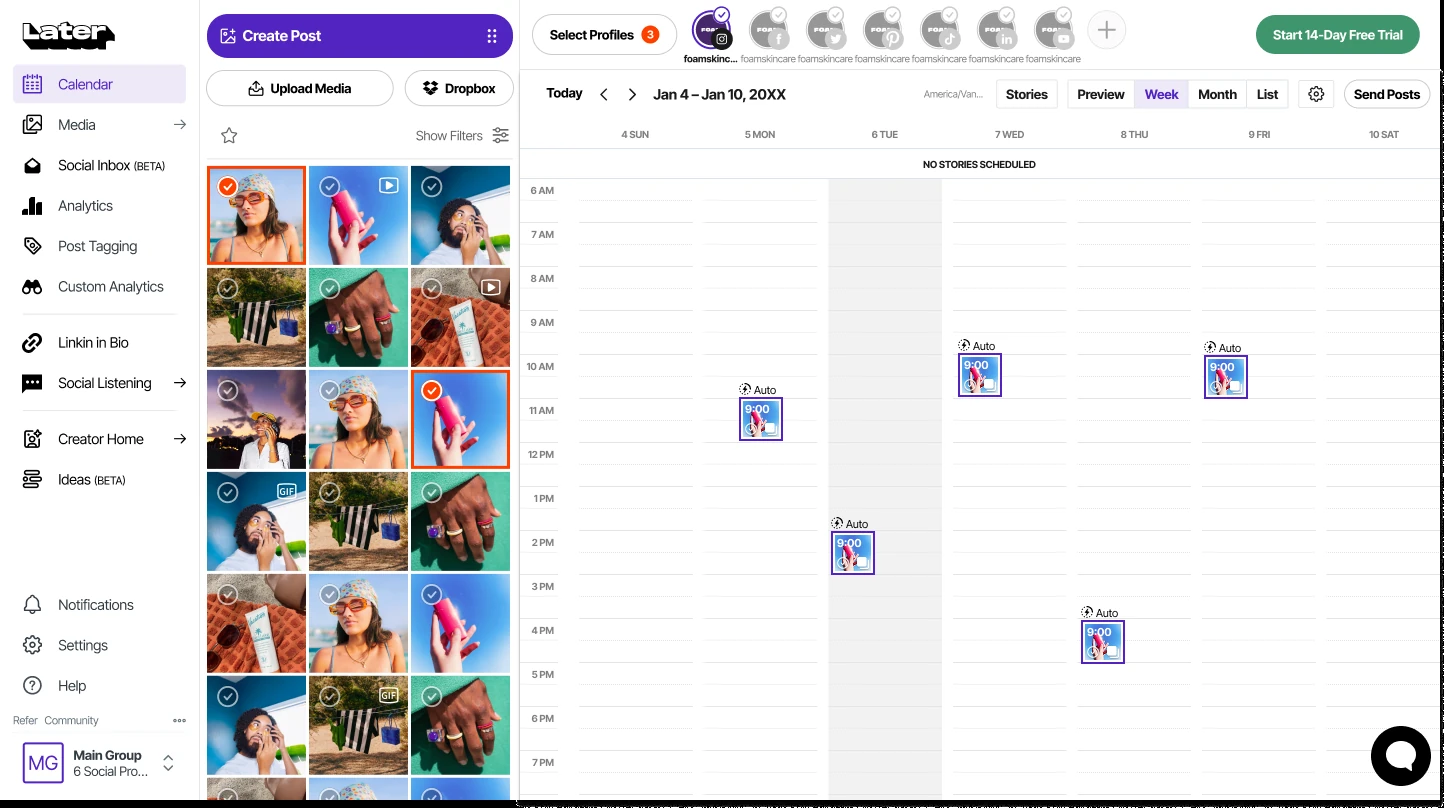
Later began as an Instagram planner and still thinks like one. It sells capacity in social sets, one set being one profile from each of its eight networks, so plans grant 1, 2 or 6 sets rather than a flat profile count.
Entry is $25 monthly, but Later caps how many posts you schedule where Zoho does not, at 30 per profile a month on that tier, counted when you schedule rather than when you publish. Unlimited posting costs $110.
Principais Recursos:
- Hard monthly post caps, 30 per profile on Starter, 180 on Growth, unlimited on Scale, counted when scheduled rather than when published.
- Metered AI credits, 5, 50 and 100 monthly, where one credit generates three ideas or one caption.
- Inbox, collaboration and approvals start at Growth, and Starter is one user with no add-ons.
Who Should Actually Use This
Stronger fit for an Instagram-led or TikTok-led brand or creator who wants the grid before publishing. Weaker fit for anyone posting to X, teams needing approvals on a budget, and high-volume publishers who will hit the caps, and our Alternativas Later page lists the switches people make, with Later vs Zoho Social.
Prós
- The best visual planner here, with a real grid preview and Reels audio suggestions.
- Social sets make multi-network coverage for one brand cheap, 8 profiles at $25 monthly.
Contras
- Monthly post caps on Starter and Growth, which Zoho does not impose at any tier.
- No X, Bluesky, Google Business Profile or WhatsApp support.
Pierre-Olivier J.
they will scam you at the end with their refund policy, it’s when you ask to get a refund that you see the thru value of a company.
Company Snapshot: Os seus Trustpilot page runs to 329 reviews at a 1.3 average against 4.5 across 347 on G2, with those complaints on renewals and refunds, not the scheduler. Our Preços posteriores breakdown covers the social-set maths.
What Sets It Apart: Visual grid planning that treats the feed as a layout rather than a queue.
No plan price is published. The pricing page is a bundle configurator, and the only figure on it is a $300 monthly add-on.
Classificações
4.6 on G2 across 442 reviews, and 4.7 on Capterra across 224.
Aplicações
Android, iOS and web, with mobile push notifications listed as an inbox feature on all plans.
Plataformas de redes sociais suportadas
Facebook, Instagram, X (Twitter), LinkedIn, TikTok, YouTube, Pinterest, Threads, and Google Business.
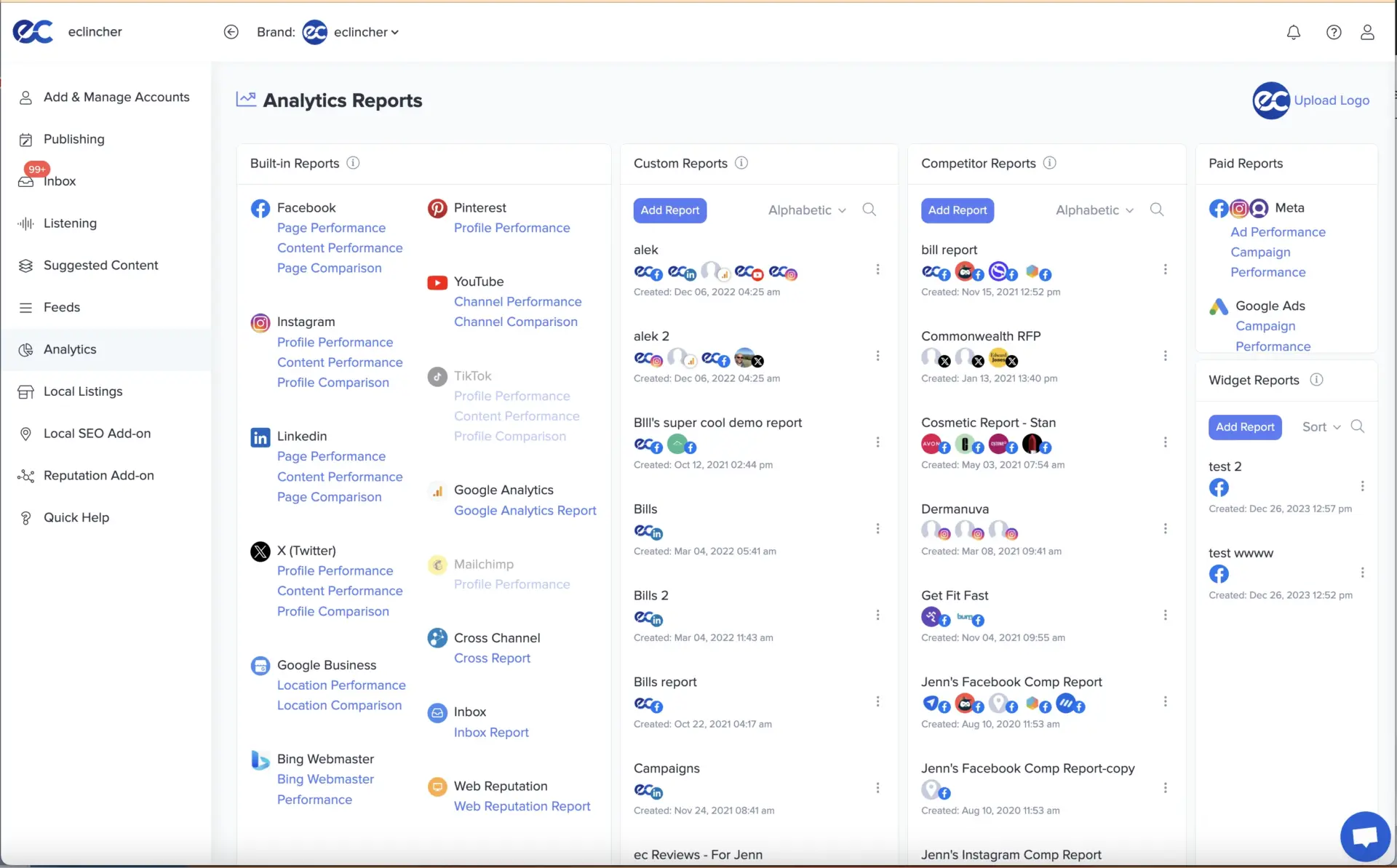
eClincher is the auto-posting tool here, built on smart queues that republish from a pool and RSS feeds that post themselves. It also moderates reviews from Google Business Profile, the Play store, the app store and the major travel and consumer review sites in one inbox. What it does not do is tell you what it costs.
No plan price is published on either billing cycle, and the billing basis is not disclosed either. The $300 figure quoted elsewhere is a Local SEO add-on sold separately from every tier, not an entry price. Zoho, by contrast, publishes every figure it charges, from $15 up to the $460 Agency Plus plan.
Principais Recursos:
- Review moderation inside the social inbox across five review sources, not just comments and DMs.
- Auto Post with smart queues and Auto Post from RSS feeds, both above the entry tier.
- Inbox rules that reply, assign, tag and raise CRM tickets, plus Salesforce, Zendesk and ServiceNow above the entry tier.
Who Should Actually Use This
Stronger fit for someone running many brands or locations who wants RSS and queue automation doing the publishing. Weaker fit for anyone who needs to compare prices before a sales call, and our Alternativas ao eClincher page covers tools that publish their rates.
Prós
- Unlimited brands above the entry tier, which directly removes Zoho’s one-brand ceiling.
- Review moderation across five review sources inside the social inbox.
Contras
- No published plan price on either billing cycle, and no disclosed billing basis.
- The entry tier is one user, maximum two, and one brand, tighter than Zoho Premium.
- Collision detection and the auto-reply AI agent are Enterprise only.
Brookelyn W.
The cost seems a little high when there are other programs that offer the same tools for a lower cost.
Company Snapshot: Its published network list runs to nine, fewer than Statusbrew’s twelve, so the breadth is in the review sources.
What Sets It Apart: Unlimited brands, sold behind a quote.
$6 per-channel monthly on Essentials, or $5 per-channel on annual billing
Classificações
4.3 on G2 across roughly 1,023 reviews
Aplicações
Android, iOS and web.
Plataformas de redes sociais suportadas
Instagram, Facebook, TikTok, LinkedIn, X (Twitter), YouTube, Threads, Pinterest, Google Business Profile, Bluesky, and Mastodon.
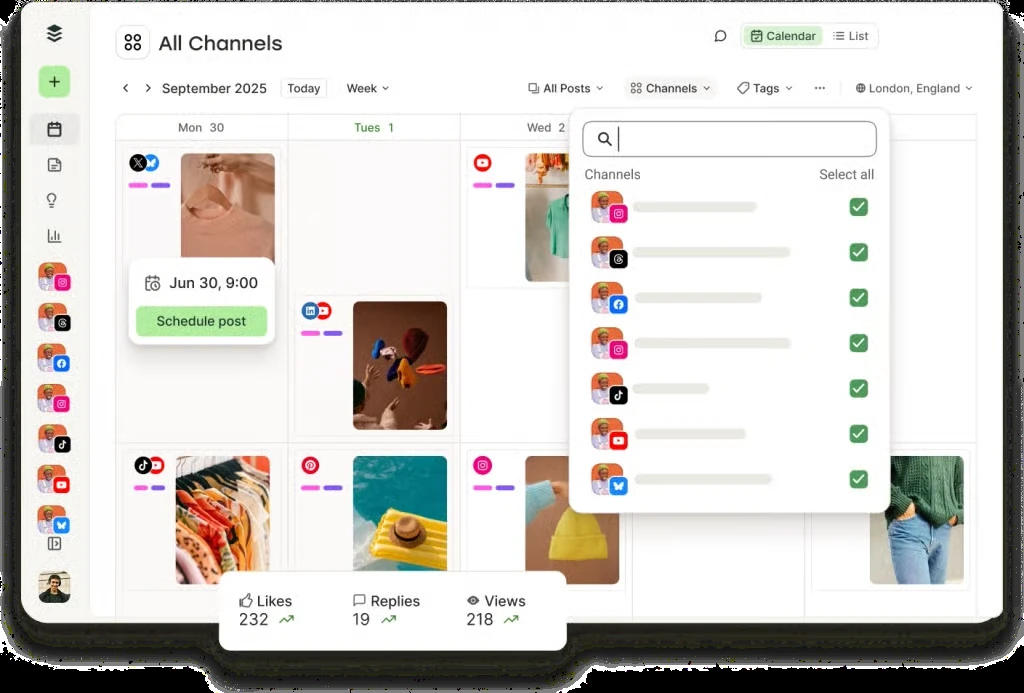
Buffer is the simplest tool here and the only one besides Zoho Social with a real free plan. It charges by the channel, so the bill scales with one thing, and volume discounts make it cheaper per channel as you add more.
One brand on 6 channels is $36 monthly against Zoho Standard’s $15 for 12, so Zoho wins clearly. Flip it to three clients on 5 channels each and the volume discount drops Buffer to $60 against Zoho’s $111, and it keeps winning down to $1 a channel above 50.
Principais Recursos:
- API access on every plan including Free, at 1 key and 3,000 requests monthly on Free, 3 keys and 7,500 on Essentials, 5 keys and 15,000 on Team.
- Unlimited scheduling governed by a published fair-use cap of 5,000 posts per channel.
- A genuine free plan with 3 channels, 1 user and 10 posts per channel.
Who Should Actually Use This
Stronger fit for one person with a handful of channels, or a high-channel-count operation that can use the volume discounts. Weaker fit for teams, because unlimited seats means the Team tier, and our Alternativas ao Buffer page covers the step up, with Zoho Social vs Buffer on the two free tiers.
Prós
- A genuine free plan with 3 channels and self-refilling post slots.
- Volume discounts that make high channel counts cheap, down to $1 per-channel above 50.
Contras
- Essentials is one user, so any team needs the Team plan at double the per-channel rate.
- Reporting is shallower than Zoho’s, with no competitor benchmarking or sentiment.
- Channel support is uneven by network, and Buffer documents the gaps rather than fixing them.
Wesley M. B.
Analytics are a little limited unless you upgrade to a higher plan and that doesn’t always work for a small nonprofit budget.
Company Snapshot: Its rates are published in a machine-readable pricing file as well as on the page, so the figures are checkable rather than screenshotted. Our Preços do buffer breakdown covers the volume bands.
What Sets It Apart: Per-channel pricing with real volume discounts, and a free plan that is not a trial.
More Zoho Social Alternatives Worth a Look
These nine missed the main list on thin review evidence, an unusual pricing model, or a narrower problem than Zoho Social solves.
Vista Social
A publishing and engagement suite priced flat rather than per seat, cheap for a small team with many profiles. The lowest figure on the Vista Social pricing page read $75 monthly.
Trade-off: listening and employee advocacy are priced add-ons, so the flat rate is not the whole bill.
SocialBu
A budget scheduler with automation rules, on a thin base of 26 reviews on G2. We print no SocialBu price, because its pricing page served two different entry rates on two readings, and an unstable number is not worth repeating.
Trade-off: the review base is too small to draw a pattern from, and the loudest reviews are about billing rather than the product.
HubSpot
Social media publishing that lives inside a CRM, which is both the reason to consider it and the reason not to. Marketing Hub rates 4.5 on G2, on a count reported inconsistently between roughly 13,000 and 14,000, and the social tools are not sold alone, so check the HubSpot Marketing Hub pricing page.
Trade-off: no client workspaces and no white-label reporting, so agencies get little out of it.
ContentStudio
A publishing tool with content discovery attached, for people who curate as much as they create. It rates 4.7 across 674 reviews on Capterra, and the entry plan read $19 monthly on the ContentStudio pricing page.
Trade-off: discovery is the reason to buy this over a plain scheduler, so test it against the domains you follow.
NapoleonCat
A moderation-first platform with strong comment and DM automation, popular with brands running ads at volume. NapoleonCat sits around 4.6 across roughly 145 reviews on G2, and we mark that count second-hand rather than pass it off as read at source. Plans are bundles starting at 2 users and 5 profiles, and we print no per-profile rate rather than repeat an unverified one.
Trade-off: bundled seats and profiles mean you buy capacity you may not need.
Loomly
A calendar and approval tool with a published reputation split worth seeing first, 4.6 across 1,793 reviews on G2 against 1.7 across just 26 on Trustpilot, a small sample but a real gap. The entry plan read $65 monthly, billed monthly, on the Loomly pricing page, and our Preço do tear analysis breaks the ladder down, with a Alternativas ao tear page too.
Trade-off: the step between its first and second tiers is steep, so price the tier above the one you plan to buy.
Planable
A collaboration-first tool where clients comment on posts in a preview that looks like the live feed. It rates 4.6 across 937 reviews on G2, and the lowest figure on the Planable pricing page read $33 monthly, charged per workspace, with analytics a separate add-on.
Trade-off: per-workspace pricing means cost scales directly with client count.
dlvr.it
An RSS-to-social automation tool rather than a social media management platform, and priced accordingly. Its samples are tiny, 3.3 across 16 reviews on G2 and 2.8 across only 4 on Capterra, too thin a base to draw a pattern from. There is a free plan on dlvr.it, and paid plans start at $9.99 monthly, billed per account. Ignore the $149.99 entry price in third-party summaries, which the vendor’s own data shows is a legacy Enterprise tier.
Trade-off: it automates feeds, it does not manage social media, so treat it as one piece of a stack.
Postly
A per-channel scheduler with broad platform coverage, including destinations the bigger tools ignore, Telegram among them. Its review base is small on both sides, 4.6 across 33 reviews on G2 and 4.5 across 24 on Capterra. The Pro plan is $16 monthly billed annually, $192 yearly, priced at $3.20 per-channel with a five-channel minimum, and no month-to-month rate appears on the Postly pricing page. There is no free plan and the trial runs 7 days.
Trade-off: the entry price exists only on annual billing, and a five-channel minimum rules out a two-channel business.
Which Zoho Social Alternative Should You Choose?
Start with SocialPilot if you are not sure, because it is the only tool here that gives you client logins, approvals and white-label reports without charging per brand or per seat. The cases below are the narrower ones where a different tool wins instead.
One brand, one person, no budget at all? Zoho Social’s free plan, or Buffer’s free 3 channels. Both stop the moment a second brand or a second person arrives.
One brand where comments and DMs are the whole job? Agorapulse, whose rule-based moderation beats every tool here, ours included, if you can pay per user and live with 10 profiles.
Sentiment scoring you can buy as a line item? Sprout Social, on the tier where sentiment finally appears, with listening an unpriced add-on above it.
Reselling with your own dashboard and domain, not just your own reports? Sendible, for unlimited users on every tier. Price the white-label add-on first, because no tier includes it.
Instagram-led and you want the grid before you publish? Later, and check the post caps against how often you post.
Value sits in a library of evergreen posts? SocialBee, for category recycling nothing else here does, on one user below its $99 tier.
Moderating app store and Google reviews alongside social? Statusbrew, which puts them in one queue with rules on top, from 5 channels on Lite.
One brand across 40 channels with two people logging in? Hootsuite Professional, where unlimited accounts stops the channel count mattering.
Unlimited brands and happy to wait for a quote? eClincher, and get the number in writing.
Only pushing an RSS feed out? dlvr.it, plus whatever you use for real posting.
Almost nobody needs one tool that does everything, and two tools that each do one job well usually cost less than the enterprise tier promising both. Match the tool to your situation rather than taking whoever tops someone else’s list.
Making the Switch from Zoho Social
Zoho Social is not the problem here. The one-brand ceiling is. Every tool on this list gets past it a different way, and the right one is the one shaped like your client list, not the one sitting at the top of somebody’s ranking.
Count your brands. Count your seats. Then pick the plan that does not charge you extra for growing.
You already know how many brands you are running. That number is the whole decision. Start your SocialPilot’s 14-day free trial, connect every one of them, and you will know before the end of the day whether the ceiling is gone. No card needed.
Perguntas mais frequentes
What is the investment value of Zoho Social?
Strong for one brand, weak for several. Standard at $15 monthly buys 12 channels and one team member, the cheapest paid tier here. The value falls off a cliff at brand two, because the add-on route costs $17 to $23 per brand monthly on the business plans and the Agency route costs $320 monthly for ten brands. Excellent value if you will still have one brand in a year. Not if you will have four.
Is Zoho Social worth the price?
Yes, at the business tiers. It averages 4.6 and 4.7 across more than 6,400 reviews on the two sites linked earlier, and the complaints are about fit rather than quality. The three that come up most are shallow analytics, no per-network customising while scheduling, and thin community-management tools.
What are the best Zoho Social competitors?
For agencies, our own tool first, because client logins, approvals and white-label reports come inside a plan rather than as an agency upgrade, then Sendible if you need unlimited users and can price its white-label add-on. For sentiment and listening, Sprout Social. For inbox volume on a single brand, Agorapulse. For a budget of zero on one brand, Buffer's free plan. For unlimited brands, eClincher, if you can live with a quote-only price.
Does Zoho Social have a free plan?
Yes, and it is genuine rather than a trial in disguise. The free tier covers one brand with 6 channels and one team member, forever. The 15-day trial of the paid tiers needs no card, and when it ends the account drops back to that free plan. Only Buffer matches it, with 3 channels.
What integrations does Zoho Social support?
Its strongest integrations are with the rest of the Zoho suite, including CRM, and reviewers name that as a main reason they stay. If your business already runs on Zoho, that is the best argument for not switching. Read the SocialPilot vs Zoho Social comparison for the two feature sets lined up.
Sobre o autor