
You found the Verification option in the TikTok app, started the form, and then reached the screen that asks for news articles about you. For a lot of creators and business owners, that is where the process stops. If you want to know how to get verified on TikTok in 2026, the rules are simpler than most guides make them look.
The blue check is free, and TikTok says it does not look at your follower count. You apply inside the app. TikTok then checks that your account is real, complete, and active, and that independent news sources have written about you. But this last part is where most people get stuck.
TikTok guards the badge closely because fake accounts are a big problem on the app. The blue check on TikTok is how people tell the real you apart from the copies.
This guide walks you through the current steps, the links that count, the reasons requests get turned down, and what to do next. It also explains the other TikTok checks, like age and ID verification, that people often mix up with the blue check.
What Does Getting Verified on TikTok Actually Mean?
Getting verified on TikTok means TikTok has reviewed your account and confirmed it represents the real person, business or brand it claims to be. You get a blue check next to your username in search results and on your profile. The badge is free, it goes to authentic and notable accounts, and it is not an endorsement.
What the TikTok Blue Tick Means (and What It Does Not)
TikTok’s Help Center says a verified badge “represents the person, business, or brand associated with the account.” In everyday terms, the TikTok blue tick tells people they’ve found the real account, not a fan page or an impostor.
The real badge sits next to the username, in search and on the profile. This is how the blue tick appears on TikTok’s own profile.
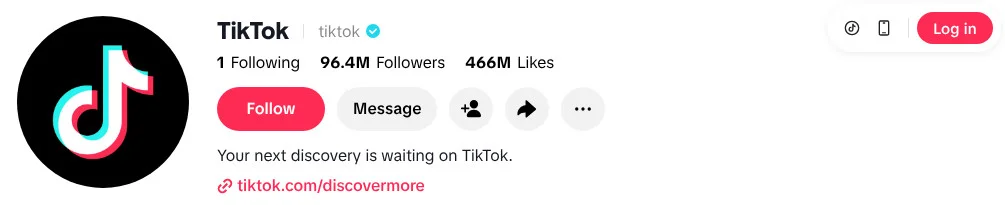
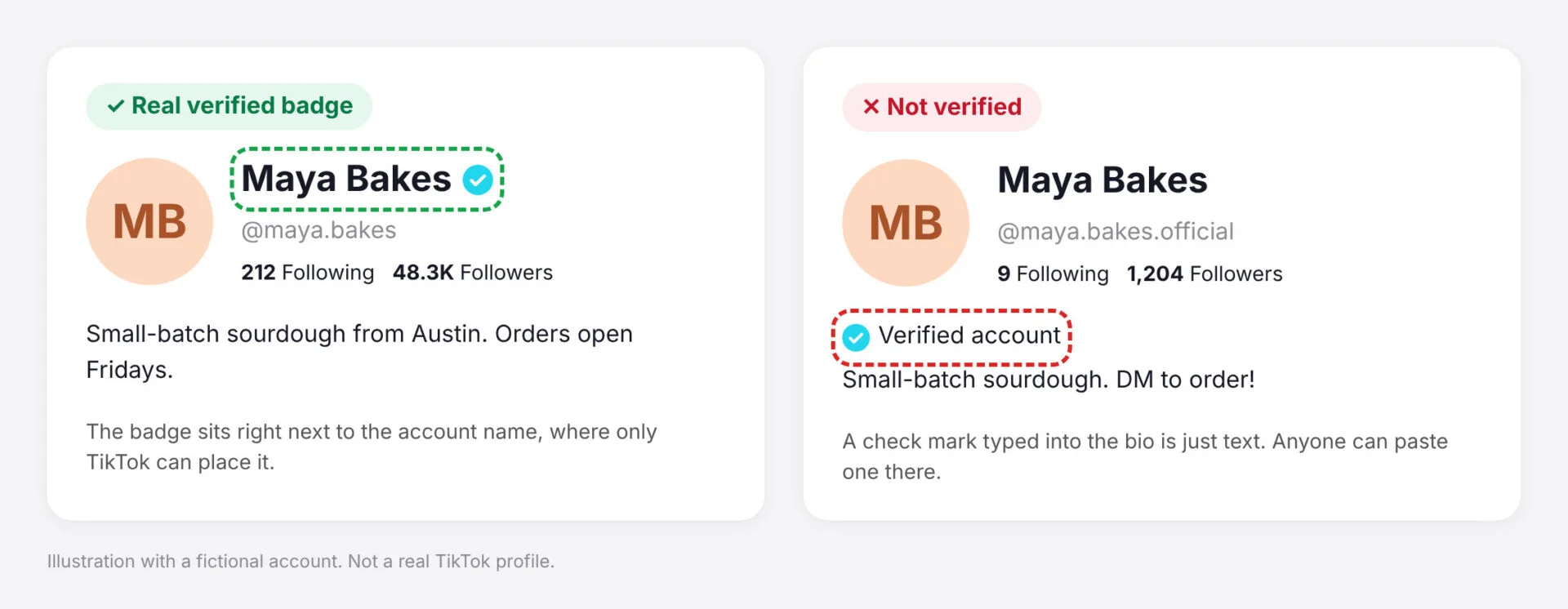
TikTok’s Creator Academy goes a step further: if you see a “verified” symbol in a bio but not next to the username, “it’s not a verified account.” A check mark in a bio or a display name is decoration, and only TikTok can put a real one next to a username.
A real verified badge always sits right next to the account name, because only TikTok can put it there. A check mark inside the bio or display name is just text that anyone can paste in.
Verified Badge vs. Age, ID, Business, and Shop Verification
Search “how to verify TikTok account” and you’ll get five different processes mixed together. Each has its own screen and documents, and passing one does nothing for the others. Find your row, then go to that section below.
| Verification | What it’s for | Where it lives | What it asks for | Go to |
| Verified badge (blue check) | Shows the account is the real, notable person or brand | App: Settings and privacy > Account > Verification | Complete profile, ID (personal) or business status (brands), links to news coverage | How to Apply section |
| Age verification | Getting back a feature or account removed for age | The notification TikTok sends you | Selfie with ID, card check, face age estimate or a parent’s confirmation | Age Verification section |
| Identity (ID) verification | Proving you’re the person behind the account | Inside the feature that asks for it | Government ID, often with a live selfie | Identity (ID) Verification section |
| Business verification | Running ads and unlocking business tools | Ads Manager, Business Center or Settings > Account > Business verification | Business licence or registration documents | Business Verification for TikTok Ads section |
| TikTok Shop verification | Selling through TikTok Shop | Seller Center > Verify Documents | ID or company documents, matching bank account | TikTok Shop Verification section |
Is It Hard to Get Verified on TikTok?
Yes, for most people it’s hard, and followers aren’t the reason. TikTok asks for credible written news coverage from independent outlets, and most creators and small businesses don’t have it. If you already have a few real articles about you and a complete, active account, the application itself takes only a few minutes.
TikTok doesn’t publish an approval rate, but most people get stuck because they don’t have a mainstream media story about themselves.
TikTok Verification Requirements in 2026
Older guides still repeat rules TikTok no longer lists, so start with TikTok’s own pages. The company has moved its verification process into the mobile app, and the current rules live in two places. The Help Center looks at whether an account is “active, authentic, notable, and unique.” The Creator Academy guide, adds “complete” and “secure.” Together, these are the TikTok verification requirements you’re judged on.
The Core Criteria: Authentic, Unique, Complete, Active, and Notable
| Criterion | What TikTok says | How to pass |
| Authentic | The account must “represent a real person, business, or institution.” Personal requests need identity verification, business requests need a Verified Business Account (VBA) or Organization Account (OA), and institutions need “official proof of affiliation.” | Use your real name. Brands get VBA or OA status first. |
| Unique | Listed by the Help Center as a factor. The Creator Academy says the badge shows you’re “not a parody or fan account.” | Apply from your one main account, not a backup, fan or clip page. |
| Complete | Public account with a profile photo, name, bio, and at least one public post. (The Help Center calls this “Recognized.”) | Fill every profile field and switch the account to public. |
| Active | Logged in “within the past 6 months” (Help Center), and “in active use” (Creator Academy). | Post regularly in the weeks before you apply. |
| Notable | “Featured in multiple news sources.” Paid media, social posts, and “outdated or irrelevant articles aren’t considered.” | Gather several independent articles mainly about you (see the notability section). |
The Creator Academy adds a sixth check: a secure account, with a verified phone number and email, and two-step verification turned on. Of the six, this is the one you can fix today.
How Many Followers Do You Need to Get Verified on TikTok?
You don’t need any set number of followers to get verified on TikTok. The Help Center says TikTok doesn’t consider followers or likes when it grants a badge, and the Creator Academy says follower count alone doesn’t decide eligibility. A small account with real press coverage can qualify, while a huge account without coverage can still be turned down.
So why does every search for how many followers to get verified on TikTok turn up a number? Partly because YouTube requires 100,000 subscribers, and people assume TikTok works the same way. Also, journalists write about accounts that already have an audience, so big followings and press often arrive together. That makes growing your TikTok followers a smart step on the way to press coverage, even though followers alone won’t earn the badge.
TikTok verifies coverage, not reach.
Creators, Brands, and Public Figures: What Differs
TikTok runs three verification types, and the Creator Academy warns that “selecting the wrong type may delay the review process or require you to submit a new application.” Pick the one that matches who the account represents.
| Type | Who it’s for (TikTok’s examples) | What you need first |
| Personal | Creators, public figures, artists, athletes, journalists | A government ID, plus coverage about you |
| Business | Companies, brands, media organizations, sports teams | VBA or OA status, plus coverage about the brand |
| Institution | Government bodies, schools, charities, NGOs | Official proof of affiliation, plus coverage |
One more rule: a Government, Politician, or Political Party Account (GPPPA) can only apply for institutional verification, according to the Help Center. If you run one of these accounts, skip the Personal and Business types.
Can You Get Verified on TikTok for Free?
Yes. TikTok verification is completely free, and the free request inside the app is the only way to get the badge. TikTok’s Help Center says, “We don’t charge you to get verified,” and adds that anyone claiming to sell verification isn’t affiliated with TikTok. If someone asks you for money, walk away.
Anyone offering a paid shortcut is running one of the scams covered further down.
How to Apply for TikTok Verification, Step by Step
Here’s how to get a blue tick on TikTok. In most regions, the only route is the request form inside the mobile app. TikTok’s old desktop application page now just says to “apply on mobile,” and many older guides show a settings path that no longer matches the app. These four steps follow TikTok’s current instructions.
Step 1: Get Your Account Ready
Plenty of requests fail here, before anyone looks at your links. Fix anything missing:
- A public account with a name, profile photo and bio that clearly show who you are
- At least one public post, ideally a steady run of recent ones
- A verified phone number and email, with two-step verification on
- Recent logins (the Help Center’s minimum is once in the past six months)
- No Community Guidelines problems or bought engagement
- The right setup: VBA or OA status for brands, a government ID ready for personal requests
- The username you want to keep, because changing it later can cost you the badge
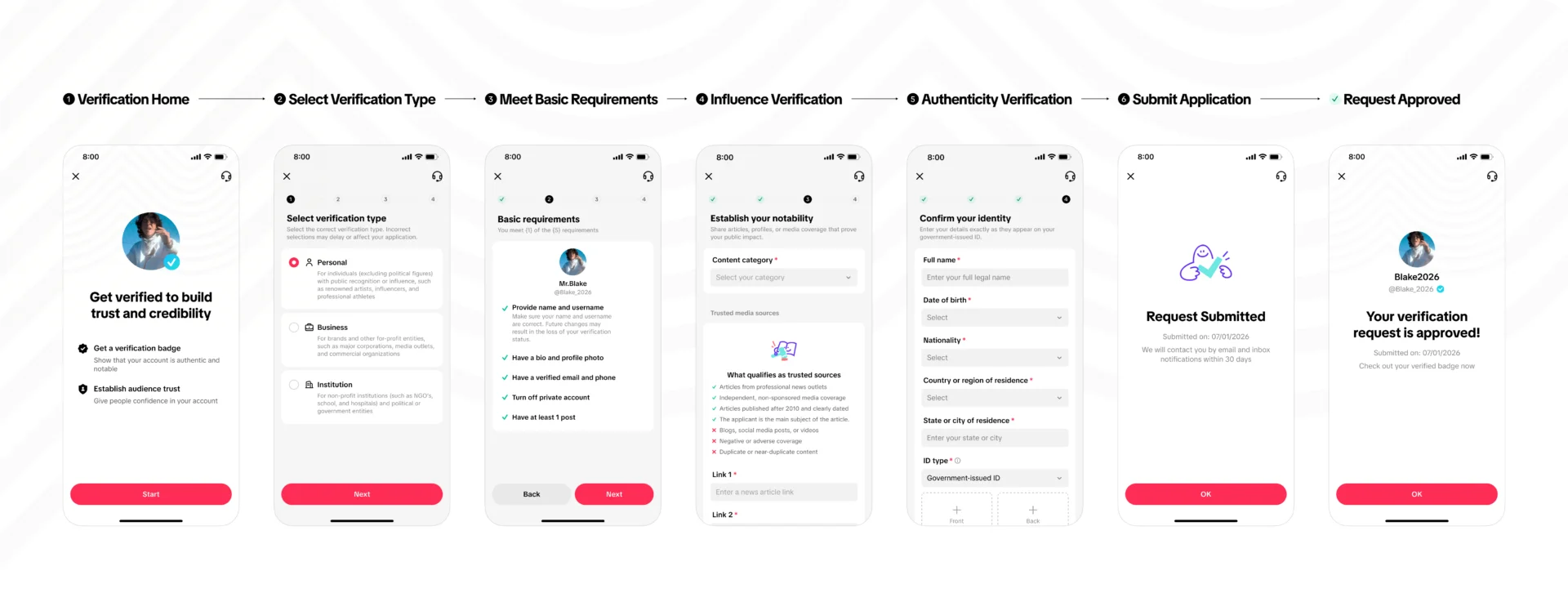
The form checks five of these before it lets you continue: your name and username, a bio and profile photo, a verified email and phone, a public account, and at least one post. It also warns that changing your name or username later “may result in the loss of your verification status.”
Step 2: Open the Verification Request in the App
Update TikTok to the latest version, then follow the path from TikTok’s Help Center:
- Tap Profile at the bottom of the screen.
- Tap the Menu ☰ button, then Settings and privacy.
- Tap Account.
- Tap Verification.
- Tap Start and follow the steps.
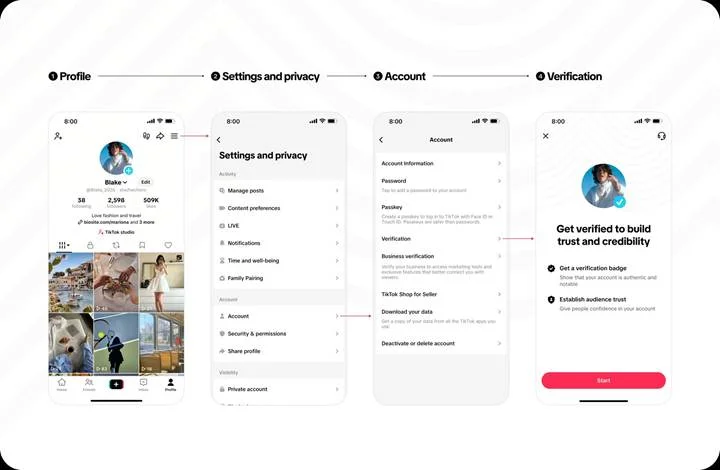
If you can’t see Verification, you’re not alone. “I don’t have that Button of verification” is the top comment, with 256 likes, under a Tech Life Unity tutorial, a community report rather than a TikTok statement. TikTok’s Artists help page notes the feature isn’t currently available everywhere. Update the app, check that you’re on the right account, and look again.
Step 3: Add Your Notability Links
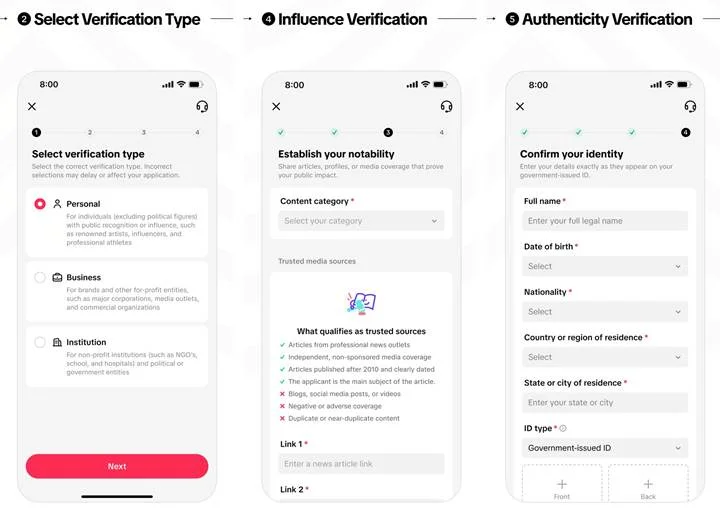
After you tap Start, the form takes you through a few short screens. The images in TikTok’s Creator Academy show them in this order:
- Select verification type. It could be Personal, Business or Institution. TikTok warns that a wrong choice “may delay or affect your application.”
- Establish your notability. Pick a content category, then paste your news article links. Link 1 and Link 2 are both marked as required.
- Confirm your identity. Enter your full legal name, date of birth, nationality, and country and city of residence exactly as they appear on your government-issued ID. Then upload photos of the front and back of that ID.
Most applicants get stuck on the links. The Help Center says you “must provide credible written media coverage, such as news articles,” and the Creator Academy asks for “direct links to the original articles.” Paste the full URL of each article, not the outlet’s homepage.
Step 4: Submit and Track Your Request
Submit when every field is right. A rejection shows its reason, which is the most useful thing you’ll get from the process, so screenshot it.
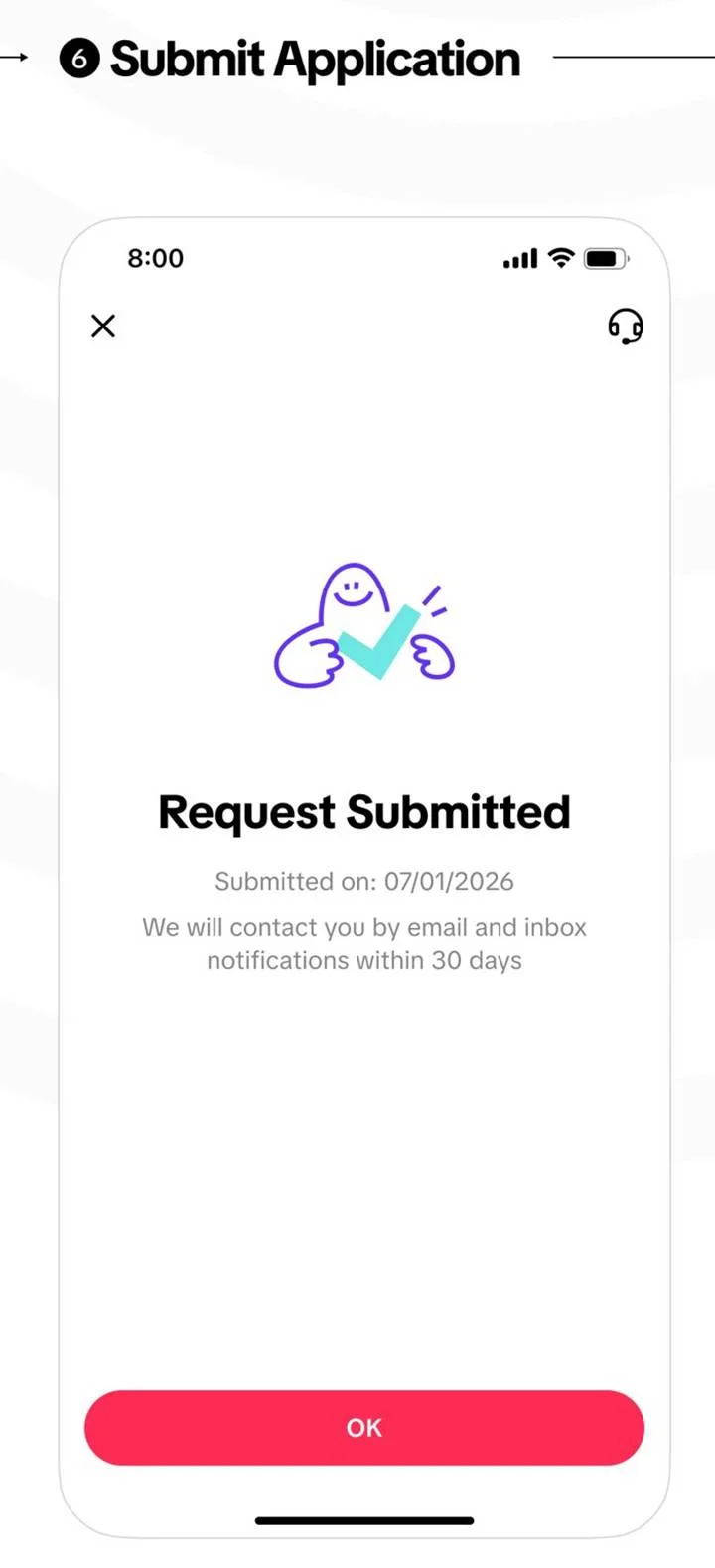
Once you submit, the app shows a “Request Submitted” screen as shown below.
How Long Does TikTok Verification Take?
TikTok’s Help Center says you’ll get a result within 30 days. The answer arrives in your TikTok notifications, and the app’s confirmation screen says it also comes by email, so check both. TikTok’s pages mention no paid or faster track. Plan for the full 30 days and don’t send a second request while the first one is still under review.
If 30 days pass with no word, check the Verification page in the app before you apply again.
What Counts as Notability Evidence?
Independent news coverage about you, linked directly to the original articles, is what TikTok counts as notability evidence. According to its Creator Academy, strong coverage comes from a recognized outlet, focuses mainly on you, shows a publication date and is open to read. It can’t be paid, promotional, a press release, a personal blog or a social media post.
The Links TikTok Asks For
The Help Center asks for “credible written media coverage, such as news articles” and says you must be “featured in multiple news sources.” The Creator Academy adds: “Submit direct links to the original articles.”
You may have seen advice about the 4 links for TikTok verification. That comes from older versions of TikTok’s desktop web form, which asked for four links. The web form now sends you to the app, and the in-app form shown in TikTok’s Creator Academy has two required link fields, each asking for a news article link. Give at least two strong articles, and add more if the form lets you.
Also repeated copies of the same article may not be accepted, so make sure to add two unique links.
What Strong Evidence Looks Like and What Does Not Count
The ✅ rows follow the Creator Academy’s description of strong coverage. The ❌ rows come from what TikTok’s Help Center, Creator Academy and the in-app form say won’t count. The in-app form also asks for articles “published after 2010 and clearly dated.”
| Evidence | Counts? | Why |
| A local newspaper profile of you or your business | ✅ | Independent outlet, mainly about you |
| A trade publication’s interview with you | ✅ | Recognized outlet, editorial, not paid |
| A dated news article where you’re the main subject | ✅ | Has a date, focuses on you |
| One quote from you in an article about ten people | ❌ (weak) | Doesn’t focus mainly on you |
| A sponsored post, advertorial or paid feature | ❌ | Paid media isn’t considered |
| A press release, even if news sites republish it | ❌ | Not independent coverage |
| Your own blog, website or social media posts | ❌ | Personal blogs and social posts aren’t accepted |
| A search results page, screenshot or outlet homepage | ❌ | Not a direct link to the original article |
| The same article twice, or syndicated copies of it | ❌ | Repeated copies may not be accepted |
| An old article that no longer reflects what you do | ❌ | Outdated or irrelevant articles aren’t considered |
| A video or podcast with no written article | ❌ | The in-app form lists videos as not trusted |
| Negative coverage about you | ❌ | The in-app form excludes negative or adverse coverage |
Getting turned down with links you trusted is maddening. One YouTube comment on an Ask Daniel Fix video, about “Why you can’t get verified on TikTok” said, “I have all the online news blog posted about me and his news website are not paid … But I am still getting rejected.”
Sometimes, coverage that feels real can still miss TikTok’s standard. Blog-style sites, brief mentions and undated pages are the usual weak spots, so check every link against the table before you resubmit.
What to Do If You Have No Press Coverage Yet
This is where most people stop, and it says nothing about your work. Most creators and small businesses just don’t have anything written about them yet.
So wait, and build coverage first. A request with no qualifying articles fails the “notable” check however good the rest of your profile is, and it only earns you a rejection and a waiting period.
A first article is more reachable than it sounds. Try these routes:
- Local news: Papers, radio sites and city magazines that cover local creators and businesses
- Trade and industry press: The publications in your field, from nursing to car repair
- Written write-ups of a talk, award, event, fundraiser or podcast appearance, published as an article.
- School and alumni publications, if the piece is mainly about you
The notability section further down covers how to pitch for it.
Why TikTok Rejects Verification Requests, and What to Do Next
A rejection stings, especially after weeks of waiting for one line of text. It isn’t a verdict on your work. The reasons TikTok gives come down to a short list of fixable gaps, and your notice tells you which one applied.
The Most Common Rejection Reasons
Find the row that matches your notice. The last column shows whether the cause comes from TikTok’s own pages or from what applicants report.
| What you see or sent | Likely cause | Fix | Source |
| No articles, or only passing mentions | Fails “notable”: needs multiple news sources | Build coverage first | TikTok Help Center |
| Sponsored posts, paid features or press releases | Paid and promotional content isn’t counted | Use independent editorial articles | TikTok Help Center, Creator Academy |
| Screenshots, search results, homepages or repeat links | Not direct links to original articles | One full URL per original article | TikTok Creator Academy |
| Your own blog, site or social profiles | Not independent coverage | Use third-party news sources only | TikTok Creator Academy |
| Private account, missing bio or photo, no public posts | Fails “complete” | Go public and fill every field | TikTok Help Center, Creator Academy |
| Account barely used lately | Fails “active” | Log in and post regularly first | TikTok Help Center |
| Personal type for a brand, or the reverse | Wrong verification type | Pick the type that matches the account | TikTok Creator Academy |
| Brand without business status | No VBA or OA | Complete business verification first | TikTok Help Center |
| ID upload keeps failing | Unclear photo, or details that don’t match the ID | Retake clear photos of the front and back, and enter your name and DOB exactly as printed | In-app form |
| Past strikes, bought followers or engagement | Violations or “artificial or inauthentic activity” | Clear violations and stop paid growth services | TikTok Help Center |
Can You Reapply, and When?
Yes, you can reapply. TikTok’s Help Center says you can check the rejection reason and resubmit after the waiting period shown with it. TikTok’s own pages don’t give a fixed number of days, so the date in your notice is the one that counts. Fix the stated reason before you send anything new.
Some older guides say you must wait 30 days, but that isn’t on TikTok’s current pages. The Creator Academy only puts it as applying again “once you are eligible to reapply,” after checking that your details and links are “accurate, complete, and up to date.” Sending the same links again is unlikely to change the answer.
How Accounts Lose a Verified Badge
Once you have the badge, you can still lose it. In the Help Center’s words (cited above), TikTok “may remove a verified badge at any time and without notice.” TikTok’s two pages list these triggers:
- Changing your username without a username update request
- Switching account type, such as business to personal (Creator Academy says this needs a new application)
- Transferring ownership of the account
- Losing VBA or OA status
- Repeated or severe Community Guidelines violations
Badges can also vanish in a sweep. In June 2024, NBC News reported that TikTok “suddenly unverified multiple accounts with millions of followers,” including Dr. Miami and Duolingo. Duolingo “was asked by TikTok to reapply for verification” and got its blue check back. If it happens to you, check the list above, then reapply through the same in-app path.
Fake Blue Ticks, Injector Tools, and Paid Verification Scams
After a long wait, a quick fix can look tempting. On TikTok, those fixes are sellers, “injector” tools and phishing messages, and none of them can give you a real badge.
Can You Buy TikTok Verification?
No, you can’t buy TikTok verification. TikTok’s Help Center says it doesn’t charge for the badge and that anyone selling verification “isn’t affiliated with us.” That’s different from X and Meta, where a paid subscription can come with a check mark. On TikTok, every real badge comes from the free in-app review.
TikTok doesn’t sell verified badges, so anyone offering to sell you one is running a scam.
What TikTok Blue Tick Injector Tools Really Are
A TikTok blue tick injector is an app, file or website that claims it can add the verified badge to your account. TikTok’s Creator Academy is clear that “only TikTok can apply verified badges,” and the real one always appears next to your username, in search and on your profile.
How to Spot a Verification Scam
Verification phishing aimed at TikTok creators is well documented. Malwarebytes described fake emails offering a “verified badge,” followed by WhatsApp chats where scammers asked for the 6-digit login code so they could take over the account in real time.
Treat any of these as a red flag:
- They contact you first. TikTok says it doesn’t email or message people asking them to apply, except Government, Politician, or Political Party Accounts.
- They ask for your password or a 6-digit code. TikTok won’t ask for either in a message.
- They want a fee, in cash, gift cards or crypto.
- They move the chat off TikTok, to WhatsApp, Telegram or a private form.
- They rush you with a deadline or a threat to delete your account.
If a message ticks any of these boxes, don’t reply. Report it in TikTok and turn on two-step verification.
Other TikTok Verification Types People Confuse With the Blue Check
Did TikTok ask you to prove your age, your identity or your business? These four checks have nothing to do with notability, so you won’t need press coverage.
TikTok Age Verification
TikTok age verification usually starts with a notification that a feature, such as LIVE or direct messages, was removed because TikTok thinks you’re under its age limit. To appeal, open the notification, tap Appeal, and confirm your age with a selfie holding your government ID, a credit card check, or another method TikTok offers in your country.
Act quickly: TikTok’s minimum age appeals page gives you 180 days for a removed feature, and its underage appeals page lists just 23 days in the US for a banned account.
Identity (ID) Verification
TikTok ID verification confirms that a real, matching person is behind the account. You’ll meet it in the personal blue check request, which asks for the front and back of your government-issued ID, and in money features such as creator payouts and TikTok Shop.
Business Verification for TikTok Ads
TikTok business verification proves your company is real. TikTok’s business verification page says you’ll be asked for it when you create an ad account, and again once your ad spend crosses a set threshold. You can also apply in the app under Settings and privacy > Account > Business verification, which TikTok’s account verification guide says usually takes 1 to 5 business days and is separate from the blue check. Once you’re verified, our complete guide to TikTok ads can help you plan your first campaign.
TikTok Shop Verification
Before you can sell on TikTok Shop, TikTok checks that you’re allowed to. In Seller Center, go to Verify Documents and upload what matches your business type, according to TikTok’s Seller Center setup guide:
| Business type | Documents |
| Individually owned business | Front and back of your passport, national ID or driver’s licence |
| Corporation | ID of the legal representative, director or person with significant control, plus a business licence or registration |
If you’re new to selling on TikTok, our guide to using TikTok Shopping for your business covers how to get your store working for you.
Does Getting Verified Help You Grow?
It helps, mainly by making people trust the account. The badge tells viewers, brands and journalists that this is the real account, which matters most when fakes are copying you. TikTok doesn’t say the badge raises views or For You placement, so treat it as credibility and protection rather than a growth tactic.
What Verification Does Not Do
Know the limits before you apply:
- No promise of more views. TikTok’s verification pages don’t link the badge to reach.
- No endorsement. TikTok says a badge “doesn’t imply an endorsement by TikTok.”
- No protection from the rules. Verified accounts follow the same Community Guidelines.
- No permanence. A username change, account-type switch or lost business status can remove it.
The badge confirms who you are, and your videos still do the growing.
How to Build Notability While You Wait
TikTok wants proof from outside the app, a profile that clearly belongs to you, and an account that’s in use. Here’s how to work on all three while you wait for your first articles.
- Pitch the story behind your account. Reporters cover stories, not accounts, so pitch a local, useful or milestone angle to a named reporter at a local or trade outlet, and include two or three of your best videos.
- Aim for independent, written coverage. Only articles from real news outlets that are mainly about you count, so skip paid features, press releases and blog posts.
- Keep your name and photo the same everywhere. Reviewers may look at “other reliable public information” about you, according to TikTok’s Creator Academy, so use one consistent name, photo and bio across TikTok, your other profiles and a simple website.
- Give your content a clear niche. A focused account is easier to pitch and easier for reporters to describe and our TikTok marketing guide covers planning videos around one.
- Keep posting on a schedule. “Active” is one of the things TikTok checks, so batch a few weeks of videos and queue them in a TikTok scheduler such as SocialPilot’s while you’re busy pitching.
- Grow the honest way. TikTok can deny or remove a badge for “artificial or inauthentic activity,” so skip bought followers and use proven tactics for getting more TikTok views instead.
Your Next Step Toward the TikTok Blue Check
Getting the blue check comes down to proof, not popularity. TikTok wants a real, complete and active account, plus independent news coverage that is mainly about you.
If you don’t have press coverage yet, don’t apply this week. Fix your profile with the checklist in Step 1, then pitch one local or trade story at a time until you have at least two strong articles.
If you already have the articles, check each one against the evidence table and apply in the app. If TikTok turned you down, read the reason in your notice, fix that one thing, and wait out the period it shows before you try again.
But make sure that your TikTok account looks active throughout this whole process. With SocialPilot, you can plan and schedule your TikTok videos weeks ahead from one content calendar, so your profile keeps posting while you focus on the stories that earn the badge. Try SocialPilot free for 14 days and keep your TikTok active while you build your case.




 Join 55,000+ social media managers


