
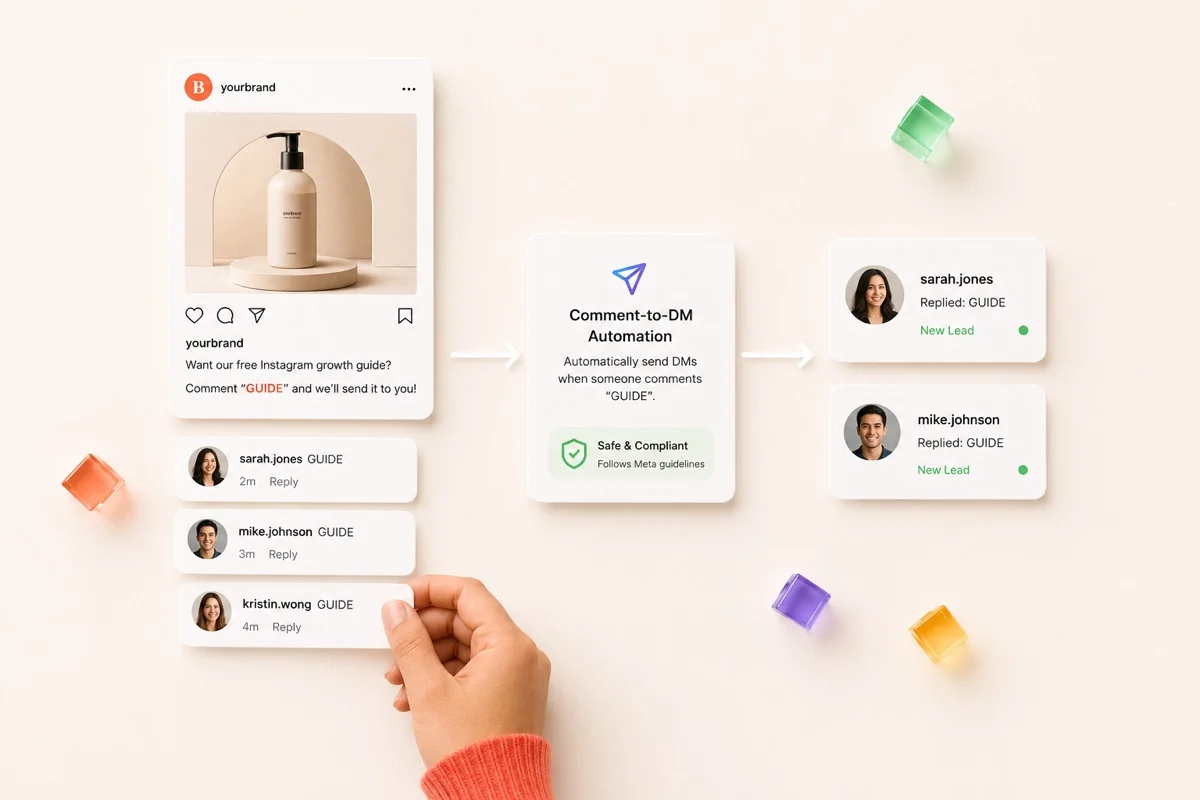
You have seen the play a hundred times.
A Reel ends with “comment GUIDE, and I’ll send you the link.” The comments fill up. Everyone who typed the word gets a DM seconds later.
That is Instagram DM automation. Right now it is the closest thing the platform has to a repeatable way to turn attention into conversations.
The catch: Instagram will not turn comments into DMs for you natively, and it is not obvious which third-party tool is actually compliant.
It also breaks in ways nobody advertises. Here is one account owner’s comment after using a DM automation tool:
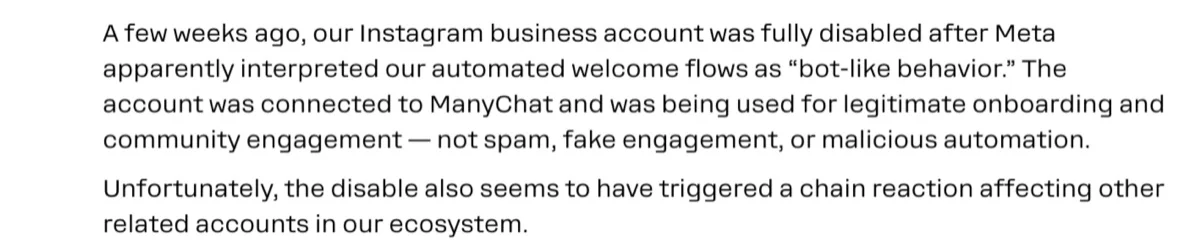
If you run Instagram for several brands or clients, that is the real stake. One flagged account is not an inconvenience. It is a client asking why their page vanished.
So this guide does two jobs most articles split apart or skip:
- It explains the tactic in plain terms.
- It backs every compliance claim with Meta’s own documentation, not the numbers vendors copy from each other.
Here is what it covers: how it works, how to set it up, when and how to use it well, and what to do if you get flagged.
What Is Comment-to-DM Automation?
At its simplest, it is any system that sends Instagram direct messages based on a trigger, without you tapping send each time.
The most popular form is comment-to-DM: someone comments a keyword on your post or Reel, and a tool sends them a private message with a link, an offer, or the next step.
It is part of a wider family:
- Comment-to-DM captures people the moment they raise their hand in public.
- Welcome flows greet new message threads.
- A customer service chatbot answers repeat questions in the inbox.
Comment-to-DM gets the most attention because it catches high intent out in the open.
How Does It Work? (comment trigger → automated DM reply)
Three moving parts:
- A trigger. A keyword in a comment (“PRICE,” “GUIDE,” “LINK”). Some setups fire on any comment.
- A public reply. The tool posts a visible comment back, which keeps the post active and points people to their inbox.
- The private message. The person gets a DM with whatever you set up: a link, a code, a question, or a short chat.
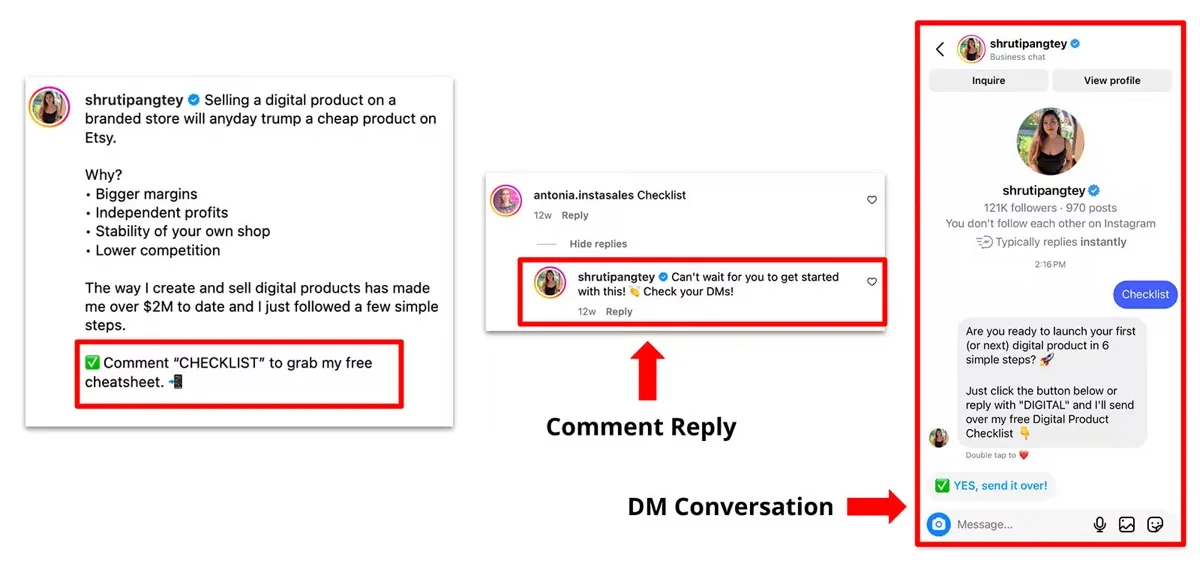
Example: You post a Reel about a skincare routine. Caption says “comment ROUTINE for the full list.” Someone comments “ROUTINE.” They instantly get a DM with the product links. You did nothing in the moment.
Manual vs. Automated Private Replies – What Instagram’s App Actually Lets You Do
- Manual: The Instagram app lets you send a “private reply” to a comment by hand, one at a time, from the post. You control each one.
- Automated: Watching for a keyword and firing that reply at scale is not built into the app. That needs a third-party tool on the official Messaging API.
This gap matters later. “Automated” is a specific label in Meta’s rules, and it comes with obligations a manual reply does not.
Where It Works Best – Posts, Reels, and Live
- Best fit: Reels built for reach, giveaways, product drops, and posts with a clear “comment X” call to action. It works on feed posts, Reels, and even Live comments.
- Weak fit: Low-comment content, or accounts where most inbound is genuine support.
Why Comment to DM Automation Became a Marketing Favorite
Attention moved into the inbox. Feeds are crowded and algorithm-gated. A DM lands in a space people actually check, and the chat is one-to-one. That is where questions get answered, and buying decisions get made.
Two reasons it took off:
- It captures leads at peak interest. Someone commenting your keyword is already interested. That is why turning DMs into qualified leads is now a core play, not a side experiment.
- It feeds the algorithm. Hundreds of keyword comments tell Instagram the post is worth showing to more people, so it quietly helps with boosting Instagram engagement organically at the same time.
A quick warning about the numbers you will see.
- Vendor blogs love a sky-high DM “open rate,” usually something in the ninety-percent range. Treat it with suspicion. That number traces back to an old, informal Facebook Messenger bot anecdote, not current Instagram data.
- The “fast replies convert far better” stat is real, but it comes from a decade-old study of B2B phone calls, not Instagram DMs.
The tactic is genuinely useful. You do not need borrowed statistics to justify it, and quoting them to a client who later checks is a bad trade.
How to Set Up Comment-to-DM Automation
Setting it up takes minutes. Setting it up so it keeps working and does not endanger the account takes a little more care (in a third-party automation tool).
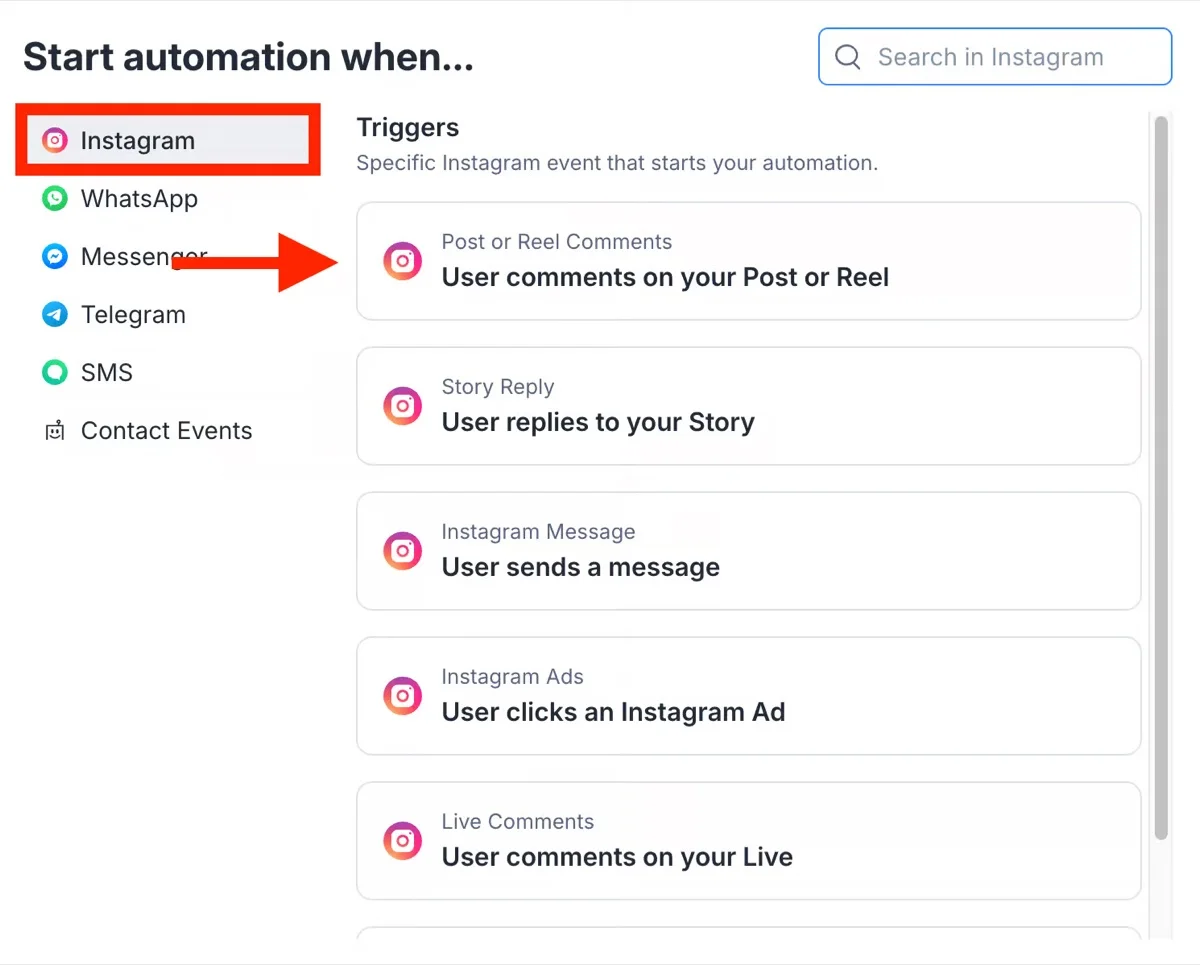
Why This Requires a Third-Party Tool (Instagram Doesn’t Offer This Natively)
Instagram does not offer keyword-triggered DM automation inside the native app.
- You connect a tool built on Meta’s official Instagram Messaging API.
- Only Business or Creator (professional) accounts can use that API.
- A personal account cannot run this at all.
Choosing a Tool Built on the Instagram Messaging API
This is the single most important choice you make. There are two camps:
- Official-API tools (ManyChat, Chatfuel, and similar). They connect the proper way.
- Unofficial “bots” that log into the account like a person and click around. This is the unauthorized access Meta’s terms prohibit, and the fast route to a restriction.
Rule of thumb: stick to the official-API camp, every time. The browser-bot “growth” services are the ones to avoid.
Building Your First Trigger-and-Reply Flow
First, select the posts or Reels where you want to enable comment-to-DM automation.
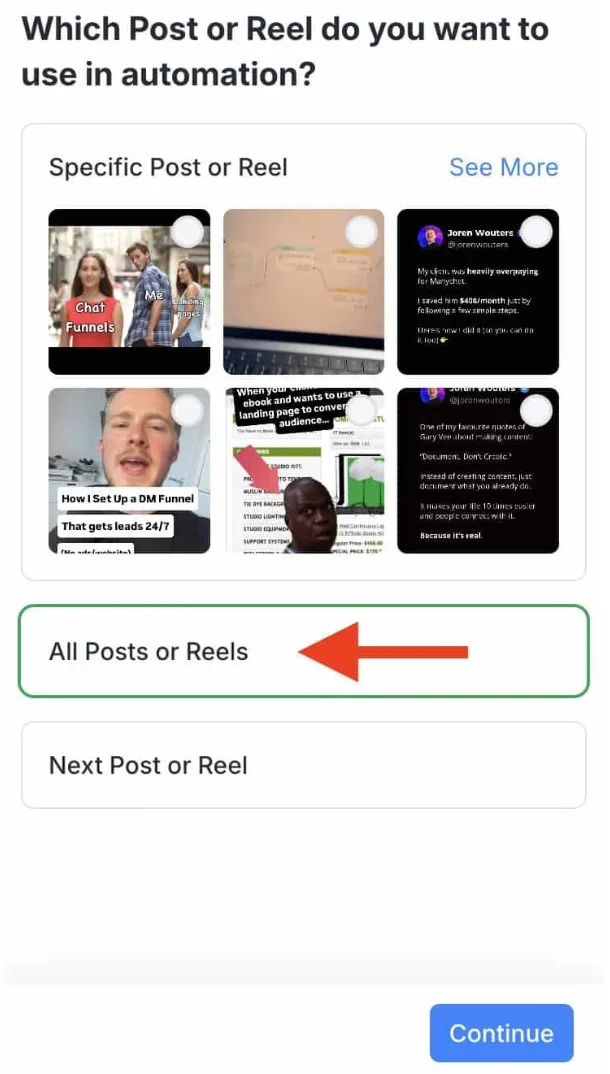
Step 1: Choose a specific keyword that users are unlikely to type by accident, such as “GUIDE” or “DEMO.”
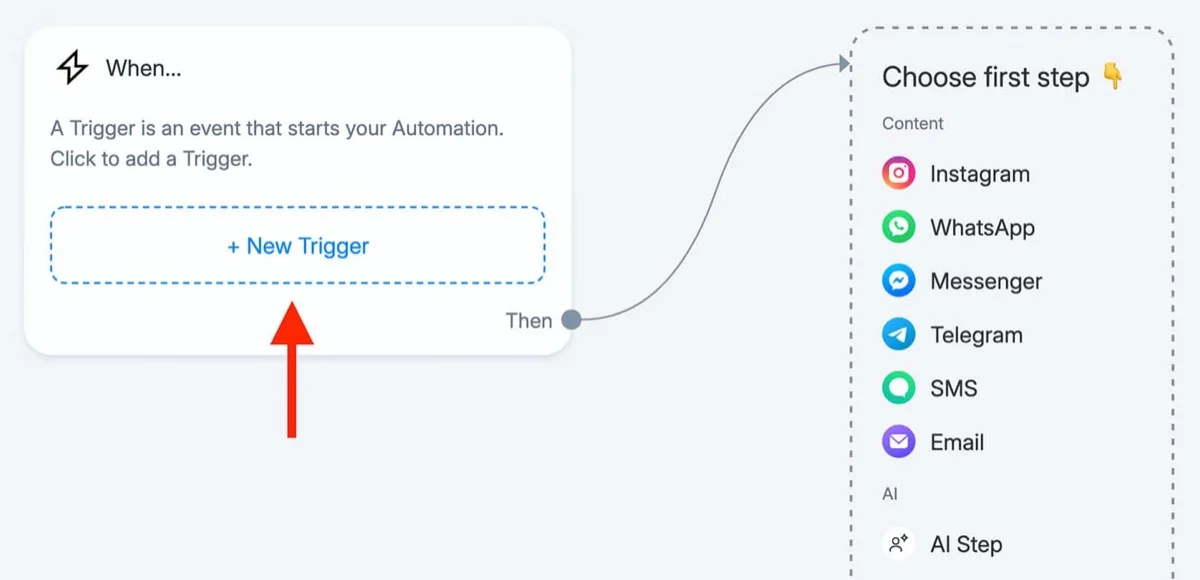
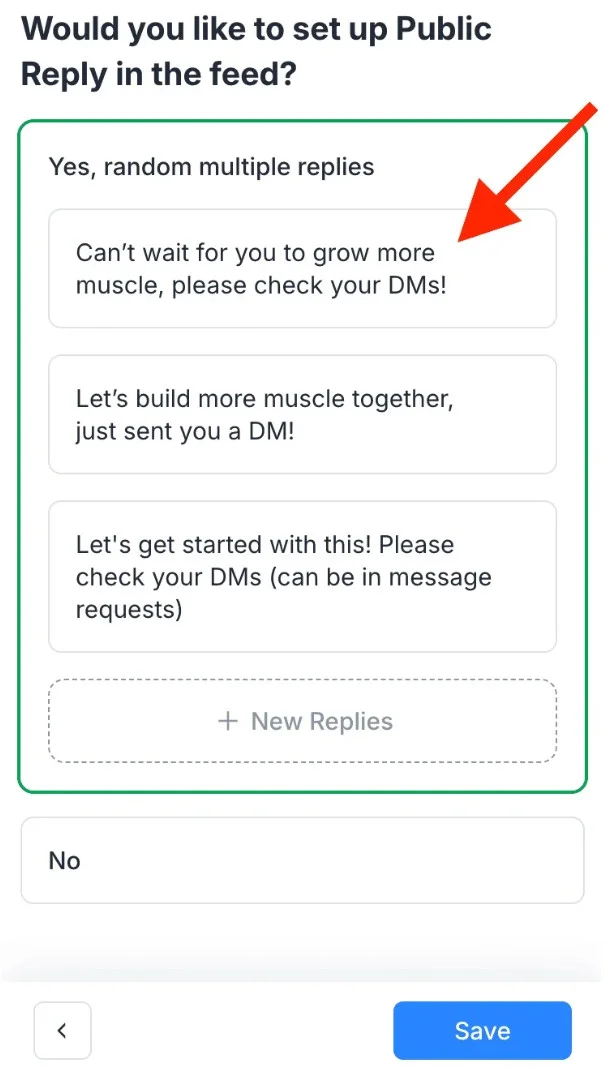
Step 2: Create a public reply that confirms their request and asks them to check their DMs.
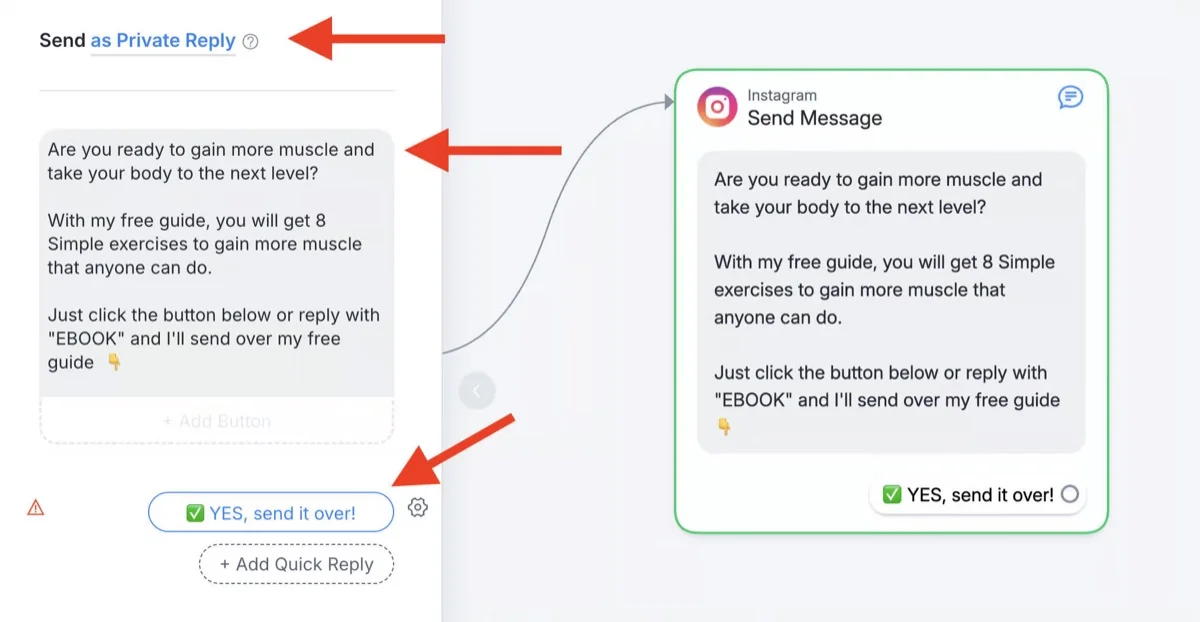
Step 3: Write a relevant DM that delivers exactly what your post promised, whether it’s a link, guide, discount, or resource.
Step 4: Include keyword variations like “link,” “Link,” or common typos so the automation works reliably.
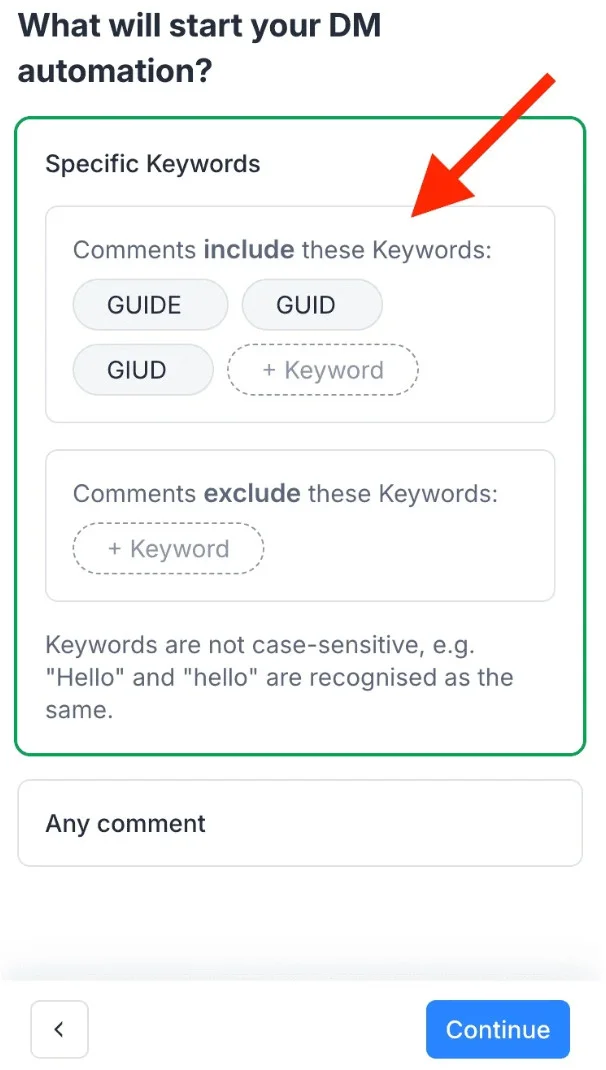
Step 5: Test the complete workflow on your own account to ensure the trigger, reply, and DM work correctly before launching your campaign.
Want more plays like this beyond the basic flow? This roundup of keyword-triggered DM automation hacks pairs several with Reels.
What Meta Actually Allows for Comment-to-DM Automation
This is where most articles get vague or plain wrong. Here it is straight from Meta’s documentation.
- The 24-hour window. After a user interacts with you, you have up to 24 hours to reply with standard messaging. Outside that window, you cannot send promotional or automated messages.
- The HUMAN AGENT exception. A narrow extension lets a real person respond up to 7 days after the user’s last message. It is for humans, not bots.
- Bot disclosure. Automated experiences must tell people they are automated: at the start, after a long gap, and when a chat hands off from a human to a bot.
- The 30-second rule. Bots classified as automated must respond within 30 seconds. Fall out of compliance, and Meta gives 7 days to fix it before your sending may be limited.
Source: Meta for Developers messaging policy
When a seller asked the ManyChat forum how to send a 48-hour follow-up, a community expert put the 24-hour rule bluntly: “You can’t message people outside the 24 hours, unfortunately, in Instagram.” (ManyChat community)
About that “200 DMs per hour” limit
You will see “200 DMs per hour” cited constantly as an official cap. It is not in Meta’s documentation anywhere. It looks like a tool-side pacing habit that got repeated until people assumed it was policy. (Other blogs claim 5,000 per hour or 300 per second, which shows how unreliable the secondhand numbers are.)
Here is what Meta actually publishes, per Instagram professional account:
| API call type | Published rate limit |
| Private replies to Live comments | 100 calls per second |
| Private replies to post and Reel comments | 750 calls per hour |
| Send API (text, links, reactions, stickers) | 100 calls per second |
| Send API (audio, video) | 10 calls per second |
| Conversations API (general messaging) | 2 calls per second |
Source: Meta for Developers, Graph API rate limiting
The one that bites: private replies to comments cap at 750 per hour.
- On a Reel with thousands of keyword comments, you hit that ceiling.
- People past it do not get their DM until the tool catches up.
- That is not a bug in your setup. It is the documented limit, and it is why “just automate everything” quietly underdelivers on viral posts.
When Should You Use Comment-to-DM Automation?
Automation earns its place on some content and hurts on other content. Match it to the moment.
Best Use Cases for DM Automation
- Viral-moment lead capture on a Reel built for reach
- Giveaways and contests where a keyword is the entry
- Product drops with a booking or purchase link
- Deflecting the same repeated FAQ so your team stops copy-pasting
When Not to Use It?
- Low-comment posts, where the setup is not worth it
- Support-heavy content, where people need a real answer
- Anything where the reply would feel like a bait-and-switch
The usual reaction is to ignore it or delete it. And comment-to-DM is not your only inbox play. For ongoing relationships, Instagram broadcast channels for community building do a job automation cannot.
How to Use It the Right Way (Best Practices)
The tools are easy. The judgment is the hard part. Two things decide it: relevance and restraint.
Writing Triggers and Replies That Don’t Feel Like Spam
Relevance: the DM has to match what the person asked for.
- Good: “Here’s the guide you asked for, plus the one thing most people miss.” That reads as help.
- Bad: a generic pitch to someone who commented “nice.” That reads as spam. For example: “sending a sales pitch when a user comments ‘Nice pic!’ is spam.” So do a quick gut-check before you publish a flow: would this message annoy you if you got it?
Keeping Response Volume and Timing Within Safe Limits
Restraint: keep it light and honest.
- Keep the first automated message short.
- Do not fire the exact same message to hundreds of people in a tight window.
- Honour the disclosure and timing rules above.
If you manage several accounts, a tool that pulls every account’s comments and DMs into one inbox, like SocialPilot, makes it easier to spot a reply landing wrong before it becomes a pattern Meta notices.
Here is the working reality you want:
- Each client’s keyword flows live in one place.
- Every automated reply ties to a real offer the post made.
- A human can jump into any conversation the second it needs a person.
- You can see at a glance which account’s automation stopped firing.
Set up that way, comment-to-DM is a lead engine you can trust in front of a client. As a pile of disconnected bots, it is a liability you cannot see coming.
What Happens If You Get Flagged? (Even With a Compliant Tool)
Here is the part almost no one tells you: an official, Meta-approved tool lowers your risk. It does not remove it.
The evidence is out in the open. In the screenshots below, an owner describes their account being disabled, and ManyChat staff confirm the platform is “an official Meta partner, fully approved for use with Instagram.”
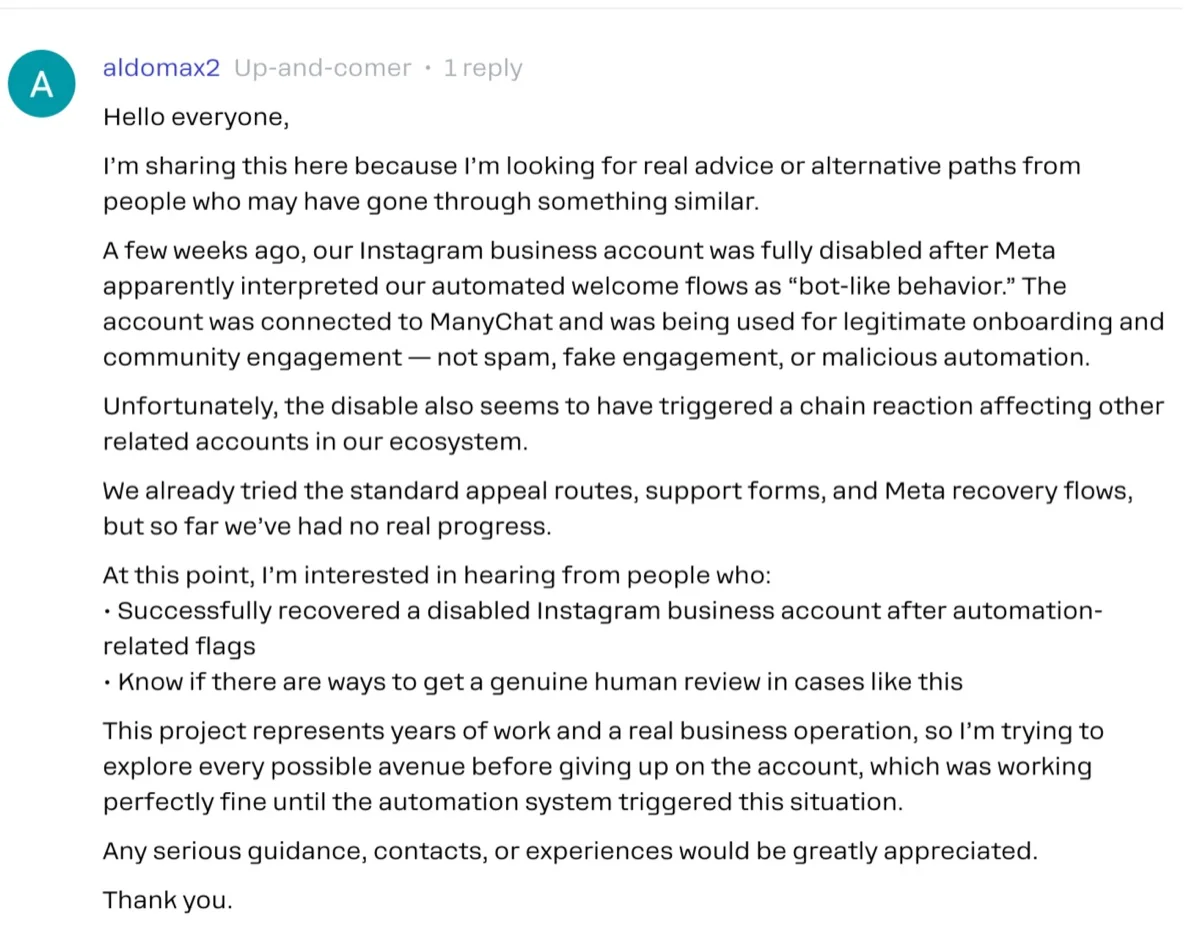
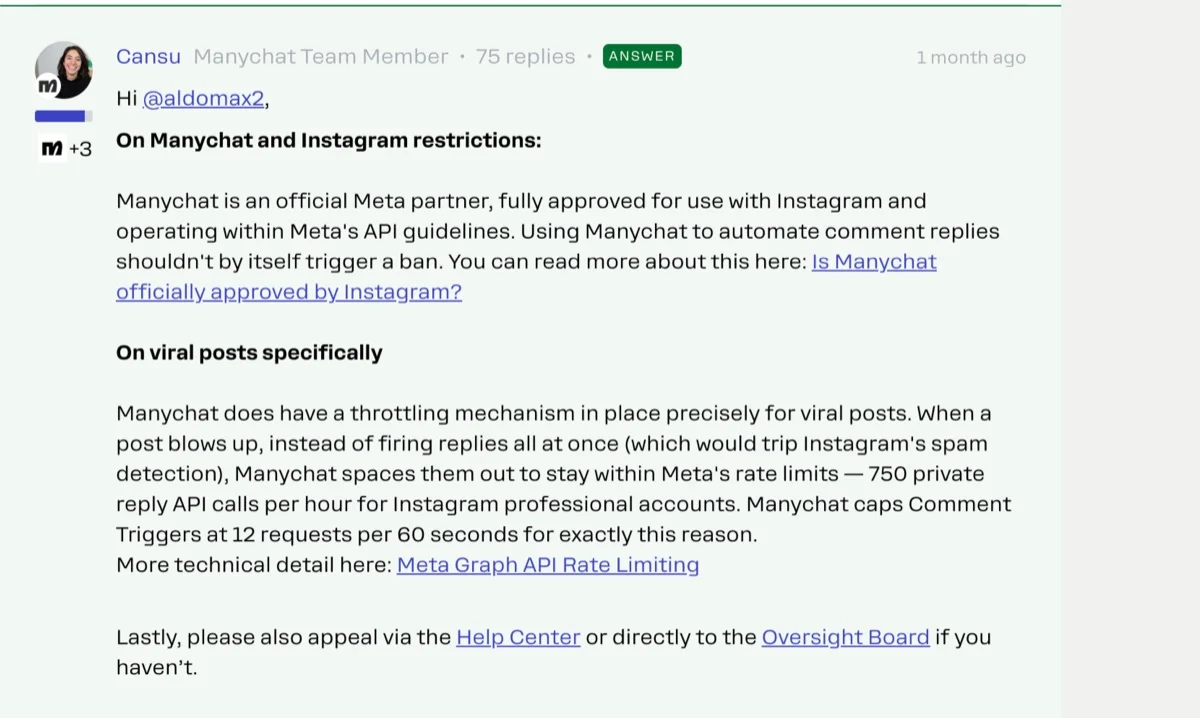
The account was still disabled, and the tool could not reverse it. (ManyChat community) Other owners on the same forum report automations that silently stop firing, and DMs that reach only a fraction of commenters.
A few honest notes on enforcement:
- Meta does not publish the exact spam thresholds that trigger a flag, on purpose. Anyone who hands you a safe “X per hour” number is guessing.
- High-cadence messaging, like a welcome flow firing fast during a follower spike, can trip detection even without bad intent.
- Appeals often route back through automated review, so recovery is slow and uncertain.
For one account, that is a scare. For many accounts, it is a problem you can actually manage:
| Risk | What to do about it |
| A single flag takes down a client account | Do not run the same aggressive flow across every account at once; stagger and vary setups |
| Automation stops silently | Check delivery per account on a schedule, not just when a client complains |
| You cannot tell a restriction is happening | Watch for sudden drops in DM delivery and reply rates as an early signal |
| One risky client behavior spreads | Keep client accounts and their settings separated, with clear access controls |
Detection is mostly about visibility. If you cannot see each account’s automation health in one view, you find out something broke when a client tells you. That is the worst time.
Comparing Tools for Comment-to-DM Automation
First, a filter: only use tools built on Meta’s official API. Unofficial bots that log in and click around like a person are the kind Meta’s terms prohibit, and sending private replies by hand does not scale. Every tool below is official-API and can run comment-to-DM.
ManyChat
The biggest name, and where most people start. ManyChat has a visual drag-and-drop flow builder, keyword triggers, comment-to-DM, story-reply automation, and AI steps. Official Meta Business Partner with a large template library and lots of integrations. The catch: pricing was restructured in 2026, and the free plan shrank, and it can feel heavy for one simple flow.
Chatfuel
An official-API tool that leans toward ecommerce. Chatfuel handles comment-to-DM, keyword flows, and AI replies, plus Shopify integration so DMs can tie to products and abandoned carts. Entry pricing is modest. Good for online stores, though less Instagram-specialized than the IG-only tools.
Inro
Built only for Instagram. Inro supports every trigger type (comment, story, DM), uses AI intent detection to route messages by what people actually mean, and includes a built-in CRM. Pricing is feature-based, so costs stay predictable as your list grows. Strong for creators and businesses focused on lead capture. Downside: Instagram only.
ReplyRush
The simple, creator-friendly pick. ReplyRush covers comment-to-DM, story replies, and lead capture, with a free plan to test the core flow and setup in a few minutes. It’s an official Meta Tech Provider. Best when you want the tactic without a learning curve and can live with fewer advanced flow-building options.
| Tool | Best for | Standout feature | Free plan | Pricing |
| ManyChat | All-round comment-to-DM at volume | Visual flow builder and big template library | Limited (shrank in 2026) | Essential plan at $17/month |
| Chatfuel | Ecommerce stores | Shopify product and cart flows | Trial only | Pro plan at $69/month |
| Inro | Instagram-only lead capture | AI intent detection and built-in CRM | Limited | Pro plan at €12.99 |
| ReplyRush | Creators wanting a simple setup | Free plan, fast setup | Yes | Lite plan at $10/month |
Pricing across the automation tools shifts often, so check current plans before you commit. For a fuller breakdown of each one’s features, pros, cons, and pricing, see this guide to the best Instagram automation tools.
Whichever you pick, pairing comment-to-DM with tactics like Instagram influencer marketing partnerships tends to compound results instead of adding one more disconnected tactic.
Automate Comment Replies Without Risking Your Account
Comment-to-DM automation works because it reaches people when they’re already interested. A simple comment can quickly turn into a private conversation, making it easier to answer questions, share links, and generate leads.
But automation only works when it’s used responsibly.
- Use a tool built on Meta’s official API.
- Send DMs only to people who asked for them.
- Follow Meta’s messaging rules and rate limits.
- Let a real person take over when the conversation needs it.
- If you manage multiple accounts, monitor them from one place so you can spot issues early.
When done right, comment-to-DM automation isn’t just another marketing tactic. It’s one of the simplest and most reliable ways to turn engagement into real conversations and, ultimately, more customers.




 Join 55,000+ social media managers


