
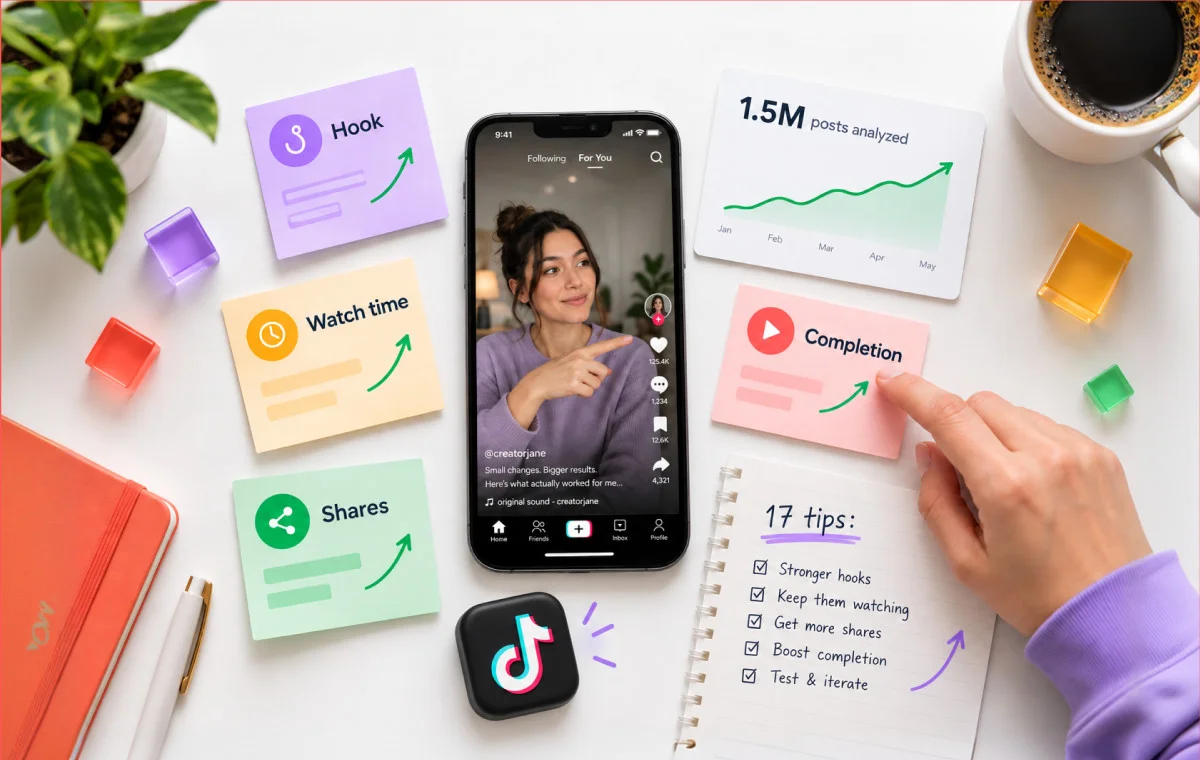
“I don’t mind being in 200 view jail. It’s better than being in 0 view hell!”
That’s how a commenter on Mike Yanda’s YouTube video put it. If you’re working out how to get more views on TikTok in 2026, and your last ten videos all stopped between 200 and 400, you probably laughed and winced at once.
Here’s what most tip lists skip: stalling is normal. When the Pew Research Center studied U.S. adults on TikTok, it found the median poster had shared just six public videos and earned 149 likes across all of them, while the most active 25% of U.S. adult users made 98% of the public videos from that group. Low numbers early on aren’t a verdict on you. They’re where almost everyone starts.
That changes the question from “what am I doing wrong?” to “where is my video stalling, and what moves that stage?”
This guide follows one video from the edit through its first hour and the weeks after, and each of the 14 tips names the TikTok signal it works on. You’ll also get straight answers on what TikTok pays in 2026.
Key Takeaways:
- A view counts the moment a video starts playing, but how far it spreads depends on how people watch it.
- Sort your fixes by timing: before you post, the first hour, and the weeks after.
- Use one to five specific hashtags and 101–200 character captions. Skip #fyp.
- Post on a steady rhythm you can keep.
- Using free view generators can result in content removal, account bans, or other enforcements.
What Counts as a TikTok View
A TikTok view counts the instant your video starts to play, even if the viewer swipes away a second later. TikTok’s own Business Help Center defines video views as the “Number of times your video started to play.” There’s no minimum watch time for that count, which is why a quick swipe-away still adds one.
The same help page adds: “For each video impression, plays are counted separately, and replays are excluded.”
Views and virality get used interchangeably, which is why so much advice feels useless when you’re stuck at 300. Views is the reach each video gets, every time you post while virality is a breakout spike far beyond your normal reach. While views rise steadily, virality is not reliable.
But you get to the audience either way. According to DataReportal’s ad reach data, TikTok’s ads could reach 2.21 billion users at the start of April 2026, an ad reach figure rather than monthly active users. For more numbers, see the latest TikTok user statistics.
With an audience of that size, your typical video has room to climb, and that’s this guide’s focus. For one big breakout, here is our full guide on how to go viral on TikTok.
The 14-Tip Framework: What to do Before, During, and After You Post
Fourteen tips sort into three stages, and TikTok judges a video on different signals at each one. The edit sets how well it holds attention, the first hour decides who sees it, and the weeks after decide whether it keeps finding viewers.
According to TikTok Newsroom, the platform ranks videos on how people interact with them and on details like captions, sounds and hashtags. For the full mechanics, read this guide on how the TikTok algorithm ranks videos.
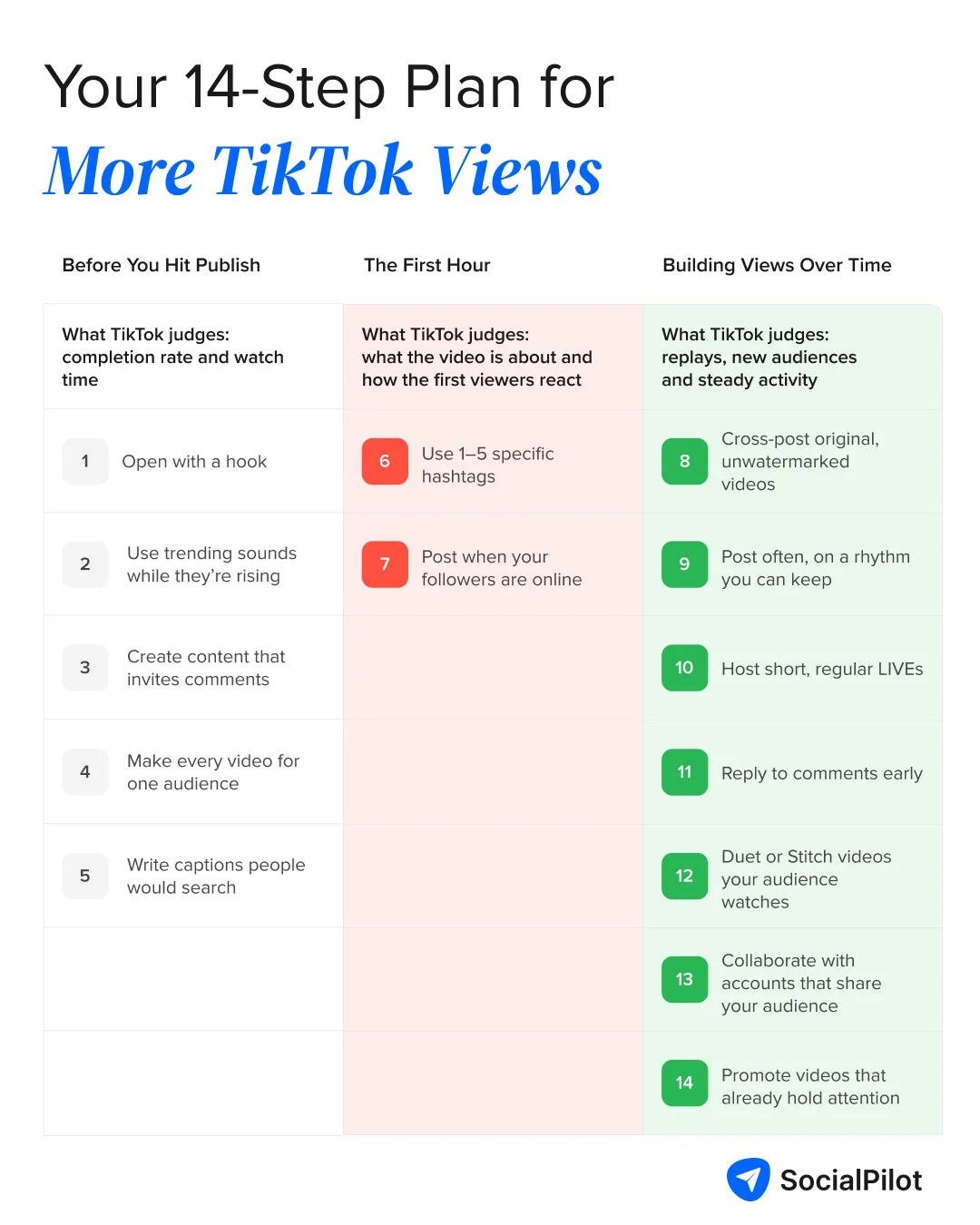
Before You Hit Publish
Most of a video’s ceiling is set in the edit, where completion rate and watch time get baked in.
1. Open With a Hook That Earns the Next Three Seconds
Signal it works on: completion rate. TikTok’s “play duration” metric covers watch time and finish rate (TikTok’s Creator Rewards announcement), and nobody finishes a video they left in second two.
Do this: Delete your greeting. Open with a bold claim, the result first or a question the viewer wants answered and put on-screen text in frame one for sound-off viewers.
On the day Duolingo announced its owl mascot had died (February 2025), it posted an 11-second clip of its cartoon characters carrying Duo’s coffin out of the office. The premise is the hook: a brand killing its own mascot gives you a reason to stay, and the clip is short enough to finish. This video has about 7.6 million likes and 93.7K comments.
2. Use Trending Sounds While They're Still Rising
Signal it works on: audio-popularity cross-referencing. The sound counts as video information, so TikTok can link you to people already engaging with it.
Business accounts get the Commercial Music Library, TikTok’s catalog of songs cleared for commercial use, so some trending songs won’t appear for you.
Do this: Catch a sound while it’s still climbing. On a business account, stick to trending tracks from that library or original audio.
Ryanair set this 10-second joke to “Beat Automotivo Tan Tan Tan Viral” by WZ Beat, one of TikTok’s most used sounds in 2025. Pairing a familiar sound with its own airline humor puts the post in front of people already engaging with that audio.
3. Create Content That Invites Comments
Signal it works on: engagement signals. Comments are considered TikTok interactions, and they show more interest than a like.
Do this: Close on a specific question (“Which would you pick?”), then answer the best comments with video replies, each a new post with a built-in hook.
In July 2026, Popeyes posted a short clip captioned “Stuck in our head fr! Drop a BOOYAH in the comments and tag us in your edits.” The ask is one word, so commenting takes a second, and the invitation to make edits gives people a reason to come back. The post drew about 27,000 comments on 8.7 million plays, one of the highest comment counts across the brand’s recent videos.
4. Pick One Audience and Make Every Video for Them
Signal it works on: content-classification signals. Stick to one topic and TikTok gets a consistent read on who to test you on.
Do this: Write one sentence about who your videos are for and drop any idea that fails it. Then try these TikTok content ideas for your niche.
If you’ve plateaued: scroll through your last ten videos. If they cover four topics, start there.
The Washington Post‘s TikTok team turned a Chris Christie hot-mic moment into a 45-second lip-sync sketch, with the full news context in the caption. Every video on the account is made for the same viewer, people in their 20s and 30s who want real news in TikTok’s own comedy style, and this one drew about 416,000 plays.
5. Write Captions People Would Actually Search
Signal it works on: content-classification signals and search value, a Creator Rewards metric.
Across about 1.5 million TikTok posts analyzed in SocialPilot’s TikTok strategy guide, Captions of 101–200 characters performed best, enough for one searchable phrase and one reason to keep watching.
Do this: Lead the caption with the phrase someone would search and say it in the video. Our TikTok SEO basics cover the same in great detail.
Canva‘s caption reads like the search someone would type: “create product videos in the Canva video editor,” plus transitions, music and text. That plain-sentence phrasing gives TikTok search a clear topic match for people looking for a how-to.
At Publish: The First Hour
When you post, TikTok runs a small test. It shows your video to a small group, and that first group leans on your followers, and your caption, hashtags and sound tell TikTok who else to try.
6. Use One to Five Specific Hashtags (and Skip #fyp)
Signal it works on: content-classification signals. Hashtags tell TikTok what a video is about. #fyp and #viral appear on almost everything, so they tell it nothing.
Our TikTok strategy guide cited above, also mentions that videos with one to five hashtags reached the most people, with a 1.16% reach rate, and reach fell sharply past 30 hashtags.
Do this: Swap #fyp and #viral (which earlier versions of this guide recommended) for three to five specific TikTok hashtags that name the topic, audience and exact problem (#sourdough, #homebaker, #sourdoughstarter).
This back-to-school post from e.l.f. Cosmetics uses four hashtags, each with a job: the brand (#elfcosmetics), its own campaign tag (#eyeslipsface), the season (#backtoschool) and the content type (#dormhaul). Four specific tags tell TikTok exactly who the video is for, with no #fyp filler.
7. Post When Your Followers Are Actually Online
Signal it works on: the initial-distribution test. If your first viewers are mostly followers and most of them are asleep, the test runs on a smaller group.
Do this: In TikTok Studio, open Analytics, then Followers, and post just before your busiest window. Our guide on the best time to post on TikTok can help you find a starting point.
The NBA posted this 10-second clip of Ja Morant’s 360-degree layup against the Nets the same night it happened, around 9:30 p.m. Eastern on November 4, 2024. Fans were still online and talking about the game, so the clip landed while interest was at its peak.
Ongoing: Building Views Over Time
After a day or two, one video’s fate is mostly set, so the work moves to the account: a steady supply of good videos, plus viewers borrowed from other creators.
8. Cross-Post Without Recycling Another App's Videos
Signal it works on: originality and For You eligibility. TikTok’s community rules say content “is also ineligible for the FYF if it includes unoriginal or reused material without anything new”, so a Reel with another app’s watermark starts behind.
Do this: Give each app its own clean, watermark-free upload. Sharing your TikTok link elsewhere is fine.
This teaser announced Mexican Pizza: The Musical, a show Taco Bell premiered live on TikTok in 2022. It grew out of a TikTok creator’s video imagining a Mexican Pizza musical, so the content was made on and for TikTok rather than cut down from a TV ad.
9. Post Often, on a Rhythm You Can Keep
Signal it works on: sustained distribution. A steady rhythm keeps fresh videos in front of followers.
Our TikTok strategy guide cited above mentions that accounts posting 6 to 15 times a week averaged a 4.85% engagement rate, ahead of those posting under 5 times (3.18%) or over 15 (3.63%). The sweet spot sits somewhere between “not too less” and “definitely not daily panic-posting:
| Posts per week | What SocialPilot’s analysis points to |
| Fewer than 5 | Too little. Followers stop expecting you, and TikTok has fewer videos to learn from |
| 6-15 | The recommended range. Enough fresh videos to stay in front of followers, with time to make each one count |
| More than 15 | Panic-posting. More uploads, but less time and care for each one |
So, posting 1-2 videos daily is completely fine. But if your posting falls further apart during your busy weeks, then we suggest you batch-film three or four videos and use a scheduler such as SocialPilot to schedule TikTok videos ahead at the times when your followers are online.
This is one of Crumbl‘s weekly lineup posts, with the week’s flavors and sale dates in the caption. Because a new lineup drops every week, fans know when the next post is coming and come back for it.
10. Host Short, Regular LIVE Sessions
Signal it works on: engagement signals in real time. Comments, follows and shares during a LIVE come from people choosing to stay.
Do this: Go live soon after a new post and send viewers to it. You’ll need at least 1,000 followers and to be 18 or older to go LIVE, per TikTok’s LIVE help page (the follower count can vary by region). Until then, put that time into the comments, Duets and collabs. Here’s how to run short TikTok LIVE sessions.
Sephora used a regular feed video to announce an upcoming TikTok LIVE, with the date, the time in two time zones and what the session would cover. Announcing the LIVE ahead of time gives followers a reason to show up when it starts.
11. Stay in the Comments, Especially Early
Signal it works on: engagement signals. A busy comment thread tells TikTok a video is worth showing to more people.
Do this: Keep the first 30 minutes after posting free for replies. If several people ask the same question in the comments, answer it with a video reply. TikTok pins their comment to your new video, so your next post comes straight from what your audience asked.
Notion answered a viewer’s comment with a full video reply, captioned “You asked, we answered!”, showing how its own team uses Notion AI. A question from the comments became the next post, and the viewer who asked got a direct answer.
12. Duet or Stitch Videos Your Audience Already Watches
Signal it works on: inherited-audience engagement. A Duet (split-screen) or Stitch (up to five seconds of someone’s clip, then yours) reaches people already engaging with the original.
Do this: Pick a video your audience already watches, tap Share, choose Duet or Stitch, and add something new.
In September 2024, creator Cassie Fitzwater posted a video asking whether Nutter Butter was okay, and it passed 2.9 million views. Five days later, the brand posted a response video tagging her, joining a conversation people were already watching instead of starting from zero.
13. Collaborate With Accounts That Share Your Audience
Signal it works on: inherited-audience engagement. When a creator your viewer already follows features you, their audience’s attention carries over.
Do this: Find accounts about your size with an overlapping audience. After each collab, check whether your follower count moved.
Rare Beauty posted a creator’s everyday makeup routine on its own account under its #rareroutine tag and credited her in the caption. The brand gets the creator’s style and audience, and the creator gets in front of Rare Beauty’s followers.
14. Use Promote on Videos That Already Hold Attention
Signal it works on: the initial-distribution test, bought instead of earned. Promote is TikTok’s paid feature that shows an existing video to more people, and if you suspect TikTok holds back organic reach to sell it, that’s a fair suspicion.
TikTok’s answer is no: “Using Promote doesn’t impact the number of views that you get on your other, non-promoted videos” (TikTok’s Promote FAQ).
Do this: Save Promote for videos whose retention already beats your average. Boosting a weak one just buys more swipes.
Why Isn't My TikTok Getting Views?
Short answer, and it’s no verdict on you: most of the time the video isn’t passing its first test. The small group TikTok shows it to swipes away before the end, so it never goes wider. The other usual causes are:
1. Posting at the Wrong Time
If your followers are offline when you post, the first test runs on a thin group, and a good video can stall at 150. Check follower activity in TikTok Studio (tip 7).
2. A Brand-New Account
New accounts swing wildly, because TikTok hasn’t learned who your videos are for yet. Another commenter on Mike Yanda’s video said: “my first 2 videos went insanely viral. Then gained consistently 1k+ views then it doubled down to 200-400 and I realized yes TikTok is still figuring me out.”
Give it a few weeks on one topic before you judge.
3. Low Engagement Signals
This is the most common cause, and the most fixable. Check the retention graph for recent videos:
- Most people leave in the first two seconds: open with a hook (tip 1).
- They leave halfway: use trending sounds so they stay longer (tip 2).
- They watch but never respond: create content that invites comments (tip 3).
4. Sensitive Content or a Shadowban
“Shadowban” isn’t TikTok’s word, but restrictions are real. A video with graphic or sensitive material can be made ineligible for the For You feed, and an account that breaks the rules can be limited.
You don’t have to guess. Content Check Lite in TikTok Studio checks whether a video may be eligible for the For You feed before posting, and Account status in your settings shows any violations or restrictions. If both are clean, look at the three causes above.
How to Get Your First 1,000 Views on TikTok
Plain consistency gets you your first 1,000 views. Pick one topic, post at least 6 videos a week on it, and borrow attention from places your audience already watches.
Here are some tips to follow:
Focus on Your Niche and Ride Real Trends
A new account is a blank file to TikTok. Make the same kind of video for the same kind of person until TikTok knows who to test it on. As one commenter put it: “I needed to narrow down to like one main topic and my 5:30 AM get ready with me for work got me to 800 views. It got me out of TikTok jail.”
Trends help when they fit your niche. Use a rising sound or format your audience already watches and add your own angle. A trend you join only for reach brings viewers who won’t return.
Little Moons, a mochi ice cream brand, joined the Dubai chocolate dessert trend by pairing its own product with it and tagging both #littlemoons and #dubaichocolate. It stayed inside the dessert niche its audience already follows, so the trend brought in viewers likely to care.
Cross-Promote and Collaborate Early
You don’t need a big following to borrow one. Share each new TikTok to channels you already have, like Instagram or a customer email list, so your first viewers are people likely to watch to the end.
Then find creators about your size in your niche. Duet or Stitch their videos with something useful to add, and suggest a simple collab.
In October 2026, Wendy’s released an emo album made with Rise Records, featuring guest vocalists from bands including Winona Fighter. This follow-up post tags Winona Fighter, which puts it in front of the band’s fans as well as Wendy’s own followers, and it drew about 1.5 million plays.
How Much Does TikTok Pay for Views in 2026?
Expect well under $1 per 1,000 views, and only once you qualify. Money comes only through the Creator Rewards Program and only on eligible videos over one minute, so under 10,000 followers the honest answer is nothing yet.
From the Creator Fund to the Creator Rewards Program
The Creator Fund launched in 2020 and paid a few cents per 1,000 views. TikTok discontinued it on December 16, 2023, in the US, UK, Germany and France, steering creators to its Creativity Program (Engadget).
That program, in beta since 2023, became the Creator Rewards Program in March 2024. It rewards original videos over a minute long on four metrics: originality, play duration, search value, and audience engagement.
So, does TikTok pay $1 per 1,000 views? Usually not, and TikTok doesn’t publish a rate. Creators who share their payouts report roughly $0.40 to $1.00 per 1,000 qualified views and Elev8or’s 2026 benchmarks put the US at about $0.85.
Qualified views come from the For You feed and exclude paid, promoted and artificial views, so you’re paid on fewer views than your counter shows.
Eligibility Requirements
According to TikTok’s program requirements, you need to:
- Be at least 18 years old
- Have at least 10,000 followers
- Have at least 100,000 video views in the last 30 days
- Have a personal account in good standing
- Post original videos longer than one minute
You also need to live in the US, UK, Germany, France, Japan, South Korea, Brazil or Mexico, which joined on October 1, 2025 (El Imparcial).
How to Apply
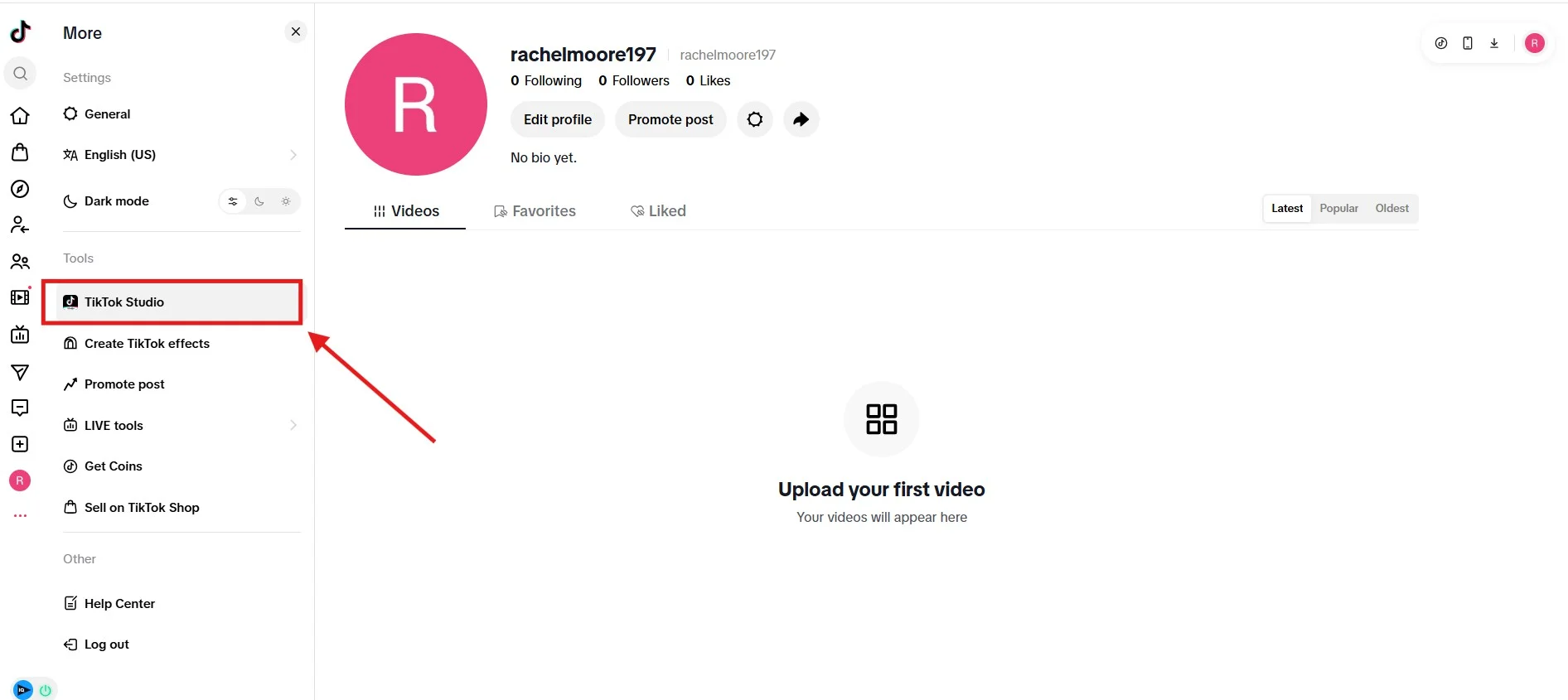
1. Open your profile. Tap More in the bottom-right corner, then select TikTok Studio from the given options.
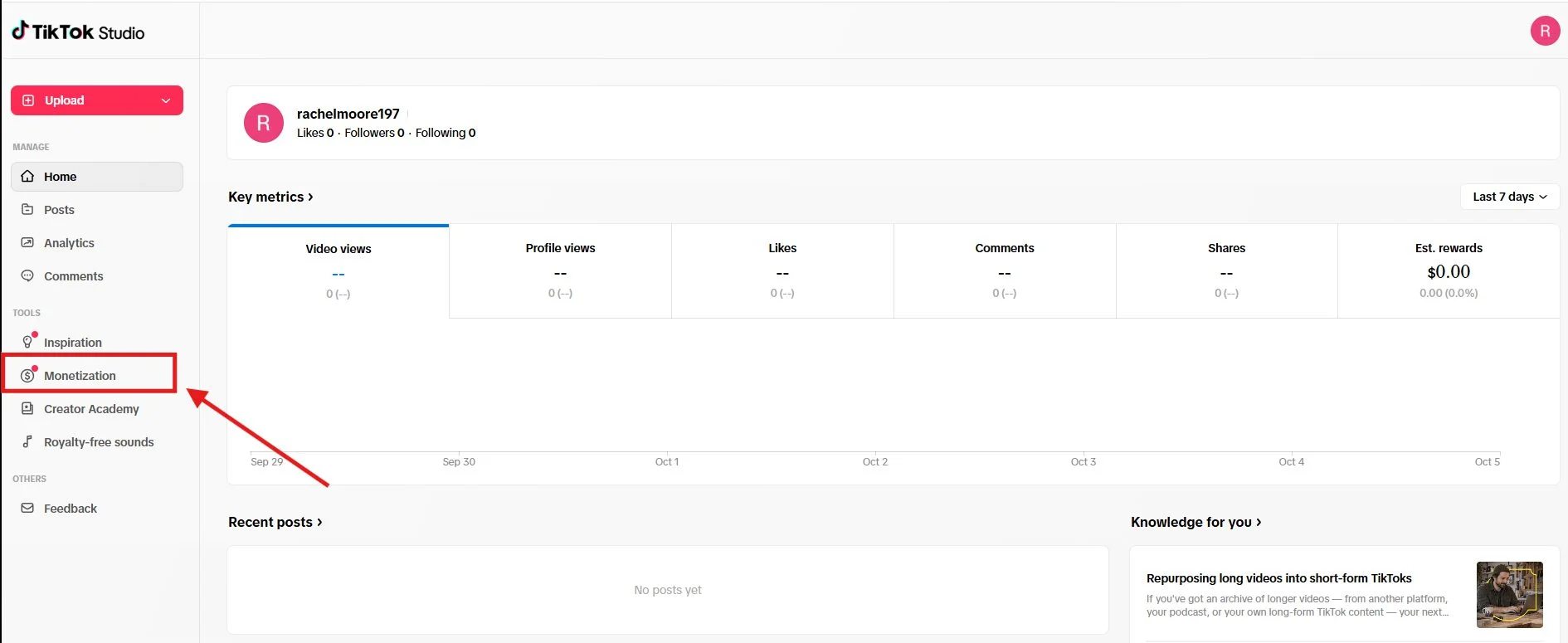
2. Go to Monetization. Scroll down in TikTok Studio and tap Monetization.
3. Choose the Creator Rewards Program. Tap Creator Rewards Program to open its eligibility page.
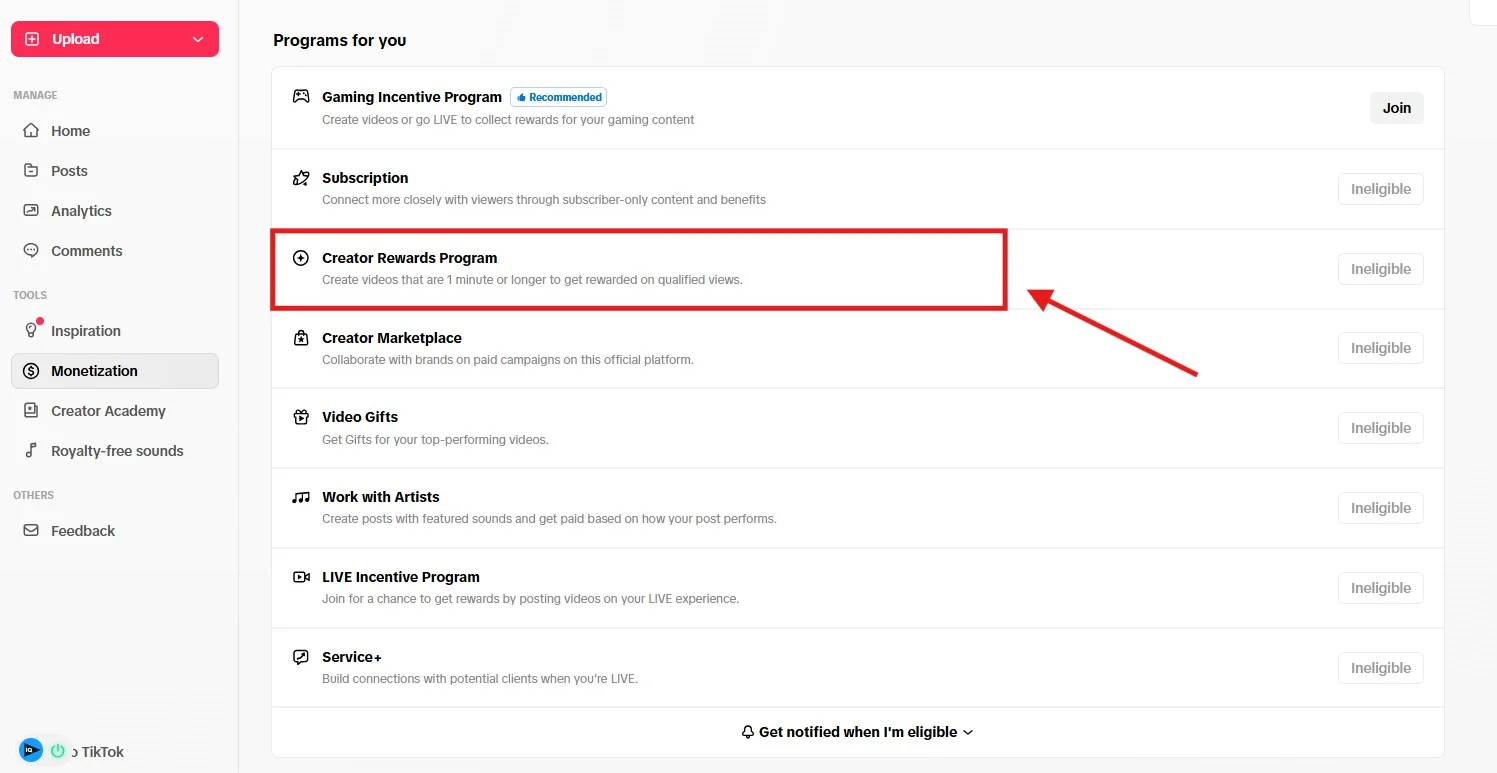
4. Check the requirements and tap Apply. The page ticks off each requirement you meet: 10,000 followers, 100,000 views in the last 30 days, and age 18 or older. If all three are green, tap “Apply” to accept the program agreement.
5. Wait for review. TikTok confirms your application and says it will review it within three days. You’ll get an email and an in-app inbox notification with the result.
6. Verify your identity and add payment details. After you join, finish identity verification and add payment information in the Creator Rewards Program dashboard before you can collect rewards.
For other ways to earn before 10,000 followers, see our guide to TikTok’s Creator Rewards Program and other income streams.
Should You Use Free View Generators? The Real Risk of Fake Views
No, however tempting it gets. Free view generators can, at best, push a number up for a while. They can’t add anything TikTok actually rewards, and they put your account at risk.
When your views won’t budge, a site promising 1,000 free views in a minute may sound like a harmless nudge. But bot views would not help you, instead they will make things worse:
- Your engagement rate drops. A thousand fake views and zero new comments make the video look less interesting, not more.
- Your analytics stop telling the truth. You can no longer see which real videos worked.
- The views can disappear. TikTok spells this out: “If we detect accounts or content with inauthentic metrics, we’ll remove fake likes, followers, or other inflated signals”.
They earn nothing, either. Creator Rewards pays only on qualified views, which exclude artificial and paid views, so even bot views that stick are worth $0.
And plenty have stopped working anyway. Even your account is at risk. TikTok’s Community Guidelines clearly state: “We strictly prohibit automation tools, scripts, or other tricks designed to bypass our systems. These can result in content removal, account bans, or other enforcement.”
If TikTok finds deceptive behavior, the same guidelines say it may ban your account, ban new accounts you create, or restrict your account.
Start Your TikTok Growth Journey
Watch your median over the next two months and ignore your best video. If the typical video moves from 250 to 600 in that time, the framework is working, even if nothing ever explodes.
Start this week. Pull up the retention graphs for your last five videos, find the second where most people leave, and work on the phase that fixes it. Keep everything else steady and compare again in a month.
And if a steady rhythm is what keeps slipping, a scheduler takes the timing off your plate. You can queue a week of TikToks at the times your followers are online and see what SocialPilot costs on the plans and pricing page, with a 14-day free trial and no credit card needed.



 Join 55,000+ social media managers


