
You post a Reel you’re proud of. The idea is good, the edit is clean, and you hit publish feeling sure about it. Then it stalls a few hundred views and never moves again.
Meanwhile, a quick clip from someone else reaches millions of people who have never heard of them. It’s easy to blame luck, the algorithm, or a shadow ban.
But going viral isn’t random. Every new post gets a small test run first, and Instagram only pushes it further when people respond. If you want to learn how to go viral on Instagram, you need to know what happens during that test.
This guide breaks it into three simple stages: the Hook, the Hold and the Share. You’ll learn what each stage needs and how to tell which one is holding your post back. You’ll also see how many views actually count as viral for an account your size.
Let’s start with what makes a post take off.
A post goes viral when Instagram keeps showing it to people who don’t follow you. That choice rests on three signals named by Instagram’s head, Adam Mosseri. “The top three signals that matter most for ranking are watch time, likes, and sends,” he said.
He further added that Sends weigh slightly more when a post reaches non-followers.
So what is viral content on Instagram? It’s a post strangers keep watching and passing on. If you also want higher view counts on everything you post, start with our guide on how to get more views on Instagram.
Now, here are the three things that can make your post take off.
Initial Engagement Velocity: The First Hour
Initial engagement velocity is how fast a new post collects reactions after you publish it. Instagram hasn’t published a first-hour rule. It does show a new post to a small group first, then widens it if that group responds. Read this guide to learn more about how the Instagram Reels algorithm ranks your posts.
Instagram’s own ranking guide lists a Reel’s “popularity” among the signals it uses. Early reactions are the first popularity a new post can show. Creators call the first hour the moment that test starts.
Watch Time and Completion Rate
Watch time is how long people spend on your post. Completion rate is the share of viewers who reach the end. Mosseri also mentions that creators must pay close attention to average watch time. Instagram’s ranking guide also says it predicts how likely you are to “watch a reel all the way through.”
As per Instagram Creators insights from August 2025, Instagram added a retention chart to Reels Insights and replaced view rate with skip rate. Skip rate is the share of viewers who swipe away in the first 3 seconds.
Instagram also says, “the flatter the retention line, the more engaged your audience is.” A steep early drop means people left before your point arrived.
You can use these Instagram analytics tools to compare the retention rate of multiple posts on your Instagram page.
A share or send is when someone passes your post on, usually to a friend in their DMs. In his Reel cited above, Adam Mosseri, says that sends count a little more when your post reaches unconnected accounts and is seen by people who don’t follow you.
That ties sends closely to reaching strangers. Instagram’s ranking guide also backs this up. The first of its most important predictions is how likely you are “to reshare a reel.”
Those three signals don’t all show up at once. Each one matters at a different point in a viewer’s journey, from the first glance to the moment they hit send.
Here’s how they fit together.
| Stage | Its job | Signal it feeds | Where to check it in Insights |
| Hook | Stop the scroll in 3 seconds | Initial engagement velocity | Skip rate |
| Hold | Keep people watching | Watch time and completion rate | Average watch time, retention chart |
| Share | Give people a reason to pass it on | Shares and sends | Sends per reach, shares |
If a post stalls, check this table first to see which stage broke. Then fix that stage. Let’s start with the Hook.
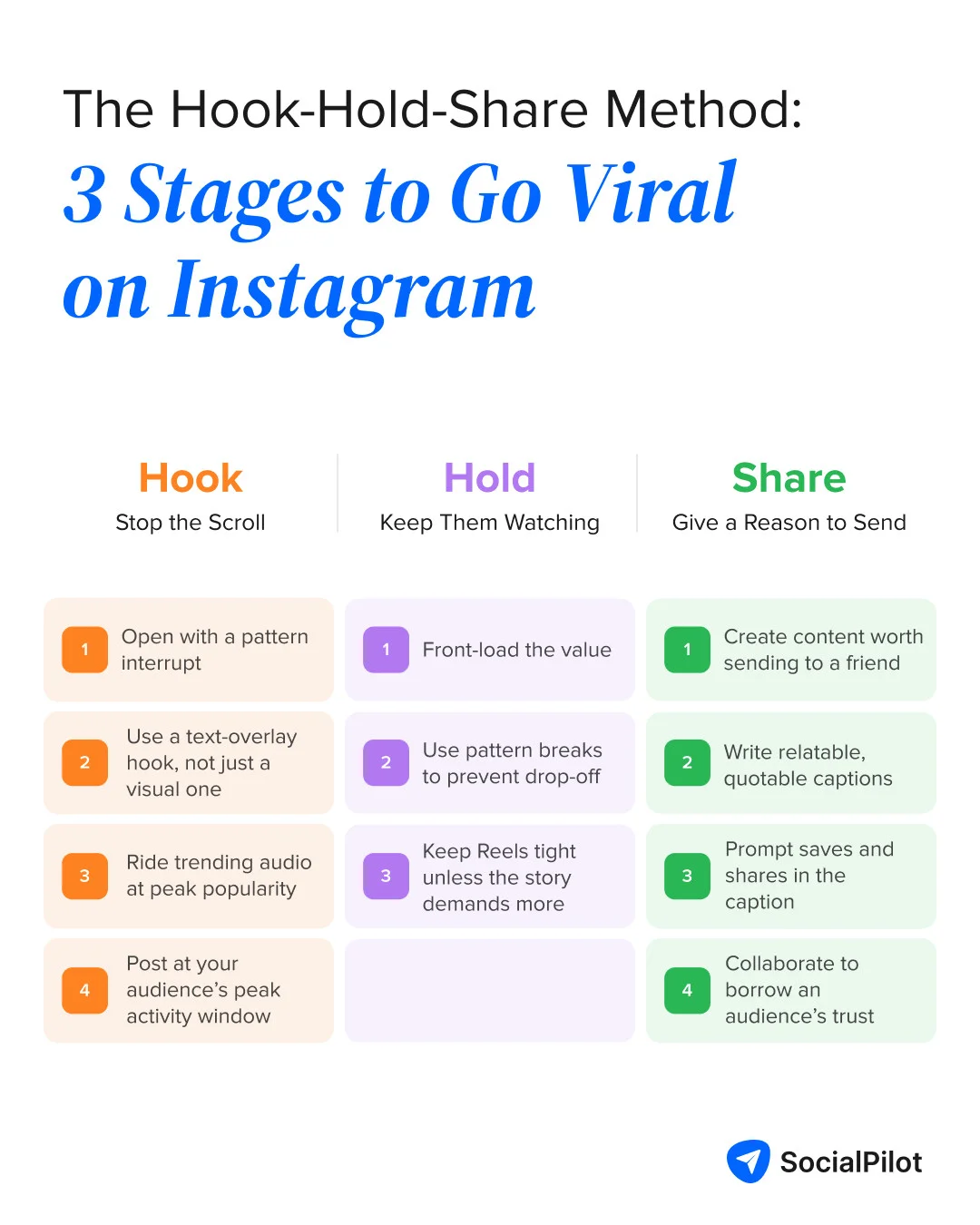
The Hook: Stopping the Scroll in the First 3 Seconds
Three seconds is all you get before a viewer stays or swipes. Your first frame and first line have to win that moment. A strong hook gets the test group reacting fast, which is what initial engagement velocity measures.
For ideas, browse these Instagram Reel hook examples by niche.
1. Open With a Pattern Interrupt
Nobody reacts to a post they swiped past. A pattern interrupt, anything that breaks the scroll’s rhythm, protects initial engagement velocity by stopping the swipe.
Think movement, a sudden cut or something unexpected in frame. A bakery can open with the knife already halfway through the cake. The first frame should never be setup.
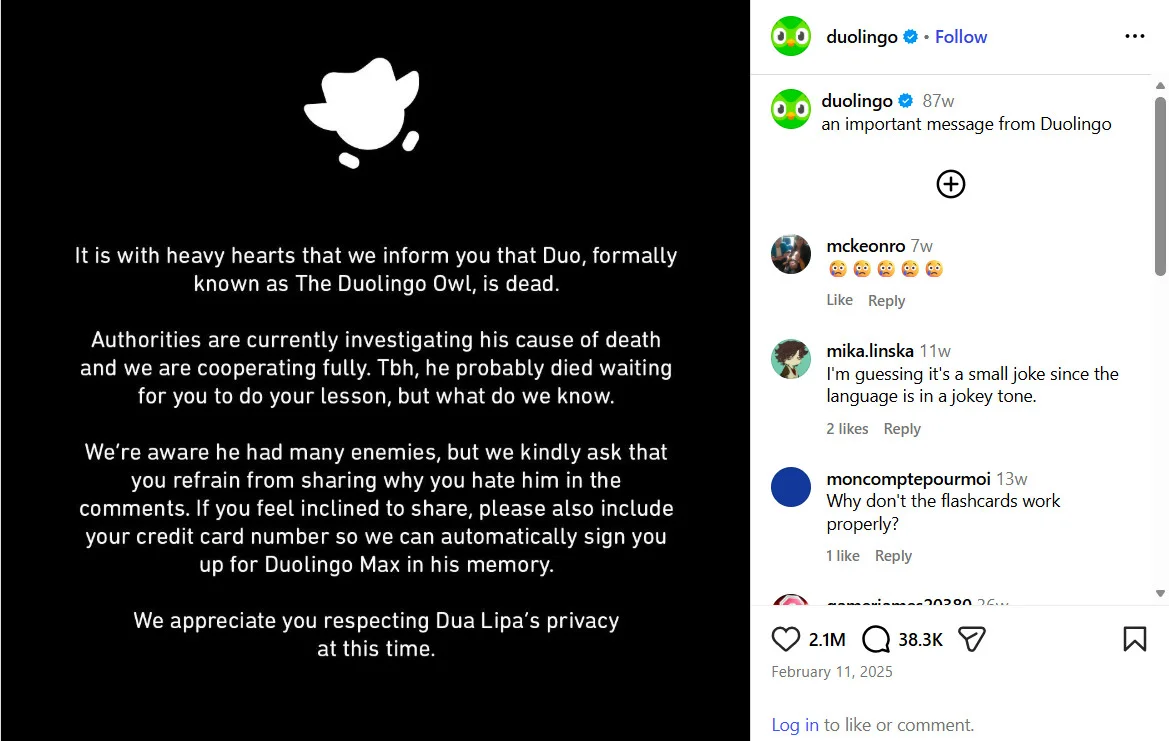
In February 2025, Duolingo posted a plain black notice saying its owl mascot, Duo, “is dead.” A playful brand suddenly going dark broke the scroll. The shock pulled people into the comments fast, with more than 38,000 so far.
2. Use a Text-Overlay Hook, Not Just a Visual One
Some people scroll with the sound off, so a spoken hook misses them. A text overlay, a short line on screen in the first frame, reaches them anyway. It lifts initial engagement velocity by telling viewers what they’ll get before they swipe.
A freelancer’s line like “Your invoice template is costing you clients” works with or without sound. Keep it to one idea.
Canva‘s tutorial Reel opens with the words “Recreate this in Canva” on screen. You know the promise before anything happens, even on mute. The caption, “No, that wasn’t a glitch,” teases the effect and gives you a reason to watch.
3. Ride Trending Audio at Peak Popularity
A trending sound, one many Reels are using right now, already feels familiar to viewers. Join it early and that familiarity can lift initial engagement velocity.
Catch it while it’s rising in your niche, not after everyone has used it. Our Instagram Reels trends roundup tracks sounds as they move. But make sure to pick a sound that fits your idea.
Around Valentine’s Day 2026, prom and bridal boutique Wildwood Bridal jumped on the “Want Some More” trend, set to Nicki Minaj’s song. The format is simple: hold a pose, then reveal a new look on the beat drop. The shop used it to show off prom looks with the caption “Don’t throw shade on Valentine’s Day!”
4. Post at Your Audience's Peak Activity Window
Posting when your followers are online helps initial engagement velocity, since more of the test group sees the post quickly.
We studied about 250,000 Reels from more than 30,000 accounts connected to SocialPilot. In our guide on the best time to post Reels on Instagram, the best window was 8 am to 12 pm, Monday to Thursday.
Use that as a starting point, then check your own follower activity in Insights.
NASA shared its Artemis II Moon photos during the mission, after the crew flew around the Moon on April 6, 2026. Its audience was already online and following the flight. Posting while attention peaks gives a post the fast early reactions this stage needs.
The Hold: Keeping Viewers Watching to the End
Once a viewer stops, you have to keep them. Watch time is the first signal Mosseri named, so this stage matters.
SocialPilot’s Instagram Trends Report 2025 studied 4.4 million posts from 45,700 accounts. Videos earned 49% more reach than carousels and static posts. That reach only lasts if people keep watching.
If you’re new to Insights, start with reading your Reels analytics.
5. Front-Load the Value
Showing the payoff early, called front-loading, protects watch time and completion rate.
Show the finished cake in second one, then show how you made it. People don’t mind knowing the ending. They mind waiting with no idea why.
Bon Appétit‘s coconut-sesame shrimp Reel leads with the finished plate of crispy shrimp and dip. The caption then promises, “Here’s how to make it.” You see the reward first, so you stay for the steps.
6. Use Pattern Breaks to Prevent Drop-Off
A pattern break is a small change every few seconds, like a new angle, a zoom or fresh text. Each one resets attention, which keeps watch time and completion rate up.
Your retention chart shows where they belong. Find where the line dips, add a cut just before it, and remove dead air.
Gymshark‘s women’s account posted a short Reel built around a quick outfit-change transition. The caption jokes, “If only getting dressed was this easy.” The sudden switch resets attention, so viewers stay to see the change.
7. Keep Reels Tight Unless the Story Demands More
Length should follow the payoff, not a target number. Every extra second has to earn its place, or it drags down watch time and completion rate.
If your retention chart drops hard at the eighth second, your Reel is really eight seconds long. A longer Reel is fine when the story needs the time. In our SocialPilot’s Instagram trends report cited above, Reels of 60 to 90 seconds got 24% more shares and the highest reach of 19%. Tight means no dead air, not always short.
End on a frame that loops back to the start to invite a rewatch.
Ryanair‘s “if it fits, it flies” Reel runs about nine seconds. It lands one joke and ends. A Reel that short is easy to finish and easy to watch twice.
Shares and sends carry your post from one person’s circle into another’s, and that’s how it reaches strangers.
Saves do a different job. A save means “useful for me later.” A send means “you need to see this.”
Wondering how to make a post go viral on Instagram without a Reel? Try a carousel. Our research also found that carousels were 17.27% of posts but brought in 22.73% of engagement. Try these Instagram carousel formats to get more Saves.
8. Create Content Worth Sending to a Friend
Send-worthy content gives the viewer a specific person to send it to. That drives shares and sends; the signal tied to reaching non-followers.
Common send triggers include:
- Tag-a-person: “the friend who always orders the same thing”
- Useful for someone: a fix a coworker needs today
- Settles an argument: proof for one side of a common debate
- “This is so us”: a moment couples or teams recognize
If you can’t name who it gets sent to, it won’t get sent.
Headspace turned a line almost everyone has said, “sorry I’m grumpy, I barely slept last night,” into a swipeable carousel. It explains the feeling in a simple, useful way. That makes it easy to send to the friend or partner it describes.
9. Write Relatable, Quotable Captions
Give the sender something to say. One line worth repeating does that, and it supports shares and sends.
Write the line your viewer would type into the DM, and put it first. “This is literally you on Mondays” travels further than a paragraph about your brand. The rest of the caption can run longer. In our 2025 Instagram study, captions over 300 characters drew 70% more comments.
BBC Earth paired a clip of a red fox with the caption “Footage of me jumping back into bed after doing the bare minimum.” That one line is the part people repeat and send. The fox facts below it keep the post useful too.
10. Prompt Saves and Shares Directly in the Caption
Asking works, if you ask for something specific. A caption prompt to save or send the post nudges shares and sends.
“Share this” is easy to ignore. “Send this to the friend who still uses a paper planner” gives them a person and a reason.
Crayola‘s caption spells out exactly what to do. Pick a color from Caydence’s drawing, create something, then tag @Crayola and #StayCreative to “share your creativity.” A clear ask like this gives viewers a reason and a way to pass the post on.
11. Collaborate to Borrow an Audience's Trust
A collab post is one post published on two accounts at once. It helps shares and sends early, because a second audience that already trusts your partner sees it.
Pick a partner whose followers would care, like a bakery and a local coffee shop. Here’s how to set up an Instagram collab step by step.
Zappos and Allbirds shared a Collab post about a sneaker swap they ran around the New York City Marathon. As Shopify points out, it went to both brands’ followers at once. Each brand borrowed the trust the other had already built.
The number that counts as viral grows with your follower count. As a rule of thumb, a Reel has gone viral at 3x to 10x the typical views for your tier, mostly from non-followers. That multiplier is ours, since Instagram doesn’t publish a viral threshold.
Ten thousand views is a breakout for an account with 2,000 followers. For an account with 500,000, it’s an ordinary day.
One Quora user wrote, “My first Instagram reel got 4k views in just 4 to 5 hours.” Nothing after it reached 1k. For a small account, that first Reel was a real breakout.
Then check your non-follower share in Insights. A post seen mostly by followers did well, but it didn’t break out.
Socialinsider’s 2026 benchmarks cover 35 million posts from 447,613 pages, using 2025 data.
| Followers | Average Reel views (Socialinsider) | Breakout range (our rule of thumb, 3x to 10x) |
| 1K to 5K | 580 | 1,740 to 5,800+ |
| 5K to 10K | 1,000 | 3,000 to 10,000+ |
| 10K to 50K | 2,460 | 7,380 to 24,600+ |
| 50K to 100K | 6,095 | 18,285 to 60,950+ |
| 100K to 1M | 16,035 | 48,105 to 160,350+ |
Socialinsider found that accounts with 1,000 to 5,000 followers average 580 views per Reel. A few thousand views from non-followers is already a breakout at that size.
If you’ve spent hours building hashtag lists, this part stings. Hashtags won’t make a post go viral in 2026. Instagram now caps them at five per post.
But hashtags still have a job. As Mosseri mentions, hashtags let your audience know what a post is about. For more, see our guide to choosing hashtags for Reels.
Trending Hashtag Categories to Use Right Now
With five slots, pick one tag from each category that fits. “Trending now” lists go stale in weeks, so here are types instead. The example tags are made up to show each type, not live trends.
| Category | What it tells Instagram | Example for an Austin bakery |
| Niche topic | What the post is about | #sourdoughbaking |
| Community | Which group it belongs to | #homebakersclub |
| Location | Where it’s from | #austinbakery |
| Branded | Who made it | #[yourbakery]bakes |
| Event or seasonal | Why it’s timely | #holidaybaking |
Swap in your own niche, place and season, then check each tag’s recent posts.
Not sure which tags fit your post? Try SocialPilot’s free Instagram hashtag generator. Describe your post, and it suggests relevant hashtags in seconds. It’s free to use, and you don’t need to sign up. Then pick the five that best match your categories.
Instagram Caption Generator
Generate scroll-halting Instagram captions with our AI-powered Instagram Caption Generator.
Here is the Generated Result
To learn where to place tags and how to build a full strategy, read our Instagram hashtags guide.
Two Instagram tools matter more than any tag: Trial Reels and the originality rule.
Trial Reels go to non-followers first, with metrics about 24 hours after sharing. Use them to test two or three hook versions of one idea, then keep the winner. They’re also the honest answer to how to go viral on Instagram without followers.
Instagram can share a Trial Reel with your followers automatically if it performs well in its first 72 hours.
The originality rule decides whether strangers see you at all. Instagram’s original content guidelines say accounts posting mostly unoriginal content “may not be seen in recommendations to new audiences.“
Narration or text that adds context counts as a real edit. Borders, watermarks, speed changes and a credit line don’t. Eligibility returns once most of your posts in a rolling 30-day window are original.
When one post breaks out, follow it with a related one. A short series gives new viewers a reason to stay.
If your real goal is higher view counts on every post, this guide tells you how to get more views on Instagram.
Going viral isn’t luck. It happens when strangers stop, stay and share. Before your next post goes live, run three quick checks.
- Hook: Would a stranger stop scrolling in the first 3 seconds?
- Hold: Does the payoff land before viewers drift away?
- Share: Can you name who this gets sent to, and why?
If one answer is no, fix that stage first. If you’re still unsure, test the post as a Trial Reel.
When a post does take off, move fast. Reply to comments, check that your bio says what you do, and have a follow-up post ready.
That last step is where planning pays off. With SocialPilot, you can plan your Reels on one content calendar, add collaborators while you schedule, and publish Reels straight to Instagram. Your follow-ups are ready before the spike, not after it.
Try SocialPilot free for 14 days, no credit card needed. Explore SocialPilot’s pricing plans and pick the one that fits how you work.


 Join 55,000+ social media managers


