

A good social media scheduling tool takes much of that work off your plate. You can plan posts across channels, manage your publishing calendar in one place, and keep your accounts active without logging into every platform.
But with different tools offering different channel limits, features, and pricing models, choosing one isn’t always straightforward.
We’ve compared 10 of the best social media scheduling tools in 2026 to help you find one that fits your workflow and budget.
Our own tool, SocialPilot, is priced and scored the same way as the other nine tools featured in this blog. It suits you once you run five to seven accounts and want them all on one flat plan.
Why Your Business Needs a Social Media Scheduling Tool
Posting straight from each app works while you run one or two channels and have time most days. Once you post to four or five, the work is less about writing and more about logging in, uploading and remembering, and a scheduler takes most of that off your hands.
The Cost of Posting Everything Manually
Each network’s own app was built for posting to that network, one post at a time. That gets expensive in time once a small business runs several of them.
- Five apps for one post. The same photo and caption get uploaded five times, with a different login and a different crop each time.
- Gaps in your busiest weeks. Posting is the first thing to slip when the diary fills up, so the feed goes quiet right when work is coming in.
- Built-in schedulers stop at their own network. A network’s native scheduler posts only to that network, so five channels still means several calendars to keep in step.
- No view of the week. Without one calendar, you can’t see that Tuesday has three posts lined up and Thursday has none.
What a Social Media Scheduling Tool Does
A social media scheduling tool is software where you write a post once, pick the channels, set a time, and it publishes for you while you get on with the day. For a small business, a good one covers five basics:
- Batch a week at once: Look for bulk upload or a posting queue.
- One post, many networks: Look for per-network editing and previews.
- Your channels covered: Check that every channel you use is included on your plan.
- A free start: Check that the free plan’s limits fit your posting week.
- Proof it worked: Look for analytics on the entry plan.
Social Media Scheduling Tools at a Glance
Not every social media scheduler is built for the same needs or budget. Here’s a side-by-side look at all 10 tools to help you narrow down your options:
| Tool | Best For | Entry Price | Free Plan | Pricing Model |
| SocialPilot | Agencies and small businesses | $30/mo | No, free trial without a card | Flat per plan |
| Zoho Social | SMBs and startups | US$15/mo | Yes, but no scheduling | Flat per brand |
| Metricool | Freelancers and small agencies | $25/mo | Yes, 20 posts a month | Per brand tier |
| Meta Business Suite | Creators and local businesses | Free | Free to use | Free |
| Buffer | Solo entrepreneurs and creators | $6/channel/mo | Yes, 3 channels | Per channel |
| Publer | Online sellers and small teams | $5/account/mo | Yes, 3 accounts | Per social account |
| SocialBee | Solopreneurs and small businesses | $29/mo | No, 14-day trial | Flat per plan |
| Later | Creators and SMBs | $25/mo | No, 14-day trial | Per social set |
| Hootsuite | Enterprises | $99/user/mo, billed annually | No, 14-day trial | Per user |
| Sprout Social | Enterprises and multi-location brands | $99/seat/mo | No, 30-day trial | Per seat |
Detailed Overview of the Top 10 Social Media Scheduling Platforms
Here’s a breakdown of all 10 platforms, covering their scheduling features, user experience, pricing, limitations, and who they’re best suited for.
1. SocialPilot – Best for Agencies and Small Businesses
SocialPilot is a social media management tool for small businesses and agencies, with scheduling, analytics, a social inbox and client approvals in one dashboard.
Key Features:
- Content calendar
- Bulk scheduling
- AI Pilot
- Social inbox
- Analytics and white-label reports
- Client management and approvals
- MCP server
What it actually looks like: You open Calendar in Month view, or switch to List, Day or Week. Each day stacks Facebook, X, LinkedIn and Instagram posts under colored labels like Quote Post, with times and double-tick statuses. Busy days end in “+1 more”. AI Pilot writes captions and hashtags, and the MCP server lets Claude or ChatGPT schedule posts for you, and Enterprise teams can request API access to plug SocialPilot into their own systems. From Premium, agencies and MSPs get client management with login-free client approvals and white-label reports.
Furkan A., founder of a 2–10 person design business, wrote on Capterra: “Post scheduling is probably the feature I use the most. Preparing content in batches and seeing everything on a calendar makes weekly planning much easier.”
On G2, SocialPilot is rated 4.5 out of 5 across 848 reviews. On Capterra, it is rated 4.4 out of 5 across 373 reviews.
What it does well: Essentials includes Smart Queue, first comments, repeat posting and Google Business Profile publishing.
According to SocialPilot’s pricing plans, Essentials runs $25.50 a month billed annually ($30 month to month) for 1 user and 7 accounts, your five-channel price. Standard is $42.50 annually or $50 monthly for 15 accounts, Premium $85 annually or $100 monthly for 25, and Ultimate $170 annually or $200 monthly for 50 with unlimited users. Enterprise is quoted, and the free trial needs no credit card.
What running SocialPilot standalone requires: Standard, because analytics and the inbox start there, and Premium for bulk scheduling from a CSV.
2. Zoho Social – Best for SMBs and Startups
Zoho Social is the social media tool in Zoho’s business suite, with scheduling, a monitoring dashboard and reports, and it connects to Zoho CRM.
Key Features:
- Publishing calendar
- SmartQ
- Bulk scheduling
- Zia AI assistant
- Zoho CRM integration
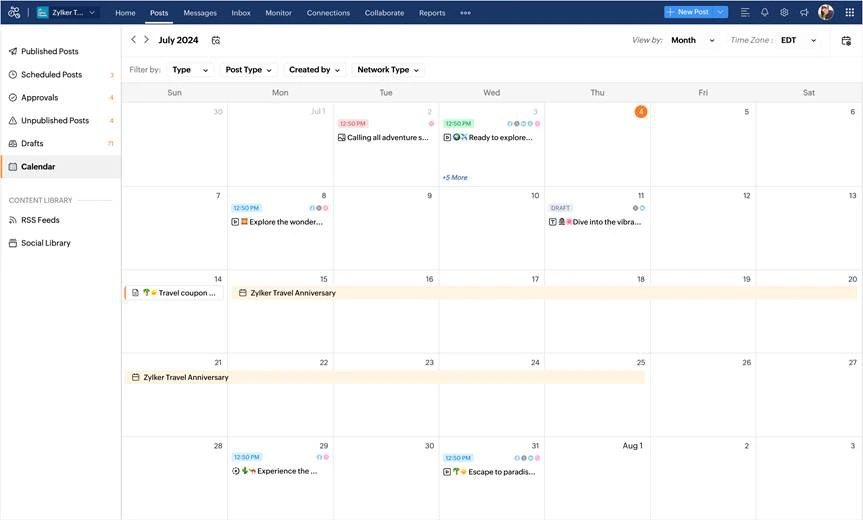
What it actually looks like: From Posts you open Calendar in Month view. Blue means scheduled, green published, orange failed and grey draft. You filter by type, post type, creator or network, then click New Post.
A managing director who tested it on a free trial wrote on Capterra: “50% extra if you want to pay month-to-month; for SMEs wary of making long-term buying decisions this feels like a lot”.
On G2, Zoho Social is rated 4.6 out of 5 across 2,992 reviews. On Capterra, it is rated 4.7 out of 5 across 3,491 reviews.
What it does well: Standard covers every small-business channel, and an orange failed post is hard to miss.
According to Zoho Social’s pricing page, Standard runs US$10 a month billed annually (US$15 month to month) for one brand (14 channels, 1 team member), so five channels cost the base price. Professional (US$30 annually, US$40 monthly) adds bulk scheduling, and Premium (US$40 annually, US$65 monthly) brings 3 team members and the inbox. A 15-day trial needs no credit card.
What running Zoho Social standalone requires: Professional to batch a month at a time, because the Bulk Scheduler and CustomQ start there. Pinterest posts may need duplicating when limits differ, as one reviewer found. If either stings, see these Zoho Social alternatives.
3. Metricool – Best for Freelancers and Small Agencies
Metricool pairs a social media planner with analytics for your social profiles, website and ads, all in one dashboard.
Key Features:
- Planner with Autolists
- Best times to post
- Social, web and ads analytics
- Competitor analysis
- AI assistant
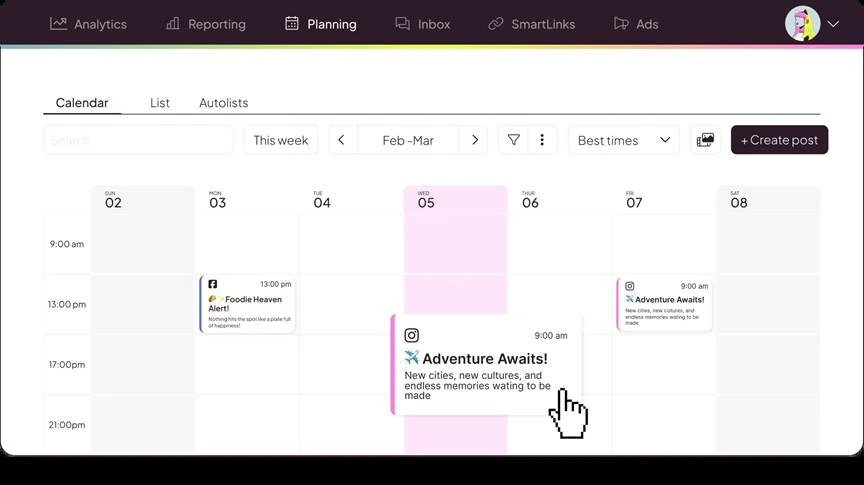
What it actually looks like: Under Planning in Metricool’s planner, you pick Calendar or Autolists. The week view lays out your Instagram and Facebook posts by day. Best times reads each network’s follower activity, and Create post starts the next one.
Emma H., a Communications Coordinator, wrote on Capterra, “Metricool has helped us level up our social media management capability by merging the data/analytics with planning, content management, scheduling, and a multi-step approval process.”
On G2, it is rated 4.4 out of 5 across 111 reviews. On Capterra, it is rated 4.4 out of 5 across 99 reviews.
What it does well: One Starter plan covers up to five brands, so a second location rides along free.
According to Metricool’s pricing page, Free covers one brand on every network except LinkedIn and X, at 20 scheduled posts a month, so five channels can cost nothing. Starter runs $20 a month billed annually ($25 monthly) for up to five brands, and X adds $10 a month per account. Advanced, with team members and post approval, runs from $53 annually ($67 monthly) for 15 brands to $159 annually ($210 monthly) for 50, and Custom is quoted.
What running Metricool standalone requires: Starter as soon as you add LinkedIn, and Advanced once a second person helps. If X is one of your five, compare these Metricool alternatives.
4. Meta Business Suite – Best for Creators and Local Businesses
Meta Business Suite is Meta’s free, built-in tool for planning posts, answering messages and checking insights across your Facebook, Instagram and Threads accounts.
Key Features:
- Planner
- Cross-posting
- Unified inbox
- Insights
- Active times
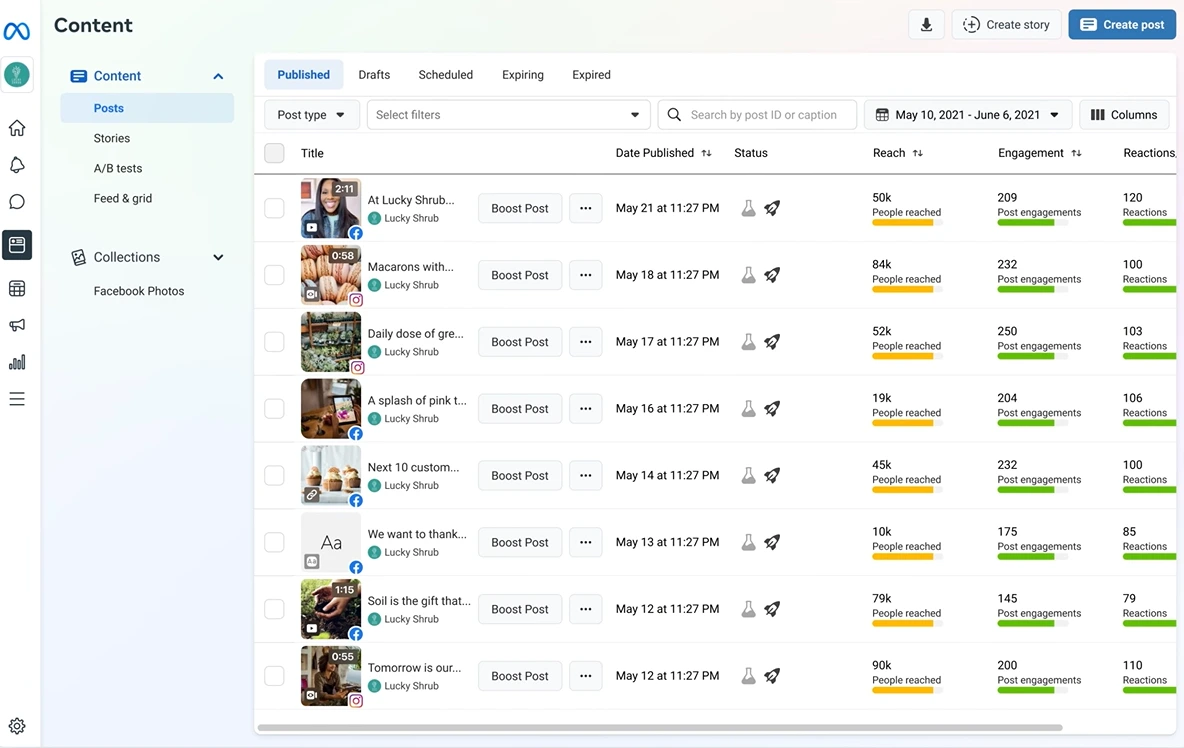
What it actually looks like: You open Planner from the left menu and pick Week or Month. Hovering over a day, you click Schedule, then Schedule post. Under Post to you pick a Page, profile or Group, write separate text per network and set the time, anywhere from 20 minutes to 29 days ahead.
Sofia L., Office Manager at a 2–10 person accounting firm, wrote on Capterra: “I love having all my engagement information easily accessible and especially being able to schedule posts out ahead of time!”
On G2, Meta Business Suite, listed as Facebook for Business, is rated 4.2 out of 5 based on 1,457 reviews. On Capterra, it is listed as Facebook business suite and is rated 4.3 out of 5 across 196 reviews.
What it does well: No third-party app needs connecting, and Active times suggests slots from when your followers were most active in the past week.
According to Meta’s help center, Business Suite is free to use on desktop and in the mobile app, with no paid tier. It schedules Facebook and Instagram content, so a five-channel setup across other networks has no price here.
What running Meta Business Suite standalone requires: A second tool for LinkedIn, Pinterest, Google Business Profile and TikTok, since Meta’s guide to creating posts covers Facebook and Instagram alone. Failed posts are yours to catch, and one reviewer warns you only find out by logging in each day to check.
5. Buffer – Best for Solo Entrepreneurs and Creators
Buffer is a simple, queue-based social media scheduler that lets you plan, publish and track posts for each channel in one place.
Key Features:
- Posting queues
- AI Assistant
- Analytics
- Community inbox
- Approval workflows
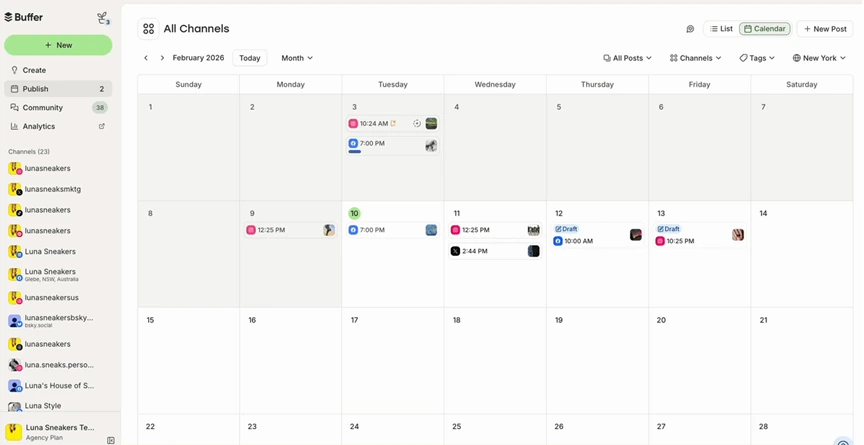
What it actually looks like: You land in Buffer’s Publish on a Month calendar and narrow it with Channels and Tags filters. Each network gets its own text box. You then send the post to Next Available, Prioritize it, or set a time.
Pupp R., owner of a 2–10 person events business, wrote on Capterra: “The scheduling is useful and the free version has enough features to make it suitable for most who are using to manage their own small business posting needs.”
On G2, Buffer is rated 4.3 out of 5 across 1,043 reviews. On Capterra, it is rated 4.5 out of 5 across 1,486 reviews.
What it does well: Free refills each channel’s 10-post queue as posts go out.
Each paid plan is priced per channel on Buffer’s pricing page: Essentials is $5 a month billed annually ($6 monthly) for 1 user, and Team is $10 annually or $12 monthly for unlimited team members and approvals. Paid plans have a 14-day trial without payment details, and five channels on Essentials cost $30 a month billed monthly or $25 billed annually.
What running Buffer standalone requires: Team once a second person joins, which doubles the rate to $12 a channel billed monthly, so a team on 10 channels pays $120 a month. Flat-priced plans cost the same team less: $50 a month on SocialPilot Standard (3 users, 15 accounts), US$65 on Zoho Social Premium (3 members) or $67 on Metricool Advanced (unlimited members). For more options, see these Buffer alternatives.
6. Publer – Best for Online Sellers and Small Teams
Publer is a social media scheduler with a visual calendar, bulk scheduling and post recycling, and it also publishes to channels like Telegram and WordPress.
Key Features:
- Calendar planner
- Bulk scheduling
- Post recycling
- AI Assist
- Link in Bio
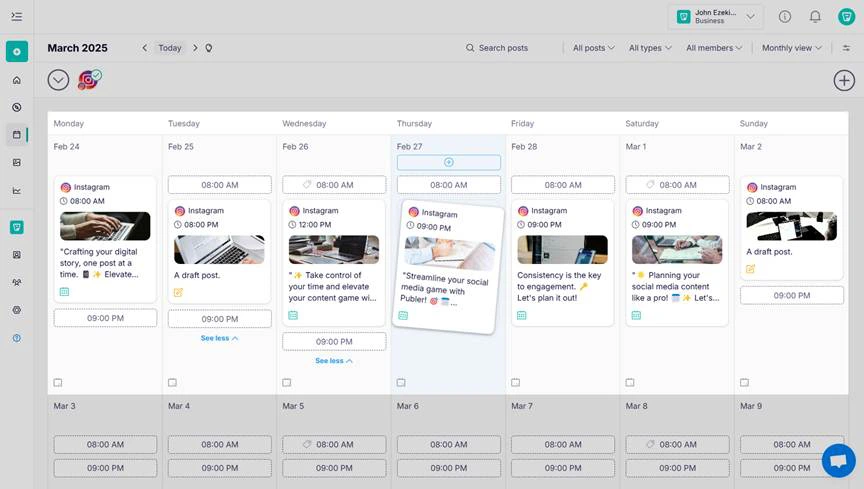
What it actually looks like: In Month view, your scheduled Instagram posts sit on their days beside empty timeslots such as 08:00 AM. You drag a post to a new date to reschedule it. Opening it lets you fix a typo or swap accounts.
Carrie C., a creative director running a small art business, wrote on Capterra: “Publer’s CSV bulk upload is the reason I use it. I plan a few weeks of posts at once, upload one file per platform, and everything is scheduled in a single sitting.”
On G2, Publer is rated 4.7 out of 5 across 553 reviews. On Capterra, it is rated 4.8 out of 5 across 992 reviews.
What it does well: The free plan actually schedules posts, and accounts can include WordPress sites and Telegram channels.
Each plan on Publer’s plans page is priced per social account, and Professional costs $5 a month for one, or $4 billed annually. Business, at $10 monthly or $8 annually, adds analytics, and Enterprise is quote only. The free plan holds 3 accounts other than X at 10 scheduled posts each. One user on five accounts pays $20 a month on Professional, or $16 annually.
What running Publer standalone requires: Analytics start on Business, $35 a month for five accounts per Publer’s plans page, so on Professional you check each network’s own insights. If that rules it out, see the Publer alternatives.
7. SocialBee – Best for Solopreneurs and Small Businesses
SocialBee is a social media scheduler that organizes your posts into content categories, with an AI assistant to help write them.
Key Features:
- Content categories
- Content recycling
- AI Copilot
- Bulk editor and CSV upload
- Post approvals
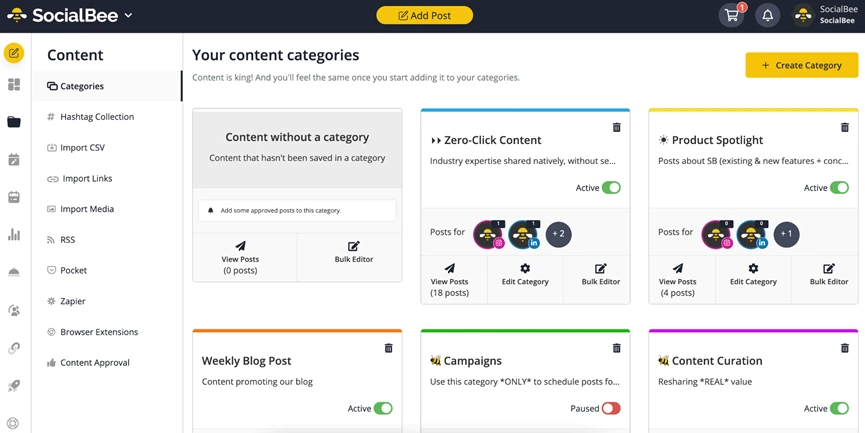
What it actually looks like: You open Content, then Categories, where each card has an Active or Paused switch. You place categories in your Posting Schedule. Each week SocialBee fills each slot from its category.
A registered acupuncturist and business owner wrote on Capterra: “When I go to write a post, once I have put a photo on, the link, as well as the tags then the whole program slows down like we are back in the 90s on dial up. This means to fully complete one post it can take up to 45 minutes, even on a fast computer.”
On G2, SocialBee is rated 4.7 out of 5 across 479 reviews. On Capterra, it is rated 4.4 out of 5 across 39 reviews.
What it does well: If Tuesday is for tips and Thursday for client stories, that’s what goes out.
According to SocialBee’s pricing page, Bootstrap costs $24.20 a month billed annually ($29 monthly) for 1 user and 5 profiles. Accelerate, at $40.80 annually or $49 monthly, gives 10 profiles and CSV upload. Pro, at $82.50 annually or $99 monthly, gives 25 profiles and 3 users per workspace. A 14-day trial replaces a free plan, and Bootstrap’s $29 covers five channels for one user.
What running SocialBee standalone requires: CSV upload starts on Accelerate, per SocialBee’s pricing page, so on Bootstrap you build each post by hand. If you batch from spreadsheets, see the SocialBee alternatives first.
8. Later – Best for Creators and SMBs
Later is a visual social media planner built around Instagram, with a drag-and-drop calendar and a link-in-bio page.
Key Features:
- Visual planner
- Link in Bio
- Auto Publish
- Hashtag suggestions
- Best time to post
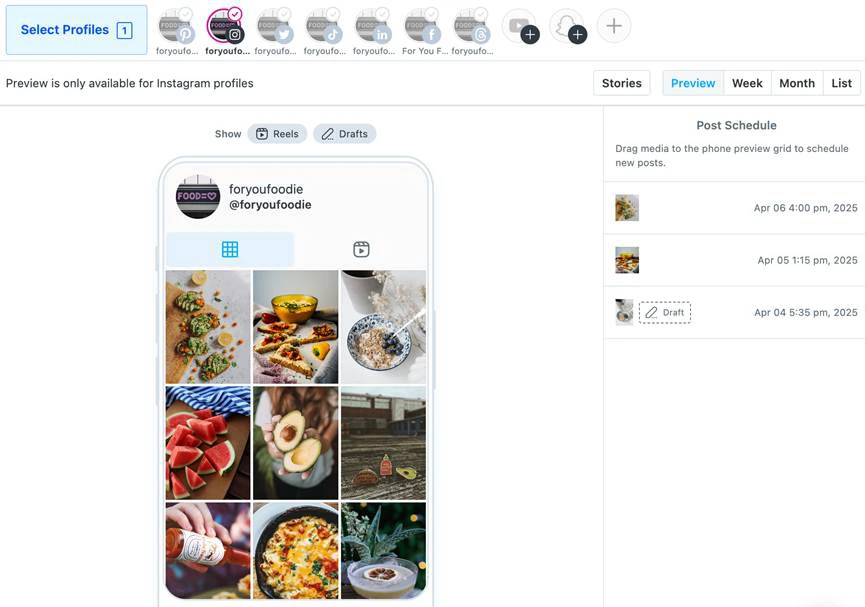
What it actually looks like: You click Preview in the Calendar to see your Instagram feed on a phone-shaped grid. Your Post Schedule runs beside it. Once Quick Scheduling is set up, you rearrange posts on the grid.
Kelly S., a self-employed content creator and podcaster, wrote on Capterra: “A lot of the features I need like analytics and hashtags are only available with the paid tier.”
On G2, Later is rated 4.5 out of 5 across 389 reviews. On Capterra, it is rated 4.4 out of 5 across 398 reviews.
What it does well: You see the whole grid before anything goes live, which matters when your feed is your shop window.
According to Later’s pricing page, plans come in social sets of one profile per platform. Starter costs $25 a month, or $18.75 billed annually, for 1 set, 1 user and 30 posts per profile monthly. Growth, at $50 monthly or $37.50 annually, gives 2 sets, 2 users and approvals, and Scale, at $110 or $82.50, gives 6 sets and 4 users. There’s a 14-day trial, and Starter’s $25 covers five channels on five platforms.
What running Later standalone requires: Google Business Profile and X aren’t in a social set on Later’s pricing page, so both need a second tool. If your Google listing matters, see the Later alternatives first.
9. Hootsuite – Best for Enterprises
Hootsuite is a social media management platform for teams, bringing publishing, a social inbox, listening and analytics into one dashboard.
Key Features:
- Social media calendar
- Best times to post
- Social inbox
- AI post and image generation
- Analytics and reporting
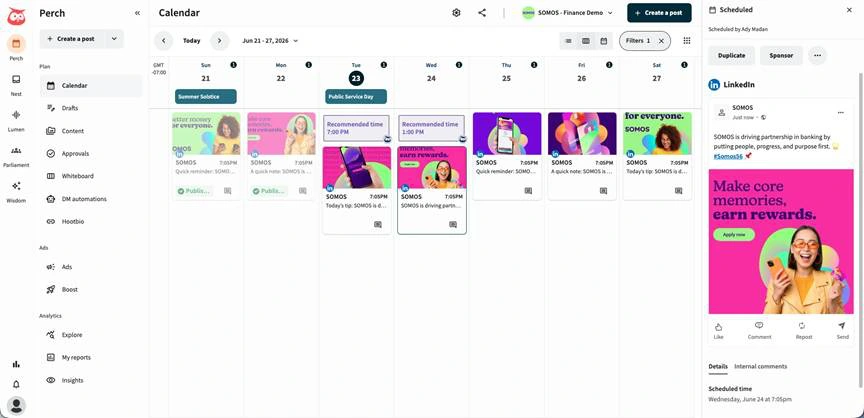
What it actually looks like: You head to Plan, then Calendar, and the week opens with empty slots marked as “best time to publish”. Clicking a post opens its preview, where you can duplicate it or boost it. In the composer, each network’s preview updates as you type.
Coline L., a marketing co-founder, wrote on Capterra: “My accounts get disconnected quite often, which is annoying, and I’m not sure why they disconnect.”
On G2, Hootsuite is rated 4.3 out of 5 across 7,764 reviews. On Capterra, it is rated 4.4 out of 5 across 3,906 reviews.
What it does well: Standard already works as a team desk, with up to 10 accounts, an inbox and competitor monitoring in one login.
Each plan on Hootsuite’s plans page is sold per user at an annual rate, and Hootsuite doesn’t publish a monthly one. Standard costs $99 per user a month for up to 10 accounts. Professional, at $199, adds unlimited accounts, Advanced, at $399, adds team approvals, and Enterprise is quote only. The 14-day trial skips bulk scheduling, and one user on five channels pays $99 a month, or $1,188 a year.
What running Hootsuite standalone requires: Hootsuite standalone requires: Every person is a separate $99 seat, so a three-person team on Standard pays $297 a month billed annually, and post approvals push each seat to $399 on Advanced. Flat-priced plans cost the same team less: $42.50 a month on SocialPilot Standard (3 users, 15 accounts), US$40 on Zoho Social Premium (3 members) or $53 on Metricool Advanced (unlimited members), all billed annually. For more options, see these Hootsuite alternatives.
10. Sprout Social – Best for Enterprises and Multi-Location Brands
Built for teams, Sprout Social brings publishing, a shared inbox, review management, listening and reporting into one platform.
Key Features:
- Publishing calendar
- Optimal Send Times
- Smart Inbox
- Review management
- AI Assist
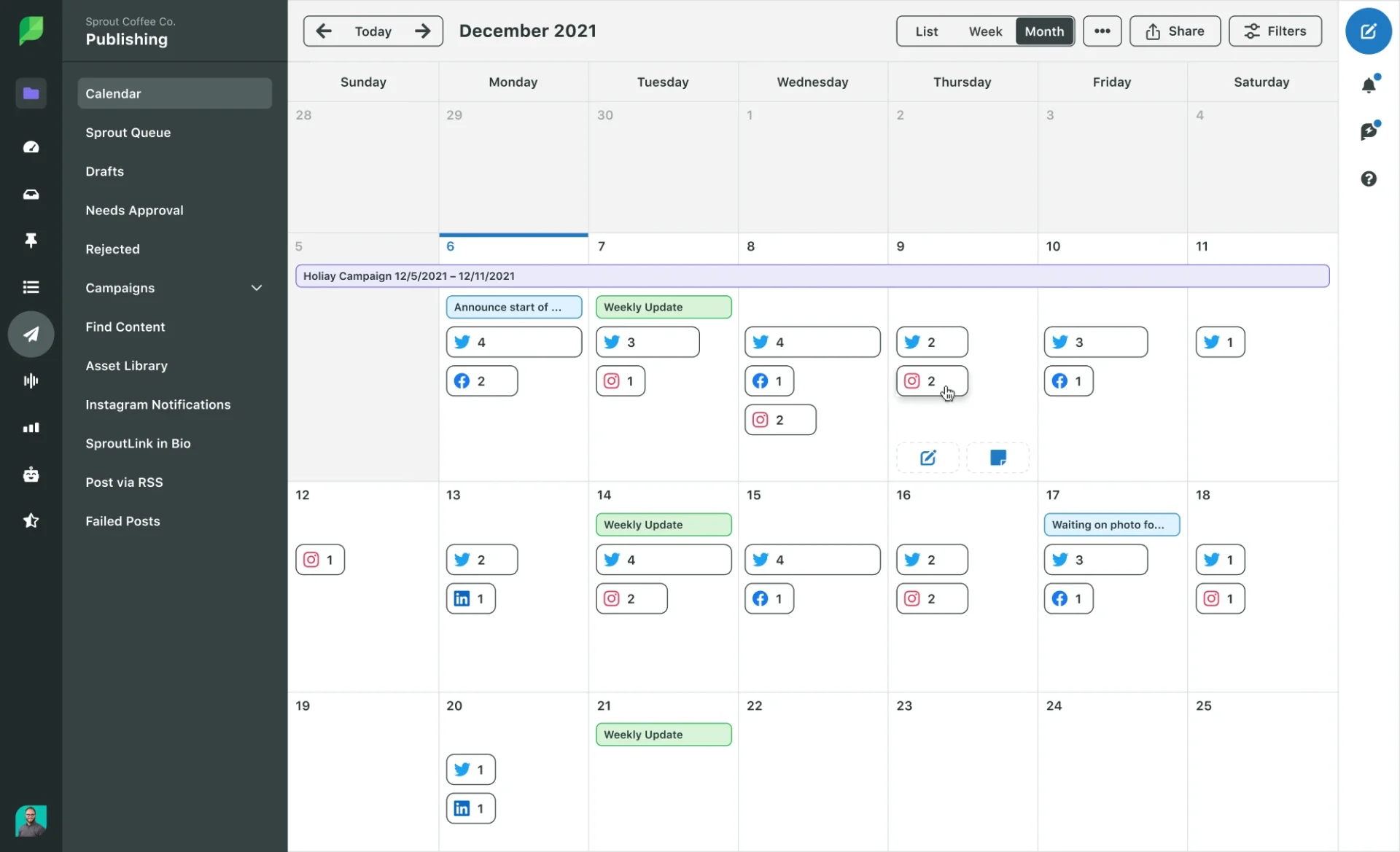
What it actually looks like: You open the Publishing Calendar’s Week view to see each day’s posts side by side. From there you can page 13 months back or ahead. In Compose, Customize post per network gives each network its own tab.
Molly L. wrote on Capterra about Sprout Social’s scheduling capabilities, “I can schedule posts ahead of time, duplicate a post for another platform, or reschedule it without rewriting it, which is nice when I’m busy.”
On G2, Sprout Social is rated 4.4 out of 5 across 7,591 reviews. On Capterra, it is rated 4.4 out of 5 across 632 reviews.
What it does well: Essentials includes Optimal Send Times, which reads 16 weeks of your audience data.
According to Sprout Social’s pricing page, Essentials costs $79 a seat a month billed annually, or $99 monthly, for 5 profiles. Standard ($199 a seat, annual) adds the inbox and review management, Professional ($299) opens unlimited profiles, Advanced costs $399 and Enterprise is quote only. The 30-day trial needs no card, and one seat on five channels costs $99 a month.
What running Sprout Social standalone requires: Professional, at $299 a seat billed annually, once you pass five profiles, because Essentials and Standard stop at five and every Google Business Profile location counts as one.
Where SocialPilot Fits in This List
SocialPilot fits small businesses, agencies and MSPs that want every channel on one calendar at a flat plan price. That covers anything from one owner on 7 accounts to a team managing clients across 50.
What SocialPilot Does Well for a Small Business
Essentials costs $30 a month billed monthly, or $25.50 a month billed annually, for 7 social accounts and 1 user. A sixth or seventh channel does not change the bill, and an eighth is a $4 add-on.
You plan the week on a drag-and-drop content calendar, and the entry plan already includes first comments, repeat posting and Google Business Profile publishing.
Where Another Tool Might Be the Better Fit
- You want to pay nothing. There is no free plan, only a free trial with no credit card. Meta Business Suite is free for Facebook and Instagram, and Buffer’s or Publer’s free plan carries up to three channels.
- You post to one or two channels. A plan sized for seven accounts leaves most of its slots empty, so a free plan or Publer’s per-account price fits better.
- Price is the only test. Zoho Social’s Standard plan covers five channels for US$15 a month billed monthly.
- You want reports or an inbox on the entry plan. Both start on Standard, at $50 a month billed monthly, while Metricool and Buffer include analytics on their entry plans.
How to Choose the Right Social Media Scheduling Tool
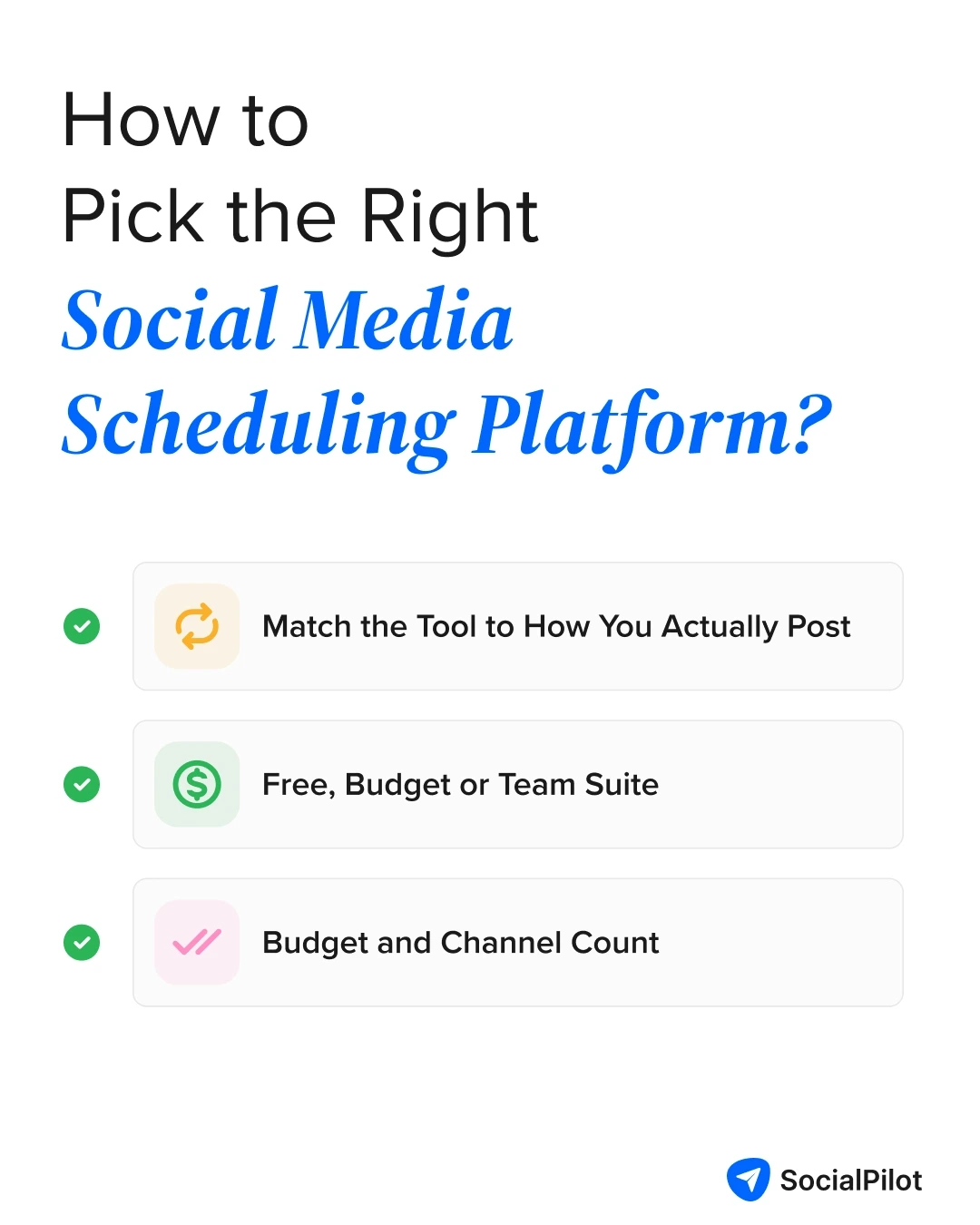
Count the channels you post to and decide whether anyone else will post with you. Those two answers shortlist your tools and point to the cheapest way to pay.
Match the Tool to How You Actually Post
| Your business | Shortlist | What to skip |
| Solo entrepreneur or creator | Buffer, Later, Meta Business Suite | Per-user plans |
| Local business on Facebook and Instagram | Meta Business Suite | Paid plans, for now |
| Online seller | Publer | Per-user plans |
| Small business or startup | SocialPilot, Zoho Social, SocialBee | Hootsuite, Sprout Social |
| Freelancer or agency | SocialPilot, Metricool | Per-user plans |
| Enterprise or multi-location brand | Hootsuite, Sprout Social | Free and single-user plans |
When to Pay for a Scheduler
- Stay free while your channels fit a free plan’s caps.
- Move to a paid plan once you pass three channels or want one bill for all of them.
- Choose SocialBee or Later only if your week already runs on content categories or an Instagram grid.
- Pay per seat only when two or more people answer customers together.
Budget and Channel Count
Price your next channel, not just today’s. A realtor on five channels who adds TikTok goes from $30 to $36 a month on Buffer and from $20 to $24 on Publer, while SocialPilot Essentials stays at $30 until an eighth account. Stay on monthly billing until that count settles.
Keep it to one paid scheduler plus a free native tool for its gap, and if your Google listing brings in customers, check that the tool can schedule Google Business Profile posts.
How We Analyze and Select These Tools
We built this list around what it costs to batch a week of posts across five channels, from a single owner up to a full team.
What We Actually Checked
- Read each vendor’s own pricing page on November 16, 2026, and priced every tool for one person on five channels.
- Took every rating and quote from G2 and Capterra, each with its score, review count and link.
- Used screenshots from vendor help centers and product pages, or from socialpilot.co.
- Picked 10 tools that ranking roundups cover, from free options for solo owners to platforms for enterprise teams.
What We Couldn’t Independently Verify
We could not verify the prices that vendors don’t publish:
- Hootsuite offers month-to-month billing but shows only its annual-billing prices.
- Sprout Social shows a month-to-month price for Essentials ($99 a seat) but only annual-billing prices for its other plans.
- Metricool lists its X add-on at $10 a month per account, with no annual-billing price.
Which Scheduling Tool Should Your Business Pick
Choosing among social media scheduling tools comes down to how many channels you post to and whether you will pay at all.
If you post only to Facebook and Instagram, Meta Business Suite is free and enough. On three channels or fewer, Buffer’s or Publer’s free plan carries you, and on five channels without LinkedIn or X, Metricool’s free plan can too.
When you want every channel for the lowest paid price, Zoho Social Standard is US$15 a month billed monthly. If your week runs on content categories or an Instagram grid, look at SocialBee or Later, and save Hootsuite or Sprout Social for larger teams that publish and answer customers across many accounts.
Once a free plan’s caps get in your way at five to seven accounts, start a free trial, no credit card, on SocialPilot’s Essentials plan, which holds 7 accounts for $30 a month billed monthly.
Frequently Asked Questions
What is the best free tool for scheduling social media posts?
Meta Business Suite is the best free pick if you post only to Facebook and Instagram. For more networks, Buffer's and Publer's free plans each cover three channels with 10 queued posts per channel, and Metricool's free plan covers one brand's networks, except LinkedIn and X, at 20 posts a month.
How much do social media scheduling tools cost?
For one person on five channels, most tools cost $10 to $30 a month, and Hootsuite and Sprout Social charge $79 to $99 per seat. Zoho Social Standard is US$10 a month billed annually, Buffer comes to $30 billed monthly at $6 per channel, and Metricool is free for up to 20 posts a month without LinkedIn or X.
Can one tool schedule to every platform I use?
Usually yes. Buffer, Publer, SocialBee and SocialPilot each publish to Facebook, Instagram, LinkedIn, Pinterest, Google Business Profile and TikTok, while Meta Business Suite stops at Facebook, Instagram, and Threads. Facebook Groups are the gap for outside tools, since Meta removed Groups publishing from its API on April 22, 2024, so Group posts go through Meta Business Suite.
Do scheduled posts get less reach?
No platform publishes a reach penalty for posts sent through a scheduler, and the small tests run by scheduling vendors point in different directions, so check it on your own account. For a few weeks, post the same kind of content natively and through your scheduler, then compare. Time both from the best times to post on each network.
Do I need a paid scheduler if I only post a few times a week?
You probably don't if you post to three channels or fewer. Buffer's and Publer's free plans each queue 10 posts per channel, about three weeks ahead at three posts a week, and Meta Business Suite is free for Facebook, Instagram, and Threads. A paid plan starts to make sense at a fourth channel or a month queued at once.
About the Author