

However, not every tool serves the same purpose. Some focus on scheduling and publishing, others help generate ideas and write content, while some specialize in creating graphics and videos. Choosing the right one can help you avoid unnecessary subscriptions and build a smoother content workflow.
This guide covers 10 AI tools across three categories: social media management and scheduling, content creation, and visual content production. We compare their key features, AI capabilities, supported platforms, pricing, and limitations to help you find the right tool for your needs and budget.
Top Social Media AI Tools at a Glance
Use this comparison table to narrow down your options before exploring the detailed reviews. Half of the tools offer a free plan, while most of the others (except InVideo AI) provide a free trial, so you can test their features before committing.
Pay attention to how each tool structures its pricing, too. Some charge per social channel, others per user or seat, while the rest use plan-based pricing. This can make a big difference in the total cost, especially for teams managing multiple accounts.
| Tool | Best For | Entry price monthly | Free Plan | Rating |
| SocialPilot | SMBs and Agencies running 15 to 50 accounts | $ 30 /mo | 14-day free trial, no card | 4.5/5 on G2 |
| Buffer | Solo Entrepreneurs and Cre ators run ning 3 to 10 channels | $ 6 /channel/mo | Free plan, 14-day trial | 4.3/5 on G2 |
| SocialBee | Solopreneurs and Small Businesses that need a content plan | $29/mo | 14-day trial, no card | 4.4/5 on Capterra |
| Hootsuite | Enterprise teams of 10 or more | $99/user/mo | 14-day trial | 4.3/5 on G2 |
| ChatGPT | Fast caption drafts and ideas | $8/mo | Free plan | 4.5/5 on Capterra |
| Claude | Monthly content plans in one voice | $ 20 /mo | Free plan | 4.6/5 on Capterra |
| Jasper | Copywriting and brand tone consistency across writers | $ 69 / mo | 7-day trial | 4. 7 /5 on G2 |
| Canva | On-brand graphics and carousels | $18/mo | Free plan | 4.7/5 on Capterra |
| CapCut | Weekly Reels, TikToks and Shorts | $ 9.99 / mo | Free plan, 7-day Pro trial, no card | 4.3/5 on Product Hunt |
| InVideo | Faceless reels from a prompt | $ 20 /seat/ mo | No free plan or trial | 4.5/5 on Capterra |
The Three Jobs Social Media AI Tools Do
Before you compare names, decide which of these three jobs is your actual bottleneck. That one decision cuts the list down faster than any feature table.
| Job | What the AI does | Tools |
| Management and scheduling | Drafts captions inside the composer, schedules and publishes across platforms, and reports on what worked | SocialPilot, Buffer, SocialBee, Hootsuite |
| Ideation, strategy and writing | Brainstorms angles and hooks, plans content, and drafts copy in your voice. It publishes nothing | ChatGPT, Claude, Jasper |
| Video and visual creation | Designs graphics and carousels, edits and captions short-form video, and builds reels from a prompt | Canva, CapCut, InVideo AI |
Where SocialPilot Fits in This Picture
Our tool belongs in the management and scheduling group. Its AI Pilot writes captions and hashtags in the composer, its custom MCP server lets Claude or ChatGPT schedule posts from a chat window, and it publishes and reports across client accounts.
It does not make videos, and its design work runs through a Canva integration rather than its own AI design engine. If short-form video is where your hours go, you’ll pair it with a tool from the third group.
AI Tools for Social Media Management and Scheduling
These tools bring content creation, scheduling, publishing, and performance reporting together in one place. They help you manage multiple social accounts without switching between platforms. The key differences lie in their AI capabilities, pricing structure, account limits, and the types of teams they are designed to serve.
| Feature | SocialPilot | Buffer | SocialBee | Hootsuite |
| AI writing assistant | AI Pilot in the composer | AI Assistant in the composer | AI Copilot plus post generator | Wisdom AI teammate |
| AI usage limit | Credit pool, 500 to unlimited a month | Unlimited on every plan | Unlimited on every plan | 100 AI credits a month |
| AI strategy and posting plan | No | No | Yes, Copilot builds one | No |
| AI image generation | No, Canva integration instead | No | Yes, in the post editor | Yes, from Standard |
| Draft and schedule from Claude or ChatGPT | Yes, MCP server on every plan | Yes, MCP server | No | Yes |
| AI reply suggestions | AI auto-replies in the Inbox (in Standard+ plan) | Yes, but Free gets 5 a week | No | Yes, from Professional |
| Social listening | No | No | No | Yes, from Standard |
| Approval workflows | Manager from Standard, client from Premium | Team plan | From Accelerate | From Advanced |
| White-label client reports | Yes, from Premium | No | Branded PDF reports | Logo on reports from Advanced |
| Pricing model | Flat per plan | Per channel | Flat per plan | Per user |
| Accounts on the entry plan | 7 | Priced per channel, 3 on Free | 5 | 10 |
1. SocialPilot – Best for Agencies and Small Businesses
AI drafting, scheduling, client approvals and reports sit on one flat-priced plan, and you can run all of it from Claude or ChatGPT.
Platforms Supported: Facebook, Instagram, X (Twitter), LinkedIn, TikTok, YouTube, Pinterest, Threads, Bluesky and Google Business Profile.
Key Features:
- AI Pilot for captions, hashtags and platform-specific variants
- MCP server to draft and schedule posts from Claude or ChatGPT
- Monthly AI credit pool on every plan, unlimited on Ultimate
- Client management with no-login client approvals
- White-label PDF reports on a schedule
What it actually looks like: In SocialPilot, you click Create Post and open AI Pilot inside the composer. Type a rough idea, pick a tone, and it returns captions, hashtags and variants sized for each network you’ve selected, which you edit before scheduling. Every plan draws on a monthly AI credit pool, from 500 on Essentials to unlimited on Ultimate.
The SocialPilot MCP server comes with every paid plan. Add it as a connector in Claude or ChatGPT, sign in, and the assistant can create, schedule and review posts across your accounts from the chat, or save them as drafts for a client to approve.
Shayne W., a G2 reviewer, wrote: “Basically 4 hours of work allows me to keep constant communication for an entire month which has proven invaluable for us as a business who does not employ internal marketing.”
On G2, SocialPilot is rated 4.5 out of 5 across 846 reviews.
What it does well: The AI doesn’t stop at writing. A post drafted in Claude or ChatGPT lands on the same calendar, goes through the same manager and client approvals, and shows up in the same white-label report, so you can switch AI assistants without changing your workflow. The price stays flat when a teammate joins.
On SocialPilot, Essentials costs $25.50 a month billed annually ($30 month to month) for 1 user, 7 accounts and 500 AI credits. Standard, at $42.50 annually or $50 monthly, covers 3 users, 15 accounts and 1,000 credits and adds the inbox and analytics. Premium runs $85 or $100 for 6 users, 25 accounts, 5,000 credits, client approvals and white-label reports. Ultimate costs $170 or $200 for 50 accounts, unlimited users and unlimited AI credits. Extra accounts are $4 a month, and there’s a 14-day free trial with no credit card.
What running SocialPilot standalone requires: A separate tool for video. It publishes Reels, Shorts and TikToks but doesn’t create or edit them, so a video-first team still needs something like CapCut or InVideo AI. Its design work runs through a Canva integration, and analytics, the inbox and approvals start on Standard, so Essentials is a drafting-and-scheduling plan only.
2. Buffer – Best for Solo Entrepreneurs and Creators
Buffer’s AI Assistant comes on every plan, the free one too, with no credit meter to watch.
Platforms Supported: Facebook, Instagram, X (Twitter), LinkedIn, TikTok, YouTube, Pinterest, Threads, Bluesky, Google Business Profile, Mastodon and Substack.
Key Features:
- AI Assistant to draft, rephrase, shorten and expand posts
- One post adapted for each selected channel
- AI reply suggestions in the community inbox
- Free plan for 3 channels
- Ideas board to save and plan posts
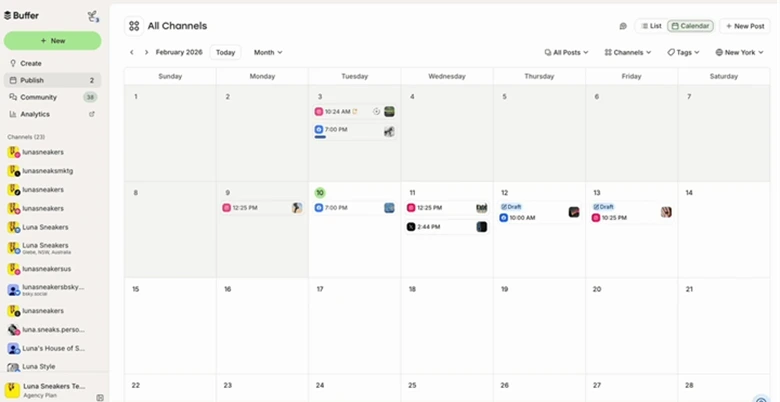
What it actually looks like: In Buffer, you click New Post and open the AI Assistant from the composer. Ask it to write a post from a prompt, or select your own draft and have it rephrased, shortened or expanded. With several channels selected, it rewrites the same post to suit each one, and anything you’re not ready to schedule saves as a Draft or an Idea.
Rebecca H., a G2 reviewer, wrote: “It’s made posting to social so much easier. Now I just schedule it once I’ve finished, and then I can forget about it.”
On G2, Buffer is rated 4.3 out of 5 across roughly 1,023 reviews.
What it does well: It’s the easiest tool here to learn, and the AI Assistant is included rather than metered, so you never run out of credits halfway through the month. The free plan is genuinely usable for three channels.
In Buffer, you pay per channel, per month. The Free plan covers 3 channels, 10 scheduled posts per channel and 1 user. Essentials is $5 per channel per month billed yearly ($60 per channel per year), and Team, with unlimited users and approvals, is $10 per channel per month billed yearly. Monthly billing costs more, and paid plans come with a 14-day free trial. See our Buffer pricing guide for the full tier math.
What running Buffer standalone requires: Watching the channel count. Kelly S., a Capterra reviewer, notes that “each additional platform is 5 dollars and that can add up if you’re managing many accounts.”
3. SocialBee – Best for Solopreneurs and Small Businesses
SocialBee’s AI Copilot builds the strategy, the posting plan and the posts, which is more than most schedulers’ caption writers attempt.
Platforms Supported: Facebook, Instagram, X (Twitter), LinkedIn, TikTok, YouTube, Pinterest, Threads, Bluesky and Google Business Profile
Key Features:
- AI Copilot that builds a social strategy and ready-to-use posts
- Unlimited AI content generation on every plan
- AI image generation inside the post editor
- Category-based scheduling with evergreen re-queuing
- Post approvals from Accelerate
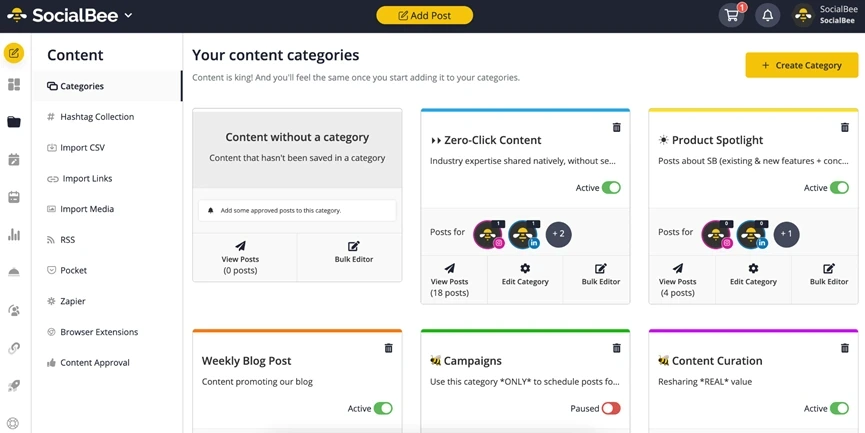
What it actually looks like: In SocialBee, you go to Content and open Categories in the left-side menu, then click Create Category. Each category, such as Promotional, Educational or Quotes, gets its own color and default settings, including whether posts re-queue to stay evergreen. You fill categories with posts, then add them to your Posting Schedule. Copilot sits on top of this: answer questions about your business and goals, and it proposes platforms, categories, a posting plan and the posts themselves.
Megan B., a Capterra reviewer, wrote: “It does what it claims to do and it does it well. It’s affordable compared to some alternatives which is a huge bonus.”
On Capterra, SocialBee is rated 4.4 out of 5 across 39 reviews.
What it does well: For a small business that doesn’t know what to post, Copilot fills the strategy gap that most schedulers leave to you. Unmetered AI generation on every plan keeps the cost predictable.
SocialBee’s Bootstrap plan is $29 a month for 5 profiles and 1 user, Accelerate is $49 for 10 profiles with post approvals, and Pro is $99 for 25 profiles, 3 users per workspace and 5 workspaces. Agency plans run $179 to $449 a month for 50 to 150 profiles. Extra users or workspaces cost $10 a month each, and there’s a 14-day free trial of Pro with no credit card.
What running SocialBee standalone requires: Someone watching the queue. A Designer and Manager on Capterra warns that “they stop posting if one post has a problem.” Bootstrap and Accelerate also cap each workspace at 1 user. Teams that outgrow it usually compare SocialBee alternatives.
4. Hootsuite – Best for Enterprises
Wisdom, Hootsuite’s AI teammate, runs across publishing, replies and listening, and every person who uses it is a separate seat.
Platforms Supported: Facebook, Instagram, X (Twitter), LinkedIn, TikTok, YouTube, Pinterest, Threads, Bluesky and Google Business Profile.
Key Features:
- Wisdom AI to generate posts and images from Standard
- AI-powered smart replies and forecasting on Professional
- Brand and competitor monitoring from Standard
- Social OS calendar, drafts and approvals in one place
- Recommended posting times in the composer
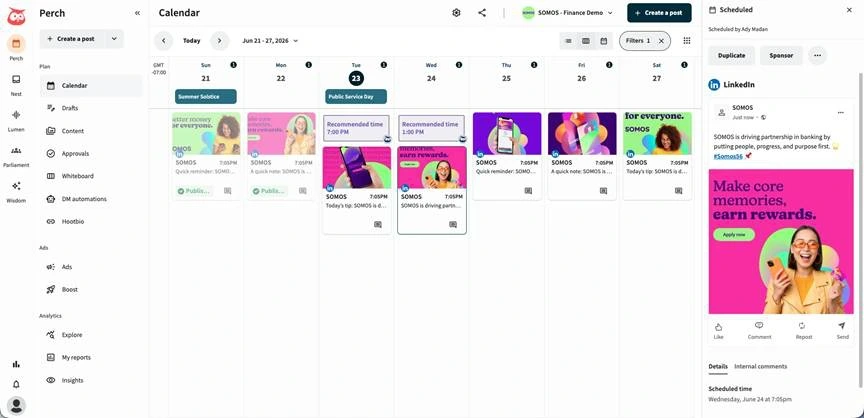
What it actually looks like: Under Plan in the left rail of Hootsuite, you choose Calendar and hit Create a post. Wisdom drafts the copy or an image from a prompt, and the composer offers a Recommended time you can accept or override. Approvals, Drafts and Whiteboard sit in the same Plan menu, while Analytics holds the listening and competitor views that Wisdom also draws on.
Carlette B., a G2 reviewer, wrote: “There’s not much we dislike about the platform, but it can be expensive and a bit clunky for a small team. Occasionally, the connection to a social media platform drops.”
On G2, Hootsuite is rated 4.3 out of 5 across 7,757 reviews.
What it does well: It covers the most ground of any tool here. Listening, competitor benchmarking, publishing and an AI assistant live in one login, so a large team doesn’t need a separate listening tool.
Hootsuite’s Standard plan is $99 per user per month billed annually, with 10 social accounts. Professional is $199 per user per month with unlimited accounts, Advanced is $399 per user per month, and Enterprise is quote only. There’s no free plan, and the 14-day trial caps posting at 10 to 20 posts a day per organization. Our Hootsuite pricing breakdown covers what each tier adds.
What running Hootsuite standalone requires: A budget that grows with headcount. Because every user is a seat, five people on Professional cost $995 a month on annual billing. Teams that hit that wall usually weigh Hootsuite alternatives with flat pricing.
AI Tools for Ideation, Strategy and Writing
ChatGPT, Claude and Jasper don’t schedule or publish anything. They’re where you think and write: brainstorming hooks, planning a month of content, and drafting or scoring posts you then move into a scheduler.
| Feature | ChatGPT | Claude | Jasper AI |
| How it keeps your brand voice | Projects and custom GPTs | Projects with a knowledge base and instructions | Brand Voice trained on your examples |
| Social-specific tools | None built in, general prompts | None built in, general prompts | Agent Library filtered to social media |
| Image generation | Yes | No | Yes |
| Connects to a scheduler | Apps and custom MCP connectors (Plus/Pro only) | Connectors (Canva, Buffer, SocialPilot) | Zapier and Make on Business, no social schedulers listed |
| Publishes posts itself | No | No | No |
| Writing inside other apps | Chrome extension | Claude in Chrome | Chrome and Edge extension, Google Docs add-on |
| Usage limits to watch | Free plan caps uploads and image creation | Session limits e very 5 hours, plus weekly caps (except Ultra) | 2 Brand Voices and 3 audiences on Pro |
| Team plan | Business, per user, from 2 users | Team, $20 per seat billed annually | Pro per seat, Business custom |
| Free plan | Yes | Yes | No, 7-day trial |
5. ChatGPT – Best for Fast Caption Drafts and Ideas
The general AI assistant most teams already know how to prompt, with a free plan that covers a lot of caption-level work.
Platforms Supported: Web, desktop app, Chrome extension, iOS and Android. Through apps and MCP connectors, it links to Canva, Buffer and SocialPilot.
Key Features:
- Projects that hold a brand’s files and instructions
- Custom GPTs for a reusable brand voice (will retire on 11th Dec 2026)
- Image generation for quick visuals
- Canva app to turn a prompt into an editable design
- Scheduled tasks for recurring content prompts
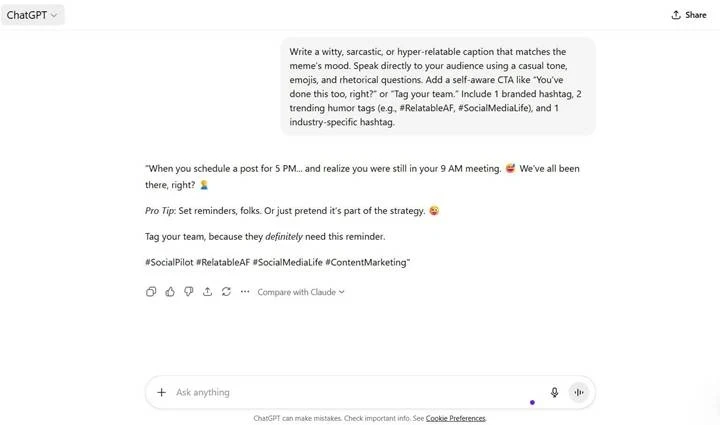
What it actually looks like: In ChatGPT, you select New project in the sidebar and name it after a brand or client. Add the brand guide and past top posts as files, then set project instructions so every chat inside it writes in that voice. Connected apps open (plugins) with an @-mention or the + button in a chat, so you can ask Canva to build a design from the caption you just wrote. For prompt ideas, see our ChatGPT prompts for social media.
Saurav J., a Content Creator reviewing on G2 (shown on Capterra), wrote: “I think the refinement in photo generation could be better. I’d like the photos to look more natural rather than AI-generated.”
On Capterra, ChatGPT is rated 4.5 out of 5 across 1,379 reviews.
What it does well: It’s the cheapest way to get capable AI writing help, and Projects mean you set a brand’s context once instead of re-pasting it every session.
ChatGPT offers a free plan with limited image creation and file uploads, alongside paid Go ($8/month), Plus ($20/month), and Pro ($100/month) plans. For teams, ChatGPT Business starts at two users, with Standard seats at $25/user/month and Premium seats at $125/user/month on monthly billing.
What running ChatGPT standalone requires: A scheduler. ChatGPT drafts posts but can’t publish or report on them, so you paste into your scheduler or connect one through MCP. Output also needs a human fact-check before it goes live. Here’s how to automate social media management with ChatGPT.
6. Claude – Best for Content Planning in a Consistent Voice
Anthropic’s assistant turns a brand guide and a pile of past posts into a month of on-voice drafts.
Key Features:
- Projects with a shared knowledge base and instructions
- Artifacts that open calendars and long drafts beside the chat
- Connectors to schedule posts in tools like SocialPilot
- Analysis of exported performance data
- Team plan with shared projects
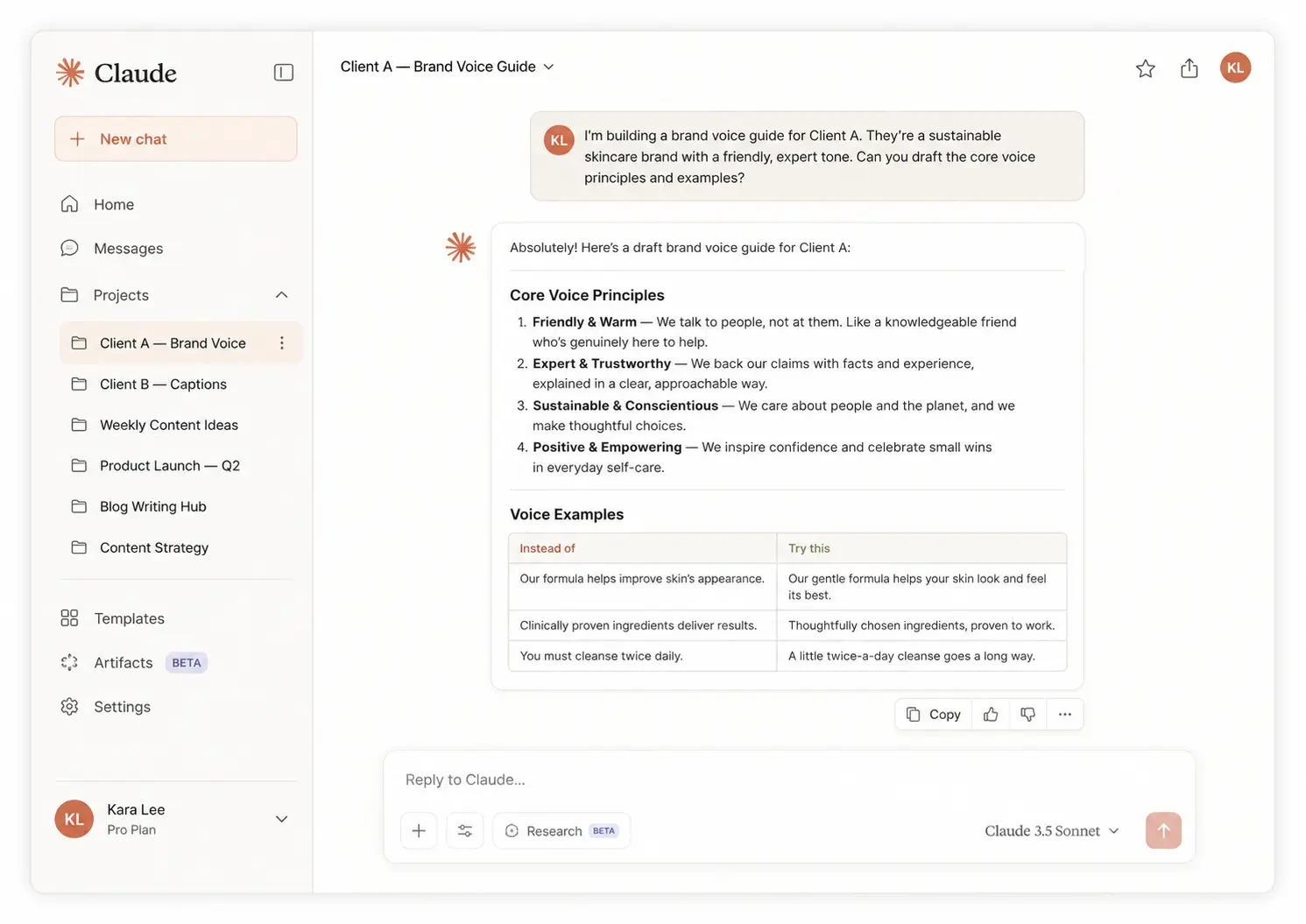
What it actually looks like: In Claude, you click Projects on the left and then + New Project. Add the brand guide, past posts and audience notes to the knowledge base on the right, and click Set project instructions so every chat follows them. Ask for a month’s content plan and it opens as an Artifact beside the chat, where you edit it before sending posts to your scheduler. Our walkthrough on building a social media content plan using Claude shows the full flow.
Liz N., a Capterra reviewer, wrote: “I feel like the usage limits keep getting shorter or smaller, and the amount I can do within a specific project has become more limited.”
On Capterra, Claude is rated 4.6 out of 5 across 849 reviews.
What it does well: It’s strong at the thinking part of social, turning a messy brief into structured, on-voice drafts. Projects keep that context in place for every chat.
Claude is free with limited usage. Pro is $17 a month billed annually ($200 up front) or $20 billed monthly, and Max starts at $100 a month for 5x Pro usage. Team is $20 per seat per month billed annually or $25 monthly, for teams of 2 to 150.
What running Claude standalone requires: A scheduler and a design or video tool. Claude doesn’t generate images or video and can’t publish to social networks by itself, so it works best connected to a scheduler. Heavy users also hit usage limits that reset every five hours, plus weekly caps.
7. Jasper AI – Best for Brand-Voice Consistency Across Writers
Jasper learns your brand voice from your own content, so every writer on the account and every agent drafts in the same tone.
Platforms Supported: Web app, a Chrome and Edge browser extension and a Google Docs add-on.
Key Features:
- Brand Voice trained on your own posts, files or URLs
- Jasper IQ with audiences, style guide and visual guidelines
- Agent Library filtered for social media marketing
- Canvas projects that hold briefs through to social posts
- Browser extension for writing inside LinkedIn and Facebook
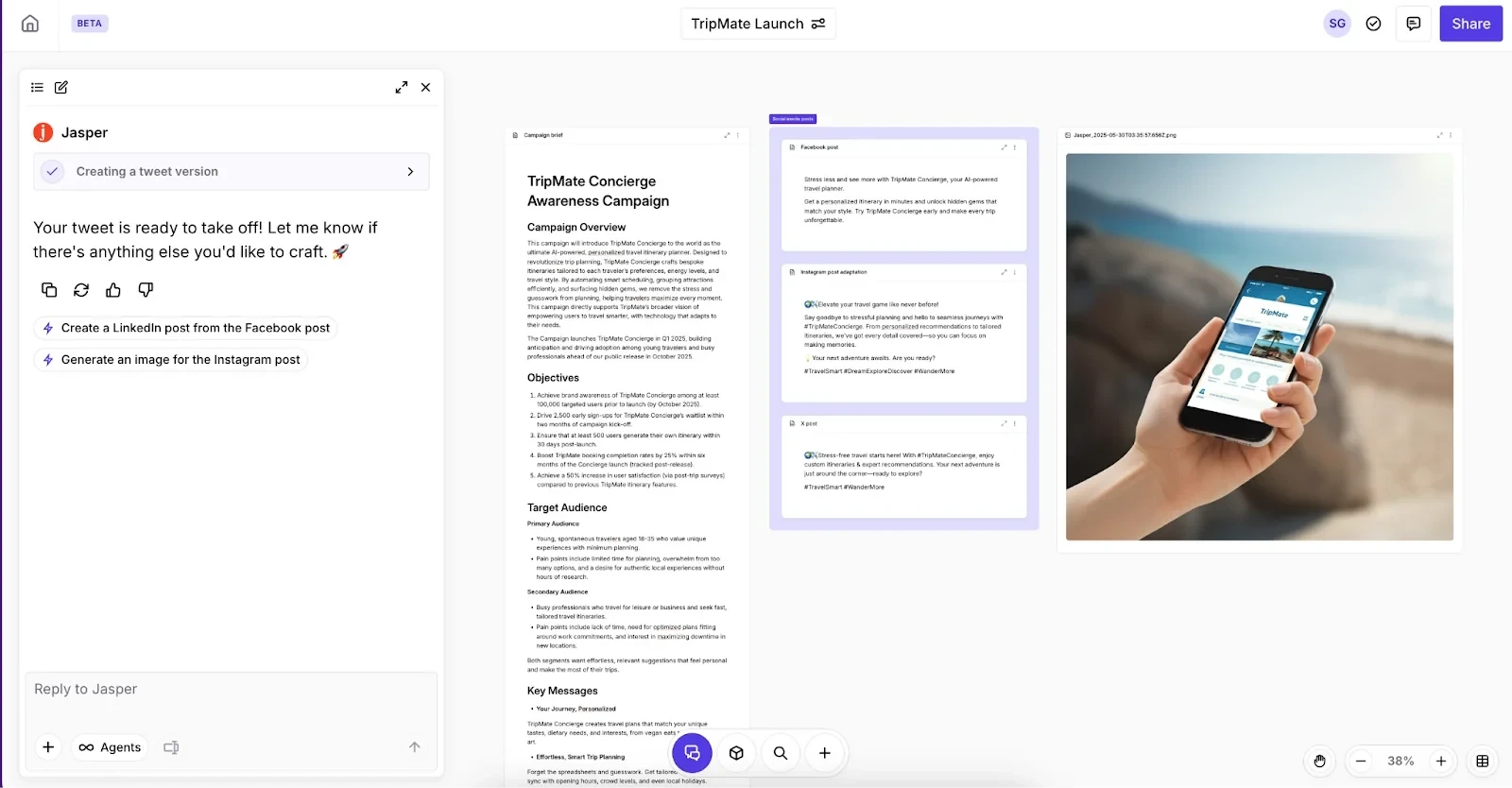
What it actually looks like: In Jasper, you go to Jasper IQ in the left sidebar, open Brand Voice and click + Add Brand Voice. Upload up to 8 examples as text, files or URLs, click Preview Brand Voice to compare a LinkedIn post with and without it, then Save changes. To write, you start a Project or pick an agent under Agents, filtered to Social Media, and set the voice and audience in Project Settings at the top of the Canvas.
Nishant T., a Senior Analyst and Capterra reviewer, wrote: “Overall, its a powerful AI writing tool which enables creation of marketing content, maintains brand voice and support team workflows.”
On Capterra, Jasper is rated 4.8 out of 5 across 1,852 reviews.
What it does well: It solves the problem that shows up once several people write for one brand, which is posts that sound like different companies. A workspace admin can set a default Brand Voice for everyone, and the Agent Library gives you ready-made social media agents instead of a blank chat box.
Jasper’s Pro plan is $59 per seat per month billed yearly or $69 monthly, with 2 Brand Voices, 5 knowledge assets and 3 audiences. Business is custom pricing with a 12-month commitment, and adds unlimited Brand Voices, API access, SSO and a no-code agent builder. There’s no free plan, only a 7-day free trial on Pro.
What running Jasper standalone requires: A scheduler, because Jasper writes posts but doesn’t publish or schedule them. Expect to edit, too. Roddy T., a Manager on Capterra, says “It requires heavy editing for quality output, so be advised. It is also a bit more expensive vs it’s competitors.” Zapier and Make automations need the Business plan.
AI Tools for Video and Visual Creation
These tools help you create the visual content behind your social media posts, from graphics and branded designs to videos and AI-generated short-form clips. While they speed up content production, you’ll still need a separate social media management tool to schedule and publish posts across multiple accounts.
| Feature | Canva | CapCut | InVideo AI |
| What it makes | Graphics, carousels and short videos | Edited short-form video | Full reels and explainers from a prompt |
| Main AI features | AI tools, Templates, Scheduling | Auto captions, long video to shorts, script to video | Text-to-video, AI voice-over, voice cloning, avatars |
| Editing style | Drag-and-drop editor | Timeline editor | Plain-text edit commands |
| Brand kit | Yes & 1 Kit on Free Plan | Yes, on Teams | Not stated |
| Publishes directly | Content Planner to Facebook Pages, Instagram Business, X, LinkedIn, Pinterest, Slack and Tumblr | TikTok from mobile, YouTube from desktop | No, export and upload |
| AI usage limit | Not stated | 1,200 credits a month on Pro | 400 to 5,000 credits a month, no rollover |
| Apps | Web, Mac, Windows, iOS, Android | Web, Windows, macOS, iOS, Android | Web, iOS, Android |
| Free plan | Yes | Yes | No |
8. Canva – Best for On-Brand Graphics and Carousels
Magic Studio puts AI design, writing and image generation inside the editor most social teams already use.
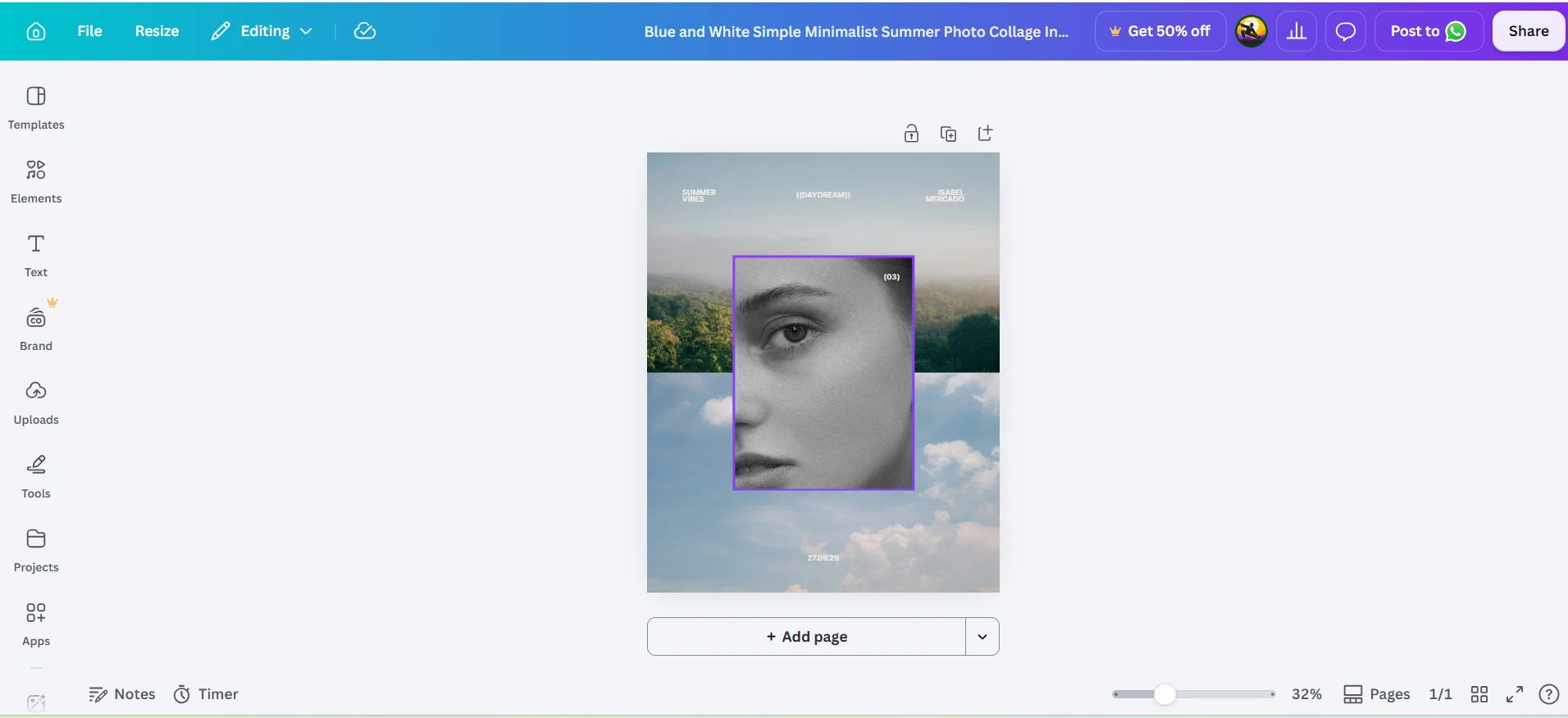
Platforms Supported: Web, Mac, Windows, iOS, Android and Chromebook. Its Content Planner schedules to Facebook Pages, Instagram Business accounts, X (Twitter), LinkedIn, Pinterest, Slack and Tumblr.
Key Features:
- Magic Design to build layouts from a prompt
- Magic Write for on-design copy
- Magic Media for AI images and video clips
- Brand kits for fonts, colors and logos
- Content Planner to schedule finished designs
What it actually looks like: In Canva, you open a design and select Quick actions, or type “/”, then choose Magic Write and Insert. To change existing text, right-click it, pick Magic Write and choose Rewrite, Shorten or More formal. When the design is done, Share, then See all and Schedule sends it to the Content Planner, where you set the channel, date, time and caption.
A Director of Sales, Marketing and Business Development, a Capterra reviewer, wrote: “Often I find the template, photo or icon that fits exactly, and then I see the small crown on it, which means it is only for Pro.”
On Capterra, Canva is rated 4.7 out of 5 across 13,491 reviews.
What it does well: It makes on-brand graphics fast for people who aren’t designers, and its template library is the deepest in this guide. It also plugs into most schedulers, SocialPilot included.
Canva offers a free plan with basic design tools and limited AI access. Its paid plans include Pro ($18/month) for individuals and Business ($25/user/month) for teams on monthly billing. These unlock premium templates, stock assets, Brand Kits, background removal, and advanced AI features.
What running Canva standalone requires: A real scheduler once you manage more than a couple of accounts. The Content Planner publishes one platform per design and doesn’t support TikTok or Instagram Creator accounts, and approvals, analytics and reporting live elsewhere.
9. CapCut – Best for Short-Form Video Editing
The most video-editing power for the lowest price in this guide, with AI captions and clipping on a free plan.
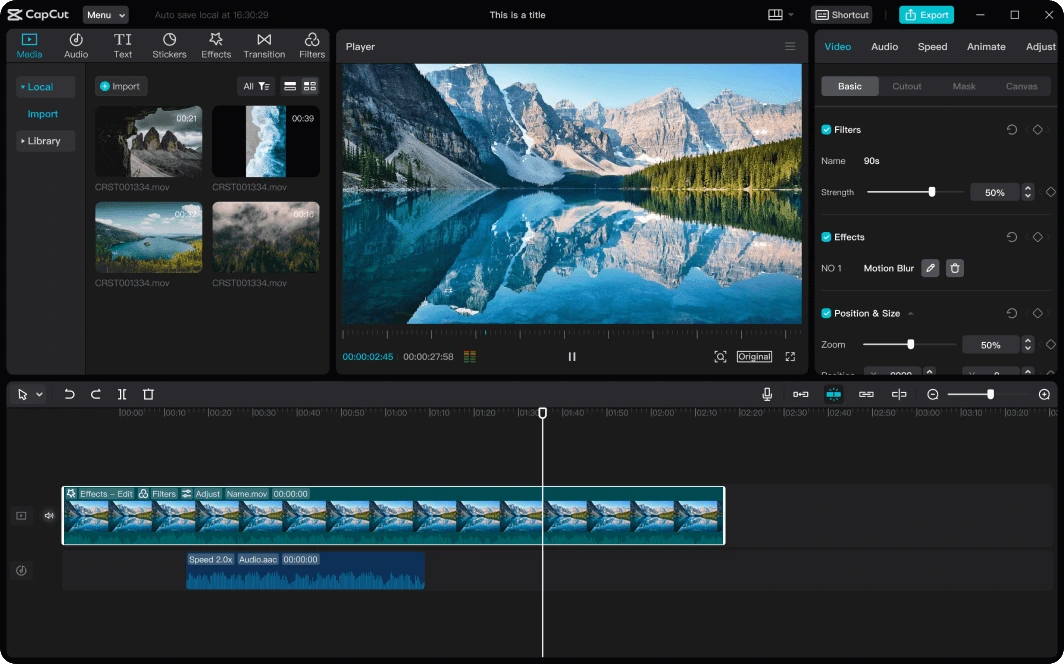
Platforms Supported: Web, Windows, macOS, iOS and Android.
Key Features:
- Auto captions in one click
- Long video to shorts clipping
- “Start with script” to draft a video from text
- Text-to-speech and custom voices
- AI video generation on paid plans
What it actually looks like: In the CapCut desktop app, you select Captions, then Auto Captions, pick the language and click Generate. The long video to shorts tool cuts a podcast or webinar into vertical clips you can then caption and trim on the same timeline. When you’re done, the Export button at top right sets resolution and frame rate, and on mobile you can link TikTok under Connected accounts and post in one tap.
Sankari Nair, a Product Hunt reviewer, wrote: “CapCut is incredibly intuitive and beginner-friendly, yet packed with enough features to make your videos look professional.”
On Product Hunt, CapCut is rated 4.3 out of 5 across 43 reviews.
What it does well: The editor and the AI tools sit in one place, so you can auto-caption, clip, trim and resize without exporting between apps, and the free plan is enough to start.
CapCut is free for basic editing. Paid web plans start with Pro at $19.99/month ($179.99/year) for 1,200 monthly AI credits and 1 TB of storage, though mobile app stores offer a basic Standard tier starting at $9.99/month (only with in-app purchase). Ultra is $79/month ($900/year) for 8,645 AI credits and 1 TB of storage. Teams starts at $12.49/seat/month (2-seat minimum, or $24.98/month total; $107.50/seat/year) and adds a shared brand kit.
What running CapCut standalone requires: A scheduler, plus a careful look at billing. CapCut makes the video but doesn’t plan or publish across a brand’s accounts. Paul Fox, a Trustpilot reviewer, wrote that he “cancelled subscription within the first month, still getting charged for months,” so note your renewal date.
10. InVideo AI – Best for Faceless Reels from a Prompt
Type one prompt and InVideo AI writes the script, picks the footage, adds a voice-over and assembles the video.
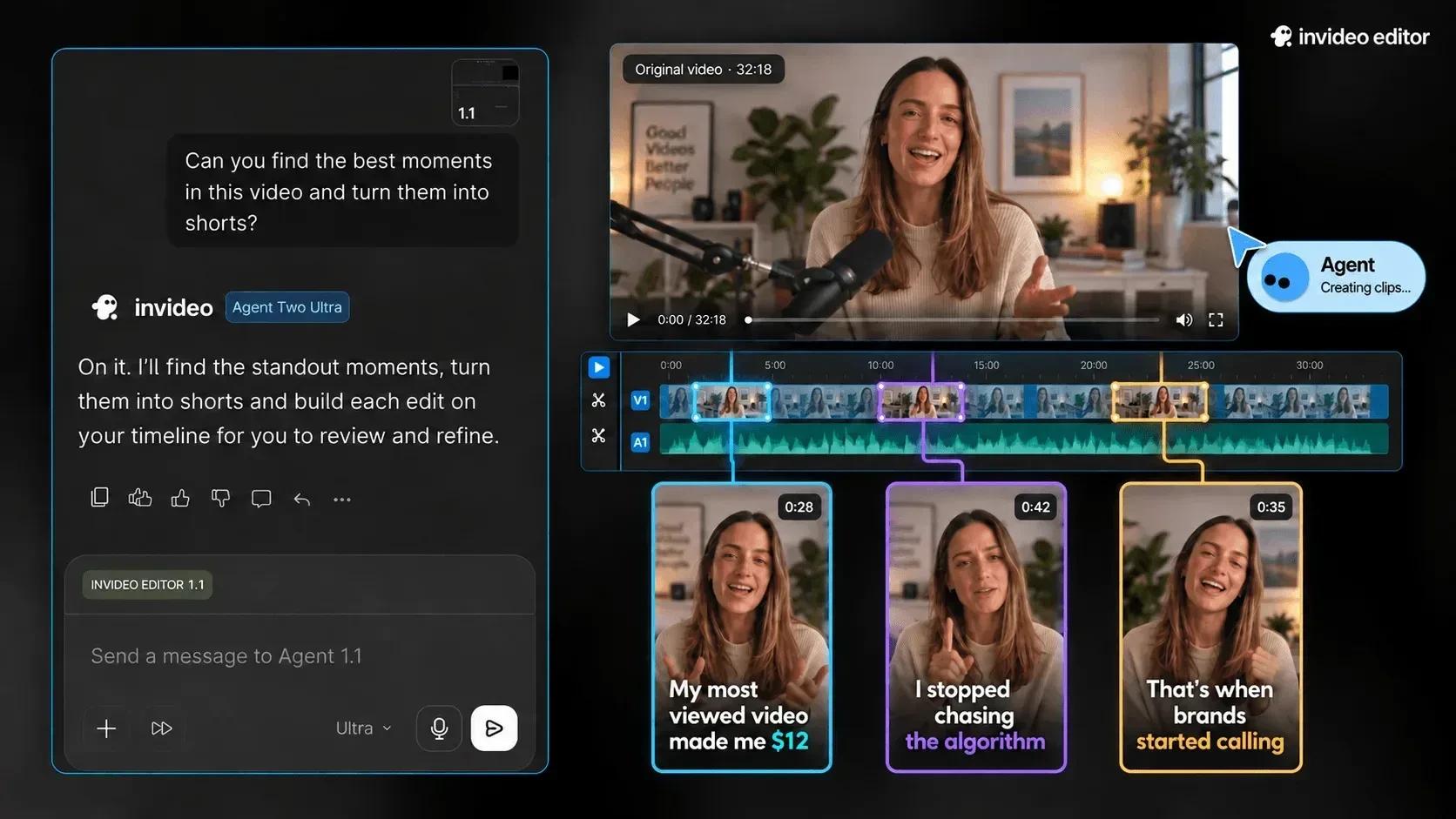
Platforms Supported: Web, with iOS and Android apps. Videos export as files you upload to Instagram, TikTok, YouTube or your scheduler.
Key Features:
- Text-to-video from a single prompt
- Workflows for YouTube Shorts, explainers and script-to-video
- Plain-text edit commands instead of a timeline
- AI voice-over and voice cloning
- UGC-style ads and AI avatars
What it actually looks like: In InVideo AI, you choose a workflow such as YouTube Shorts or Script to video from the drop-down, write a detailed prompt, and select your audience, look and feel, and platform. It generates a full draft. You then click Edit to swap media or rewrite the script, or type a plain-text command, such as asking it to increase the pace of the video, and finish with Export, choosing resolution and branding.
A Content Creator, a Capterra reviewer, wrote: “The templates look great, the editor is simple to use, and the AI features save me a ton of time.”
On Capterra, InVideo is rated 4.5 out of 5 across 417 reviews.
What it does well: It gets someone with no footage and no editing skills to a finished reel fastest. For faceless explainers and quick ad variants, that speed is the point.
InVideo AI’s Starter plan is $10 per seat per month billed annually ($20 monthly) with 400 credits. Plus is $30 billed annually ($60 monthly) with 2,000 credits, and Max is $75 billed annually ($200 monthly) with 8,000 credits. No free plan or trial on InVideo.
What running InVideo AI standalone requires: Careful credit planning and a scheduler. Credits pay for generation, transcripts and premium stock, and unused credits don’t roll over. A Marketing Manager on Capterra puts it bluntly: “The credit usage is not transparent and is constantly running out and urging to buy more credits to finish your task.”
Choosing the Right Setup for Your Team
| Team type | Recommended setup |
| Solo creator posting to 3 to 5 channels | Buffer’s free plan or SocialPilot Essentials for scheduling, ChatGPT or Claude free for drafts, Canva free for graphics. Skip paid video tools until video is a weekly habit |
| Small business that doesn’t know what to post | SocialBee for the AI-built content plan, Canva for visuals. Skip a separate writing assistant, since Copilot covers it |
| Agency managing client accounts | SocialPilot for scheduling, approvals and white-label reports, Claude or ChatGPT connected through MCP for drafting, Canva for client graphics. Add CapCut for clients who post Reels and TikToks |
| Video-first brand or podcaster | CapCut to edit and caption clips, InVideo AI for faceless reels, and one scheduler to publish them. Skip heavy writing tools |
| Enterprise team needing listening | Hootsuite for publishing and listening in one place, Canva for brand-controlled design |
Build a Stack, Not a Single Pick
No tool in this guide does all three jobs well. The pattern that works is one scheduler as the hub, one writing assistant feeding it, and one creation tool for the format you post most. The scheduler is the piece worth choosing carefully, because it’s the one your whole team logs into every day.
If you want more depth on the creation side, our guide to AI tools for social media content creation covers 20 tools across text, image, video and audio.
Other AI Tools Social Media Teams Use
These tools didn’t make our main list because they focus on specific tasks or fall outside the three categories covered above. Still, they can complement your existing workflow, helping agencies and creators handle specialized tasks alongside their primary social media tools.
| Tool | Category | What teams use it for |
| OpusClip | Video repurposing | Cuts long videos into captioned short clips with a virality score |
| Submagic | Video captions | Adds animated, emoji-styled captions to short-form video |
| Brand24 | Social listening | Tracks brand mentions and sentiment, with weekly AI Insights and an AI Brand Assistant |
| Sprout Social | Enterprise analytics and care | Publishing, inbox and listening for larger teams, with the Trellis AI agent |
| ManyChat | DM and comment automation | Auto-replies to Instagram comments and DMs with keyword triggers and AI replies |
| Adobe Express | Design | Quick social graphics and short videos with Firefly generative AI |
| Granola | Ideation | Turns meeting and voice notes into structured notes you can mine for post ideas |
| Predis.ai | All-in-one post generation | Generates posts, carousels and short videos from a prompt, with competitor analysis |
| HypeAuditor | Influencer marketing | Vets influencer audiences for fake followers before a brand pays for a partnership |
Pick the Job First, Then the Tool
The fastest way through this list is to ignore the names and start with the job that’s eating your week. If it’s keeping several accounts posted on time, start with a scheduler. If it’s staring at a blank caption box, add a writing assistant. And if Reels and carousels are the bottleneck, pick a creation tool.
Most teams end up with one tool from each group, with the scheduler at the center, because that’s where everything you write and design eventually has to go. Choose that one carefully, since it decides how many accounts you can run, who approves what, and how the bill grows as your team does.
If you manage several brands or clients, try SocialPilot free for 14 days, connect the AI assistant you already use, and see how much of your week you get back.
Frequently Asked Questions
What is the best AI tool for social media?
The best AI tool depends on your needs. For managing and scheduling posts across multiple accounts, consider SocialPilot, Buffer, or Hootsuite. For content ideation and writing, ChatGPT and Claude are versatile options, while Jasper helps maintain a consistent brand voice. For creating visuals and videos, Canva, CapCut, and InVideo AI are worth exploring.
Are there free AI tools for social media?
Yes. Buffer has a free plan for 3 channels with its AI Assistant included, and ChatGPT, Claude, Canva and CapCut all have free plans with limits. Free plans usually cap usage, add watermarks or lock the best templates.
Can one AI tool handle all of social media management?
Not effectively. Tools like SocialPilot and Hootsuite bring scheduling, publishing, AI-assisted drafting, and reporting together, but they don't replace dedicated tools for advanced graphic and video creation. Most teams get better results by combining a social media management platform with a writing or visual creation tool.
What's the difference between an AI scheduler and an AI writing tool?
An AI scheduler writes captions inside the tool that publishes them, so drafts go straight onto the calendar. An AI writing tool like ChatGPT, Claude or Jasper only produces text, which you then move into a scheduler yourself or through an MCP connection.
Will AI-written posts sound generic?
They will if you use them unedited. Give the tool examples of your past posts and a short brand-voice brief, keep a human edit before anything publishes, and fact-check any number the AI adds.
About the Author