
Your manager forwards a competitor’s Instagram post with one question: why is theirs doing better than ours? You scroll back a month, count likes, and by the third competitor you’re copying numbers into a spreadsheet by hand. A competitor analysis tool does that tracking for you, but only if it covers the networks you compete on and the number of competitors you need to watch.
Social media competitor analysis tools all promise to show what your competitors are up to, but they differ on three things: which networks they can track competitors on, how many competitors your plan allows, and where the numbers end up.
We compared 9 tools on those three checks and split them into two groups: management tools with competitor reports built in, and dedicated tools for benchmarking and listening. Let’s now talk about each of these tools in detail, their weak spots included.
What Competitor Analysis Tools Can and Can’t See
Competitor analysis tools work from public data, so they can show a competitor’s followers, posts, likes and comments but not their reach, saves or impressions. Those numbers live in the competitor’s own insights, which only their account admins can open. When a tool shows reach for a competitor, it’s an estimate.
What tools can see (public data):
- Follower count and growth, from the day you start tracking
- How many posts a competitor publishes, and when
- Post formats: images, carousels, videos and Reels
- Likes and comments on each post, plus shares on Facebook
- Engagement rate per post, calculated against followers
- Top posts by engagement and the hashtags they use
What they can’t see (private data):
- Reach and impressions (some tools show an estimate)
- Saves on Instagram
- Story views
- Follower demographics such as age and location
- Paid data from their ads
- Exact follower history from before you added the competitor
The networks also have a few free views of their own. On LinkedIn, the Competitors tab in Page analytics tracks one competitor on a free Page and up to nine on a Premium Company Page, showing followers, engagements, posts and trending posts from the past 30 days (LinkedIn Help). That’s enough for a quick check on one network, but it won’t put LinkedIn next to Instagram in a single report.
If you want to run the comparison by hand before paying for anything, our step-by-step social media competitor analysis guide covers which competitors to pick and which numbers to pull.
Four Jobs a Competitor Analysis Tool Does
A social media competitor analysis tool tracks your competitors’ public accounts and shows how your numbers stack up against theirs. Every tool in this list does some mix of four jobs, and most do only two or three of them well.
Work out which of those jobs you actually need and the shortlisting gets much easier.
- Benchmark: You compare your posts with your competitors’ on engagement rate, posting frequency, format mix and follower growth. Look for side-by-side charts for the same date range, with post-level detail you can filter by format.
- Report: You turn that comparison into a PDF your boss or client can read without logging in. Look for PDF export, scheduled delivery and white-label branding.
- Listen: You track what people say about your competitors, including sentiment and share of voice, which is the slice of all mentions in your market that each brand owns. Look for mention tracking with share of voice and positive or negative sentiment charts.
- Reach: You check which networks the tool can follow competitors on, a list that is often shorter than the one it publishes to. Look for named-competitor tracking on every network you compete on.
If you also want deeper numbers on your own accounts, our roundup of social media analytics tools covers that side of reporting.
Competitor Analysis Tools at a Glance
Four of these nine keep competitor tracking off their entry plan, and per-seat pricing grows with every person who logs in, while flat plans hold their price as you hire.
Here are all 9 compared tools side by side.
| Tool | Best For | Competitor networks | Plan with competitor tracking (annual / monthly) | Free plan / trial |
| SocialPilot | Agencies and Small Businesses | Facebook Pages, Instagram | Premium, $85/mo / $100/mo | No free plan; 14-day free trial, no card |
| Sprout Social | Enterprises & Multi-Locational Brands | Facebook, Instagram (Business), X | Professional, $299/seat/mo / $399/seat/mo | No free plan; 30-day trial, no card |
| Hootsuite | Enterprises & Large Brands | X, Facebook Pages, Instagram Business (LinkedIn and TikTok as industry averages only) | Standard, $99/user/mo / annual rate | No free plan; 14-day trial |
| Agorapulse | Large Teams & Enterprises | Facebook Pages, Instagram | Advanced, $149/user/mo / $199/user/mo | Free plan after a 30-day trial, no card |
| Metricool | Freelancers and Small Agencies | Facebook, Instagram, Threads, Bluesky, Twitch; YouTube and X (X add-on) on paid plans | Free | Free plan, no trial |
| Socialinsider | Agencies and In-House Brand Teams | Facebook, Instagram, LinkedIn company pages, TikTok, YouTube, X | Adapt, $83/mo / $99/mo | No free plan; 14-day trial, no card |
| Rival IQ | Agency Competitive Audits | Facebook, Instagram, X, TikTok, YouTube (no LinkedIn competitors) | Drive, $199/mo / $239/mo | 14-day trial, no card |
| Iconosquare | Instagram-First Brands | Instagram, Facebook Pages | Scale, $79/mo / $95/mo | Free plan (no competitor tracking); 14-day trial, no card |
| Brand24 | PR Teams and Consumer Brands | Mentions on Facebook, Instagram, X, Reddit; LinkedIn, YouTube, TikTok from Team | Individual, $199/mo / $249/mo | No free plan; 14-day trial, no card |
Prices are monthly rates on annual billing, as checked on each vendor’s pricing page. Vendors change plans without notice, so confirm on the pricing page before you buy.
Social Media Management Tools With Built-In Competitor Reports
Each of these five already schedules your posts, answers your comments and sends your client reports, and the competitor report lives in that same login. Pick one of these if you want to benchmark a handful of competitors on Facebook and Instagram (and X, on some) without paying for a second tool.
1. SocialPilot – Best for Agencies and Small Businesses
Competitor numbers land in the same branded PDF your clients already get from you. They cover only Facebook and Instagram, and only from Premium.
Platforms Supported (competitor tracking): Facebook Pages and Instagram (Business and Creator accounts).
Key Features:
- Competitor Reports for Facebook and Instagram (Premium, Ultimate)
- Add up to 10 competitor accounts in one go
- Post type mix across reels, carousels, videos and images
- Engagement rate per post and top posts by engagement
- PDF export, scheduled delivery and white-label branding
- Free, no-login Instagram and Facebook competitor tools
What it looks like: In SocialPilot, you click Analytics in the left menu, open Competitor Reports and hit Add Competitor in the top-right corner. A Facebook page shows up in Search Competitor after three typed characters, while an Instagram account needs its exact username. Open the report, and View Report puts the competitor’s Followers, Posts, Engagements and Reactions on cards, each marked against Since Previous Period, with a Publishing Trend chart below that splits their output into Image, Text, Video and Link posts. Click Date to change the period, going back as far as 90 days. From there, Competitor Reports download as a PDF or go out on a schedule with your branding.
If you work in Claude or ChatGPT, the SocialPilot MCP server (every paid plan) lets the assistant create and schedule posts or check publishing status from the chat, and our guide to competitor analysis using Claude shows how to pull competitor’ posts into the same conversation and act on the gaps.
Shayne W., a G2 reviewer, wrote: “Basically 4 hours of work allows me to keep constant communication for an entire month which has proven invaluable for us as a business who does not employ internal marketing.”
On G2, SocialPilot is rated 4.5 out of 5 across 848 reviews.
What it does well: An agency can add a client’s two closest competitors to the monthly report and send it under the agency’s own logo, because competitor data and white label social media reporting come on the same plans.
Competitor Reports start on Premium, at $85 a month billed annually ($100 month to month) for 6 users, 25 accounts, unlimited client seats, client approvals and white-label reports. Ultimate keeps them at $170 or $200 and raises the limit to 50 accounts with unlimited users. Essentials ($25.50 annually or $30 monthly, 1 user, 7 accounts, no analytics) and Standard ($42.50 or $50, 3 users, 15 accounts, PDF reports) don’t include competitor tracking, and Enterprise is quote only.
Billing is flat per plan, so the price moves only when you add a user ($5 a month on Premium) or an account ($4 a month). No total competitor cap is published. There’s no free plan, and the free trial needs no credit card. See SocialPilot’s plans for current details.
2. Sprout Social – Best for Enterprises & Multi-Locational Brands
Nothing below Professional, at $299 a seat, includes Sprout’s competitor reports. Once you pay for it, Facebook, Instagram and X competitors share one view.
Platforms Supported (competitor tracking): Facebook, Instagram (Business profiles) and X (Twitter).
Key Features:
- Cross-network Competitor Performance Report (Professional and up)
- Separate Facebook, Instagram and X Competitors reports
- Competitor Posts Report filtered by content type
- Top three hashtags for each Instagram competitor
- Up to 20 competitors per group on X
- Competitive share of voice with the Listening add-on
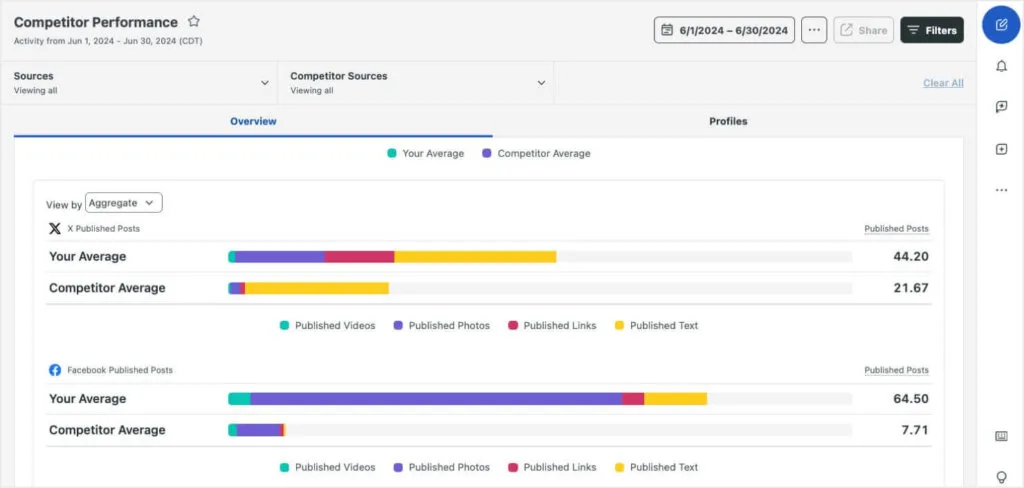
What it looks like: In Sprout Social, you go to Reports, then Cross-Network, and open Competitor Performance. Competitor Sources sets who you measure against, Filters narrows the dates, and the Overview and Profiles tabs switch between the totals and each competitor. The Engagements panel sets Your Average beside Competitor Average, with tabs for Cross-Network, X, Facebook and Instagram, and breaks Public Engagements per Post into likes, replies and shares.
Joe J., a G2 reviewer, wrote that “The dashboard is super intuitive, the scheduling tools are a lifesaver, and the reporting actually helps me see what’s working without getting lost in data.” But he also added that “it can get pretty pricey, especially if you need access for a larger team.”
On G2, Sprout Social is rated 4.4 out of 5 across 7,591 reviews.
What it does well: The Competitor Posts Report lists every post a competitor has published on Facebook, Instagram or X, filtered by content type, so you can see which formats they’re betting on and export up to 1,000 rows to CSV.
Sprout bills per seat, and according to Sprout Social’s pricing page, competitor reports start on Professional, at $299 a seat a month billed annually or $399 monthly, with unlimited profiles. Advanced keeps them at $399 or $499, and Enterprise is quote only. Essentials ($79 or $99, 5 profiles, no inbox) and Standard ($199 or $249) leave them out. There’s no free plan, and the 30-day trial needs no credit card.
Every person who logs in needs a seat on the same plan, so three people on Professional cost $897 a month on annual billing and five cost $1,495. Check our Sprout Social pricing guide for current plans.
What running Sprout Social standalone requires: Patience and a second tool. Sprout’s help centre says the reports show data only from the day you start tracking a competitor, and LinkedIn pages can’t be tracked at all. If $299 a seat is more than the reporting is worth to you, compare Sprout Social alternatives priced per plan instead of per person.
3. Hootsuite – Best for Enterprises & Large Brands
Five named competitors come with Standard, Hootsuite’s cheapest plan, but on LinkedIn and TikTok you’re measured against an industry average instead of real competitors.
Platforms Supported (competitor tracking): X (Twitter), Facebook Pages and Instagram Business accounts, with LinkedIn and TikTok covered by industry averages only.
Key Features:
- 5 competitors on Standard, 20 on Professional and Advanced
- 30 days of data backfilled when you add a competitor.
- Benchmarking report with hashtags and post length
- Industry benchmarks for LinkedIn and TikTok
- PDF and PPTX export with your own logo
- Share of voice and sentiment through Listening on higher tiers
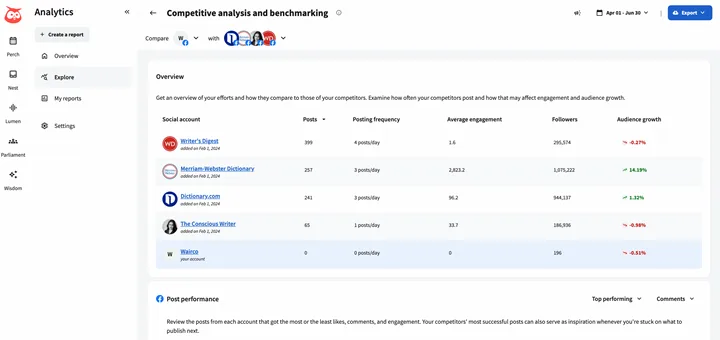
What it looks like: In Hootsuite, you add rivals from Analytics settings, under Competitors. Pick a network, search by Page name or username (or paste the profile URL), then close the panel, and the watchlist is shared with your whole team. The Competitive analysis and benchmarking report then lines up your account against each competitor on Posts, Posting frequency, Average engagement, Followers and Audience growth. Export, in the corner, saves it as a PDF or PPTX with your logo.
Carlette B., a G2 reviewer, wrote: “There’s not much we dislike about the platform, but it can be expensive and a bit clunky for a small team. Occasionally, the connection to a social media platform drops.”
On G2, Hootsuite is rated 4.3 out of 5 across 7,764 reviews.
What it does well: Adding a competitor pulls in its last 30 days straight away, so your first benchmark has something in it on day one instead of an empty chart.
Pricing: Every plan on Hootsuite’s plans page tracks competitors, and the plan sets how many. Standard is $99 a user a month billed annually, with 10 social accounts and 5 competitors. Professional is $199 with unlimited accounts, custom reports and 20 competitors. Advanced is $399, adds team approvals and keeps 20 competitors. Enterprise is quote only, with a custom competitor count.
Monthly billing costs more at a rate Hootsuite doesn’t print. There’s no free plan, and the 14-day trial caps posting at 10 to 20 posts a day and blocks bulk scheduling.
Each user is a separate seat, so two people who need 20 competitors pay $398 a month on Professional, billed annually. Our Hootsuite pricing breakdown walks through each tier.
What running Hootsuite standalone requires: Another tool for named LinkedIn and TikTok rivals, and Listening on a higher tier if you want share of voice or sentiment. If that pushes the per-seat bill past what your team can justify, weigh it against Hootsuite alternatives that price by plan.
4. Agorapulse – Best for Large Teams & Enterprises
Competitor benchmarking is an Advanced feature on Agorapulse, where you can watch up to six competitors on Facebook and Instagram.
Platforms Supported (competitor tracking): Facebook Pages and Instagram (Professional or Business accounts).
Key Features:
- Competitor benchmarking on Advanced, with 6 competitor profiles
- Extra competitors as a paid add-on
- Format mix across Reels, Carousels, Videos, Photos, Links and Texts
- Top 6 competitor posts, sortable by engagement type
- Engagement per post type chart
- PDF export emailed to you
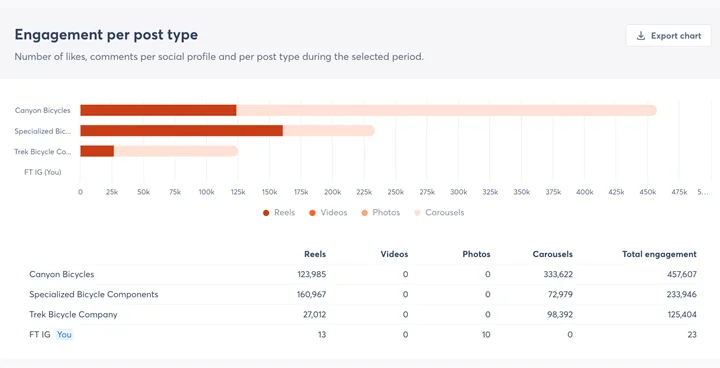
What it looks like: In Agorapulse, you click the Analytics icon in the left menu, choose Competitors and pick one of your Facebook or Instagram profiles under Social profiles. Manage competitors, in the top-right, opens a panel where + Add competitor takes a Facebook page URL or an Instagram username. Click Add, then Save changes. Your profile, tagged You, then sits beside each competitor, and Engagement per post type splits total engagement across Reels, Videos, Photos and Carousels. The Export icon emails a PDF of the report to your account address.
Ray B., a G2 reviewer, wrote that “I use Agorapulse solely for the inbox feature to keep track of my business social pages. It solves the problem of compiling my multiple business social inboxes in one place. The initial setup was easy, with no problems, and there’s great support if you need it.”
On G2, Agorapulse is rated 4.5 out of 5 across 979 reviews.
What it does well: Putting your own profile in the same Engagement per post type chart as your competitors shows at a glance whether their Reels outpull your carousels.
Per Agorapulse’s pricing page, it charges per user, per month, and every listed plan includes 10 social profiles. Standard is $79 on annual billing or $99 monthly, and Professional, which adds assignments and simple approvals, is $119 or $149. Competitor benchmarking comes on Advanced, at $149 or $199, which also adds shared calendars and ROI reports, and on Custom.
Agorapulse’s help center adds that the Competitors report is open only on per-user (PPU) or Custom plans, with one competitor profile on Standard and Professional and six on Advanced. Custom is quote only, with the competitor count set in your contract. Extra profiles cost $10 each a month on annual billing or $15 monthly, and extra competitors are an add-on with no published price.
The 30-day trial needs no credit card, and you can stay on a free plan after it ends, though the free plan doesn’t include the Competitors report. See our Agorapulse pricing guide for current plans.
What running Agorapulse standalone requires: A separate tool for any competitor outside Facebook and Instagram. History is thin too, because Agorapulse’s help article says follower tracking starts the day you add a competitor and post data stops updating after 30 days. If you need more than one competitor before Advanced, look at Agorapulse alternatives that include more competitors on a flat plan.
5. Metricool – Best for Freelancers and Small Agencies
Metricool’s free plan watches five competitors, so you can start before you pay anything. Pick them carefully, because on the free plan you can’t delete one once it’s added.
Platforms Supported (competitor tracking): Facebook, Instagram, Threads, Bluesky, Twitch, YouTube (paid plans) and X (Twitter, paid plans plus the X add-on).
Key Features:
- 5 free competitors on Facebook, Instagram, Threads, Bluesky and Twitch
- Up to 100 competitors per network from Starter (YouTube 10)
- Competitor post list with More Statistics per competitor
- CSV download of the comparison table
- Up to 300 past posts synced on paid plans
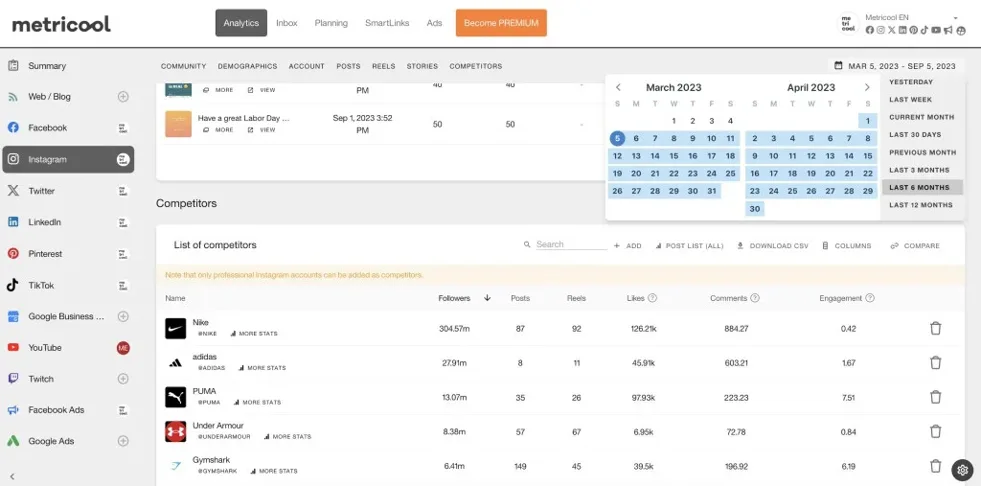
What it looks like: In Metricool, you open Analytics, click the Competitors tab and hit Add. The List of competitors table lines up each competitor’s Followers, Posts, Reels, Likes, Comments and Engagement, and Compare puts two side by side. Download CSV exports the table, and Posts (All) lists everything they’ve published. A note on the screen warns that only professional Instagram accounts can be added. Engagement is worked out against followers, because reach isn’t public for accounts you don’t own.
A G2 reviewer, Jessie R., wrote that ” The interface is well designed, pleasant to navigate, and makes it easy to access a wide range of features, from content scheduling and analytics to reporting and competitor tracking.”
On G2, Metricool is rated 4.4 out of 5 across 111 reviews.
What it does well: It tracks Threads and Bluesky competitors, which none of the other four management tools here can, and paid plans hold up to 100 competitors per network.
Competitor tracking is on every plan on Metricool’s pricing page, Free included, so the plan sets the cap rather than unlocking the feature. Free covers 1 brand, 20 posts a month, 30 days of analytics, and 5 competitors. Starter lifts the cap to 100 per network for $20 a month billed annually or $25 monthly with 5 brands, or $36 or $45 with 10, on a single login. Advanced adds unlimited team members and approvals at $53 or $67 for 15 brands, $85 or $107 for 25, and $159 or $210 for 50. Custom is quote only.
A brand is one profile per network; VAT is extra, and connecting X adds $10 a month per account. There’s no trial, so the free plan is your test. See our Metricool pricing guide for current plans.
What running Metricool standalone requires: Another tool for LinkedIn and TikTok competitors, since Metricool’s help centre lists neither as a competitor network, and Advanced before a teammate can open the competitor table, because Starter is a single login. Agencies that need both can check our list of Metricool alternatives.
Dedicated Competitor Benchmarking Tools
These four don’t publish posts. Three benchmark your numbers against competitors, and Brand24 tracks what people say about each brand. Pick one of these if you need more networks, history, or exports than the suites above.
6. Socialinsider – Best for Agencies and In-House Brand Teams
Your competitor’s LinkedIn company page and TikTok account sit in the same benchmark as their Instagram. Each one you add also uses up the profile allowance your own accounts draw on.
Platforms Supported (competitor tracking): Facebook, Instagram, LinkedIn (company pages), TikTok, YouTube and X (Twitter).
Key Features:
- Competitor benchmarking on all six networks, every plan
- LinkedIn company pages tracked like your own
- Average Performance Indicator against your industry
- Content pillars that tag competitor posts by keyword or hashtag
- Estimated reach for competitors’ Facebook and Instagram posts
- PDF, PPT, XLS and CSV exports with scheduled Autoreports
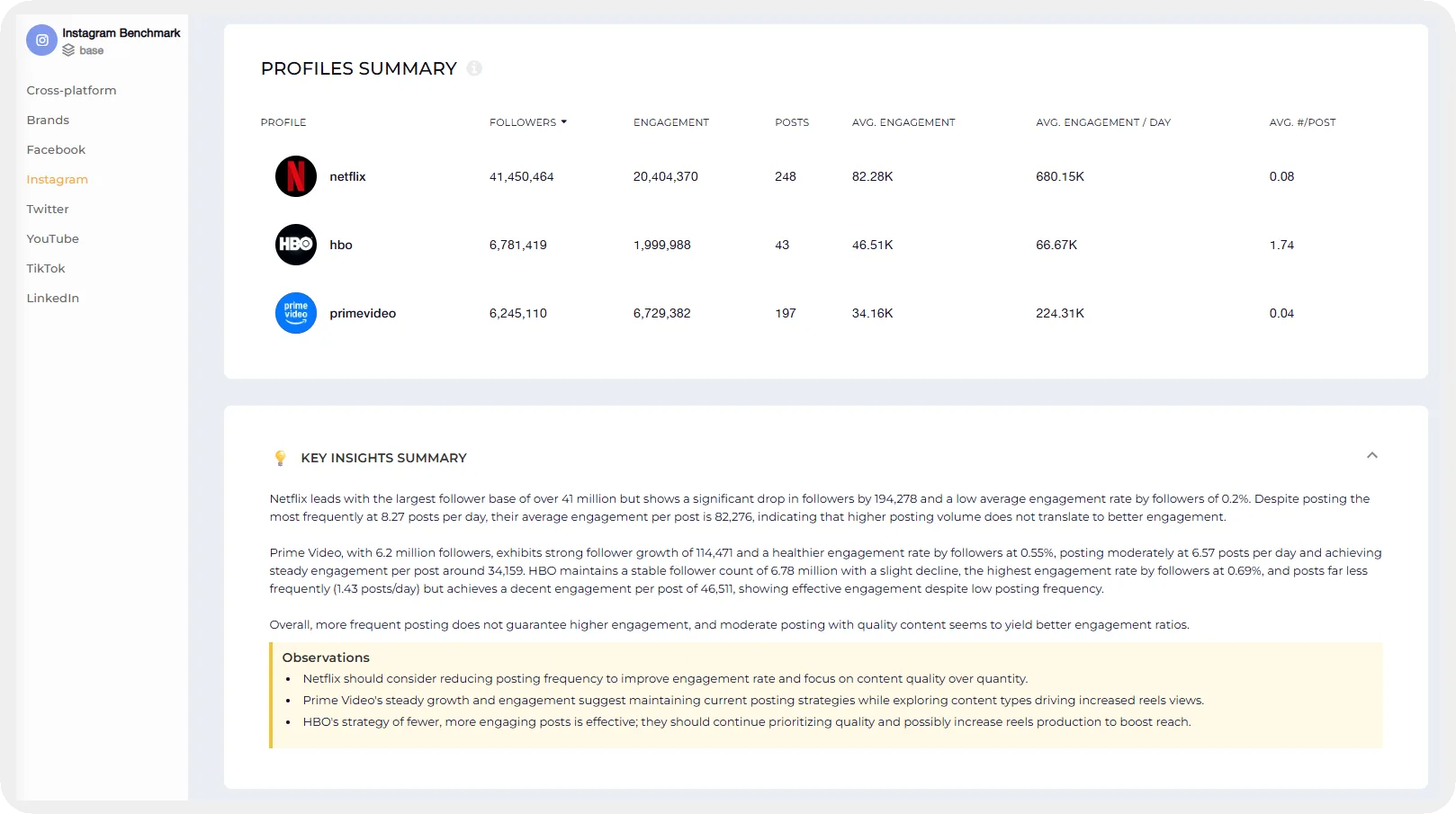
What it looks like: In Socialinsider, you start on Home, click Add Social Profiles, paste a competitor’s profile URL and hit Add profile. Open Benchmarks from the left sidebar, pick the network, tick the profiles you want side by side, and click Apply. The Instagram view opens on a Profiles Summary that lines up followers, follower growth, engagement and organic value for each brand, with engagement and post reach charts and a Key Insights Summary below. Download, at the top right, export the page.
Farhin Q., a G2 reviewer, wrote that “I like the competition analysis summary and suggestions that Socialinsider provides. The accuracy of the numbers is wonderful, and it gives me a great support to plan my social media strategy and outperform the competition.”
On G2, Socialinsider is rated 4.7 out of 5 across 147 reviews.
What it does well: A competitor’s LinkedIn company page gets the same post-level engagement formula as your connected accounts, so the two numbers compare like for like. Even Adapt, the cheapest plan, benchmarks all six networks.
Socialinsider bills per workspace, and the plan size is a profile count that includes the competitors you track. Adapt is $83 a month billed annually ($990 a year) or $99 monthly, for 20 profiles, 1 seat and 3 months of history. Optimize is $124 or $149 for 30 profiles, 2 seats and 6 months. Predict is $199 or $239 for 40 profiles, 5 seats and 12 months. Enterprise is quote only. Extra profiles cost $6 each month, and an extra team member is $15 a month. There’s no free plan, and the 14-day trial needs no credit card. See Socialinsider’s pricing page for current plans.
Profiles count per network, so the allowance goes faster than it looks. Your brand plus five competitors on Instagram, TikTok and LinkedIn is 18 profiles, which fits Adapt. Add Facebook and it’s 24, which means Optimize at $149 monthly or Adapt plus four extra profiles at $123.
What running Socialinsider standalone requires: Comfort with estimates. For competitors, Facebook reach and impressions are estimated, Instagram saves, Stories and demographics aren’t available, and follower history from before you added the profile is estimated too, as Socialinsider’s app limitations guide spells out.
7. Rival IQ – Best for Agency Competitive Audits
Rival IQ counts competitors by the company, so one slot covers a rival’s handle on each of five networks, and you can swap every one of them out each month.
Platforms Supported (competitor tracking): Facebook, Instagram, X (Twitter), TikTok and YouTube. LinkedIn works for your own page only.
Key Features:
- 10, 20 or 40 tracked companies, by plan
- Unlimited landscapes for separate competitor sets
- Boosted-post detection on competitors’ Facebook posts
- Email alerts when a competitor post breaks out
- Estimated competitor impressions on Engage Pro
- Scheduled PDF, PowerPoint and CSV exports
- Social listening saved searches from Engage
What it looks like: Everything in Rival IQ hangs off a landscape, the set of companies you compare. Go to Landscape > Companies, click Add Company, type a name or social URL, then Add to Landscape. The first company you add becomes the Focus Company, so start with your own brand.
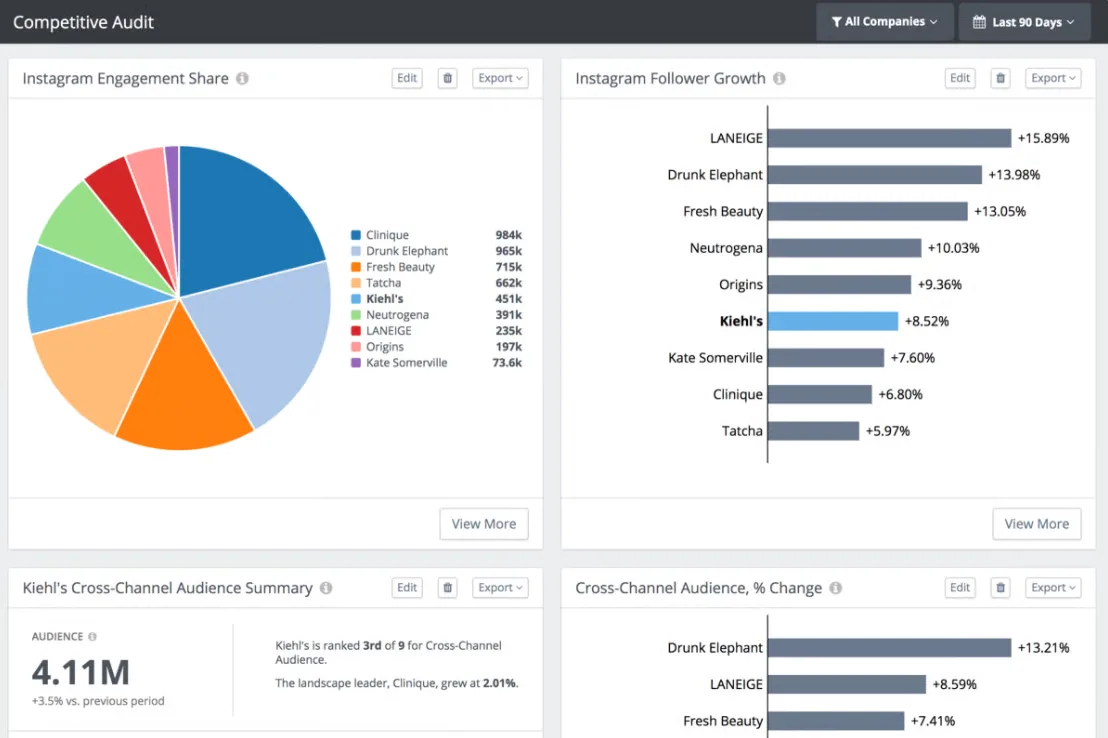
The Competitive Audit dashboard then lines up the landscape for All Companies over a period such as the Last 90 Days. Instagram Engagement Share splits total engagement between the brands, Instagram Follower Growth ranks them by percentage growth, and a Cross-Channel Audience Summary shows where your brand ranks for audience and how fast the landscape leader grew. Each panel has its own Edit and Export buttons, and View More opens the full chart.
Grace T., a G2 reviewer, wrote that “I appreciate that RivalIQ offers me stats and tables for metrics that I may not have previously considered a being instrumental pieces of data.”
On G2, Rival IQ is rated 4.5 out of 5 across 49 G2 reviews.
What it does well: Every plan lets you swap out every one of your tracked companies each month, so an agency can rebuild a landscape for a new pitch without buying more slots. Boosted-post detection shows which of a rival’s Facebook posts had ad money behind them.
Rival IQ charges a flat price per account, sized by how many companies you track. Drive is $199 a month on annual billing or $239 monthly, for 10 companies, 1 user, 6 months of history and data refreshed every 12 hours. Engage is $299 or $349 for 20 companies, 2 users, 12 months of history, 6-hour refreshes and 2 social listening searches.
Engage Pro is $469 or $559 for 40 companies, 5 users, 24 months, 3-hour refreshes and 10 listening searches. Larger volumes are quote only. Extra companies cost $50 a month for a pack of 5, and extra users $10 a month each. The 14-day trial needs no credit card. See Rival IQ’s pricing page for current plans.
What running Rival IQ standalone requires: A different tool for LinkedIn competitors, because Rival IQ only shows LinkedIn data for pages you connect and can’t show LinkedIn metrics for competitors. Past your plan’s cap, each extra company works out to $10 a month, sold five at a time.
8. Iconosquare – Best for Instagram-First Brands
If Instagram and Facebook are the only places your competitors matter, Iconosquare’s Scale plan puts them in a side-by-side table from $79 a month. None of the cheaper plans track competitors at all.

Platforms Supported (competitor tracking): Instagram (Business and Creator profiles) and Facebook Pages.
Key Features:
- Competitors overview table, on Scale and Custom
- 5 competitors per connected profile
- Industry benchmark for Instagram and Facebook
- Scheduled Competitor Reports by email, in XLS
- CSV or PNG export of the comparison table
- Hashtag analysis on your competitors’ tags
What it actually looks like: In Iconosquare, click Listening in the left menu, then Competitors, then the + at the top of the page. Type the competitor’s exact Instagram username and pick it from the dropdown, because only Business or Creator profiles show up, and near matches don’t. After up to 24 hours, Competitors overview puts your profile beside each rival, with a VS picker to add or drop brands and date chips from Last 7 days to Last 3 months. On a Facebook page you see page followers, fans, posts and average engagement rate per post, with Download report at the top.
Mallory G., a G2 reviewer wrote that “I love how intuitive and user friendly Iconosquare is; it’s easy to navigate, it’s nice to see the layout and preview of the feed before publishing a post, and it’s accessible for the entire team to use.“
On G2, Iconosquare is rated 4.4 out of 5 across 136 reviews.
What it does well: The industry benchmark sets your Instagram or Facebook engagement and follower growth against other accounts in your sector, which gives a monthly report a baseline beyond the competitors you picked.
Iconosquare prices each plan by social profile pack, and competitor tracking starts on Scale. Free (2 profiles), Starter (from $10 a month billed annually or $13 monthly) and Launch ($39 or $46 for 5 profiles) don’t track competitors. Scale is $79 a month billed annually or $95 monthly for 5 profiles, $139 or $167 for 10, $199 or $239 for 15 and $259 or $311 for 20, with 3 users and 5 competitors per profile. Custom, which adds white-label reports, is quote only. The free plan never expires, and the 14-day trial covers every feature with no credit card. See Iconosquare’s plans and pricing for current figures.
Because the cap is per profile, connecting one Instagram account and one Facebook Page on Scale’s 5-profile pack lets you watch 5 competitors on each network for $79 a month billed annually.
What running Iconosquare standalone requires: Another tool for TikTok, LinkedIn or X competitors, since the help center documents competitor tracking only for Instagram Business profiles and Facebook Pages. Rival data covers 90 days, competitor reports export as XLS only, and reach, impressions and follower demographics stay private, as Iconosquare’s article on competitors’ insights explains.
9. Brand24 – Best for PR Teams and Consumer Brands
What Brand24 watches is the conversation about a competitor, from Reddit threads to news sites, and it can’t tell you how that competitor’s own posts performed.
Platforms Supported (competitor tracking): Mentions, not profiles. Facebook, Instagram, X (Twitter) and Reddit on every plan, LinkedIn, YouTube and TikTok from Team, reviews from Pro and podcasts from Business, plus news sites and blogs.
Key Features:
- Share of Voice across compared projects
- AI Sentiment comparison on every plan
- Presence score and AVE side by side
- Categories Share Chart showing where each brand is discussed
- Period-over-period comparison
- White-label PDF, Excel and PowerPoint reports from Pro
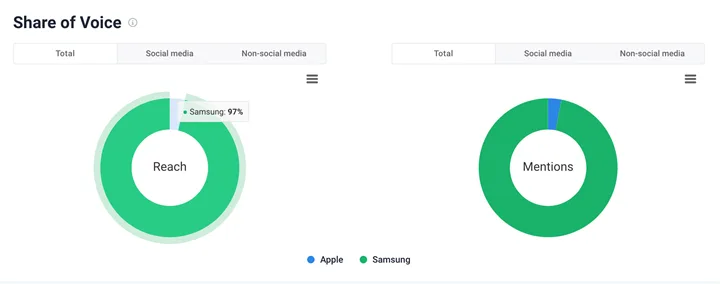
What it actually looks like: In Brand24, you set up each competitor as its own project, built on a keyword such as the brand name. Once your brand and a competitor are both in, open the Comparison tab, and the Share of Voice block shows how many mentions belong to each project, as Reach and Mentions donuts you can switch between Total, Social media and Non-social media. Further down the same tab, the Overview Table compares positive and negative mentions, reach, presence score and AVE.
Reflex S., a G2 reviewer, wrote that the dashboard makes it “simple to track the progress of our brand’s online visibility, monitor relevant mentions, and keep an eye on our competitors and their performance.” But the same reviewer added that “One challenge is the limitation on the number of keywords, especially in our case, as our company name is not unique and often appears in unrelated conversations.”
On G2, Brand24 is rated 4.6 out of 5 across 390 reviews.
What it does well: Share of voice counts every mention, Reddit threads and news coverage included, so you see who’s being talked about even in weeks when a competitor posts less than you. Sentiment comes on Individual, the cheapest plan.
Brand24 charges a flat price per account, sized by keywords and monthly mentions, and each competitor you track uses a keyword. Individual is $199 a month billed annually or $249 monthly, for 3 keywords, 2,000 mentions, 1 user and updates every 12 hours. Team is $299 or $349 for 7 keywords, 10,000 mentions, unlimited users and hourly updates, and it’s the first plan that reads LinkedIn, YouTube and TikTok.
Pro is $399 or $499 for 12 keywords, 40,000 mentions, real-time updates and white-label reports. Business is $599 or $699 for 25 keywords and 100,000 mentions. Enterprise starts at $1,499 a month billed annually. Mentions over the monthly limit are billed as overage. There’s no free plan, and the 14-day trial needs no credit card. See Brand24’s pricing page for current plans.
What running Brand24 standalone requires: A benchmarking tool beside it if you need competitors’ follower growth, posting frequency or format mix, because the Comparison tab measures mentions about each brand rather than how a competitor’s own posts perform. A brand name that’s also an everyday word will spend your mention quota on noise.
Where SocialPilot Fits In This List
Our own tool belongs with the management tools that have competitor reports built in. It suits Facebook- and Instagram-heavy brands and agencies who want competitors’ numbers inside the white-label PDF a client already gets every month, sent on a schedule. Skip it if your competitors live on TikTok or LinkedIn, or if you need to know what people say about them.
The price is set per plan, not per seat. Competitor Reports start on Premium at $85 a month on annual billing ($100 monthly), which covers 6 users and 25 accounts. An agency with 12 clients on Facebook and Instagram connects 24 accounts, so the whole team and every client’s competitor report sit on that one plan. If you’re weighing it against a suite, here’s how SocialPilot and Sprout Social compare.
Where Another Tool Might Be the Better Fit
- Competitors on TikTok or LinkedIn. Our Competitor Reports cover Facebook and Instagram only. Socialinsider tracks competitors on six networks, LinkedIn company pages and TikTok included, on every plan.
- Many competitors per client. No total competitor cap is published for our plans. Rival IQ sizes each plan by tracked companies (10, 20 or 40) and sells 5 more for $50 a month, so you know the ceiling before you sign.
- Share of voice and what people say. None of our plans include social listening. Brand24 counts mentions of each brand and splits them into share of voice and sentiment.
- Zero budget. Metricool’s free plan tracks 5 competitors on Facebook, Instagram, Threads, Bluesky and Twitch.
- Already paying for a suite. If your team lives in Sprout Social or Hootsuite, their competitor reports cover Facebook, Instagram and X in the same login. Check your plan first, since Sprout needs Professional.
- X rivals. Sprout Social, Hootsuite and Metricool (with its X add-on) track competitors on X, while our competitor reports stick to Facebook and Instagram.
How to Choose a Competitor Analysis Tool
Count your competitors, list the networks you compete on, and decide where the numbers have to end up. Those three answers cut most of this list, because half the tools can’t follow a competitor onto LinkedIn or TikTok, and only a few put competitor data into a branded client report.
Match the Tool to Your Team
| Your team | Shortlist | Features you won’t need |
| Small business on Facebook and Instagram | SocialPilot, Iconosquare, Metricool | Social listening, LinkedIn and TikTok benchmarking |
| Small business on TikTok or LinkedIn | Socialinsider, LinkedIn’s free Competitors tab | White-label reports, client seats |
| In-house team already on a suite | Sprout Social, Hootsuite | A second login for Facebook, Instagram and X rivals |
| In-house team needing share of voice | Brand24 | White-label reports, post-level format breakdowns |
| Agency with Facebook- and Instagram-heavy clients. | SocialPilot, Metricool | Enterprise listening, per-seat suites |
| Agency with multi-network clients | Socialinsider, Rival IQ (no LinkedIn rivals) | Publishing and inbox, if you already have a scheduler |
What It Costs to Watch Your Competitors
We priced three setups on each tool’s cheapest plan that fits, using the prices and caps in the entries above. Small business is 1 user tracking 3 competitors on Instagram and Facebook. Marketing team is 3 users tracking 5 competitors across Instagram, Facebook and LinkedIn. Agency is 6 users with 10 clients on Facebook and Instagram, 3 competitors per client, and competitor data in a white-label report. Figures are monthly on annual billing, with month-to-month in brackets.
| Tool | Small business (1 user, 3 competitors, IG + FB) | Marketing team (3 users, 5 competitors, IG + FB + LinkedIn) | Agency (6 users, 10 clients × 3 competitors, IG + FB, white-label) |
| SocialPilot | $85 ($100), Premium | Not possible (no LinkedIn competitors) | $85 ($100), Premium, 20 of 25 accounts |
| Sprout Social | $299 ($399), Professional × 1 seat | Not possible (no LinkedIn competitors) | $1,794 ($2,394), Professional × 6 seats (custom-branded PDF reports included) |
| Hootsuite | $99, Standard (monthly not published) | Not possible (LinkedIn industry averages only) | Quote only, Enterprise (white-label reports start on Advanced, which caps competitors at 20). |
| Agorapulse | $149 ($199), Advanced × 1 user | Not possible (no LinkedIn competitors) | $994 ($1,344), Advanced × 6 users + 10 extra profiles, covers 6 competitors; the other 24 are an add-on with no published price |
| Metricool | $0, Free | Not possible (no LinkedIn competitors) | Quote only (white-label is on the Custom plan) |
| Socialinsider | $83 ($99), Adapt, 8 of 20 profiles | $113 ($129), Adapt + 2 team members at $15, 18 of 20 profiles | $454 ($494), Predict + 40 profiles at $6 + 1 team member at $15 (no white-label option listed) |
| Rival IQ | $199 ($239), Drive, 4 of 10 companies | Not possible (no LinkedIn competitors) | $479 ($569), Engage Pro, 40 of 40 companies + 1 user at $10 |
| Iconosquare | $79 ($95), Scale, 5-profile pack | Not possible (no LinkedIn competitors) | Quote only (white-label is Custom only) |
| Brand24 | $299 ($349), Team, 4 of 7 keywords (mentions, not profile stats) | $299 ($349), Team, 6 of 7 keywords (mentions, not profile stats) | From $1,499, Enterprise (annual), 40 keywords (mentions, not profile stats) |
Add LinkedIn and most of the list drops out, leaving Socialinsider as the only tool that benchmarks LinkedIn competitors’ posts. On Facebook and Instagram, the billing model matters more than the tool, because per-seat suites multiply with every person you add while flat plans hold one price for the whole team. Agencies that need white-label reports have fewer options than the prices suggest, since several tools keep branding for a custom or higher plan.
Hidden costs to check before you sign:
- Competitors counting as profiles. Socialinsider’s 20, 30 or 40 profile limit includes every rival on every network, so 5 rivals on 3 networks use 15 of them.
- Per-seat pricing. Sprout Social, Hootsuite and Agorapulse charge for each person who logs in, so a competitor report shared with five people costs five seats.
- Extra competitors. Agorapulse sells competitors past its plan limit as an add-on with no published price, and Rival IQ charges $50 a month for 5 more companies.
- History limits. Most tools track a competitor only from the day you add them. Iconosquare keeps 90 days of competitor data, and Socialinsider’s history runs 3, 6 or 12 months by plan.
- Add-on networks. Metricool charges $10 a month per X account, and Brand24 doesn’t read LinkedIn, YouTube or TikTok until Team.
Free Ways to Check on Competitors
You can start without paying if you can live with a cap on networks, competitors or history.
| Option | What you get free | Limit |
| LinkedIn Page Analytics, Competitors tab | Followers, engagements, posts and trending posts for competitor Pages over the past 30 days | 1 competitor on a free Page, up to 9 on a Premium Company Page; LinkedIn only |
| Meta Ad Library | A competitor’s active ads on Facebook and Instagram | Active ads only, with no spend for most ads. |
| Metricool free plan | 5 competitors on Facebook, Instagram, Threads, Bluesky and Twitch | 1 brand, 30 days of analytics, and no PDF reports. Also, on the free plan competitors can’t be deleted once added |
| Our free Instagram competitor analysis tool | Your Instagram account compared with one competitor, no login | One competitor at a time |
| Our free Facebook competitor analysis tool | Your Facebook Page compared with a competitor, no login | One competitor at a time |
| Social Blade | Public follower and growth stats on YouTube, Instagram, TikTok, Twitch and Facebook | Side-by-side Compare works for YouTube only, Instagram stats need a login, and free history tables cover 14 days |
What to Test During Your Free Trial
- Add your three closest competitors on day one and check whether each one counts against your profile or account limit.
- Compare a competitor’s follower count and last five posts in the tool with their live profile.
- Note how far back the data goes for a competitor you just added, since most tools start counting that day.
- Export the competitor report the way your boss or client will see it, with your logo, on a schedule.
- Try to add a competitor on every network you compete on, LinkedIn and TikTok included, plus a Facebook Reel, which Hootsuite’s benchmarking skips.
How We Analyze and Select These Tools
We judged every tool on three checks: which networks it can track competitors on, how many competitors each plan allows, and where the numbers end up. Prices, caps and features came from vendors’ own pages, and reviews from G2.
What We Actually Checked
- Pricing pages. We read every vendor’s pricing page for monthly and annual rates, the first plan with competitor tracking, and what raises the bill.
- Help docs. We read each vendor’s help articles for the networks it can track rivals on, the competitor cap per plan, and how far back data goes.
- Reviews. We pulled named G2 reviews and the G2 score for each tool.
What We Couldn’t Independently Verify
- Data accuracy. We couldn’t check how closely each tool’s competitor numbers match what the competitor sees in their own insights.
- Unpublished caps. Our own total competitor cap, Sprout Social’s Facebook and Instagram cap, whether Hootsuite’s cap counts per network, and the price of Agorapulse’s extra competitors aren’t published.
- Moving prices. Prices, caps and review counts change often, so confirm them before you buy.
Which Competitor Analysis Tool Should You Start With?
Small businesses and agencies whose competitors sit on Facebook and Instagram can start with a management tool that already holds their reports, such as SocialPilot or Metricool, or Sprout Social and Hootsuite if the team already pays for one. Once the list of competitors or networks grows, a dedicated tool like Socialinsider or Rival IQ is worth the second login.
If LinkedIn or TikTok competitors matter, go straight to Socialinsider. If the question is what people say rather than what competitors post, start with Brand24 and add a benchmarking tool later.
Run it on your own competitors before you decide whether competitor tracking belongs in your reporting. Start your free SocialPilot trial and run your first competitor report on Premium, which is the plan that includes Competitor Reports, no card required.
Frequently Asked Questions
Are there free social media competitor analysis tools?
Yes. Metricool's free plan tracks 5 competitors on Facebook, Instagram, Threads, Bluesky and Twitch, though on the free plan you can't remove one once it's added. LinkedIn's Page analytics Competitors tab tracks one competitor on a free Page, and SocialPilot's free Instagram and Facebook tools compare your account with one competitor at a time, no login needed.
Can competitor analysis tools track TikTok and LinkedIn?
Most can't. Socialinsider is the only tool in this list that tracks named competitors on both TikTok and LinkedIn company pages. Rival IQ covers TikTok but not LinkedIn competitors, Brand24 reads TikTok and LinkedIn mentions from its Team plan, and Hootsuite shows only industry averages for both networks.
Can you see a competitor's Instagram insights?
No. Instagram Insights, including reach, impressions, saves, Story views and follower demographics, are open only to people with admin access to the account. Competitor analysis tools work from public data, so they show a rival's followers, posts, likes, comments and engagement rate.
What metrics should you track in a social media competitor analysis?
Track follower growth, posting frequency, engagement rate per post, format mix and top posts for each competitor, over the same date range as your own. Add share of voice and sentiment if you run listening. Skip competitor reach and impressions, since tools only estimate them.
How often should you run a social media competitor analysis?
Check your main competitors once a month and run a full analysis every quarter. The monthly look catches new formats and posting changes early, and the quarterly review has enough data to show real trends.
What's the difference between social listening and competitor analysis?
Competitor analysis compares your accounts with named competitor accounts on followers, posts and engagement. Social listening tracks what people say about each brand in posts, news sites and blogs, then measures share of voice and sentiment.
About the Author