


It’s Monday morning and you have five native apps open. The LinkedIn post meant for Friday is still sitting in drafts, and your manager wants last month’s numbers by noon. You know a social media management tool would fix this. The hard part is choosing one. As one social media manager put it on Reddit, “The options seem almost endless and my research is just bringing up more and more options.”
Most of those options look alike from the outside, because each one promises a calendar, an inbox and reports. The real difference shows up later, on the bill. A price that looks fine for one person can climb fast once you add seats, channels or clients. And that climb usually decides whether a tool still fits a year from now.
So we compared 10 tools on what they actually cost as you grow. We split them into three groups: all-in-one tools priced for growing teams and agencies, lean schedulers for solo marketers and small brands, and suites for multi-location brands with listening and deep reporting. Our own product, SocialPilot, also gets the same write-up as the other nine, weak spots included.
Why Native Apps Stop Working Once You Run Several Accounts
Native apps are fine while you run one or two accounts. Past three or four, your scheduling, replies and reporting sit behind separate logins, and nothing shows you the whole week in one place. That’s where a social media management tool starts paying for itself.
What Juggling Native Apps Actually Costs You
- No single calendar. You can’t see what is going out on Instagram, LinkedIn and TikTok this week without opening each app in turn.
- Posts slip. A draft saved in one app never goes live, and nobody notices until Friday, when someone asks where it went.
- Replies get missed. Comments and DMs land in separate inboxes, so the customer who asked a question on Facebook waits while you answer one on Instagram.
- Reporting by screenshot. Proving results means pasting numbers from each app’s insights page into a slide deck, every month, by hand.
- Shared logins. Teammates sign in with one password, so there is no record of who posted what, and removing a leaver means changing it everywhere.
If that list reads like your Monday, our guide on how to manage multiple social media accounts covers the daily habits that help before you buy anything.
What Social Media Management Software Does
A social media management tool is software that lets you publish, schedule, reply to and report on several social accounts from one dashboard.
A scheduler handles only the first part and gets posts out on time. A full management tool adds the shared inbox, the reports and the approval step, which you need once more than one person touches a post.
| What you need | What to look for |
| Post once to every network | A publisher that supports every network you use, including Threads, Bluesky, TikTok and YouTube Shorts |
| See the whole week | A shared content calendar with drag-and-drop rescheduling |
| Never miss a reply | One social inbox for comments, DMs and mentions |
| Prove results | Reporting with scheduled, branded PDF reports |
| A second pair of eyes | An approval step that holds a post until someone says yes |
| Keep content flowing | AI help to draft captions and recycle evergreen posts |
If scheduling is the part you want to get better at, this walkthrough on how to schedule social media posts efficiently shows the routine most teams settle into.
For one person, a scheduler is enough. The day a second person or a client joins, you’ll care more about approvals and reporting than about the scheduler.
Social Media Management Tools at a Glance
Paid entry plans on this list start at $5 a channel (Buffer) and run up to $99 a user (Hootsuite), all on annual billing. A flat plan holds its price as you hire, while a per-seat plan grows with every person who logs in.
Here are all 10 compared tools side by side.
| Tool | Best For | Entry price | Free Plan |
| SocialPilot | Teams of 3 to 6, agencies up to 25 client accounts | $25.50/mo | 14-day free trial, no card |
| Sendible | Agencies running 3 to 7 client brands | $30/mo | 14-day trial, no card |
| Vista Social | Two-person teams with up to 15 profiles | $80/mo | 14-day trial, no card |
| Zoho Social | One brand on Zoho CRM, up to 3 people | $10/mo | Free plan, 15-day trial |
| Buffer | Solo marketers on 3 to 5 channels | $5/channel/mo | Free plan, 14-day trial |
| Later | One- or two-person brands focused on Instagram and TikTok | $18.75/mo | Free plan, 14-day trial |
| Metricool | Solo freelancers or owners with 1 to 5 brands | $20/mo | Free plan, no trial |
| Sprout Social | Teams of 10+ handling high message volume | $79/seat/mo | 30-day trial, no card |
| Hootsuite | Enterprise teams of 10+ needing monitoring and ads | $99/user/mo | 14-day trial |
| Agorapulse | Community or support teams of 2 to 5, up to 10 profiles | $79/user/mo | 30-day trial, no card |
Entry prices are monthly rates on annual billing, as checked on each vendor’s pricing page in November 2026. Vendors change plans without notice, so confirm on the pricing page before you buy.
All-in-One Tools Priced for Growing Teams and Agencies
These four tools put publishing, a social inbox, reports and approvals under one login, and their base price covers a set number of people instead of charging for every seat. Pick one of these if you run several brands or clients with a team of 2 to 25 and want the bill to stay predictable as you hire.
1. SocialPilot – Best for Agencies and Small Businesses
Your team and your clients share one flat-priced plan, though clients can’t sign off on anything until Premium.
Platforms Supported: Facebook, Instagram, X (Twitter), LinkedIn, TikTok, YouTube, Pinterest, Threads, Bluesky and Google Business Profile.
Key Features:
- Bulk scheduling of up to 500 posts by CSV (Premium)
- Drag-and-drop content calendar across every account
- AI Pilot for captions, hashtags and post variations
- One Social Inbox for comments and messages
- Client workspaces with no-login client approvals
- White-label PDF reports on a schedule
- MCP server to run SocialPilot from Claude or ChatGPT
What it actually looks like: In SocialPilot, you open the content calendar and pick List, Day, Week or Month. Month view puts every connected account’s posts on one grid, and a crowded day folds into a “+X more” link you click to see the rest. You can also drag any post to a new day to reschedule it. The “Search a Post” option at the top left of the dashboard helps you find a particular post by keyword. Then there is AI that does the routine work, with AI Pilot drafting captions, hashtags, and post variations from inside the composer.
You can also run SocialPilot from the AI assistant you already use. The SocialPilot MCP server comes with every paid plan: add it as a connector in Claude or ChatGPT, sign in, and the assistant can create, schedule and review posts across your accounts, or flag ones that didn’t go out, right from the chat. Teams that want to build their own integrations can use SocialPilot’s API, which comes with the Enterprise plan.
Shayne W., a G2 reviewer, wrote: “Basically 4 hours of work allows me to keep constant communication for an entire month which has proven invaluable for us as a business who does not employ internal marketing.”
On G2, SocialPilot is rated 4.5 out of 5 across 846 reviews.
What it does well: Approvals run manager first, client second, so a client only sees posts your manager has already passed. From Premium, client seats are unlimited, and with Approvals On-The-Go the client approves or sends back a post from an email link, with no password to remember.
SocialPilot’s Essentials costs $25.50 a month billed annually ($30 month to month) for 1 user and 7 accounts, with no analytics, inbox or approvals. Standard, at $42.50 annually or $50 monthly, covers 3 users and 15 accounts and adds the Social Inbox, PDF reports and manager approval. Premium runs $85 or $100 for 6 users, 25 accounts, unlimited client seats, client approvals, bulk scheduling by CSV and white-label reports. Ultimate costs $170 or $200 for 50 accounts and unlimited users, and Enterprise is quote only.
Billing is flat per plan, so the bill moves only when you add a user ($5 a month on Standard and Premium) or an account ($4 a month on Essentials, Standard and Premium). There’s no free plan, and the free trial needs no credit card. See SocialPilot’s plans for current details.
What running SocialPilot standalone requires: A separate listening tool if you track brand mentions beyond your own accounts, because no plan includes social listening. Agencies also need Premium before clients can approve posts or receive white label social media reporting.
2. Sendible – Best for Marketing Agencies
Add a freelancer or a client contact and the bill stays put, because no plan charges by the user, only by brands and profiles.
Platforms Supported: Facebook, Instagram, X (Twitter), LinkedIn, TikTok, YouTube, Threads, Bluesky and Google Business Profile.
Key Features:
- Client Connect to add accounts without passwords
- A separate workspace per client or location
- Unlimited users on every plan
- Inbox for monitoring and replying
- Custom branded reports from Premium
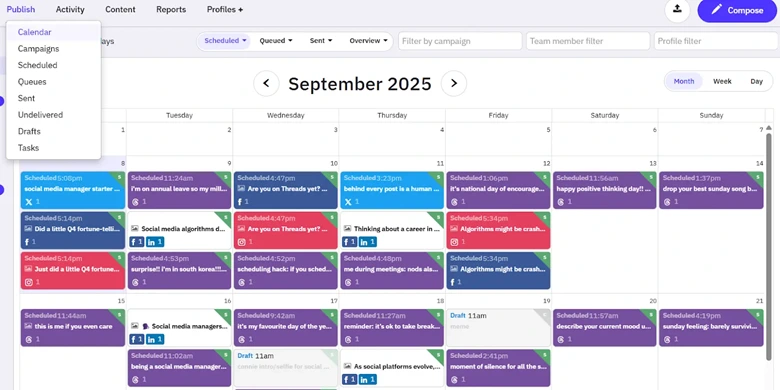
What it actually looks like: In Sendible, you open Publish and land on Calendar, where Month view lays out every post by day. Each card shows its status, For Approval, Draft or Scheduled, with the time and network, so you can spot what still needs sign-off. Switch to Week or Day, filter by Scheduled, Queued or Sent, or narrow the grid by team member or profile. Campaigns, Queues, Failed and Drafts sit in the left menu, and Compose opens a new post.
Maggie B., a G2 reviewer, wrote: “I like how easy it is to schedule posts and let everyone on my team see what is going on!”
On G2, Sendible is rated 4.5 out of 5 across roughly 900 reviews.
What it does well: Each client or location gets its own workspace. Bulk scheduling, comment replies, and unlimited AI credits are already on Core, the cheapest plan.
Sendible’s Core costs $30 a month billed annually or $35 monthly for 1 workspace and 6 social profiles. Plus, at $84 or $99, gives 3 workspaces, 18 profiles and approvals. Premium runs $169 or $199 for 7 workspaces, 42 profiles and custom branded reports. Elite costs $254 or $299 for 15 workspaces and 90 profiles, and Enterprise $638 or $750 for 50 workspaces and 300 profiles, with a quote-only tailored plan above that. See our Sendible pricing guide for current plans.
What running Sendible standalone requires: Plus, at least, if anyone needs to sign off on posts, because Core has no approval step. If that rules it out, our Sendible alternatives list covers the options.
3. Vista Social – Best for Small Teams and Local Businesses
You get listening, review management and a link-in-bio page on the cheapest plan, and room for exactly two people to use them.
Platforms Supported: Facebook, Instagram, X (Twitter, paid add-on), LinkedIn, TikTok, YouTube, Pinterest, Threads, Bluesky, Google Business Profile, Snapchat and Tumblr.
Key Features:
- Listening and review management on every plan
- Built-in link-in-bio page
- Unified inbox across profiles
- Single-step approvals, multi-step from Advanced
- Shared calendars for no-login client approval
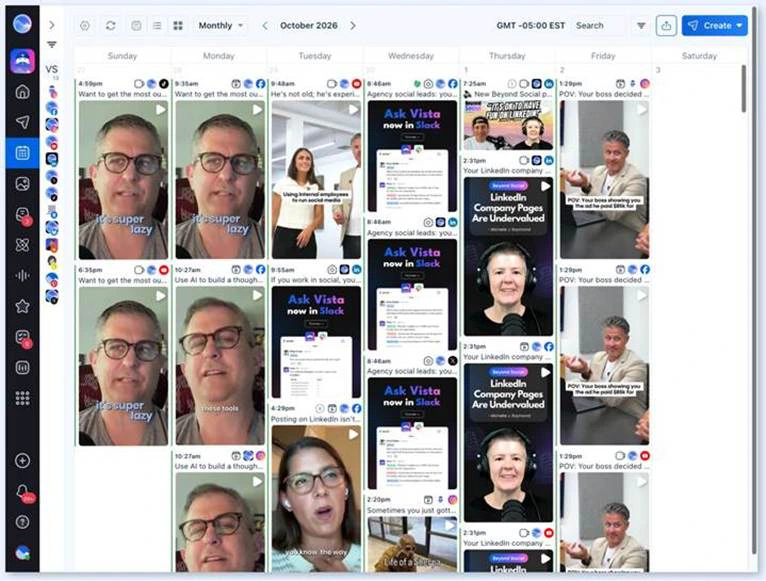
What it actually looks like: You open the publishing calendar in Vista Social, set it to Monthly and switch the preview to Large. Each scheduled post then shows its full image with the network icons beside it, so you can check the visuals for the month at a glance. Check the time zone beside the month (GMT -05:00 EST in the screenshot), use Search to find a post, or hit Create to start a new one.
Caroline H., a G2 reviewer, wrote: “The pages feature has been a hit among clients! It replaces LinkTree and similar apps, while allowing us to easily pull those analytics with our monthly reports.”
On G2, Vista Social is rated 4.8 out of 5 across 1142 reviews.
What it does well: On Professional, you watch what people say on your own profiles and answer reviews from the same login you schedule from, with no second product to buy.
Vista Social’s Professional costs $80 a month billed yearly ($950 a year) or $99 monthly for 15 social profiles and 2 users. Advanced, at $160 ($1,910 a year) or $199, gives 30 profiles, 3 users and multi-stage approvals. Scale runs $360 ($4,310 a year) or $449 for 70 profiles, 4 users and advanced white label, and Enterprise is quote only. Each X profile costs $29 a month on top, and listening across social, web and news starts at $75 a month. See Vista Social’s pricing page for current plans.
What running Vista Social standalone requires: Extra users and profiles can only be bought on Scale, so a Professional team that hires a third person has to move up to Advanced at $160 a month. A team of four fits Scale at $360 a month billed annually or $449 monthly. Scale can add more users, but that price isn’t published.
4. Zoho Social – Best for SMBs and Startups
Paid plans start at $10 a month billed annually, the lowest in this group, and the tool plugs straight into Zoho CRM.
Platforms Supported: Facebook, Instagram, X (Twitter), LinkedIn, TikTok, YouTube, Pinterest, Threads, Bluesky, Google Business Profile, Mastodon, Snapchat, WhatsApp, Telegram and Arattai.
Key Features:
- Direct Zoho CRM integration
- Publishing calendar with campaign events
- Monitoring dashboard for keywords and mentions
- Content approvals on Premium
- Agency-branded reports with free client logins
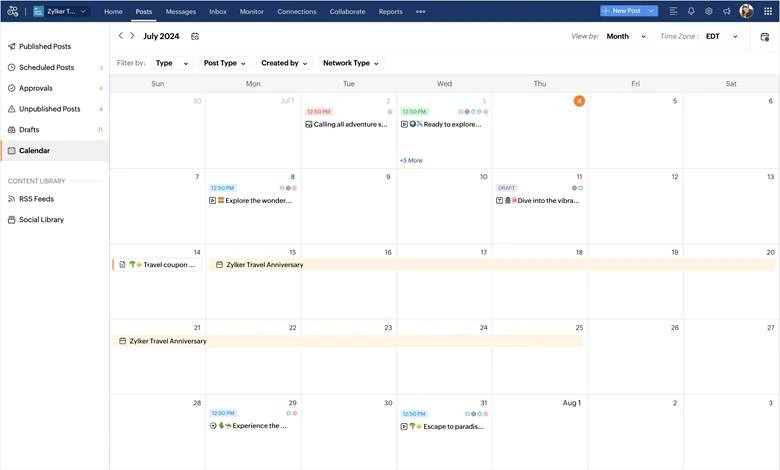
What it actually looks like: In Zoho Social, you go to Posts and open Calendar, which sits beside Published Posts, Scheduled Posts, Approvals, Unpublished Posts and Drafts. It opens in Month view. Filter by Type, Post Type, Created by, or Network Type to see one teammate’s work or one network, and drag a post to a new date to reschedule it. Campaign events run as a bar across the days they cover.
Nitin V., a G2 reviewer, wrote: “The interface feels a bit outdated and clunky sometimes. The analytics are quite basic compared to other tools.”
On G2, Zoho Social is rated 4.6 out of 5 across 2,963 reviews.
What it does well: On Premium, the Zoho CRM integration turns people who comment or message into CRM leads and contacts, so a sales team sees social conversations without a second login.
The Free plan of Zoho Social covers 1 brand, 6 channels and 1 member, but scheduling starts on Standard, at $10 a month billed annually or $15 monthly. Professional costs $30 or $40 and adds bulk scheduling, messages and the monitoring dashboard. Premium runs $40 or $65 for 3 team members, the Inbox, approvals and custom reports. Each of those plans covers one brand. There’s also a 15-day trial that needs no card. See our Zoho Social pricing guide for current plans.
What running Zoho Social standalone requires: Premium as soon as a second person needs to approve posts or reply from one inbox, and then $19.50 a month for every brand after the first. A small agency with four clients pays for three extra brands or jumps to Agency at $230 a month billed annually or $320 billed monthly. Our Zoho Social alternatives page compares the tools that price brands differently.
Lean Social Media Scheduling Tools for Solo Marketers and Small Brands
These three cost the least and ask the least of you: one or two people, a handful of channels and a budget counted in tens of dollars a month. Pick one if posting on time is the job and approvals are a someday problem.
5. Buffer – Best for Solo Entrepreneurs and Creators
Three networks cost you almost nothing on Buffer, and fifteen become a real line item, because you pay per channel.
Platforms Supported: Facebook, Instagram, X (Twitter), LinkedIn, TikTok, YouTube, Pinterest, Threads, Bluesky, Google Business Profile, Mastodon and Substack.
Key Features:
- Free plan for 3 channels
- Publishing queue with calendar and list views
- Comment inbox on every plan
- Drafts and approvals on the Team plan
- A space to save and plan post ideas
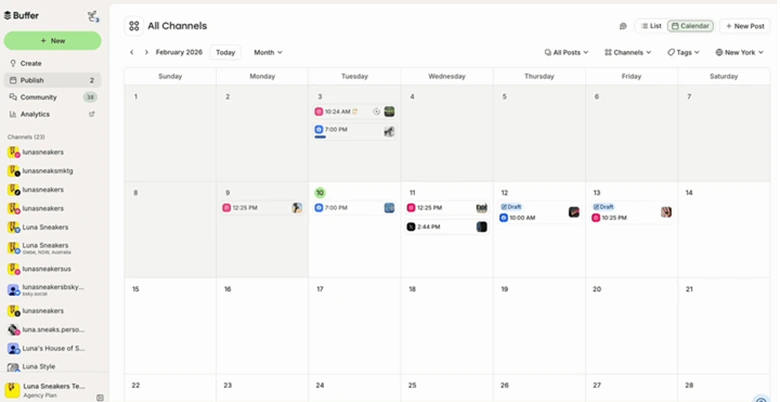
What it actually looks like: In Buffer, you click Publish in the top bar and land on All Channels in Month view. Flip the List / Calendar toggle to see posts laid out by day, and narrow them with the Channels and Tags filters. New Post opens the composer, and anything you’re not ready to send saves as a Draft. Community and Analytics sit beside Publish in the same top bar.
Rebecca H., a G2 reviewer, wrote: “It’s made posting to social so much easier. Now I just schedule it once I’ve finished, and then I can forget about it.”
On G2, Buffer is rated 4.3 out of 5 across roughly 1,023 reviews.
What it does well: The community inbox for comments is included on every plan, Free too, so you can answer replies without upgrading. The Team plan removes the user cap entirely.
In Buffer, you pay per channel, per month. The Free plan covers 3 channels, 10 scheduled posts per channel and 1 user. Essentials runs from $5 per channel on annual billing or $6 monthly, for 1 user. Team, with unlimited users and approvals, runs from $10 per channel annually or $12 monthly. From the 11th channel, the per-channel rate drops. Paid plans come with a 14-day free trial.
Because every channel is billed separately, the cost climbs with each profile you add: 10 channels on Essentials come to $60 a month on monthly billing. Flat-priced tools like SocialPilot and Vista Social keep one price until you pass the plan’s account limit. See our Buffer pricing guide for current plans.
What running Buffer standalone requires: Watching the channel count, because every network you add is another charge, and there’s no social listening at any price. Past ten channels, price the Buffer alternatives that bundle accounts into a flat plan.
6. Later – Best for Creators and SMBs
If you plan the Instagram grid before you write a single caption, Later lets you drag photos straight onto it.
Platforms Supported: Instagram, Facebook, TikTok, LinkedIn, YouTube, Pinterest, Threads and Snapchat.
Key Features:
- Drag-and-drop Instagram grid planner
- Social sets covering 8 networks
- Approvals and inbox from Growth
- Brand Mentions and Brand Health on Scale
- Free plan with 12 posts per profile
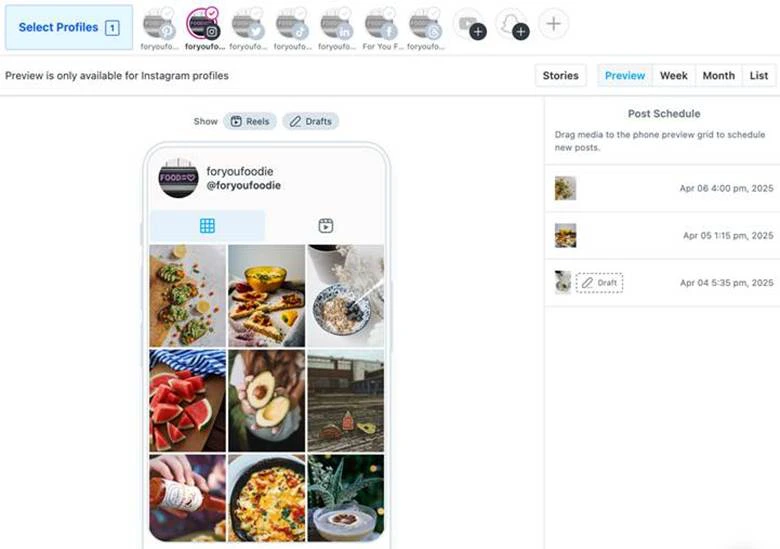
What it actually looks like: Choose your Instagram account in Select Profiles inside Later and switch to Preview. Your grid appears on a phone mockup, with the Post Schedule list beside it. Drag a photo from your media onto the phone preview grid and it’s scheduled in that slot, so you see how it sits next to last week’s posts before it goes live. Show Reels and Drafts toggle what the grid includes, and Week, Month and List give you the plain calendar.
Casey G., a G2 reviewer, wrote that “I like the full calendar view of your week’s worth of content. I also find the analytics page very helpful for my monthly overview of content performance.”
On G2, Later Social is rated 4.5 out of 5 across 389 reviews.
What it does well: One social set covers a profile on each of eight networks, including Pinterest, Threads and Snapchat, so a brand with a presence everywhere still counts as one set.
Later charges a flat price per plan, capped by social sets and users. Starter is $18.75 a month on annual billing or $25 monthly, for 1 set, 1 user and 30 posts per profile. Growth, which adds approvals and the inbox, is $37.50 or $50 for 2 sets, 2 users and 180 posts per profile. Scale is $82.50 or $110 for 6 sets, 4 users and unlimited posts. On Growth and Scale, an extra set costs $11.25 annually or $15 monthly, and an extra user $3.75 or $5. Starter can’t add either. There’s a Free plan with 12 posts per profile a month, and paid plans come with a 14-day free trial. See our Later pricing guide for current plans.
What running Later standalone requires: Growth as soon as a second person needs to approve posts or answer comments, and patience with images in drafts. If LinkedIn or X carries more of your weight than Instagram, look at Later alternatives first.
7. Metricool – Best for Freelancers and Small Agencies
Metricool sells reporting first and scheduling second, and the price moves with how many brands you manage.
Platforms Supported: Facebook, Instagram, X (Twitter, paid add-on), LinkedIn (paid plans), TikTok, YouTube, Pinterest, Threads, Bluesky, Google Business Profile and Twitch.
Key Features:
- Reach split by followers and non-followers
- Unlimited analytics history from Starter
- Competitor tracking, even on the free plan
- Scheduling around each network’s peak times
- Approvals and client collaborators on Advanced
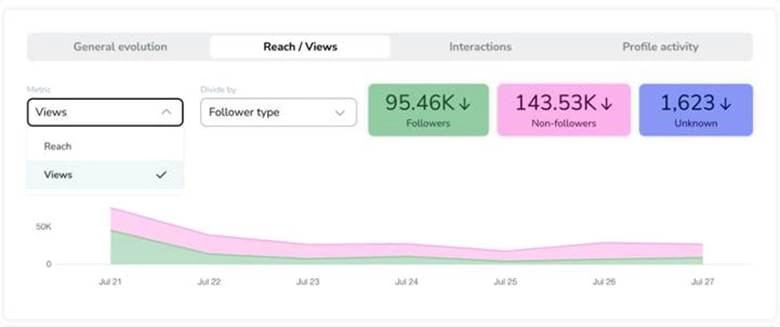
What it actually looks like: Inside the Instagram analytics of Metricool, you land on General evolution and click across to Reach / Views. Set Metric to Reach / Views and Divide by to Follower type, and three cards split the number into Followers, Non-followers and Unknown. Interactions and Profile activity sit in the next tabs over when you want engagement instead of reach.
Celia Y., a G2 reviewer, wrote that “The best thing about Metricool is that you can schedule all posts on different social networks, taking into account the peak activity times for each one. Additionally, the interface is very intuitive and easy to navigate.”
On G2, Metricool is rated 4.5 out of 5 across 111 reviews.
What it does well: Splitting reach by follower type shows whether a post travelled beyond your existing audience. Starter keeps unlimited analytics history (X metrics are capped at 30 days), so year-on-year comparisons don’t need an export.
Metricool sets each plan’s price by how many brands you manage (a brand is one profile per network), and VAT is extra. Free covers 1 brand, 20 posts a month, no LinkedIn or X, and 30 days of analytics. Starter is $20 a month annually or $25 monthly for 5 brands, or $36 or $45 for 10, for a single login.
Advanced adds unlimited team members and approvals at $53 or $67 for 15 brands, $85 or $107 for 25, and $159 or $210 for 50. Custom is quote only. Connecting X adds $10 a month per account. There’s no trial, so the free plan is your test. See our Metricool pricing guide for current plans.
What running Metricool standalone requires: Advanced before anyone else can log in, since Starter can’t add team members, only one collaborator, and client review is still per post. Agencies that need calendar-level sign-off can check our list of Metricool alternatives.
Suites for Multi-Location Brands With Listening and Deep Reporting
These three suites suit brands that run many locations, regions or sub-brands, and they charge per person, so your bill follows headcount. Pick one of these if social listening, a shared inbox or leadership-grade reports is what you need.
8. Sprout Social – Best for Enterprises & Multi-Locational Brands
Sprout puts the deepest inbox and reporting on this list behind a price that grows with every seat.
Platforms Supported: Facebook, Instagram, X (Twitter), LinkedIn, TikTok, YouTube, Pinterest, Threads, Bluesky, Google Business Profile, Reddit, Snapchat and WhatsApp.
Key Features:
- Smart Inbox with sentiment labels and tags
- Reply approvals before messages go out
- Keyword and brand monitoring from Standard
- Custom report branding on Professional
- Trellis AI assistant for social data
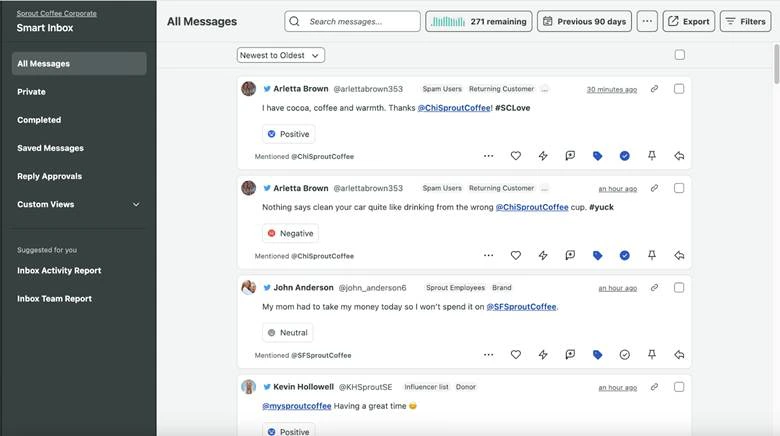
What it actually looks like: You open the Smart Inbox in Sprout Social and land on All Messages, where every comment, mention and DM from your connected profiles sits sorted Newest to Oldest. Each message carries a Positive, Negative or Neutral label, so you can open Filters and pull up only the angry ones from the Previous 90 days. Send a reply that needs a second pair of eyes to Reply Approvals and mark the rest Completed. At the end of the week, the Inbox Team Report shows how your team handled the queue.
Joe J., a G2 reviewer, wrote that “The dashboard is super intuitive, the scheduling tools are a lifesaver, and the reporting actually helps me see what’s working without getting lost in data.” But he also added that “it can get pretty pricey, especially if you need access for a larger team.”
On G2, Sprout Social is rated 4.4 out of 5 across 7,588 reviews.
What it does well: A support lead can triage by sentiment and sign off on replies without leaving the inbox. Trellis, Sprout’s AI assistant, comes free on every plan.
Sprout bills per seat, on annual or monthly billing. Essentials costs $79 per seat a month annually or $99 when billed monthly, with 5 social profiles and no inbox. Standard is $199 a seat a month annually or $249 monthly, Professional is $299 or $399 (unlimited profiles), and Advanced is $399 or $499. Enterprise is quote only. There’s no free plan, but the 30-day trial needs no credit card.
Every person who logs in needs a seat, so five people on Professional cost $1,495 a month on annual billing. Check our Sprout Social pricing guide for current plans.
What running Sprout Social standalone requires: A budget that scales with every hire. Message approvals start on Professional, so a team of three that needs them pays $897 a month before any add-on, and full listening is still a separate quote. Teams that hit that ceiling usually start comparing Sprout Social alternatives priced per plan rather than per person.
9. Hootsuite – Best for Enterprises & Large Brands
After a 2026 rebuild, the category’s oldest name runs on a single “Social OS” workspace and bills per user.
Platforms Supported: Facebook, Instagram, X (Twitter), LinkedIn, TikTok, YouTube, Pinterest, Threads, Bluesky and Google Business Profile.
Key Features:
- Social OS calendar, drafts and approvals in one place
- Brand and competitor monitoring from Standard
- Reply inbox, with automation on Professional
- Ads and boosting beside the calendar
- DM automations and Hootbio link-in-bio
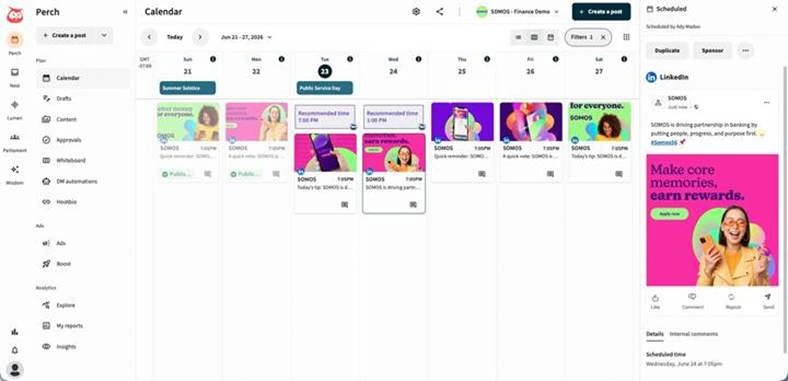
What it actually looks like: Under Plan in the left rail of Hootsuite, you choose Calendar and see your week, starting from Today, with Filters to narrow it by network or status. Hit Create a post, write it, and accept the Recommended time or pick your own. Click any Scheduled post and a preview panel opens with Duplicate, Sponsor, Details and Internal comments. Approvals, Drafts and Whiteboard sit in the same Plan menu, and Analytics holds Explore, My reports and Insights.
Carlette B., a G2 reviewer, wrote: “There’s not much we dislike about the platform, but it can be expensive and a bit clunky for a small team. Occasionally, the connection to a social media platform drops.”
On G2, Hootsuite is rated 4.3 out of 5 across 7,757 reviews.
What it does well: Brand and competitor monitoring comes on the cheapest plan, which none of the other per-seat suites here include at entry level. Ads, boosting and analytics sit in the same menu as the calendar.
Pricing: Our Hootsuite pricing breakdown walks through each tier in detail. Monthly billing exists at a higher rate it doesn’t print. Standard is $99 with 10 social accounts. Professional is $199 with unlimited accounts and custom reports. Advanced is $399 and adds team approvals. Enterprise is quote only, and taxes are extra. There’s no free plan. The 14-day trial caps posting at 10 to 20 posts a day per organization and blocks bulk scheduling.
Each user is a separate seat, so three people who need approvals on Advanced cost $1,197 a month on annual billing, and advanced listening needs an Enterprise quote. A flat pricing tool such as SocialPilot or Vista Social holds its price as your team grows, with published add-on rates.
What running Hootsuite standalone requires: Advanced for every person who drafts or approves, because review and approval only start there. Three people on Advanced cost $1,197 a month billed annually. If approvals are the reason you’re shopping, set that number against Hootsuite alternatives that include them at a flat plan price.
10. Agorapulse – Best for Large Teams & Enterprises
Replies, assignments and spam cleanup get more attention in Agorapulse than the calendar does, because the whole tool is built around the inbox.
Platforms Supported: Facebook, Instagram, X (Twitter, paid add-on), LinkedIn, TikTok, YouTube, Pinterest, Threads, Bluesky and Google Business Profile.
Key Features:
- Inbox with To Review, assignments and bulk actions
- Moderation rules and saved replies on Advanced
- White-label reports from Standard
- ROI analysis and competitor benchmarking
- Shared content calendars on Advanced
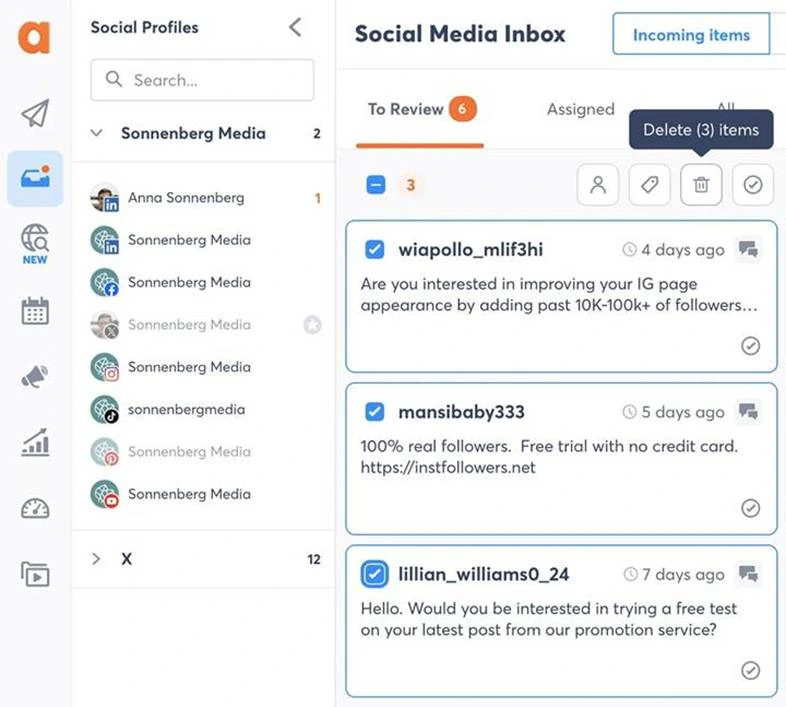
What it actually looks like: Pick a page from the Social Profiles list down the left of Agorapulse and its Social Media Inbox opens on the To Review tab, holding every Incoming item that hasn’t been handled. Tick the spam comments and clear them with Delete (3) items, then switch to Assigned to see what a teammate has picked up.
Ray B., a G2 reviewer, wrote that “I use Agorapulse solely for the inbox feature to keep track of my business social pages. It solves the problem of compiling my multiple business social inboxes in one place. The initial setup was easy, with no problems, and there’s great support if you need it.”
On G2, Agorapulse is rated 4.5 out of 5 across 979 reviews.
What it does well: Items stay in To Review until someone acts, so nothing slips between shifts. Branded report exports come on Standard.
Pricing: Agorapulse charges per user, per month, and every listed plan includes 10 social profiles. Extra profiles cost $10 each a month on annual billing or $15 monthly. Standard is $79 on annual billing or $99 monthly. Professional (adds assignments and simple approvals) is $119 or $149. Advanced (adds shared calendars and ROI reports) is $149 or $199. Custom, with unlimited profiles and multi-step approvals, is quote only.
It has a 30-day trial that needs no credit card, and you can stay on a free plan after it ends. See our Agorapulse pricing guide for current plans.
What running Agorapulse standalone requires: Extra profiles once you pass 10, at $10 each a month on annual billing or $15 monthly. If accounts grow faster than your team, our Agorapulse alternatives roundup lists tools that publish that price.
Where SocialPilot Fits In This List
Our own tool belongs with the all-in-one tools for growing teams and agencies. It suits you if you want publishing, a shared inbox, client approval and reports under one flat monthly price, and it’s a weaker pick if social listening tops your list.
The price is set per plan, not per seat, so a 5-person team with 12 profiles fits on Standard, which includes 3 users and 15 accounts. Two extra users at $5 each bring it to about $60 a month on monthly billing ($50 + $10), or $52.50 on annual billing ($42.50 + $10).
From Premium ($85 a month on annual billing, $100 monthly), posts can go to clients for sign-off, and client seats are unlimited. For drafting, the built-in AI Pilot writes captions, hashtags and post variations from your plan’s monthly AI credits.
Where Another Tool Might Be the Better Fit
- Social listening at scale. Listening isn’t listed on any of our public plans. Sprout Social and Hootsuite both include brand monitoring on their Standard plans and sell deeper listening on top.
- Client sign-off on a small budget. Client approval starts at Premium. Standard stops at a manager approving your own team’s posts, so a two-person agency that needs clients in the loop pays for the bigger plan.
- Inbox-heavy community work. If you spend most of your day replying, Agorapulse puts the inbox first.
- One person, three channels, tiny budget. Buffer’s free plan covers 3 channels and 1 user, and you may never need more.
- Visual-first Instagram planning. Later suits a brand that plans the grid before the captions.
- X-first accounts. If nearly all your posting happens on X, these dedicated Twitter management tools are built around that one network.
How to Choose the Right Social Media Management Tool
Count the people who touch a post and the accounts you run, then pick the billing model that stays cheapest at that count. Most social media management tools share the same core features, so the billing model usually decides which one is cheapest for your team.
Match the Tool to Your Team
| Your team | Shortlist | Features you won't need |
| Agencies managing client brands | SocialPilot, Sendible | Enterprise listening, per-market approval chains |
| Small businesses, SMBs and startups | SocialPilot, Zoho Social, Later | Enterprise governance, paid listening |
| Local businesses and small teams | Vista Social | Multi-step approval chains, white-label reports |
| Solo entrepreneurs and creators | Buffer, Later | Approvals, client access, listening |
| Freelancers and small agencies | Metricool, SocialPilot | Enterprise governance, paid listening add-ons |
| Franchises and multi-location brands | Sprout Social, Sendible | Creator tools, single-user plans |
| Enterprises and large teams | Hootsuite, Agorapulse, Sprout Social | Free plans, single-user plans |
What Each Tool Costs at Your Team Size
We priced three setups on the cheapest fitting plan from each vendor’s public pricing page. Solopreneur is 1 user and 5 profiles with no approvals. Marketing team is 5 users and 12 profiles with internal approvals. Agency is 6 users and 45 profiles across 15 client brands (3 each), with client approvals. Figures are monthly on annual billing, month-to-month in bracket.
| Tool | Solopreneur (1 user, 5 profiles) | Marketing team (5 users, 12 profiles) | Agency (6 users, 45 profiles, 15 brands) |
| SocialPilot | $25.50 ($30), Essentials | $52.50 ($60), Standard + 2 users at $5 | $165 ($180), Premium + 20 accounts at $4 |
| Sendible | $30 ($35), Core | $84 ($99), Plus | $254 ($299), Elite |
| Vista Social | $80 ($99), Professional | Not on public plans (5 users exceeds every public tier) | Quote only |
| Zoho Social | $10 ($15), Standard | $60 ($89), Premium + 2 members | $316 ($424), Agency + 5-client pack + 1 member |
| Buffer | $25 ($30), Essentials, 5 channels | $106.67 ($128), Team, 12 channels | $200 ($240), Team, 45 channels |
| Later | $18.75 ($25), Starter | $48.75 ($65), Growth + 3 users | $191.25 ($255), Scale + 9 sets + 2 users |
| Metricool | $20 ($25), Starter | $53 ($67), Advanced | $53 ($67), Advanced |
| Sprout Social | $79 ($99), Essentials | $1,495 ($1,995), Professional × 5 seats | $2,394 ($2,994), Advanced × 6 seats |
| Hootsuite | $99, Standard (monthly price not published) | $1,995, Advanced × 5 users (monthly price not published) | $2,394, Advanced × 6 users (monthly price not published) |
| Agorapulse | $79 ($99), Standard | $615 ($775), Professional + 2 profiles | $1,064 ($1,419), Professional + 35 profiles |
Later’s solo figure assumes 5 profiles on 5 different networks, and Metricool’s assumes no X accounts, which add $10 a month each. Hootsuite’s agency figure counts only your team, and client approvers may need paid seats.
The table shows why the billing model matters more than the entry price. Per-seat tools multiply with every person you add: going from one user to a 5-person team takes Sprout Social from $79 to $1,495 a month, and Hootsuite from $99 to $1,995. Per-channel tools like Buffer climb with every profile you connect, from $25 for 5 channels to about $107 for 12.
Flat-priced plans such as SocialPilot, Sendible and Zoho Social hold one price until you outgrow the plan’s limits, so the same 5-person team with 12 profiles pays about $52.50 a month on SocialPilot, $84 on Sendible and $60 on Zoho Social, all on annual billing.
Hidden costs to check before you sign:
- Extra profiles. Some plans charge per profile past the limit, and Agorapulse, for example, adds $10 a profile a month on annual billing.
- Listening add-ons. Sprout Social sells Listening as a quote-only add-on, and Vista Social’s starts at $75 a month.
- AI credits. Most plans cap monthly AI drafts, so heavy use moves you up a tier.
- Annual lock-in. Some vendors publish only the cheaper annual price, so ask what month-to-month costs.
- Client seats. Ask whether client approvers count as paid users.
What to Test During Your Free Trial
- Run a full week of real posts with everyone who will use the tool.
- Send one post for approval to your least organized client.
- Publish a carousel, a Reel and a LinkedIn document, and check each matches its preview.
- Connect your trickiest accounts first, such as an Instagram-only profile.
- Ask support, in writing, what your plan costs at renewal.
How We Analyze and Select These Tools
We judged every tool on which one gives a team your size the most for the money. Prices, plan limits and features came from vendors’ own pages, and reviews from G2.
What We Actually Tested
- Pricing pages. We read all pricing pages, noting monthly and annual rates, the first plan with approvals, and what raises the bill.
- Networks and flows. We checked supported networks and followed the publishing and approval steps in each tool’s help docs and screenshots.
- Reviews. We pulled named G2 reviews for every tool, plus its G2 score.
- Buyer conversations. We read 16 Reddit threads from r/SocialMediaManagers, r/socialmedia, r/agency and r/smallbusiness, posted in 2026, to see what buyers ask before paying.
What We Couldn't Independently Verify
- Long-term reliability. Failed posts, disconnects, and slow support only show up after months of daily use.
- Quote-only tiers. Enterprise plans and Vista Social’s extra users on Scale aren’t priced publicly, so we couldn’t cost them.
- Moving numbers. G2 review counts and prices change often, so confirm both before you buy.
Which Social Media Management Tool Should You Start With?
The right social media management tool is the one whose bill still makes sense after your team and account list grow. Count the people who touch a post and the profiles you run, then compare what each shortlisted tool costs at that size, not at its entry price.
Solo marketers can start lean with Buffer, Metricool or Later. Growing teams and agencies get the most room from flat-priced all-in-one plans, where adding a teammate or a client doesn’t multiply the bill. Teams of ten or more that need listening should budget per seat for Sprout Social or Hootsuite.
The quickest way to know if a tool fits is to use it. Start your free SocialPilot trial and plan next week’s posts in it, no card required.
Frequently Asked Questions
What are social media management tools used for?
Social media management tools are used to publish, schedule, reply to, and report on several social accounts from one dashboard. Teams also use them to keep a shared content calendar, hold posts for approval before they go live, and send managers or clients a regular report without copying numbers out of each app.
How do I choose the right social media management tool?
Count the people who touch a post and the accounts you run, then pick the billing model that stays cheapest at that count. Lastly, put a real week of posts through a free trial before you opt for any paid plan.
Which is better, Hootsuite or Buffer?
Buffer is better for a solo marketer or small team posting to a handful of channels, since it charges from $5 per channel a month on annual billing and has a free plan. Hootsuite fits larger teams that need monitoring and governance, at $99 per user a month annually.
What are the best practices for managing multiple social media accounts?
Keep every account on one shared calendar, answer comments and DMs from one inbox, and give each person their own login and role instead of sharing passwords. Add an approval step before posts go live, recycle evergreen content, and review one weekly report across all accounts so you spot which network is slipping.
About the Author